COMPUTING GCSE AQA PAP
 Studied by 1 person
 Call with Kai
 Learn
Learn Practice Test
 Spaced Repetition
 Match
Match Flashcards
 Knowt Play
1/254

There's no tags or description
Looks like no tags are added yet.
Name | Mastery | Learn | Test | Matching | Spaced | Call with Kai |
|---|
No analytics yet
Send a link to your students to track their progress
255 Terms
What can binary represent
Text, numbers, pictures, sound
Binary used how
Used by computers to represent all data
Hexadecimal used how
To represent larger numbers than binary
Hexadecimal uses
Colour values, MAC adress
How to divide denary to hex
Divide num by 16 and write the answer and the remainder.
Divide the answer by 16 again and write down the answer and the remainder.
Keep going until you reach 0
Read the remainders from bottom to the top
Convert each remainder into hex.
How to binary to hex
Write binary number across two separate tables of 8,4,2,1
For each table, add up the numbers which have a 1 beneath them
Convert each number to hexadecimal
A in hexadecimal
10
B in hexadecimal
11
C in hexadecimal
12
D in hexadecimal
13
E in hexadecimal
14
F in hexadecimal
15
Denary to hex
Divide the number by 16 and write both the answer and remainder.
Divide the answer by 16 again and write down both the answer and the remainder.
Keep going until you reach 0
Convert each remainder to hex
A bit
The most basic unit of data measurement
0 or 1
a byte
8 bits
How many bytes in a KB
1024 bytes
How many kilobytes in a MB
1024 kilobytes
How many megabytes in a GB
1024 megabytes
How many gigabytes in a TB
1024 gigabytes
Binary addition 0+0 =
0
Binary addition 1 + 0 =
1
Binary addition 1 + 1 =
10
Binary addition 1 + 1 + 1 =
11
multiply by 2 in a binary shift
1 place to the left
Multiply by 4 in binary shift
2 places to the left
Divide by 2 binary shift
1 place to the right
Divide by 4 binary shift
2 places to the right
When will the computer use a character set
When storing and transmitting characters
ASCII bits
7 bits, 128 characters
ASCII disadvantage
Too small to hold every character and symbol in english and other languages
Unicode bits
16 bits and 65,536 characters
unicode advantages
More characters than ASCII
Same character codes as ASCII until 127
Includes additional symbols and emojis
Colour depth
The number of bits used to store the colour of a single pixel in a digital image
Image file and colour depth
The greater the colour depth, the larger the image file will be
Image size
Measured in the number of pixel used
Written as pixels wide x pixels high
File size formula
Height in pixels X width in pixels X colour depth in pixels
(divide by 8 will give value in bytes)
amplitude
The height of the sound wave at the time it was sampled
Amplitude and sound
The higher the amplitude the louder the sound
Sample rate
The number of samples taken in one second
Sample rate measured in
Hertz
Hertz and sample rate
1 hertz = 1 sample per second
Sampling and files
Small sampling interval = high sample rate = better quality sound file = larger file
Sample resolution
The number of bits used to store each sample
High sample rate
More accurate representation
More space needed - larger file size
Calculating sound files sizes
Sampling rate X sample resolution X seconds
Compression
Ways to reduce the amount of storage space required for data
Lossy compression
Data is lost and the original contents of the file can be completely recovered
Lossless compression
No data is lost and the original contents of the file can be completely recovered
Cons of lossless compression
Larger file sizes compared to lossy
Pros of lossless compression
Original quality maintained, data integrity
Lossless compression best used for
Text documents, software, medical records, professional photos, backups
Lossless compression examples
ZIP, PNG, FLAC, TIFF
Lossy compression pros
V small files, faster loading, less bandwidth
Lossy compression cons
Irreversible data loss, blurriness/blockiness
Lossy compression best for
Streaming video/audio, web images
Lossy compression examples
MP3, JPEG, MP4
Huffman coding compression method
Lossless
Huffman coding
A way to reduce the number of bits needed to send or store a message
Creating a huffman tree
Count how many times each character appears in the string
Add together the number of the two least common characters in a new block and label it with the total
Move the new block into the right place in the list based on its number
Repeat steps 2&3 until only one block remains
Label the branches in the tree working from the top down
Label the branches going in one direction 1 and the other 0
Calculating bits needed to store hoffmann compressed strings
Take length of the bit pattern for each character
Multiply it by the times the pattern is used
Add this together for each charachter
Calculating the bits needed to store uncompressed ASCII
number of characters x7
Run length encoding
Relies on original data having many repeating digits
Finds patterns in the original data to save space
Run length encoding compression method
Lossless compression
Hardware
The physical components of a computer
Hardware examples
Monitor, CPU, RAM, keyboard
Software
The programs and applications which run in the computer
Software examples
OS, games, word processor
AND boolean operator symbol

AND boolean operator
Two conditions must be met for the statement to be true
OR boolean operator symbol

OR boolean operator
at least one component must be met for the statement to be true
NOT boolean operator symbol
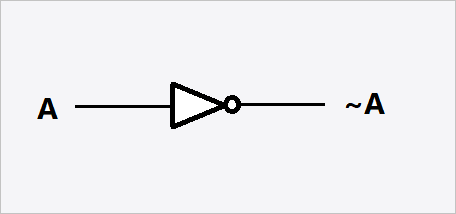
NOT boolean operator
Inverts the result
XOR boolean operator symbol

XOR boolean operator
exclusive or only output if 1 is true not both
AND boolean written as
‘.’
OR boolean written as
‘+’
NOT boolean written as
‘-’ (above the letter)
XOR boolean written as
‘⊕’
Trace tables
Test's algorithms for logic errors
System software
Controls hardware, allows other programs to run, provides an interface for the user to interact with the computer, maintains the computer system
Examples of system software
OS, utility software
Operating system function
Handles key hardware functions and provides a foundation for the user to interact with the computer and for other applications to run
File management
Allows users to find and manage data stored by the computer
controlled by OS
Process management
Allows users to run applications such as web browsers or word processors
Allocates use of main memory and CPU between processes
Controlled by OS
Peripheral management
Manages input and output between peripherals and a process
Uses device drivers to communicate with drivers
Controlled by OS
User management
acess levels control access to systems for security
Controlled by OS
Utility software
Helps with upkeep and maintenance of the system
File repair
Scans disk surface for damage
Can sometimes repair corrupt files
Type of utility software
Backups
Copies data for backup
Allowing damaged data to be restored
Type of utility software
Data compression
Reduces file size using algorithms
Lossless and lossy
Type of utility software
Defragmentation
Files on a disk are broken down into a series of segments
Rearanges fragmented segments so they are stored next to each other - decreases read/write time and improbes performance
Type of utility software
Anti-malware
Protects against viruses, spyware, and any other unwanted software
Type of utility software
Machine code
Processors understand it
Each type of processors has its own specific machine code
Consists of 1s and 0s
Low level programming language
Machine code cons
V difficult to learn, write, debug
Assembly language
Uses mnemonics
Must be translated into machine code for execution
Low level programming language
When assembly language used
in embedded systems
Commonly used to program device drivers
Assembly code pros
Easier for humans to understand and program than machine code
Assembly code cons
still quite difficult to learn
Advantages of low level programming languages
More tasks are possible
More flexible
Direct instructions
Less limited
More efficient
 Note
Note  Flashcards (31)