comp sci (4+5/10)
 Call Kai
 Learn
Learn Practice Test
 Spaced Repetition
 Match
Match Flashcards
 Knowt Play
1/55

Earn XP
Description and Tags
Name | Mastery | Learn | Test | Matching | Spaced | Call with Kai | Chat |
|---|
No analytics yet
Send a link to your students to track their progress
56 Terms
forms of attack on a network:
Malware
Social engineering: phishing
Brute-force attacks
Denial of service attacks
Data interception & theft
SQL injection
malware
-types of malware
-any software that has been created with malicious intent to cause harm to a computer system
-virus, worms, trojan, spyware, ransomware
what malware can do
-Files being deleted, corrupted or encrypted
-Internet connection becoming slow or unusable
-Computer crashing or shutting down
virus=
-A program which can replicate itself on a user's computer. It contains code that will cause unwanted and unexpected events to occur
Examples of issues a user may experience are
Corrupt files
Delete data
Prevent applications from running correctly
worms=
-how do users get them
-are very similar to viruses, with the main difference being that they will spread to other drives and computers on the network
Worms can infect other computers from
Infected websites
Instant message services
Email
Network connection
trojan/ trojan horse=
disguise themselves as legitimate software but contain malicious code in the background
spyware=
-where from
-Software which will allow a person to spy on the users' activities on their devices
-This form of software will be embedded into other software such as games or programs that have been downloaded from illegitimate sources
-Spyware can record your screen, log your keystrokes to gain access to passwords and more
ransomeware=
-form of malware that locks your device and encrypts your documents and other important files
-Often a demand is made for money to receive the password that will allow the user to decrypt the files
-There is no guarantee paying the ransom will result in the user getting their data back
What is social engineering?
-is exploiting weaknesses in a computer system by targeting the people that use or have access to them
phishing=
Sending deceieving emails to a large number of email addresses, claiming to be from a reputable company or trusted source to try and gain access to your details, often by coaxing the user to click on a login button
why r people seen as a weak point in a system
-Not locking doors to computer/server rooms
-Not logging their device when they're not using it
-Sharing passwords
-Not encrypting data
-Not keeping operating systems or anti-malware software up to date
brute force attack=
+e.g.
works by an attacker repeatedly trying multiple combinations of a user's password to try and gain unauthorised access to their accounts or devices
-e.g. an attacker finding out the length of a PIN code, for example, 4-digits OR trying popular words or phrases
Denial of Service Attack (DOS attack) =
-occurs when an attacker repeatedly sends requests to a server to flood the server with traffic, causing it to overload the system
-The server will slow down to the point of becoming unusable
purpose of a DOS attack
-will prevent customers from accessing or using a service
-This will result in companies losing money and not being able to carry out their daily duties
-A DOS attack can cause damage to a company's reputation
Data interception and theft=
-when thieves or hackers can compromise usernames and passwords as well as other sensitive data
-This is done by using devices such as a packet sniffer
-A packet sniffer will be able to collect the data that is being transferred on a network
-A thief can use this data to gain unauthorised access to websites, companies and more
what is SQL
-Structured Query Language (SQL) is a language used to create, access and manipulate a database
what is SQL injection
-is entering an SQL command into a web text field to manipulate the SQL query
-The goal is to insert, modify or delete data from the database
An example of SQL injection would be a user typing in a query such as
SELECT UserId, Name, Password FROM Users WHERE UserId = 100 or 1=1;This would return all of the User IDs, Names and passwords because 1 is always equal to 1
shouldering/ shouler phishing=
-watching what a user is doing on a comp over a victims shoulder
-common w ATMS
adware=
-s.w. displays advert
-collects data ab the user 4 marketing
-often hidden within freeware s.w.
-can cause problems: pop-up window sm change of home page
penetration testing=
-a method of preventing vulnerabilities whereby a company employ people to try and hack their network and databases
-This allows the 'hackers' to point out the parts of the system that are vulnerable
-The companies then use this information to fix the issues that are found
what form of attack wld penetration testing prevent
SQL injection
anti-malware software=
term used to describe a combination of different software to prevent computers from being susceptible to viruses and other malicious software
diff types of anti malware s.w.
Anti-virus
Anti-spam
Anti-spyware
How does anti-malware work?
-scans through email attachments, websites and downloaded files to search for issues
-has a list of known malware signatures to block immediately if they try to access your device in any way
-also performs checks for updates to ensure the database of known issues is up to date
What form of attack would anti-malware prevent?
against any form of malicious software
firewall=
-hardware and s.w.
-a barrier between a network and the internet
-prevents unwanted traffic from entering a network by filtering requests to ensure they are legitimate
It can be both hardware and software and they are often used together to provide stronger security to a network
Hardware firewalls will protect the whole network and prevent unauthorised traffic
software firewalls will protect the individual devices on the network, monitoring the data going to and from each computer
what does a firewall prevent
Hackers
Malware
Unauthorised Access to a Network
DOS/DDOS attacks
user access levels=
ensure users of a network have designated roles on a network
-e.g. Administrators: Unrestricted - Can access all areas of the network
password=
a digital lock to prevent unauthorised access to an account
what form of attacks do pasw prevent
Data Interception and Theft
Physical Security Issues
SQL Injection
what form of attack does encryption prevent
does not prevent the attacks from occurring but it does stop the attacker from gaining access to the information
physical security=
-a method of physically preventing access to any part of a network
There are a range of physical security measures that can be implemented on a network
Locked doors: Preventing access to server rooms and cabinets of switches
Biometrics: Fingerprint scanners, facial recognition and retinal scans
what form of attack does physical security prevent
Data interception and theft
Social engineering
Q)A web development company wants to protect their computer systems and data from unauthorised access.
Identify and describe two software-based security methods that the company can use to protect their computer systems and data. [6]
Anti-malware
Scans for / identifies virus/spyware/malware
Compares data to a database of malware
Alerts user and requests action
Quarantines/deletes virus/spyware/malware
Stops the download of virus/spyware/malware
Firewall
Scans incoming and outgoing traffic
Compares traffic to a criteria
Blocks traffic that is unauthorised
Blocks incoming/outgoing traffic
Encryption
Scrambles data using an algorithm
So if intercepted it cannot be understood
Key needed to decrypt
User access levels
Data can be read/write/ read-write
Prevents accidental changes
Limits data users can access
Passwords/biometrics/authentication code/fingerprint
Has to be correctly entered to gain access
Strong password // letters, numbers, symbols // fingerprint is unique to individual
Harder/impossible for a brute-force attack to succeed
Lock after set number of failed attempts
what is an operating system (os)
-software that provides an interface between the user and the hardware in a computer system
An operating system hides the complexities of the hardware from the user, for example:
A user does not need to know 'where' on secondary storage data is kept, just that it is saved for when they want it again
5 main functions of an os
Provide a user interface
Memory management & multitasking
Peripheral management & device drivers
User management
File management
user interface=
-e.g.s
is how the user interacts with the operating system
-Command Line Interface (CLI)
-Graphical User Interface (GUI)
-Menu
-Natural language (NLI)
command line interface =
-requires users to interact with the operating system using text based commands
-CLIs are more commonly used by advanced users
graphical user interface =
-requires users to interact with the operating system using visual elements such as windows, icons, menus & pointers (WIMP)
-GUIs are optimised for mouse and touch gesture input
menu interface=
+e.g.
-successive menus presented to a user with a single option at each stage
-Often performed with buttons or a keypad
-vending machines
natural language interface=
-e.g.s
-uses the spoken word to respond to spoken or textual inputs from a user
-Virtual assistants - Amazon Alexa, Google Assistant, Siri + Search engines
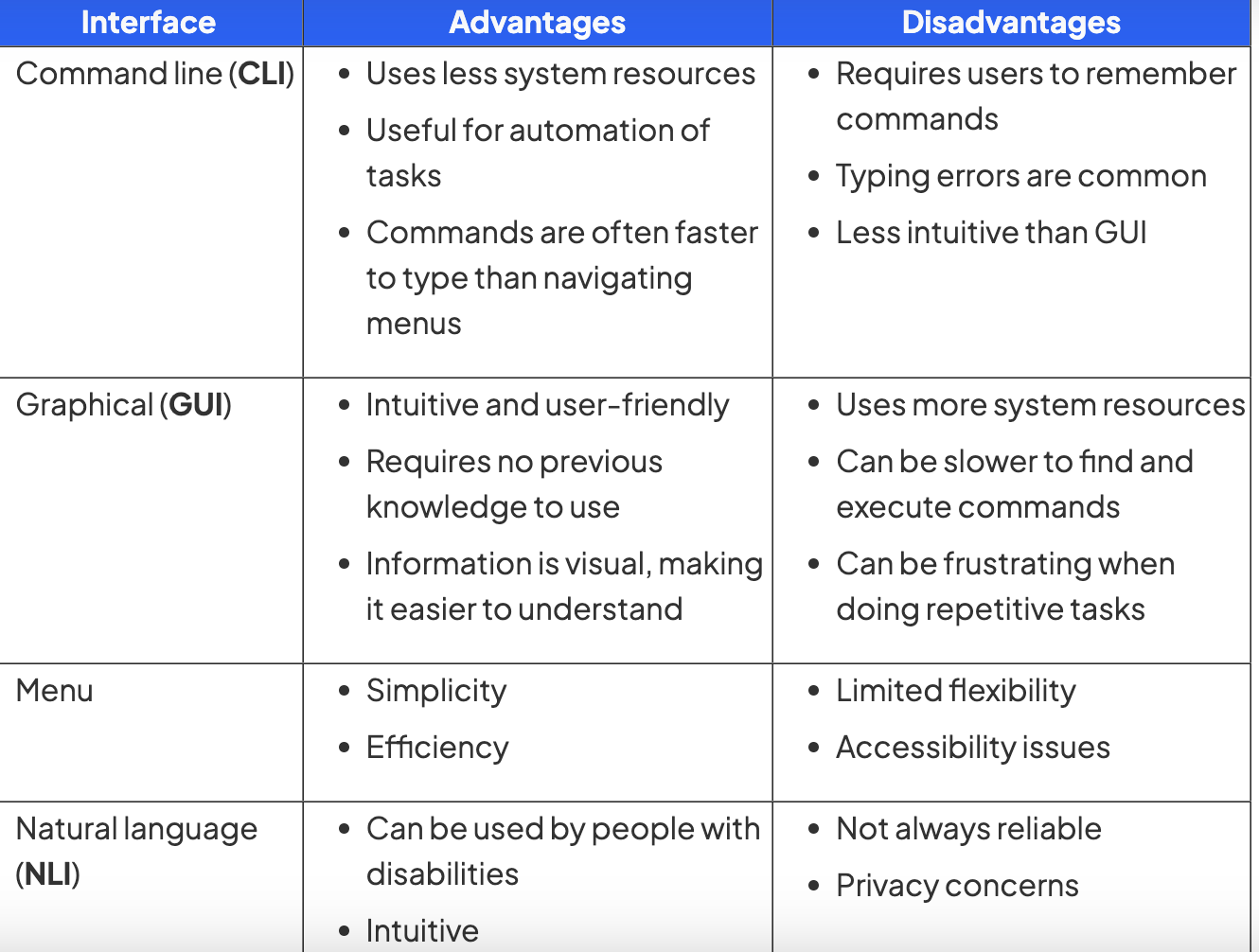
pros + cons of each interface
yes
memory management=
+purpose
-data is transferred between the device and processor
-programs removed from RAM when completed to free up space for other tasks
-process carried out by the operating system allocating main memory (RAM) between different programs that are open at the same time
- OS is responsible for copying programs and data from secondary to primary storage as it is needed
-Programs and data require different amounts of RAM to operate efficiently and the OS manages this process
-RAM is allocated based on priority and fairness, for example, system applications (essential) may have a higher priority than user applications
-The OS dynamically manages the memory, adjusting allocation as needed to maintain optimal system performance
-Memory management makes multitasking possible
multi tasking=
-hows it made
-process made possible by the OS simultaneously managing system resources (memory, CPU etc) to give a user the perception of being able to use multiple programs at the same time
-The OS splits tasks and allocates system resources based on a priority
-The CPU can only execute one instruction at a time, it can can execute billions of them in one second.
-This makes it appear that multiple programs are running at the same time
peripheral management=
-process carried out by the operating system managing the way peripherals (hardware) interact with software
-The OS allocates system resources to peripherals to ensure efficient operation
-Peripheral management makes plug-and-play (PnP) functionality possible, automatically detecting and configuring new peripherals without the need for manually installing device drivers or power cycling the system
device driver=
-provides an interface for the os to interact and communicate with the peripheral.
-piece of software used to control a piece of hardware
-Peripherals require device drivers in order to be used by the operating system
-The OS has generic device drivers built in which makes basic compatibility possible and enables plug-and-play (PnP)
-In order for hardware to be used to its maximum capacity, often a separate device driver must be downloaded from the manufacturer
-Device drivers are OS specific and are regularly updated
-hardware dependant
user management=
-os allows to create, manage and delete individual accs
-process carried out by the operating system enabling different users to log onto a computer
-OS is able to maintain settings for individual users, such as desktop backgrounds, icons and colour schemes
-A system administrator is able to allocate different access rights for different users on a network
file management=
-process carried out by the operating system creating, organising, manipulating and accessing files and folders on a computer system
-allows files to be named, opened, copied, moved, saved, sorted and deleted
-The OS manages where data is stored in both primary and secondary storage
-allows users to set access rights for specific files and to view file properties
-The OS provides a search facility to find specific files based on various criteria
file management gives the user the ability to
Create files/folders
Name files/folders
Rename files/folders
Copy files/folders
Move files/folders
Delete files/folders
Q)Ella uses her computer to create artwork for a magazine
Ella makes use of system software.
One type of system software is the operating system.
Identify and describe two functions of an operating system [6]
Memory management
Allocates memory to programs currently in use
Gets data from RAM
Stores data in RAM
File management
Creating/editing/renaming files
Creating/editing/renaming folders
Movement of files/folders
utility s.w.=
-software designed to help maintain, enhance and troubleshoot/repair a computer system
-Utility software is designed to perform a limited number of tasks not performed by o.s.
-Utility software interacts with the computers hardware, for example, secondary storage devices
-Some utility software comes installed with the operating system
defragmentation
Fragmentation:
-fragmentation occurs when there is limited space to store a file on a hdd
-files r split into parts that r saved in diff storage locations
-fragmentation increases access times
-files that r fragmented take longer to load and read because of the distance between the fragments of the files
Defragmentation:
-Defragmentation software groups fragmented files back together in order to improve access speed
-As programs and data are added to a new hard disk drive, it is added in order, over time as files are deleted this leaves gaps
-empty spaces are collected together on the hard disk drive and file fragments are moved to be stored together
-As programs and data are added over time, these gaps get filled and data becomes fragmented
-Defragmentation can only used on magnetic storage
-faster access times cus read write head doesn’t need. to move as far
e.g.s of a utility s.w.
-defragmentation, compression, encryption, task manager, anti-malware
pros
compression=
-reduces the amount of secondary storage required by performing an algorithm on the original data
pros: -files take up less storage space
-files can be transferred quicker
-files can be read from or written to quicker
-Lossy compression physically removes data using an algorithm from the original data to reduce its size, the original file can not be re-created → used in audio, images, videos
-Lossless compression uses algorithms to order data more efficiently reducing its size, the original files can be re-created as no data is lost → used in files, games, word documents
task manager=
-software that is built into the operating system to allow users to monitor system resources in order to help troubleshoot potential problems
-Task manager gives system information such as: Processes, Performance, App history, Start-up app, Users, Services
Q)A hotel has a computer-based booking system which is running slowly. A technician has
said that the hard disk drive is fragmented. The technician has suggested using utility software to defragment the drive.
Explain how the hotel’s hard disk could have become fragmented [4]
Booking have been saved onto the system and then deleted once completed [1]
New bookings are created [1] which may need more space than the completed ones left behind [1]
The booking files are split up [1]