computer science notes
0.0(0)
Studied by 2 people Call Kai
 Learn
Learn Practice Test
 Spaced Repetition
 Match
Match Flashcards
 Knowt Play
Card Sorting
1/92

Earn XP
Description and Tags
Last updated 4:40 PM on 12/8/22
Name | Mastery | Learn | Test | Matching | Spaced | Call with Kai | Chat |
|---|
No analytics yet
Send a link to your students to track their progress
93 Terms
1
New cards
Overflow error
Type of error that occurs when a number that is too large and impossible to store is generated. Add 1 to left handside for overflow error.
2
New cards
logical binary shifts
Shift one number to the left or right.
3
New cards
Mac address
a unique address that is given to a computer at the manufacturing stage that can be used to identify the computer.
Address is written in hexadecimal
Address is written in hexadecimal
4
New cards
Analogue Data
A continuous stream of data processed by humans. (TV, Videotape, Photocopier)
5
New cards
Digital data
Discrete data that uses only values 1 and 0 (digital clock, computer, servers)
6
New cards
Registers
a smal component in a computer svstem that is used to temporarily store data.
7
New cards
Pixels
a very small dot of colour that is
displayed with many others to create an image
displayed with many others to create an image
8
New cards
Resolutions
Dimensions of image
9
New cards
sample resolution
Number of bits used to record each sample.
10
New cards
Calculating size of a file
IMAGE FILE: Width of image x height of image x colour depth of image x number of images in a file (divide by 8 to turn into byte then so on)
SOUND FILE: sample rate x sample resolution x length of soundtrack
SOUND FILE: sample rate x sample resolution x length of soundtrack
11
New cards
Compression
Method that uses an algorithm to reduce the size of a file.
Lossy compression:he data in a file is removed and not restored to its original form after decompression. Specifically, data is permanently removed, which is why this method is also known as irreversible compression. (decreasing resolution)
Lossless compression: method that temporarily alters data to make a smaller file. (instead of storing characters individually, save it once along with its position in text)
Lossy compression:he data in a file is removed and not restored to its original form after decompression. Specifically, data is permanently removed, which is why this method is also known as irreversible compression. (decreasing resolution)
Lossless compression: method that temporarily alters data to make a smaller file. (instead of storing characters individually, save it once along with its position in text)
12
New cards
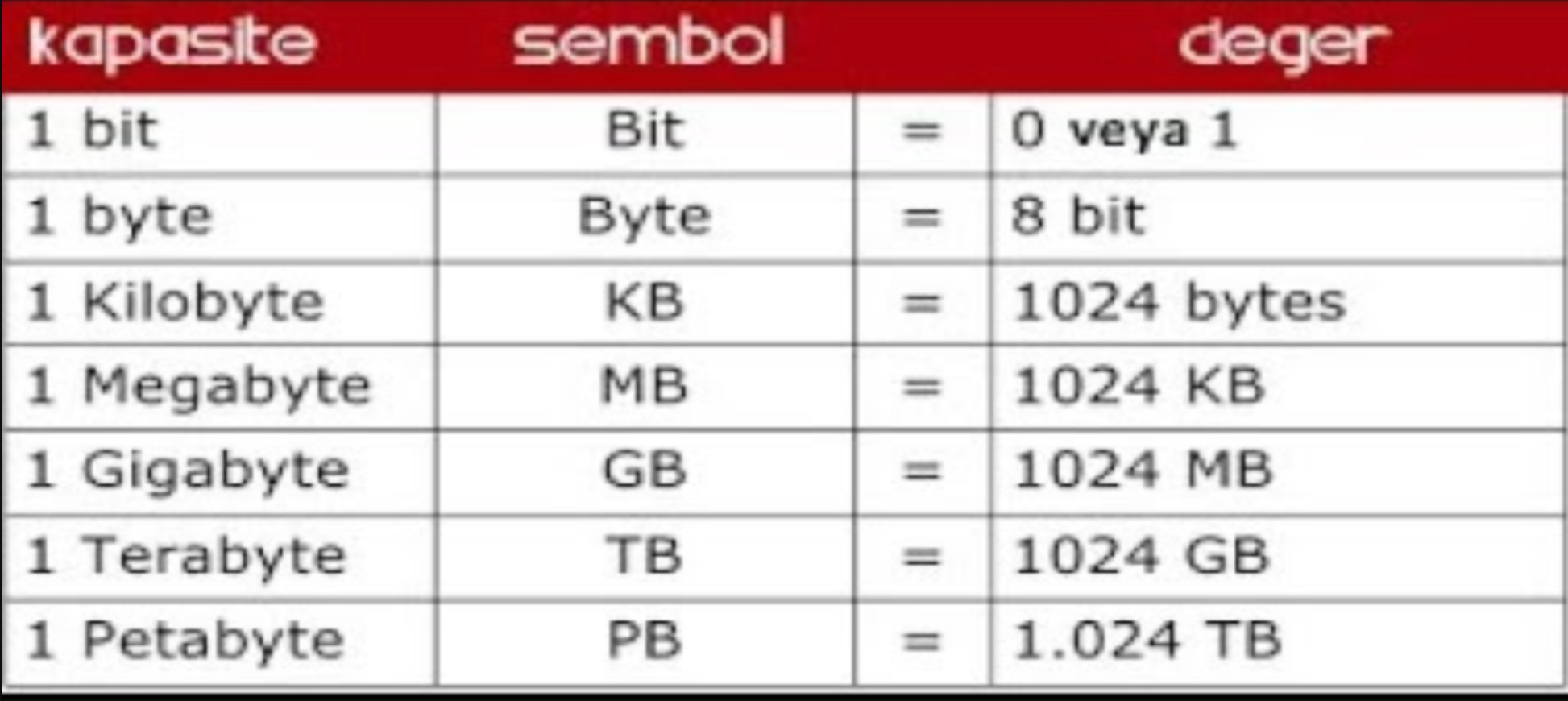
Conversion
13
New cards
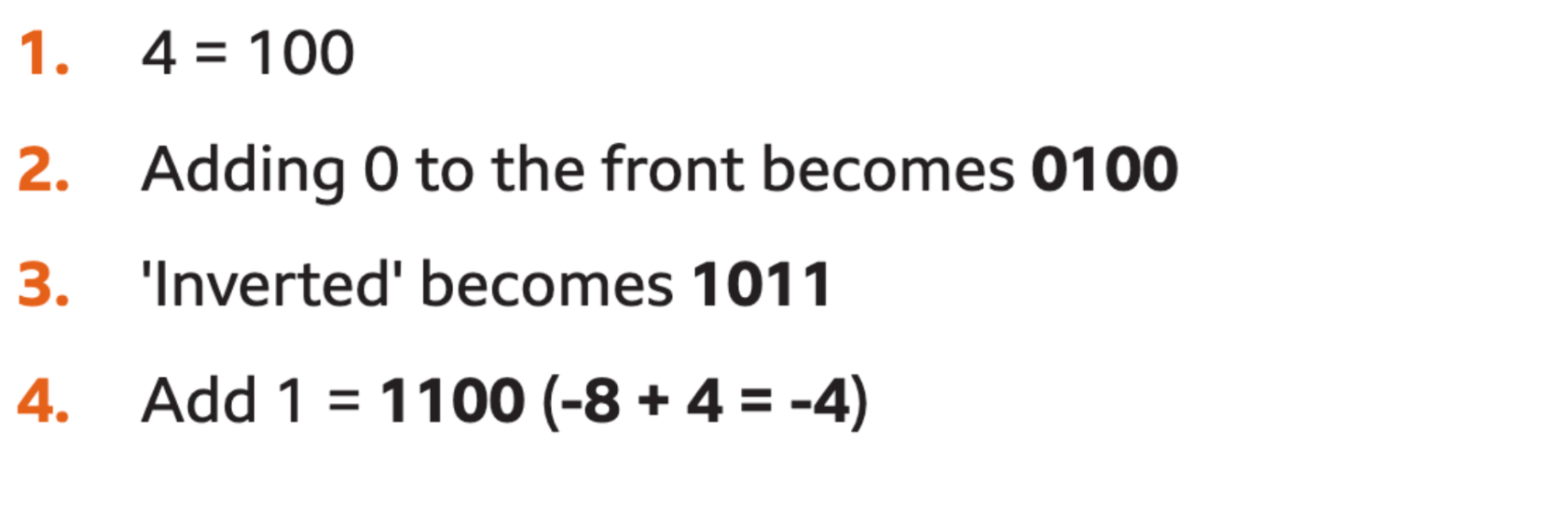
Negative Binary Numbers
Convert the positive number to binary
Invert the number (change 0 -> 1 & 1->0)
Add 1 to the whole binary number (1010 + 1) Remember rules of binary addition
Invert the number (change 0 -> 1 & 1->0)
Add 1 to the whole binary number (1010 + 1) Remember rules of binary addition
14
New cards
Binary
A Base 2 number system that uses the values 1 and 0, system on computers uses combinations of 0s and 1s.
15
New cards
DENARY
A Base 10 number system that uses the values 0-9
16
New cards
Hexadecimal
A base 16 number system that uses the values 0-9 and characters A-F.

17
New cards
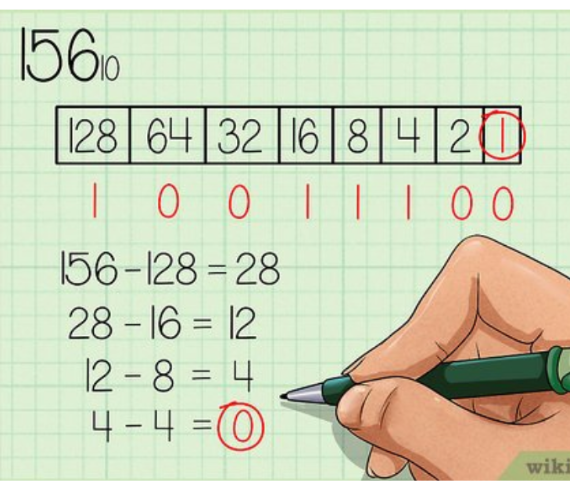
Converting Denary to Binary
18
New cards
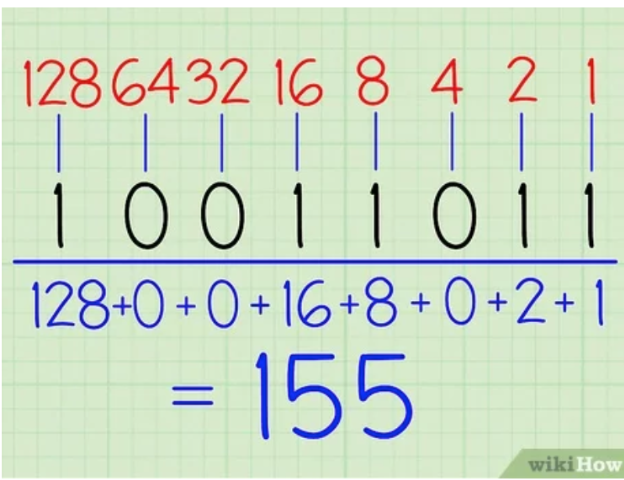
Converting binary to denary
19
New cards
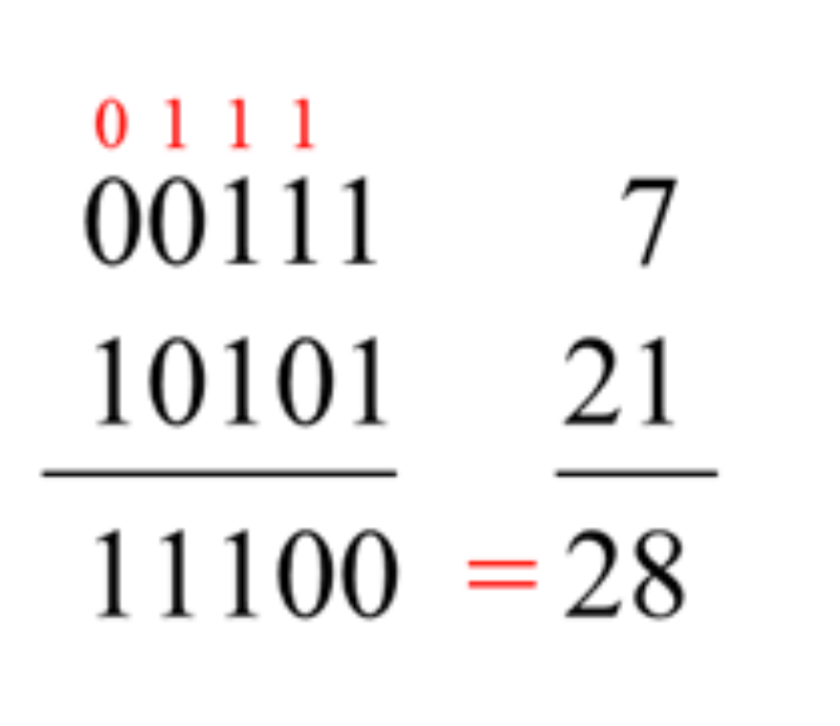
Adding Binary digits
0+0 = 0
1 + 0 = 1
1 + 1 = 0
1 + 1 + 1 = 1
1 + 0 = 1
1 + 1 = 0
1 + 1 + 1 = 1
20
New cards
Packets
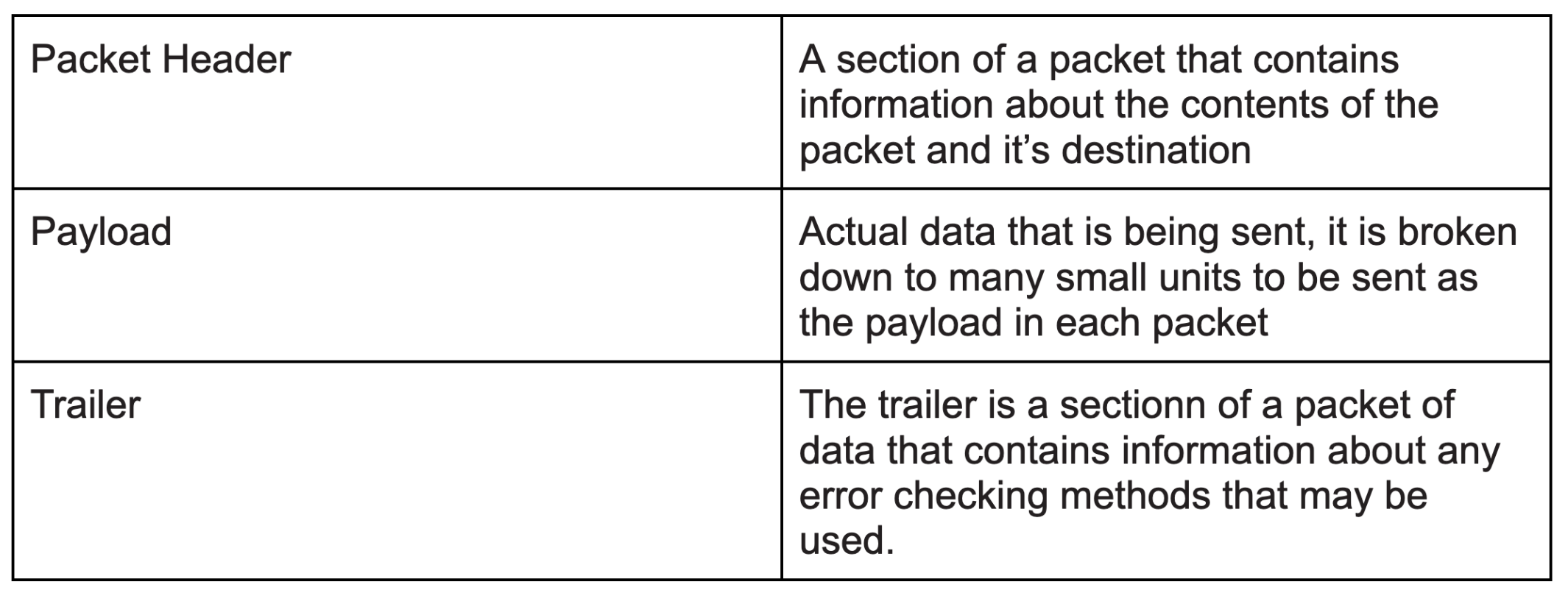
Data is too large to be transmit from one device to another, therefore data is broken into very small files called packets for it to be transmitted.
21
New cards
3 sections of a packet
22
New cards
Packet switching
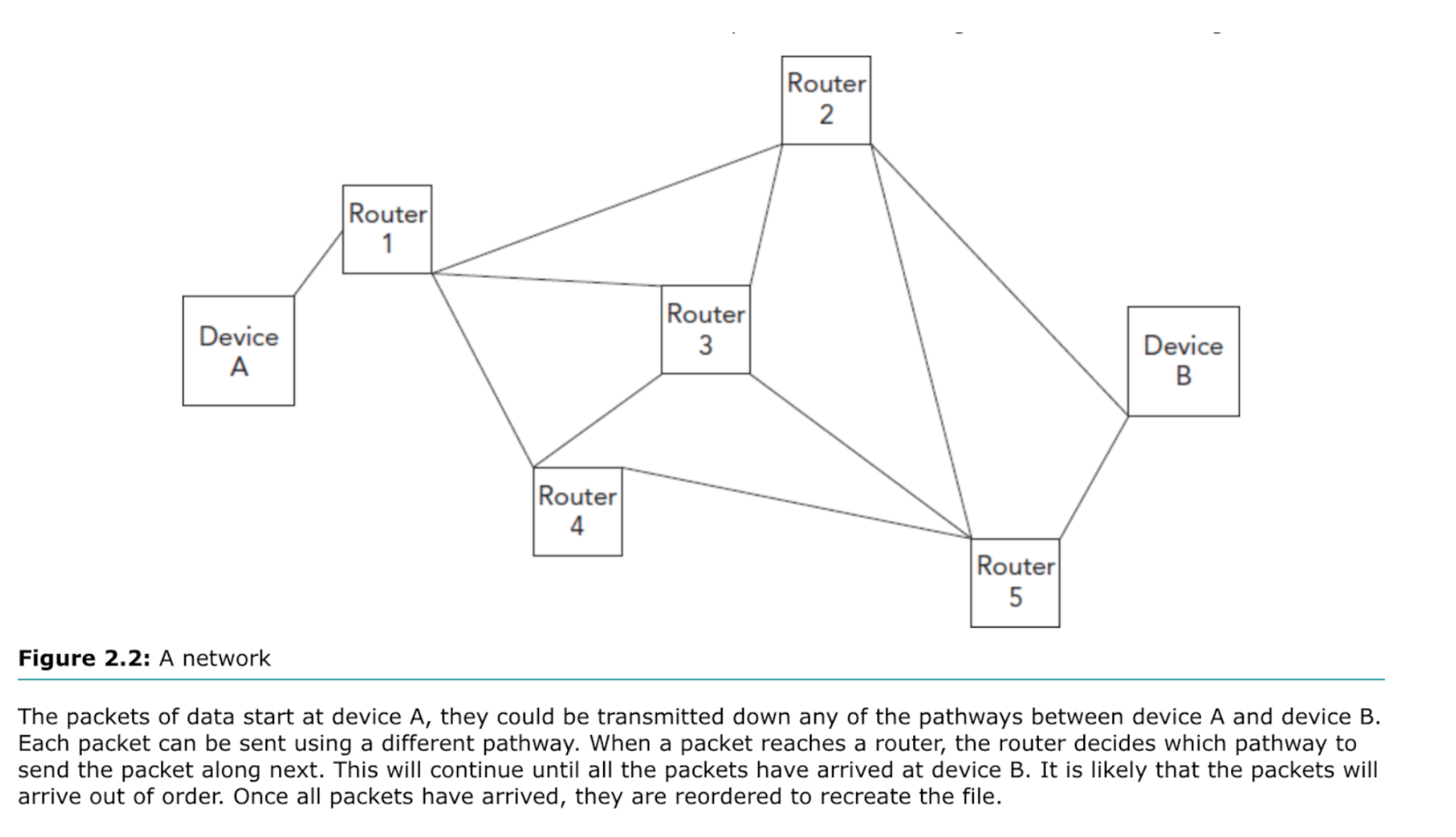
The process of transmitting this data is called packet switching. Each data packet is sent individually from one device to another.
23
New cards
Networks
Networks are computer and devices that are joined together using cables or wireless technology.
24
New cards
Router
A router is the device that controls which path will be used to transmit each packet of data.
25
New cards
Data Transmission
Data transmission is the transfer of data from one digital device to another.
26
New cards
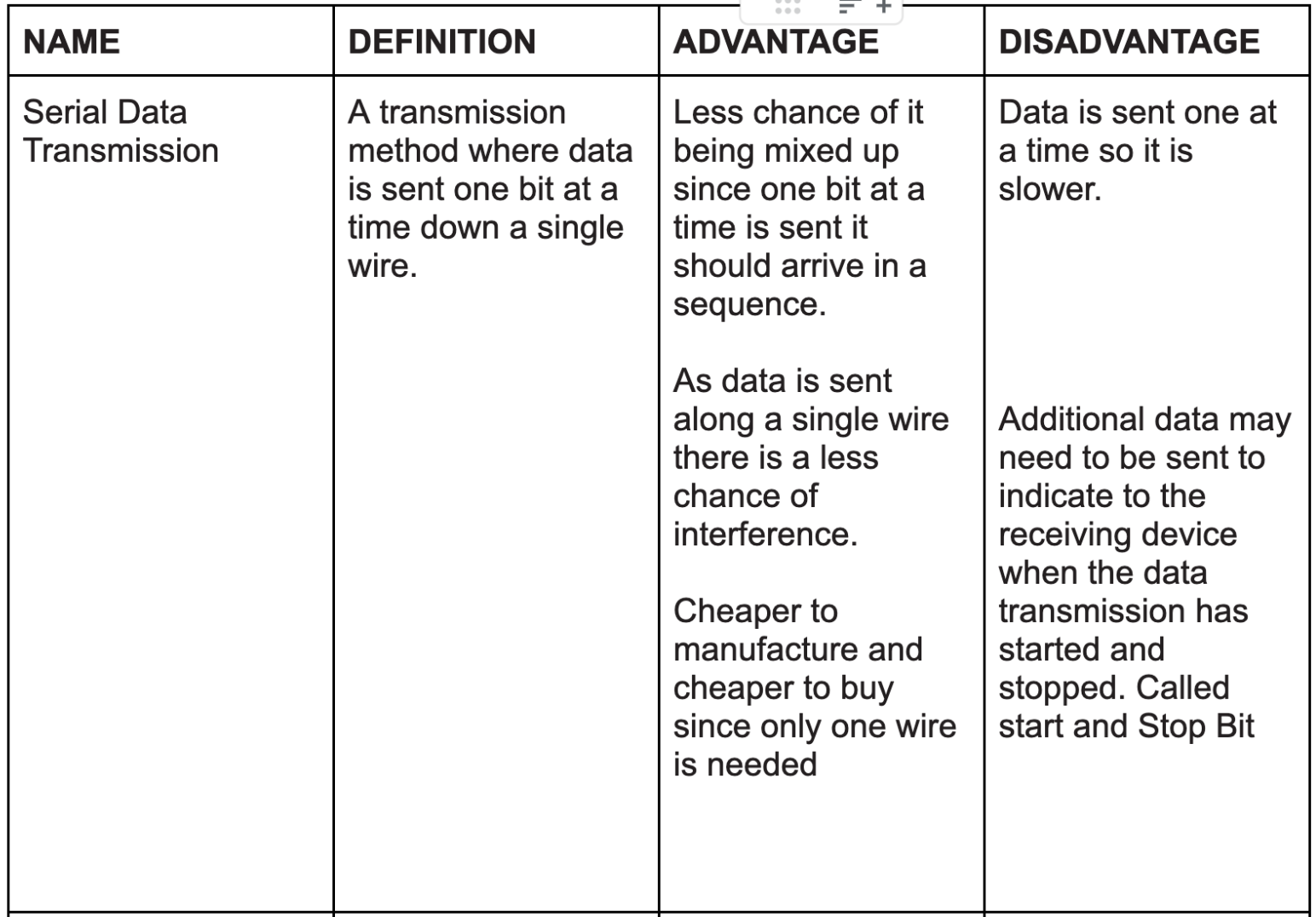
Serial data transmission
27
New cards
Parallel Data transmission
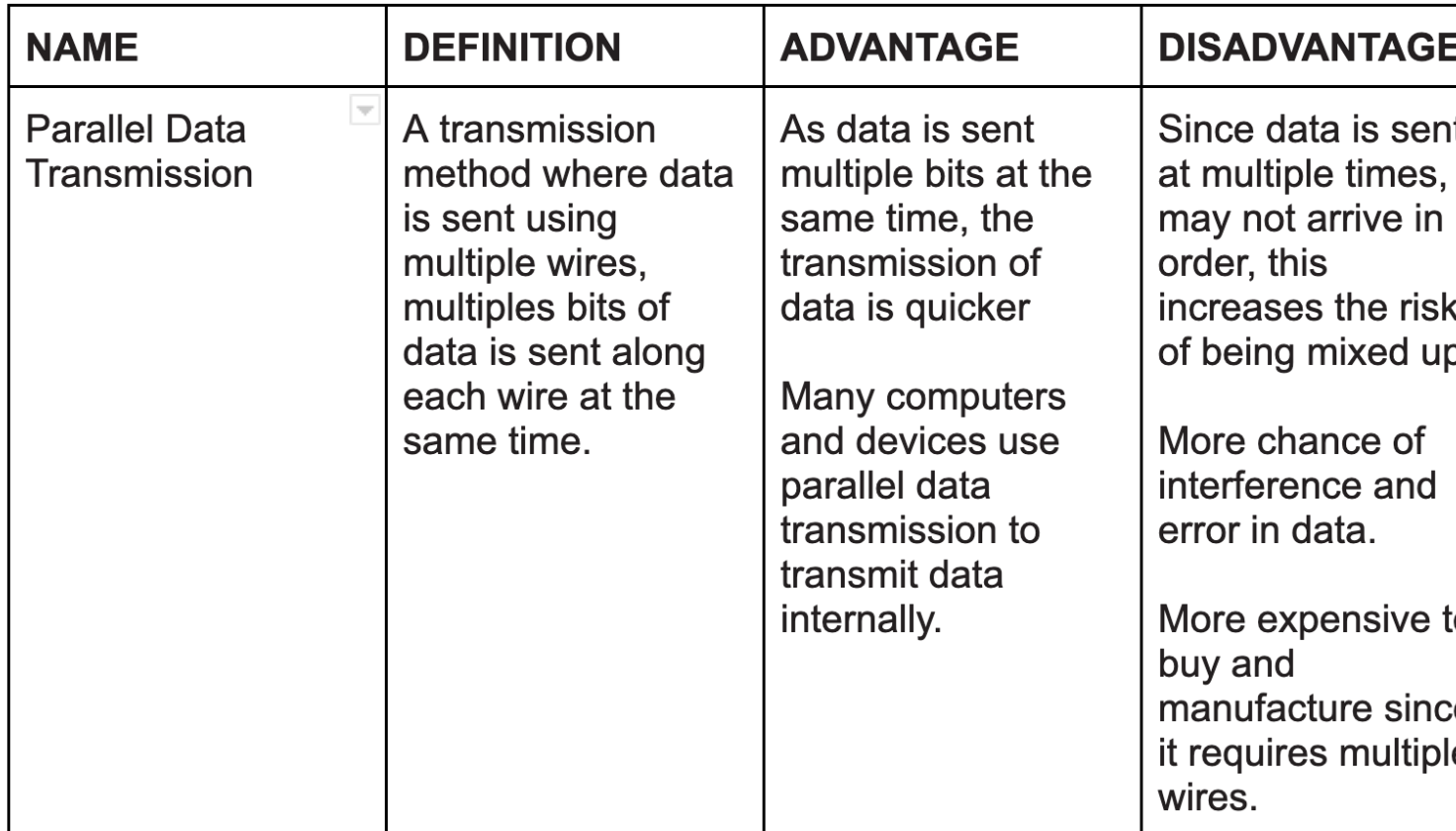
28
New cards
Simplex data transmission
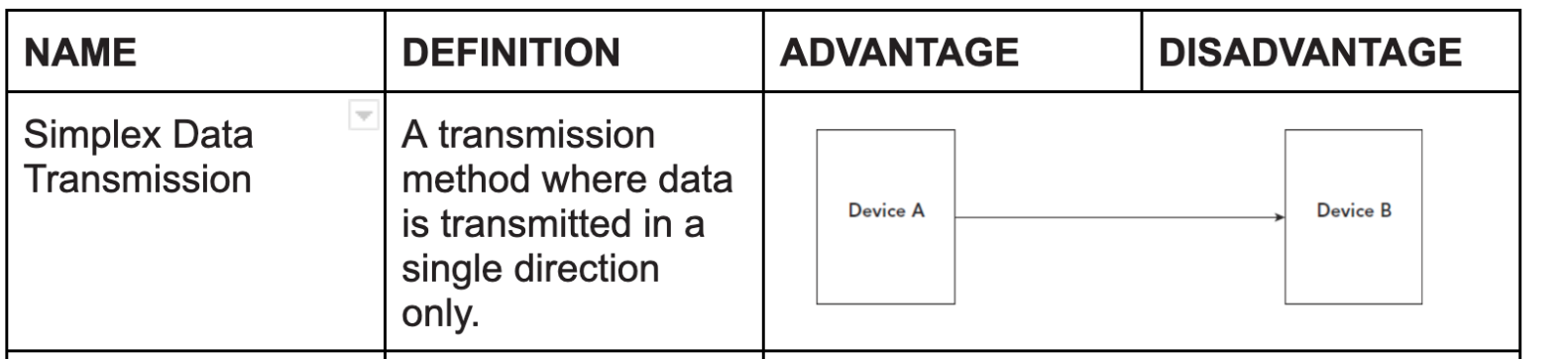
29
New cards
Duplex data transmission
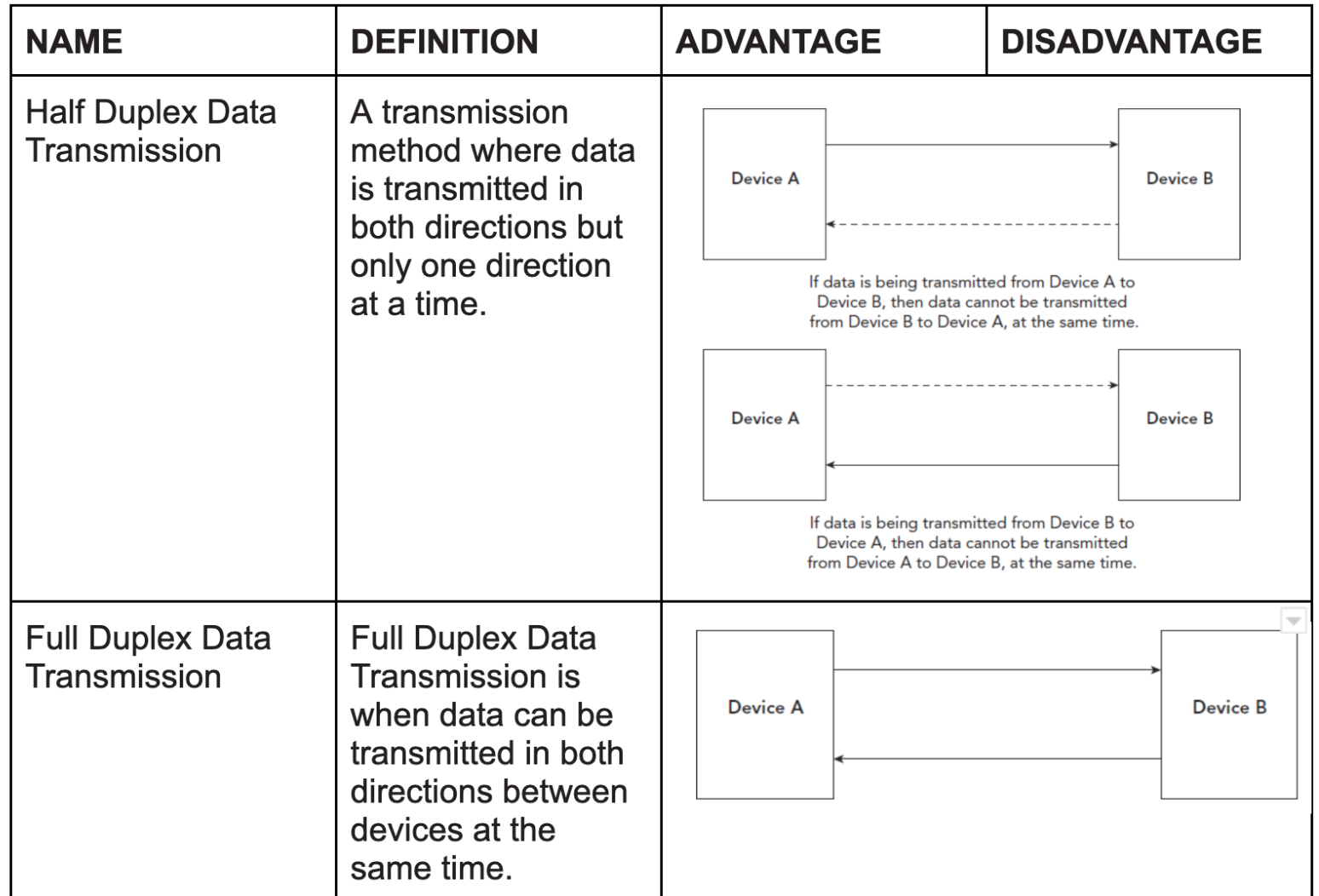
30
New cards
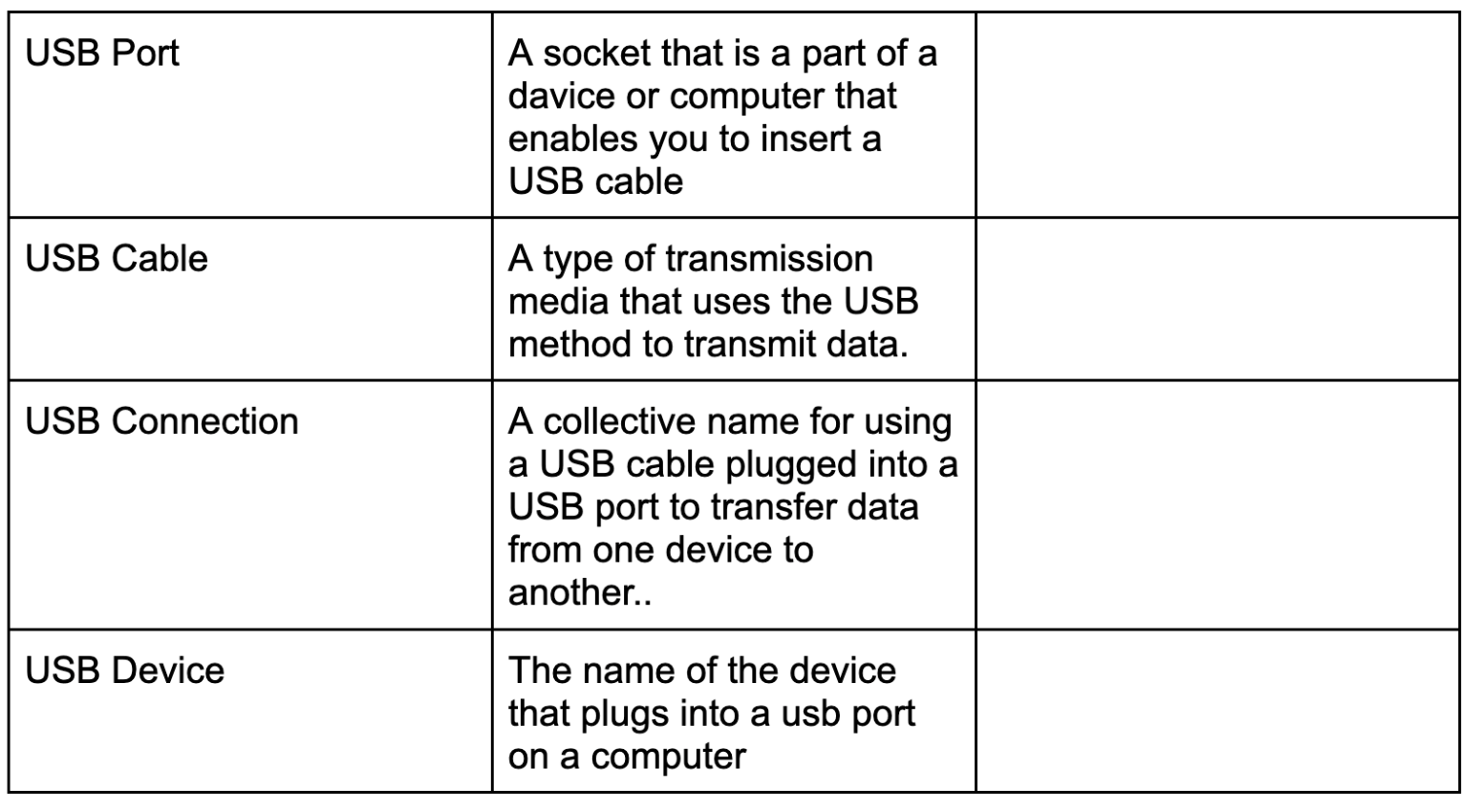
Universal Serial Bus (USB)
A Universal Serial Bus (USB) is a common interface that enables communication between devices and a host controller such as a personal computer (PC) or smartphone. It connects peripheral devices such as digital cameras, mice, keyboards, printers, scanners, media devices, external hard drives and flash drives.
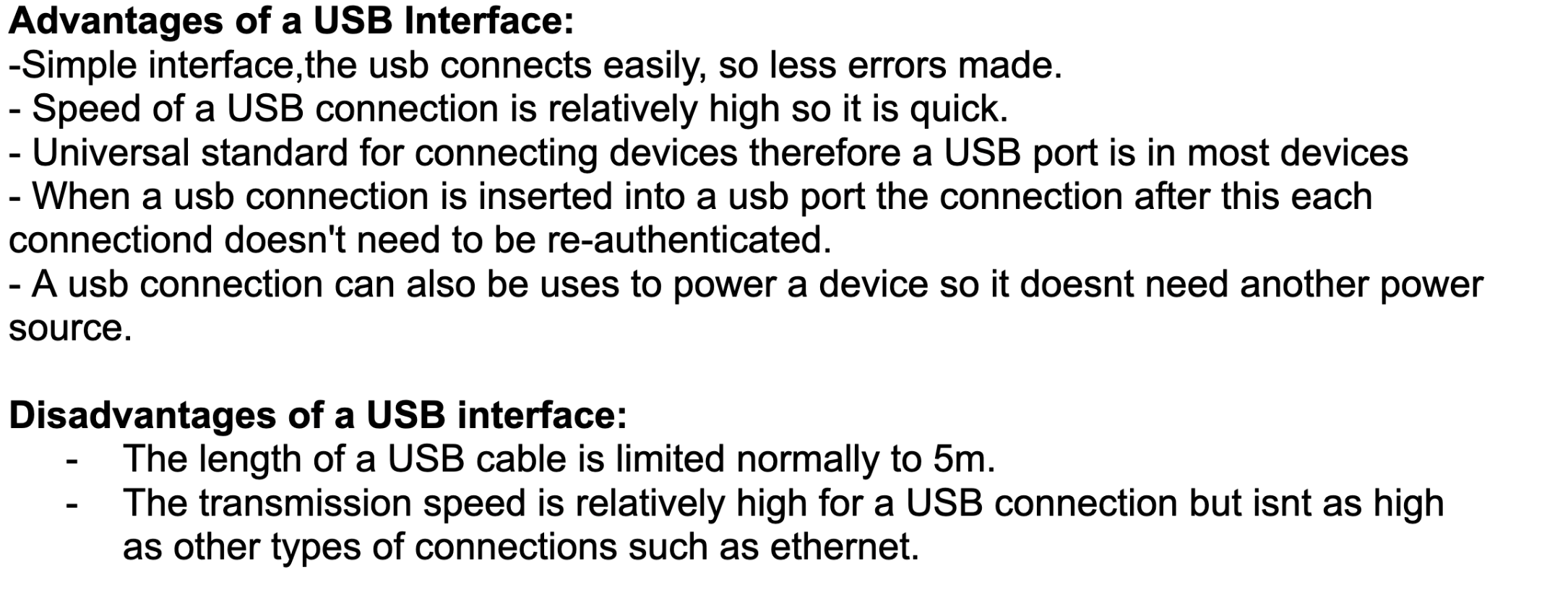
31
New cards
USB devices
32
New cards
DETECTING ERRORS IN DATA TRANSMISSION
Data transmission from one device to another is often not a perfect process, data can be lost, changed or added.
33
New cards
Parity check
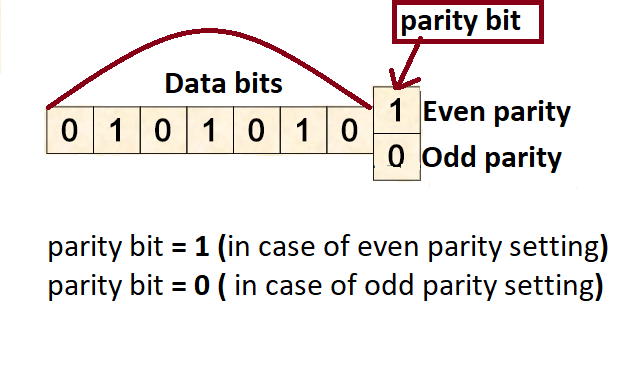
a method for detecting errors by counting the number of ones or zeros per byte, including a special check bit (parity bit), to see if the value is even or odd.
Parity bit: A Parity bit's purpose is to enforce the selected protocol (if even parity and odd numbers, the parity will make the number even) it is usually the first or larger digit.
Even Parity: even number of 0s and 1s (4,4)
Odd parity: odd number of 0s and 1s ( 5,3)
Parity bit: A Parity bit's purpose is to enforce the selected protocol (if even parity and odd numbers, the parity will make the number even) it is usually the first or larger digit.
Even Parity: even number of 0s and 1s (4,4)
Odd parity: odd number of 0s and 1s ( 5,3)
34
New cards
Check sum
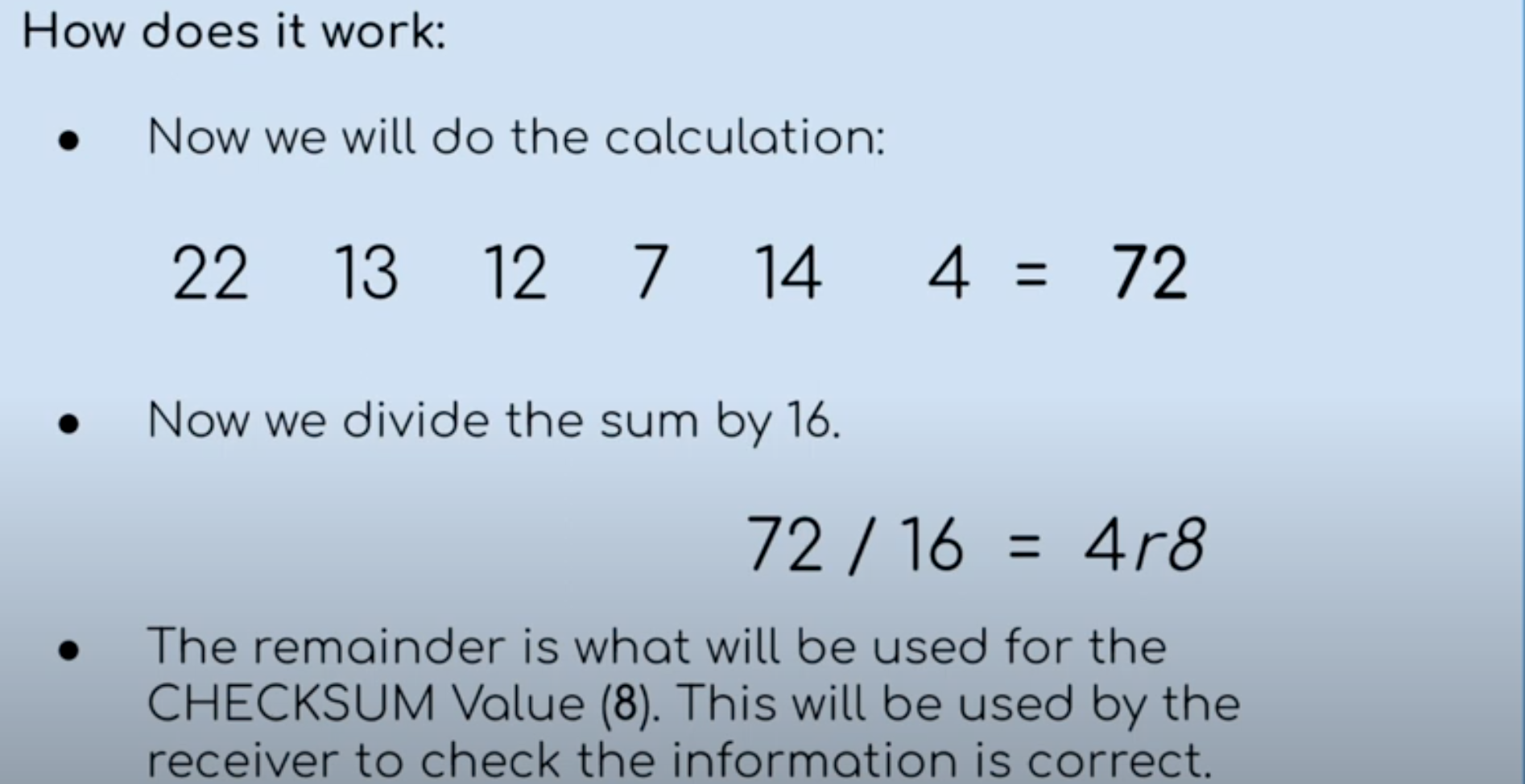
A method that performs a calculate on the data to create a checksum value. The value is then compared to the original value to see if they match.
Both the SENDER and RECEIVER agree on a calculation and a number to divide the SUM of these numbers by. (add then divide by a agreeable number then get a remainder which should be the same in both receiver and sender)
Both the SENDER and RECEIVER agree on a calculation and a number to divide the SUM of these numbers by. (add then divide by a agreeable number then get a remainder which should be the same in both receiver and sender)
35
New cards
Echo
Sends a copy of transmitted data back to the sender to be compared with the original data sent.
36
New cards
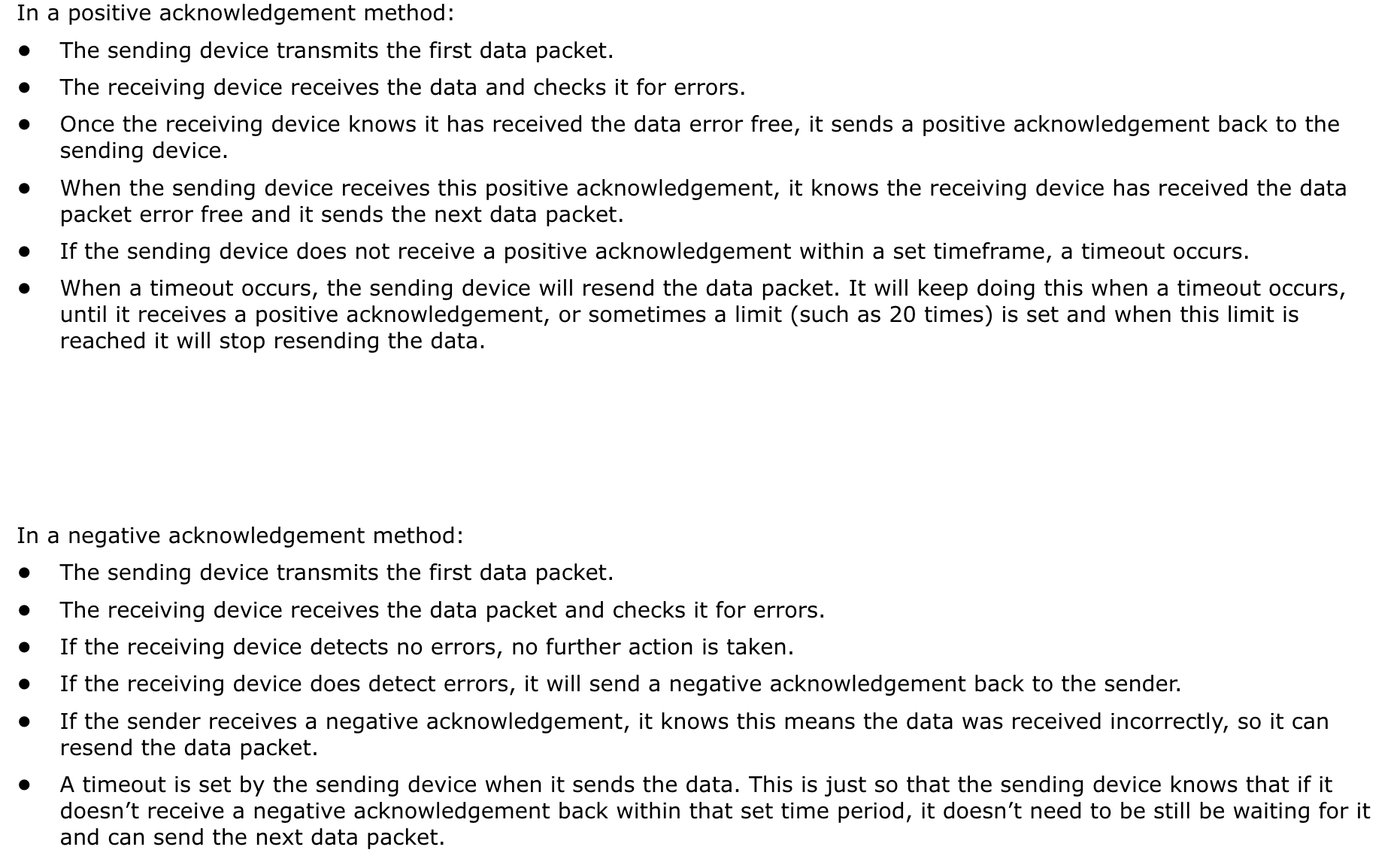
Automatic Repeat Request
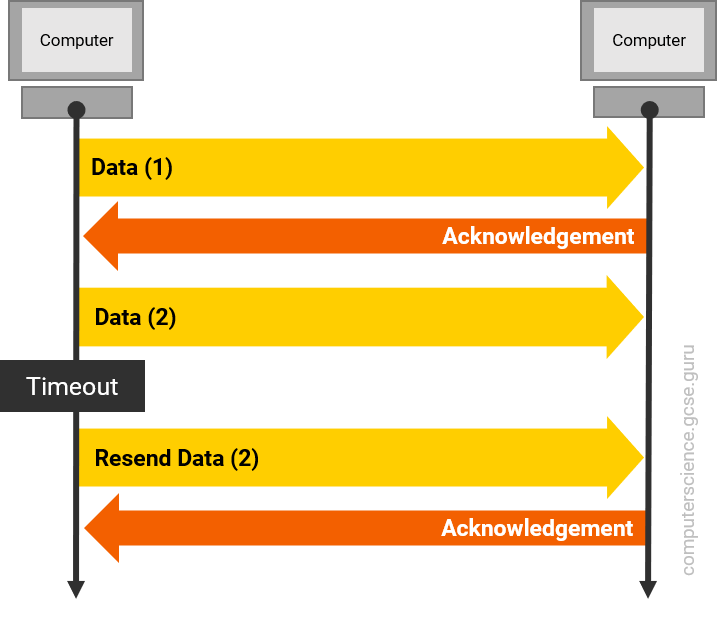
A form of error detection using acknowledgements and timeouts.
When an error has been detected after the data is transmitted, it is likely that the data will need to be retransmitted. Either
the sending device will need to ask the receiving device if it received the data correctly, or the receiving device will need to tell the sending device it did or did not receive the data correctly. This will allow the data to be retransmitted if necessary.
When an error has been detected after the data is transmitted, it is likely that the data will need to be retransmitted. Either
the sending device will need to ask the receiving device if it received the data correctly, or the receiving device will need to tell the sending device it did or did not receive the data correctly. This will allow the data to be retransmitted if necessary.
37
New cards
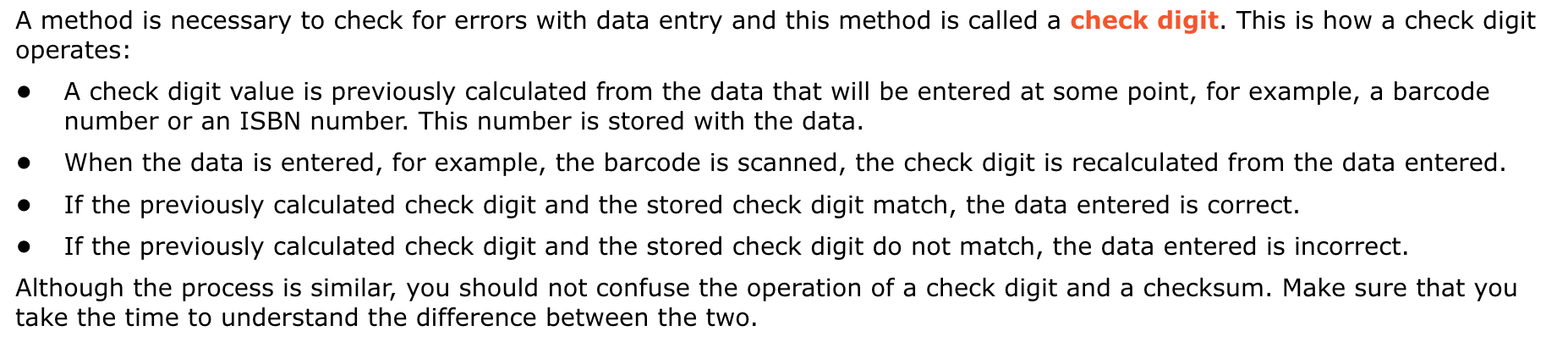
Check digit
a type of error detection method that is used for
data entry. A calculation is performed on the data
entered to create a value. Check digit values are
compared to see if the data entered is correct.
data entry. A calculation is performed on the data
entered to create a value. Check digit values are
compared to see if the data entered is correct.
38
New cards
Encryption
a method of securing data for storage or transmission that scrambles it and makes it meaningless.
39
New cards
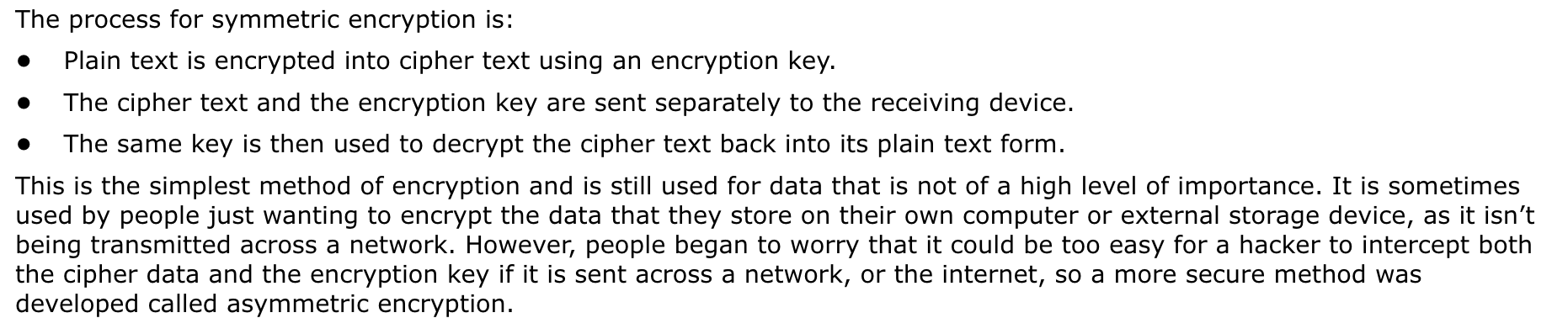
Symmetric Encryption
40
New cards
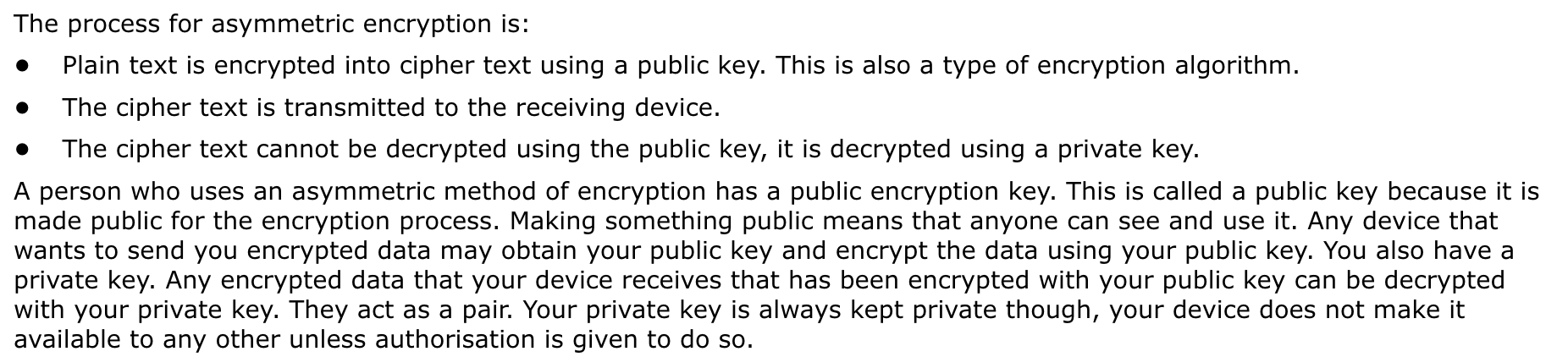
Assymetric Encryption
more secure than symmetric encryption
41
New cards
Encryption KEY
A type of algorithm that is used to encrypt data to make is meaningless.
42
New cards
Cipher text
Name given to the data after it is scrambled and becomes meaningless.
43
New cards
CPU( Central proccesing UNIT)
A component in the computer system that process data instructions
44
New cards
Microprocessor
An integrated circuit that is able to perform many of the functions of a cpu. A microporccessor will process limited instruction and is built into a system that is designed to perform a very specific task(embedded system)
45
New cards
Embedded System
A computer system that performs a very dedicated function.
(examples: digital alarm clock, traffic light, washing machine)
(examples: digital alarm clock, traffic light, washing machine)
46
New cards
Fetch-decode-execute cycle
The cycle through which data is processed.
FETCH:This is the stage where instruction is fetched into the CPU.
DECODE: Stage where the instruction is decoded within the CPU
EXECUTE: Stage where the instruction is executed by the CPU
FETCH:This is the stage where instruction is fetched into the CPU.
DECODE: Stage where the instruction is decoded within the CPU
EXECUTE: Stage where the instruction is executed by the CPU
47
New cards
The fetch stage
In order for the data and instructions to be processed, they need to be brought from the RAM into the CPU. This is what happens at the fetch stage of the cycle.
48
New cards
Input Devies
Device that allows data to be entered through a computer system.
(mouse, keyboard, scanner, microphone
(mouse, keyboard, scanner, microphone
49
New cards
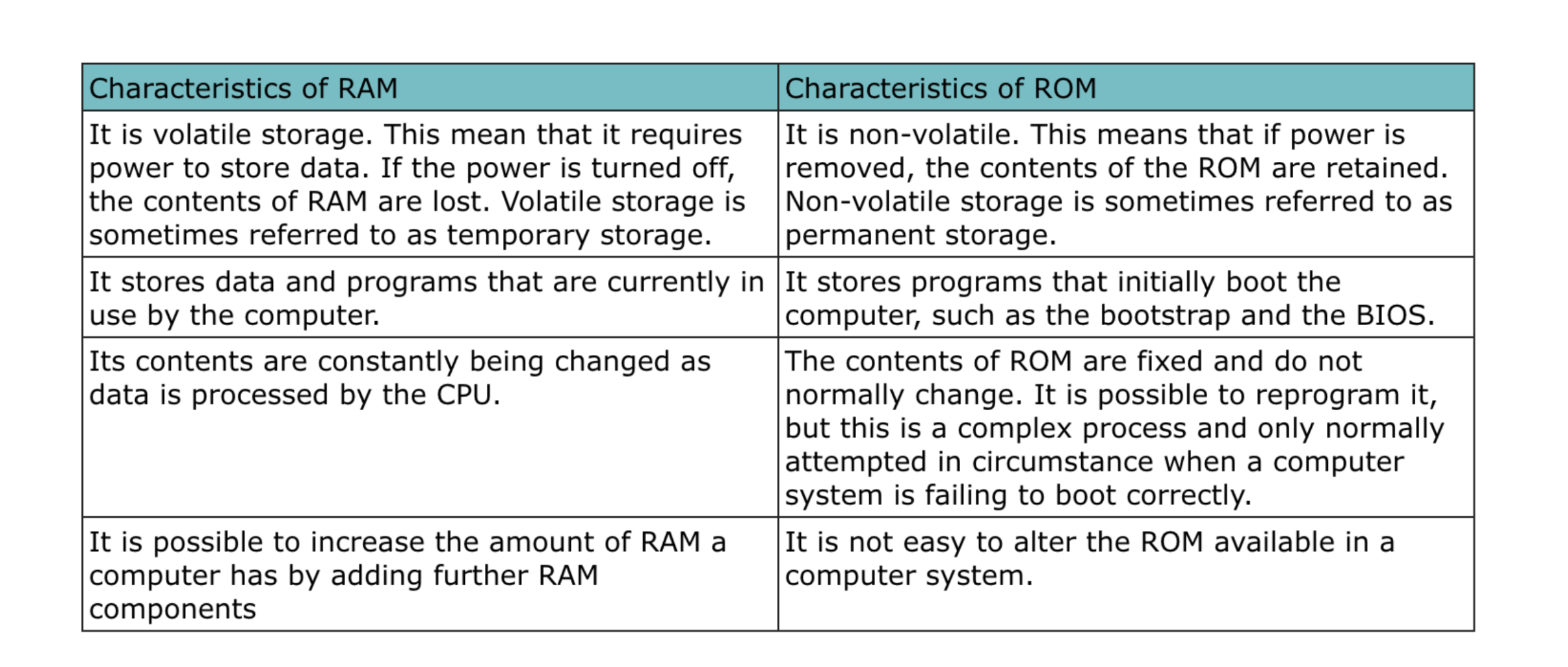
- RAM (Random access memory) :
component of a computer that stores programs currently being executed, or data needed for immediate use.
50
New cards
Hard drive
A Storage device that permanently stores data.
51
New cards
Address
A memory location in the RAM
52
New cards
PC (Program counter)
A component of the CPU that stores the address of the next instructions to be processed.
53
New cards
Memory address register (MAR)
A component of the CPU that holds the address of the data or instruction to be located in RAM.
54
New cards
Address Bus
Wires used for the transmission of addresses within the components of a computer.
55
New cards
Memory Data Register (MDR)
Holds the data or instruction that is fetched from the RAM.
56
New cards
Data Bus
Wires used for the transmission of data within the components of a computer.
57
New cards
Current Instruction Register (CIR)
a register that is built into the CU
that holds the current instruction
that is being processed in the CPU.
that holds the current instruction
that is being processed in the CPU.
58
New cards
Control Unit
Component in the CPU that controls all the operations. It decodes the instruction in the Decode stage
59
New cards
Decode Stage
Instruction is received by the CU
60
New cards
Instruction set
A set of commands that can be processed by a certain CPU.
61
New cards
Execute Stage
Actions that are required for the instruction are carried out.
62
New cards
Arithmetic Logic
the component in the CPU that
performs all the mathematical and
logical operations required when
processing data and instructions.
performs all the mathematical and
logical operations required when
processing data and instructions.
63
New cards
Accumulator (ACC)
a register that is built into the ALU
that stores the result of any interim
calculations.
that stores the result of any interim
calculations.
64
New cards
Control Bus
Wires used for the transmission of control signalswithin the components of a computer.
65
New cards
Arithmetic Logic Unit
66
New cards
3 factors that effect the performance of a CPU
Cores: contains all the components that are used to perform the fetch decode-execute style. (2 cores- 2 cycles)
Clock speed:Number of fetch-decode-execute cycles that can be performed in a second( speed; hertz, one instruction per second is in one second)
Cache: a type of storage that is built into
the CPU, to store the most frequently used data and instructions. (Larger the cache the more storage space to store the insutrction and data it uses most, it can store more of them and will need less time going to the RAM)
Clock speed:Number of fetch-decode-execute cycles that can be performed in a second( speed; hertz, one instruction per second is in one second)
Cache: a type of storage that is built into
the CPU, to store the most frequently used data and instructions. (Larger the cache the more storage space to store the insutrction and data it uses most, it can store more of them and will need less time going to the RAM)
67
New cards
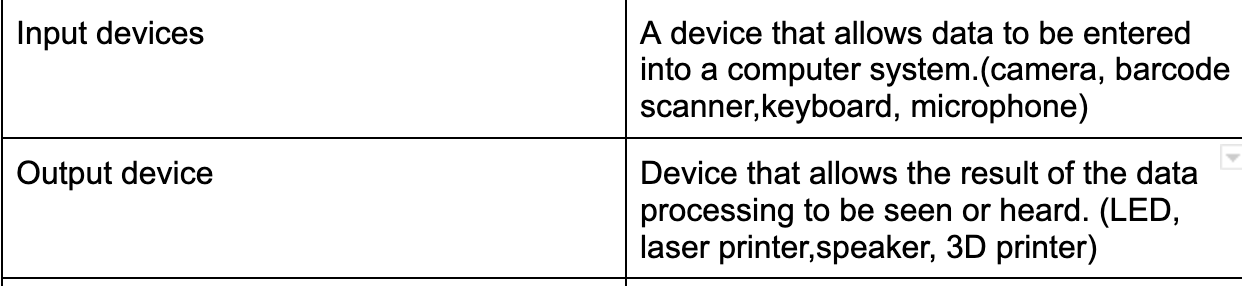
Types of devices
68
New cards
Sensor (input device)
Captures data from it’s immediate environment
Acoustic Sensor: measures the level of sound in an environment.
Accelerometer: This type of sensor measures acceleration forces.
Flow: Measures the amount of liquid, gas or steam.
Gas: Measures the presence and concentration of gas within the immediate atmosphere.
Acoustic Sensor: measures the level of sound in an environment.
Accelerometer: This type of sensor measures acceleration forces.
Flow: Measures the amount of liquid, gas or steam.
Gas: Measures the presence and concentration of gas within the immediate atmosphere.
69
New cards
Automated System
System designed to work without any human intervention.
70
New cards
Primary storage
Type of storage that is directly accessed by the CPU
71
New cards
Secondary storage
Type of storage that stores data permanently until deleted by the user.It is not directly accessed by the CPU.
Magnetic storage: relies on the properties of magnetism to store data (hard disk)
Optical storage: Uses lasers to read and write data to and from a circular disk(CD,DVD, Blue-ray)
Solid State Storage/Flash memory: Uses transistors, which are wired together without any moving parts.
Magnetic storage: relies on the properties of magnetism to store data (hard disk)
Optical storage: Uses lasers to read and write data to and from a circular disk(CD,DVD, Blue-ray)
Solid State Storage/Flash memory: Uses transistors, which are wired together without any moving parts.
72
New cards
Semi-conductor chips
an electronic circuit, where
transistors are set on a
semiconductor material, such as
silicon.
transistors are set on a
semiconductor material, such as
silicon.
73
New cards
Transistors
A device that acts as a gate or signal for electronic signals.
74
New cards
Gates
Control Gate: Controls flow of electric current
Floating Gate: Can store electric charge.
Floating Gate: Can store electric charge.
75
New cards
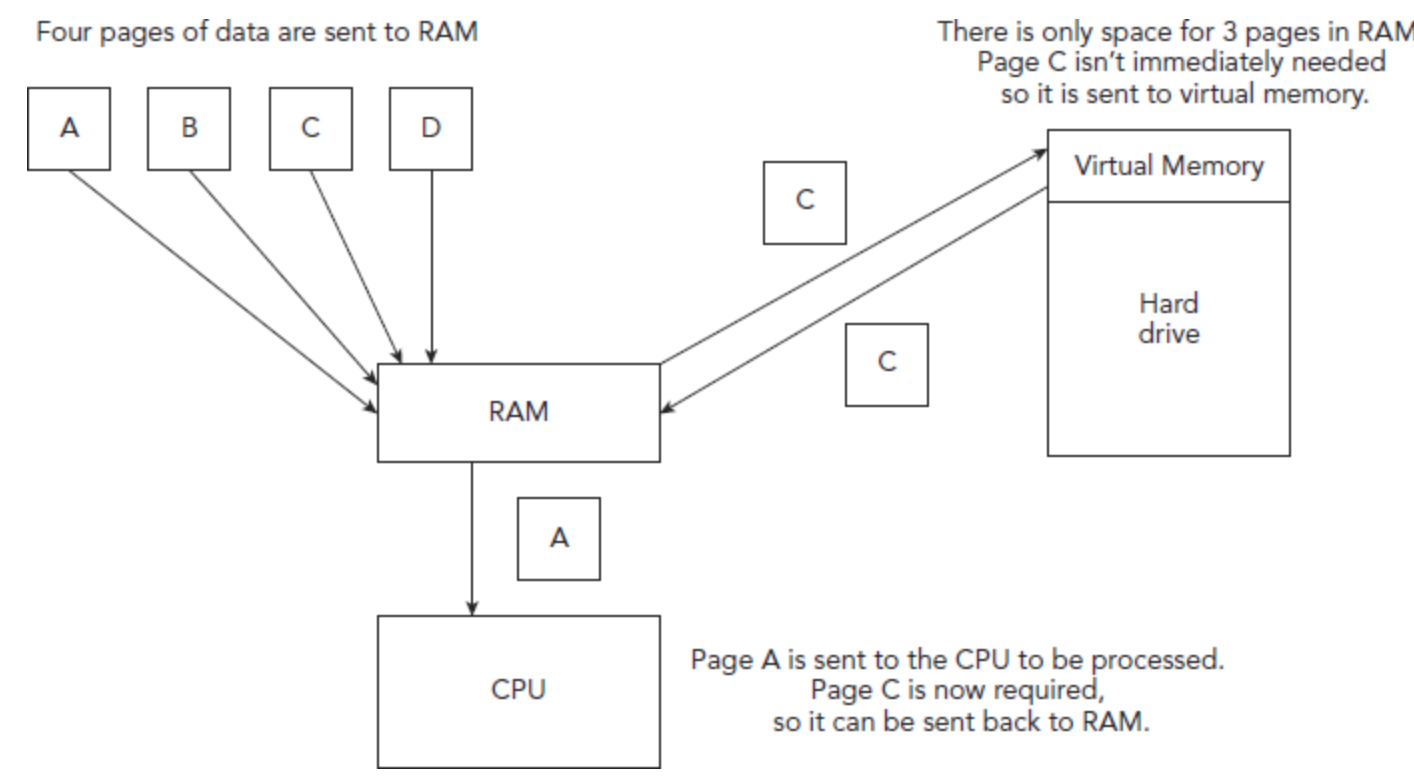
Virtual memory
Another type of storage, it isn’t a component that can be seen or touched, it is an extension of RAM. RAM can crash when it becomes full and will not be able to transfer pager of data to virtual memory, therefore unable to complete ther task it is working on.
76
New cards
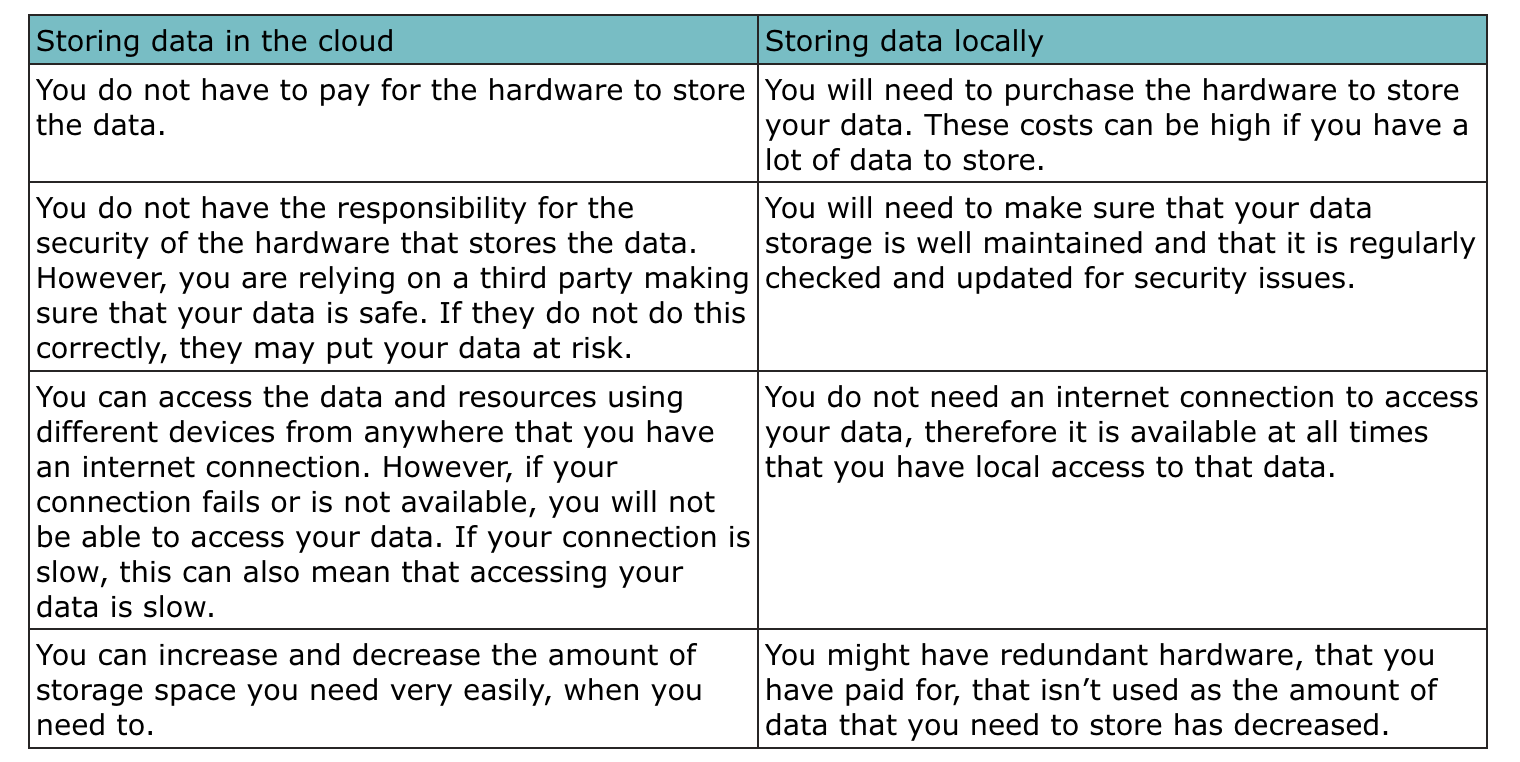
cloud storage
Data storage that is owned by a third party and accessed by the user, using internet.
77
New cards
servers
a component that acts as a central resource for the storage of data and applications or providing a service
78
New cards
network
computer devices that are joined together using cables or wireless technology
79
New cards
hardware needed to create a network
Network Interface card (NIC): The component in the computer that is used to connect it to a network.
Media Access Control (MAC) Address: Unique address given to a NIC by the manufacturer. Usually has 6 pairs of numbers separated with a colon or dash and is in hexadecimal.
Router: a network component that examines a data packet to obtain its destination address and then forwards the packet to this address.
Transmission Media: Cables that are used to transfer data in a network
Media Access Control (MAC) Address: Unique address given to a NIC by the manufacturer. Usually has 6 pairs of numbers separated with a colon or dash and is in hexadecimal.
Router: a network component that examines a data packet to obtain its destination address and then forwards the packet to this address.
Transmission Media: Cables that are used to transfer data in a network
80
New cards
IP Address
Unique address that identifies a device on the internet or a local network
Static IP address: An IP address that doesn't change every time you connect to the network. (DNS Server)
Dynamic IP address: An IP address that can change every time you connect to the network. ( Pc, smartphones, tablet)
Static IP address: An IP address that doesn't change every time you connect to the network. (DNS Server)
Dynamic IP address: An IP address that can change every time you connect to the network. ( Pc, smartphones, tablet)
81
New cards
software
series of instructions written in a programming languague that perform a function.
82
New cards
System software
manages software and hardware in a computer by allowing communication between these components.
operating system (OS): manages the computer, allows the user to communicate with the computer and lets software run.
utility programs: system software that performs housekeeping activities.
operating system (OS): manages the computer, allows the user to communicate with the computer and lets software run.
utility programs: system software that performs housekeeping activities.
83
New cards
Application software
software that allows the user to perform a useful task
word processor: create written docs
spreadsheet: performs data calculations
database: store and search a set of data
web browser: view and navigate websites
word processor: create written docs
spreadsheet: performs data calculations
database: store and search a set of data
web browser: view and navigate websites
84
New cards
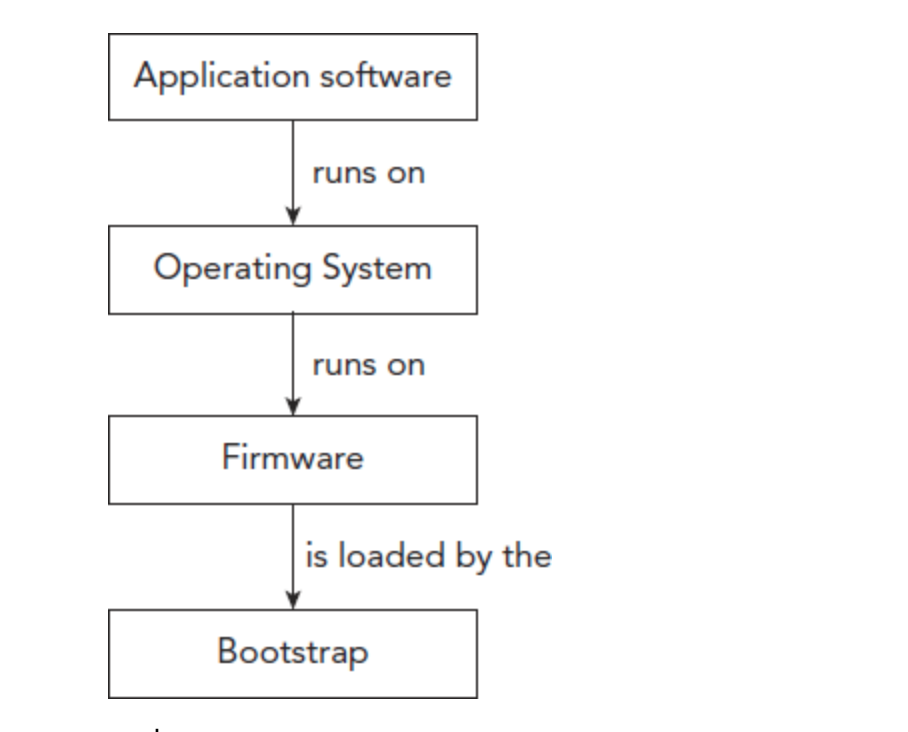
operating system
firmware: instructions that are stored in the ROM and are loaded when the computer starts
bootstrap: first commands loaded when a computer starts, it checks hardware and loads firmware.
bootstrap: first commands loaded when a computer starts, it checks hardware and loads firmware.
85
New cards
Interface
A method by which a user communicates with it's device.
Graphical user interface: has windows, icons,menus.
Command line interface: requires user to enter text as commands.
Natural language interface: allows user to enter text or speak commands.
Graphical user interface: has windows, icons,menus.
Command line interface: requires user to enter text as commands.
Natural language interface: allows user to enter text or speak commands.
86
New cards
Interrupts
a signal sent to the processor to tell it that it's attention is required.
Interrupt handler: a program that organizes interrupts based on its priorities
(ISR) Interrupt service routine: program that retrieves and interrupts and performs the task
Interrupt handler: a program that organizes interrupts based on its priorities
(ISR) Interrupt service routine: program that retrieves and interrupts and performs the task
87
New cards
peripherals and drivers
peripheral: a hardware device, used to input,
store or output data from a computer, that is not directly part of the computer itself.
driver: program that controls a device(keyboard/printer)
store or output data from a computer, that is not directly part of the computer itself.
driver: program that controls a device(keyboard/printer)
88
New cards
High level language
a type of programming that uses human language style words. they are considered portable, they can be written on one computer and run on another.
89
New cards
Low level language
programming that uses a language closer to machine language, could use binary. This is non-portable
Assembly language: code written in mnemonics that
allows direct manipulation of the hardware. It must be converted into binary code to run.
Machine code: uses binary code
Assembly language: code written in mnemonics that
allows direct manipulation of the hardware. It must be converted into binary code to run.
Machine code: uses binary code
90
New cards
interpreter & compiler
interpreter: a translator that converts a high-
level language into a low-level language. It checks one line of code and then executes it before checking the next.
compiler: a translator that converts a high-
level language into a low-level language. It checks all code before running the program.
level language into a low-level language. It checks one line of code and then executes it before checking the next.
compiler: a translator that converts a high-
level language into a low-level language. It checks all code before running the program.
91
New cards
integrated development environment(IDE)
a program that allows a user to test, run and write a program. it allows provides debugging services, such as (breakpoints, variable watch windows, stepping)
auto-completion: start typing and it suggests options for you to select the correct one.
auto-correction: if you spell a command incorrectly it changes to the right version.
prettyprint: changes the colors of words to spot key terms.
block minimizing: you can make sections of code, minimised so there is less code to read through.
auto-completion: start typing and it suggests options for you to select the correct one.
auto-correction: if you spell a command incorrectly it changes to the right version.
prettyprint: changes the colors of words to spot key terms.
block minimizing: you can make sections of code, minimised so there is less code to read through.
92
New cards
3 types of translators
compiler, assembles, interpreter
93
New cards
Some parts of a computer's memory are marked 'read only', which means their contents cannot be changed or deleted. The contents of ROM are safe when a computer loses power