IST 1110 Understanding Computers
 Call Kai
 Learn
Learn Practice Test
 Spaced Repetition
 Match
Match Flashcards
 Knowt Play
1/66

Earn XP
Description and Tags
Chapter 2
Name | Mastery | Learn | Test | Matching | Spaced | Call with Kai |
|---|
No analytics yet
Send a link to your students to track their progress
67 Terms
What are binary?
a list of 0’s and 1’s that are used to represent data in computers.
Also referred to as open & closed circuits.
The computer’s natural language
What is a Bit?
The smallest unit of data that a computer can recognize.
What is a Byte?
8 Bits grouped together are referred to as a Byte.
What is a Kilobyte(KB)?
A Kilobyte is approximately 1000 bytes.
What is a Megabyte(MB)?
A Megabyte is approximately 1000 Bytes.
What is a gigabyte(GB)?
A Gigabyte is approximately 1million bytes.
What is a terabyte(TB)?
A Terabyte is approximately1billion bytes.
What is a Petabyte(PB)?
A Petabyte is approximately 1000 Terabytes.
What is an Exabyte(EB)?
An Exabyte is about 1000 Petabytes.
What is a Zettabyte(ZB)?
A Zettabyte is approximately 1000 Exabytes.
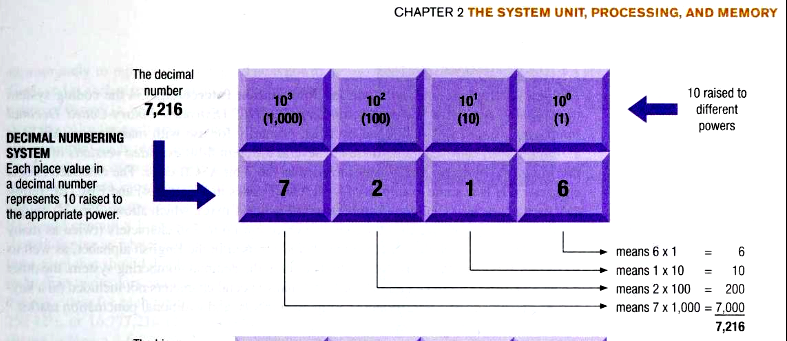
What is the Decimal Numbering System?
A numbering system that uses 10 symbols, 1-9, to represent all possible numbers.
Explain how the power of each base number increases and the order flows in a Decimal Numbering System.
The order is read from right to left.
The base number starts at zero and is increased by 10 for each one after. (The number on the top right that is multiplied by)
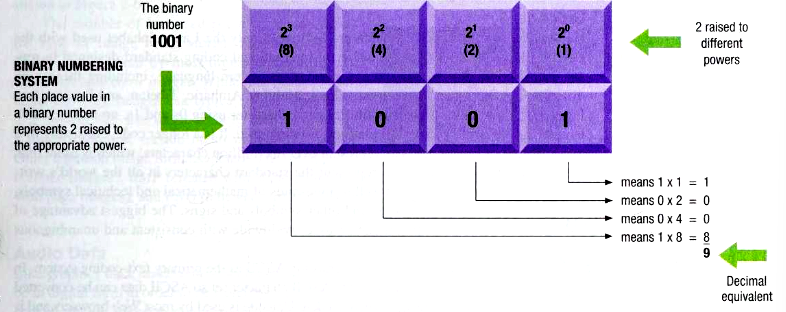
Explain how the power of each base number increases and the order flows in a Binary Numbering System.
The order goes from right to left.
The base number increases by 2.
Unlike the DNS, the overall number can translate into two different numbers. A DNS number equivalent (this example, 1001), and the Binary Number System equivalent (this example, 9 is the representation of 1001).
What is Unicode?
A universal international coding standard designed to represent text-based data written in any language.
What is Graphic Data?
Graphic data that consists of still images.
Bitmap image, is an image made up of a grid of small dots called pixels.
What is a Pixel?
A Pixel is short for picture element, which is a small colored dot on an image.
What is TIF?
A common image format used with scanned images.
What is BMF?
A common image format that is created with some painting programs.
What is BMP?
A common image format that is an older format for web page images.
What is PNG?
A common image format that is a newer format for web page images.
How is Audio Data used?
The digital representation of sound, first as a digital form to be stored in a storage medium or processed by a computer.
What is Video Data?
A collection of frames that contains a still image projected one after another, typically at a rate of 24 frames per second.
What is Machine Language?
A set of Instructions that look like a string of 0’s and 1’s that actually represent a set of specific operations.
What is a System Unit?
The main case of a computer or mobile device that houses the processing hardware.
What is a Circuit Board?
A thin board containing computer chips(IC’s/Integrated Circuits) and other electronic components.
A computer chip also contains interconnected components called Transistors that enable electrical current to perform functions.
What is the Motherboard?
The main circuit board inside the system unit.
What are processors?
The part that does the processing in a computer or mobile device.
What is a Multi-core CPU?
A CPU that contains the processing components of multiple independent processors.
Dual Core CPU = 2 cores
Quad Core CPU = 4 cores
It allows computers to work on multiple tasks at the same time.
Computers today typically have 4 cores.
What does having a higher CPU clock speed mean?
More instructions can be performed per second than at a lower Clock speed.
Today, people look for overall processing speed or performance in computers rather than Clock Speed.
What are Bench Mark test used for?
The Measurement of overall processing speed is the maximum number of instructions that the CPU can process per second.
This is the overall tester for computer processing speed at stores today.
What is Cache Memory?
A special group of very fast memory circuitry usually built into the CPU.
Cache memory is used to speed up processing by storing the data and instructions that may be needed next by the CPU.
When the Cache memory is full, it overwrites the data that is needed to make room for the next set.
Bus
An electronic path that data uses to travel.
Bus Width
The number of wires in the bus that data can use to travel.
The number of Bits that can be transmitted at one time is dependent on the Bus Width,
Bandwidth
The amount of data that can be transferred through the bus at a time. (speed)
Throughput
The amount of data that is actually transferred in real-life conditions.
Memory
Refers to chip based storage.
RAM (Random Access Memory) (Hardware)
Random access memory / main memory / system memory, used to store essential parts of the operating system while the computer is running. (programs/data)
RAM is volatile like cache and registers, meaning its contents are erased once the power to the memory stops.
The amount of RAM you can install depends on your CPU. 32BIt CPU = 4GB RAM, more CPU = more RAM
Random Access (Method )
The ability to access any storage location in roughly the same amount of time in any order.
ROM
Read On Memory and flash memory are nonvolatile.
You can’t write over the data.
NRAM (Nonvolatile)
Consumes less power, and data is retained, which can extend battery life.
MRAM (Magnetic)
Instead of an electric charge to store data, memristor-based RAM change their resistance in response to current flowing through it.
Registers (Hardware)
A high-speed memory built into the CPU to store data.(Fastest type of memory used by the CPU)
Flash Memory (Nonvolatile)
Used for storage by the computer, have started to replace ROM in BIOS(Basic Input Output System) or UEFI (Unified Extensible Firmware Interface / the boot up process).
Discussion Question Chapter 1
Select a technology you use every day and consider its
benefits and risks. Answer the following questions:
– What benefits does the technology provide?
– Are there any risks involved, and if so, how can they be
minimized?
– If you chose not to use this technology because of the
possible risks associated with it, how would your life
affected?
– Who should determine if the benefits of a new technology
outweigh the potential risks? Consumers? Companies? The
government?
daily lives, education, and how we communicate with each other
Own opinion.
Discussion Question Chapter 2
1.Define ROM (read-only memory). What is one important
difference between ROM and RAM (random access memory)?
• What are the general operations of a machine cycle?
2. Discuss the design of a hypothetical computer of tomorrow, the
equivalent of a desktop or notebook PC today. How big would the
computer be? Would it be portable or built into furniture or some
other object? Should it be wearable or embedded in a person’s
body? What is the ideal computer of the future?
3. Discuss products that use computer chips and microprocessors
today. What functions do the chips provide to their stated products?
Discuss other products that would benefit from the inclusion of a
processor in the future. What about products that would be
improved if they included built-in computer processing abilities?
ROM (read-only memory) consists of nonvolatile chips that permanently store data or programs, they are attached to the motherboard inside the system unit, and the data and programs are only accessed when they are needed. A unique thing about ROM is that the data inside cannot be added removed or written over, this is why it is called Read-Only, the data/content can also not be erased when the computer is powered off. Traditionally, ROM was used to permanently store instructions for a computer, an example would be firmware.
RAM (Random access memory) consists of volatile chips which is different from ROM's nonvolatile chips, this means that it only temporarily stores the data and programs that are actively being used, and this content is then erased when the computer is powered off. Unlike ROM, the data within RAM is able to be written over and changed at any time, this makes it great for multitasking and running multiple applications that only require data to be stored temporarily. The data storage of ROM is more so used to hold onto important and necessary information for a long period of time. (I didn’t write this, but it seems general )
Own opinion
Discussion Question Chapter 3
Discuss how storage media differ from RAM in terms of volatility.
Discuss embedded flash memory and its uses.
What does remote storage refer to? Describe some common types of remote storage.
What is a smart card? Describe some common features and uses of smart cards.
S
Embedded flash memory refers to flash memory chips that are embedded into a product's hardware as a form of non volatile storage. Which means that data is preserved even if the product is shut down. Flash memory refers to a tiny memory chip that's often the size of a paperclip. We constantly use flash memory every day without even realizing how much of an impact it makes. In terms of reliability and speed, it makes every experience feel seamless. Several iterations of flash memory exist that provide a specific format or greater capacity for general purposes, such as Secure Digital (SD), Secure Digital High Capacity (SDHC), and Secure Digital Extended Capacity. Due to the convenience in size, many products, such as smartphones, tablets, and smartwatches, utilize this to provide data storage. Other common applications that often utilize these functions as well are professional photography to support high definition resolution and video game devices, such as the Wii or PSP, for storing memory. I'm sure that as technology evolves further, embedded flash memory will continue to play a crucial role in supporting faster performance and storage capacity for products. Without it, we probably would not be able to enjoy the convenience as efficiently of portable technology.
Storage media are physical pieces that are made and used to take, store, and catch electronic data making it seem like a storing center for digital information. RAM which is shor for (Random Acsess Memory) and this is a piece that is connected to the motherboard in a computer and the purpose of the RAM is that it is our quick, short-term memory that holds your data and any sort of files for as long as it is on for. Now storage media differs from Ram in terms of volatility because storage media is non-volatile and this means that it keeps data saved even when you turn it off, while RAM in terms of volatility is volatile because it demands to much power to keep data that is lost in an instant if it is turned off. Embedded flash memory is categorized as non-volatile because it keeps data without power and saves it permanently. Some of the key uses of embedded flash memory are firmware storage, it also has uses in consumer electronics, as well in IoT devices, and in automotive systems just to name a few of the uses that embedded flash memory has. Remote storage refers to data that is or was placed on servers, services, and devices that is stationed outside a user's expoditous environment that is acsessed through the internet. Some common types of remote storage include cloud storage, network attached storage, and storage area network just to name a few of common types of remote storages. (Dont copy word for word its not my words, just read it and it needs to be replaced)
Addressable Media
Media that allows random access.
Storage systems can locate each piece of stored data to a unique address.
Sequential Access
The data can only be retrieved in the order that is physically stored in the medium.
Magnetic tape drive
Sometimes used with computers for backup purposes, uses sequential Access.
Computer magnetic tapes
Works like an audio cassette tape or videotape; you have to fast-forward to get to the location you want access too.
File / Documents
Anything on a storage medium (ex. program, song, photograph, letter)
Folders / directories
An organized list of related files stored on a storage medium.
Magnetic (storage type)
Storage can be changed with magnetic alignment and can be written, deleted, or rewritten. (like a cassette tape)
Optically
In a writable optical media, a laser changes the reflectivity of the medium to represent 1s and 0s (a CD)
Hard drive
Store most programs and data.
Internal hard drive
Located inside the unit, it allows the user to add additional storage (external hard drives)
Solid-State Drives (SSDs)
Hard drives that use flash memory chips instead of magnetic disks.
Solid-State Hybrid Drives (SSHDs)
Contains both flash memory chips and magnetic hard drives.
Remote Storage
Refers to using a storage device that is not connected directly to the user’s computer.
connected through a network or the internet.
Network Attached Storage (NAS)
A high-performance storage system that are connected individually to a network to provide storage to the computer connected to that network.
some are used for small business use and others for home use
Storage Area Networks (SAN)
Provides storage for a network, but it consists of a separate network of hard drives or other storage devices, which is connected to the main network.
Usually used for a larger network of storage.
The difference between NAS and SAN is how the storage devices interface with the network.
The storage devices act as individual network nodes, just like computers and printers, or whether they’re in a completely separate network of storage that is accessible via the main network.
Chapter 4 Discussion Questions
1.What is a touch pad?
2. How do color and monochrome displays form colors?
3. How do digital cameras work?
4. Discuss impact vs. nonimpact printers. Are there
applications today that require the use of an impact
printer (hint: impact for printing carbon copies, such as
invoices and credit card receipts)? Discuss 3D printers.
Brainstorm applications in which a 3D printer would be
beneficial and make a list on the board. What
advantages do 3D printers have for these applications?
A touch-sensitive input device located on the laptop that allows the user to interact with the device using their fingers in replacement of a standard mouse. Through the use of specific gestures like swiping and pinching, the user can mimic the function of mouse movement and zooming. Other features, such as taping and fast swiping, perform the function of selecting objects and scrolling.
Color in displays can appear in several ways, depending on the display. For example, the CRT(Cathode-ray tube) used in large bulky TVs contains an electron gun that projects the necessary colors by targeting the appropriate phosphor dots. While flat-panel displays are thinner and lighter TVs that display color through the manipulation of electronically charged gases and chemicals tightly packed in glass sheets. An LCD(Liquid Crystal Display) displays color through charged liquid crystals located between two gas panels to light up the appropriate pixels. This also forms monochrome colors when the liquid crystals change their orientation to block out light. EPD, or Electronic Paper Displays, is a type of technology that imitates the appearance of printed paper through the use of electronic ink.
a
Digital film cameras work similarly to film cameras with a few exceptions. Instead of using film, it uses a digital storage medium to determine the number of photos that can be stored at a time. These digital storage media can come in the form of flash memory, embedded flash memory, or a built-in hard drive. The benefit is that images are available to view instantly or printed, instead of having to dedicate a room to have the film developed. However, the number of pixels in an image in a digital camera can affect the quality of the image as well as the size of that image. Previously, film cameras came in only two separate versions: the still image camera or the moving image camera. Today, many digital cameras are integrated to capture both these features. Additionally, it contains the ability to safely transfer stored images onto a computer for storage and editing.
Chapter 5 Discussion Questions
Describe the functionality of an operating system.
Explain multitasking with reference to an operating system.
Compare graphical user interfaces (GUIs) with command line interfaces.
What is the purpose of uninstall utilities?
The operating system is considered the most critical piece of software on a computer, for its collection of programs that manage and coordinate the activities taking place within the computer. A crucial function that all computers must go through is the booting process, in which the computer loads up the operating system to ensure that the configurations are running properly. One of its functions is to translate the user’s or the computer’s instructions into a form that the computer or user can understand. Such as interacting with a program or receiving feedback from hardware. Similarly, the operating system continuously manages and monitors its resources to ensure that if a problem does occur, the user will know of it. Additionally, it is responsible for keeping files organized in the file management program so that they can be easily retrieved when needed. The operating system can use passwords and security features, such as passwords or a firewall. The operating system is also responsible for configuring all devices connected to a computer by installing an appropriate device driver that will allow the hardware to be ready to use. It is also in charge of managing the network connections, such as wired or wireless connections, in a home, business, or school. It also contains the ability to multitask and use threads, such as having multiple programs open at a time, and having access to spell checking.
Multitasking is the ability of an operating system to handle more than one program at a time. When using any program, the operating system must refer to its location in the file management folder and check that the file is ready to use. When more than one program is open in the multitasking program, the operating system can still perform all the essential tasks, but it is sequential instead of being processed all at the same time. When multiple programs are open, the operating system will optimize the use of the main memory to those being used and reclaim any that are closed. If the amount of RAM in use is being exceeded, then the operating system will use a portion of the computer’s hard drive in the form of virtual memory. The operating system is in charge of ensuring that all open programs are running efficiently while managing and monitoring resources for any problems that might occur. The operating system will still run as normal whenever the user interacts with the interfaces. If any files are downloaded during this process, then they will be stored in a location that operation system deems appropriate.
A graphical user interface is the process by which the user can interact with objects such as icons, menus, and tiles with the use of a mouse, pen, or finger. While a command-line interface is the process by which the operating system requires the user to input commands using the keyboard.
The purpose of uninstall utilities or removed from the hard drive
Chapter 6 Discussion Questions
What programs are typically contained in office suites?
What is the difference between a spreadsheet and spreadsheet software?
What is a database? Define the terms field, record, and table as they relate to a database.
A software suite is a bundle of related software programs typically used for everyday productivity. In a school setting, you might see the use of word processing software to allow the user to easily and conveniently create and save text-based documents. Additionally, it allows the user the capability to incorporate tables, graphics, and templates into these documents to format them to their desired style. Spreadsheet software is another crucial software that you might see in the life of an accountant. This allows users to create documents that contain labels, constant values, formulas, and functions to answer complex mathematical calculations. This software can also process charts and create what-if analysis to find the probability of profit from business decisions. Database software is a program that is used to maintain, organize, and retrieve data. This program includes fields/columns, such as tables, to separate a single type of data that can appear in several forms, like a name, address, city, or street. Databases are also important for queries and reports that may pertain to specific information, results, or fields. Presentation Graphic is a type of software suite that is an image designed to enhance a presentation in documented reports or an electronic slide show. The purpose is to display information in a dynamic and comprehensible way to the target audience through the use of embedded images, text, audio, video, etc. Overall, a software suite incorporates these programs in a cohesive system that allows users to efficiently create, manage, analyze, and present information in whichever task is required within a professional or everyday environment.
A spreadsheet is a document that is used to organize, store, and calculate data in a table format. It is arranged in rows and columns, and the intersections of these rows and columns are called cells. These cells can hold numbers, text, or formulas. People use spreadsheets to manage budgets, track expenses, organize data, and analyze information. The spreadsheet itself is the actual file that contains all of this data.
Spreadsheet software, on the other hand, is the program that allows you to create, edit, and work with spreadsheets. Examples include Microsoft Excel, Google Sheets, and Apple Numbers. The software provides tools and features such as formulas, functions, charts, and formatting options. These tools make it easier to perform calculations, organize data clearly, and present information in a visual way.
The main difference is that a spreadsheet is the document where the data is stored, while spreadsheet software is the application that helps you create and manage that document. But in simple terms, the spreadsheet is the product, and the software is the tool used to make and edit it. Understanding this difference is important because people often use the terms interchangeably, even though they are not the same thing.
a
Chapter 7 Questions
Define a computer network. List some common uses for the computer network.
What is a network topology? Describe the major network topologies.
Discuss different types of computer networks.
Define Communications protocols and Networking Standards.
Discuss the TCP/IP protocol.
A computer network is a collection of computers and hardware devices connected together so that users can share among each other the hardware, software, and data. It is essential to allow users to share resources, access the internet, and communicate with each other. In a business setting, a computer network might be used to exchange and collaborate on documents, as well as to process customer orders, manage inventory, and run fulfilment systems. In homes, this system might be used in the form of communication services such as the Plain Old Telephone Service, which allows users to have a landline for home telephones. Additionally, it could be used to connect to a Wi-Fi Network, which allows mobile devices to have access to a consistent network for internet connectivity and phone calls. In the healthcare field, you might see the use of telemedicine, which is networking technology that allows physicians the capability to communicate with patients from other locations through the use of cameras. Another form of telemedicine is telesurgery, which is a robot-controlled by a physician to operate on patients. This operation is done remotely over the internet and uses several cameras to assist with very small, precise incisions that a typical surgeon would struggle to make.
Chapter 9 questions
Why should we care about Internet security and privacy?
Discuss effective ways to create strong passwords.
List and discuss at least five strategies for virus prevention.
We should care about internet security and privacy because it affects all vital information, such as credit cards and passwords, which protect our sensitive information.

