Software engineering FINAL
 Studied by 0 people
 Call Kai
 Learn
Learn Practice Test
 Spaced Repetition
 Match
Match Flashcards
 Knowt Play
1/76

There's no tags or description
Looks like no tags are added yet.
Name | Mastery | Learn | Test | Matching | Spaced | Call with Kai |
|---|
No analytics yet
Send a link to your students to track their progress
77 Terms
Life Cycle: What is SDLC?
A structured process that describes how software is planned, built, tested, delivered, and maintained.
Life Cycle: Requirements
What the system should do, functional and nonfunctional requirements, stakeholders, user stories.
Life Cycle: Design
High level structure, architecture, components, interfaces, data models.
Life Cycle: Implementation (coding)
Turning design into source code.
Life Cycle: Deployment
Releasing the software to users or production environments.
Life Cycle: Maintenance
Fixing bugs, adding features, adapting to new environments, improving performance.
Development does not end at delivery. The system enters maintenance and may continue to evolve for years.
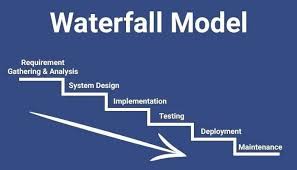
Waterfall: Sequence
Requirements, design, implementation, testing, deployment, maintenance.
Waterfall: Characteristics
Plan driven, heavy documentation, changes late in the project are expensive.
Waterfall: Strengths and weaknesses
Better when requirements are stable and well understood. Harder when requirements change often.
Waterfall: When would you choose a Waterfall style approach versus Agile
Requirements are stable & known and the project scope is known
Agile: Iterative and incremental
Work is done in small iterations. Each iteration delivers a potentially shippable increment.
Agile: Customer collaboration
Frequent feedback from users and stakeholders.
Agile: Responding to change
Requirements can change and the team adapts.
Agile: Working software over documentation
Documentation still exists but the main measure of progress is working software.
explain Agile values and why frequent feedback is important.
The core of Agile philosophy is the Agile Manifesto, which outlines four foundational values that prioritize adaptability, human interaction, and tangible results over rigid processes and extensive documentation. Frequent feedback is a direct implementation of these values, particularly the emphasis on customer collaboration and responding to change
Scrum: Product Owner
Owns the product backlog, sets priorities, represents stakeholders.
Scrum: Scrum Master
Facilitates the process, removes blockers, ensures Scrum is followed.
Scrum: Development Team
Cross functional team that builds the product.
Events:
Fixed length iteration (for example two weeks) that ends with a potentially shippable product increment.
Events: Sprint Planning
Decide what to deliver in this sprint and how to do the work.
Events: Daily Scrum
Short daily meeting to coordinate the team.
Events Sprint Review
Demonstrate the increment to stakeholders, gather feedback.
Sprint Retrospective
Reflect on the process, decide how to improve in the next sprint.
describe the life of one sprint from planning to review and retrospective.
A sprint typically begins with planning, where the team selects items from the product backlog, followed by development work, a daily Scrum for coordination, and concludes with the Sprint Review to demonstrate the increment and gather feedback, topped off by the Sprint Retrospective to reflect and identify improvements.
Git Basics and Repositories: Repository
A project’s history and files tracked by Git. You can have a local repository on your machine and a remote repository on GitHub.
Git Basics and Repositories: Staging area
Place where you prepare changes before committing.
Git Basics and Repositories: Commit
A snapshot of the project at a point in time, with a message that explains the change.
Git Basics and Repositories: git init
Creates a new Git repository in the current folder.
Git Basics and Repositories: git status
Shows tracked and untracked files and which changes are staged.
Git Basics and Repositories: git add <file> or git add .
Moves changes into the staging area.
Git Basics and Repositories: git commit -m "message"
Saves the staged changes with a message.
Git Basics and Repositories: git remote add origin <url>
Connect your local repository to a remote repository on GitHub named origin.
Git Basics and Repositories: git pull
Fetches and merges changes from remote into your current branch.
Git Basics and Repositories: git push
Sends your local commits to the remote repository.
Git Basics and Repositories: git clone <url>
Copies a remote repository to your local machine.
Using Git and GitHub from VS Code: What is the usual Git repo workflow
Clone or init repository
Edit files
Add changes
Commit
Pull to get latest remote changes
Resolve conflicts if needed
Push
Using Git and GitHub from VS Code: Opening a folder as a project
Use File then Open Folder and pick your project directory.
Using Git and GitHub from VS Code: Source Control
The icon on the side bar shows changes, lets you stage files and type commit messages.
Using Git and GitHub from VS Code: Initializing or connecting to Git
If there is no repository, VS Code can run git init for you.
If you cloned from GitHub, the folder is already a repository.
Using Git and GitHub from VS Code: Staging and committing
Use the plus icon next to a file to stage.
Type a message in the input at the top then press Commit.
Using Git and GitHub from VS Code: Pull and push
Use the Source Control menu or status bar controls to pull or push.
Be aware that VS Code uses Git behind the scenes, same commands as the terminal.
Using Git and GitHub from VS Code: Sync
VS Code can combine pull and push into a sync action. You should still understand that it is really a pull then a push.
Using Git and GitHub from VS Code: Pull and push
Use the Source Control menu or status bar controls to pull or push.
Be aware that VS Code uses Git behind the scenes, same commands as the terminal.
Using Git and GitHub from VS Code: Sync
VS Code can combine pull and push into a sync action. You should still understand that it is really a pull then a push.
Branches and Pull Requests: What is a branch
A separate line of development from the main branch.
Branches and Pull Requests: Why use branches
Experiment safely, add features, fix bugs without breaking main.
Branches and Pull Requests: Common branch commands
git branch to list branches
git checkout <branch> to switch
git checkout -b <branch> to create and switch
git merge <branch> to merge into current branch
Branches and Pull Requests: Pull request
A request to merge changes from one branch into another, often from a feature branch into main.
Branches and Pull Requests: Purpose
Code review, discussion, automatic checks, and approval before merging.
Branches and Pull Requests: Typical steps
Create branch
Commit changes
Push branch to GitHub
Open pull request on GitHub
Review and comments
Fix issues and push more commits
Approve and merge
Branches and Pull Requests: describe how you would use a pull request to integrate a feature in a team project.
A pull request is used to propose integrating a new feature by creating a dedicated branch, committing the changes, and then submitting the pull request for code review. Team members can review the modifications, discuss feedback, and ensure quality checks are passed before merging the changes into the main branch.
Know what Kanban is:
Kanban is a visual workflow management method that uses cards or boards to represent work items and their progress through various stages of completion, allowing for efficient task management and continuous delivery.
Cards
Each card represents a task, issue, or user story. Cards move across columns as work progresses.
GitHub Projects
Projects can display issues and pull requests as cards on a board.
You can assign tasks, add labels, due dates, and link cards to branches or pull requests.
The board helps the team see what is in progress, blocked, or completed.
Be ready to describe: Why Kanban boards are useful for managing team work
Kanban boards are useful for managing team work because they provide a clear visual representation of tasks, enhance communication among team members, and promote efficiency by highlighting work in progress, bottlenecks, and completed tasks.
Be ready to describe: How moving cards across columns reflects the state of work
progression
Core debugging concepts: Breakpoint
A marker in code where execution pauses so you can inspect state.
Stepping
Step over, step into, and step out to control how you move through code.
Variables and call stack
See variable values and function call history while paused.
In VS Code for Python:
Install Python extension.
Use Run and Debug view.
Create or use a launch configuration if needed.
Set breakpoints by clicking next to line numbers.
Start debugger, run the code, and when it pauses you can inspect variables, modify them, and continue.
How do you set a breakpoint and run the debugger
To set a breakpoint, click next to the line number in your code editor. Then, start the debugger to run your code; it will pause execution at the breakpoint, allowing you to inspect and modify variables.
How can a debugger help you find a bug that print statements might miss
A debugger helps by allowing you to step through code line by line, inspecting variables and the call stack at each step, which can reveal issues that may not be apparent through print statements alone.
Understand why testing is important:
Ensures correctness of code
Prevents bugs from returning when code changes
Improves confidence in refactoring
Testing in Python:
Simple tests with assert
Example:
def add(a, b):
return a + b
assert add(2, 3) == 5
Structured tests with unittest or pytest
You should know the idea that test functions call your code and check expected results.
Testing in VS Code:
Testing in VS Code:
Python extension can discover tests.
You can run all tests or individual tests from the Testing view.
Failures show detailed output and stack traces.
Types of Software Testing:
Types of Software Testing: Unit testing
Tests individual functions or classes in isolation.
Types of Software Testing: Integration testing
Tests how different modules or services work together.
Types of Software Testing: System testing
Tests the complete integrated application as a whole.
Types of Software Testing: Acceptance testing
Confirms that the system meets user requirements, often done by or with the customer.
Types of Software Testing: Regression testing
After changes, runs tests that passed before to check that nothing broke.
Types of Software Testing: Smoke testing
Quick basic tests to check that the build is not obviously broken.
Types of Software Testing: Performance or load testing
Measures speed, scalability, and behavior under heavy load.
Is Development Done at Delivery?
Development is not truly finished when you deliver software to the customer.
The product enters the maintenance phase, which can include:
Corrective maintenance: bug fixes
Adaptive maintenance: adjust to new environments or platforms
Perfective maintenance: improvements in performance or usability
Preventive maintenance: refactoring to avoid future issues
Why is maintenance is often the longest part of the life cycle
Maintenance involves ongoing updates, bug fixing, and enhancements, which require significant time and resources as software needs to adapt to changing requirements and environments.
How Agile and DevOps encourage continuous delivery and continuous improvement instead of a one time delivery
Agile and DevOps frameworks promote iterative development and collaboration, allowing for frequent updates and improvements. This approach focuses on delivering smaller increments of software, facilitating quicker feedback, and enabling teams to adapt to changes continuously.
 Note
Note  Flashcards (64)