3.6 Computer Power Supply
 Call Kai
 Learn
Learn Practice Test
 Spaced Repetition
 Match
Match Flashcards
 Knowt Play
1/19

There's no tags or description
Looks like no tags are added yet.
Name | Mastery | Learn | Test | Matching | Spaced | Call with Kai | Chat |
|---|
No analytics yet
Send a link to your students to track their progress
20 Terms
Computer Power Supply
Converts wall source AC power to DC power, converts 120 VAC or 240 VAC to 3.3 VDC, 5 VDC, or 12 VDC. Gives specifications for AC and DC power
Power safety when working on computers
Always disconnect from the power source when working on a device
Some devices store a charge in capacitors, so discharge them before touching
Amps
The rate of electron flow past a point in one second (eg the diameter of a hose)
Voltage
Electrical pressure pushing the electrons (how open a faucet is)
Power in Watts
Volt * Amp = Watt, Measurement of real power use
AC (Alternating Current)
Direction of current constantly reverses, very efficient over long distances. Wall power sources are 120 VAC at 60 Hz in US/Canada and 230 VAC at 50 Hz in Europe. Most power supplies accept both, some switch standards automatically, some have an manual switch. Don’t plug 120 power supply into a 230 power source!
DC (Direct Current)
Current moves in one direction with a constant voltage
+12 V power supply
PCIe adapters, hard drive motors, cooling fans, most modern components that require higher power
+5 V power supply
Some motherboard components, many now use +3.3 V instead
+3.3 V power supply
M.2 slots, RAM slots, motherboard logic circuits
+5 VSB power supply
Standby power provided to motherboard when it’s in a standby or sleeping state, so the device can be woken up by a button or network signal
-12 V power supply
Integrated LAN, Older serial ports, some PCI cards. Negative voltages are used to replicate signals from devices with both positive and negative components, such as switches and amplifiers.
-5 V
ISA adapter cards, most modern motherboards don’t have ISA slots
What are the most common power supplies?
+5 V and +12 V
What is a rail?
Each output with its own connector on a power supply is called a rail. Power supplies many have multiple rails, each supporting specific outputs and connectors.
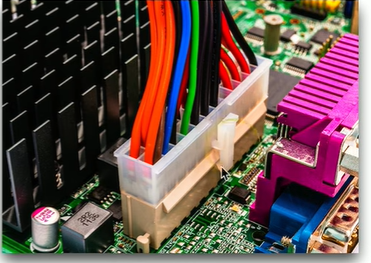
20+4 Pin Motherboard Connector
Main motherboard power providing +3.3 V, ± 5 V, and ±12 V. Originally 20-pin ATX power connector, with 24-pins added for PCIe power. Keyed so can only plug in one way, to supply proper voltage to the right pins. Can connect a 24-pin connector to a 20-pin motherboard.
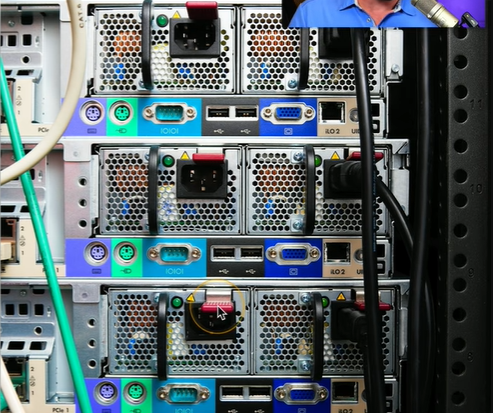
Redundant Power Supply
A secondary power supply that provides power in case of power failure, commonly internal to servers or rack mounted. Each power supply can handle 100% of load and split 50% of the load in normal operation. Hot swappable, so a faulty power supply can be replaced without powering down device.
Fixed vs Modular Power Supply Connectors
Fixed connector can’t be changed, sometimes too many or too little. Modular connectors are a power supply that is not permanently attached to a device and can be added as needed. Potential for additional power connections to a device, as well as quick installation and removal.
Sizing a power supply
Power supplies are rated by watts, more wattage will be more expensive. Calculate the watts required for all the components of a computer and get a supply that supports at least 50% of that capacity.
Energy efficiency
Some power will be lost in the form of heat when converting from AC to DC power. Power supplies range between 80-96% efficiency and are rated using the 80 PLUS standard.