IT Analysis Design & Project Management
 Call Kai
 Learn
Learn Practice Test
 Spaced Repetition
 Match
Match Flashcards
 Knowt Play
1/38

Earn XP
Description and Tags
Lesson 2
Name | Mastery | Learn | Test | Matching | Spaced | Call with Kai | Chat |
|---|
No analytics yet
Send a link to your students to track their progress
39 Terms
List and briefly describe the five activities of systems analysis.
Gather detailed information – meet with users to understand the business processes and needs
Define requirements – document findings by building models such as use case diagram and class diagram
Prioritize requirements – Decide which requirements (such as use cases) should be done first
Develop user-interface dialogs – work with the users to define exactly how they will use the system and what interactions with the system are required
Evaluate requirements with users – ensure that the requirements are complete, accurate, and prioritized correctly
What are three types of models?
Textual models
Graphical models
Mathematical models
What is the difference between functional requirements and nonfunctional requirements?
Functional requirements describe the business rules that must be supported by the new system, while non-functional requirements are the system characteristics such as speed, throughput, response time, and security. Both are important.
Describe the steps in preparing for, conducting, and following up an interview session.
Prepare for an interview by establishing the objective, determining the users and project team members, write questions, review preliminary materials, set up the interview time and location and tell everybody.
Conduct the interview by asking questions, looking for exception conditions and probing for good details. Also take good notes, and document all the follow-up items.
Follow-up the interview by reviewing everybody's notes, building the models as necessary, document open issues, then follow-up with them. Be sure to thank contributors.
What are the benefits of doing vendor research during information-gathering activities?
It can inform the current team and users of new ideas and possibly more effective methods
The team can possibly find out about more current state-of-the-art solutions that vendors have created.
It may even be cheaper, faster, and more effective to purchase a solution instead of building.
What types of stakeholders should you include in fact finding?
Both internal and external stakeholders. Internal stakeholders would include operational people who work with the system and executive stakeholders who may receive executive reports, or depend on the success of the system.
External stakeholders may include customers or partner organizations, who also receive information directly from the system. At the executive level, external stakeholders may be investors or regulators.
Describe the open-items list and then explain why it is important.
During fact finding activities, and in fact throughout all the project, some issues can be answered immediately, but others cannot be answered immediately. Some questions may not be answered because more research may need to be done, or other items may need to be decided first, or the user procedure has not be finalized, etc. Those items will need to be tracked so that they are not left out of the solution system. The open-items list provides that tracking function by noting the item, assigning a responsible person, and tracking the completion of the open item.
List and briefly describe the six information gathering techniques.
Interview users and stakeholders – the most effective for information gathering, but the most expensive
Distribute questionnaires – good for finding overview or summary information from many people
Review current system documentation – good for understanding current processes
Observe current business processes – also good for understanding the user's processes and requirements
Research vendor solutions – good for generating new ideas and learning what already has been done
Collect user comments – good for finding out about problems with current processes
What is the purpose of an activity diagram?
One purpose of an activity diagram is to document current user workflows. Activity diagrams are often called workflow diagrams. They can be used to document a user procedure as he/she interacts with the computer system.
Explain why the Unified Modeling Language (UML) is important to use as a standard for creating information systems models.
Prior to UML there was no standard so diagrams would vary between companies and even within a company. This caused confusion and also discrepancies or gaps in the requirements definition. There also was no standard that was taught in university level courses and textbooks. This caused problems in both student preparation and in the ability of students to adapt to different company methods and models.
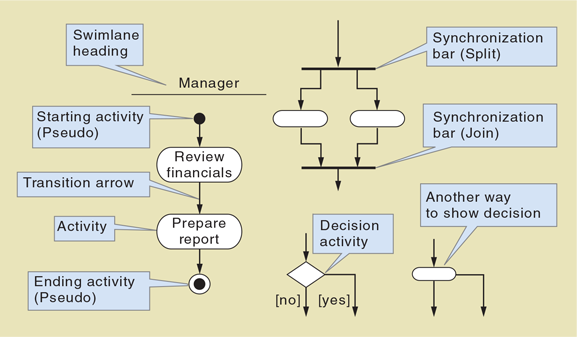
Draw and explain the symbols used on an activity diagram.
Technology Architecture
The set of computing hardware, network hardware and topology, and system software employed by an organization
Application Architecture
The set of information systems the organization needs to support its strategic plan
Systems Analysis Activities
Gather detailed information
Define requirements
Prioritize requirements
Develop user-interface dialogs
Evaluate requirements with users
System requirements
The activities the new system must perform or support and the constraints that the new system must meet.
Functional requirements
The activities that the system must perform (i.e., the business uses to which the system will be applied).
Nonfunctional requirements
Characteristics of the system other than those activities it must perform or support.
FURPS
An acronym that stands for functional, usability, reliability, performance, and security.
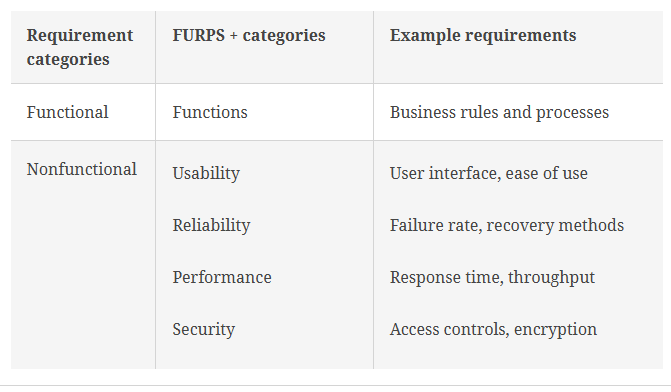
FURPS+
An extension of FURPS that adds additional categories
Design constraints (FURPS+ additional categories)
Describe restrictions to which the hardware and software must adhere.
Implementation requirements (FURPS+ additional categories)
Describe constraints such as required programming languages and tools, documentation method and level of detail, and a specific communication protocol for distributed components.
Interface requirements (FURPS+ additional categories)
Describe interactions among systems.
Physical requirements (FURPS+ additional categories)
Describe such characteristics of hardware as size, weight, power consumption, and operating conditions.
Supportability requirements (FURPS+ additional categories)
Describe how a system is installed, configured, monitored, and updated.
Stakeholders
All the people who have an interest in the successful implementation of the system.
Client
The person or group that provides the funding for the project.
Develop a list of current CSS stakeholders
Phone/mail sales order representatives
Warehouse and shipping personnel
Marketing personnel who maintain online catalog information
Marketing, sales, accounting, and financial managers
Senior executives
Information-Gathering Techniques
Interviewing users and other stakeholders
Distributing and collecting questionnaires
Reviewing inputs, outputs, and documentation
Observing and documenting business procedures
Researching vendor solutions
Collecting active user comments and suggestions
There are two sources of information about inputs, outputs, and procedures.
One source is external to the organization—industry-wide professional organizations and other companies.
The second source of inputs, outputs, and procedures includes existing business documents and procedure descriptions within
the organization.
There are three positive contributions and one danger in exploring existing solutions.
First, researching existing solutions will frequently help users generate new ideas for how to better perform their business functions.
Second, some of these solutions are excellent and state of the art.
Third, it is often cheaper and less risky to buy a solution rather than to build it.
The danger in exploring existing solutions is that the users and even the systems analysts may want to buy one of the alternatives immediately.
Model
A representation or abstraction of some aspect of the system being built.
Analysis and design models can be grouped into three generic types:
Textual models-Memos, reports, narratives, and lists to describe requirements that are detailed and are difficult to represent in other ways.
Graphical models-Make it easier to understand complex relationships that are difficult to follow when described as a list or narrative.
Mathematical models- one or more formulas that describe technical aspects of a system.
Workflow
The sequence of work steps that complete one business transaction or customer request.
Activity diagram
Describes the various user (or system) activities, the person or component that completes each activity, and the sequential
flow of these activities.
Synchronization bar
The heavy solid line which either splits the path into multiple concurrent paths or recombines concurrent paths.
Swimlane
Represents an agent who performs the activities. Each agent follows a path parallel with other agents in the workflow.
Creating activity diagrams to document workflows is straightforward. The first step is to identify the agents to create the
appropriate swimlanes. Next, follow the various steps of the workflow and then make appropriate ovals for the activities.
Connect the activity ovals with arrows to show the workflow.
Use a decision symbol to represent an either/or situation—one path or the other path but not both. As a shorthand notation, you can merge an activity (by using an oval) and a decision (by using a diamond) into a single oval with two exit arrows
Use synchronization bars for parallel paths—situations in which both paths are taken. Include a beginning and an ending synchronization bar. You can also use synchronization bars to represent a loop, such as a “do while” programming loop. Put the bar at the beginning of the loop and then describe it as “for every.” Put another synchronization bar at the end of the loop with the description “end for every.”