Domain 2 Core 2 2.6-2.11
 Call Kai
 Learn
Learn Practice Test
 Spaced Repetition
 Match
Match Flashcards
 Knowt Play
1/19

There's no tags or description
Looks like no tags are added yet.
Name | Mastery | Learn | Test | Matching | Spaced | Call with Kai | Chat |
|---|
No analytics yet
Send a link to your students to track their progress
20 Terms
2.6 Procedures for Malware Removal Step 1.
Investigate and verify malware symptoms
pop-up
Message asking for money
Not booting
Slow
Applications not working
Step 2
Quarantine infected systems
Remove the system off the network
Disconnect the NIC or disable the WiFi card
Step 3
Disable system restore in windows
Step 4
Remediate infected systems
update anti-malware software
Scanning and removal techniques (e.g. , safe mode, pre installation environment)
Step 5
Schedule scans and runs updates
Step 6
Enable system restore and create a restore point in windows
Step 7
Educate the end user
2.7 Workstation Security
Data-at-rest encryption
use Bitlocker or EFS to encrypt data stored on the computer
Password best practices
complexity requirements
-Length 8-10 min
-Character types—Mix of all character on keyboard
expiration requirements
Should expire every 60-90 days
Should set a BIOS or UEFI password
-This must be entered before windows boot
2.7 Workstation security
End- user best practices
use screensaver locks
Log off when not in use
Secure/protect critical hardware (e.g., laptops)
Secure personally identifiable information (PII) and passwords
Disable AutoRun and AutoPlay
2.7 Workstation security
Account Management
Restrict user permissions
-Give Min permissions to do the job
-No one should have an admin account
Restrict login times
-Should only be able to login during work hours
Disable guest account
Use failed attempts lockout
Use timeout/screen lock
Change default administrators user account/password
2.8 Mobile Device security
Screen locks
facial recognition
PIN Codes
Fingerprint
Pattern
Swipe
Remove wipes
Locator applications
able to find the device if lost
2.8 Mobile device Security
OS Updates
keep the device updates with the latest updates
Device encryption
full disk encryption
Most newer phones has this on by default
Remote backup applications
ability to remotely backup data on the device
Failed login attempts restrictions
if password is entered wrong too many time device will lock
Anti-virus/malware
generally 3rd party software to prevent or clean malware
Firewalls
help to protect worms for viruses from entering
2.8 Mobile Device Security
Policies and Procedures
BYOD vs Corporate owned
Profile security requirements
Internet of Things (IoT)
all devices connected to the internet
Change default passwords
Keep updated
2.9 Data Destruction
Physical destruction
Drilling
use a drill to break the platter in the drive
Shredding
uses a device to physically shred the drives into small pieces
Degaussing
using a large magnetic to remove data from the disk
Incinerating
melts the drive
2.8 data destruction
Recycling or repurposing best practices
erasing/wiping
Low-level formatting
Standard formatting
Outsourcing concepts
third-party vendor
Certification of destruction/recycling
2.10 SOHO Network security
Home router settings
change default passwords
IP filtering and Content filtering
Filter unwanted content from IP address or sites
Firmware updates
should be kept updated since newer firmware will include security updates
Physical placement/secure locations
should be stored in a secured location to ensure no authorized physical access to the device
2.10 SOHO Network security
Home router settings
DHCP reservations
to ensure a certain device such as a printer always receives a set IP address
Static wide-area network (WAN) IP
if your ISP gives you a static IP address it will have to be configured on the router
Universal Plug and Play (UPnP)
enables apps and devices to automatically open and close ports to connect with the LAN network
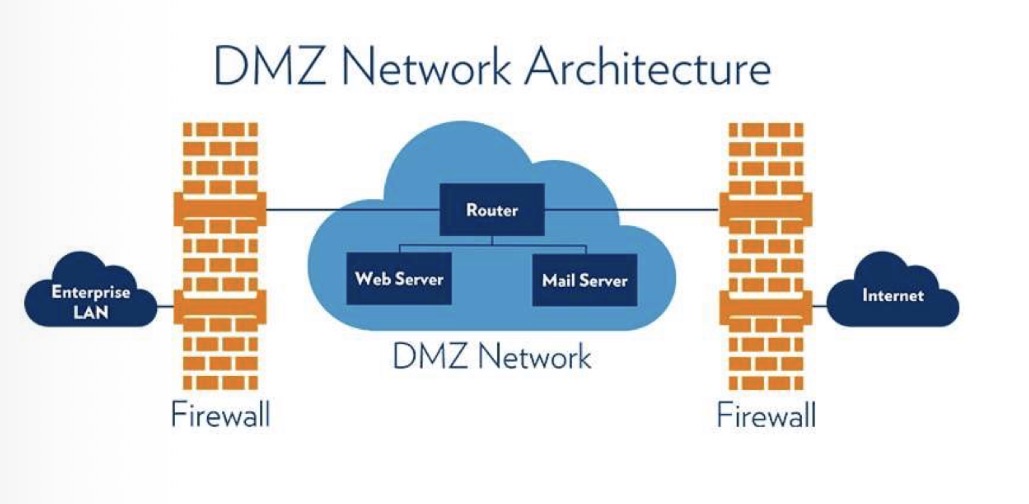
Screened Subnet
a demilitarized zone where companies store publicly accessible servers such as a web server
2.8 SOHO Network security
Wireless specific
Changing the service set identifier (SSID)
Disabling SSID broadcast
Encryption settings
Disabling guest access
Changing channels
Firewall settings
disabling unused ports
Port forwarding/mapping
enable remote access to applications or server from outside the network
2.11 Browser Security
Browser download/installation
trusted sources
Extension and plugins
trusted sources
Untrusted resources
Password managers
Secure connections/sites—valid certificates
2.11 Browser Security
Settings
pop- up blocker
Clearing browsing data
Clearing cache
Private-browsing mode
Sign-in/browser data synchronization
Ad blockers