1.3.4 Web technologies
 Call Kai
 Learn
Learn Practice Test
 Spaced Repetition
 Match
Match Flashcards
 Knowt Play
1/97

Earn XP
Description and Tags
98 Terms
HTML is the abreviation of…
abreviation of hypertext markup language
Describe Hypertext markup language (HTML)
The language that web pages are written in.
HTML allows a browser to interpret and render a webpage for the viewer by describing the structure and content of the webpage.
Uses tags written in angle brackets (e.g. <title>)
HTML is not a programming language as it cannot perform computation
What is the purpose of html?
HTML defines the structure and content of a web page.
The two sections of an HTML webpage
Head
Body
What the head section of the HTML page contains
Contains things that the browser pre-processes and isn’t displayed on the page itself.
Contains the <title> which sets the browser tab title
Embedded CSS or links to style sheets
Often holds any <script> that you will use in the page (although script tags can be used in the body section as well)
What the body section of the HTML page contains
Contains the main content of the page - it defines the text, images and hyperlinks.
<html>
Tag that encloses all content of an HTML page. All code within these tag is interpreted as HTML.
<head>
HTML tag that defines the browser tab or window heading area
<body>
HTML tag that defines the main content of the webpage
<title>
HTML tag that defines the text that appears with the browser tab or window heading area
<link>
HTML tag used to link to additional files, such as a CSS stylesheet.
Does not create a hyperlink
<h1>, <h2>, … , <h5>, <h6>
Heading tags decreasing in level of priority and size.
Number of levels of heading tags
There are 6 levels of HTML heading tags, but you will only ever need ot use the h1, h2 and h3 heading tags in the exam
Number of times the h1 tag should be used on each webpage
The h1 tag should only be used once on each web page.
Number of times the <h2> to <h6> tags should be used on each webpage
____ HTML tags can be used as many times as needed
<img>
HTML tag that adds an image to a webpage. Has an attribute for the source of an image, in addition to a number of optional attributes including alt, height, width
alt attribute for <img> HTML tag
Alternative text
Describes the image and can help make a website more accessible
For example, it can help people using screen readers to understand what the image shows
<a>
Hyperlink HTML tag.
Stands for anchor.
Must have the href attribute which specifies the target of the link.
The piece of text between the __ tags will appear on the page as the link
<ol>
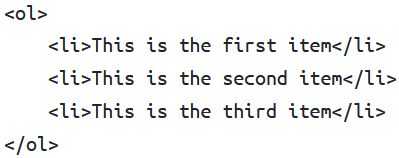
HTML tag used to define an ordered list. Each item of the list is numbered, starting with 1 for the first item.
<ul>
HTML tag used to define an unordered list. Each item has a bullet point next to it.
<li>
HTML tag used to add individual items to a list. Must be enclosed within <ol> or <ul> tags.
<form>
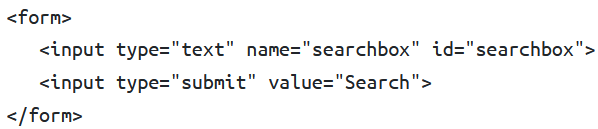
The HTML tag that defines a form that can be used to gather data
Each form can contain a number of form controls (components of the form), such as a textbox and submit button as shown in the image
<input>
HTML tag used to define a form control. Has a type attibute.
What HTML code do you use to create a text box in a form?
You add a form control with type “text” and a name that identifies it:
<input type="text" id="myID" name="myID">
You don’t need </input>
What HTML code do you use to create a submit button in a form?
You use a form control with type “submit” and a optional value attribute for the text that will appear on the button:
<input type="submit" value="buttonName">
Why all form controls that collect data must have the name attribute
The name attribute is needed because data is submitted to web servers as a name-value pair
id attribute of a form control
Often given the same identifier as the name attribute, but doesnt have to be
The id is used client-side, unlike the name attribute which is used server side
Javascript can target elements by their id so that they can be manipulated
<p>
HTML tag used to define a paragraph
Paragraphs are seperated by a blank line above and below
<div> tag is used to create…
…page divisions
HTML page divisions
Containers or boxes that contain other elements of the page like text, images, forms etc.
They must have a unique id attribute
Can be used to group content together
Used to split pages up into sections / areas
<script>
HTML tag used to embed a client-side script (Javascript) or to point to an external script file through the src attribute
What is CSS the abreviation of?
Abreviation of cascading style sheets
What is cascading style sheets (CSS)?
A language which is used to describe the style of a web page. It is used alongside HTML.
What is the purpose of CSS, and what are the different ways of using it?
CSS defines the appearance / style using selectors such as classes and IDs
CSS can be inline, embedded or stored externally in a file
Multiple pieces of CSS can be combined, with the more local instances overriding others
HTML vs. CSS
HTML tells the browser what content, and the structure of the content, to display on a page. CSS tells the browser how each element should appear.
CSS syntax for a rule or rule set
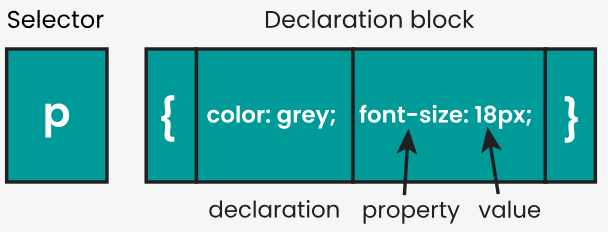
Consists of selector(s) followed by declaration block.
The example image shows a CSS rule set for p (paragraph) elements that states their (text) colour should be grey and the font size should be 18 pixels.
CSS element selector
Targets the element that you want to style.
If the value of a property has not been specified (e.g. font type), the default browser value will be used (e.g. default browser font)
CSS declaration block
Curly brackets containing one or more CSS declarations separated by semicolons
{
  color: grey;
  font-size: 12px
}CSS declaration
Made up of a CSS property and a value, separated by a colon.
For example,
color: orangeis a CSS declaration.
CSS properties
Particular thing which can be changed (e.g. background colour, font size)
background-color CSS property
Changes the colour of the background.
Example usage:
background-color: grey
border-color CSS property
Changes the colour of the border around an element.
Must be spelt color
Example usage:
border-color: blue
border-style CSS property
Change the style of the border.
Can be dotted, dashed, solid, or double.
Example usage:
border-style: solid
border-width CSS property
Changes the width of the border.
Can be set to either thin/medium/thick, or a width value in pixels.
You should always declare the style of the border before the width.
Example usage:
border-width: 12px
color CSS property
Changes the colour of text.
Can be specified as a word for more common colours, or a hashtage followed by a hex value.
Example usages:
color: orange,color: #1212efThere is a ‘web safe’ pallete of colours which will display consistently on all major browsers
font-family CSS property
Changes the font.
Multiple font names separated by commas can be specified so that if the browser does not support the first font, it tries the next font and so on.
Example usage:
font-family: Roboto, Arial, sans-serif
font-size CSS property
Changes the size of the text
Example usage:
font-size: 12px
height CSS property
Changes the height of the element, e.g. the height of an image, or the height of a <div>
Example usage:
height: 240px
width CSS property
Changes the width of the element, e.g. the width of an image
Example usage:
width: 120px
CSS element selector
Applies a CSS rule-set to a standard HTML tag
Name of selector is name of element
CSS id selector
Selector used to target elements that are unique (appear once only) on an HTML page
Used to style a single element
Begins with a # to show it is an id selector, followed by the name of the targeted element’s id
CSS class selector
Applies a CSS rule-set to a defined group of elements.
Begins with . to show its a class selector
Can be applied multiple times on a page and to different HTML elements (e.g. heading and paragraph)
Name of class is the class identifier that you chose
How to apply a CSS class selector to an element of a webpage
Set class attribute to the name of the class (without the . ). For example: <p class="funky_neon_text"> This looks weird </p>
What are external CSS style sheets? What are their advantages?
A file that contains the CSS rules you have written. You link it to your HTML file, using a link tag in the head section:
<link rel="stylesheet" type="text/css" href="styleSheetName.css">Can be linked to multiple web pages on a website, giving a consistent look.
Changing the one style sheet will change the look of all the linked pages, instead of having to change each individual one. This makes editing / maintaining / updating the website much easier.
Inline style
Allows you to add a style rule-set within a HTML tag by using the style attribute
For example:
<h1 style="color:orange; font-size:12px"> Styled heading </h1>Overides any other styling information (e.g. information from an external style sheet)
Three forms of using CSS
In-line CSS
Embedded CSS
External CSS
Embedded CSS
When the styles are defined within the HTML document in the top <head> section of the page in <style> tags
External CSS
CSS written in a separate style sheet that a HTML file can then link to.
In-line CSS
When the style of an element is defined with the style attribute in its tag. This overrides any other styling.
Javascript
An interpreted programming language that can be used to add interactivity to webpages
Defining a variable in javascript
Use the var keyword, but don’t specify the data type
For example:
var bestNumber = 12;
Selection and iteration in javascript
Same syntax as C
Defining arrays in Javascript
Use square brackets arround the arrays elements
For example:
var colours = ["blue", "orange", "green"];
What code do you use to add a new element to an array in Javascript?
myArray.push(newElement);How to write procedures in javascript
Use the function keyword, parenthesis containing the parameters, braces containing the code.
There should be no return statement or return with no value
function procedureName(parameter1, parameter2, ...) {
  // Code block to perform actions
  // No return statement or return with no value;
}Output methods using Javascript
Alert boxes
Document write
Changing the value of an element
Alert boxes using javascript and its usage
Use the built in alert() procedure.
Not often used on live web pages as can be very annoying, but can be useful during developement (e.g. display the value of a variable)
alert("Hello!");Document write using Javascript
Writes the result of processing directly onto the web page.
The result will appear in the position on the page where the script is embedded within the HTML.
Tags can be used to mark-up the content written
<script>
var result = 12 + 21;
document.write("<h1>",result,"</h1>");
</script>Changing the value of an element using Javascript
Likely the most useful output method on the A-level course.
innerHTML is the HTML between the tags
<h1 id="example">page heading</h1>

<script>
chosen_element = document.getElementById("example");
chosen_element.innerHTML = "Hello World";
</script>Getting the value of an element using Javascript
var contents = document.getElementById("example").value;Input method(s) using javascript
HTML forms are commonly used to collect data from the user
Javascript can then be used to retrieve the input and process it (e.g. validate it)
Responding to events using Javascript
Events are detected by the browser
When an event occurs, an event handler (a subroutine written in javascript) can be called. This can then respond to the event
Example:
<button onclick="say_hello()">Press me!</button>. In this example onclick is the event and say_hello() is the event handler.
How to store Javascript code in a seperate file
Must link to the Javascript file using a <script> tag within the <head> section of the HTML page. The name of file must be specified as the source attribute within the <script> tag. For example:
<head>
<script src="my_script.js"></script>
</head>Advantages of storing Javascript code in a seperate file
You can link the same file to multiple pages if they all need access to the same functions
The HTML document is less cluttered and easier for the developer to read because the scripts are held separately
The web page may be faster to load because the linked file can be cached
Common misconception: the contents of the file will not be secret because the file can be opened and examined using developer tools by a knowledgable user (this is a not an advantage)
Advantages of using Javascript
Local computer can deal with invalid data before it is sent off to the servers, so:
Can ease the load on servers
Reduces web traffic
Client-side processing (aka client side scripting)
When the client processes data on their local device. This uses languages such as Javascript
Server side processing (aka server side scripting)
When a client sends data to a server for it to be processed. This means the information is not processed on the client computer. Common server side scripting languages are SQL or PHP.
Advantages of client-side processing
Webpage can immediately respond to user actions because there is no need to submit to server and wait for a response
Executes quickly
Reduces the load on the server
Will need to spend less on processing power and bandwidth
Gives developers more control over the behaviour and look of the website
Disadvantages of client-side processing
Client side processing could be altered
Browser may not support client-side language / scripting could be turned off
Advantages of server-side processing
Can perform large calculations much faster than clients
Scripts are hidden on the server
Better protects intellectual property
Helps prevent anyone from tampering with the code
Can be used to dynamically generate HTML for a webpage
Allows content of website to be customised for user
Script to do this may do calculations and/or look things up in a database to build the HTML etc. Then it sends this to the client.
Not browser dependent - more control over the environment in which the scripts are be executed
Disadvantages of server-side processing
Server hardware will (generally) need to be specialised with large processing power and other capabilities, which makes them very expensive
JSON is the abreviation of …
… abreviation for Javascript object notation
JavaScript Object Notation (JSON)
A standard for interchange of data
Text based (i.e. readable by humans)
Built on two structures:
An ordered list of values
A collection of name/value pairs
Easy for computers to parse and therefore quick to process
JSON is open source and language independent
Disadvantage of JSON
JSON supports a limited number of data types
XML is the abreviation of …
… abreviation of extensible markup language
Extensible markup language (XML)
An alternative format to JSON for the interchange of data.
An XML file is longer than its JSON equivelent
Allows a schema to be written, which specifies the structure of the XML file, ensuring the data contained in the file is in the correct format and of the right data types.
XML schema
A type of metadata which specifies the structure of the XML file, ensuring the data contained in the file is in the correct format and of the right data types.
Search engine
a program that searches through a database of internet addresses looking for resources matching criteria set by the client.
Factors that determine the page rank of a page
Number of incoming links from other webpages
The page rank of the pages that link to it
(Damping factor)
Page rank algorithm
An algorithm used to determine the order used when showing web results for a search engine query.
Software used by search engines for web indexing
Web crawlers
What web crawlers do
They travel across the internet collecting keywords and phrases from web pages and adding them to an index of web resources.
How do search engines index websites?
Web crawler visits sites…
… either by selecting them from an existing list or by following links
Records information about each page, like:
the position of words within the page, including the tags they are between
Information in metatags
Storing them in a database
Follows links to other sites
Damping factor
A value between 0 and 1 that is the probability that a user will continue following links
Disadvantage of using inline styling for a website’s owner
Formatting code has to be rewritten for every page
To change the style of the website, changes have to be made to every page
It is a lot of work to keep the look of the site consistent
Disadvantage of using inline styling for a website’s visitors
The site may be slower to access as the formatting information cannot be cached so must be reloaded for every page
The site is unlikely to have formatting specific to their device/needs
What are 3 methods of exchanging data with other computer systems?
CSV
JSON
XML
What does CSV stand for?
Comma separated values