21 - Common Network Issues

0.0(0)
Studied by 0 people
call kaiCall Kai
Locked
learnLearn
examPractice Test
spaced repetitionSpaced Repetition
heart puzzleMatch
flashcardsFlashcards
GameKnowt Play
Card Sorting

1/21

encourage image

There's no tags or description

Looks like no tags are added yet.

Last updated 8:52 PM on 9/25/26
Name
Mastery
Learn
Test
Matching
Spaced
Call with Kai
Chat

No analytics yet

Send a link to your students to track their progress

22 Terms

1
New cards
Spanning Tree Protocol (STP) - Switching Role
Prevents network loops in switched networks by creating a loop-free logical topology; critical for preventing switching loops and ensuring efficient data flow. Proper implementation and management of root bridge selection, port roles, and port states is essential for a stable, reliable network.
2
New cards
Network Loops (Switching)
Occur when multiple active paths exist between network switches, causing broadcast storms and network congestion. Resolved by STP, which automatically blocks redundant paths to prevent loops and ensure a stable network.
3
New cards

Root Bridge (STP)

A root bridge is the central reference switch in a local area network running the Spanning Tree Protocol (STP) that acts as the focal point for all path calculations and loop prevention.
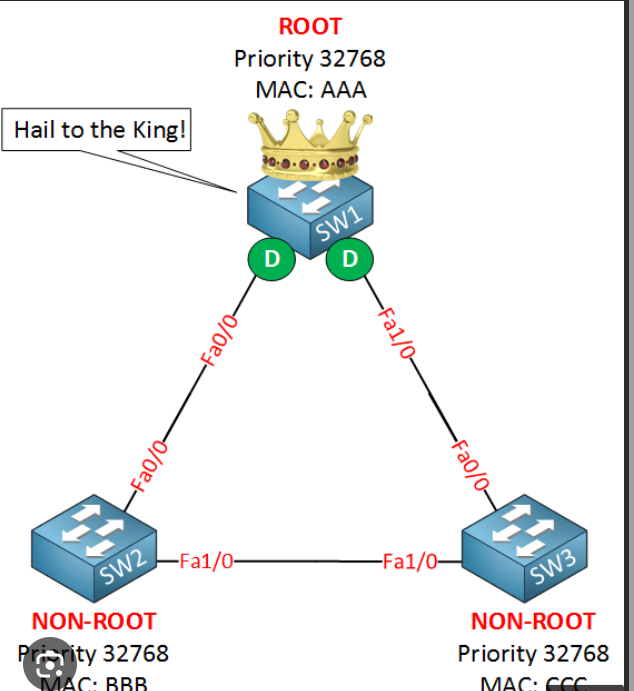
<p>A root bridge is the central reference switch in a local area network running the Spanning Tree Protocol (STP) that acts as the focal point for all path calculations and loop prevention.</p>
4
New cards
STP Port Roles
STP assigns specific roles to switch ports to maintain a loop-free network: Root Port (the best path to the root bridge), Designated Port (the best path to a specific network segment), and Blocked Port (prevents loops by not forwarding traffic).
5
New cards
STP Port States
STP ports transition through several states to ensure network stability: Blocking (prevents traffic to avoid loops), Listening (prepares to forward traffic without adding to the MAC table), Learning (adds MAC addresses to the table without forwarding), and Forwarding (actively forwards traffic). Incorrect port states can cause connectivity problems; resolved by verifying and configuring port states appropriately.
6
New cards

Incorrect VLAN Assignment

Occurs when devices are placed in VLANs that don't match their intended network segmentation.

Issues: devices on different VLANs are unable to communicate with each other as intended, and security vulnerabilities can arise if sensitive data is accessible from unauthorized VLANs.

Resolved by verifying and correcting VLAN assignments to ensure devices are on the intended network segments, and regularly auditing VLAN configurations to maintain proper segmentation and security.

7
New cards

Access Control Lists (ACLs)

Used to control network traffic by specifying which users or systems can access network resources and under what conditions.

Issue: misconfigured ACLs can block legitimate traffic or allow unauthorized access, leading to security breaches and connectivity problems.

Resolved by carefully reviewing and updating ACLs to ensure they are correctly configured to permit or deny traffic based on the network's security policies, and implementing regular audits and testing of ACLs to ensure they function as intended without disrupting network operations.

8
New cards
Stale Routes
Routes that are no longer valid but remain in the routing table, which can cause misrouting of packets. Resolved by regularly updating and cleaning routing tables to remove outdated routes.
9
New cards
Misconfigured Static Routes
Incorrect static route entries that can lead to packet loss and routing loops. Resolved by verifying static route configurations and ensuring they align with the network topology.
10
New cards
Dynamic Routing Protocol Conflicts
Inconsistent routing information due to misconfigured or conflicting routing protocols. Resolved by ensuring proper configuration and compatibility of dynamic routing protocols like OSPF, EIGRP, and BGP.
11
New cards
Missing Default Route
The absence of a default route, which can cause packets destined for unknown networks to be dropped. Resolved by configuring a default route to handle traffic for unspecified destinations.
12
New cards
Incorrect Default Route
A misconfigured default route that directs traffic to the wrong gateway, causing connectivity issues. Resolved by verifying and correcting the default route configuration to ensure accurate routing.
13
New cards
IP Address Pool Exhaustion - Over-subscription
Occurs when too many devices attempt to obtain IP addresses from a limited pool, and available IP addresses in a network's DHCP scope or subnet are depleted. Resolved by expanding the DHCP scope or subnet to include more IP addresses.
14
New cards
IP Address Pool Exhaustion - Improper Scope Configuration
Occurs when DHCP scopes are not configured to meet network demands, leading to insufficient IP allocation. Resolved by implementing IP address management (IPAM) to monitor and optimize IP address allocation.
15
New cards
IP Address Pool Exhaustion - Leased IPs Not Released
Occurs when devices do not properly release IP addresses, causing addresses to be marked as in-use unnecessarily. Resolved by ensuring proper lease times and release mechanisms are configured.
16
New cards
Incorrect Default Gateway - Misconfigured Gateway Address
Devices point to a non-existent or incorrect gateway IP, preventing them from communicating with other networks including the internet. Resolved by verifying and correcting the default gateway IP address on affected devices.
17
New cards
Incorrect Default Gateway - Gateway IP Outside Subnet
The default gateway IP is not within the same subnet as the device, causing routing failures. Resolved by ensuring the default gateway is within the correct subnet range.
18
New cards
Incorrect Default Gateway - Multiple/Conflicting Gateways
Devices are configured with conflicting default gateway settings, leading to inconsistent routing behavior. Resolved by standardizing default gateway configurations across the network to avoid conflicts.
19
New cards
Incorrect IP Address - Manual Configuration Errors
Typographical errors or incorrect IP addresses entered manually when assigning IP addresses, causing devices to fail in communicating with the network. Resolved by double-checking and verifying IP configurations for accuracy.
20
New cards
Incorrect IP Address - Static vs. DHCP Conflicts
Manually assigned static IP addresses conflicting with dynamically assigned DHCP addresses. Resolved by using DHCP reservations for devices that require a static IP address to avoid conflicts.
21
New cards
Duplicate IP Address
Occurs when two devices on the same network are assigned the same IP address, causing network conflicts. Common causes: the same IP address assigned manually to multiple devices (manual configuration), or a DHCP server assigning an IP address that is already in use (DHCP lease issue). Resolved by using IP address management tools to detect and resolve IP conflicts, ensuring DHCP scopes are properly configured to avoid overlaps with static IP ranges, and regularly monitoring the network for IP conflicts.
22
New cards
Incorrect Subnet Mask
An incorrect subnet mask can lead to improper network segmentation, causing devices to fail in communicating with each other. Common causes: subnet masks entered incorrectly during network setup (configuration errors), or devices configured with subnet masks that don't match the network's addressing scheme (incompatible subnets). Resolved by verifying subnet mask configurations to ensure they match the network design, educating network administrators on proper subnetting techniques, and using network planning tools to design and implement correct subnetting schemes.



