Professor Messer N10-009 Comptia Network+ 1.1 & 1.2, 1.3, 1.4
 Call Kai
 Learn
Learn Practice Test
 Spaced Repetition
 Match
Match Flashcards
 Knowt Play
1/83

There's no tags or description
Looks like no tags are added yet.
Name | Mastery | Learn | Test | Matching | Spaced | Call with Kai | Chat |
|---|
No analytics yet
Send a link to your students to track their progress
84 Terms
OSI Model
All People Seem To Need Data Processing;
Layers
Application
Presentation
Session
Transport
Network
Data Link
Physical
OSI Layer 7: Application
What we see
OSI Layer 6: Presentation
Character encoding, encryption. Prepares data
OSI Layer 5: Session
Communication management. Controls dialogue between 2 computers. Establishes, manages and terminates connections between the local and remote client
OSI Layer 4: Transport
Post office layer. Manages network traffic between hosts and end systems to ensure complete data transfers
OSI Layer 3: Network
The network layer is responsible for packet forwarding including routing through intermediate routers, since it knows the address of neighboring network nodes
OSI Layer 2: Data Link
Made up of MAC sublayers. Deals with physical addressing, logical addressing, and method of transmission. Also deals with flow/error control and synchronization (LLC)
OSI Layer 1: Physical
Cable, connectors, etc
Router
Routes traffic between IP subnets (OSI Layer 3: Networking)
Routers inside of switches are sometimes layer 3 switches
Switch
Bridging done in hardware (OSI Layer 2: Data Link)
May provide POE
Storage Area Network (SAN)
Looks and feels like a local storage device (Hard drive) Dedicated network that allows multiple servers to access a shared pool of storage devices.
Provides block level access
Block Level Access
Treated exactly like a hard drive. You attach the drive to a cloud PC, and that cloud PC accesses the data much like a hard drive.
Network Attatched Storage (NAS)
Connect to shared storage across a network (File Level Access)
Difference between NAS and SAN
NAS is a single device, while SAN is a network of multiple devices
Load Balancer
Load balancing is the process of distributing a set of tasks over a set of resources, with the aim of making their overall processing more efficient.
Able to keep site up and running with zero uptime
Large scale implementation
Proxies
• Sits between the users and the external network
• Receives the user requests and sends the request on their behalf (the proxy), verifies if answer doesn't come with malicious software/code and provides answer
• Some proxies are invisible (transparent)
Wireless LAN Controllers
• Centralized management of access points
• Deploy new access points
• Performance and security monitoring
• Usually a proprietary system due wireless controller is paired with the access points
IDS/IPS Devices
Watch network traffic
IDS (Detection)
-Alarms system
IPS (Prevention)
-Blocks data from entering system
- Often times sit directly behind firewall
Firewall
Filter traffic by port number or application based on an organizations previously established security policies
Encrypts traffic
Sits on the egress/ingress of a network
Dynamic routing
User Datagram Protocol (UDP)
A communications protocol for time-sensitive applications like gaming, playing videos, or Domain Name System (DNS) lookups
Uses less time when transferring due to there not being a firm destination before transferring the data (results in speedier communications)
Transmission Control Protocol (TCP)
One of the protocols of the transport layer in the OSI
Is used for sharing files, emails and browsing
Guarantees accuracy of data since it has built in error checking
Virtual Private Network
An arrangement whereby a secure, apparently private network is achieved using encryption over a public network, typically the internet
Difference between Proxy and VPN
Proxy servers serve as a "middleman" between a user and the web. They hide the user's IP address from a web server the user visits, but it does not secure the data that is sent and received.
Difference between proxy and firewall
A firewall blocks incoming/outgoing requests via ports. Think of it as a steel wall that sits between you (internal network) and the outside world (the internet). It protects your internal network from the dangers of the internet. You can also create filters to block/allow certain inbound/outbound traffic.
A proxy makes requests to the internet or other servers on your behalf. For example, you want to browse to comptia.com. So instead of your computer doing it, your computer instead sends the request to the proxy server. The proxy server then browses to comptia.com for you and sends the "cached" website back to your pc for viewing. Protects your pc from outside malware/viruses and so on.
Cloud deployment models
Public
- Available to everyone over the internet
Private
- Your own virtualized local data center
Hybris
- Mixture of both
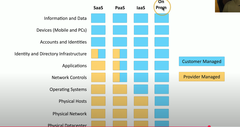
Software as a Service (SaaS)
• On-demand software
- No local installation
- Why manage your own email distribution?
Or payroll?
• Central management of data and applications
- Your data is out there
• A complete application offering
- No development work required
• Google Mail
Infrastructure as a Service (IaaS)
Sometimes called Hardware as a Service (HaaS)
- Outsource your equipment
• You're still responsible for the management
- And for the security
Platform as a Service (PaaS)
*No servers, no software, no
maintenance team, no HVAC
• Someone else handles the platform, you handle the
development
*You don't have direct control of the data, people, or
infrastructure
• Trained security professionals are watching your stuff
*Put the building blocks together
• Develop your app from what's available
on the platform
• SalesForce.com
Internet Control Message Protocol
"Text messaging" for your network devices
Another protocol carried by IP
ICMP is its OWN protocol
Devices can request and reply to administrative requests
- Hey are you there / Yes, I'm right here
Devices can send messages when things don't go well
Generic Routing Encapsulation
The tunnel between 2 endpoints
Encapsulate traffic inside of an IP
- Two endpoints appear to be directly connected each other
- No built in encryption
VPN
Encrypted data traversing a public network/
Concentrator
- Encrypting/decryption access device
- Often integrated into firewall
Many deployment options
-Specialized cryptographic hardware
- Software based options
Site-to-site VPN
Always On
Or almost always
Firewalls often act as VPN concentrators
Probably already have firewalls in place
Internet Protocol Security (IPSec)
Security for OSI Layer 3
- Authentication and encryption for every packet
Confidentiality and integrity/anti-replay
-Encryption and packet signing
Common to use
Authentication header (AH)
Encapsulation Security Payload (ESP)
Internet Key Exchange (IKE)
Agree on encryption/decryption keys
- Without sending the key across the network
- Builds a Security Association (SA)
Phase I
- Use a Diffie-Hellman to create a shared secret key
- UDP/500
- ISAKMP (Internet Security Association and Key Management Protocol)
Phase II
- Coordinate ciphers and key sizes
- Negotiate an inbound and outbound SA for IPSec
Transport Mode

Transport Mode and IKE
Insert IPSec Header before IP Header and Data
Data is encrypted and IP Sec Trailer is listed at the end
If they got the original data with no IPSec, the person would be able to capture the data

Tunnel Mode and IKE
Original IP Header and Data are encrypted
New IP Header and includes IP Header + Trailer from Transport Mode

Unicast
One station sending information to another station (one to one relationship)
Send information between 2 systems
Web surfing, file transfers, etc
Does not scale optimally
IPv4, IPv6
Multicast
Delivery of information to interested systems
- One to many of many
Multimedia delivery, stock exchanges, dynamic routing updates
Very specialized
- Difficult to scale across large networks\
IPv4 and IPv6
Anycast
Single destination IP address has multiple paths to two or more endpoints
One-to-one-of-many
Used in IPv4 and IPv6
Configured the same anycast address on many devices
Looks like any other unicast address
Packets sent to an anycast address are delivered to the closest interface
- Announce the same route out of multiple data centers, clients use the data center closest to them
- Anycast DNS
Broadcast
Send information to everyone at once
- One to all
One packet, received by all
Limited to domain
Routing updates, ARP requests
IPv4 and NOT IPv6
- IPv6 uses multicast instead
File Transfer Protocol (FTP)
Transfers files between systems
- Generic file transfer method
- Not specified to an operating system
TCP/20 (Active mode data), TCP/21 (Control)
- Authenticates with a username and password
Full-featured functionality
- List, add, delete, etc.
Secure Shell (SSH)
-TCP/22
- Text based console communication
- Encrypted communication link
Secure File Transfer Protocol (SFTP)
Generic File Transfer with security
Uses SSH File Transfer Protocol
-TCP/22
Provides file system functionality
- Resuming interrupted transfers, directory listings, remote file removal
Uses SSH (Port 22)
-SSH isn't for console communication
Telnet (Telecommunication Network)
TCP/23
Non-encrypted
Console Access
- Similar functionality to SSH
In-the-clear communication
- Not the best choice for production systems
SMTP (Simple Mail Transfer Protocol)
• Server to server email transfer
- tcp/25 (SMTP using plaintext)
- tcp/587 (SMTP using TLS encryption)
• Also used to send mail from a device to a mail server
• Commonly configured on mobile devices
and email clients
• Other protocols are used for clients to receive email
-IMAP, POP3
Domain Name System (DNS)
Converts IP address into domains, or identifying labels that use a variety of recognizable naming conventions.
- UDP/53
www.professormesser.com = 162.159.246.164
Large transfers may use TCP/53
Very critical resources
- Usually multiple DNS servers are in production
Dynamic Host Configuration Protocol (DHCP)
• Automated configuration of IP address, subnet mask
• udp/67, udp/68
• Requires a DHCP server
• Server, appliance, integrated into a SOHO router, etc.
• Dynamic / pooled
• IP addresses are assigned in real-time from a pool
• Each system is given a lease and must renew
at set intervals
• DHCP reservation
• Addresses are assigned by MAC address
in the DHCP server
• Quickly manage addresses from one location
Trivial File Transfer Protocol (TFTP)
UDP/69 Transfer files from one device to another without authentication
Ex: VoIP Device getting IP from DHCP Server
Hypertext Transfer Protocol (HTTP/HTTPS)
HTTP: TCP/80
- Hypertext Transfer Protocol
Webserver Communication
HTTPS: TCP/443
-HTTP over TLS/SSL
Webserver Communication with encryption
Communication in the browser and by other applications
Encrypted
-SSL (Secure Sockets Layer) or TLS (Transport Layer Security)
Network Time Protocol (NTP)
UDP/123
Switches, routers, firewalls, servers, workstations - each devices has its own clock
synchronizing the clocks becomes critical - log files, authentication, outage details
automatic updates - flexible, very accurate
Simple Network Management Protocol (SNMP)
UDP/161
Queries devices and tracks how that device may be performing
Ex: Management station and you'd be querying how much traffic has traversed that device over a specific amount of time
SNMP Traps
- Alerts and notifications from the network devices
- UDP/162
Lightweight Directory Access Protocol (LDAP)
TCP/389
Store and retrieve information in a network directory
LDAPS (LDAP Secure)
- TCP/636
- A nonstandard implementation of LDAP over SSL
Server Message Block (SMB)
TCP/445
A protocol used by Windows to share files and printers on a network.
Syslog
UDP/514
Standard for message logging
Integrated into the Security Information and Event Manager
Data storage from an extended time frame
Databases
Collection of information
Structured Query Language (SQL)
- A standard language across database servers
ex: SELECT * FROM Customers WHERE Last_Name= 'Messer'
Microsoft SQL Server
TCP/1433
Remote Desktop Protocol (RDP)
TCP/3389
Connect to an entire desktop/application
VoIP (Voice over IP)
TCP/5060 and TCP/5061
Setup and manage voice sessions
- Call, ring, play busy signal, hang up
Telnet
tcp/23 in the clear remote command console access
Server Message Block (SMB)
TCP/445
Share Files and Printers on a network
SMTP (Simple Mail Transfer Protocol)
TCP/25 (Plain Text)
TCP/587 (SMPT using Transport Layer Security encryption)
Send mail from a device to a mail server
Domain Name System (DNS)
UDP/53 (Large Transfers use TCP)
Converts IP addresses into domains
Dynamic Host Configuration (DHCP)
UDP/67, UDP/68
Automated configuration of an IP Address subnet mask
IP addresses are assigned in real time from a pool within DHCP server
Trivial File Transfer Protocol (TFTP)
UDP/69 (funny number)
Transfer files from one device to another without authentication
Hypertext Transfer Protocol (HTTP/HTTPS)
HTTP: TCP/80
HTTPS: TCP/443
Webserver communication
HTTPS is webserver communication with encryption
(SSL or TSL)
Network Time Protocol (NTP)
UDP/123 (1, 2, 3 like time ticking on clock)
Internal clock of network devices (Switches, routers, firewalls, servers)
Simple Network Management Protocol (SNMP)
UDP/161
Queries devices and tracks how they'd be performing
Ex: Management station and you'd be querying how much traffic has traversed that device over a specific amount of time
Simple Network Management Protocol Traps (SNMP Traps)
UDP/162
Alerts and notifications from network devices
Lightweight Directory Access Protocol (LDAP)
TCP/389
Store and retrieve data on a network
Maintains and stores usernames, passwords, email addresses, printer connections, and other static data within directories.
LDAP Secure
TCP/636
A non-standard implementation of LDAP over SSL
(Encrypted)
Syslog
UDP/514
Data storage from an extended time frame
Standard for message logging
Integrated into the Security Information and Event Manager
Databases
TCP/1433
(Microsoft SQL Server)
Structured Query Language (SQL)
- A standard language for storing and processing information in a database servers
ex: SELECT * FROM Customers WHERE Last_Name= 'Messer'
Remote Desktop Protocol (RDP)
TCP/3389
Connect to an entire desktop/application
VoIP (Voice over IP)
TCP/5060 + 5061
Setup and manage voice sessions- Call, ring, play busy signal, hang up
SIP is a subprotocol that share the same port and acts as a gateway for VoIP sessions
File Transfer Protocol (A/C)
TCP/20 (Active) // TCP/21 (Command)
Transfer files between systems
You use port 20 to transmit files. Known as the data port, port 20 handles the uploading and downloading of files between a client and a server.
Port 21 to issue commands during an FTP session. Unlike port 20, you use port 21 during FTP sessions regardless of whether you use active or passive mode FTP.
POP3
TCP/110 and TCP/995 (Encypted)
Most commonly used protocol for receiving email over the internet. This standard protocol, which most email servers and their clients support, is used to receive emails from a remote server and send to a local client.
IMAP
TCP/143 and 993 (Encrypted)
Syncs your emails across a server across multiple devices
Moving van analogy
Efficiently move large amounts of data (Use a shipping truck)
Network topology is the road (Ethernet, DSL, Cable System)
The truck is the IP (Designed roads for the truck)
The Boxes hold your data (TCP and UDP)
Inside the boxes are more things (Application information)
IP Payload Diagram

TCP and UDP
-Transported inside of IP (encapsulated by the IP Protocol)
-Two ways to move data (different features for different applications)
-Referred to OSI Layer 4 (Transport Layer)
-Multiplexing allows you to use many different applications at the same time
Transmission Control Protocol (TCP)
Connection Oriented
A protocol for sending packets that does error-checking to ensure all packets are received and properly ordered
"Reliable delivery" Sending data to another device will send an acknowledgement that that device has successfully received that data. If it doesn't receive an acknowledgment, then its safe to assume there was an error and that information was not received. It will then resend that info to ensure that it was able to resend that data.
Flow control manages how much data is sent

User Data Control (UDP)
Connectionless (No set up or warning that information is inbound to a device)
"Unreliable delivery"
Does not make it more susceptible to problems communicating, its the exact same
However
No error recovery(no acknowledgement)
Thus no flow control because nothing is being sent back to originating station

Ports
IPv4 Sockets
Server IP address, protocol, server application port number.
-Client IP address, protocol, client port number.
Non-Ephemeral Ports (Permanent port numbers)
- Ports 0-1023
- Usually on a server or service
Ephemeral ports (Temporary Port Numbers)
- Ports 1024 through 65,535
Port numbers
• TCP and UDP ports can be any number
between 0 and 65,535
• Most servers (services) use non-ephemeral
(not-temporary) port numbers
• This isn't always the case - it's just a number.
• Port numbers are for communication, not security (Will still need firewall)
• Service port numbers need to be "well known"
- Ex: Webservers should use port 80 or Port 443
• TCP port numbers aren't the same as UDP port numbers
Port on the network
Web Server: TCP/80
VoIP Server: UDP/5004
Email server: TCP/143