Chapter 1 - Introduction to Networking
 Call Kai
 Learn
Learn Practice Test
 Spaced Repetition
 Match
Match Flashcards
 Knowt Play
1/55

There's no tags or description
Looks like no tags are added yet.
Name | Mastery | Learn | Test | Matching | Spaced | Call with Kai | Chat |
|---|
No analytics yet
Send a link to your students to track their progress
56 Terms
Networking
group of computers/devices connected by some transmission media (ex. printer)
Topology
how parts of a whole work together:
physical toplogy
refers to a network's hardware, how computers/devices/cables work together to form a physical network.
logical topology
refers to software controls accessing network resources, how specific databases are shared on the network. (eg, users/softwares initially gain access to network)
NOS (netwok operating system)
software that manages network resources to allow computers to communicate/share info.(eg. windows server 2019, ubuntu server)
ensures only authorized people can access the network
Manage data/resources for client
Control which files users can open
P2P(peer-to-peer network model)
when each computer can act like both client and server. Can share info directly between other computers without needing a central server.
advantages of P2P
Simple to set up and used in environments where time/technical enterprise is sacred
Cost less to maintain compared to other networks. (eg. window server 2019 is more expensive than desktop operating system like windows 10)
disadvantages of P2P
Scalable: as the P2P network grows larger, adding/changing elements of the network may be difficult.
Not secure: simple installation, data shared by network users can be easily discovered by unauthorized people.
Server: any computer/program that provides a service like data to another device.
Client-server network model
one computer called a server provides resources/services to other computers called clients who request/use services.
AD(Active Directory)
contains user account info/security for the entire group of computers. Each user has their own domain level account assigned by the network administrator.
Web service
web servers provide web pages to clients. Corporations usually have private networks.
TCP (transmission control protocol)
organizing data to ensure secure transmission between server and client.
internet protocol (IP)
addressing and routing packets of data between devices for networks
hypertext transmission protocol (HTTP)
used to transfer web pages/data over the internet
File transfer protocol (FTP)
used to transfer files between computers on a network
simple mail transfer protocol (SMTP)
used for sending emails
Post office protocol(POP)/ internet message access protocol(IMAP)
used to receive emails, IMAP allows advanced features like email synchronization.
Domain Name system (DNS)
Translates domain names to IP addresses, allows users to access websites using human readable names.
Dynamic Host configuration protocols(DHCP)
network protocol used automatically configure/assign IP addresses to devices, that allows them to use DNS/NTP and communication TCP/UDP
Secure Socket Shell (SSH)
gives users a secure way to access a computer over an unsecure network. (This is preferred way to secure sensitive info)
Telnet
remotely connect/control another computer over the network. Telnet is not secure b/c it doesn’t encrypt the data.
Transport layer security (TLS)
a cryptographic protocol that provides privacy, authentication, and data integrity for communications over the Internet
Structured query language(SQL)
programming language used to manage/manipulating databases (store/talk to databases efficiently)
Remote Desktop protocol(RDP):
provide secure/encrypted transmissions offered by microsoft. Lets you access a computer from a different location.(eg. Working from home using your office computer)
Local area network (LAN)
connects computers/devices within a small geographical area. (eg. home/office)
Bus topology
all devices connected to a single central cable, main cables fail entire network down.

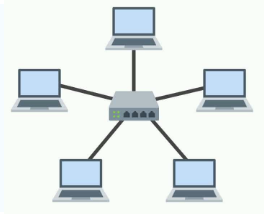
Star topology
All devices are connected to the central hub/switch, 1 device fails don’t affect others, if central fails entire network down
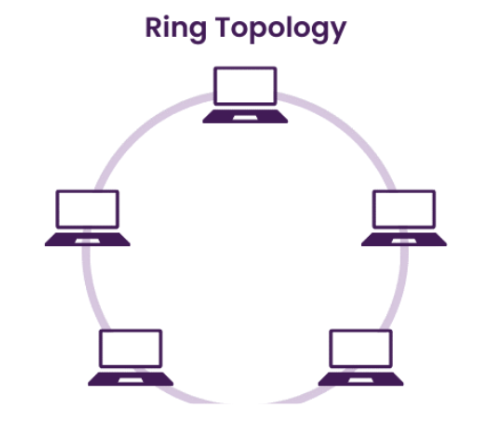
Ring topology
each device is connected to 2 other devices, forming a closed loop; if one device fails, it will affect the entire network.
Mesh topology
devices are interconnected, multiple path ways between them, complex set up and a lot of cabling.

Tree topology
combination of star/bus topology group of star networks connected to linear bus, scalable, if backbone fails affect the entire network.

Hybrid topology
Mix of two or more different topologies, combining strengths of different topologies.
Backbone
central part of network and connects different segment/components together
switch
connects multiple devices within (LAN)
open source
software where source code is made available to the public for use, modification,distribution
WAN (wide area network)
telecommunications network extends over a large geographic area.
(eg. cities/countries/globally)
Metropolitan area network(MAN)
network covers a larger area than LAN but is smaller than WAN.
(eg. spans a city or large campus)
Campus area network(CAN)
Connects multiple buildings and limited geographical area
(eg. university buildings/business complex)
Local area network (LAN)
connects computers/devices within a small geographical area. (eg. home/office)
Personal area network(PAN)
small network that connects devices within a very limited area, typically an individual. (eg. smartphones,tablets, laptops)
Body area network(BAN)
personal fitness devices like smartwatches, fitness trackers
Storage area network(SAN)
high capacity storage in a distinct network segment
Wireless local area network(WLAN)
consists of two or more devices connected wirelessly
Open system interconnection(OSI)
conceptual framework that divides network communications functions into seven layers
Layer 7
application layer - Describes the interface between two applications on separate computers (HTTP, SMTP, POP3, IMAP4, RTP)
application programs
provide services to a user such as web browser and web server using HTTP Application protocol
utility programs
provide services to the system SNMP (Simple Network Management Protocol) and monitor and gather information about network Traffic
Layer 6
Presentation Layer - Responsible for Reformatting, Compressing, Encrypting Data
This is crucial so that the receiving end is able to read information
Layer 5
Session Layer - Describes how data between application is synced and recovered if messages don’t arrive in contact
Often Layer 7,6,5 are intertwined and uses by OS
payload
Any data passed through Application, Presentation, Session layer
any data passed through layers 7,6,5
Layer 4
transport layer:
Responsible for transporting application payload (data) from one application to another
The protocol inputs a header in front of the payload to understand and tell the payload where to go next
This depends on what kind of protocol you have
two types of transport
TCP (transmission control protocol)
Establishes a connection with end host, checks whether data is received and resends if needed
Connection-oriented Protocol
Used by web browsers & Email
TURNS PAYLOAD INTO SEGMENT
what are the 2 types of transport layer protocols
TCP and UDP
UDP
Does not guarantee delivery
Does not look for connection first
Connectionless protocol/best effort
Used for broadcasting, such as streaming video or audio
TURNS PAYLOAD IN DATAGRAM
Layer 3
Network Layer
Network layer is IP (Internet Protocol)
Sending data to correct Node
Adds on label and TURNS either SEGMENT/DATAGRAM INTO PACKET
IP relies on either ICMP or ARP to find best route for packet
If the packet is too big, it will divide and label itself in the process called fragmentation.
Layer 2
Responsible for linking with physical hardware only on local network
Protocols are programmed into the firmware of a computer (NIC)
Ex. –Ethernet = wired network, WiFi = wireless network
TURNS PACKET INTO A FRAME
Contains MAC Address
Physical Address
Data Link Address
Layer 1
Physical Layer - Responsible for sending bits via wired connection or wireless connection