CompTIA Data+ DA0-002
 Call Kai
 Learn
Learn Practice Test
 Spaced Repetition
 Match
Match Flashcards
 Knowt Play
1/285

There's no tags or description
Looks like no tags are added yet.
Name | Mastery | Learn | Test | Matching | Spaced | Call with Kai | Chat |
|---|
No analytics yet
Send a link to your students to track their progress
286 Terms
Data
- Raw facts that our systems and processes generate and collect
Information
- Data that has been processed, analyzed, and put into context
- Allows us to make data-driven business decisions
Steps:
1. Data Capture and Collection
2. Data Correlation
3. Reporting and Communication
Spreadsheets
- Data analysis tool that organizes data in tabular form (rows and columns)
- Quickly and easily perform mathematical calculations; sum, min, max, mean, median
- Lack constraints of a relational database
- Microsoft Excel is the most common type of spreadsheet used
Structured Data
- Organizes data into well-defined tables
- Highly organized in a predefined format with a fixed schema
- Database tables
- Uses RDBMS and Data Warehouses
Semi-Structured Data
- uses tags and markers to provide some organization, but lacks a strict relational model
- JSON
- Nested structures
- Uses RDBMS with some adaptation and Data Lakes
Unstructured Data
- Is not easily organized into tables
- Has no predefined format or model and is the most free-form
- Video files, emails
- Uses Data Lakes and file systems
Machine Data
- Common source of unstructured data
Database
- Extend the tabular model used by spreadsheets to the relational model
Column
Synonyms: Column, Field, Attribute
- Contains information about a single characteristic (entity)
Row
Synonyms: Row, Tuple, Record
- Contains information about a single instance of the table subject
Table
Synonyms: Table, File, Relation
- Fundamental structure for organizing data into rows and columns
Key/Value Pairs
- Provide a simple way to store data values indexed by a key value
- Key: Value
- Appear in JSON files
Key/Value Stores
- Databases that provide efficient storage and fast retrieval of key/value pairs
Data Types
- Describes the nature of the data stored in a database or application
Types:
- Numeric: INT, DECIMAL, FLOAT
- Boolean: TRUE/1, FALSE/0
- Strings: CHAR, VARCHAR, NVARCHAR
- NULL values: NULL
- Spatial: GEOMETRY, GEOGRAPHY
- Date values: DATE, DATETIME, TIMESTAMP
- Large: objects Binary Large Objects - BLOB & Character Large Objects - CLOB
- GUID: Globally Unique Identifier
- UUID: Universally Unique Identifier
Numeric Data Type
- Stores quantitative data
Includes:
- INT
- DECIMAL
- FLOAT
Integer Values
- Whole numbers that do not have decimal places
- Include positive or negative values
Decimal Values
- Contain decimal places
- Used for exact values
DECIMAL(8,2): Holds 8 numbers, with 2 of those numbers after the decimal point
Floating Point Values
- Contain decimals
- Use less storage and store approximate values
Currency Values
- Provide a better option than floating point data types for storing information about money
- Usually stored using integer or decimal values
Boolean Value
- Either 0 or 1 (a single bit)
- 0 represents FALSE
- 1 represents TRUE
- Often refer to boolean values as flags
String Values
- Text data is stored in character strings
- May contain alphanumeric data, mixing alphabetic characters, symbols, and digits
CHAR(3) - fixed character length ASCII code. Contains exactly 3 characters
VARCHAR(12) - variable character length ASCII code. Contains up to 12 characters
NCHAR() - fixed length unicode data, like state abbreviations
NVARCHAR() - variable length unicode
NCHAR & NVARCHAR takes up twice as much storage space, so use only when needing Unicode support
ASCII Encoding
- Transforms alphanumeric characters into binary form
Unicode
- Provides extended character sets, including non-English characters
- Universal character encoding standard that assigns a unique numerical code point to every character in every language, symbol, and emoji
Character Large Objects (CLOB)
- Used to store large amounts of character-base text
- Designed to handle data that exceeds the size limits of traditional string types
- Often stored separately from main table with a reference, or 'locator', pointing to the data's location
- Store documents elsewhere on disk
Discrete Data
- Takes on values from a limited set of possibilities
- May be numeric or text-based
- Counting things
Continuous Data
- Takes on any possible value from a range
- Continuous data is numeric
- Measuring things
Categorical Data
- Text data that is discrete, grouping items into a limited number of categories
- Grouping things into buckets
- Limited set of values from which we can choose
Date & Time Data Types
- Date data types store values independent of display format (stores only date)
- Time data types store values with an optional time zone
- Datetime data types store a date and time value in a timestamp
DATE - typically in format of 'YYYY-MM-DD'
DATETIME - typically in format of YYYY-MM-DD HH:MM:SS
TIMESTAMP - stores both data and time, similar to datetime, but includes timezone awareness, typically stored in UTC in the format of YYYY-MM-DD HH:MM:SS
Binary Large Objects (BLOB)
- Multimedia Data
- Images are commonly stored in GIF, JPG, and PNG formats
- Useful in storing medical imaging, audio recordings, photos, emails, video data
- This is unstructured data that will be compressed when stored
- Stored separately from main table with a reference, or 'locator', pointing to the data's location
Spatial Data
- Data type that stores geometric and geographic information
- Geometric data describes 2-D and 3-D shapes and objects (layout of a building or the boundaries of a piece of land)
- Geographic data describes locations on the Earth's surface (Latitude and Longitude coordinates & used for mapping, navigation, geospatial analysis)
Globally Unique Identifier (GUID)
- Microsoft Implementation
- 128-bit value designed to be unique across all environments and timespans
- Commonly used as Primary Keys for database tables
- Requires more storage space
- Can affect DB index performance
- Less efficient for queries that require sequential order
- Length and complexity make it difficult to read and work with manually (difficult to debug/troubleshoot)
Universally Unique Identifier (UUID)
- Open Standard
- 128-bit value designed to be unique across all environments and timespans
- Commonly used as Primary Keys for database tables
- Requires more storage space
- Can affect DB index performance
- Less efficient for queries that require sequential order
- Length and complexity make it difficult to read and work with manually (difficult to debug/troubleshoot)
File Extension
Flat file format - refers to simple plain text file for data storage; single table in plaintext, where each line is a record and fields are separated by delimiters like commas or tabs
- .csv
- .xlsx
- .json
- .txt
- .jpg
- .dat
CSV Files (Comma Separated Values) .csv
- Flat-file, comma-separated values delimit fields with commas
- Simple plain text file used to store tabular data like a spreadsheet
- Allow limited structure
- Each line corresponds to a single row, or data observation
- Text files don't have columns, so CSV file uses commas to separate data that would appear in different columns
- Recognize by presence of commas in the file
- One of most common ways to exchange data
JPG/JPEG Files (Joint Photographic Experts Group) .jpg/.jpeg
- Image file with lossy compression, making image sizes smaller
- Opens in any image program
PNG File (Portable Network Graphics) .png
- Lossless image file
- No quality is lost during compression
- Larger image size that supports transparency
XLSX File (Microsoft Excel) .xlsx
- Default file format for Microsoft Excel
- Earlier versions used .xls extension
- .xlsm enables Excel to store and run macros (.xlm is legacy extension)
- .xltx - enables Excel templates (.xlt is legacy extension)
TSV Files (Tab-Separated Values) .tsv
- Flat file, tab-separated values delimit fields with tabs
- Similar to CSV files but use tabs instead of commas
- Allow limited structure
- Recognize by presence of whitespace in the file
- Common way to exchange data
TXT Files (Text Files) .txt
- Commonly used for unstructured text
JavaScript Object Notation (JSON) .json
- Allows data structures with key-value pairs
- {"key": value}
- Each JSON object represents a single observation
- Contain a variety of data types (String, Numeric, Boolean, Arrays, Objects
- * Recognize JSON objects by the presence of curly brackets and a colon-separated key: value pairs *
HyperText Markup Language (HTML) .html
- Provides formatting for web pages
- Uses Tags
- tag is used for bold text
- tag is used for italics
- tag is used for hyperlinks in a document
- Tag is used between < > signs; is the beginning, or opening for the bolded portion of text and ends, or closes the bolded portion.
- This is bold text
- 'bold text' would be the only portion that displays as bolded
- Commonly used to exchange data over the Internet
- * Recognize HTML documents by the use of standard formatting tags contained wtihin < > symbols *
eXtensible Markup Language (XML) .xml
- Uses tags to define key-value pairs
- Like JSON, uses tags < > to open and to close
- Commonly used to exchange data over the Internet
- * Recognize XML documents by noticing highly structured text all contained within < > tags *
Binary Files .dat
- Generic data file
- Store data in a computer-readable format
- Often use .dat file extension
- Look like nonsense when opened in a text editor
- Need to know the correct application that created the file in order to open the file
- * Recognize binary data files by looking for .dat files and unreadable text *
Relational Databases
- Databases extend to the tabular model used by spreadsheets
- Allow for the storage of data as well as the relationships between the data elements
- Contain special keys (Primary, Foreign, Composite, Candidate, Superkey, Alternate, Unique, Surrogate)
Keys
- Special-purpose database fields that help organize tables and define relationships
Primary Key
- Uniquely identify rows in a table
- Must be:
- Unique
- Never change
- Not NULL
Constraints
- Business rules enforced by the database
Artificial Key
- Primary key that is artificially generated by the DBMS, like a unique ID number
- Designed to guarantee a unique identifier for each row in a table
- Used when no suitable natural key exists or a natural key is too complex
Foreign Key
- Relationship between two tables
- Column or set of columns in a child table that refers to the primary key in the parent table
- Establishes a link, or relationship, between the two tables
- Crucial for maintaining referential integrity in a RDBMS
Normalization
- Organizing data in a database to reduce data redundancy and improve data integrity
- Data structured for optimal storage and use within a program
Denormalization
- Intentionally introducing redundancy into a database
- Often done by combining data from multiple normalized tables into a single, larger table
First Normal Form (1NF)
- Each column holds a single atomic value and each row is unique with a primary key
Second Normal Form (2NF)
- Must be 1NF plus all non-key attributes must be fully depending on the entire primary key
- Uses foreign keys
Third Normal Form (3NF)
- Must be 2NF plus no transitive dependencies (every non-key attribute must directly depend on the primary key, and not indirectly through another non-key attribute)
Online Transaction Processing (OLTP)
- Databases that support day-to-day business operations
- High-volume, real-time transactions
- DB is update in real-time with details of each transaction
- Transactional data types, simple query types, frequent data modification, normalized schema, fast response times
Online Analytical Processing (OLAP)
- Databases that support reporting and analytics
- Analyze large datasets for insights
- Complex data analysis and reporting over large historical datasets
- Analytic data types, complex query types, infrequent data modifications, denormalized schema, slow response times
Data Warehouse
- Schema-on-write
- Company-wide database aggregating data from many OLAP databases
- Structured, cleaned, and processed data
- Provide a single source of truth
- Purpose: enterprise-wide reporting and business intelligence
Data Mart
- Schema-on-write
- Subset of a data warehouse serving a specific part of the organization
- Data is secure and accessible only to the users who should have access to that data
- Structured, processed data, often summarized
- Purpose: department-specific analysis and reporting
Data Lake
- Schema-on-read
- Stores raw, unstructured data in its native format and is complex to use
- Data that's been collected but not yet ready for cleaning or analysis
- Purpose: large-scale data exploration, big data analytics, and machine learning
Lakehouse
- Combines elements of data lakes and data warehouse
- Flexible and scalable solution for managing structured and unstructured data
- Provides a unified platform that supports both real-time transactional workloads and analytical processing
- Allows for efficient data ingestion, transformation, and querying while maintaining governance and security controls
Data Silo
- Collection of information that is isolated from other systems and departments within an organization, making it inaccessible to others
- Prevent data sharing and can lead to inconsistencies
Non-relational Database
- Used for big data
- Key-value pairs
- Graph databases - model relationships between objects
- Document stores - optimized for storage of large documents in JSON, XML, and similar formats
- Gain efficiency by reducing overhead
Schemas
- Different ways to organize data
Star Schema
- Contains a fact table at its center, storing mostly numeric facts
- Dimension tables form the outer edges of the star, and contain supplemental information. Directly connect to fact table
- Dimension tables are generally denormalized data for performance and simplicity
- Fast query performance due to fewer joins
Snowflake Schema
- Has a fact table and dimension tables, but differs from Star in how it handles dimensions
- Dimension tables are normalized into smaller, hierarchical sub-dimension tables
- Slower query performance due to more complex joins across multiple tables
- Bridge table - aka Junction table - intermediary to handle many-to-many relationships by breaking them into two one-to-many relationships
Fact Table
- Central table in a star or snowflake schema
- Stores quantitative data, or facts (primarily numerical data)
- Foreign keys link to associated dimension tables
Dimension Table
- Provide descriptive context for the numerical facts in the fact table
- Describe who, what, where, when, why, how
- Use descriptive attributes
- Smaller than fact tables
Bridge Table
- AKA Junction Table
- Special construct used to manage complex relationships that cannot be handled by a direct Foreign Key link between a fact and dimension table
- Resolves many-to-many relationships
- Contains only Foreign Keys
- Sits between fact and dimension tables
Application Programming Interface (API)
- Allows for the access of data stored on websites
- Serves as a standardized interface that allows other applications to interact with a DBMS
- Acts as a middleman providing a defined set of rules and protocols for how applications can request and receive data or functionality from the DB
- Uses HTTP protocol
- Request actions or information
- Return in the format of XML or JSON
Web Scraping
- Writes code that automatically extracts data from websites and parses them to obtain desired information
- Uses HTML
- Systematically collects info from web pages and converts it into a structured, analyzable format
- Performance is impacted when scraping
- Generally not illegal, but site owners may not want this done
- Consider intellectual property implications when scraping
- Minor website changes can break scraping code
Logs
- Typically contained within an organization
- Provide insight into internal operations, security events, user behavior
- Web server logs contain details like timestamps, IP addresses, requested pages, referral sources
- Firewall & Network logs help security teams monitor and respond to potential threats. Record network traffic patterns, access attempts, anomalies
- System & Application logs capture events related to user authentication, system errors, software performance & are used to track system crashes and monitor for unauthorized login attempts
Files
- Structured
- Used for storing and exchanging data
- Stored as .csv, .json, .xml, etc
On-Premise Database
- Database hosted on an organizations server; located physically on-site or off-site
- Organization hosts their own environments and have total control over architecture
Cloud-Based Database
- Database hosted by a cloud vendor who installs, configures, and manages server and system infrastructure
Cloud Computing
- Delivering computing resources to a remote customer or user(s) over a network
- A model for enabling ubiquitous, convenient, on-demand network access to a shared pool of configurable computing resources that can be rapidly provisioned and released with minimal management effort or service provider interaction (NIST definition)
- Offers on-demand self-service
- Scalable
- Offers elasticity
- Metered services; pay for what you consume
Cloud Providers
- AWS (Amazon Web Services)
- Azure
- Each offer a borad range of services including. computing, power storage, networking databases, and security solutions
AWS
- Amazon Web Services
- Largest and most widely adopted cloud provider
- Launched 2006
- Offers vast selection of services from VMs in EC2 to scalable storage in S3
- Known for extensive global infrastructure with data centers in many different regions to ensure high availability and disaster recovery
- Leads market share & global infrastructure
Azure
- Microsoft counterpart to AWS
- Strong among business users already using Microsoft products
- Integrates seamlessly with tools like Active Directory, M365, and Windows Server
- Offers VMs, AI tools, hybrid cloud solutions
- Excels in enterprise integration
Google Cloud Platform (GCP)
- Known for expertise in data analytics, machine learning, container-based services
- Pioneered Kubernetes, container orchestration & BigQuery analytics tools
- Businesses focused on AI, data science, and scalable app development
- Stands out in AI and data analytics
National Institute for Standards and Technology (NIST)
- US government agency within the Dept of Commerce that promotes innovation and industrial competitiveness
- Known for its work in cybersecurity through guidelines and frameworks
Horizontal Scaling
- Adding more machines to your systems or servers to your pool to meet increased demand
- Usually utilizes load balancers to distribute requests across available servers
- Avoids single-points of failure as load can be distributed across multiple servers
- Highly scalable and flexible
- Complex to manage
Vertical Scaling
- AKA 'Scaling up'
- Adding more resources to existing servers/machines like CPU or RAM
- Simple to manage
- Hardware limitations on capacity
- Single-point of failure
Cloud Deployment Models
- Private Cloud
- Public Cloud
- Hybrid Cloud
- Community Cloud
- No cloud model is inherently superior to the other
- Depends on the context, approach, and needs of the user/company
Private Cloud
- Organization uses a dedicated cloud infrastructure
- Hardware is often on-premises, however can be cloud-based
- Dedicated to a single organization
- Greater control and security over infrastructure and ideal for stringent compliance requirements
Public Cloud
- Cloud provider owns and operates infrastructure
- Services are available to general public over network
- Scalable - scale up or down quickly
- Shared services with multiple others; hardware is not dedicated to one user or organization (multi-tenancy)
- Pay-as-you-go options; sometimes free low-tier services
- Can introduce performance and security risks since it's a shared service
Hybrid Cloud
- Combination of public and private cloud environments
- Allows data and apps to move between them
- Enables orgs to use the public cloud for less-sensitive tasks while keeping sensitive data secure in private cloud
Community Cloud
- Serves a specific community with common business models, security requirements, and compliance considerations
- Shared pool of resources used by multiple organizations with similar needs and interests
- Can be configured to meet specific security and compliance needs of the group
- Not open to general public
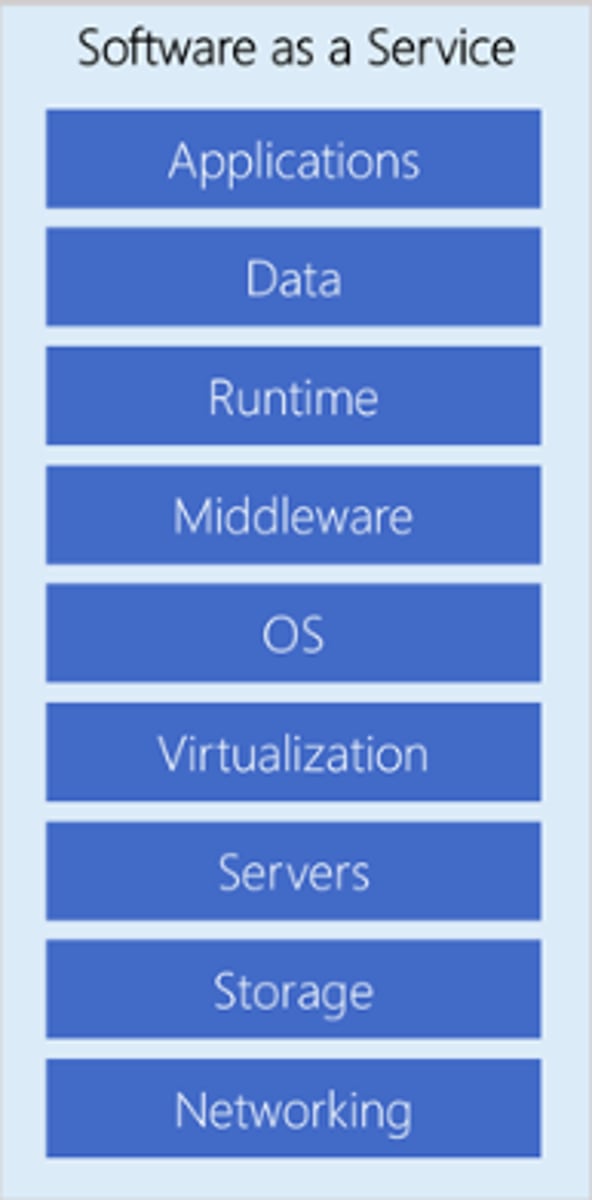
Software as a Service (SaaS)
- Service provider manages all development delivering ready-to-use applications via web browser
- Offerings Include:
- Salesforce
- Microsoft 365
- PowerBI
- Google Drive
- Netflix
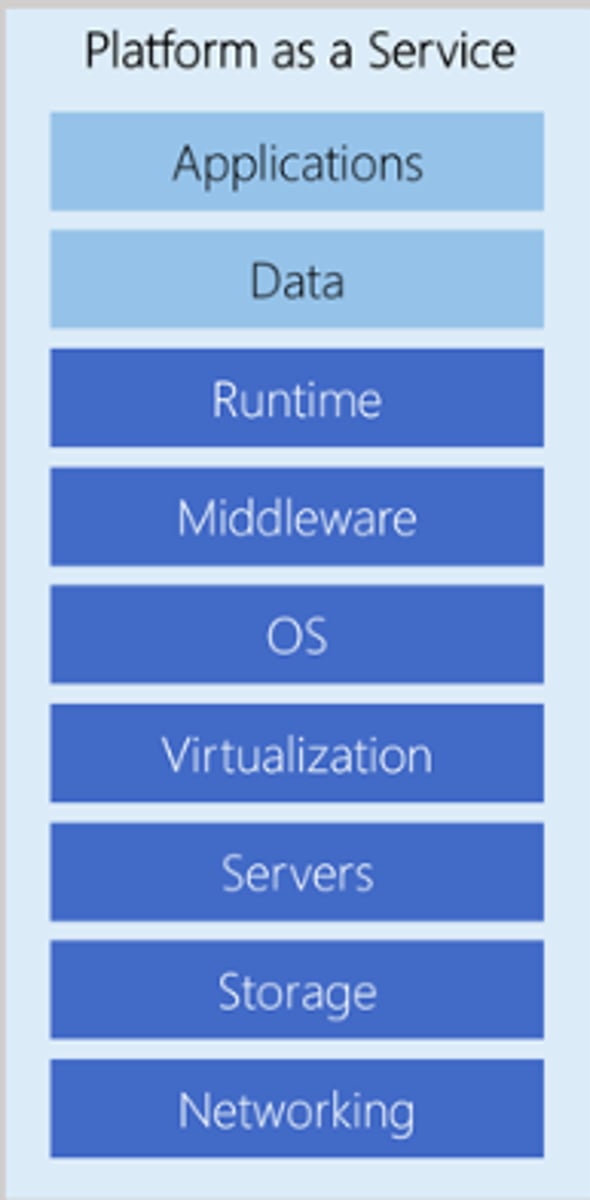
Platform as a Service (PaaS)
- Service provider handles creation and maintenance of the infrastructure including OS and software
- Leverages Database as a Service (DBaaS) providing backups and routine maintenance
- Generally used for:
- Application Development
- Business Intelligence (BI) Development
- Internet of Things (IoT)
- Providers Include:
- MS Azure
- AWS
- Oracle Cloud
- Google Cloud
- SAP Cloud
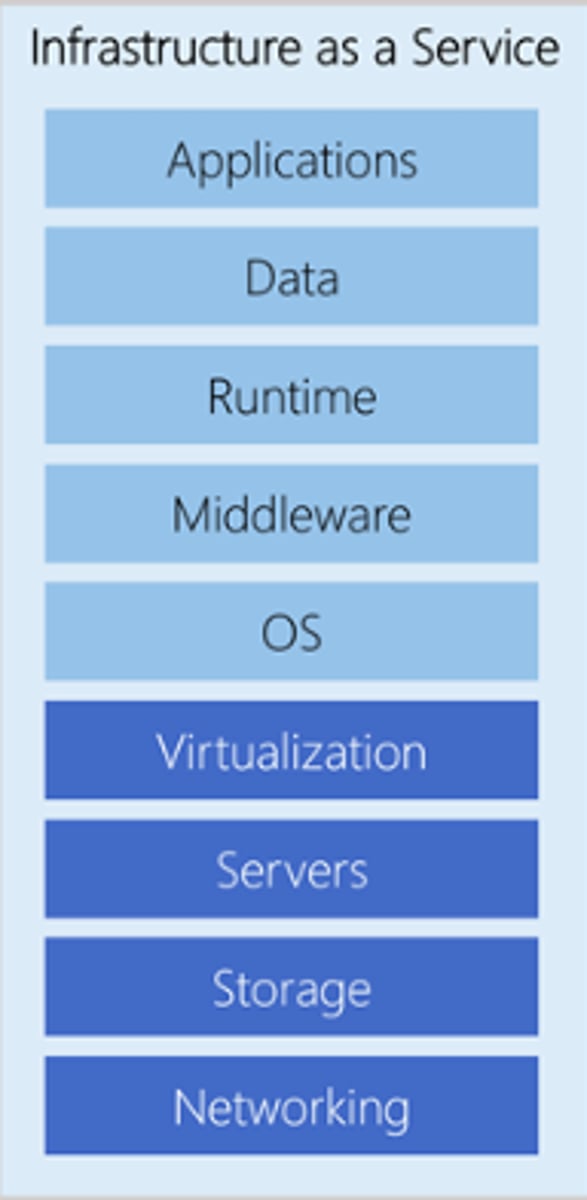
Infrastructure as a Service (IaaS)
- Virtualized computing resources (servers, storage, networks) over the internet
- Organization, not the cloud provider, manages the OS, middleware, runtime, applications, and data
- Offers more flexibility for custom setups and developing
- Providers Include:
- AWS EC2
- Azure VMs
- Google Compute Engine
Virtualization
- Host machines run on physical hardware
- Host machines provide services to several virtualized guest machines
- Hardware is shared among many virtual machines
- Hypervisor tricks each guest into thinking it's running on dedicated hardware
- Two types of hypervisors - Type 1 & Type 2
Type 1 Hypervisor
- Bare metal
- Install directly on physical hardware/server
- High performance; has direct hardware access
- More secure due to smaller attack surface
- VMware ESXi, Microsoft Hyper-V, KVM, Xen
- VM Sprawl: uncontrolled growth of VMs often due to easy creation and lack of proper management; not decommissioned properly and misconfiguration
Type 2 Hypervisor
- Run on top of existing Operating System
- Lower performance due to layers of host OS
- Less secure relying on security of host OS
- Desktop virtualization software like Oracle VM Virtualbox, VMware Workstation, Parallels Desktop
- VM Escape: vulnerability that allows a program running inside a VM to break out and interact with the host OS
Containerization
- Runs multiple applications on a single host OS by packaging them into lightweight, isolated containers that share the host's kernel, making them faster and more resource-efficient
- Isolated user spaces for apps
- Containers function regardless of the OS and hardware
- Highly secure
Cloud Storage Types & Locations
Types:
- Object
- File
- Block
Locations:
- Local
- Shared
Block Storage
- Stores data in fixed-size chunks called blocks, each with a unique identifier
- Partitioned into volumes
- High performance, low-latency
- Ideal for Databases, VMs and applications requiring frequent, fast access to data
- Typically presented to a server as a raw disk, requiring a file system to be installed on top
File Storage
- Organizes data in a hierarchical structure of files and folders
- Intuitive for humans and supports features like permissions and locking for collaborative work
- Commonly used for shared documents, home directories, and general-purpose file sharing
- NAS functionality
- Mechanical or Solid State Disks
Object Storage
- Stores data as self-contained units called objects, each containing the data itself, a unique identifier, and metadata
- Highly scalable and cost-effective for unstructured data like backups, archives, media files, large datasets for analytics, or AI/ML applications
- Accessed via APIs and typically used in cloud environments
- Premium (immediate) or archival storage
Programming Languages
- Allow developers to write their own code and software
- Coding environments Include R, Visual Studio (VS), Text editors, Notebooks
- Coding Languages include SAS, Python, R, Scala
R & RStudio
- R is a popular programming language dedicated to analytics
- Focused on creating analytics applications
- Appeared in 1990's as a statistical programming language
- Open source
- CRAN is a repository of popular R code
- Tidyverse is a collection of R packages
- RStudio is a popular IDE used in conjunction with R