SL

0.0(0)
Studied by 0 people
call kaiCall Kai
Locked
learnLearn
examPractice Test
spaced repetitionSpaced Repetition
heart puzzleMatch
flashcardsFlashcards
GameKnowt Play
Card Sorting

1/3

encourage image

There's no tags or description

Looks like no tags are added yet.

Last updated 5:19 PM on 8/8/26
Name
Mastery
Learn
Test
Matching
Spaced
Call with Kai
Chat

No analytics yet

Send a link to your students to track their progress

4 Terms

1
New cards

Discuss Memory Allocation in Ruby

Memory Allocation

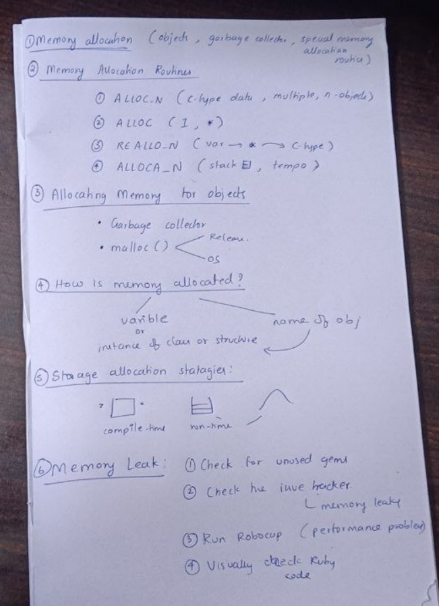
Sometimes, a Ruby extension needs memory for things that are not Ruby objects. For example, it may need memory for a large bitmap, an image, or many small structures that Ruby does not directly use.

To allocate such memory safely and work correctly with Ruby's garbage collector, special memory allocation routines should be used. These routines do a little more work than the normal malloc() function.

For example, when ALLOC_N finds that there is not enough memory for the requested amount, it asks the garbage collector to try to free some unused memory. If the requested memory is invalid or cannot be allocated even after this, it raises a NoMemError.

Memory Allocation Routines1. ALLOC_N

Syntax:
type ALLOC_N(c-type, n)

  • Allocates memory for n objects of the given C type.

  • The c-type must be the actual name of the C type, not a variable of that type.

  • It is useful when we need memory for multiple objects of the same type.

2. ALLOC

Syntax:
type ALLOC(c-type)

  • Allocates memory for one object of the given C type.

  • The result is converted into a pointer to that type.

3. REALLOC_N

Syntax:
REALLOC_N(var, c-type, n)

  • Reallocates memory for n objects of the given C type.

  • The newly allocated memory is assigned to var.

  • var is a pointer to the given C type.

4. ALLOCA_N

Syntax:
type ALLOCA_N(c-type, n)

  • Allocates memory for n objects of the given C type on the stack.

  • This memory is temporary.

  • It is automatically released when the function that called ALLOCA_N returns.

Which Method Allocates Memory for Objects in Ruby?

Ruby manages memory using its garbage collector. When there is too much memory being used, Ruby can release a small amount of unused memory/pages.

Ruby may use the malloc function to allocate memory. When memory is no longer needed, the operating system may release that freed memory back to the system. The exact behavior depends on the operating system and the implementation of the malloc library.

How Is Memory Allocated?

There are two basic ways in which memory can be allocated.

When we declare a variable or create an instance of a structure or class, memory is allocated for that object. The name given to the object is then used to access that block of memory.

The main storage allocation strategies are:

1. Static Allocation

  • Memory is arranged for all required data objects at compile time.

  • The storage is decided before the program starts running.

2. Stack Allocation

  • Run-time memory is managed using a stack.

  • Memory is automatically handled according to the order in which functions and variables are used.

  • Memory allocated on the stack using ALLOCA_N is automatically released when the function returns.

3. Heap Allocation

  • Memory is allocated and deallocated as needed during run time.

  • This memory comes from a data area called the heap.

  • Heap memory is useful when the required amount of memory is not known in advance.

Steps to Find a Memory Leak

A memory leak happens when memory that is no longer needed is not properly released or remains unnecessarily allocated.

The following steps can be used to find memory leaks in a Ruby program:

  1. Check for unused gems in the Gemfile and remove them if they are not needed.

  2. Check the issue tracker of every gem that is still present in the Gemfile to see whether other users have reported memory leaks.

  3. Run RuboCop with the rubocop-performance extension to identify possible performance-related problems.

  4. Visually check the Ruby code and look for places where memory may be unnecessarily allocated or not properly released.
<p>Memory Allocation</p><p>Sometimes, a Ruby extension needs memory for things that are <strong>not Ruby objects</strong>. For example, it may need memory for a large bitmap, an image, or many small structures that Ruby does not directly use.</p><p>To allocate such memory safely and work correctly with Ruby's <strong>garbage collector</strong>, special memory allocation routines should be used. These routines do a little more work than the normal <code>malloc()</code> function.</p><p>For example, when <code>ALLOC_N</code> finds that there is not enough memory for the requested amount, it asks the <strong>garbage collector</strong> to try to free some unused memory. If the requested memory is invalid or cannot be allocated even after this, it raises a <code>NoMemError</code>.</p><p>Memory Allocation Routines1. <code>ALLOC_N</code></p><p><strong>Syntax:</strong><br><code>type ALLOC_N(c-type, n)</code></p><ul><li><p>Allocates memory for <strong>n objects</strong> of the given C type.</p></li><li><p>The <code>c-type</code> must be the actual name of the C type, not a variable of that type.</p></li><li><p>It is useful when we need memory for multiple objects of the same type.</p></li></ul><p>2. <code>ALLOC</code></p><p><strong>Syntax:</strong><br><code>type ALLOC(c-type)</code></p><ul><li><p>Allocates memory for <strong>one object</strong> of the given C type.</p></li><li><p>The result is converted into a pointer to that type.</p></li></ul><p>3. <code>REALLOC_N</code></p><p><strong>Syntax:</strong><br><code>REALLOC_N(var, c-type, n)</code></p><ul><li><p>Reallocates memory for <strong>n objects</strong> of the given C type.</p></li><li><p>The newly allocated memory is assigned to <code>var</code>.</p></li><li><p><code>var</code> is a pointer to the given C type.</p></li></ul><p>4. <code>ALLOCA_N</code></p><p><strong>Syntax:</strong><br><code>type ALLOCA_N(c-type, n)</code></p><ul><li><p>Allocates memory for <strong>n objects</strong> of the given C type on the <strong>stack</strong>.</p></li><li><p>This memory is temporary.</p></li><li><p>It is automatically released when the function that called <code>ALLOCA_N</code> returns.</p></li></ul><p>Which Method Allocates Memory for Objects in Ruby?</p><p>Ruby manages memory using its <strong>garbage collector</strong>. When there is too much memory being used, Ruby can release a small amount of unused memory/pages.</p><p>Ruby may use the <code>malloc</code> function to allocate memory. When memory is no longer needed, the operating system may release that freed memory back to the system. The exact behavior depends on the <strong>operating system and the implementation of the </strong><code>malloc</code><strong> library</strong>.</p><p>How Is Memory Allocated?</p><p>There are two basic ways in which memory can be allocated.</p><p>When we declare a <strong>variable</strong> or create an <strong>instance of a structure or class</strong>, memory is allocated for that object. The name given to the object is then used to access that block of memory.</p><p>The main storage allocation strategies are:</p><p>1. Static Allocation</p><ul><li><p>Memory is arranged for all required data objects at <strong>compile time</strong>.</p></li><li><p>The storage is decided before the program starts running.</p></li></ul><p>2. Stack Allocation</p><ul><li><p>Run-time memory is managed using a <strong>stack</strong>.</p></li><li><p>Memory is automatically handled according to the order in which functions and variables are used.</p></li><li><p>Memory allocated on the stack using <code>ALLOCA_N</code> is automatically released when the function returns.</p></li></ul><p>3. Heap Allocation</p><ul><li><p>Memory is allocated and deallocated <strong>as needed during run time</strong>.</p></li><li><p>This memory comes from a data area called the <strong>heap</strong>.</p></li><li><p>Heap memory is useful when the required amount of memory is not known in advance.</p></li></ul><p>Steps to Find a Memory Leak</p><p>A <strong>memory leak</strong> happens when memory that is no longer needed is not properly released or remains unnecessarily allocated.</p><p>The following steps can be used to find memory leaks in a Ruby program:</p><ol><li><p><strong>Check for unused gems</strong> in the <code>Gemfile</code> and remove them if they are not needed.</p></li><li><p><strong>Check the issue tracker</strong> of every gem that is still present in the <code>Gemfile</code> to see whether other users have reported memory leaks.</p></li><li><p><strong>Run RuboCop</strong> with the <code>rubocop-performance</code> extension to identify possible performance-related problems.</p></li><li><p><strong>Visually check the Ruby code</strong> and look for places where memory may be unnecessarily allocated or not properly released.</p></li></ol><p></p>
2
New cards

Discuss characteristics of scripting languages.

Top 10 Characteristics of Scripting Languages

  1. Easy to learn and use – They have simple syntax and require less code.

  2. Interpreted – The code is usually executed directly by an interpreter without separate compilation.

  3. Rapid development – Programs can be developed, tested, and modified quickly.

  4. Dynamically typed – The data type of a variable can usually be determined during program execution.

  5. Automatic memory management – Memory is managed automatically, often using garbage collection.

  6. Task automation – They are useful for automating repetitive tasks such as file handling and system administration.

  7. Portable – Scripts can often run on different operating systems if the required interpreter is available.

  8. Extensible and embeddable – They can be integrated into existing applications and used to extend their functionality.

  9. Interactive – Many scripting languages allow commands to be executed immediately, making testing and debugging easier.

  10. Easy integration – They can easily interact with databases, operating-system commands, web services, and other software components.

3
New cards

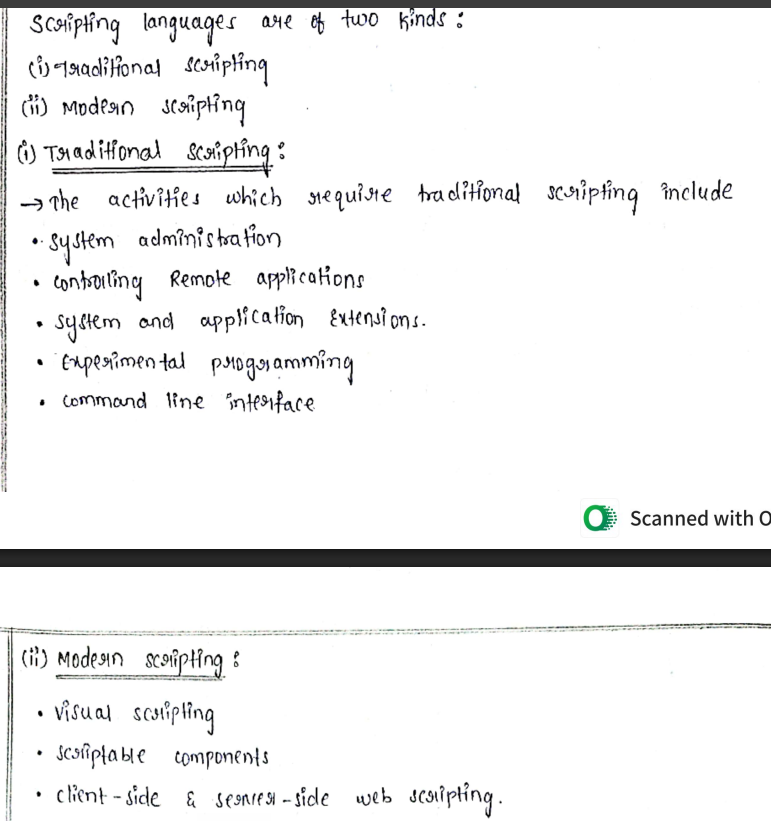
Explain the uses of scripting languages

10 Easiest Uses of Scripting Languages

  1. Web Development – Used to create interactive and dynamic websites.

  2. Automation – Used to automatically perform repetitive tasks.

  3. Data Processing – Used to collect, organize, and process data.

  4. System Administration – Used to manage files, users, and system operations.

  5. Database Management – Used to store, retrieve, update, and manage data in databases.

  6. Software Testing – Used to automatically test programs and find errors.

  7. File Management – Used to create, copy, move, rename, and delete files.

  8. Prototyping – Used to quickly create a basic working model of an application.

  9. Command Execution – Used to run multiple operating-system commands automatically.

  10. Application Integration – Used to connect different programs and allow them to work together.
<p>10 Easiest Uses of Scripting Languages</p><ol><li><p><strong>Web Development</strong> – Used to create interactive and dynamic websites.</p></li><li><p><strong>Automation</strong> – Used to automatically perform repetitive tasks.</p></li><li><p><strong>Data Processing</strong> – Used to collect, organize, and process data.</p></li><li><p><strong>System Administration</strong> – Used to manage files, users, and system operations.</p></li><li><p><strong>Database Management</strong> – Used to store, retrieve, update, and manage data in databases.</p></li><li><p><strong>Software Testing</strong> – Used to automatically test programs and find errors.</p></li><li><p><strong>File Management</strong> – Used to create, copy, move, rename, and delete files.</p></li><li><p><strong>Prototyping</strong> – Used to quickly create a basic working model of an application.</p></li><li><p><strong>Command Execution</strong> – Used to run multiple operating-system commands automatically.</p></li><li><p><strong>Application Integration</strong> – Used to connect different programs and allow them to work together.</p></li></ol><p></p>
4
New cards

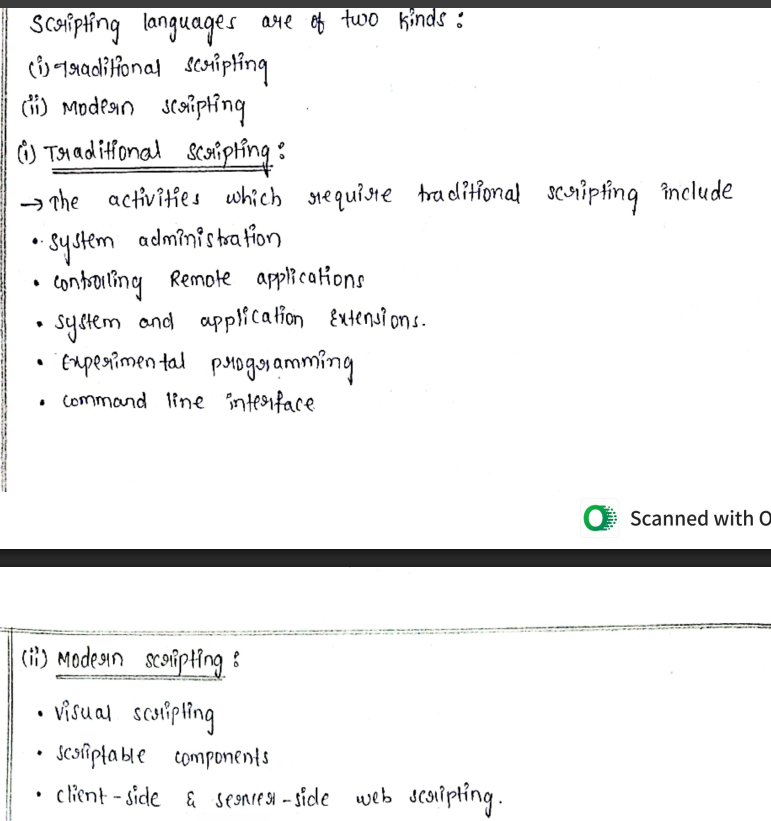
9. Explain the uses of scripting languages
knowt flashcard image



