descriptive statistics
 View linked note
 Call Kai
 Learn
Learn Practice Test
 Spaced Repetition
 Match
Match Flashcards
 Knowt Play
1/4

There's no tags or description
Looks like no tags are added yet.
Name | Mastery | Learn | Test | Matching | Spaced | Call with Kai | Chat |
|---|
No analytics yet
Send a link to your students to track their progress
5 Terms
Counting: how to find the number of elements of a list in Excel
The function that counts the number of numbers in a range of cells is represented as =count( A1:A9 ) or =count( A:A )
where A1 is the start and A9 is the end. obviously, there’s 9 elements in between them.
Summation: how to find the total sum of elements of a list in Excel
The function that calculates the sum of a list of numbers in a range of cells is represented as =sum( A1:A9 ) or =sum( A:A )
adds A1 + A2 + A3 + A4 + A5 + A6 + A7 + A8 + A9
Sum of squares: how to find the sum of the squares of each element of a list in Excel
The function that calculates the sum of the squares of a list of numbers in a range of cells is represented as =sumsq( A1:A9 ) or =sumsq( A:A )
adds A1² + A2² + A3² + A4² + A5² + A6² + A7² + A8² + A9²
this is useful for variation: sum of (each element²)
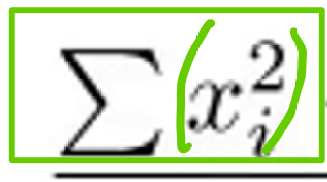
Cross summation: how to find the sum of (product between lists) in Excel
The function that calculates the sum of the products of corresponding values in two lists is represented as =sumproduct(A1:A9,B1:B9)
elements in [A1 to A9] is multiplied with elements in [B1 to B9] and then added up
this is useful for (find out what this is useful for: to do list!!1)
![<p>The function that calculates the sum of the products of corresponding values in two lists is represented as =sumproduct(A1:A9,B1:B9)</p><p></p><p>elements in [A1 to A9] is multiplied with elements in [B1 to B9] and then added up </p><p></p><p>this is useful for (find out what this is useful for: to do list!!1)<br></p>](https://knowt-user-attachments.s3.amazonaws.com/98ae6f1d-cc3c-43f9-8899-34afdacd7e1e.jpeg)
what does this symbol represent?
this symbol represents mean
also known as the average (how much is it in total divided by how many elements there are)