Operating Systems
 Call Kai
 Learn
Learn Practice Test
 Spaced Repetition
 Match
Match Flashcards
 Knowt Play
1/11

There's no tags or description
Looks like no tags are added yet.
Name | Mastery | Learn | Test | Matching | Spaced | Call with Kai | Chat |
|---|
No analytics yet
Send a link to your students to track their progress
12 Terms
Operating systems provides what?
abstractions and control
Lecture 1: Linux Security Basics
What do these explain?
Files instead of raw disk sectors, Processes instead of direct CPU control, Virtual memory instead of physical addresses, Sockets instead of network-controller command
abstractions make hardware usable
Lecture 1: Linux Security Basics
What do these explain?
Allocates competing resources, Prevents unauthorized access, Coordinates concurrent activity, Detects and handles error
Control keeps the system safe
Lecture 1: Linux Security Basics
What two complementary views explain what an OS does?
Extended / virtual machine and Resource manager
Lecture 1: Linux Security Basics
What does the described do?
Hides inconvenient hardware details, Offers stable, higher-level operations, Creates useful illusions such as many processes and large memory
Extended / virtual machine
Lecture 1: Linux Security Basics
What does the described do?
Tracks ownership and availability, Schedules and allocates resources, Resolves conflicts using policies
Resource manager
Lecture 1: Linux Security Basics
What does the five responsibilities define?
process (create), memory (allocate), storage (organize), devices (control), security (authorize)
OS control surface

Lecture 1: Linux Security Basics
What is the picture an example of?
Sequential execution

Lecture 1: Linux Security Basics
What is the picture an example of?
Multiprogramming
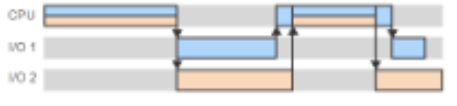
Lecture 1: Linux Security Basics
What is the picture an example of?
Time sharing
Lecture 1: Linux Security Basics
Processes p1 and p2 execute on a system with a single CPU and a single I/O device. Each Process executes a compute bound phase followed by an I/O bound phase. The system uses multiprogramming without time-sharing. The following table shows lengths of each phase.
p1 computes: 10, I/O: 50
p2 computes 30, I/O: 60
Determine without multiprogramming the computation terminates at time and with multiprogramming the computation terminates at time.
Expected: 150, 120
Without multiprogramming, the total time is the same regardless of the number of I/O devices, since the I/O phases do not overlap, 60 + 90 = 150 time units.
With multiprogramming, p1 runs from 0 to 10, followed by the I/O phase from 10 to 60. p2 starts as soon as p1's compute phase terminates and runs from 10 to 40.
At time 40 the I/O device is still busy and thus p2's I/O phase is delayed until time 60. Thus p2 terminates at time 120
Lecture 1: Linux Security Basics
Processes p1 and p2 execute on a system with a single CPU and two identical I/O device. Each Process executes a compute bound phase followed by an I/O bound phase. The system uses multiprogramming without time-sharing. The following table shows lengths of each phase.
p1 computes: 20, I/O: 40
p2 computes 10, I/O: 80
Determine without multiprogramming the computation terminates at time and with multiprogramming the computation terminates at time.
Expected: 150, 110