Parts of Computer Motherboard and their Function
 Call Kai
 Learn
Learn Practice Test
 Spaced Repetition
 Match
Match Flashcards
 Knowt Play
1/93

Earn XP
Description and Tags
LESSON 2
Name | Mastery | Learn | Test | Matching | Spaced | Call with Kai | Chat |
|---|
No analytics yet
Send a link to your students to track their progress
94 Terms
Enumerate the major parts of the computer motherboard
CPU socket
Memory slot
BIOS chip & CMOS battery
Expansion Buses
IDE or SATA slot
Computer Chip-sets
Input/Output Ports
Which is the important component of a computer system?
Technically each and every component is important, where the processor plays an important role in the computer but it can’t operate without memory or power supply this is why each and all the components of a computer are very important they are there for a reason.
CPU Socket
It is considered an integral part of your Computer.
CPU socket is where your ——- ——- is installed.
CPU processor
It is the brain of the computer that is responsible for ——-, ——-, and ——- —- ——- as well as ——- —— and ——- ——-
Fetching, decoding, executing program instructions, performing mathematical, and logical calculations
What is the difference between LGA and PGA?
Understood as opposites
LGA stands for?
Land grid array
PGA stands for?
Pin grid array
What is the difference between LGA and PGA?
Land grid array (LGA) consists of a socket with pins. While, PGA ("pin grid array") places the pins on the processor, which you then insert into a socket with appropriately placed holes.
RAM slot is also called?
RAM socket and memory slot
what is a RAM slot?
A gap on your computer’s motherboard where you can insert your RAM.
Depending on the motherboard type, there might be up to how many memory sockets?
Four
If you have a high-tier motherboard, you can have how many memory sosckets?
4 or more
What made the modules faster?
The physical modifications
These changes also impacted what?
The looks of the RAM sockets
What are some of the changes included in the RAM slots?
A different number of pins
The different gap between pins
Keyway slots are in different locations in the connector space
Different height and length
Indents and shapes
A different number of pins
Newer RAM modules have higher number of pins.
Can not insert newer RAM modules into old sockets
Different height and length
The length is more problematic since it either fits in the RAM socket or it doesn’t. The height may vary even among the same module types because it doesn’t have to fit anywhere.
Indents and shapes
Newer modules have an indent on their edges so you can take them out easily, and their shape also varies depending on the version
SDRAM
64-bit bus
3.3V
168 pins DIMM
DDR1
First double data rate memory
184 pins
popular in the late 20th century - 2005
Max capacity 1GB
AMD socket A and 939
Intel socket 478 and LGA 775
Socket 756
DDR2
240 pins per DIMM
capacity 4GB
Replaced DDR 1 in 2005
Supports Intel LGA 775 & AMD Socket AM2
DDR3
Similar shape to its predecessor
240 pins
Higher frequency range
Capacity 8GB
The RAM sockets that can support it include the LGA 775, 1150, 1151, 1155, 1156, and 2011, as well as the AMD AM1, 3, 3+, FM1, FM2, and FM2+.
DDR4
288 pins
16GB
high-end
compatible with the Intel LGA 2011-E3, 1151, and AMD AM4 sockets.
BIOS CHIP stand for?
Basic input/output system
CMOS BATTERY stands for?
Complementary Metal Oxide Semiconductor
BIOS chip
Is where all the information and settings for the motherboard are stored.
BIOS chip can be ——-, ——-, and ——- VIA the ——- ——-
accessed, updated, and modified VIA the BIOS mode
BIOS is essentially the link between the?
computer hardware and software in a system.
Where is the BIOS stored?
in a ROM chip
Why is the BIOS stored on a ROM chip?
because ROM retains information even when no power is being supplied to the computer and used during startup routine (boot process) to check out the system and prepare to run the hardware.
CMOS battery is responsible for?
Keeping all the information intact when the entire system is shut down.
Is the CMOS battery removable?
Yes
CMOS battery -
All motherboards include a small separate block for CMOS which are kept alive by a battery (known as a CMOS battery) even when the PC’s power is off. This prevents reconfiguration when the PC is powered on. Again the CMOS battery is removable that can be removed to reset the BIOS after a failed update or if you overlock your RAM beyond its capabilities.
Expansion Buses
Are the slots that allow inserting expansion cards such as graphics card, sound card, LAN card, or several other functional computer parts.
Are the slots that allow inserting expansion cards such as ——- —-, ——- —-, or ——- —- ——- ——- —-
graphics card, LAN card or several other functional computer parts.
What is the most common expansion bus in PC and other hardware platforms?
PCI
Buses cary signals such as?
data, memory addresses, power, and control signals from component to component.
Other types of buses include?
ISA and EISA
PCI slot
It is an interface on the motherboard that allows you to put in a device that requires power
PCI slot
Famous for coming with the first Intel Pentiums in 1993
The PCI stands for?
Peripheral components interconnect
Peripheral devices
A standard computer bus to connect ——- ——- directly to your motherboard.
PCI slot
Its name comes from its physical location between two other elements and from the electrical signals it sends and recieves.
The acronym AGP stands for?
Advanced/Accelerated Graphics Port
AGP slots
Mainly designed to support video/graphic cards with high bandwidth requirements.
AGP slots
The advantage of these slots type is that they support a simple direct connection between CPU and the motherboard without any connectors ar cables needed.
AGP was the mainstream until the successor standard _________.
PCI Express was put into practical use.
AGP was first released when? and up to what version was released?
1997 and up to version AGP 3.0
Why was the AGP slots almost replaced?
Because of the PCI Express standard around 2005.
PCI-Express provides more excellent performance in terms of —— and ——-.
frequency and bandwidth
What are the leading manufacturers of graphics cards that have presented fewer and fewer products for AGP slots?
ATI aand Nvidia
What are the oldest types of slots on the motherboard?
ISA slots
ISA stands for?
Industry Standard Architecture
Why was it named Industry Standard Architecture?
Because it was the only slots invented at that time.
ISA
The components designed to install on —— slot were huge in size and among the first slots to be used in personal computers
What are the different slots in expansion buses?
PCI
AGP
PCI EXPRESS
ISA
IDE stands for?
Integrated Drive Electronics
These are the standard interface for connecting a motherboard to storage devices such as hard drives and CD-ROM/DVD drives. It is also on older computer motherboards.
IDE connectors
latest motherboards make use of ——- technology.
SATA
SATA stands for?
Serial advanced technology attachment
It is a computer bus interface used to connect host bus adapters (disk drive controllers) with mass storage devices like optical drives and hard drives.
SATA connectors
Northbridge is also called?
memory controller
Southbridge is also called?
input/output controller or expansion controller
Northbridge
It is in charge of controlling transfers between the processor and the RAM, which is why it is located physically near the processor.
Northbridge
It is sometimes called the GMCH, for Graphic and Memory Controller Hub.
Southbridge
It handles communications between slower peripheral devices such as USB, audio, serial, the system BIOS, the ISA bus, the interrupt controller and the IDE channels.
Southbridge
It is also called the ICH (I/O Controller Hub). The term “bridge” is generally used to designate a component that connects two buses.
Input/Output Ports
•Microphone- Pink 3.5mm jack port
•Speakers and Headphones / Headsets / Earbuds- Bold green 3.5mm jack port
•Monitor- Older motherboards are equipped with a solid blue VGA port at the back, but newer motherboards use the HDMI and black or white DVI port as standard
•Ethernet network cable port- Colorless port
•Keyboard and Mouse- PS/2 port (Keyboard- purple; Mouse- green)
•USB devices- USB 2.0 colorless port; USB 3.0/3.1 solid blue port (Yes, VGA ports are a similar color, but this only goes to show how outdated VGA is)

CPU socket
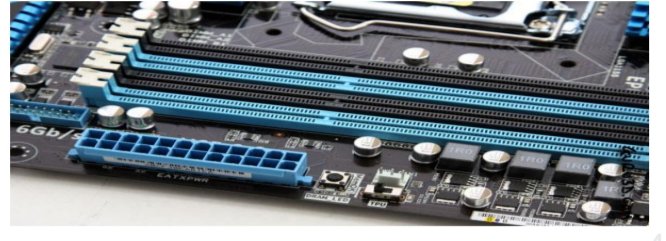
Memory socket

DDR2
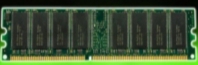
DDR1

DDR4
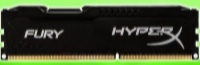
DDR3

DDR3

DDR2

DDR

SDRAM

BIOS CHIP & CMOS BATTERY

Expansion Buses

PCI slots

PCIE slost

AGP slots


AGP

AGP

PCI-E
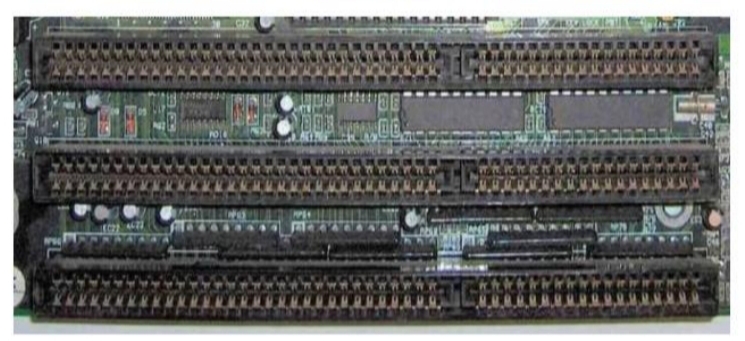
ISA slots

SATA slots

IDE slots

Northbrige
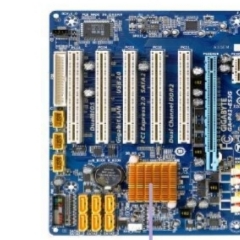
Southbridge

Input/Output Ports