Topic G + H - JavaDoc / Unit Testing
 Studied by 0 people
 Call Kai
 Learn
Learn Practice Test
 Spaced Repetition
 Match
Match Flashcards
 Knowt Play
1/30

There's no tags or description
Looks like no tags are added yet.
Name | Mastery | Learn | Test | Matching | Spaced |
|---|
No study sessions yet.
31 Terms
why should you document programs?
to make it easy to understand for other engineers who may want to reuse/update/maintain the program
what should you document with JavaDoc
interface
syntactic interface → structure and form of a method (i.e., the method signature)
semantic interface → meaning and behaviour (i.e., explanation of what a method does)
general internal working of a system
why should you use JavaDoc specifically to document programs/source codes?
to combine source code with documentaton (documentation is basically like when you comment your code to explain what each component means and does) and other reference materials
to make it easier to ensure that the documentation and code are in sync
to generate API specifications (or interface specifications) from source code (i.e., a description of the operations that an interface provides, how to call them, what inputs they accept, what outputs their produce, and any constraints/rules on their behaviour)
how do you make a special JavaDoc comment on your source code?
attach documentation comments (or doc comments) to classes, fields, and methods in your source code using the opening /** and the closing */
use a tool, called javadoc, to automatically generate HTML pages from source code
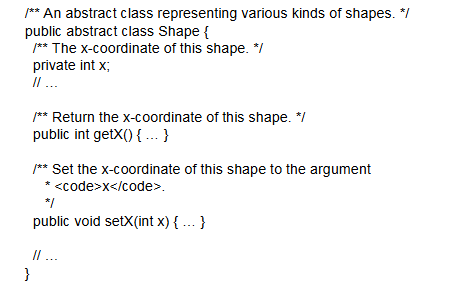
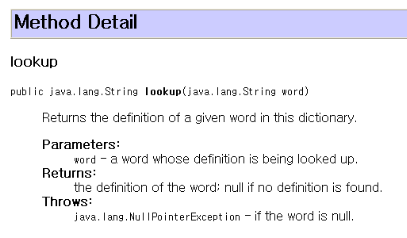
explain what’s happening in the source code example
every comment framed by “/** [insert documentation comment] */” gets put in a HTML page (see image)
![<p>every comment framed by “/** [insert documentation comment] */” gets put in a HTML page (see image) </p>](https://knowt-user-attachments.s3.amazonaws.com/6b0fb51a-9b5a-482f-a0ae-0f8d1492e390.png)
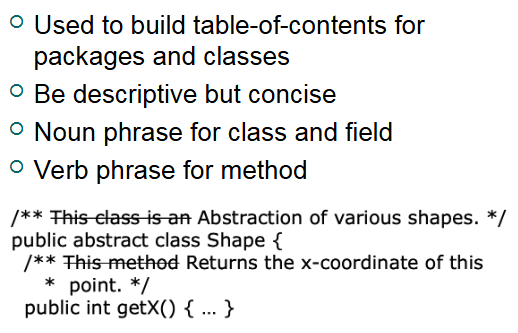
how to write and format documentation comments
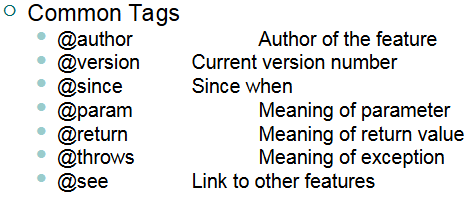
what is a “javadoc tag”
a special keyword recognized by the javadoc tool and will be specially formatted in the HTML page
common javadoc tags
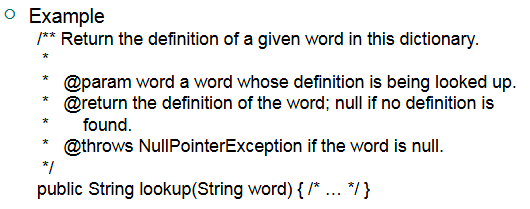
what would the HTML page look like for this documentation comment
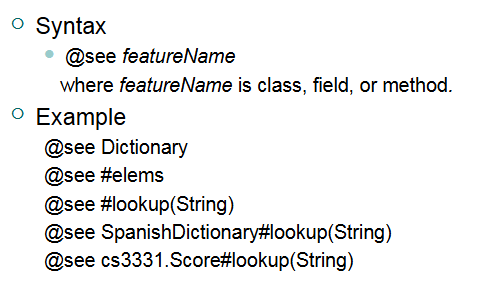
how to link to other features of the program using javadoc comments
example:
@see Dictionary#lookup(String) → links to the method “lookup(String)” in the class “Dictionary”
what would linking to other features using javadoc look like in the HTML page
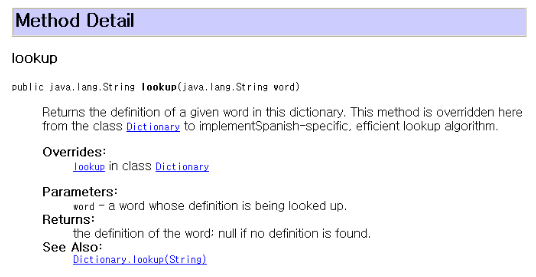
how to link to existing API specifications using javadoc

what does “testing” mean in terms of software engineering?
a process of showing that a program works for certain inputs
what are the phases of testing in software development?
unit testing → to test each module/unit/component independently, usually done by the developers of the code
integration and system testing → to test the system as a whole and everything works in harmony, usually done by separate testing or QA (quality assurance) team
acceptance testing → to validate system functions for users and customers
what is unit testing?
testing the smallest, base units of code (such as methods, classes, procedures, subroutines/subprograms)
component is tested IN ISOLATION from the rest of the system and in a controlled environment
unit testing is often the target of testing applications such as JUnit
what is considered a “unit” in java
a class or interface or a set of them (e.g., an interface and 3 classes that implement it, or a public class along w/ its helper classes)
why should you do unit testing?
code must be tested to ensure that it is functional (the most barebones way to do this is to use the print statement)
unit testing is the epitome of the “divide and conquer approach,” which is where you split complex systems into manageable units and debug units individually; this method allows you to narrow down where bugs can be
how to do incorporate unit testing in the development of a system
build systems in layers
start with foundational classes that don’t depend on other classes
continuously test those classes before you build onto them (to ensure they are functional and reliable) and make classes that depend on them
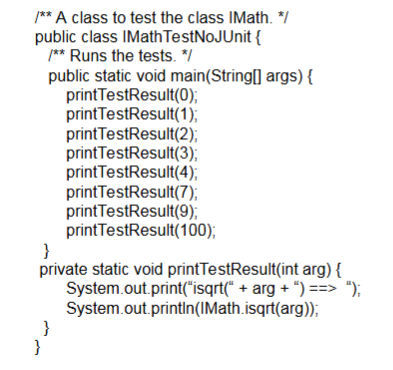
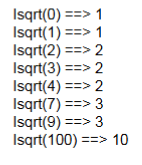
conventional testing without JUnit: what would be the output of this? why is this insufficient for unit testing?
see the output in the image
this is insufficient because you don’t have a organized comparison to what the EXPECTED outputs are, which is where JUnit comes in handy
what is the solution to shortcomings of conventional barebones testing with the print method?
automatic verification by a testing program
you can write a test program (a separate code file that’s specifically for running test cases)
OR use a testing tool such as JUNIT
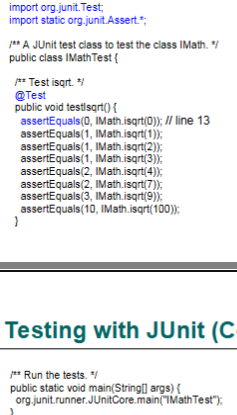
example of testing the Math.sqrt(int) method with JUnit
the most important thing to note:
the “assertEquals” method works like this:
given assertEquals(a,b): a = EXPECTED OUTPUT, b = ACTUAL OUTPUT given by the method that you are testing
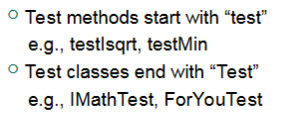
naming convention for test files (for when you are doing unit testing)
assertion methods provided by JUnit
(this is also in the cheat sheet)
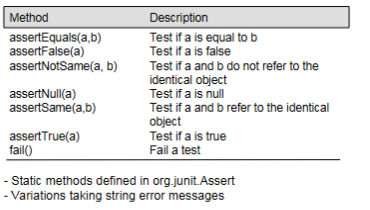
three main parts of test code
test fixture
test driver
test oracle
test fixture (one of the three main part of test code)
the fixed, prepared setup of objects and data that a test needs in order to run correctly.
test driver (one of the three main part of test code)
the class that runs the test cases; the code that sets up the test, calls the method being tested, and feeds it inputs
test oracle (one of the three main part of test code)
the code for a test data/case that determines success or failure for that test data/case (aka, the “assert” method)
how to set up test fixture in a test class
@Before and @After are for initializing the variables in the test fixture
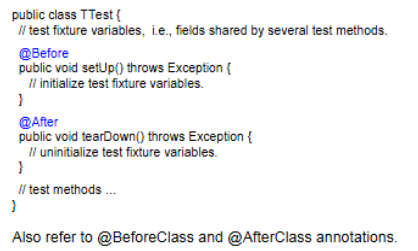
example of setting up text fixture using JUnit
“@Before” is very important
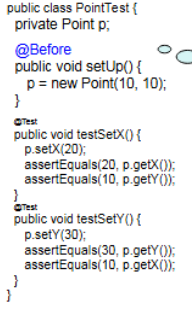
test suite
a set of test methods (methods that run tests on your code) and other test suites
organizes tests that share significant commonalities into a larger test set
aids in automation of testing
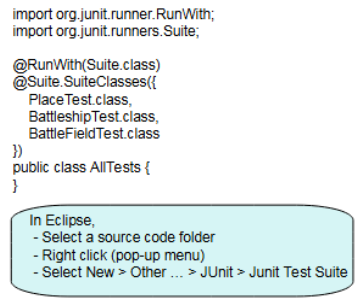
example of test suite