Networking Fundementals (1.6)
 Call Kai
 Learn
Learn Practice Test
 Spaced Repetition
 Match
Match Flashcards
 Knowt Play
1/32

There's no tags or description
Looks like no tags are added yet.
Name | Mastery | Learn | Test | Matching | Spaced | Call with Kai | Chat |
|---|
No analytics yet
Send a link to your students to track their progress
33 Terms
What is a network?
A computer network is a system of interconnected computers and other devices that communicate and share resources and information.
Networks can be categorized by their size and structure.
The main purpose of all networks is to share resources (Data, devices, applications, etc.)
(At least two devices connected to each other SHARING resources)
Hosts
Hosts are devices or systems on a network that use, provide, or share resources and services, such as computers, servers, and network-enabled devices. Generally any device with an IP address.
Host: Server
Server is a computer or system that provides resources, data, services, or programs to other computers, known as clients, over a network.
Workstation
Workstation is a high-performance computer designed for technical or scientific applications, often used by one person at a time.
Client Machine
Client Machine is a computer or device that accesses services, applications, or resources provided by a server over a network.
Network Devices
Network Devices allows servers, workstations, and client computers to connect and share resources. Such as routers, switches, AP, and firewalls
LAN
Local Area Network (LAN):
Covers a small geographic area like a home, office, or building. Typically used for sharing resources such as files and printers.
WAN
Wide Area Network (WAN):
Spans a large geographic area, often a country or continent. The internet is the largest example of a WAN. (Spans the globe)
MAN
Metropolitan Area Network (MAN):
Covers a larger area than a LAN but smaller than a WAN, such as a city
CAN
Campus Area Network (CAN):
IS a type of network that interconnects multiple local area networks (LAN) within a limited geographical area, such as a university campus, corporate campus, or a large industrial complex.
SAN
Storage Area Network (SAN):
Is a highspeed network that provides access to consolidated data storage. SANs are primarily used to enhance storage devices, such as disk arrays, tape libraries and optical jukeboxes, so that they appear to servers as locally attached devices.
PAN
Personal Area Network (PAN):
Covers a very small area, usually within a single room. Examples include Bluetooth connections between a phone and headset.
Peer-to-peer network (P2P)
Peer-to-peer network:
Decentralized network architecture where each device (peer) in the network can act both as a client and a server, allowing direct sharing of resources, data, and services among all connected devices without the need for a central server.
Client-server network
Client-server network:
A network architecture where multiple client devices (computers, smartphones, etc.) connect to a central server to access shared resources, services, and applications.
The server manages and provides the requested services while the clients initiate requests and utilize the services provided by the server.
1 centralized device
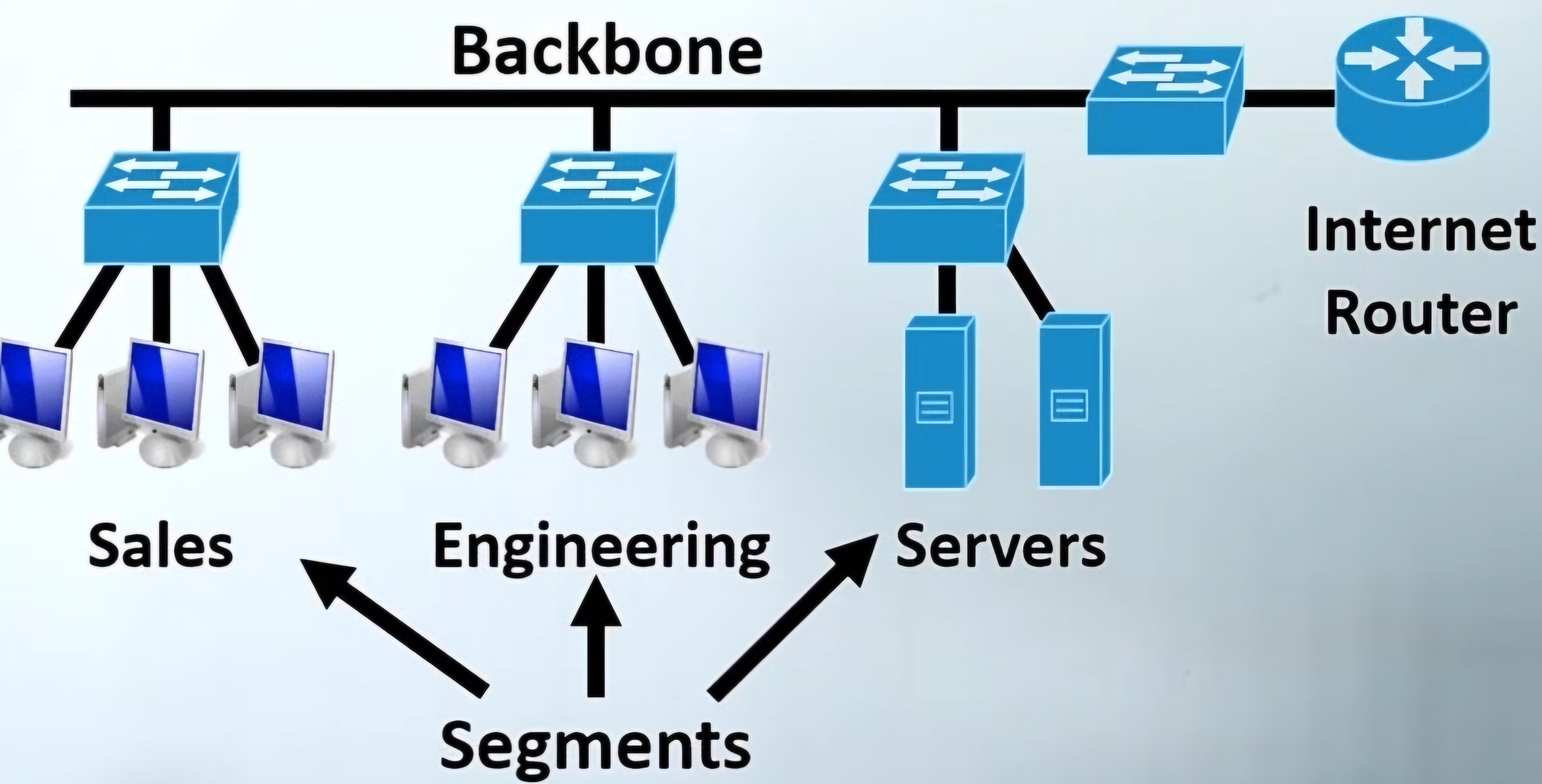
Network Backbone
A network backbone is the main infrastructure that interconnects various segments of a computer network, providing a central pathway for data exchange.
It is typically composed of high speed, high capacity links and core routers or switches, which handle the bulk of network traffic and ensure efficient data transmission across the network.
Example: Big Cisco Switch
Network Segment
Network segments are smaller subnetworks or clusters of devices that connect to the backbone.
Each segment can include a variety of networked devices such as computers, servers, switches and other hardware.
Segments often represent different departments or areas within an organization, and they rely on the backbone to communicate with other segments and access shared resources and services.
Network topologies
Network topologies describe the layout or arrangement of elements (links, nodes, etc.) of a computer network.
There are several types, each with unique configurations and characteristics, influencing the networks performance, reliability and scalability.
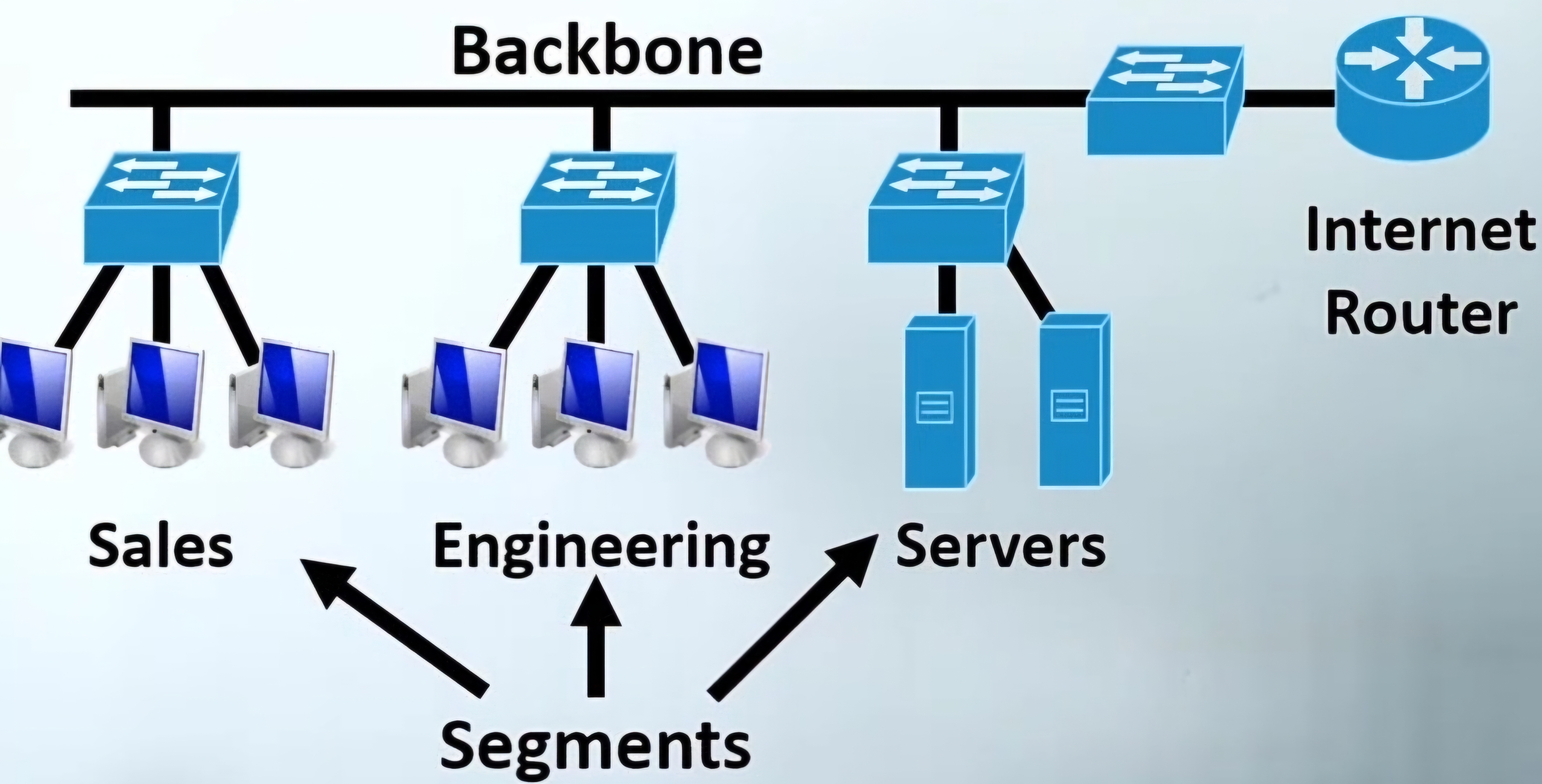
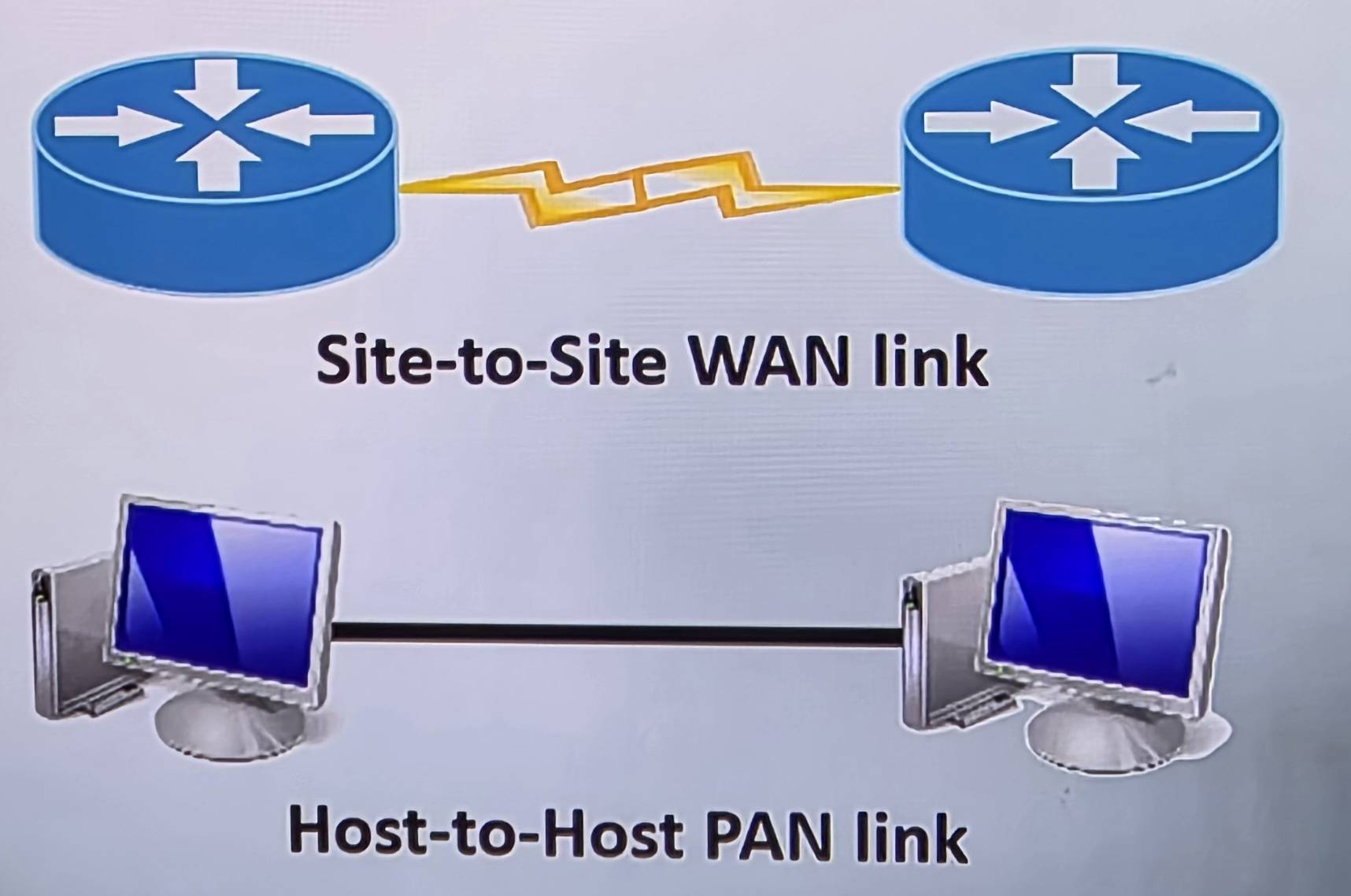
Point-to-point
This topology involves a direct connection between two networking devices, typically using a single cable or wireless link.
It is mainly used for dedicated connections, such as those between a main office and a branch office, or between two pieces of network equipment.
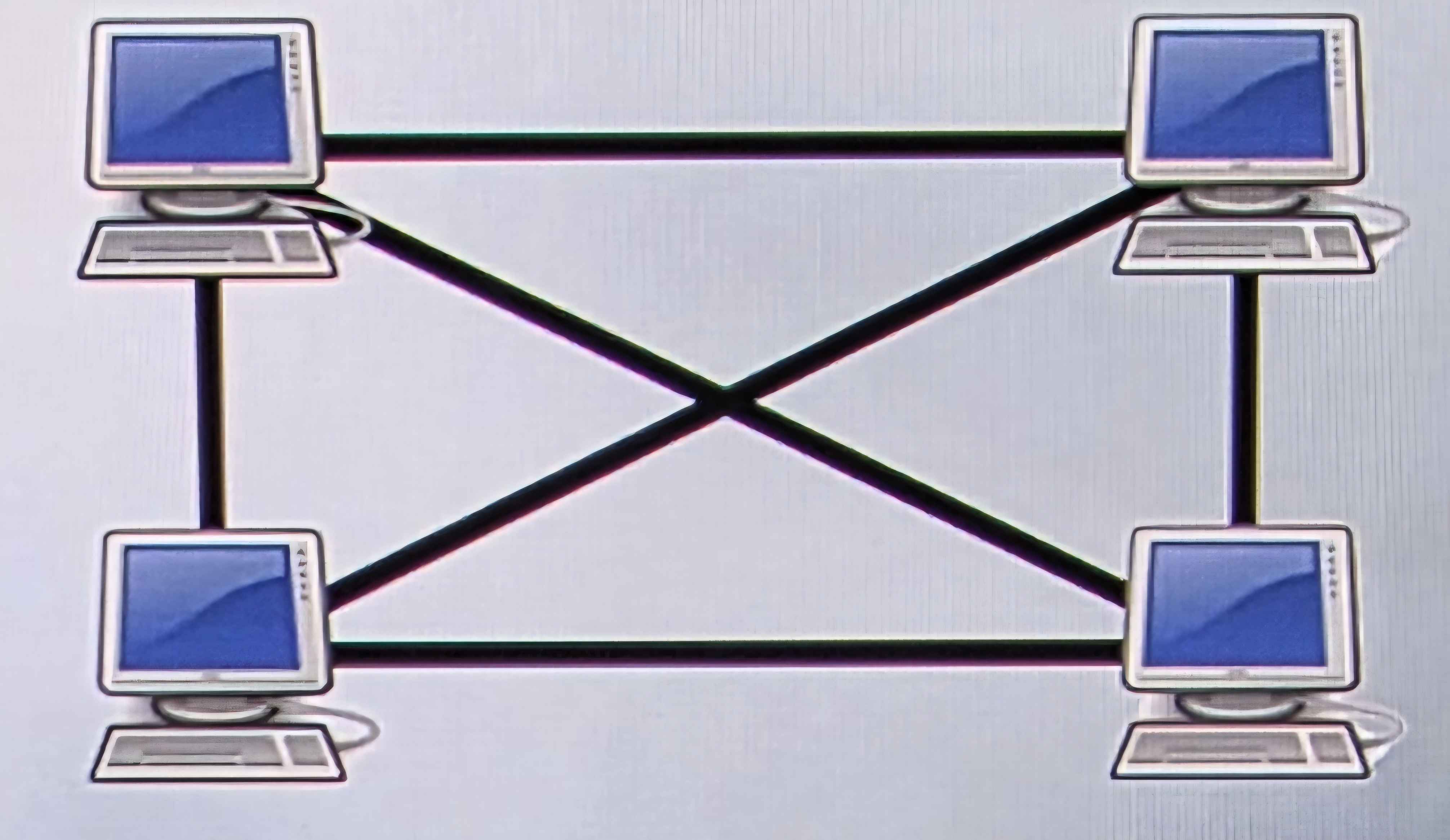
Mesh
Mesh topology is a network setup where each host is connected to every other host, creating a network with no central connecting point.
This topology ensures high availability and redundancy because if any one link fails, data can be rerouted through multiple alternative paths.
Advantages
1. Most Fault Tolerant
Disadvantages
1. Most expensive
2. Most complex
3. Most difficult to expand
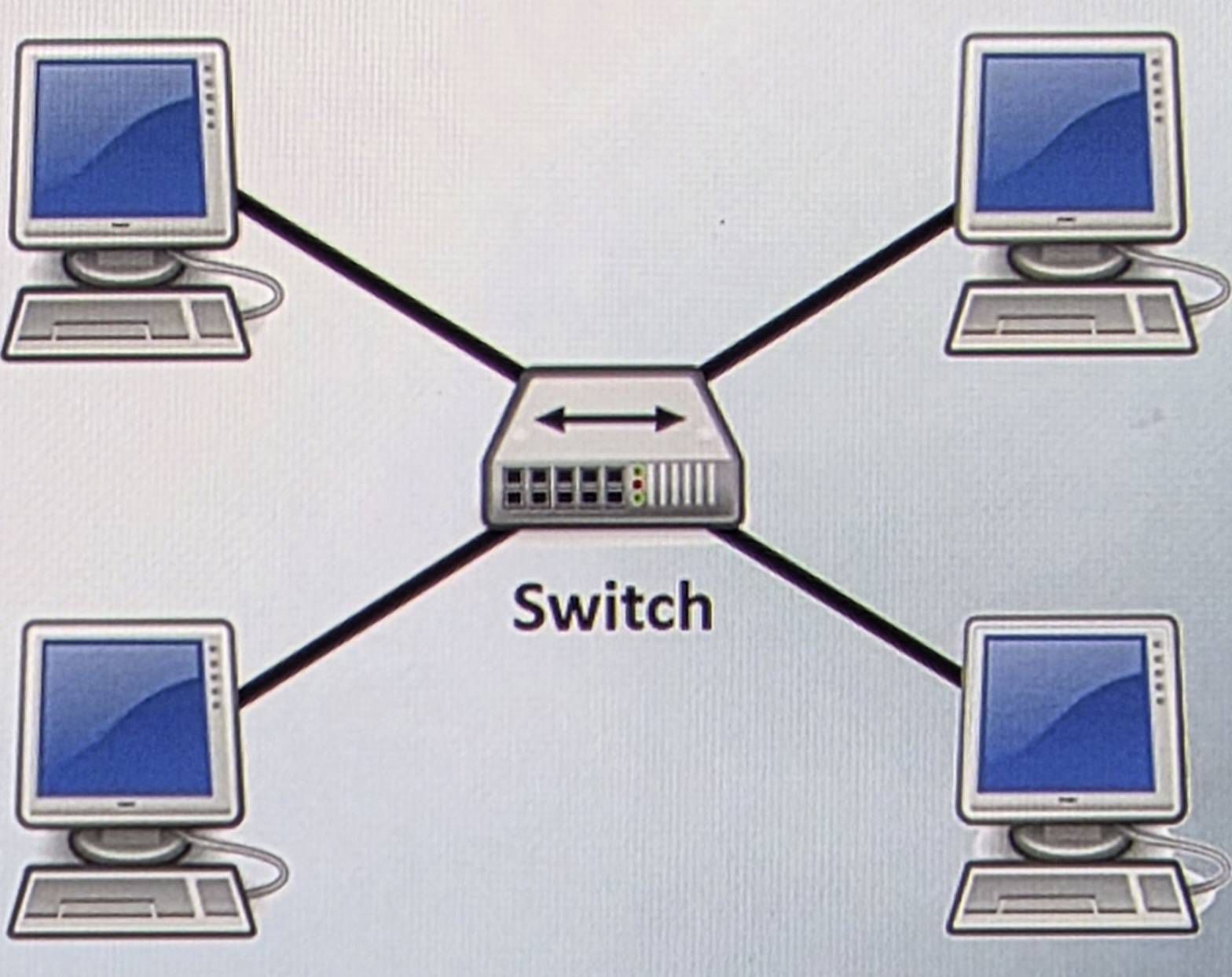
Star/Hub-and-Spoke
In a star or hub-and-spoke topology, all nodes are connected to a central node such as hubs/switches/Wireless access points.
This setup simplifies network management and troubleshooting but creates a single point of failure, as the failure of the central hub can bring down the entire network
Hybrid
Hybrid topology combines two or more different topologies to form a resultant topology that leverages the advantages and mitigates the disadvantages of the constituent topologies
It offers flexibility in network design and can be tailored to meet specific needs or constraints of an organization
Three-tier Hierarchiacal Model
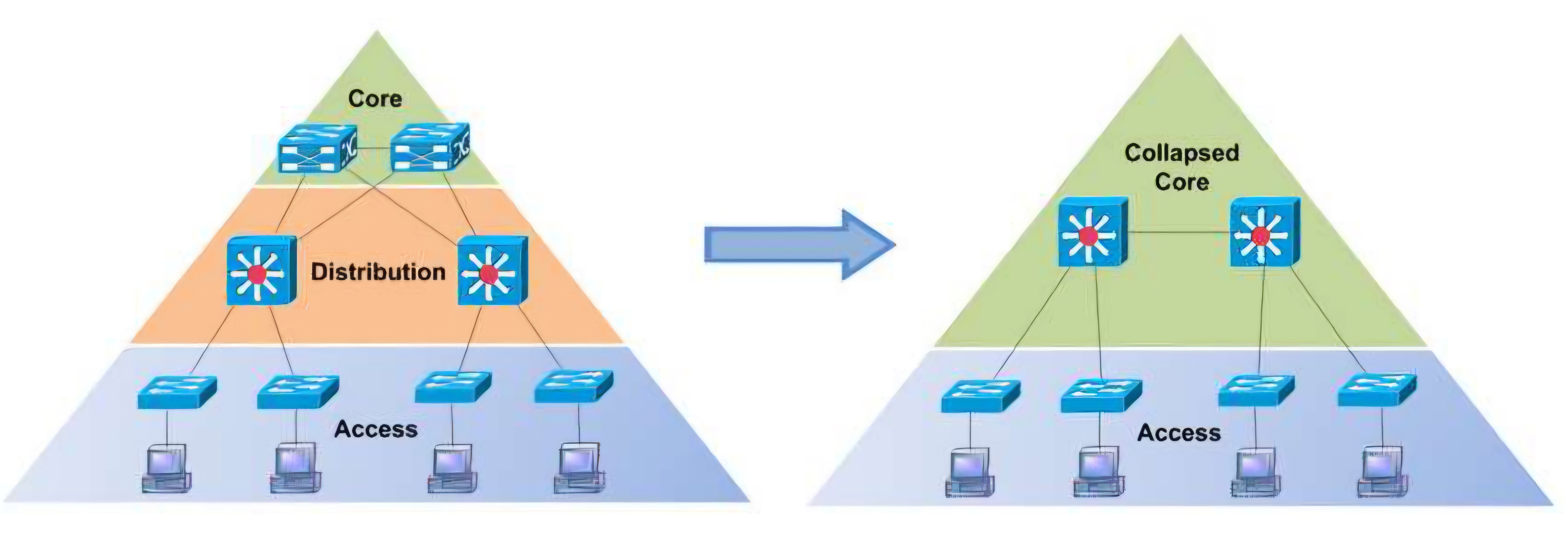
The three tier hiearchical network model is a structured approach to network design that breaks the network into three distinct layers.
Each layer is designed to serve a specific purpose, optimizing scalability, performance, and maintainability.
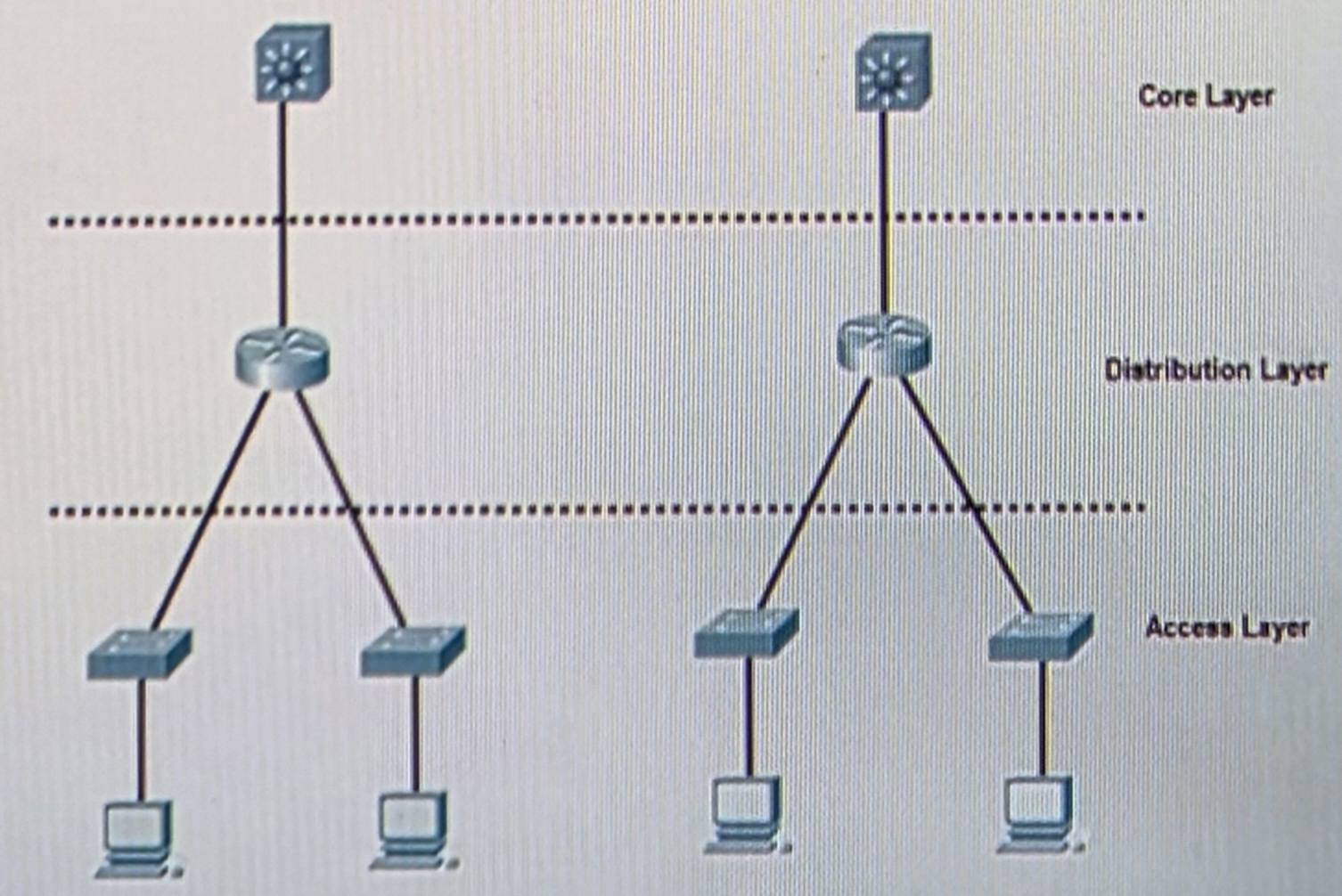
Core Layer
The core layer is the backbone of the network, handling high-speed packet switching across the entire network.
It is responsible for fast and reliable routing of data and should have high redundancy and fault tolerance to prevent downtime.
Distribution Layer
The distribution layer acts as the intermediary between the core and access layers, managing outing, filtering, and WAN access.
It aggregates the data recieved from the access layer switches before it is transmitted to the core layer for routing to the final destination.
Access Layer
The access layer is the networks point of entry for devices and end users, connecting them to the network.
This layer includes switches and access points that provide connectivity to desktop PC’s, laptops, and other network devices.
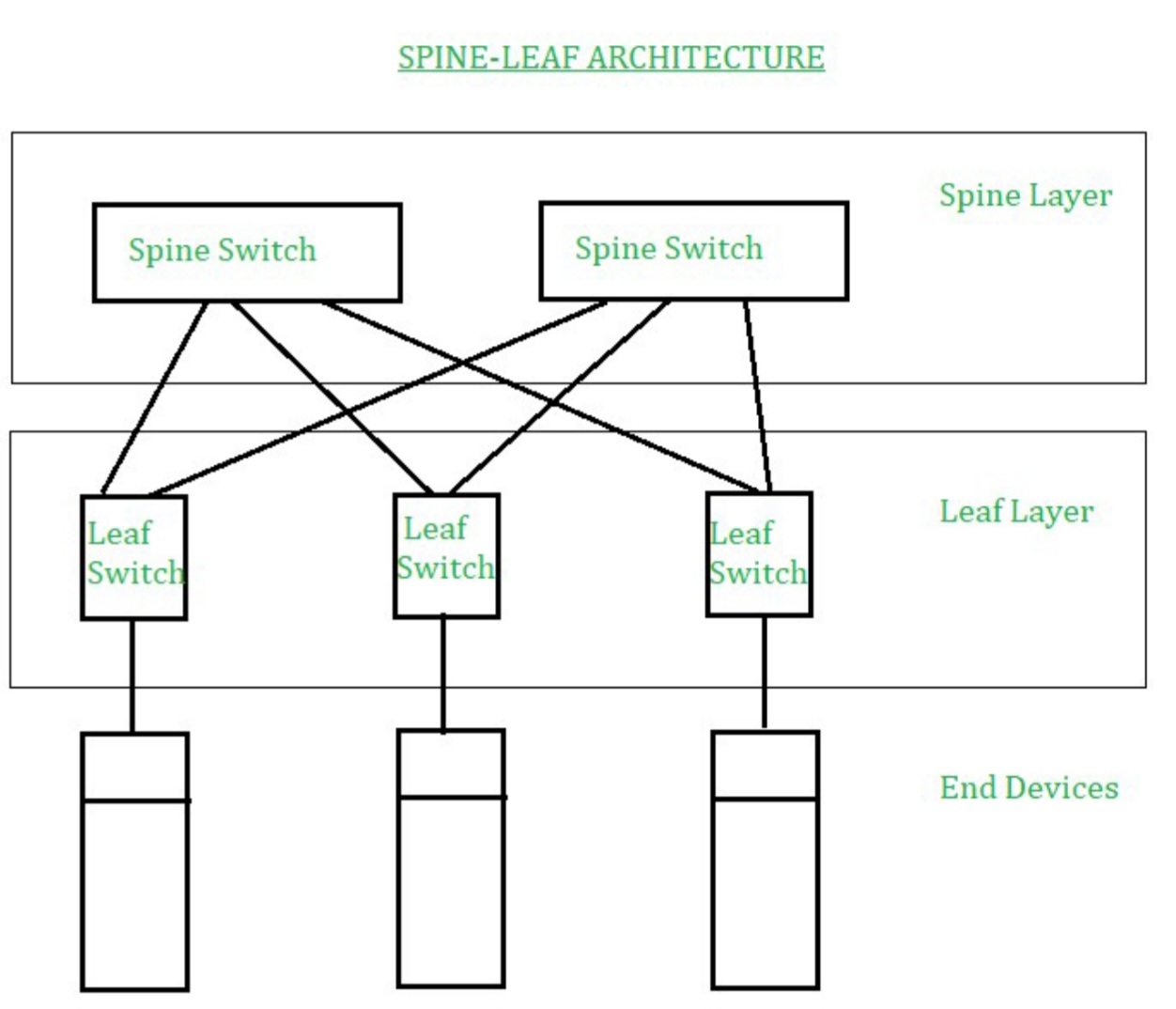
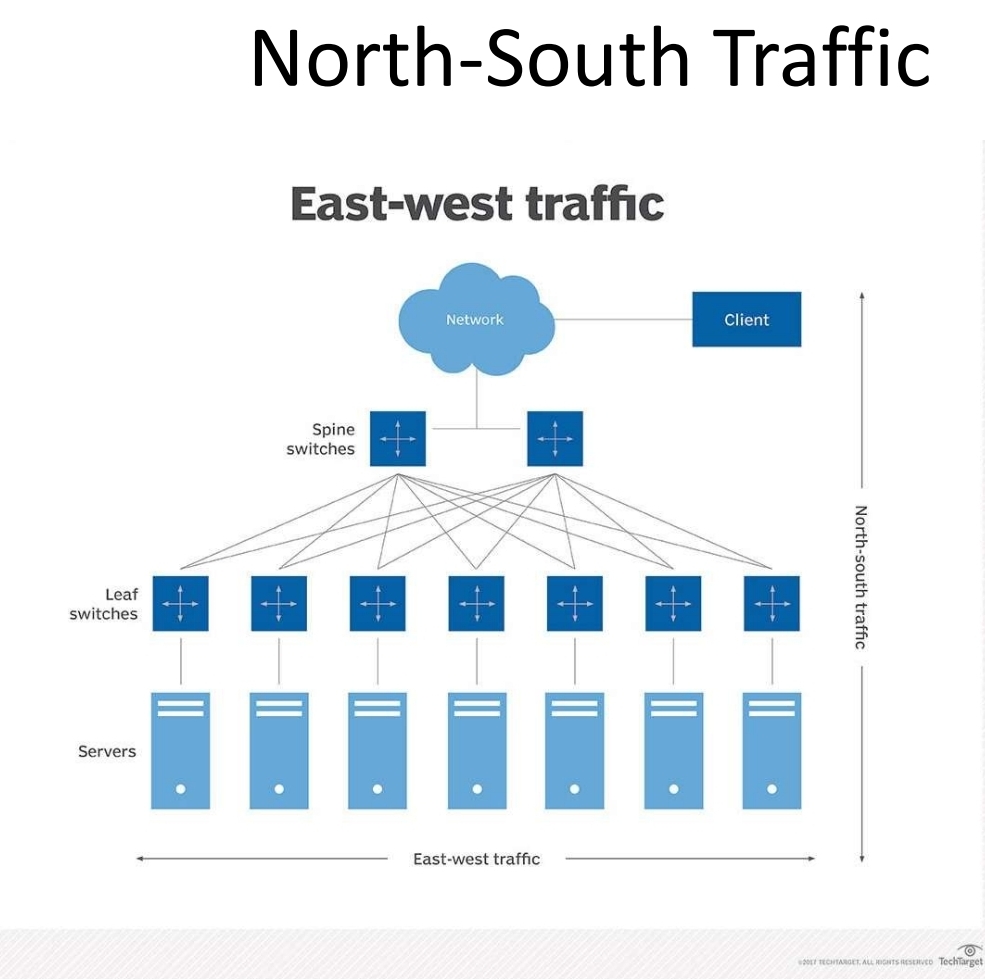
Spine an Leaf
Spine and leaf architecture is a two-layer network topology that is highly scalable and minimizes latency by ensuring that every leaf switch (access layer) is seperated by no more than two switches from any other leaf switch.
In this topology, leaf switches form the access layer where devices are connected, while spine switches serve as the backbone for data transport, connecting all leaf switches without interconnecting with each other.
Collapsed Core Architecture
Collapsed Core Architecture merges the core and distribution layers into a single layer, simplifying the network design and reducing hardware costs.
This approach is ideal for small to medium-sized networks where managing seperate layers is unnecessary.
The architecture facilitates easier management and maintenance, while enhancing performance by reducing latency between the networks core and distribution functions.
North-South Traffic
This describes the flow of network traffic between the data center and the outside world (e.g., the internet or other data centers), focusing on inbound and outbound traffic patterns.
It typically involves client-to-server communication, where clients access services hosted the data center
East-West Traffic
Refers to the traffic flow within the data center, especially in modern data centers.
This includes server-to-server, server-to-storage, and VM-to-VM traffic, highlighting the importance of efficient internal networking to support high volumes of internal data exchange.
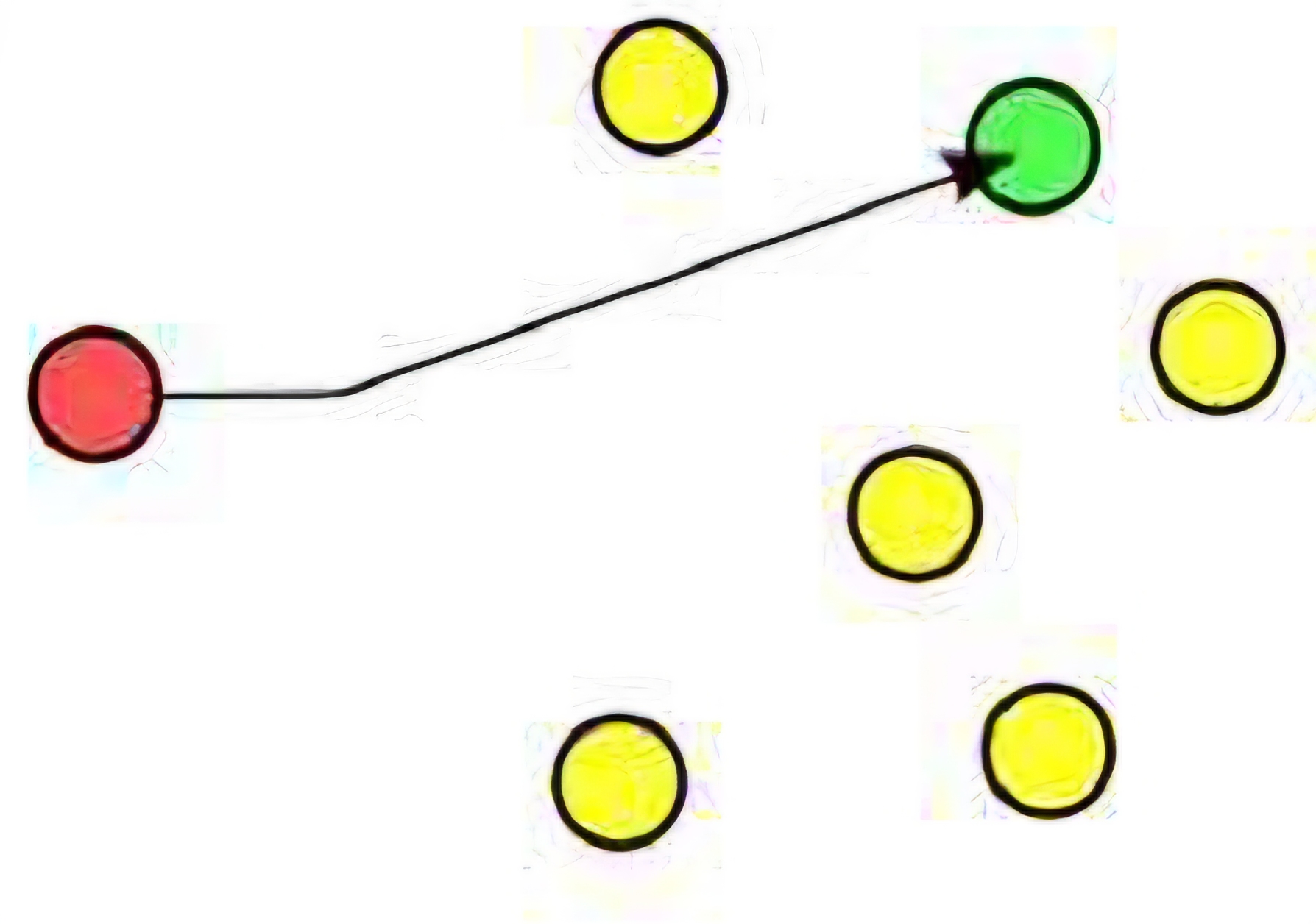
Unicast
Unicast is a one-to-one form of communication where data is sent from one source to one specific destination identified by a unique IP address.
It is the most common form of IP communication, used for most internet traffic, includiing web browsing, email, and files transfers.
Unicast communication ensures that data packets are delivered to a single, specific recipient over a network
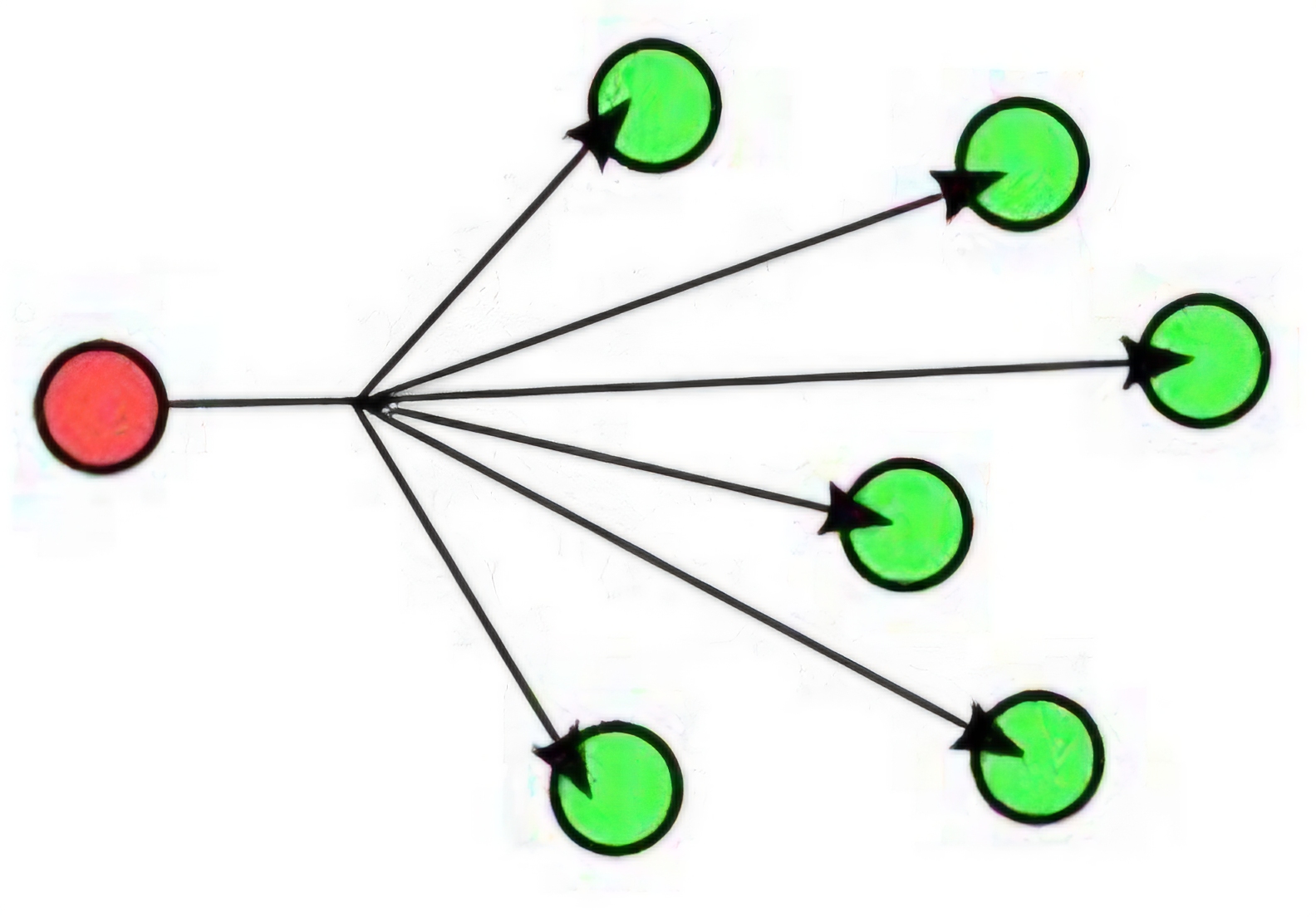
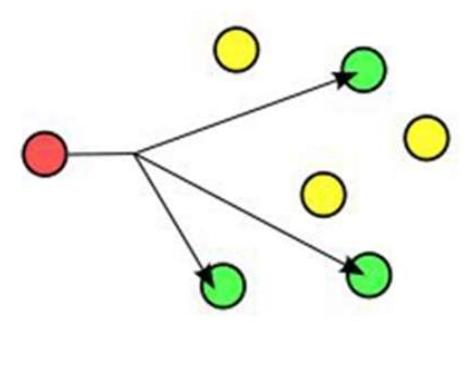
Multicast
Multicast is a method of communication where data is sent from one or more sources to multiple destinations simultaneously over a network, using a specific multicast group address
Multicast is efficient for applications like streaming video or audio, where the same data needs to be delivered to multiple recipients, reducing the bandwidth consumption compared to sending separate copies of the data to each recipient.
This approach is used in both IPv4 and IPv6 networks to optimize the delivery of packets to multiple destinations.
Anycast
Anycast is a network addressing and routing method where data is sent to the nearest or best destination as determined by routing protocols, from among multiple potential destinations sharing the same address.
It is used in IPv6 (and to a lesser extent in IPv4) to provide fast and efficient delivery of services by directing users to the closest server, commonly used in DNS and CDN (Content Delivery Network) services
Anycast can improve network performance and availability by automatically routing requests to the nearest data center.
Broadcast
Broadcast is a communication method where a message is sent from one sender to all potential recievers within a network segment.
In IPv4, the broadcast address is used to send data to all devices on a LAN simultaneously, such as when a device requests an IP address via DHCP
Broadcast is not supported in IPv6; instead, multicast addresses are used for similar purposes.