GIST 8109 - Midterm
 Studied by 126 people
 Call Kai
 Learn
Learn Practice Test
 Spaced Repetition
 Match
Match Flashcards
 Knowt Play
1/154

There's no tags or description
Looks like no tags are added yet.
Name | Mastery | Learn | Test | Matching | Spaced | Call with Kai |
|---|
No analytics yet
Send a link to your students to track their progress
155 Terms
Geospatial System
Hardware, software, procedures, and people that store, query, analyze, and distribute geographic information.
What is Geospatial Systems Management?
Management of all hardware, software, data, procedures, and people that make up a GIS.
(T/F) In Geospatial Systems Management, a GIS Systems Administrator requires GIS + IT knowledge, and ideally, a good understanding of geospatial systems.
True
Responsibilities of Geospatial Systems Management
Not an entry-level job
Manage and supervise GIS staff
Install/configure software and hardware with DBAs
Security administration (portals, access)
Data analysis (networks, spatial statistics)
Performance and storage optimization
Database design, analysis, creation
Data modelling
Administering existing enterprise databases
Who Manages GIS?
Depends on scope & org structure:
Single person or team
GIS Systems Admin
IT Systems Admin
GIS Analyst
Information Systems definition and types
Interrelated components that collect, process, store, and distributes data and information, with feedback mechanisms to help ensure a system can meet its goals.
Decision Support (GIS)
Enterprise Systems
Export Systems
Data Warehouse
Search Engines
Common Components of Information Systems
Hardware
Software
Data and Databases
Networks
Procedures
People
Common Issues of Information Systems
Scope (Intranet, Extranet, Internet)
On-premise vs Cloud
Security and User Roles
Systems Development
Systems Maintenance
Common Benefits of Information Systems
Increased efficiency and effectiveness
Reduced costs
Real-time/Archived Information
Information access
Stability
What is involved in managing hardware, software, data, and planning for GIS?
Hardware = optimal performance, minimum downtime
Software = GIS integration with other apps, currency, security and user roles
Data (database) = size, compression, backup, QA/QC, compatibility
Planning = big picture (schedule, upgrade budget, incorporating new tech, training)
GIS Manager
Manages GIS team, purchasing, ensures GIS adds value
Often business-focused with some GIS skills.
GIS Lead
Manages GIS projects, project QA/QC, supports GIS system admin and manager, uses GIS as a decision support
Has expert GIS skills.
GIS Systems Administrator
Manages hardware, software, data, system design, scheduling, global QA/QC
Knowledge of GIS hardware, software, network infrastructure
GIS Analyst
Completes high-level GIS project tasks and QA/QC, scripting for projects, solution planning.
Strong/Export GIS skills
GIS Technologist
Completes task-level GIS work and QA/QC, scripting for tasks
Basic/Intermediate GIS skill
GIS Application Developer
Develops custom GIS applications
Has strong programming skills and GIS knowledge.
Hardware definition and Types
Physical components of computing devices.
Handheld (smartphone)
Portable (tablet, laptop)
Single-User non-portable (thin client, mini PC, Workstation, SBC)
Multi-user Systems (Servers)
Other devices (Input/Output only like GPS, Microwaves, Microcontroller)
Hardware Components in a Computer
CPU (binary processing)
Data Storage
Input
Output
Graphics Card (with GPU, parallel/concurrent processing)
CPU Components
Arithmetic/Logic unit (AU, ALU) = calculations, comparisons
Control Unit (CU) = access and decode, data flow
Registers = temporary memory, high speed access
CPU Process/Cycle
Read
Decode
Execute
Store
Machine Cycle Time and how Clock Speed affects it
Time to complete the CPU process/cycle, measured in nanoseconds/picoseconds or MIPS)
Clock speed affects machine cycle time based on the rate of electronic pulses released by CPU
(T/F) Speed does not factor into heat generation on the device
False.
Faster speeds on a desktop will generate more heat which uses more power for cooling.
CPU Cores
A device has multiple cores. Multi-core CPUs run tasks in parallel. Hyper-threading increases virtual processors.
Parallel Computing vs Grid computing
Parallel Computing
Simultaneous execution of the same task on multiple processors in the same machine. Used for modeling, simulations, large datasets.
Grid computing
Individual workstations working in parallel on the
same task, controlled by a server.
Instruction Sets. RISC vs CISC.
A set of operations/instructions that a CPU performs.
RISC = reduced instructions, processors use less energy and produces less heat
CISC = complex instructions, performs many operations but can take more time to complete
(T/F) Modern CPUs will use either RISC or CISC
False.
Modern CPUs will have a mixture of both.
Properties affecting how powerful the CPU is
Hardware Type
Processing Chip
Number of cores
Clock speed
Machine Cycle Time
Cooling Efficiency
GPU vs CPU
GPU = faster for repetitive parallel tasks (graphics, machine learning, computations)
CPU = more versatile for different tasks
NPU and TPU
NPU (neural networks)
TPU (machine learning, Google).
Data Storage Units
Bit = single transistor (on/off)
Byte = 8 bits
KB = 1000 bytes
MB → GB → TB → PB → EB → ZB → YB
Two main types of data storage in a computer
Primary (on motherboard, high speed, RAM, ROM)
Secondary (connected to CPU via bus, slower, HDD, SSD)
Primary storage types
Volatile (powered memory, RAM and cache)
Non-volatile (powered off memory, ROM)
(T/F) Non-volatile storage is used for boot information and hardwired programs
True
What is RAM?
Stores instructions and data before and after registers.
RAM comes in pairs of equal size and GHZ.
DDR types not interchangable
What is caching?
Memory bottle neck, quick storage of information that can be access by the processor.
Cache Controller determines what is stored in cache and what gets deleted
Located near CPU chip for faster access than RAM
(T/F) The CPU looks for RAM first then Cache for instructions.
False.
The CPU looks to the Cache first then RAM for instructions.
Characteristics of secondary storage
Long term
Cheap
Large capacity
Sequential access (SASD)
Direct access (SSD, Harddrive)
SATA vs PCIe
SATA = connected to motherboard via cable
PCIe = connected directly to motherboard making it faster
Both have similar boot speeds for windows.
SASD vs HDD vs SSD
SASD = uses magnetic tape, slow with huge capacity
HDD = magnetic hard disk with moving parts, prone to failure but large storage for cheap
SSD = solid state, memory chip, faster, requires less power, best for C drive booting and scratch drives but expensive
Video Connection Types
VGA |
|
DVI |
|
DisplayPort |
|
HDMI |
|
USB-C |
|
USB Standards
USB-A | data transfer and flash drives |
USB-B | printers and external drives |
USB-C | data, video, and power in one |
Transfer rates: 1, 1.1, 2, 3, 3.1, 3.2, 4
Six input modalities and an example from each
Mechanical |
|
Composite |
|
Audio |
|
Imaging |
|
Wireless/Wired Transmission |
|
File Transfer |
|
Four output modalities and an example from each
Display |
|
Audio |
|
Wireless transmission |
|
Printing/Plotting |
|
Goal of choosing hardware for a system
Choosing a system that meets current and future needs, considering factors like cost, scalability, processing power, and portability.
Strategies for making hardware requirement decisions
Upgradable systems over replaceable
Redeployment of usable computers for use or as thin clients
Hardware meets software needs, software can utilize all hardware
Determine if software responds more to RAM, CPU clock speed vs. core count, or GPU power
GIS specific considerations when choosing hardware
Huge datasets
Complex processing
3D graphics
Web apps
All of these make GIS hardware expensive
GIS Tasks and examples of hardware from each
Data Collection |
|
Data Processing |
|
Data Storage |
|
Software definition
Programs that control hardware (OS) or help users solve specific problems (Application). They are installed into secondary stroage.
Software Types
Operating System Software
Utility Programs
Application Software
Application Programming Interface (API)
What happens when a computer system is powered on?
Instructions in ROM communicate start up to hardware
OS kernel loads into RAM
Loaded OS controls hardware function, provide UI and IO, manage system memory, processing, and security
Main role of a kernel
Control all critical system processes and operations
Where operating systems receive instructions
Input devices
Command Line Interface (commands)
Graphical User Interface (menu options and icons)
32 bit vs 64 bit OS Software
32-bit systems are limited to 4 GB RAM and one core
64-bit systems support much more RAM (up to 16 exabytes) and multiple cores
Utility Software Types
Built or installed into the OS as firewalls, virus and malware detection, disc utilities, data backup, debugging, and calendars.
Disc Utilities Types
Defragmentation (HDD only)
Compression (7-zip, WinZip)
Registry Cleaners
Application Software definition and types
Cloud or installed software that solves problems or performs tasks.
Mobile (single purpose)
Personal (web browser, can be desktop or cloud)
Workgroup (multi-user collab, emails and file sharing)
Enterprise (payroll, accounting)
Decision support (GIS)
Information (multi-user database
How do program codes work?
Code converted into machine language and gives instructions to CPU
Programming Languages
Can be compiled (converted to ML and execute as needed, faster) or interpreted (converted to ML and execute line-by-line, slower)
(T/F) programming languages can only be entered via command line.
False.
Programming languages can be enter via command line, graphical interface, or using no text options.
Where is most creation of software using programming languages done?
Integrated development environment
API vs SDK
API | SDK |
|
|
COTS vs Proprietary vs Open Source software
COTS (commercial off the shelf) |
|
Proprietary |
|
Open Source |
|
Licensing Types
Single-User | Software registered on a specific machine |
Multi-user | Software installed on multiple machines |
Network | Single copy installed on server, software accessed by limited seats |
(T/F) Copyright gives legal protection to software vendors and can charge against illegal access.
True
Open Source GPL
Software can be adapted and redistributed, but Copyleft prevents owning improvements and redistributions for profit.
Bugs and Support
Defects in software preventing it from functioning as expected.
All software has bugs, best to register for alerts and wait for the first patch before installing major upgrades
Support can be included or come at an additional cost, open source support is the community
GIS COTS Examples
ESRI products
MapInfo
AutoCAD Map 3D
Microstation
Smallworld
GIS Open Source Examples
QGIS
GRASS
GeoServer
PostGIS
(T/F) GIS software originally ran on UNIX mainframes and servers before migrating to workstations and eventually handheld devices
True.
GIS Apps Examples
QField
Field Maps
Fulcrum
(T/F) Tablet GIS apps are simple to set up and have built in GPS. External GPS are no longer needed to improve reception.
False.
External GPS’ can improve reception with real-time connection.
Digital Data
Information represented as discrete, finite symbols (letters, digits, binary).
Most common form of digital data
Binary
Why is the line between data and application blurry?
Input data is a program
Codes for both stored exactly the same way (binary)
Program code can store data (e.g. spellchecker)
GIS Data Characteristics
Storage Heavy | Large and increasing storage needs |
Hardware dependent | Need powerful hardware for processing and internet speeds (DaaS) |
Quality | Accuracy, resolution, currency, scale, errors |
Compatibility | Multiple formats, structures, integrations |
Three data structures (these are also GIS data formats)
Binary, ASCII, Unicode
Binary Data
Base 2 (0 or 1), stored in 1 bit
ASCII Data
1 byte (8 bits) per character. 255 different codes.
Unicode
Up to 4 bytes per character, supports world writing systems
Which is more widely used between ASCII and Unicode?
Unicode as it supports more bytes per character, enabling more support for other languages.
Unicode Encoding Sets
UTF-8 = 1 byte
UTF-16 = 2 bytes
UTF-32 = 4 bytes
Unicode vs UTF
Unicode = character set (e.g. A=64)
UTF = translates unicode to binary
What is base in reference to numbers?
Number/Combination of digits used to represent numbers.
Use of Hexadecimal (base 16)
Represent 0-9, A-F
Used for computer addressing (4 digits = 1 hex)
Binary shorthand (large numbers, less digits)
Easy to convert to decimals
Array
Ordered list of similar values
Associative Array
Name-value pairsR
Record
Indexed collection of values. Each entry is a recorded/observed value.
Graphs and Trees
Values stored with no order, uses nodes linked by edges. Allows complex relationships to be represented.
Data structure that is important for compression.
Graphs and Trees
Bit addresses are stored as ________
a hexadecimal number
Main GIS data structures
Vector = points, lines, polygons, topologies
Raster = cells, multiple bands and compression structures
Proprietary GIS data structures
File geodatabase
AutoCAD dwg
MrSID (Raster)
ECW (Raster)
Open GIS data structures
Autocad DXF
Esri Shapefile
xml
gml
GeoJSON
gpx
csv
JPEG, PNG, TIFF, BMP (Raster)
GIF (Raster)
Database definition
Collection of files → records → fields → characters (Binary, ASCII, Unicode)
Used in enterprise to share multiple types of information
Managed by a DBMS
How does a DBMS work?
DBMS acts as an interface between the database and the user
Database has needed data (e.g. property tax, bylaws, utilities)
Users use an application software to access the data
DBMS acts as an access medium between the application and database.
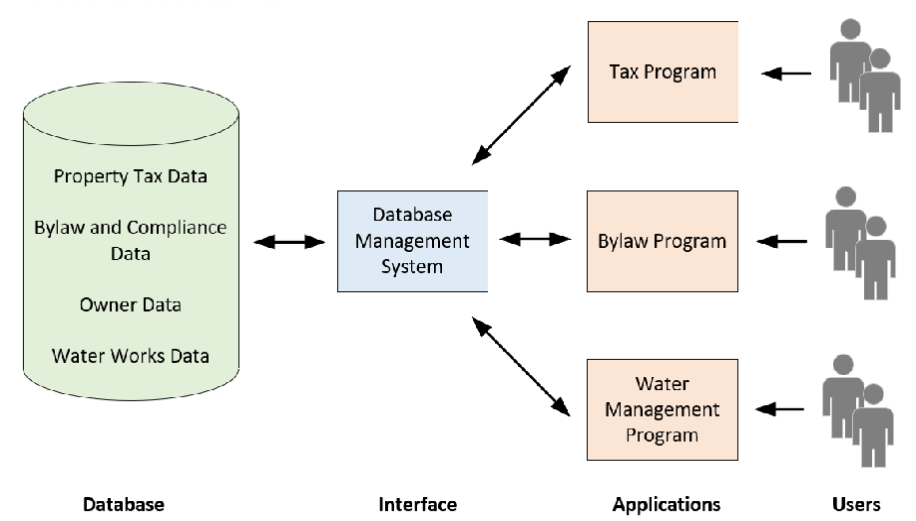
Database Types and Uses
Relational | Most common. Multiple related tables using SQL |
Flat File | Single file or table |
Spatial Database | Support geometry. Part of RDB or in special purpose DB. |
Graph/NoSQL | Newest. Real-time, very large data with edges and nodes. |
Responsibilities of Database Administration
Plan, design, create, operate, secure, monitor, and maintain DB.
Manage DB redundancy, archiving, versioning, and security.
Indexing definition and use.
Structure that improves data lookup performance (like the index of a book referencing a page). Mainly a tree type structure.
Used to improve data lookup in large databases but will inexpensively take up more storage.
Must be rebuilt when data changes (no auto update)
Which database type does not need indexing?
Graph Databases as data is directly linked.
But when handling big data, sophisticated indexing is needed anyways.
 Note
Note  Flashcards (142)