Networking Basics
 Call Kai
 Learn
Learn Practice Test
 Spaced Repetition
 Match
Match Flashcards
 Knowt Play
1/68

There's no tags or description
Looks like no tags are added yet.
Name | Mastery | Learn | Test | Matching | Spaced | Call with Kai | Chat |
|---|
No analytics yet
Send a link to your students to track their progress
69 Terms
The Internet “Network of Networks“
A global connection created by interconnecting thousands of local networks (home, SOHO, and business networks) together.
Network Types by Size - Small Home Networks
Simple networks consisting of a few computers connected to each and to the Internet.
Network Types by Size - Small Office and Home Office (SOHO) Networks
Allows computers in a home office or a remote office to connect to a corporate network, or access centralized, shared resources such as printers.
Network Types by Size - Medium to Large Networks
Networks used by corporations, schools, or organizations that connect hundreds or thousands of devices.
Network Types by Size - World Wide Networks
Networks that connect millions of computers globally, such as the Internet.
Radio frequency identification (RFIDs) tags
They can be placed in or on objects to track them or monitor sensors for many conditions.
What is a bit, and what does the term stand for?
"Bit" stands for binary digit. It is the smallest unit of data in computing and can hold a value of either 0 or 1. During storage or transmission a bit is physically represented as one of two discrete physical states, such as: Two distinct levels of light intensity (On / Off). How do input and output devices interact with binary data?
Input devices: Translate human actions into binary code for the CPU to process.
Output devices: Translate binary data back into human-recognizable form (text, sound, images).
What is ASCII, and how many bits represent each character in ASCII?
American Standard Code for Information Interchange. It uses 8 bits (1 byte) to represent each character (letters, numbers, and symbols).
What is a byte?
It’s a group of 8 bits used to represent a single character, number, or symbol.
What is network media?
The physical medium through which signals are transmitted across a network (e.g., copper wire, fiber-optic cable, electromagnetic waves through the air).
What is a signal in networking?
Electrical or optical patterns transmitted from one device to another that represent digital bits (0s and 1s) as electrical pulses, light pulses, or radio waves. What are the three common methods of signal transmission in networks?
Electrical signals: Electrical pulses over copper wire.
Optical signals: Light pulses over fiber-optic cable.
Wireless signals: Infrared, microwave, or radio waves through the air.
Which transmission media are most commonly used in homes and small businesses?
Copper wires (Ethernet cables) and Wi-Fi-enabled wireless connections.
What type of transmission media do larger networks use to transmit signals reliably over long distances?
Fiber-optic cables, which convert electrical signals into light pulses.
What is digital bandwidth?
The capacity of a physical medium to carry data, measuring the theoretical amount of data (bits) that can flow from one point to another in one second. What are the standard units of measure for bandwidth and their values?
bps: Bits per second (fundamental unit of bandwidth)
Kbps: Kilobits per second (1,000 bps or 10³ bps)
Mbps: Megabits per second (1,000,000 bps or 10^6 bps)
Gbps: Gigabits per second (1,000,000,000 bps or 10^9 bps)
What is throughput in networking?
The actual measure of the transfer of bits across media over a given period of time, which usually does not match the theoretical maximum bandwidth. What three main factors influence network throughput?
Amount of data being sent and received.
Types of data being transmitted.
Latency created by the number of network devices encountered between source and destination.
What is latency in a network?
The total amount of time, including all delays, required for data to travel from one given point to another.
Does throughput measurement account for the usefulness or type of bits transmitted?
No. Throughput measures all bits transferred, including non-application traffic like network control messages, traffic regulation, and error correction.
How does a single low-bandwidth segment affect total network throughput across multiple links?
End-to-end throughput cannot be faster than the slowest link in the path between the sending and receiving devices.
Which of the following measurements includes any latency encountered during data transmissions?
throughput
What is a host in networking?
Any computer connected to a network that participates directly in communication by sending and receiving messages.
What factor determines whether a computer host acts as a client, a server, or both?
The software installed on the computer.
What is the core difference between a server and a client host?
Server: A host running software that enables it to provide information or services to other hosts.
Client: A host running software that enables it to request and display information obtained from a server.
What is a peer-to-peer (P2P) network?
A network environment where computers function as both clients and servers simultaneously, sharing resources directly without needing dedicated servers.
What is the simplest form of a peer-to-peer (P2P) network?
Two directly connected computers (via wired or wireless connection) that exchange data and services, acting as either client or server as necessary.
What device is required when connecting multiple PCs to form a larger P2P network?
An intermediate network device, such as a switch.
What are the 4 key advantages of peer-to-peer (P2P) networks?
Easy to set up
Less complex
Lower cost (dedicated servers/devices are not strictly required)
Ideal for simple tasks (e.g., file transfer, printer sharing)
What are the 4 main disadvantages of peer-to-peer (P2P) networks?
No centralized administration
Not as secure
Not scalable (unsuitable for large businesses)
Performance degradation (hosts slow down when serving requests while acting as clients)
What is network infrastructure?
The platform that supports the network, providing the stable and reliable channel over which communications occur. What are the 3 categories of hardware components in network infrastructure?
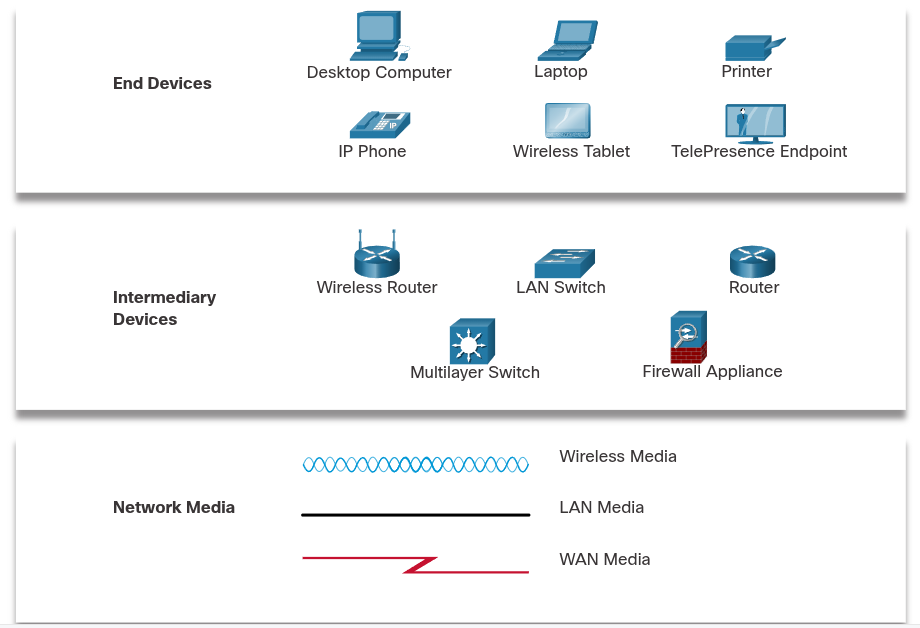
End devices: Desktop computers, laptops, printers, IP phones, wireless tablets, and TelePresence endpoints.
Intermediary (Intermediate) devices: Wireless routers, LAN switches, routers, multilayer switches, and firewall appliances.
Network media: Wireless Media (transmitted via electromagnetic waves through air), LAN Media (usually copper cabling for local networks), WAN Media (cabling/connections for wide-area networks).
What role does an end device play in message transmission across a network?
An end device acts as either the source (initiator/sender) or the destination (recipient) of a transmitted message.
How does a sending host specify where a network message should be delivered?
By using the unique network address of the destination host when initiating communication.
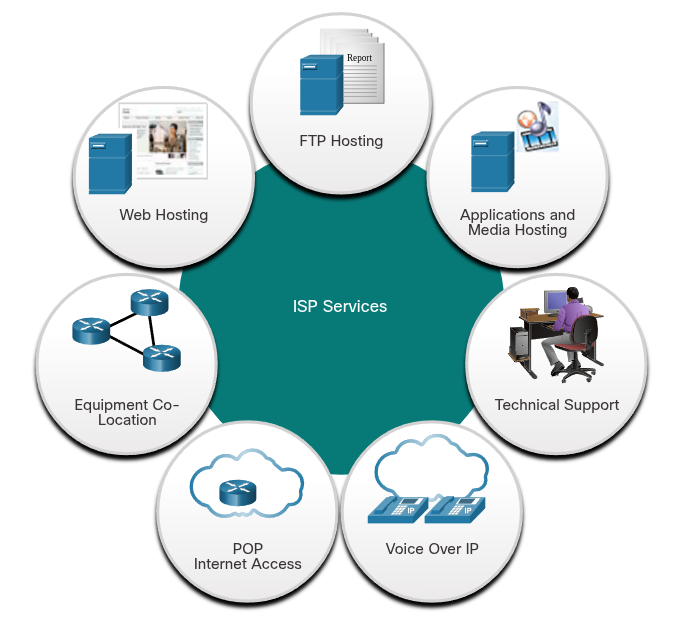
What is an Internet Service Provider (ISP)?
A provider that supplies the connection link between a local network (e.g., home/business) and the global internet. ISPs connect to each other in a hierarchical structure, ensuring that internet traffic generally takes the shortest path from source to destination.
What is the internet backbone, and what is its primary physical transmission medium?
Definition: A network of high-speed data links connecting major service provider networks in metropolitan areas worldwide.
Primary Medium: Fiber-optic cables (run underground between cities and undersea between continents).
ISP Connections
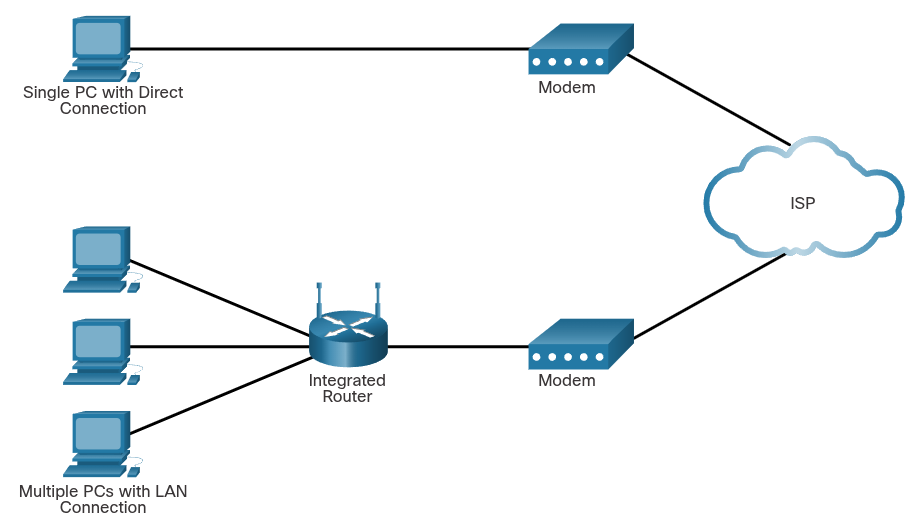
The interconnection of ISPs that forms the backbone of the internet is a complex web of fiber-optic cables with expensive networking switches and routers that direct the flow of information between source and destination hosts. What device is required to securely connect a local computer or network to an ISP?
A router (typically a wireless integrated router).
Wireless Networks
GPS: Receiving signals from Satellites that cover the globe.
Bluetooth: Wireless technology, communication over short distances, multiple devices - connection - same time. Low power.
Wi-Fi: Uses radio waves for devices to communicate.
Near-Field Communication (NFC): Uses electromagnetic fields to transmit data. Extremely short distance.
What four key precautions should be taken to protect Wi-Fi communications on mobile devices?
Never send login or password details in unencrypted plaintext.
Use a VPN connection when transmitting sensitive data.
Enable security on home networks.
Use WPA2 or higher encryption for network security.
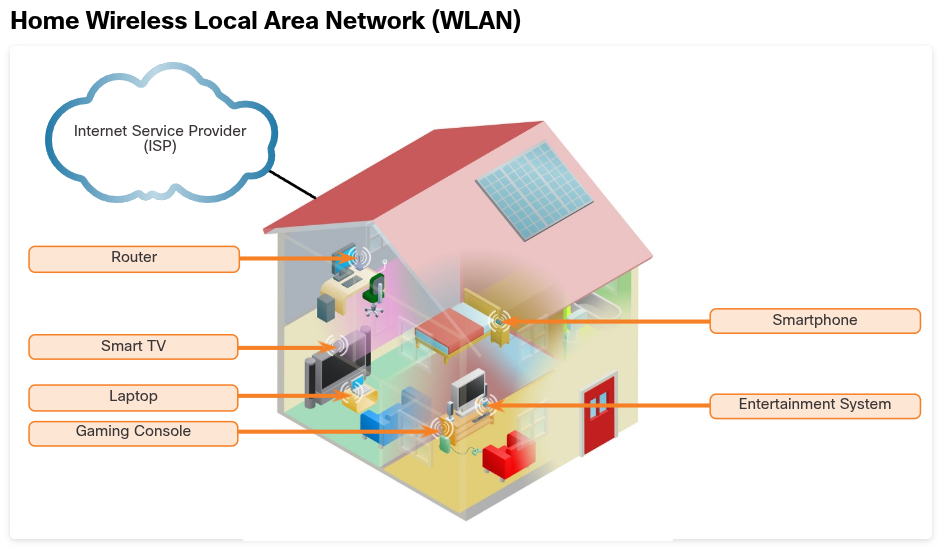
Home Network
It’s a small LAN with devices that usually connect to an integrated router and to each either in order to exchange information.
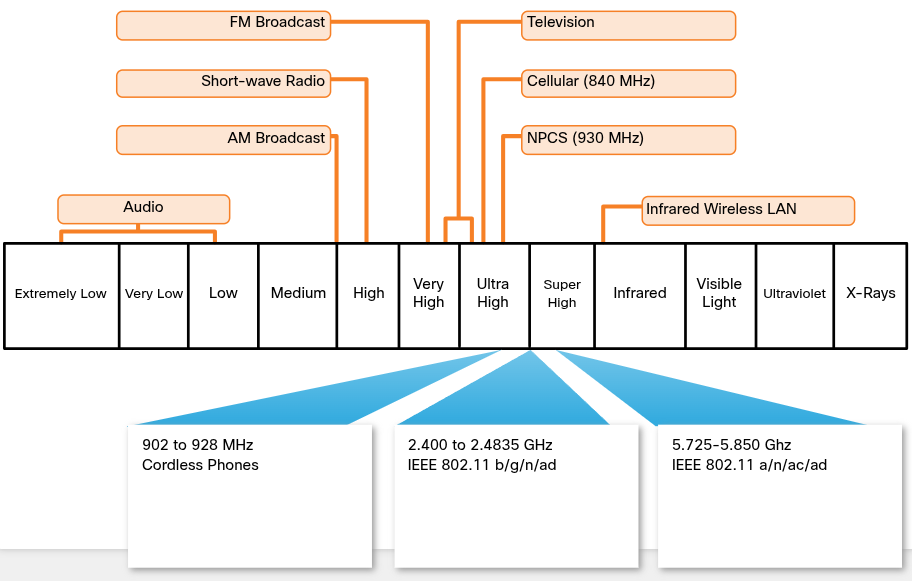
LAN Wireless Frequencies
The wireless technologies most frequently used in home networks are in the unlicensed 2.4 GHz and 5 GHz frequency ranges.
Bluetooth is a technology that makes use of the 2.4 GHz band.
Other technologies that use the 2.4 GHz and 5 GHz bands are the modern wireless LAN technologies that conform to the various IEEE 802.11 standards.
How do IEEE 802.11 (Wi-Fi) technologies compare to Bluetooth regarding power and range?
802.11 devices transmit at a much higher power level, giving them a greater range and improved throughput compared to Bluetooth.
What is the most commonly implemented protocol suite for wired LAN connections?
The Ethernet protocol. What cable and connector type are standard for directly connecting wired devices in an Ethernet LAN?
Cable: Unshielded Twisted Pair (UTP) Ethernet patch cable.
Connector: RJ-45 connector
What are the three main types of physical media used for wired network connections?
Category 5e (Cat 5e) Cable (Twisted Pair): It’s the most common wiring used in a LAN. The cable is made up of 4 pairs of wires that are twisted to reduce electrical interference.
Coaxial Cable: It has an inner wire surrounded by a tubular insulating layer, that is then surrounded by a tubular conducting shield. Most coax cables also have an external insulating sheath or jacket.
Fiber-Optic Cable: They can be either glass or plastic with a diameter about the same as a human hair and it can carry digital information at very high speeds over long distances. They have a very high bandwidth, which enables them to carry very large amounts of data.
Which organization is responsible for creating technical standards for wireless networks?
The IEEE (Institute of Electrical and Electronics Engineers).
What is the primary role of the Wi-Fi Alliance?
Testing wireless LAN devices from different manufacturers to certify standard compliance and ensure interoperability (indicated by the Wi-Fi logo).
What are four essential wireless settings that must be configured on an 802.11 wireless router?
Network mode: Determines the type of technology that must be supported. For example,802.11b,802.11g,802.11n or Mixed Mode.
Network Name (SSID = Service Set Identifier): Used to identify the WLAN. All devices that wish to participate in the WLAN must have the same SSID.
Standard Channel: Specifies the channel over which communication will occur. By default, this is set to Auto to allow the access point (AP) to determine the optimum channel to use.
SSID Broadcast: Determines if the SSID will be broadcast to all devices within range. By default, set to Enabled.
What is the tradeoff between configuring an Access Point for a single 802.11 standard versus "Mixed Mode"?
Single Standard: Provides maximum speed for devices using that standard, but blocks devices that do not support it.
Mixed Mode: Allows legacy/older devices to connect, but overall network performance may be limited by slower standards.
What happens when SSID broadcast is disabled on a wireless router?
The network name is not publicly advertised. Legitimate clients must manually enter the SSID to connect to the wireless network. The SSD is a case-sensitive, alphanumeric string containing up to 32 characters, sent in the header of all WLAN frames.
Router Ports
Internet Port => WAN: This port is used to connect the device to another network. The internet port connects the router to a different network than the Ethernet ports. This port is often used to connect to the cable or DSL modem in order to access the internet.
Ethernet Port => LAN: These ports connect to the internal switch portion of the router. These ports are usually labeled “Ethernet” or “LAN”, as shown in the figure. All devices connected to the switch ports are on the same local network.
Which feature is characteristic of MAC address filtering in wireless networks?
It restricts device access to the network by using physical MAC addresses to specify exactly which devices are allowed (or denied) connection.
What are network protocols, and why are they necessary on a local network?
Protocols are sets of rules for communication. All hosts on a network must share a common protocol ("speak the same language") to communicate with each other.
Aspects of communications over the local network by Network Protocols
Message Format: The specific structure required for a message based on its type and delivery channel.
Message Size: Strict rules governing frame size, requiring long messages to be broken into smaller pieces for reliable delivery.
Encoding: Converts message data into bits/signals (light, sound, or electrical impulses) for transmission over media, which the receiving host decodes.
Timing: Determines transmission speed, when a host can send data, and total data sent per transmission.
Encapsulation: The process of adding header information (such as source/destination addressing and application data) to pieces of message data so they can be properly routed and delivered.
Request/Response: Requires an acknowledgment before sending subsequent messages.
Streaming: Continuous data transmission without requiring delivery acknowledgments.
All communications methods include a message source, destination, and transmission medium.
Communication Standards
The network it’s a combination of many different protocols that allows devices to really see their place in the network and how to communicate with other devices.
Ex. Protocols: IPv4, IPv6, ICMP, ICMPv6, TCP, UDP, HTTP/S, DNS, DHCP, DHCPv6, SSH, Ethernet, WLAN, ARP, and more
The protocols DHCP and ICMPv6 provide IP address info including:
What network I belong to
The address of the default gateway (where I send packets that are destined for a different network)
The IP address of the DNS server for when I know a domain name but not the IP address
IP is used to deliver the packet from the source of the info to it’s final destination, in this case the web server (similar to sending a letter). Whether or not that message is within the same network or has to go across multiple networks.
TCP is a protocol used to guarantee reliability, to make sure all the info that was sent was received. If any of the IP packets don’t make It to the destination, TCP resend them.
What is a networking or internet standard?
A set of rules determining how something must be implemented to ensure all connecting devices enforce the same protocols in the exact same manner. They allow completely different types of devices (e.g., a personal computer and a mobile phone) to exchange information seamlessly (e.g., formatting, forwarding, and receiving email).
Network Standards Organizations
These different standards are developed, published, and maintained by a variety of organizations, as IEEE, IANA, IETF, ICANN, ITU, TIA.
When a new standard is proposed, each stage of the development and approval process is recorded in a numbered Request for Comments (RFC) document so that the evolution of the standard is tracked. RFCs for internet standards are published and managed by the Internet Engineering Task Force (IETF).
Network Communication Models
Device: send a message, it’s actually using several protocols.
Ethernet Protocol: Used for NIC card to NIC card communications in the same network. (NIC = Network Interface Card).
HTTP: Governs the exchange or transfer of HTML.
What are the key benefits of using a layered model for network protocols?
Simplifies protocol design through standardized interfaces.
Promotes multi-vendor interoperability and competition.
Allows updates at one layer without breaking higher or lower layers.
Offers a shared reference terminology for network capabilities.
What are the 4 layers of the TCP/IP model, and what does each layer do?
Application: Formats data for the end user, managing encoding and session control.
Transport: Handles data delivery and communication sessions between end systems across networks.
Internet: Selects optimal paths and addresses traffic across interconnected networks.
Network Access: Manages physical hardware connections and transmission media.
Protocol Model
This model closely matches the structure of a particular protocol suite. A protocol suite includes the set of related protocols that typically provide all the functionality required for people to communicate with the data network.
The TCP/IP model is a protocol model because it describes the functions that occur at each layer of protocols within the TCP/IP suite.
Reference Model
This type of model describes the functions that must be completed at a particular layer, but does not specify exactly how a function should be accomplished.
A reference model is not intended to provide a sufficient level of detail to define precisely how each protocol should work at each layer.
The primary purpose of a reference model is to aid in clearer understanding of the functions and processes necessary for network communications.
The most widely known internetwork reference model was created by the Open Systems Interconnection (OSI) project, It's used for data network design, operation specifications, and troubleshooting.
OSI Model Layer
Layer 7 (Application): Contains protocols used for process-to-process communications.
Layer 6 (Presentation): Provides for common representation of the data transferred between application layer services.
Layer 5 (Session): Provides services to the presentation layer to organize its dialogue and to manage data exchange.
Layer 4 (Transport): Defines services to segments, transfers, and reassembles data for individual communications between the end devices.
Layer 3 (Network): Provides services to exchange the individual pieces of data over the network between identified end devices.
Layer 2 (Data Link): Describe methods for exchanging data frames between devices over a common media.
Layer 1 (Physical): Describe the mechanical, electrical, functional, and procedural means to activate, maintain, and de-activate physical connections for a bit transmission to and from a network device.
OSI Model and TCP/IP Model Comparison
The TCP/IP model is a method of visualizing the interactions of the various protocols that make up the TCP/IP protocol suite.
It does not describe general functions that are necessary for all networking communications. It describes the networking functions specific to those protocols in use in the TCP/IP protocol suite.
For example, at the network access layer, the TCP/IP protocol suite does not specify which protocols to use when transmitting over a physical medium, nor the method of encoding the signals for transmission. OSI Layers 1 and 2 discuss the necessary procedures to access the media and the physical means to send data over a network.
The functions that occur at the internet layer in the TCP/IP model are contained in the network layer of the OSI Model.
The transport layer functionality is the same between both models.
However, the network access layer and the application layer of the TCP/IP model are further divided in the OSI model to describe discrete functions that must occur at these layers.
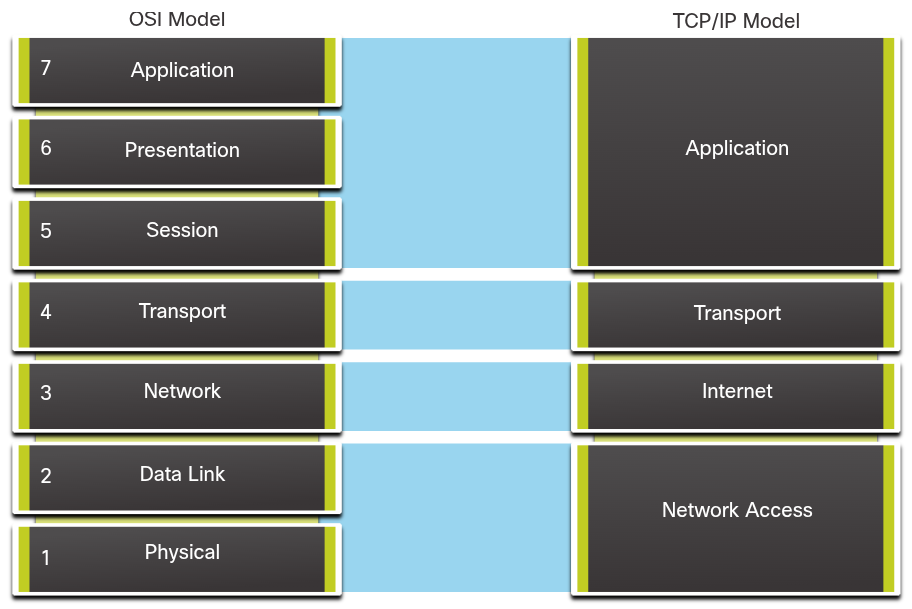
How do OSI Layers 3 and 4 directly map to the TCP/IP model layers?
OSI Layer 4 (Transport) maps directly to the TCP/IP Transport Layer. This layer describes general services and functions that provide ordered and reliable delivery of data between source and destination hosts.
OSI Layer 3 (Network) maps directly to the TCP/IP Internet Layer. This layer is used to describe protocols that address and route messages through an internetwork.
How does the TCP/IP Application layer correspond to the OSI model?
A single TCP/IP Application layer encompasses the functions of three distinct OSI layers: Session (Layer 5), Presentation (Layer 6), and Application (Layer 7). The TCP/IP application layer includes several protocols that provide specific functionality to a variety of end user applications. The OSI model Layers 5, 6, and 7 are used as references for application software developers and vendors to produce applications that operate on networks.
How does the TCP/IP Network Access layer correspond to the OSI model, and why study OSI Layers 1–2?
The TCP/IP Network Access layer spans both OSI Layer 1 (Physical) and OSI Layer 2 (Data Link).
The OSI model is studied because TCP/IP does not specify physical media transmission or signal encoding methods, which are explicitly detailed in OSI Layers 1 and 2.
Network Media Types
Network media provides the connectivity and the path for the communications to travel over in a network. Wireless or copper connectivity. The most common type of connectivity in an Ethernet network is using unshielded twisted pair or UTP for short.
What are the three main types of network media and how is data encoded in each?
Copper (Metal Wires): Data is encoded as electrical impulses.
Fiber-Optic (Glass/Plastic Fibers): Data is encoded as pulses of light.
Wireless: Data is encoded via modulation of electromagnetic wave frequencies.
Data is transmitted across a network on media. The media provides the channel over which the message travels from source to destination.
What are the 4 main criteria used to choose appropriate network media?
Distance: Maximum distance the media can successfully carry a signal.
Environment: Conditions of the installation environment.
Bandwidth/Speed: Amount of data and speed required for transmission.
Cost: Total cost of media and installation.
Common Network Cables - Twisted-Pair Cable
Ethernet technology generally uses twisted-pair cables to interconnect devices. Because Ethernet is the foundation for most local networks, twisted-pair is the most commonly encountered type of network cabling.
In twisted-pair, wires are grouped in pairs and twisted together to reduce interference. The pairs of wires are colored so that you can identify the same wire at each end. Typically, in each pair, one of the wires is a solid color and its partner is the same color striped onto a white background.
Common Network Cables - Coaxial Cable
Coaxial was one of the earliest types of network cabling developed. Coaxial cable is the kind of copper cable used by cable TV companies. It is also used for connecting the various components which make up satellite communication systems. Coaxial cable has a single rigid copper core that conducts the signal. This core is typically surrounded by a layer of insulation, braided metal shielding, and a protective jacket. It is used as a high-frequency transmission line to carry high-frequency or broadband signals.
Common Network Cables - Fiber-Optic Cable
Fiber-optic cable can be either glass or plastic with a diameter about the same as a human hair and it can carry digital information at very high speeds over long distances. Because light is used instead of electricity, electrical interference does not affect the signal. Fiber-optic cables have many uses as well as communications. They are also used in medical imaging, medical treatment, and mechanical engineering inspection.
They have a very high bandwidth, which enables them to carry very large amounts of data. Fiber is used in backbone networks, large enterprise environments, and large data centers. It is also used extensively by telephone companies.
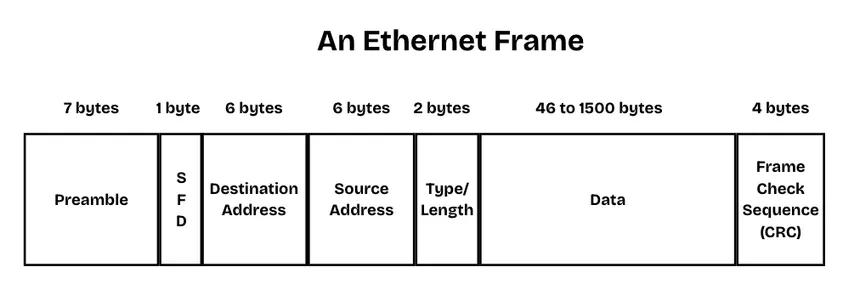
The Fields of the Ethernet Frame
Ethernet is technology commonly used in local area networks. Devices access the Ethernet LAN using an Ethernet Network Interface Card (NIC). Each Ethernet NIC has a unique address permanently embedded on the card known as a Media Access Control (MAC) address. The MAC address for both the source and destination are fields in an Ethernet frame.