CCNA Part 2
 Call Kai
 Learn
Learn Practice Test
 Spaced Repetition
 Match
Match Flashcards
 Knowt Play
1/159

There's no tags or description
Looks like no tags are added yet.
Name | Mastery | Learn | Test | Matching | Spaced | Call with Kai | Chat |
|---|
No analytics yet
Send a link to your students to track their progress
160 Terms
What is a Floating Static Route and what is its function?
By default, a static route has an AD of 1.
A Floating Static Route is configured with an administrative distance higher than the running dynamic routing protocol (e.g., setting AD to 120 when OSPF is running with AD 110).
Function: The static route remains inactive (not installed in the routing table) as long as the dynamic route is active. If the dynamic route fails, the floating static route immediately enters the routing table as a backup
How does a Cisco router decide which route to use? There are 4 routing decisions it goes through.
Longest Prefix Match (Most Specific Route): Always wins first when forwarding traffic for a specific target IP address, regardless of AD or metric.
Administrative Distance (AD): Used when deciding which route source to install into the routing table when learned from different protocols for the exact same destination subnet.
Metric: Used when deciding between paths learned from the same protocol for the exact same destination subnet.
ECMP: Applied when multiple paths from the same protocol have the exact same metric.
Router A receives a packet destined for 10.20.0.14. Its routing table contains the following entries:
S 10.20.0.0/22 [AD: 1, Metric: 0]
R 10.20.0.0/24 [AD: 120, Metric: 2]
D 10.20.0.0/26 [AD: 90, Metric: 2560]
O 10.20.0.0/28 [AD: 110, Metric: 10]
Which route will Router A use to forward the packet?
Answer: The OSPF route (10.20.0.0/28).
Explanation: Although the static route has the lowest AD and EIGRP has a lower AD than OSPF, these entries are for different subnet mask lengths (prefix lengths). The Longest Prefix Match rule takes precedence above AD and Metric. The destination IP 10.20.0.14 matches /28 (range 10.20.0.0 - 10.20.0.15), which is the most specific mask.
Note: RIP (Routing Information Protocol)
Type: Distance Vector Interior Gateway Protocol (IGP).
Standard: Industry standard (non-proprietary).
Metric: Hop Count (Maximum = 15 hops; 16 hops is considered unreachable) [00:02:43]. Link bandwidth is completely ignored (e.g., a 10 Gbps link and a 10 Mbps link both equal 1 hop).
What is the update interval of RIP?
Update Interval: Sends routing table updates every 30 seconds
What is the AD of RIP?
120
What is the difference between RIPv1 and RIPv2 in terms of addressing support, subnet mask info, and messaging type?
Feature | RIPv1 | RIPv2 |
Addressing Support | Classful only (Class A, B, C) | Classless (Supports VLSM & CIDR) |
Subnet Mask Info | Not sent in advertisements | Included in advertisements |
Messaging Type | Broadcast (255.255.255.255) | Multicast (224.0.0.9) |
What are the commands to configure RIPv2 on a router?
Router(config)# router rip
Router(config-router)# version 2
Router(config-router)# no auto-summary
Router(config-router)# network 10.0.0.0
Router(config-router)# passive-interface g2/0
Router(config-router)# default-information originate
no auto-summary: Disables automatic classful network summarization.
The network command behavior:
Commands are classful (e.g., entering 10.12.0.0 automatically truncates to 10.0.0.0).
Function: Identifies local interfaces whose IP addresses fall within the specified network range. It activates RIP on those interfaces to form adjacencies and advertises the interface's exact prefix length (not the classful network).
passive-interface <interface>: Prevents RIP update messages from being sent out of an interface while still advertising the interface’s subnet to neighbors.
default-information originate: Advertises a local default route (0.0.0.0/0) to downstream RIP neighbors.
Note: EIGRP (Enhanced Interior Gateway Routing Protocol)
Type: Advanced/Hybrid Distance Vector IGP.
Vendor Support: Originally Cisco proprietary; now an open standard, though predominantly deployed on Cisco equipment
What is the multicast address for EIGRP?
Multicast Address: 224.0.0.10
What metric calculation does EIGRP use?
Metric Calculation: Uses Bandwidth (slowest link in the path) and Delay (sum of delays) by default (K1=1, K3=1)
What is the AD for EIGRP internal routes? What about for external routes?
Internal routes: 90
External routes: 170
What does EIGRP support in addition to Equal-Cost Multi-Path (ECMP)?
Unique Feature: Supports Unequal Cost Load Balancing
EIGRP and OSPF use wildcard masks (inverted subnet masks) in network statements. How do you calculate the wildcard mask?
Just subtract each octet of the normal subnet mask from 255
/24 (255.255.255.0) —> 0.0.0.255
/28 (255.255.255.240) —> 0.0.0.15
/32 (255.255.255.255) —> 0.0.0.0
What is the selection order for how EIGRP chooses what the router ID will be?
Manual Configuration: eigrp router-id <id> command.
Highest Loopback IP: Highest IP address among configured virtual loopback interfaces.
Highest Physical IP: Highest IP address among active physical interfaces
What are the commands to configure EIGRP?
Router(config)# router eigrp 1
Router(config-router)# no auto-summary
Router(config-router)# passive-interface GigabitEthernet2/0
Router(config-router)# network 10.0.0.0
Router(config-router)# network 172.16.1.0 0.0.0.15
Router(config-router)# eigrp router-id 1.1.1.1
Note: The Autonomous System (AS) number (e.g., 1) must match between neighboring routers to form adjacencies
What does the network command do?
A common point of confusion is thinking the network statement tells EIGRP "go talk to a router at this remote network."
Instead, the network command acts as an internal filter for the local router:
Scans local interfaces: The router checks its own interfaces to see if any local IP address matches the network statement.
Enables EIGRP on matching interfaces: If an interface matches, EIGRP turns on for that specific port.
Starts sending Hellos: The router begins sending EIGRP Hello packets out that interface to 224.0.0.10 to discover neighbors.
Advertises the attached subnet: The router includes that interface's subnet in its EIGRP routing updates to its neighbors.
For two routers to form an EIGRP neighbor relationship and exchange routes, their configurations must agree on 4 parameters. What are they?
Parameter | Constraint | What Happens If It Mismatches? |
Autonomous System (AS) Number | Must match exactly (e.g., both use router eigrp 1). | Routers ignore each other's Hellos entirely. |
Primary IP Subnet | Neighboring interfaces must be on the same IP subnet. | Routers report a "neighbor not on same subnet" error. |
K-Values (Metrics) | Metric weight constants must match (default: K1=1, K3=1, others 0). | Neighbors will continuously form and immediately drop. |
Authentication | If configured, keys/passwords must match. | Hellos are rejected; neighbors won't form. |
Summary: The network engineer configures the AS Number and the local network statements to enable EIGRP on specific physical/virtual interfaces. Once enabled, the router automatically uses multicast (224.0.0.10) to find any neighbor on the same link that shares that AS Number!
note
What commands lets you verify RIP, EIGRP, and OSPF and see the configuration details?
‘show ip protocols’
What command lets you view the routes that formed from RIP and EIGRP?
show ip route
R: Code for RIP routes.
D: Code for EIGRP routes
In what scenario does a router use Administrative Distance (AD) to make a route selection decision?
A) When receiving multiple routes to different destinations from different protocols.
B) When receiving multiple routes to the same destination from the same protocol.
C) When receiving multiple routes to the same destination from different protocols.
D) When load balancing across equal-cost links.
C) When receiving multiple routes to the same destination from different protocols.
Simple EIGRP config example
Here are the exact network commands for R4 based on the topology and instructions in the image.
First, identify all interfaces on R4 that need to participate in EIGRP:
Loopback 0 Interface (Instruction #2): 4.4.4.4/32
FastEthernet 1/0 Interface (connected to R2): 10.0.24.0/30
FastEthernet 2/0 Interface (connected to R3): 10.0.34.0/30
GigabitEthernet 0/0 Interface (connected to SW1/PC1): 192.168.4.0/24
Option 1: Standard Method (Matching Subnet & Wildcard Mask)
Under router eigrp 100:
Plaintext
R4(config)# router eigrp 100
R4(config-router)# no auto-summary
R4(config-router)# network 4.4.4.4 0.0.0.0
R4(config-router)# network 10.0.24.0 0.0.0.3
R4(config-router)# network 10.0.34.0 0.0.0.3
R4(config-router)# network 192.168.4.0 0.0.0.255
Option 2: The Exact IP Method (0.0.0.0 Wildcard)
If you prefer using exact interface IP (interface on R4) addresses to avoid wildcard calculations:
Plaintext
R4(config)# router eigrp 100
R4(config-router)# no auto-summary
R4(config-router)# network 4.4.4.4 0.0.0.0
R4(config-router)# network 10.0.24.2 0.0.0.0
R4(config-router)# network 10.0.34.2 0.0.0.0
R4(config-router)# network 192.168.4.254 0.0.0.0
Note: In EIGRP, R1 knows that every destination network exists and how far away it is (the metric), but it has no idea how the routers behind its neighbors are physically wired together. It relies entirely on the word of its neighbors.
EIGRP is like road signs (Distance-Vector): R1 pulls up to an intersection and sees two signs:
Left (via R2): "Destin, FL — 500 miles"
Right (via R3): "Destin, FL — 550 miles"
R1 doesn't know if the road to the left is a straight highway or a winding backroad, nor does it know how many towns lie between R2 and Destin. It simply trusts R2's sign post, adds the distance to get to R2, and picks the shorter route.
note
Define Link-State routing (OSPF, IS-IS) and the pros and cons of it.
Link-State (e.g., OSPF, IS-IS): Every router builds and maintains a full connectivity map (topology) of the network. Each router independently executes the Shortest Path First (SPF) algorithm to compute the best path to every destination.
Pros: Faster convergence, highly accurate routing.
Cons: Higher RAM and CPU consumption due to maintaining complete network topology data.
What is the shortest path first algorithm that link state routers use to compute the best path to every destination?
Algorithm: OSPF uses Dijkstra’s Shortest Path First (SPF) Algorithm
What are Link State Advertisements (LSAs)?
Data packets sent by routers containing information about local links, connected networks, and link metrics
What is the Link State Database (LSDB)?
A repository storing all received LSAs. All routers within the same OSPF area share an identical LSDB
Define Flooding
Process of sending LSAs to all OSPF neighbors so every router in an area converges on the exact same topology map
Define LSA Refresh Rate
LSAs have a default aging timer of 30 minutes, after which they are re-flooded
Summarize the OSPF operation in 3 steps
Become Neighbors: Form adjacencies with neighboring routers on shared link segments.
Exchange LSAs: Flood LSAs so all area routers form matching LSDBs.
Calculate Best Paths: Run Dijkstra’s SPF algorithm locally to insert optimal routes into the routing table
Why use areas? What is the problem with running a single OSPF area in large networks (500+ routers)?
In large networks (e.g., 500+ routers), running a single OSPF area causes:
Excessive CPU load from frequent SPF re-calculations.
High memory usage for huge LSDBs.
Network-wide LSA flooding when any single link fluctuates.
Dividing the network into smaller areas confines SPF calculations and LSA flooding within each boundary
Define Backbone Area (Area 0)
The central area to which all other OSPF areas must connect
Define Internal Router
A router with all interfaces in a single area
Define Area Border Router (ABR)
A router with interfaces in multiple areas (e.g., Area 0 and Area 1). It maintains a separate LSDB for each area
Define Autonomous System Boundary Router (ASBR)
An OSPF router connected to an external network (such as an ISP or another routing protocol domain)
Define Backbone Router
Any router with at least one interface in Area 0 (includes ABRs connected to Area 0)
Define Intra-Area Route
A route to a destination within the same OSPF area
Define Inter-Area Route
A route to a destination in a different OSPF area
Rules for OSPF area: Define rule Contiguous Area
An area must be physically connected together, not split into separated parts
Rules for OSPF area: Define rule Backbone Connection
All non-backbone areas must directly attach to Area 0 via an ABR
Rules for OSPF area: Define rule Subnet Matching Area
Interfaces on the same IP subnet must belong to the same OSPF area to become neighbors
What are the commands to configure OSPF?
Entering OSPF configuration mode requires a Process ID (locally significant and does not need to match between neighbors):
Router(config)# router ospf 1
Router(config-router)# network 10.0.12.0 0.0.0.3 area 0
Router(config-router)# network 10.0.13.0 0.0.0.3 area 0
Router(config-router)# network 172.16.1.0 0.0.0.15 area 0
Note: OSPF uses wildcard masks (inverse subnet masks) and requires specifying the area parameter in the network statement
What does the network command tell OSPF to do?
Look for any interfaces with an IP address contained in the range specified in the network command
Activate OSPF on the interface in the specified area
The router will then try to become OSPF neighbors with other OSPF activated neighbor routers
What is an OSPF passive interface and how is it configured?
Prevents OSPF Hello messages from being sent out host-facing interfaces while still advertising that subnet to neighbors:
Router(config-router)# passive-interface g2/0
What is the command/commands to propagate a default static route to all downstream OSPF routers?
To propagate a default static route to all downstream OSPF routers:
Router(config)# ip route 0.0.0.0 0.0.0.0 203.0.113.2
Router(config)# router ospf 1
Router(config-router)# default-information-originate
OSPF identifies each router using a 32-bit IPv4-formatted Router ID. In what order does OSPF go about selecting the Router ID for each router?
Manual Configuration: Set via router-id <x.x.x.x>
Highest Active Loopback IP: Highest IP address among all loopback interfaces.
Highest Active Physical IP: Highest IP address among active physical interfaces
What is the command to manually set the router-id?
router-id 1.1.1.1
What verification command displays information such as process and router id, AD, ASBR status, and ECMP?
‘show ip protocols’
Process ID & Router ID
Administrative Distance (AD): 110 for OSPF
ASBR Status: Displays if the router is redistributing external routes or default routes
Equal-Cost Multi-Path (ECMP): Defaults to 4 paths (max paths adjustable up to 16/32 depending on IOS)
If you run the ‘default-information-originate’ command on a router, what does that router transform into?
Executing default-information-originate transforms the router into an ASBR by importing an external default route into the OSPF domain.
What does OSPF use as its routing metric?
OSPF uses Cost as its routing metric. Cost is inversely proportional to bandwidth—faster links have lower costs.
What is the OSPF Cost Calculation Formula?
Cost = Reference Bandwidth / Interface Bandwidth
Interface Type | Default Speed | Formula | Calculated Cost | Actual OSPF Cost |
Ethernet | 10 Mbps | 100 / 10 | 10 | 10 |
Fast Ethernet | 100 Mbps | 100 / 100 | 1 | 1 |
Gigabit Ethernet | 1000 Mbps | 100 / 1000 | 0.1 | 1 |
10G Ethernet | 10,000 Mbps | 100 / 10000 | 0.01 | 1 |
What is the problem with the OSPF reference bandwidth defaulting to 100?
Fast Ethernet, Gigabit, and 10G Ethernet all have an equal cost of 1 by default, preventing OSPF from choosing optimal high-speed paths
What is the command to modify OSPF cost using auto-cost reference bandwidth (recommended for global scaling)?
Mode: Router OSPF configuration mode (config-router#).
Command: auto-cost reference-bandwidth <bandwidth-in-Mbps>
Example: Setting reference bandwidth to 100,000 Mbps (100 Gbps) makes Gigabit Ethernet cost = 100 and Fast Ethernet cost = 1000.
Critical Rule: Must be configured identically on all routers in the OSPF domain
What is the command to manually modify the OSPF cost on an individual interface?
Mode: Interface configuration mode (config-if#).
Command: ip ospf cost <cost-value>
Overrides automatically calculated costs.
Recommended for individual link tuning
How is the total OSPF cost to a destination calculated?
Total OSPF cost to a destination is the cumulative sum of all outgoing (exit) interface costs along the path
What is the default OSPF cost of loopback interfaces?
1
Routers exchange OSPF ____ ____ to discover neighbors and negotiate adjacencies
Hello messages
What is the Hello multicast IP?
224.0.0.5 (All OSPF Routers)
What is the Hello IP Protocol Number?
89
What are the default Hello timers for ethernet (Hello, Dead)?
Hello = 10 sec, Dead = 40 sec (4x Hello timer)
The 7 OSPF Neighbor States:
What is the first OSPF neighbor state and what occurs in this state?
Down State
It is the initial state. No Hello packets have been received from the neighbor.
The 7 OSPF Neighbor States:
What is the second OSPF neighbor state and what occurs in this state?
Init State
A Hello is received. A Hello packet is received from a potential neighbor, but the receiving router's own Router ID (RID) is not listed in the Hello message.
The 7 OSPF Neighbor States:
What is the third OSPF neighbor state and what occurs in this state?
2-Way State
Bidirectional communication is established. Both routers receive a Hello packet with its own RID in it. Both routers are now official neighbors. Designated Router (DR) and Backup Designated Router (BDR) elections occur at this stage on multi-access networks.

The 7 OSPF Neighbor States:
What is the fourth OSPF neighbor state and what occurs in this state?
ExStart State
Master/Slave negotiation. The two routers prepare to exchange information about their LSDB. Before that, they have to choose which one will start the exchange. They do this in the Exstart state. The router with the higher RID will become the Master and initiate the exchange. The router with the lower RID will become the slave.
The 7 OSPF Neighbor States:
What is the fifth OSPF neighbor state and what occurs in this state?
Exchange State
Database description exchange. Routers exchange DBD packets containing headers/summaries of their LSAs. Routers compare received summaries with their own LSDB to identify missing LSAs.
The 7 OSPF Neighbor States:
What is the sixth OSPF neighbor state and what occurs in this state?
Loading State
Database synchronization. The routers send Link State Request (LSR) messages to request that their neighbors send them any LSAs they don’t have. LSAs are sent in Link State Update (LSU) messages. The routers send LSAck messages to acknowledge that they received the LSAs.
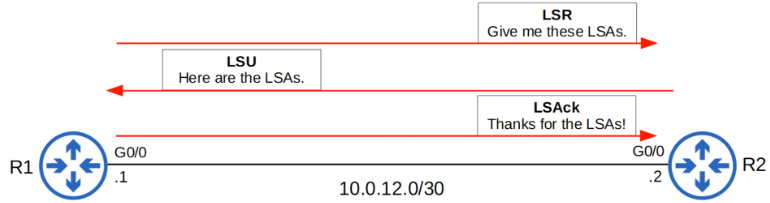
The 7 OSPF Neighbor States:
What is the seventh OSPF neighbor state and what occurs in this state?
Full State
Full adjacency achieved. The routers have a full OSPF adjacency and identical LSDBs. They continue to send and listen for Hello packets (every 10 seconds by default) to maintain the neighbor adjacency. Every time a Hello packet is received, the ‘Dead’ timer (40 seconds by default) is reset. If the Dead timer counts down to 0 and no Hello message is received, the neighbor is removed. The routers will continue to share LSAs as the network changes to make sure each router has a complete and accurate map of the network (LSDB).
Define the Hello message type
Discovers and maintains neighbor relationships
Define the DBD (Database Description) message type
Summary list of router's LSDB used during Exchange state
Define the LSR (Link-State Request) message type
Requests specific full LSAs from a neighbor
Define the LSU (Link-State Update) message type
Carries requested LSAs to sync databases
Define the LSAck (Link-State Acknowledgment) message type
Explicitly acknowledges receipt of LSUs
Instead of using network commands under router ospf <process-id>, OSPF can be enabled directly on individual interfaces. What are the commands that let you do this?
Router(config)# interface gigabitethernet 0/0
Router(config-if)# ip ospf 1 area 0
What are the commands that let you secure all user-facing interfaces without manually disabling OSPF on each?
Router(config)# router ospf 1
Router(config-router)# passive-interface default
Router(config-router)# no passive-interface gigabitethernet 0/0
What verification command displays neighbor Router IDs, state (e.g., FULL/DR), dead timer countdown, and interface?
show ip ospf neighbor
What verification command provides a quick concise summary of OSPF-enabled interfaces, process ID, area, cost, and neighbor count?
show ip ospf interface brief
What verification command displays detailed interface parameters including Hello/Dead timers, cost, and DR/BDR roles?
show ip ospf interface <interface-id>
Note: Think of the DR like the teacher in a classroom, the BDR like the substitute teacher, and the DROthers like the students
note
Define DROthers (Students)
Students (DROthers) only talk directly to the teacher and substitute. They don't exchange full OSPF databases with each other. Their relationship with other students stops at the 2-WAY state.
Define DR (Teacher) and BDR (Substitute)
The Teacher (DR) and Substitute (BDR) must talk to every single student to gather homework and pass out assignments. Therefore, the teacher is FULL with every student.
In OSPF, what is the difference between a Neighbor and an Adjacency (FULL)?
Neighbor: Any router on the same segment that you have discovered via Hello packets and established a two-way communication with (the 2-WAY state).
Adjacency (FULL): A neighbor with whom you have fully synchronized Link-State Databases (LSDBs) (the FULL state).
Define loopback interfaces. What are their purpose? How do they correlate with OSPF?
Definition: A virtual interface inside the router that stays in an up/up state unless manually shut down.
Purpose: Provides a stable, permanent IP address that does not depend on hardware or physical links.
OSPF Integration: Automatically chosen as the OSPF Router ID (RID) if no explicit ID is configured, ensuring a stable identity across the network.
OSPF behaves differently depending on the underlying ___ ___ ___ type
OSPF behaves differently depending on the underlying Layer 2 media type
What is the first OSPF network type and what is its default media type?
Broadcast Network Type
Default Media: Ethernet and FDDI interfaces
Broadcast Network Type: Neighbor Discovery
Neighbor Discovery: Dynamic via multicast address 224.0.0.5
Broadcast Network Type: DR/BDR Election
Designated Router (DR) and Backup Designated Router (BDR) are elected per subnet to reduce LSA flooding.
Non-DR/BDR routers become DROther
Broadcast Network Type: Adjacency Behavior
DROthers form FULL adjacencies only with the DR and BDR.
DROthers remain in the 2-WAY state with each other
Broadcast Network Type: Multicast Communication
All OSPF Routers: 224.0.0.5
DR and BDR only: 224.0.0.6
Broadcast Network Type: How does the DR/BDR election work?
Highest OSPF Interface Priority wins (Default = 1, Range = 0–255). Priority 0 prevents a router from becoming DR/BDR.
Highest Router ID (RID) serves as the tiebreaker.
Non-Preemptive: Once elected, the DR/BDR roles persist until the OSPF process resets or the interface fails.
Step-Up Rule: If the current DR fails, the BDR immediately becomes the new DR, and a new BDR election is held
What is the second OSPF network type and what is its default media?
Point-to-Point Network Type
Default Media: Serial links using PPP or HDLC encapsulation
Point-to-Point Network Type: Neighbor Discovery
Neighbor Discovery: Dynamic via 224.0.0.5
Point-to-Point Network Type: DR/BDR Election
DR/BDR Election: None. Directly connected routers establish a direct FULL adjacency
Point-to-Point Network Type: Timers
Timers: Default Hello = 10s, Dead = 40s (same as Broadcast)
What is the third OSPF network type and what is its default media type?
Non-Broadcast Network Type
Default Media: Frame Relay and X.25
Non-Broadcast Network Type: Neighbor Discovery
Neighbor Discovery: Manual configuration required (neighbor command)
Non-Broadcast Network Type: Timers
Timers: Default Hello = 30s, Dead = 120s
To successfully establish neighbor relationships and exchange routing updates, routers must satisfy 8 matching parameters. What are these parameters?
1. Area Number | Must match on interconnecting interfaces. |
2. IP Subnet | Interfaces must reside on the same network subnet/mask. |
3. Process Status | OSPF process must not be administratively shut down. |
4. Unique Router IDs | Duplicate RIDs prevent adjacency formation. |
5. Timers Match | Hello and Dead intervals must match on both ends. |
6. Authentication | Passwords and authentication methods must match. |
7. MTU Match | Mismatched MTU causes neighbor state to get stuck in EXSTART/EXCHANGE. |
8. Network Type | Mismatched types can show FULL status but fail to populate routes in the routing table. |
What command lets you fix duplicate router ID?
no router-id
What command lets you fix Hello or Dead Interval Mismatch?
no ip ospf hello-interval
no ip ospf dead-interval