GCSE Computer Science Paper 2 (Coding)
 Call Kai
 Learn
Learn Practice Test
 Spaced Repetition
 Match
Match Flashcards
 Knowt Play
1/84

Earn XP
Description and Tags
Paper 2 ('computational thinking, algorithms & programming'): Algorithms, Programming fundamentals, Producing robust programs, Boolean logic, Programming languages and integrated development environments, 1hr 30, 80 marks, 50% of GCSE
Name | Mastery | Learn | Test | Matching | Spaced | Call with Kai |
|---|
No analytics yet
Send a link to your students to track their progress
85 Terms
abstraction
the process of removing unnecessary details of a problem to focus on the important features to implement a solution eg modelling a real life object, environment, action(s), or concept
implementations include sport, computer games, flight / car simulators, transport maps
when creating a program, developers must identify important features that will contribute to solving the problem or have a role to play in the solution
computer games use abstraction to hide unnecessary complexity so players can focus on enjoyment. in realistic situations, abstraction helps make games visually believable & responsive without overwhelming users with technical details eg algorithms controlling NPCs
the london underground map is abstracted - travellers don’t need to know the geographical layout of the routes, only the sequence of stops
decomposition
the process of breaking down a large problem into a set of smaller problems
smaller problems are easier to solve, each can be solved independently of others, problems can be tested independently, can be combined to produce a solution to the full problem
computer games are made with decomposition. the complex task is broken into smaller, manageable parts like levels, characters & landscapes, which are designed & developed independently by different teams. once they’re completed they are combined to create the full game
algorithmic thinking
the process of creating step by step instructions in order to produce a solution to a problem
requires the use of abstraction & decomposition to identify steps and create an algorithm (precise set of rules) to solve the problem
eg if a recipe is followed precisely it leads to the desired outcome
algorithmic thinking can lead to solutions being automated eg traffic lights
searching algorithms
precise step by step instructions that a computer follows to efficiently locate specific data in massive datasets. binary search & linear search
binary search
keeps halving a dataset by comparing the target value with the middle value, going left if smaller, right if bigger until it finds the value or realises it’s not there
data must be in order. work with datasets with numbers or words - words are compared alphabetically
identify the middle value of the set
compare it to the value you’re looking for
if it’s the value you’re looking for, stop
if it’s bigger than the one you’re looking for, create a new list with the values left of it
if it’s smaller than the one you’re looking for, create a new list with the values right of it
repeat with the new list
fast for large datasets, efficient for repeated searches. dataset must be in order, more complex to implement
linear serach
starts with the first value and checks each one until all have been checked. can be performed even if the values aren’t in order
check the first value
if it’s the one you’re looking for, stop
move onto the next value & check it
repeat until you’ve checked all values & not found the one you’re looking for
these aren’t the values you’re looking for 😲
works on unsorted datasets, faster than binary on very small datasets, simple to understand & implement. slow for large datasets, inefficient as it starts at the beginning each time
sorting algorithm
a precise step by step instruction that a computer can follow to sort data in massive datasets efficiently
bubble sort
merge sort
insertion sort
bubble sort
starts at the beginning of a dataset and check values in pairs & swaps them if they’re not in the right order. one full run of comparisons from beginning → end is a pass. multiple passes may be needed to sort the dataset. the algorithm is finished when there are no more swaps to make
compare the first 2 values
if they’re in the wrong order swap them
compare the next 2 values
repeat until you reach the end of the dataset (pass 1)
if you’ve made swaps, repeat from the start
if you’ve not made any swaps, stop - it’s in the right order
merge sort
uses the divide & conquer strategy of dividing a dataset into smaller sub datasets & merging them back together in the right order
divide the dataset into individual datasets by repeatedly splitting the set in half
merge pairs of sub-datasets together by comparing the first value in each dataset
repeat step 2 until all sub-datasets are merged together in 1 dataset
insertion sort
sorts 1 item at a time by placing it in the correct position of an unsorted list, repeating until all items are in the right place. values in the dataset can move as many places as they need
take the 1st value, this is now the sorted list
look at the next value & compare it to the first value. if it’s smaller, put it into the right position to the left. if not, keep it in the same position
repeat until all values have been compared & the list is in order
input
data / information being entered / taken into a program before it’s processed in the algorithm
values are read from an input device - keyboards (typing text), mice (selecting an item, clicking buttons), sensors (reading data eg temp, pressure or motion), microphone (capturing audio, speech recognition
without inputs programs aren’t useful as they can’t interact with the outside world & always produce the same result
process
a doing action performed in the algorithm that transforms inputs into the desired output
the CPU executes the instructions that define the process eg comparing 2 numbers, calculating an average
output
the result of the processing in an algorithm. usually the way a user can see if the algorithm works as intended
can take various forms - numbers, text, images, actions (triggering events)
values are sent to an output device from a computer program - monitors (displaying text / images / graphics), speakers (playing audio), printers (creating physical copies of documents / images)
structure diagrams
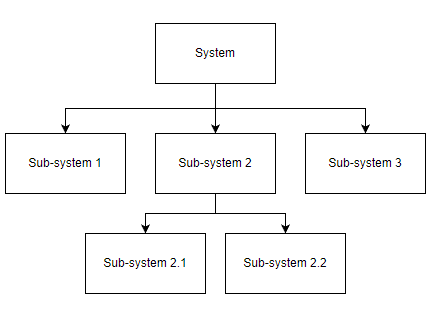
a visual representation of a problem decomposition
a tool to show how a complex program can be broken down into more manageable sub problems. a planning tool for developers during the analysis of a problem
pseudocode
a text based tool that uses short english words / statements to describe an algorithm. more structured than writing english sentences but very flexible
OCR exam reference language is the officially designed pseudocode seen in OCR based exams to describe algorithms. pseudocode has no official syntax so to keep exams consistent OCR has developed their own
#output
print('hello')

#input
num = input('enter a number')

#selection
if num == 2 then
elseif num < 4 then
endif

#for loops
for i = 1 to 10
next i

#while loops
while (i != 11)
endwhileflowcharts
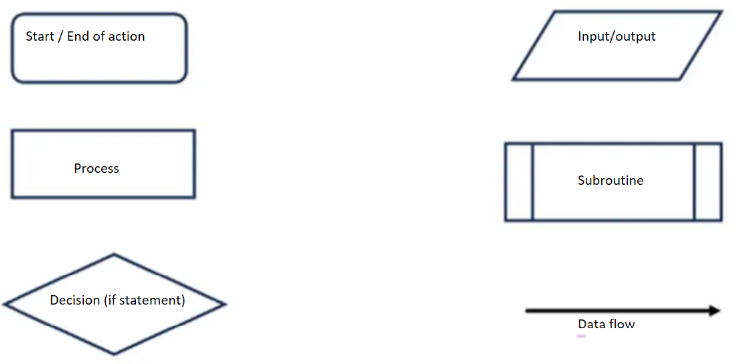
a visual tool that uses shapes to represent different functions to describe an algorithm. show input & output data, processes and any decisions or repetition. lines are used to show the flow of control
syntax errors
an error that breaks the grammatical rules of a programming language and stops it from running eg:
typos & spelling errors
missing/extra brackets/speech marks
misplaced/missing semicolons
invalid variable/function names
incorrect use of operators
incorrectly nested loops & code blocks
logic errors
when incorrect code is used that causes the program to run but produces an incorrect output / result eg:
incorrect use of operators (< or >, AND or OR)
looping too many times
indexing arrays incorrectly
using variables before they’re assigned
infinite loops
they can be hard to identify by the person who wrote the program, so trace tables are sometimes used to find them
trace tables
used to test algorithms & programs for logic errors that appear when an algorithm / program executes. can be used with flowcharts, pseudocode or program code
each stage of the algorithm is executed step by step. inputs, outputs, variables & processes can be checked for the right value when the stage is completed
can be used to discover the purpose of an algorithm by showing output data & intermediary steps, and record the state of the algorithm at each step / iteration
variable
a named memory location that holds data that can change during the execution of a program
can store a variety of different types of data eg numbers, text, true / false values etc. to store data in a variable, the process of assignment is used
constant
fixed data that can’t be changed during the execution of a program
a constant can store a variety of different types of data like variables. pi is a mathematical fixed value that would typically be stored as a constant
assignment
the process of storing data in a variable / constant under a descriptive name. performed using the = symbol
#assigning variables in reference language
x = 3
name = "sophia"

#assigning variables in python
x = 3
name = "sophia"

#assiging constants in reference language
const pi = 3.142

#assigning constants in python
PI = 3.142operators
symbols used to instruct a computer to perform a specific operation - arithmetic, comparison & boolean
arithmetic operators
Operator | reference language | python |
|---|---|---|
Addition |
|
|
Subtraction |
|
|
Multiplication |
|
|
Division |
|
|
Modulus (remainder after division) |
|
|
Quotient (whole number division) |
|
|
Exponentiation (to the power of) |
|
|
comparison operators
Operator | code |
|---|---|
Equal to |
|
Not equal to |
|
Less than |
|
Less than or equal to |
|
Greater than |
|
Greater than or equal to |
|
boolean operators
AND, OR, NOT
programming constructs
determines the order that lines of code are executed. control the logic & behaviour of code. sequence, selection & iteration
you can identify which programming constructs are used by looking at keywords - if, else, switch, case for selection, for, while, do for iteration, and if none are used it’s sequence
sequence
lines of code run one line at a time in the order they’re written from the first to last line
crucial to the flow of a program. instructions out of sequence can lead to unexpected behaviour / errors
selection
when the flow of a program is changed depending on a set of conditions. the outcome of this condition will determine which lines / block of code is run next
used for validation, calculation & making sense of a user’s choices
2 ways to write selection statements:
if/then/else statements - testing conditions sequentially
case select or switch statements - testing an expression against multiple possible constant values (cases)
select case can mean less code but only is useful when comparing multiple values of the same variable. if statements are more flexible & are generally used more in languages like python
iteration
repeating a line or block of code using a loop. can be:
count controlled: code repeated a fixed number of times (for loop)
for i in range (0,5):
	print(i)
condition controlled: code repeated until a condition is met (while loop)
password = ''
while password != 'secret':
password = input('what is the password?')data types
a classification of data into groups according to the kind of data they represent
computers use different data types to represent different types of data in a program
integer: whole numbers eg 10, -5, 0
real/float: numbers with a fractional part eg 3.14, -2.5, 0.0
character: a single character eg a, B, 6, £
string: a sequence of characters eg hello world, ABC, @#%!
boolean: true or false values - true, false
it’s important to choose the right data type for a situation to ensure accuracy & efficiency in the program. data types can be change within the program in casting
casting
when you convert one data type to another
to real:
float(value)to integer:
int(value)to string:
str(value)to boolean:
bool(value)
string manipulation
the use of programming techniques to modify, analyse or extract information from a string eg:
case conversion (modify)
length (analyse)
substrings (analyse)
concatenation (modify)
ASCII conversion (analyse)
string manipulation - case conversion
changing a string from one case to another
string = 'hello world'

#uppercase
string.upper()

#lowercase
string.lower()

#title case
string.title()string manipulation - length
counting the number of characters in a string
string = 'helloworld'
len(string)string manipulation - substrings
extracting a sequence of characters from a larger string. performed using slicing, using a specific start & end to slice out the desired characters
substrings are 0 indexed (starts at 0)
string[start character:end character]
string = 'computerscience'

#2-5
string(2:5)

#start-4
string(:4)

#4-end
string(4:)string manipulation - concatenation
the ability to join 2 or more strings together to form a single string. uses the + operator to join strings together
firstname = 'sarah'
surname = 'jones'

#for no spaces ('SarahJones')
fullname = firstname + surname

#for spaces ('Sarah Jones')
fullname = firstname + ' ' + surname

#string + variable
greeting = 'hello, ' + namestring manipulation - ASCII conversion
the ability to return an ASCII character from a numerical value & vice versa
#ascii - number
ord('A')

#number - ascii
chr(97)file handling
the use of programming techniques to work with info stored in text files. opening, reading, writing & closing text files
file = open('text.txt','r') #or 'w' or 'a'

file.readline()

file.write('lala') #or writeLine

file.close()
when opening a file you can use:
‘r’ to only read from a file
‘w’ to write to a new file. if the file named doesn’t exist it’ll be created. if a file with the same name exists the contents will be overwritten
‘a’ to append to a file - writing to the end of an existing file
not closing a file can lead to data not being saved properly, loss / corruption if the program crashes, or file remains being locked, preventing access by other programs / users
database
an organised collection of data. allows easy storage, retrieval & management of information. useful when working with large amounts of data
stored on secondary storage, often in remote servers so multiple users can access it at the same time - useful for online systems
data can be sorted & searched efficiently making use of more advanced structures
more secure than text files
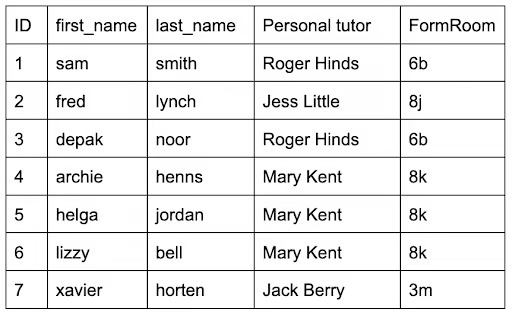
uses fields & records to organise how it stores data
fields & records
a field is one piece of information relating to one person / item / object. represented by a column
a record is a collection of fields relating to one person / item / object. represented by a row

databases with text files
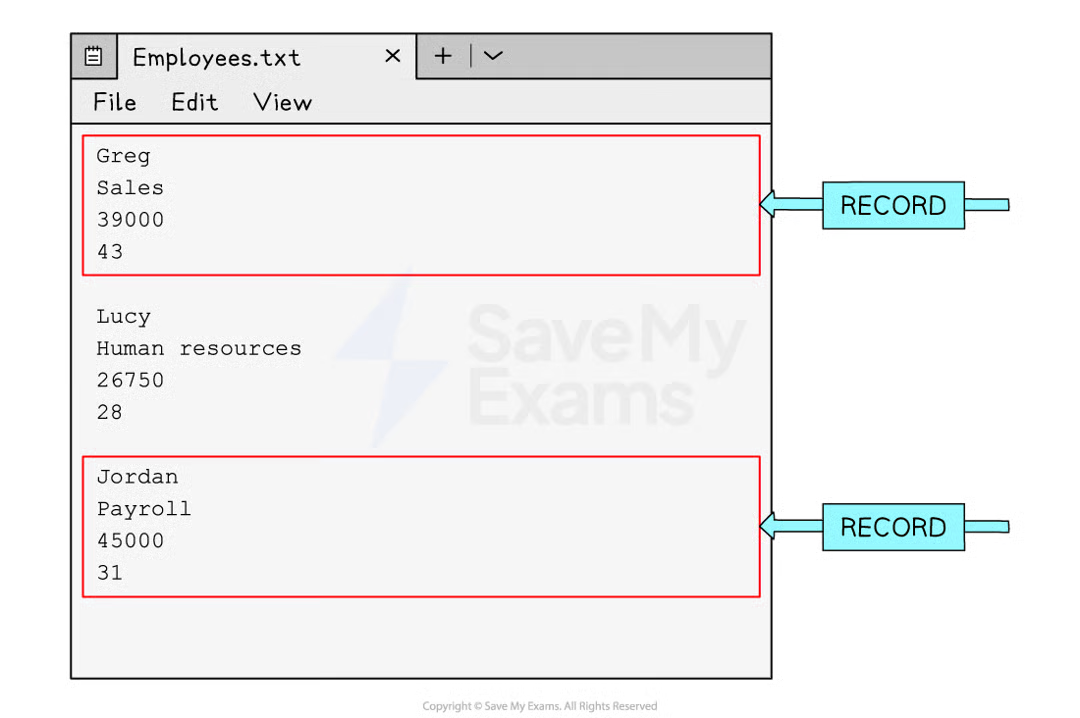
useful when working with small amounts of data. stored on secondary storage & read into a program when being used
used to store info when the application is closed
each entry is stored on a separate line / separated with an identifier like a comma
can be hard to know where a record begins & ends
arrays
an ordered, static set of elements in a fixed size memory location. useful when working with small amounts of data. stored in main memory (RAM)
used to store info when the application is in use. can be more efficient & faster to search than working with text files. can only store 1 data type
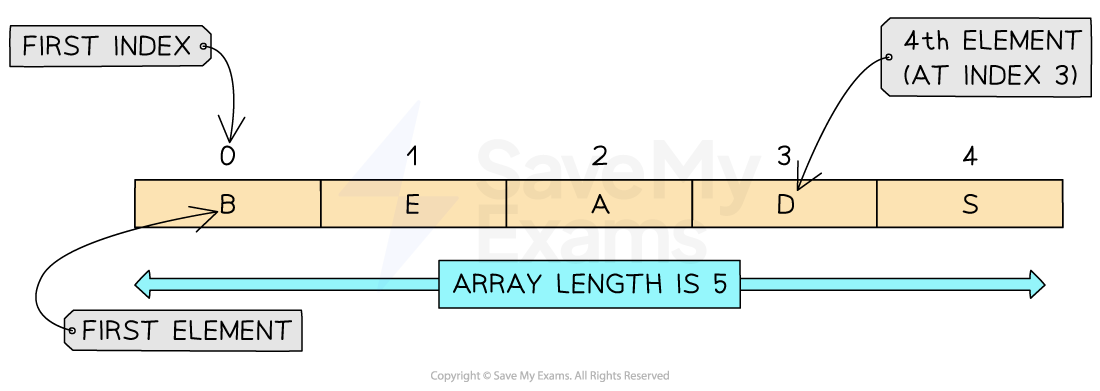
1D array is called a linear array. 0 indexed (indexes start at 0)
SQL
Structured Query Language - a programming language used to interact with a DBMS (DataBase Management System - software used to manage databases)
allows users to locate specific info in a database using 3 basic commands:
select - retrieves data from a database table
from - specifies the table to retrieve data from
where - filters the data based on a specified condition
SELECT *
SELECT name, age
FROM users
WHERE age > 30
the * symbol is a wildcard and selects all fields in the table
array commands
#create blank 1D array with 5 elements, initialised to 0
scores = [0]*5

#create empty array
scores = []

#assign a 'element' to index 4
colours[4] = 'red' 2D arrays
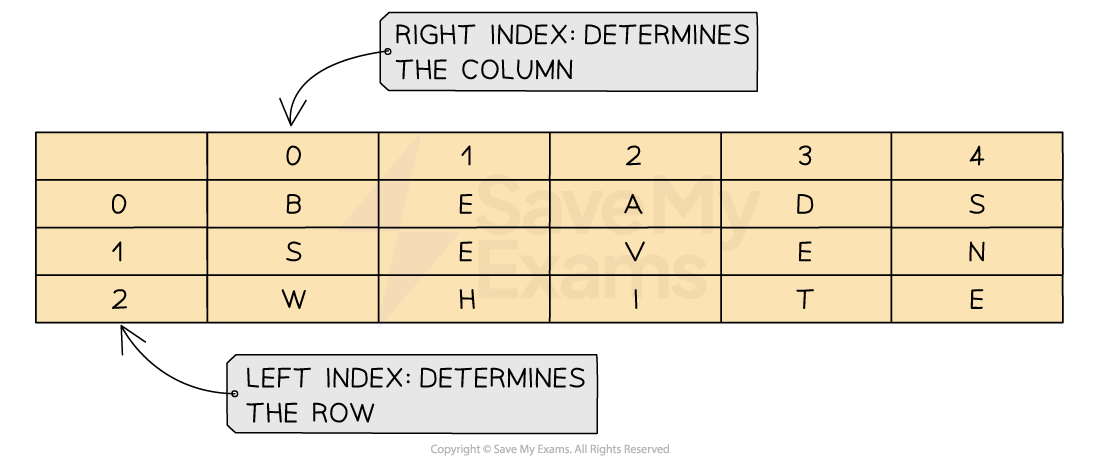
extends the concept of a 1D array by adding another dimension. visualised as a table with rows & columns
when navigating through you must go down the rows & then across the columns
2D array commands
#create an array with names in row 0 and scores in row 1
array = [['rob', 'paul', 'hayley'], [10, 5, 8]]

#assign a value to row 0, column 1
array[0][1] = 'holly'

#access a value
name = array[2,2]subroutines
a sequence of instructions that perform a specific task or set of tasks. used to simplify a program by breaking it into smaller more manageable parts. used to:
avoid duplicating code - can be reused throughout a program
improve readability & maintainability of code
perform calculations, retrieve data or make decisions based on input
to use them you ‘call’ them from the main program
parameters
values that are passed into a subroutine. can be variables or values and they are located in brackets after the name of the subroutine eg:
def mysubroutine(parameter1, parameter2)

#and then call it
mysubroutine(computerscience,sophia)
subroutines can have multiple parameters
subroutines: functions vs procedures
a function returns a value, a procedure doesn’t
#create function
def myfunction(parameter):
	#do stuff here

#call a function
result = myfunction(data)

#create a procedure
def myprocedure(name):
	print('hi', name)

#call a procedure
myprocedure('sophia')global vs local variables
a global variable is a variable declared at the outermost level of a program (outside any modules eg functions / procedures)
have a global scope - can be accessed & modified from anywhere in the program
a local variable is declared in a specific scope eg a function / code block
have a local scope - are only accessible in the bock they’re defined in & their lifetime is limited to that block. once its execution ends, it’s destroyed & its memory released
random number generation
import random
number = random.randint(1,10)defensive design
an approach to software development where every possible input from a user is considered in order to anticipate all the ways a user could misuse a program. ensures the final program is reliable & robust for all users
the programmer must ensure the software has a way of dealing with potential errors to ensure it doesn’t crash. they must ensure their software deals with these errors:
peripherals commonly don’t perform as intended & this can cause issues for the end user eg if a printer jams / runs out of paper the user should be able to reprint their document
programs like word processing software must be able to account for errors on the disk drive eg the disk running out of space, files / folders not being found & corrupted files. the user should have an alternate option eg using another disk
when communication errors occur (eg connection to a host server is lost) applications should have a way for the user to cancel their request & try again or automatically retry if the connection resumes
authentication
making sure a person is who they say they are
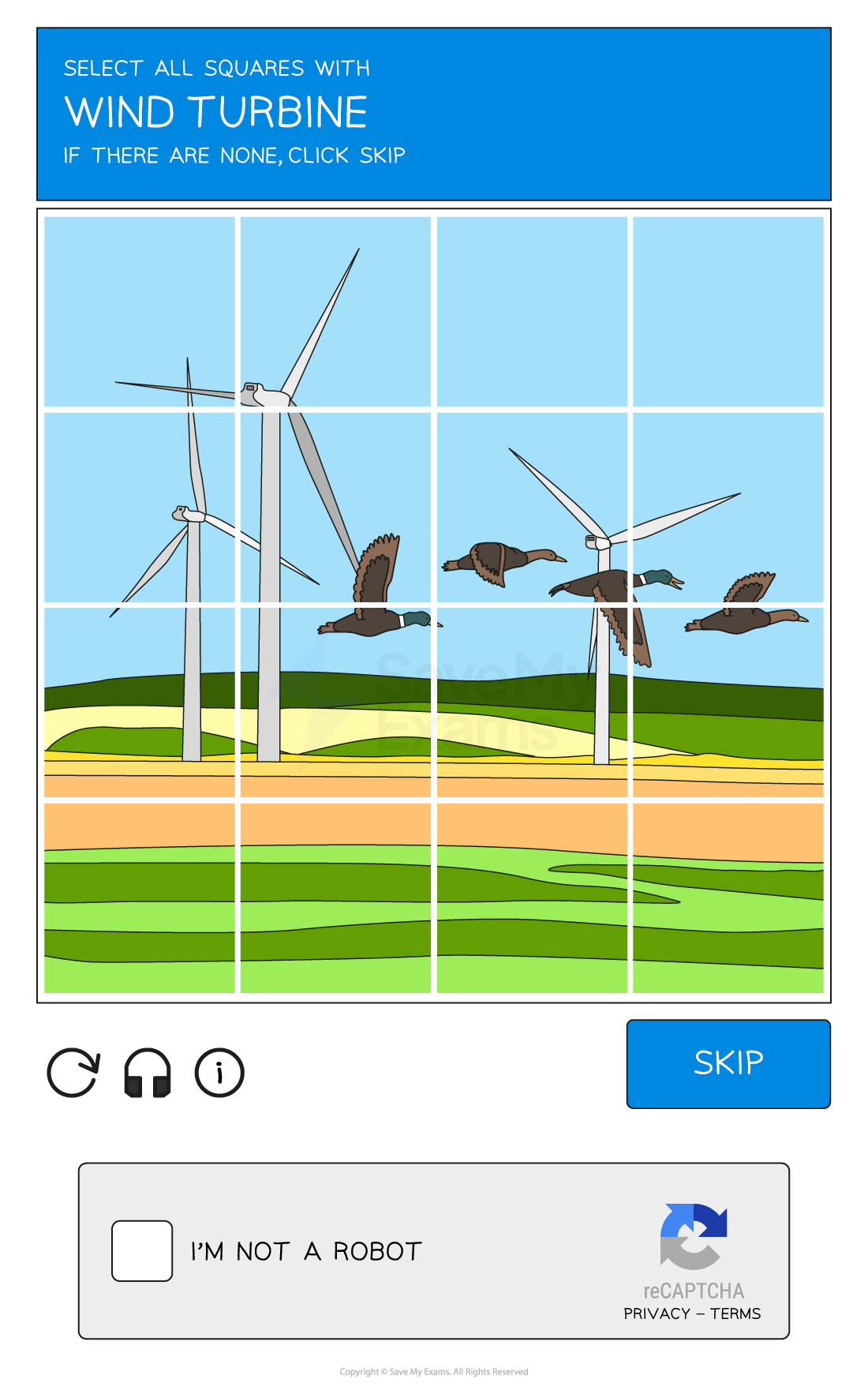
ensuring that a system is secure by asking the user to complete tasks to prove they are an authorised user of the system. done because bots can submit data in online forms
can be done in different ways eg usernames & passwords, CAPTCHA, or other methods like allowing users to recover passwords via emails / SMS codes, and encrypting data
CAPTCHA
Completely Automated Public Turing test to tell Computers and Humans Apart
input validation
code used to check that an input from a user is acceptable & matches the requirements of the program. 5 categories:
length check: checks the length of a string
password_length = len(password)
while password_length < 8:
	password = input('enter a password more than 8 characters')
type check: checks the data type of a field
while age.isdigit() == False:
	age = input('enter your age as a number')
range check: ensures data entered as a number falls in a particular range
while age < 0 or age > 100:
	age = int(input('enter your age between 0-100'))
presence check: checking that any data has been entered in a field
while name == '':
	name = input('enter your name')
format check: checks that data has been entered in the right format
while '@' not in email or '.' not in email:
	email = input('enter a valid email address')
more than 1 can be used on a field eg a password field having a length, presence & type check
maintainability
used to ensure programmers can easily understand what a program is doing months / years after having first written it or when programming as part of a large team so each person understands what the code is doing
commenting to explain the purpose of a section of code
white space to make each section clear & easy to see
indentation to show each instance of selection & iteration and to make it clear which code belongs to which clause
sensible variable names so the name explains the purpose & to prevent confusion later on
use of subroutines to split up programs into reusable sections of code, removing the need for duplicating code
reasons for testing
ensure there are no errors / bugs in code
ensure the code performs as it was intended
ensure no one can gain unauthorised access to the system
check the program solves the initial problem & meets all requirements
2 types used to ensure programs are robust & meet the requirements that have been set out - iterative testing & final testing
iterative testing
repeatedly testing the program while continuing to make changes & improvements
each part of a program & every pathway through the program is tested, including each branch / pathway inside IF statements
done during the development of the program. ensures the program is fully functional & working as intended
each time you run your code while working on it, you are testing it using iterative testing
final testing
testing that all parts (modules) of a program work together. checking the program against real data to ensure it meets all requirements - normal, boundary & erroneous data
done towards the end of the development cycle once the entire program is complete. can include alpha & beta testing
identifying syntax & logic errors in testing
syntax errors breaking the rules of the programming language will mean the program won’t execute. easily identifiable as the IDE will provide info on the error to help the programmer be able to fix it
logic errors can be harder to find because the program will still run. check logical operators, boolean operators & division by 0
types of test
normal tests: user enters data that should be accepted
boundary tests: user enters data on the edge of what’s acceptable
erroneous tests: user enters the wrong data type
invalid tests: user enters data that’s the right data type but outside what’s accepted
boolean logic
used in computer science & electronics to make logical decisions
TRUE or FALSE & represented as 1 or 0. inputs & outputs are given letters to represent them. special symbols used to make writing expressions much easier
boolean operators can be combined to produce more complex expressions, forming a logic expression. brackets are used to clarify the order of operations & logic diagrams are used to visually represent the combos. eg:

logic gates
a visual way of representing a boolean expression. AND, OR, NOT
logic gates - AND
conjunction
only works if both inputs are true
TRUE and TRUE = TRUE, otherwise = FALSE
symbol A ∧ B

logic gates - OR
disjunction
works if either inputs are true
TRUE or FALSE = TRUE
FALSE or FALSE = FALSE
symbol A ∨ B

logic gates - NOT
negation - reverses the input value
NOT TRUE = FALSE, NOT FALSE = TRUE
symbol ¬ A

truth tables
a tool used in logic to visualise the results of boolean expressions. represent all possible inputs & associated outputs for a given boolean expression
to create truth tables for logic expressions, calculate the number of rows needed (2number of inputs), and start with 000 and count up in 3-bit binary. add new columns for new parts of the expression - a column for each result of an operator

AND truth table
A | B | A ^ B |
0 | 0 | 0 |
0 | 1 | 0 |
1 | 0 | 0 |
1 | 1 | 1 |

OR truth table
A | B | A V B |
0 | 0 | 0 |
0 | 1 | 1 |
1 | 0 | 1 |
1 | 1 | 1 |

NOT truth table
A | ¬A |
0 | 1 |
1 | 0 |

programming languages
since the invention of the computer people have needed to learn how to communicate with them using programming languages
early computers were complex & instructions would have to be written in binary code. this was v slow so over time new generations of programming languages have enabled people to be faster & more efficient at writing programs as they resemble human language
programming languages can be split into 2 categories: low level (first generation, second generation) and high level (third generation)
low-level programming languages
a language that directly translates to machine code understood by the processor
allow direct control over hardware components like memory & registers. written for specific processors to ensure they embed the correct machine architecture
machine code (first generation) & assembly code (second generation)
low-level programming languages - first generation
machine code is a first generation language. instructions are written in binary code & directly executable by the processor
low-level programming languages - second generation
assembly code is a second generation language that’s written using mnemonics - abbreviated text commands eg LDA (load) & STA (store)
programmers can write human-readable programs that correspond almost exactly to machine code. needs to be translated into machine code to be executed. 1 instruction = 1 machine code instruction
complete control over the system components, occupy less memory & execute faster, direct manipulation of hardware
hard to write & understand, machine dependent, more prone to errors, knowledge of computer architecture needed
high-level programming languages
use english-like statements to allow users to program with easy to use code, eg python, java, basic, C+
allow for clear debugging & are easier to maintain. needed due to the development of processor speeds & the increase in memory capacity. 1 instruction translates to many machine code instructions
needs to be translated into machine code for the computer to be able to execute it
easier to read & write, easier to debug, portable (can be used on any computer), 1 line of code = multiple commands
user isn’t able to directly manipulate hardware, needs to be translated, program may be less efficient
translators
a program that translates program source code into machine code so it can be executed directly by a processor
low-level languages (machine code, assembly code) are translated using an assembler
high-level languages (python, java) are translated using a compiler or interpreter
compiler
translates high level languages into machine code all in one go. used when a program is finished & has been checked for syntax errors
compiled code can be distributed & run without the need for translation software as an executable file is created
if compiled code contains any errors, after fixing it’ll need re-compiling
high execution speed, optimises code, original source code isn’t seen. can be memory intensive, hard to debug, changes must be recompiled, designed solely for 1 specific processor
interpreter
translates high-level languages into machine code one line at a time. each line is executed after translation & if any errors are found the process stops
used when a program is being written in the development stage. interpreted code is harder to distribute as translation software is needed for it to run
stops when it finds syntax errors, easier to debug, requires less RAM to process code. slower execution, program must be translated every time it runs, executed as it - no optimisation
IDEs
Integrated Development Environment - software designed to make writing high level languages more efficient
include tools & facilities to make the process of creating & maintaining code easier:
editor
error diagnostics
run-time environment
translators
IDE tools - editor
gives users an environment to write, edit & maintain high level code. provide:
basic code formatting tools: changing font, text size, making it bold etc
coloured keywords: using colour to make it easier to identify keywords (eg print, input, if)
code editing: auto completion & auto correction of code, bracket matching & syntax checks
commenting: allows sections of code to be commented out to stop it from being run

IDE tools - error diagnostics
tools that help identify, understand & fix errors in code:
identifying errors: highlighting particular areas of code / providing direct error messages where the error may have appeared eg indentation errors
debugger: provides a ‘step through’ command that provides step by step instructions & shows what’s happening to code line by line - useful for finding logic errors

IDE tools - run-time environment
gives the user the ability to run & see the corresponding output of a high level language

IDE tools - translator
built in compiler or interpreter to translate code without the need for extra software
computational thinking
solving problems that can be implemented by a computer system
3 main principles: abstraction, decomposition, algorithmic thinking