Module 1: Introduction to Computer Network
 Call Kai
 Learn
Learn Practice Test
 Spaced Repetition
 Match
Match Flashcards
 Knowt Play
1/41

Earn XP
Description and Tags
Prelim Topic
Name | Mastery | Learn | Test | Matching | Spaced | Call with Kai | Chat |
|---|
No analytics yet
Send a link to your students to track their progress
42 Terms
Computer Network
An interconnection of computers and computing equipment using either wires or radio waves over small or large geographic areas
Local Area Network (LAN)
Networks that are small in geographic size spanning a room, floor, building, or campus
Metropolitan Area Network (MAN)
Networks that serve an area of 1 to 30 miles, approximately the size of a typical city
Wide Area Network (WAN)
A large network that encompasses parts of states, multiple states, countries, and the world
The internet is a prime example of this
Personal Area Network (PAN)
A network of a few meters, between wireless devices such as phones, laptops, PDAs, and other similar devices
Voice Network
A network that transmits only telephone signals (almost extinct)
Data Network
A network that transmits voice and computer data (replacing voice networks)
Data Communications
The transfer of digital or analog data using digital or analog signals
Telecommunications
The study of telephones and the systems that transmit telephone signals (becoming simply data communications)
Network Management
The design, installation, and support of a network, including its hardware and software
Network Cloud
A network (local or remote) that contains software, applications, and/or data
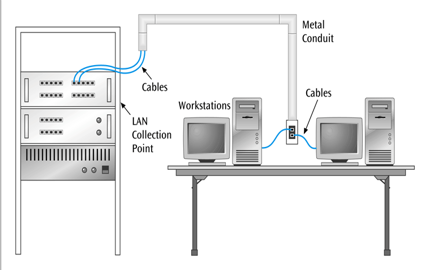
Microcomputer-to-Local Area Network
(Type of network layout)
It is common to see in businesses, academic environments, and now homes
Typically a medium to high speed connection
A device needs to have a Network Interface Card (NIC), the NIC connects to a switch.
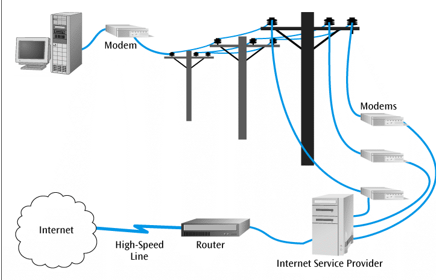
Microcomputer-to-Internet
(Type of network layout)
It is common with home users and small businesses
Dial up, Digital Subscriber Line (DSL), Cable, Fiber
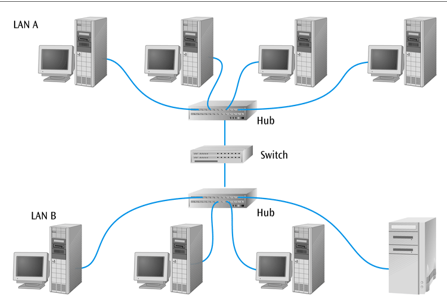
Local Area Network-to-Local Area Network
(Type of network layout)
It is found in systems where 2 or more LANs are required to intercommunicate
A bridge like device such as a switch is typically used to interconnect LANs. The switch can filter frames
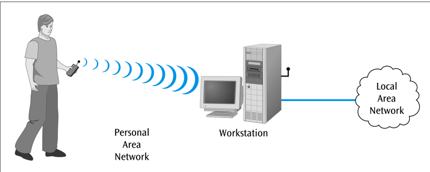
Personal Area Network-to-Workstation
(Type of network layout)
Connects wireless devices such as laptops, music devices, earphones, PDAs
Used over short distances such as a few meters
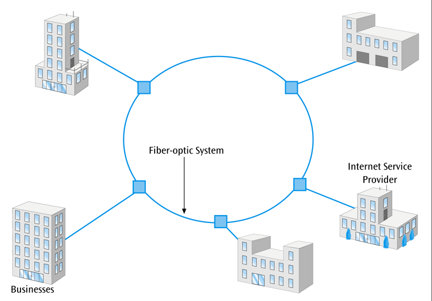
Local Area Network-to-Metropolitan Area Network
(Type of network layout)
Used to interconnect companies and their LANs to networks that encompass a city
High-speed networks with redundant circuits
Metro Ethernet is the latest example of this
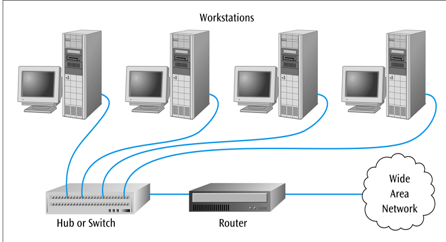
Local Area Network-to-Wide Area Network
(Type of network layout)
A way to interconnect a user on a LAN computer to the Internet
Router performs a Network Address Translation (NAT) to connect a LAN to the Internet; A router converts your LAN’s private IP addresses into a single public IP address so that all of your devices can connect to the internet.
Routers are more complex devices than switches
Wide Area Network-to-Wide Area Network Layout
(Type of network layout)
High-speed routers and switches are used to connect one WAN to another
Thousands of WANs across North American, many interconnected via these routers and switches
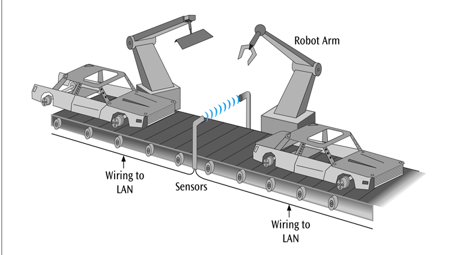
Sensor-to-Local Area Network
(Type of network layout)
Not all LANs deal with microcomputer workstations
This is common in industrial and laboratory environments
Assembly lines and robotic controls depend heavily on sensor-based LANs
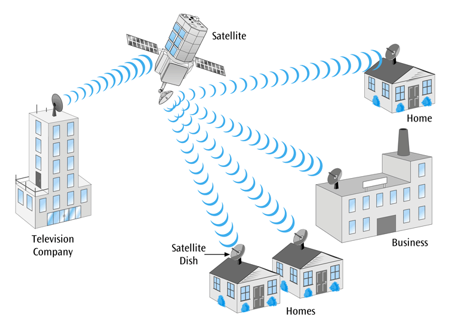
Satellite and Microwave Layout
(Type of network layout)
Typically a long distance wireless connections, many applications include long distance telephone, television, radio, long-haul data transfers, and wireless data services
Typically expensive services but many companies offer competitive services and rates
Newer shorter-distance services such as Wi-Max
Cell Phone Layout
(Type of network layout)
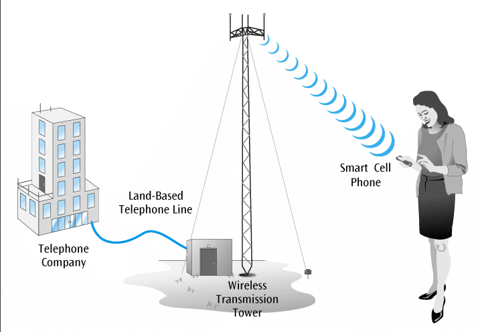
Divides a city into areas called cells. Each cell has a cell tower with antennas. Your phone connects to this tower using radio waves.
Third generation services available in many areas and under many types of plans with fourth gen services starting to appear.
Terminal/Microcomputer-to-Mainframe Computer
(Type of network layout)
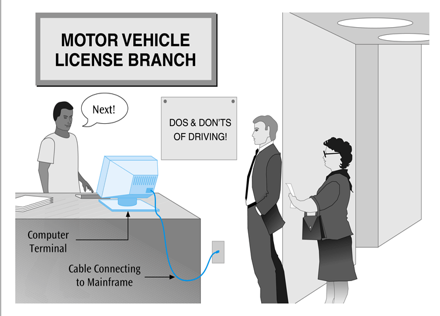
Legacy systems from the 1960s and 1970s, is still used in many types of businesses for data entry and data retrieval
There are few dumb terminals still left today; most are microcomputers with terminal emulation card, a web browser and web interface, Telnet software, or a thin client.
Application Layer
(Layers of TCP/IP Model)
The top layer of the TCP/IP Suite, where applications like web browsers, email clients, and file sharing tools interact with the network
Acts as a bridge between user applications and lower network layers
Common network applications include web browsing, email, file transfers and remote logins
Transport Layer
(Layers of TCP/IP Model)
Ensures reliable and efficient delivery of data between devices, managing segmentation, ordering, and retransmission as needed.
Performs series of functions (at the end-points of the connection) necessary for presenting the data package properly to the sender or receiver
Breaks large messages into packets and reassembles them at the destination.
Network/Internet Layer
(Layers of TCP/IP Model)
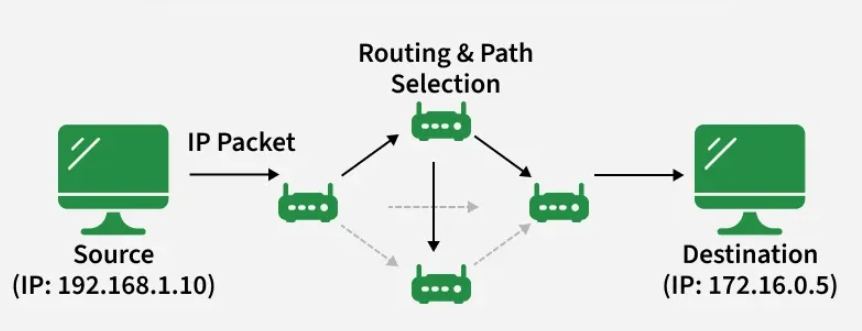
Responsible for addressing, packaging, and routing data packets so they can travel across networks and reach the correct destination device. It ensures that data can move between different networks efficiently.
Transfers data packet from node to node (ex. router to router) within network
Network Access Layer
(Layers of TCP/IP Model)
Responsible for taking the data and transforming it into a frame with header, control and address information, and error detection code, then transmitting it between the workstations and the network
Responsible for physically transmitting data over network hardware, including cables, switches, and wireless connections. It handles how data is formatted for the network medium and ensures it reaches the next device on the path.
Physical Layer
(Layers of TCP/IP Model)
Handles the transmission of bits (1s and 0s) over a communications channel
Is simply the hardware part of the network. It is the raw cables, radio waves, and electrical signals.
Includes the voltage levels, connectors, media choice, modulation techniques
5
How many Layers are there in the TCP/IP Protocol Suite?
Transmission Control Protocol (TCP)
This is used when data accuracy and reliability are needed
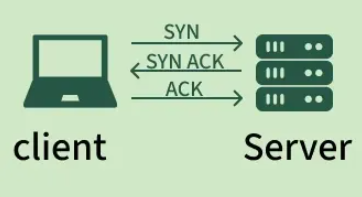
This checks for errors in the data, data is broken into packets, and ensures these packets arrive in the correct sequence.
Establishes acknowledgements between sender and receiver
Example uses: Loading web pages, downloading files, sending emails, or any application where data must be complete and accurate.
User Datagram Protocol (UDP)
This is unreliable type of connection, only used when speed is more valuable than data accuracy.
It checks for errors but does not fix it, packets may arrive out of order but the protocol does not fix it, and lost or damaged data is not resent.
Uses fewer resources and is much faster
Example uses: Voice calls, video conferencing, Live-streaming, online gaming, or any real-time systems where speed is prioritized more than accuracy.
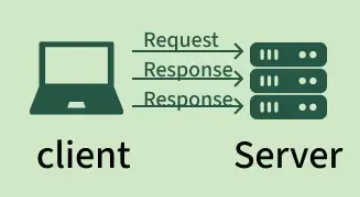
Open Systems Interconnection (OSI) model
A conceptual model created by the International Organization for Standardization which enables diverse communication systems to communicate using standard protocols; provides a standard for different computer systems to be able to communicate with each other.
Seen as a universal language for computer networking. It is based on the concept of splitting up a communication system into seven abstract layers, each one stacked upon the last.
Application Layer (7)
(Layers of the OSI Model)
Top layer of the OSI model, the layer that directly interacts with data from the user (HCI). Web browsers and email clients rely on this layer to initiate communications.
Client Software applications are NOT part of the application layer; rather the application layer is responsible for the protocols and a data manipulation that the software relies on to present meaningful data to the user
Presentation Layer (6)
(Layers of the OSI Model)
Is responsible for making data presentable for applications to consume. This layer is responsible for translation, encryption, and compression of data.
Two communicating devices communicating may be using different encoding methods, so this is responsible for translating incoming data into a syntax that the application layer of the receiving device can understand.
Session Layer (5)
(Layers of the OSI Model)
This layer is responsible for opening and closing communication between two devices.
The time between when the communication is opened and closed is known as the session
Ensures that the session stays open long enough to transfer all the data being exchanged, and then promptly closes the session in order to avoid wasting resources.
Ex: This layer can also synchronize data transfers with checkpoints, when you download a 100 mb file, this layer sets a checkpoint every 5mb. If you disconnect this download and reconnect again, the session can be resumed to the last check point.
Transport Layer (4)
(Layers of the OSI Model)
It takes data from the session layer, break it up into chunks called segments (adds port numbers) before sending it to layer 3. This layer on the receiving device is responsible for reassembling the segments into data the session layer can consume.
Also responsible for flow control and error control.
Includes TCP and UDP
Imagine taking a giant book and ripping it into individual pages so you can easily mail them one by one. The receiver who receives these individual pages is responsible for reassembling these pages back into the giant book.
Network Layer (3)
(Layers of the OSI Model)
This layer is responsible for facilitating data transfer between two different networks
Finds the best physical path for the data to reach its destination; this is known as routing.
This layer breaks up segments from the transport layer into smaller units, called packets (wraps it with the source and destination IP addresses), on the sender’s device, and reassembling these packets on the receiving device.
Data Link Layer (2)
This layer takes packets from the network layer and breaks them into smaller pieces called frames (wraps it with the source and destination MAC addresses). Like the network layer, this layer is also responsible for flow control and error control in intra-network communication (The transport layer only does flow control and error control for inter-network communications).
Physical Layer (1)
The bottom of the OSI model, This layer includes the physical equipment involved in the data transfer, such as the cables and switches.
This is also the layer where the data gets converted into a bit stream, which is a string of 1s and 0s. This layer of both devices must also agree on a signal convention so that the 1s can be distinguished from the 0s on both devices.
Includes voltage levels, connectors, media choice, modulation techniques.
7
How many layers are there in the OSI model
Logical Connection
Is the connection that exists only in the software
In network architecture, all higher layers contain this type of connection
Physical Connection
Is the connection that exists only in the hardware
In network architecture, only the lowest layer contains this connection
Encapsulation
The term of adding of information over pre-existing information