Domain 1: Networking Concepts
 Call Kai
 Learn
Learn Practice Test
 Spaced Repetition
 Match
Match Flashcards
 Knowt Play
1/123

There's no tags or description
Looks like no tags are added yet.
Name | Mastery | Learn | Test | Matching | Spaced | Call with Kai | Chat |
|---|
No analytics yet
Send a link to your students to track their progress
124 Terms
Clients
Devices that users access the network with (iPhone,iPad,laptop)
Servers
Provide resources to the network
Hubs
Older network devices that connect other devices like clients and server over a local area network
Switches
“Smarter hubs” that provide more security and more efficient bandwidth utilization
Wireless Access Points (WAPs/APs)
Allow wireless devices to connect a wired network
Routers
Used to connect different networks together
Firewalls
Security barriers between internal networks and the external world
Load Balancers
Devices or software that distribute network or application traffic across multiple servers
Proxy
Acts as an intermediary between a user’s device and the Internet
Intrusion Detection Systems (IDS)
Detect unauthorized access or anomalies and alert administrators
Intrusion Prevention Systems (IPS)
Not only detect threats, but also take action to prevent intrusion
Controllers
In Software-Defined Networking (SDN) context, these are central units used to manage flow control to networking devices
Network-attached Storage (NAS) Device
Dedicated file storage system that provides data access to a heterogeneous group of clients
Storage Area Network (SAN)
High-speed network that provides access to consolidated block-level data storage
Media
In networking, it refers to the physical materials used to transmit data
Wide Area Network (WAN)
Used to connect networks over large geographical areas
Client/Server Model
Utilizes a dedicated server to provide access to network resources (files, scanners, printers, etc.)
Benefits:
Centralized management
Great for large networks
Good scalability
Drawbacks:
High cost
Specialized OS
Has dedicated resources
Peer-to-Peer Model
Peers or other machines (e.g., laptops, desktops) can share resources together directly
Benefits:
Lower cost
No specialized OS
No dedicated resources
Drawbacks:
Decentralized management
Inefficient for large networks
Poor scalability
Personal Area Network (PAN)
Smallest type of wired or wireless network which usually covers a distance about 10 feet or less
Local Area Network (LAN)
Connects components in a limited distance, generally up to about 100 meters or 300 feet
Campus Area Network (CAN)
A building-centric LAN that is spread across numerous buildings in a certain area
Metropolitan Area Network (MAN)
Connects locations that are scattered across the entire city
Wide Area Network (WAN)
Connects geographically disparate internal networks
Network Topology
Refers to the arrangement of different elements like links, nodes, clients, and servers that make up a computer network
Physical Topology
Used to show how the network devices and components are physically cabled and connected together
Logical Topology
Talks about how the traffic is actually going to flow in the network
Point-to-point Topology
Simplest form of network topology that involves a direct connection between two devices
Ring Topology
A network configuration where each device is connected to two other devices, forming a circular data path
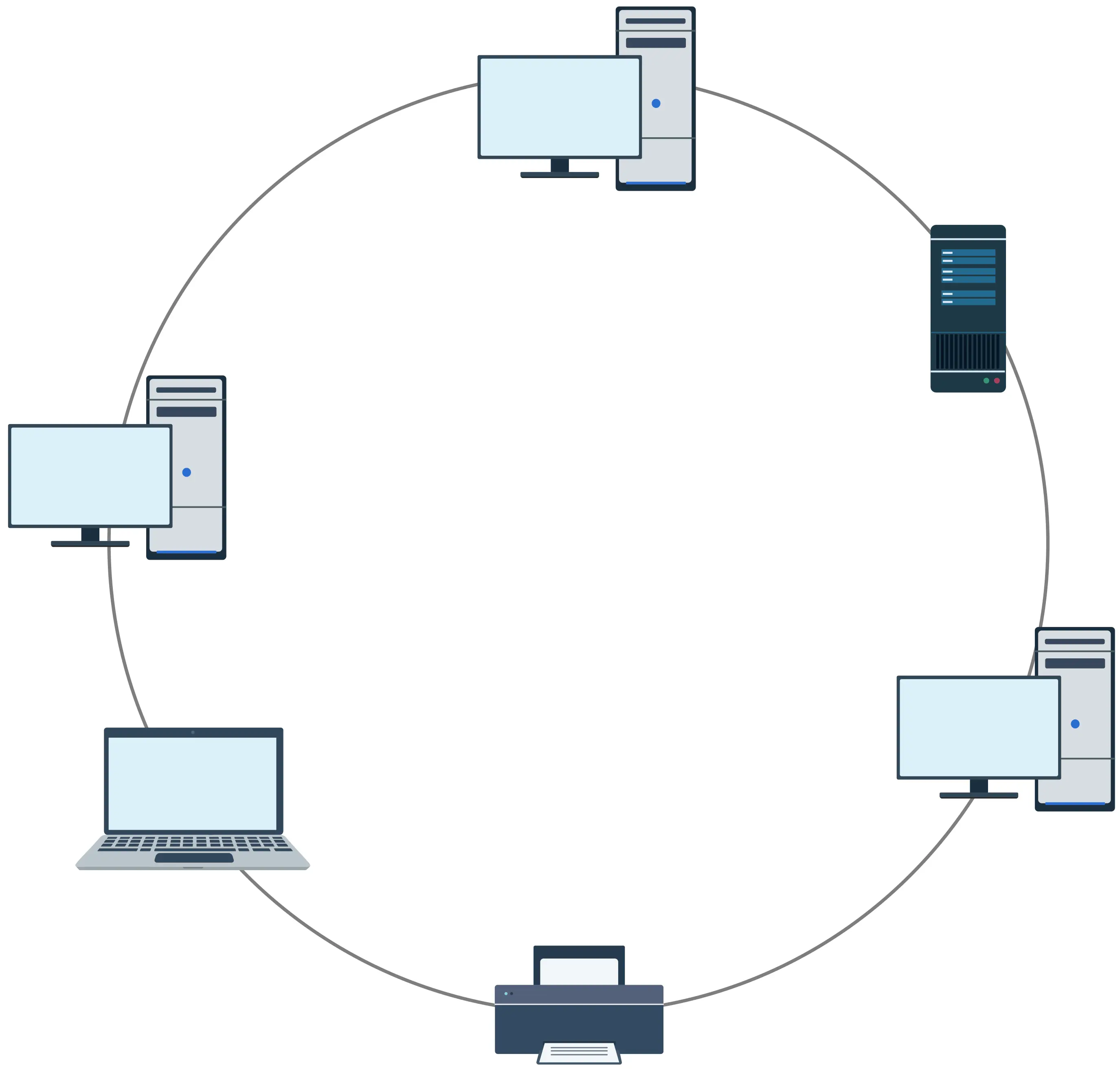
Fiber Distributed Data Interface (FDDI)
Used to conduct data transmissions on fiber optic lines in a local area network
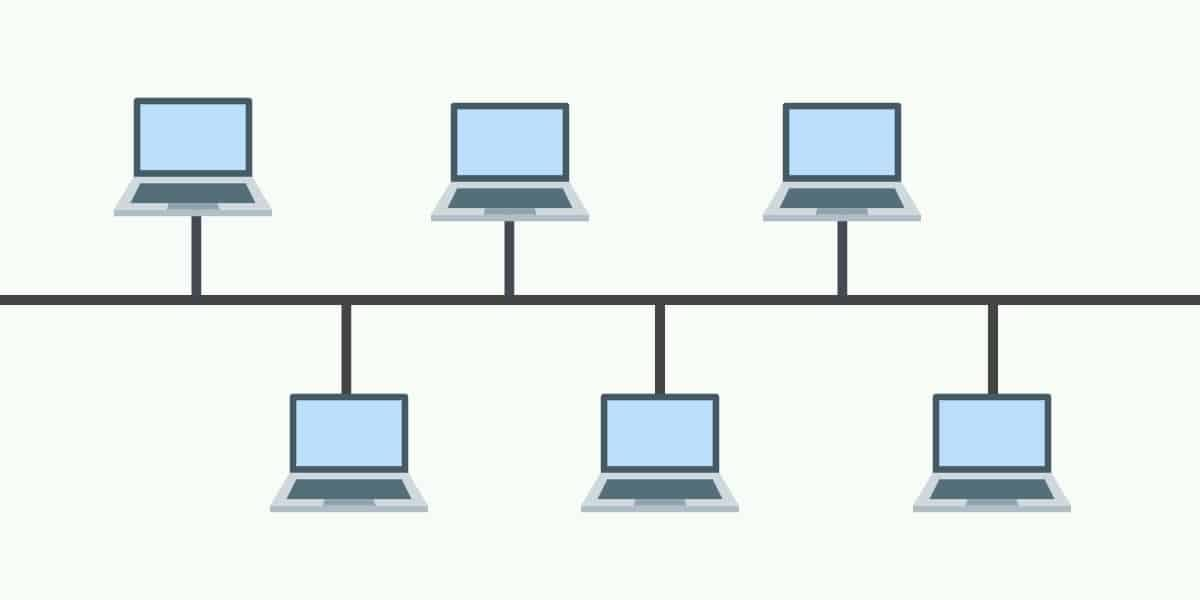
Bus Topology
All of the network devices are connected to a single central cable, called the bus or backbone
Star Topology
Each node in the network is connected to a centralized connection point, which is normally going to be a network switch
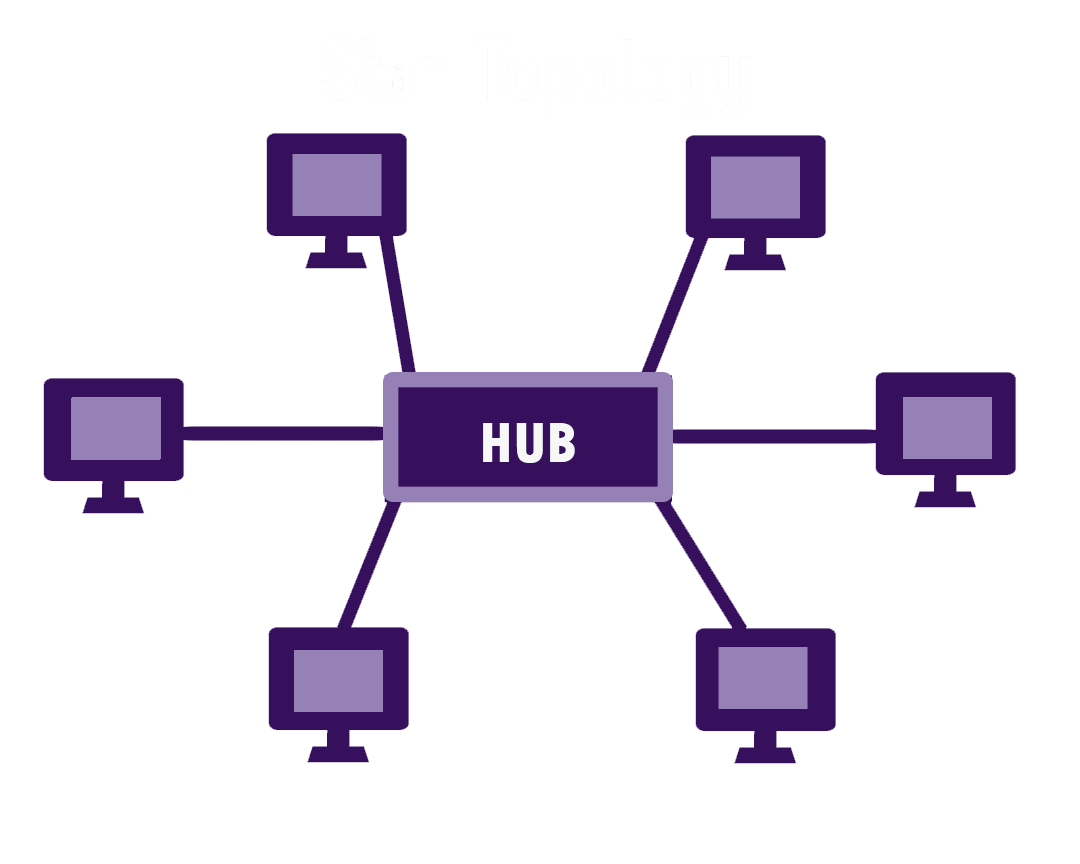
Hub-and-spoke Topology
A variation of the star topology where the central node (hub) is connected to multiple nodes (spokes)
Mesh Topology
Features a point-to-point connection between every single device on the network to create a robust and redundant network
Full-mesh Topology:
Every node is connected to every node in the network
Partial-mesh Topology:
Some nodes are organized in a full mesh scheme, while others are only connected to one or two devices in the network
Infrastructure Mode
The most common type of wireless network that uses a wireless access point as a centralized point
Ad Hoc Mode
Decentralized wireless network which creates Peer-to-Peer connections
Wireless Mesh Topology
An interconnection of different types of nodes, devices, and radios
Datacenter
Any facility that businesses and other organizations use to organize, process, store, and disseminate large amounts of data
Collapsed Core
Network architecture where the core and the distribution layers are being merged into a single layer
Spine and Leaf Architacture
An alternative type of network architecture that focuses on the communication within the datacenter itself
North-South Flow
Traffic that enters or leaves the data center from a system physically residing outside the datacenter
East-West Flow
Refers to data flow within a datacenter
ISO Model
A conceptual framework that standardizes how different computer systems communicate over a network
Reference Model
Used to categorize the functions of a network in the OSI Model during troubleshooting efforts
7 Layers of OSI Model
Physical, Data Link, Network, Transport, Session, Presentation, Application
“Please Do Not Throw Sausage Pizza Away”
Data flow through the OSI model
Data → Data → Data → Segments → Packets → Frames → Bits
“Do Some People Fear Birthdays”
Physical Layer
Where transmission of bits across the network occurs, and includes physical and electrical network characteristics
Transition Modulation
If it changes during the clock cycle, then a 1 is represented (otherwise, a 0 is represented)
Asynchronous (Layer 1)
Uses start and stop bits to indicate when transmissions occur from the sender to the receiver
Synchronous (Layer 1)
Uses a reference clock to coordinate the transmissions by both sender and receiver
Broadband
Divides bandwidth into separate channels
Baseband
Uses all available frequencies on a medium (cable) to transmit data
Time-Division Multiplexing (TDM)
Each session takes a turn, using time slots, to share the medium between all users
Statistical Time-Division Multiplexing (StatTDM)
Dynamically allocates the time slots on an as-needed basis
Frequency-Division Multiplexing (FDM)
Divides the medium into channels based on frequencies and each session is transmitted over a different channel
Data Link Layer (2)
Packages data into frames and transmits those frames on the network
Media Access Control (MAC)
Physical addressing system of a device which operates on a logical topology
Logical Link Control (LLC)
Provides connection services and allows acknowledgement of receipt of messages
Isochronous (Layer 2)
Network devices use a common reference clock source and create time slows for transmission
Synchronous (Layer 2)
Network devices agree on clocking method to indicate beginning and end of frames and can use control characters
Asynchronous (Layer 2)
Network devices reference internal clocks and use start and stop bits for synchronization
Packet Switching
Data is divided into packets and then forwarded
Circuit Switching
A dedicated and constant communication path is maintained for the duration of a conversation
Message Switching
Data is divided into messages which may be stored and then forwarded
Route Discovery and Selection
Manually configured as a static route or dynamically through a routing protocol
Connection Services
Augment Layer 2 connection services to improve reliability
Internet Control Message Protocol (ICMP)
Sends error messages and operational information to an IP destination
Transport Layer (4)
Dividing line between the upper layers and the lower layers of the OSI model
Transmission Control Protocol (TCP) (Layer 4)
Sits at the transport layer and provides reliable, ordered, and error-checked delivery of data between application over a networkapplications
User Datagram Protocol (UDP) (4)
Connectionless protocol that is an unreliable way to transport segments across the network
TCP versus UDP (4)
TCP:
Reliable, Connection-oriented, Segment retransmission and flow control through windowing, Segment sequencing, Acknowledges segments
UDP:
Unreliable, Connectionless, no windowing or retransmission, no sequencing, no acknowledgment
Windowing (4)
Occurs by allowing the receiver to specify the amount of data it can handle at a time
Buffering (Layer 4)
Occurs when devices allocate memory to store segments if bandwidth is not readily available
Session Layer (5)
Keeps conversations separate to prevent intermingling of data
Set Up Session (Layer 5)
Checking of user credentials and assigning numbers to sessions to help identify them
Maintain Session
Where data transfer back and forth over the network
Tear Down Session
Ending of a session after the transfer is done or when the other party disconnects
H.323 (5)
Used to set up, maintain, and tear down voice and video connections
NetBIOS
Used to share files over a network
Presentation Layer (6)
Formats the data to be exchanged and secures that data with proper encryption
Data Formatting (6)
Data is formatted by the computer to have compatibility between different devices
Encryption
Used to scramble the data in transit to keep it secure from prying eyes and provide data confidentiality
Application Layer (7)
Provides application-level services where users communicate with the computer
Application Services
Unites communicating components from more than one network application
Service Advertisement
Sending out of announcements to other devices on the network to state the services they offer
Protocol Data Unit (PDU)
A single unit of information transmitted in a computer network
SYN (Synchronization)
Used to synchronize connection during the three-way handshake
ACK (Acknowledgement)
Used during the three-way handshake, but also used to acknowledge the successful receipt of packets
FIN (Finished)
Used to tear down the virtual connections created using the three-way handshake and the SYN flag
RST (Reset)
Used when a client or server receives a packet that it was not expecting during the current connection
PSH (Push)
Used to ensure data is given priority and is processed at the sending or receiving ends
URG (Urgent)
Similar to PSH and identifies incoming data as urgent
MAC Address
Physical address that is used to identify a network card on a local area network
EtherType
Used to indicate which protocol is encapsulated in the payload of a frame
Port
Virtual entry/exit point for communications used by software applications to exchange information
Protocol
Set of rules and conventions for data exchange between network devices
Ephemeral Ports
Short-lived temporary ports which are opened for just a small period of time from a predefined range of ports
Internet Control Message Protocol (ICMP)
Integral part of the Internet Protocol Suite which is a set of networking protocols used on the Internet
ICMP Flood Attack
Type of attack that involves overwhelming a target machine with a large number of ICMP Echo Request packets
Distributed Denial of Service (DDoS) Attack
Where the attacker usually uses a network of compromised computers (called botnet) to generate significant amount of traffic
Ping of Death
Attack that exploits a vulnerability that existed in older, unpatched systems where the attacker sends malformed or oversized packets using the ICMP protocol