Chapter 4: Business Process and Functional Modeling
 Call Kai
 Learn
Learn Practice Test
 Spaced Repetition
 Match
Match Flashcards
 Knowt Play
1/23

Earn XP
Description and Tags
Vocabulary practice flashcards covering terms, notations, and concepts from Chapter 4 on Use Cases and Activity Diagrams.
Name | Mastery | Learn | Test | Matching | Spaced | Call with Kai | Chat |
|---|
No analytics yet
Send a link to your students to track their progress
24 Terms

Use Case
A logical model that illustrates the activities performed by users of a system without specifying how those activities are implemented or discussing technology.

Actor
A person or external system that derives benefit from and is external to the subject, depicted as a stick figure or as a rectangle containing <

Subject Boundary
A rectangle representing the scope of the subject (such as a system or individual business process), labeled with the subject's name inside or on top.

Association Relationship
A relationship line in a use-case diagram that links an actor with the use case or use cases with which it interacts.
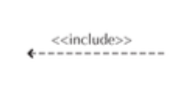
Include Relationship
A relationship representing the inclusion of one use case's functionality within another, drawn as a dashed arrow labeled <

Extend Relationship
A relationship representing the extension of a use case to include optional behavior, drawn as a dashed arrow labeled <

Generalization Relationship
A relationship representing a specialized use case or actor linked to a more generalized one, denoted by a line with a hollow arrowhead pointing to the base/superclass.
Overview Use Case
A type of use case that provides a high-level overview of the requirements.
high‐level overview of the requirements.
Detail Use Case
A type of use case that contains all information needed to fully describe the interaction.
Essential Use Case
A type of use case describing only the minimum essential issues necessary to understand the business processes, independent of technology.
minimum essential issues necessary to understand
Real Use Case
A type of use case that goes further than essential requirements to describe a specific set of implementation steps.
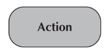
Action
A simple, nondecomposable piece of behavior in an activity diagram that is labeled by its name.

Activity
A construct in an activity diagram used to represent a set of actions, labeled by its name.

Object Node
A node in an activity diagram representing an object connected to a set of object flows, labeled by its class name.
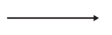
Control Flow
A solid arrow in an activity diagram showing the sequence of execution.

Object Flow
A dashed arrow in an activity diagram showing the flow of an object from one activity (or action) to another.

Initial Node
A solid circle in an activity diagram portraying the beginning of a set of actions or activities.

Final-Activity Node
A symbol consisting of a solid circle inside an outer ring, used to stop all control flows and object flows in an activity (or action).

Final-Flow Node
A circle containing an 'X' used in an activity diagram to stop a specific control flow or object flow.

Decision Node
A diamond symbol representing a test condition to ensure control or object flow goes down only one path, labeled with decision criteria.

Merge Node
A diamond symbol used to bring back together different decision paths created using a decision node.

Fork Node
A horizontal or vertical bar used to split behavior into a set of parallel or concurrent flows of activities (or actions).

Join Node
A horizontal or vertical bar used to bring back together a set of parallel or concurrent flows of activities (or actions).

Swimlane
A mechanism used to break up an activity diagram into rows and columns to assign individual activities or actions to responsible individuals or objects.