Network and Security- Foundations- D315
 Call Kai
 Learn
Learn Practice Test
 Spaced Repetition
 Match
Match Flashcards
 Knowt Play
1/161

There's no tags or description
Looks like no tags are added yet.
Name | Mastery | Learn | Test | Matching | Spaced | Call with Kai | Chat |
|---|
No analytics yet
Send a link to your students to track their progress
162 Terms
TCP/IP
Transmission Control Protocol/Internet Protocol
Application Layer
This layer is responsible for the communication protocols between nodes. The protocols in this layer include hypertext transfer protocol (HTTP and HTTPS), Secure Shell (SSH), and network time protocol (NTP), among many others.
Transport Layer
This layer is responsible for the end-to-end transport of data. The protocols that live in this layer are transmission control protocol (TCP) and user datagram protocol (UDP).
Network Layer
This layer defines the logical transmission protocols for the whole network. The main protocols that live in this layer are internet protocol (IP), internet control message protocol (ICMP), and address resolution protocol (ARP).
Network interface Layer
This layer establishes how data should be physically sent through the network.
OSI Model
Open Systems Interconnection Model
Physical Layer (Layer 1)
This layer is responsible for the physical connections of the devices in the network. This layer is implemented through the use of devices such as hubs, repeaters, modem devices, and physical cabling.
Data Link Layer (Layer 2)
This layer is responsible for the error-free delivery of data to the receiving device or node. This layer is implemented through the use of devices such as switches and bridge devices, as well as anything with a network interface, like wireless or wired network cards.
Network Layer (Layer 3)
This layer is responsible for the transmission of data between hosts in different networks as well as routing of data packets. This layer is implemented through the use of devices such as routers and some switches.
Transport layer (layer 4)
In this layer protocols ensure that data are transferred from point A to point B reliably and without errors. this layer services include flow control, acknowledgment, error correction, segmentation, reassembly, and sequencing.
Session Layer (Layer 5)
This layer is responsible for connection establishment, session maintenance, and authentication.
Presentation Layer (Layer 6)
This layer is responsible for translating data from the application layer into the format required to transmit the data over the network as well as encrypting the data for security if encryption is used.
Application Layer (Layer 7)
This layer is responsible for network applications (like HTTP or FTP) and their production of data to be transferred over the network.
Hub {Physical Layer}
-The simplest device used on an Ethernet network for connecting devices to each other
-split the bandwidth of a connection among all the computers connected to it
- do not perform any packet filtering or addressing functions but instead broadcast data to all computers connected to it
Switch {Data and Network Layer}
-Provides connectivity to devices in a local network
-Creates a dedicated full-speed connection between two computers that are communicating with each other
- makes use of the MAC address to deliver the message to the right destination
Router{Network Layer}
-Interconnect two or more networks
-Operate at the border of your network
-Stores information about the systems that are connected to it and where to send requests when the destination is unknown
-Works at the network layer of the OSI model
Wireless Access point {WAP}
-Extends a wired network to wireless connections
-Involves the IEEE 802.11 group of standards that defines wireless LAN's {WLAN's}
-Central connecting point for computers equipped with wireless network adapters
- identifies each computer by its MAC address
Patch Panel
-A box designed as a junction point for twisted pair (TP) cable and fiber cable used in networks.
-First step in organizing your cables
Firewall
-A security hardware appliance or software application that protects a computer or network from unwanted intrusion
-Blocks unwanted connections from untrusted networks and can block basic network attacks
Modem {Physical and Data link Layer}
-Connects a LAN to an internet service provider
-Converts digital signals into analog signals and vice versa
Network Interface Card (NIC) {Physical Layer}
-The interface on a computer or other device that connects to the LAN
-Designed to take the communication off the physical cable or wireless signal and present it to the computer for processing
-Each NIC has a unique physical address known as a MAC address
Bridge {Data link Layer}
Connects two or more networks
Forwards data to next network with analysis
Not widely used in modern networks
Repeater{Physical Layer}
Amplifies that signal it receives so that it can travel a longer distance
unsheilded twisted pair (UTP)
Unshielded twisted pair cables are created when pairs of wires are tested around each other to protect and cancel out interference from each other and outside sources.
Cat 3 cable
Supports up to 10 Mbps {megabits per second} for up to 100 meters and is commonly used for phone lines today
CAT 4 Cable
Supports 16 Mbps for up to 100 meters and is not commonly used today
CAT-5 Cable
Used in Ethernet LAN's containing two twisted pairs, allowing for up to 100 Mbps up to 100 meters between the devices and the switch, hub, or router. This has been practically replaced by the cat 5e specification
Cat 5e cable
Doubles the number of twisted pairs to four for up to 1 Gbps {gigabits per second} over up to 100 meters
Cat 6 cable
Used in Ethernet LAN's and data centers, cat 6 is made up of four woven twisted pairs {more twisted per linear foot} and supports 1 Gbps for up to 100 meters or 10 Gbps for up to 55 meters
Cat 6a cable
An improvement of the cable Cat 6 standard, supporting the same standard and lengths, {with the ability to run 10 Gbps over 100 meters maximum}, but using a higher quality cable that is more resistant to interference. This is most commonly used in wired networks today
fiber-optic cable
Cable that uses light guided through thin glass tubes instead of electrical signals to transmit data. It is very fast, but also expensive.
Single-mode fiber
Have several thin glass strands { in rare cases, plastic} covered protective insulation. Single-mode cables have thin 10-micron strands and support a narrow range of wavelengths and higher bandwidth, making them ideal for submarine cabling across continents
Multi-mode fiber
Much cheaper than single-mode across shorter distances. The fiber in these cables is thicker, from 50 to 100 microns. Because of their thickness, they can run a wider frequency of light over shorter distances, from a couple of thousand meters to a couple of miles.
Coaxial cable
A single copper wire surrounded by layers of plastic insulation and sheathing is used mainly in cable television and cable Internet service.
Ping command
Tools for testing connectivity to other hosts
Sends internet control message protocol {ICMP} to a host and listens for the reply
Replies displays time it took and time to live {TTL}
Traceroute/Tracert command
Trace the route an IP packet takes to it's destination
Display each hop {next router} with its IP address and the time it takes to receive the packet
Traceroute is linux command { can only be used by super user}
Tracert is windows command
tracepath command
Similar to traceroute/tracert
Display the path taken by packet to its destination
Used in linux { any user can use}
ipconfig
Provides the user with the IP, subnet mask, and default gateway for each network adapter
With/all can display MAC address, DHCP status and lease information
Used in windows
ifconfig
Similar to ipconfig
Used to configure the network interface
Used in linux
ARP
Address Resolution Protocol
Displays the MAC address mapping for the hosts that have been discovered in the ARP cache
netstat
Displays information about active ports and their state
Useful for troubleshooting
nslookup
Displays information for display DNS information
Used for troubleshooting DNS problems
Displays names to ip address mappings
Primarily used in windows
Dig
Used to query the DNS name servers
Helpful in troubleshooting DNS problems
Replaced nslookup in linux OS
Who is
Used to lookup who owns a domain or block of IP address
Includes: name, email address, and physical address
Can purchase privacy to hide this information
Primarily used on linux
Route
Used to display the current route tables on a host
Can be used to add or remove routes
SCP
Secure Copy Protection
Used to copy files between servers
Uses SSH for authentication and encryption
FTP
File Transfer Protocol
Copies files from one host to another host
Data is unencrypted; for encryption, use FTPS, which utilizes SSL/TLS}
Uses TCP for reliability
Used often on WAN's and the internet
TFTP (Trivial File Transfer Protocol)
Transfers a file from a client to a server or from server to a client
Uses UDP
Used on reliable {local} network
Finger
Displays information about a user or users on a remote system
Includes last log-in and username
Primarily used in linux
Nmap{network mapper}
Scans networks for hosts and open ports
Used to determine what is deployed on a network
Not native to either linux or windows
TCP Dump
Displays TCP/IP packets and other network packets that are being transmitted over the network
Used a packet sniffer
Displays in readable format for troubleshooting
Not native to either Linux and window
telnet/ssh
Both used to manage accounts and devices remotely
SSH is encrypted
Telnet is unencrypted
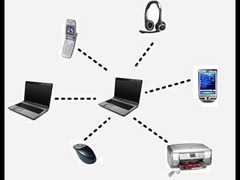
Personal Area Network (PAN)
A network that is created to center around a person and their devices
Communication over connections such as bluetooth or USB
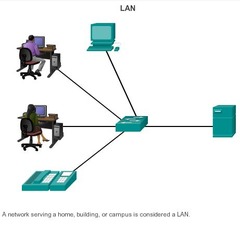
Local Area Network (LAN)
Consist of computers connected within a limited area, such as a house, lab, or office building
LAN's use Ethernet, wi-fi, or a combination of both.
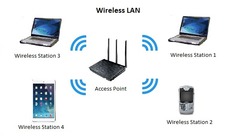
Wireless Local Area Network (WLAN)
A LAN with all devices connected wirelessly
Users and devices can be placed anywhere and moved anywhere in the coverage area
Easy and inexpensive to install
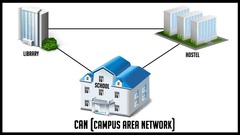
Campus Area Network (CAN)
Provides networking of multiple LAN's across a limited area
Each single building would typically have its own LAN
Typically, connects LANs owned by a single company, university, government agency, etc
Metropolitan Area Network (MAN)
Provides networking across a larger area, such as a whole city
Made up as many organizations within a city
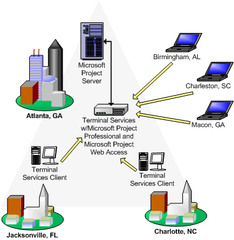
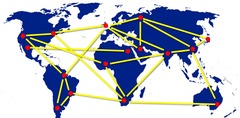
Wide Area Network (WAN)
Covers a large geographical area within its network
WAN networks can span cities, countries, or the entire globe
The internet is an example of WAN
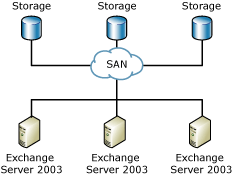
Storage Area Network (SAN)
A network that allows access to storage devices instead of general network purposes
SANs are dedicated to storage devices and the servers that need access to them
Allows servers to access tape libraries and disk array like they are locally attacked devices
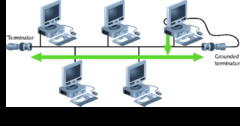
Bus Topology
All the devices are connected to a shared single cable
Bus topologies are uncommon today
Computers in a bus topology physically tap into the network cable using special adapters
The ends of the cables have terminators
In a bus topology only one computer can communicate at a time
All traffic transmitted is received by everyone
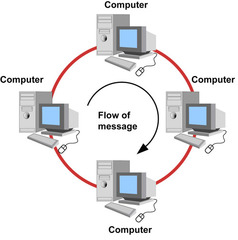
Ring Topology
The computers are connected to form a closed loop
The computers are connected in a single line
Each computer on the ring has an input port and an output port
More reliable than a bus topology but communication still falls if the ring is broken
A dual-ring topology provides high availability
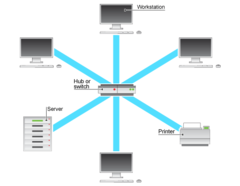
Star Topology
Also known as a hub-and-spoke network
Composed of a central network device, such as a switch or a hub
Each device is individually connected to the central network device
Star topologies are the most common type found in LANs
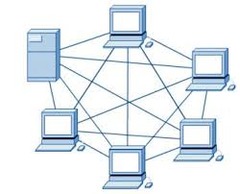
Mesh Topology
Full mesh: every mode of connection to all other nodes
Partial mesh: each node connects to a few other nodes
Typically used for requirements of high availability and redundancy
The most expensive and most complex topology
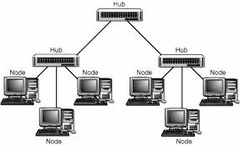
Tree Topology
Acts as both a star and bus topology
The network is divided into multiple levels or layers
The top device is known as a root node
A parent-child hierarchy between nodes
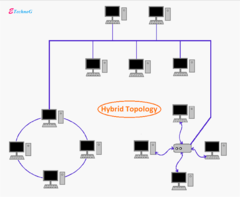
Hybrid Topology
A combination of different topologies
Inherits the advantages and disadvantages of each combined topology
Offers the benefits of flexibility
very effective and sealable but can be costly
Centralization
Users logged on to machines called dumb terminals to perform their task. They were so named because the terminal had no intelligence or sophistication.
Decentralization
An approach that puts the computer power in the user's devices rather than a data center
client/server model
This approach offloads some of the computing requirements from the data center's servers, but more importantly, the client-server model allows application designers to implement advanced user interfaces that would not otherwise be possible in a web-based or terminal-based application.
Peer-to-Peer Model
In a peer-to-peer network, client computers act as both servers and workstations because they share files and printers while allowing a user to log on and use the client computer for normal tasks
Virualization
Creates multiple "virtual" machines on a single computing device
Virtual devices operate similarly to their physical counterparts.
Benefits of virtualization:
-Deploy new virtual device quickly
-It is easier to move virtual devices within a data center or between data centers.
-Can increase or decrease resources allocated based on it's utilization rising and falling
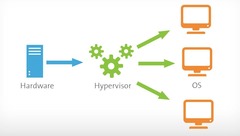
Hypervisor
Software that creates and manages virtual machines on a server or on a local computer Also called a virtual machine manager (VMM).
Type 1 hypervisor
- Also referred to as a bare-metal hypervisor, bare-metal systems are ones that do not have an operating system already installed
-Accessing details and managing your virtual machines is done through a remote system
-Examples
VMware esxi
Microsoft hyper-v
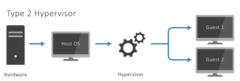
Type 2 hypervisor
-Sometimes referred to as a hosted hypervisor
-Installed as an application on personal computer and laptop
- Virtual machine shares the hardware resources with the hosted system
-Examples
Vmware workstation
Virtual box
Cloud Computing
Consider the meaning and business implications of some of the more well-known and accepted characteristics of cloud computing: on-demand, self-service, resource pooling, elastic, accessible, and measurable.
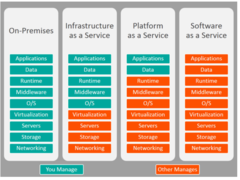
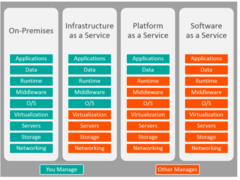
IaaS (Infrastructure as a Service)
Infrastructure refers to the physical layers {servers}, storage, and networking that are required to exist before you can create any virtual servers or install any application
PaaS (Platform as a Service)
The cloud provider is responsible for the virtual servers and, in some cases, the services that run on top of them, such as database engines, and provides you with a platform on which you can run your code or store your data
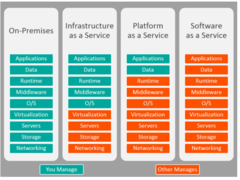
SaaS (Software as a Service)
Software as a service allows consumers to store and potentially publish information without the need to manage the underlying application or infrastructure
Private Cloud
a cloud that is owned and operated by an organization for its own benefit
Public Cloud
There are many public cloud providers, but some providers, such as Amazon Web Services {AWS}, Microsoft Azure, and Google Cloud Platform {GCP}, are more well-known because of their marketing and experience in the industry.
Community cloud
These clouds are data centers that are jointly owned and operated by the tenants
Hybrid Cloud
For hybrid cloud computing, the customer will require a dedicated connection between their on-premises data center and the public cloud provider. this connection may be a virtual private network {VPN} established over the internet or a dedicated wide area network {WAN} connection maintained by a telecommunications provider
Multi-Cloud
A cloud deployment model where the cloud consumer uses multiple public cloud services.
Weak Password
A password that is short in length (less than 15 characters),uses a common word (princess), a predictable sequence of characters (abc123), or personal information (Braden).
Default password
Passwords on system administration, user, or service accounts predefined in a system, application, or device; usually associated with the default account. Default accounts and passwords are published, well known, and therefore easily guessed.
Misconfigured firewall
Can allow traffic that should be blocked and reduce the overall security of the network. It is a good policy to regularly review your firewall configuration identify what each rule does, remove only rules that are no longer needed, and regularly change the password
Personal Devices within the Network
Many businesses are adopting a mobile computing strategy that often includes a concept known as bring your own device, {BYOD}, which encourages users to bring their personal computers, tablets, or phones to work to use on the network
Advanced Persistent Threat (APT)
A network attack in which an intruder gains access to a network and stays there undetected with the intention of stealing data over a long period of time.
Zero-Day
The term zero-day alludes to the fact that the exploit or vulnerability is not yet known by the public, meaning there is no patch available to mitigate this vulnerability
Vulnerability Tester
A vulnerability tester is responsible for scanning servers and network devices for known vulnerabilities
Red Team
The red team attempt to compromise the security
Blue Team
The blue team defends
White Team
White team that observes the festivities and may even serve as referee
Purple Team
A mode of penetration testing where red and blue teams share information and collaborate throughout the engagement.
White hats hackers
Non-malicious hackers who attempt to break into a company's systems at their request
Black-hat hackers
May or may not be IT professionals but possess the knowledge and will to breach system for profit
Gray hat hackers
A cross between black and white—they will often illegally break into systems merely to flaunt their expertise to the administrator of the system they penetrated or to attempt to sell their services in repairing security breaches.
Insider threats
Some of the most potent threats come from people within your organization. Because they have legitimate access to systems, they are in a position to hack from the inside of the network, often undetected.
industrial espionage
The process of gathering corporate information illegally or unethically.
Nation states
Have substantially larger budgets to hire hackers then the average criminal enterprise
script kiddie
An attacker with little expertise or sophistication. Script kiddies use existing scripts to launch attacks.