HPI SWT
 Call Kai
 Learn
Learn Practice Test
 Spaced Repetition
 Match
Match Flashcards
 Knowt Play
1/218

There's no tags or description
Looks like no tags are added yet.
Name | Mastery | Learn | Test | Matching | Spaced | Call with Kai | Chat |
|---|
No analytics yet
Send a link to your students to track their progress
219 Terms
Requirements Engineering Process
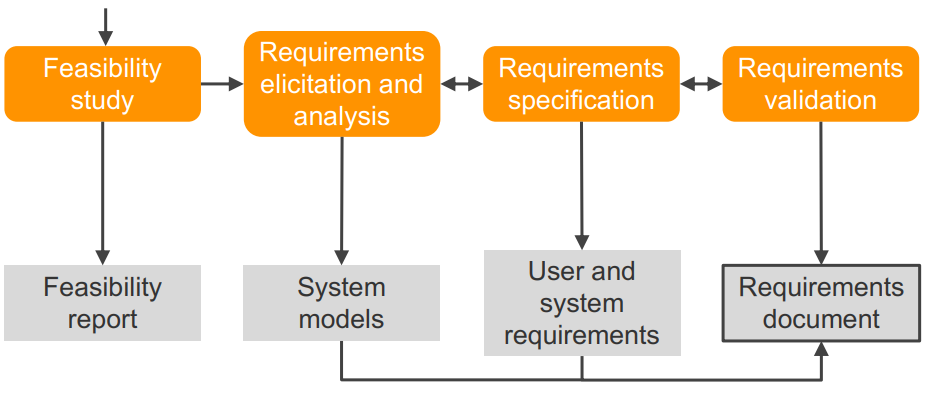
Requirements Feasibility study
Determine if the user needs can be satisfied with the available technology and budget
Requirements analysis
Find out what system stakeholders require from the system
Technical staff works with customers and users to determine
- Application domain
- Services that the system should provide
- System’s operational constraints
Requirements Analysis Process
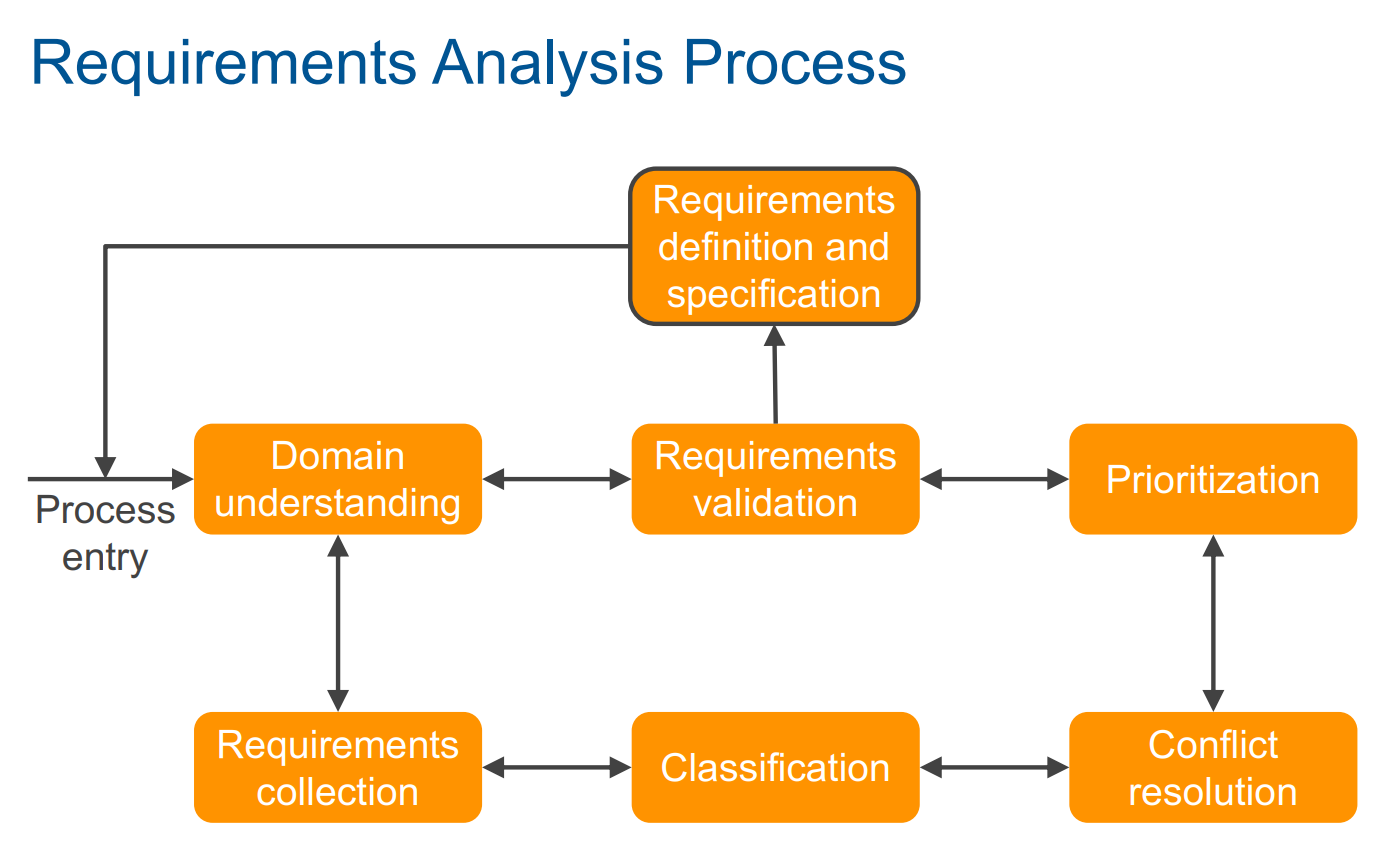
Problems of Requirements Analysis
Stakeholders often do not know what they really want
Different stakeholders may have conflicting requirements
The requirements change during the analysis process
New stakeholders may emerge
Requirements Definition
Define the requirements in a form understandable to the customer
Requirements definitions usually consist of natural language, supplemented by (for example UML) diagrams and tables
Requirements Definition Problems
• It is hard to write documents that are both precise and easy-to-read
• Several different requirements might have been expressed together
• Functional and non-functional requirements tend to be intertwined
Requirements specification
Define the requirements in detail (written as a contract between client and contractor), for DEVs
Functional Requirements
Describe system services or functions
Non-Functional Requirements
Product, Organizational, External
for example:
Availability
• Safety and privacy concerns
… Non-functional requirements may be more critical than functional
Requirements Verifiability
Requirements must be written so that they can be objectively verified PRECISE!
Scenarios
Describe interactions between actors and system at the system boundary to accomplish a goal
Use Case
A use case is a numbered list of scenarios
Actor
An actor is someone or something outside the system that interacts with it
Stakeholders
points of view
Interview as many kinds of stakeholders as possible/necessary
- Translate requirements into use cases or stories
Use case levels of detail
Brief use case
- Few sentences summarizing the use case
• Casual use case
- Few paragraphs, summarizing the use case
• Fully dressed use case
- Formal document based on a detailed template - Common understanding of a “use case”
Prototyping
Prototyping starts with requirements that are poorly understood
throw-away prototyping
validate or derive system requirements
Used to reduce requirements risk
evolutionary prototyping
deliver a working system to users
Used for systems where the specification cannot be developed in advance
Requirements Checking
does the system provde the functions that best support the users needs?
complete?
no conflicts?
feasible with given budget and tech?
Requirements Reviews
Regular reviews should be held while the requirements definition is being formulated
• Both customer and contractor should be involved
Review Checks
are the requirements:
properly understood
testable
traceable (trace back from every system component to the original requirement, sowtware used for this, simple conventions, like naming conventions, can help)
adaptable (can change without a large impact on other requirements
Responsibility-driven Design
(design objects for their responsibilities, nothing more)
A method for deriving a software design in terms of collaborating objects
- Roles, - Responsibilities, and - Collaborations
Functional Decomposition
Decompose according to the functions a system is supposed to perform.
Object-oriented Decomposition
Decompose according to the objects that correspond to elements of the domain a system is supposed to support.
Initial Exploration
1. Find the objects/classes in your system
2. Determine the responsibilities of each object/class - Operations to be performed - Knowledge to be maintained
3. Determine how objects/classes collaborate with each other to fulfill their responsibilities
Guidelines for Selecting Classes
- Model physical objects (e.g. disk, printer)
- Model conceptual entities (e.g. window, file)
- Model attribute values, not attributes (e.g. point vs. center)
CRC Cards
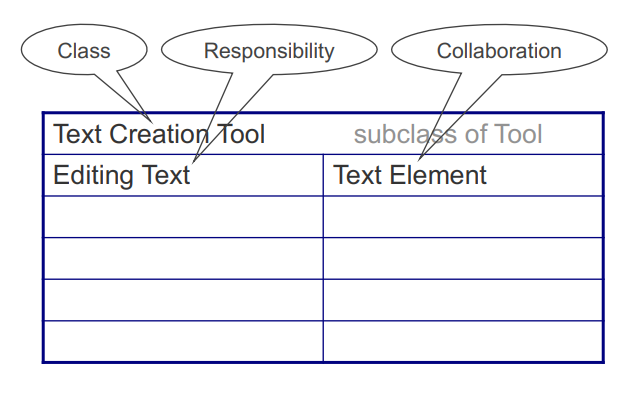
CRC Session
- Prepare a CRC card for each candidate class (one card per class)
- Get a team of developers to sit around a table
- Distribute the cards to the team
- The team walks through scenarios, playing the roles of the classes
Responsibilities of an object
The actions an object can perform
The knowledge an object maintains (and provides)
Responsibilities represent the public services an object may provide to clients
Specify what an object does, not how it does it
Do not describe the interface yet, only conceptual responsibilities
Assigning Responsibilities - strategies
Evenly distribute system intelligence
State responsibilities as generally as possible
Keep behavior together with related information
Keep information about one thing in one place
Share responsibilities among related objects
Relationship types Between Classes
is-kind-of
is-analogous-to (make superclass between them)
is-part-of (composition)
Collaborations between classes
How do objects fulfill their responsibilities? - Perform the necessary computations themselves or - Collaborate with other classes
Collaborations reveal control and information flow → subsystems
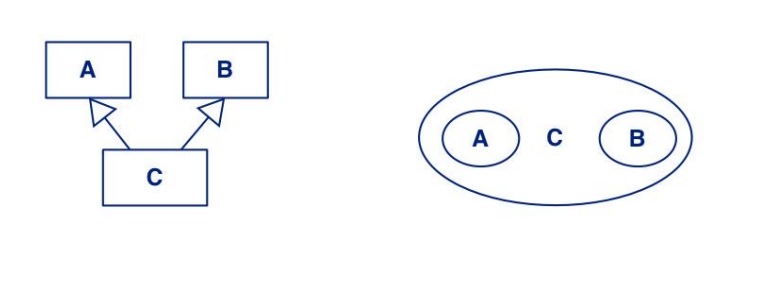
Find common superclasses
Decide whether a class will be instantiated to determine if it is abstract or concrete
• Responsibilities of subclasses are larger than those of superclasses
Venn Diagrams can be used to visualize shared responsibilities
• Intersections represent common superclasses
Protocols
A protocol is a public interface to which a class will respond
XP is an ___ method for developing software
agile
Extreme Programming (XP) - when is it needed
Developers favor programming over endless requirements
Most processes are far to complex
Costs, Time, and Quality should remain stable
Requirements are rapidly changing
Team is small
Working software is needed constantly
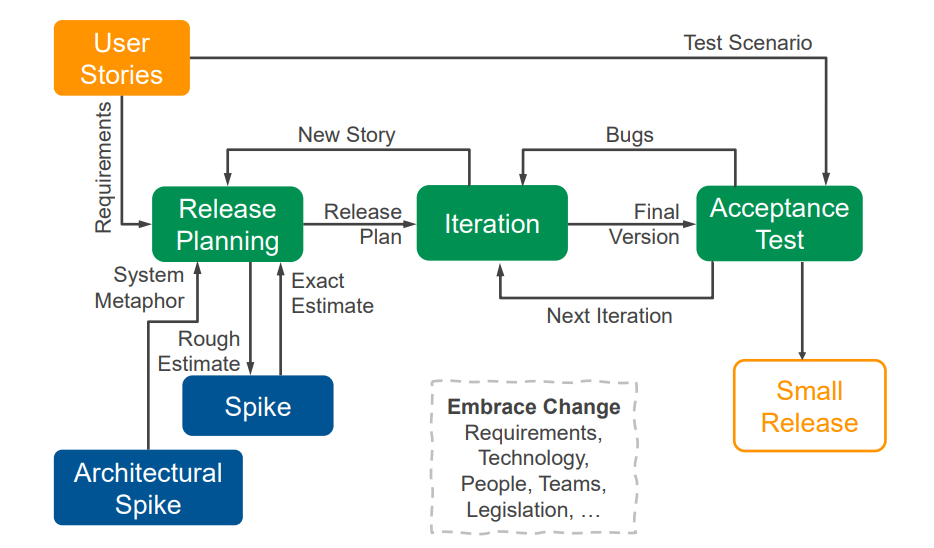
XP overview diagram
5 XP Values
Communication, Simplicity, Feedback, Courage, Respect
XP Principles
Humanity (Respecting personal concerns),
Economics (make sure what u doing has value),
Mutual Benefit,
Self-Similarity (Try copying the structure of one solution into a new context),
Consistent Improvement,
Diversity (in thinking about how to solve problems),
Reflection,
Flow (steady flow of new features),
Redundancy,
Quality
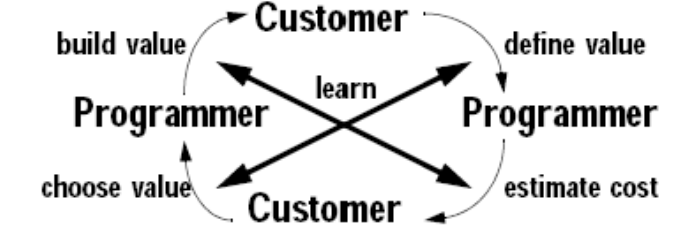
XP Circle of Life
User Stories
Each user story is a short description of the behavior of the system
Stories should encompass a week or two of programmer time
Spike
An experiment, where you do enough work to get a good feeling for how to implement the story
Release Planning
Decide for a set of user stories
− Define the deadline
− Use known stories for time planning
Iterations
One to a few weeks long
− Set of high priority user-stories
− Tasks for every story defined
− Deadlines must be adhered
• If necessary, reduce features
how to Estimate time
Cover all activities inside software development
Strive for good estimates − But if anything: overestimate → bounded cost instead of unbounded in underestimation
Story Points
A team-specific proxy (measurement) for effort
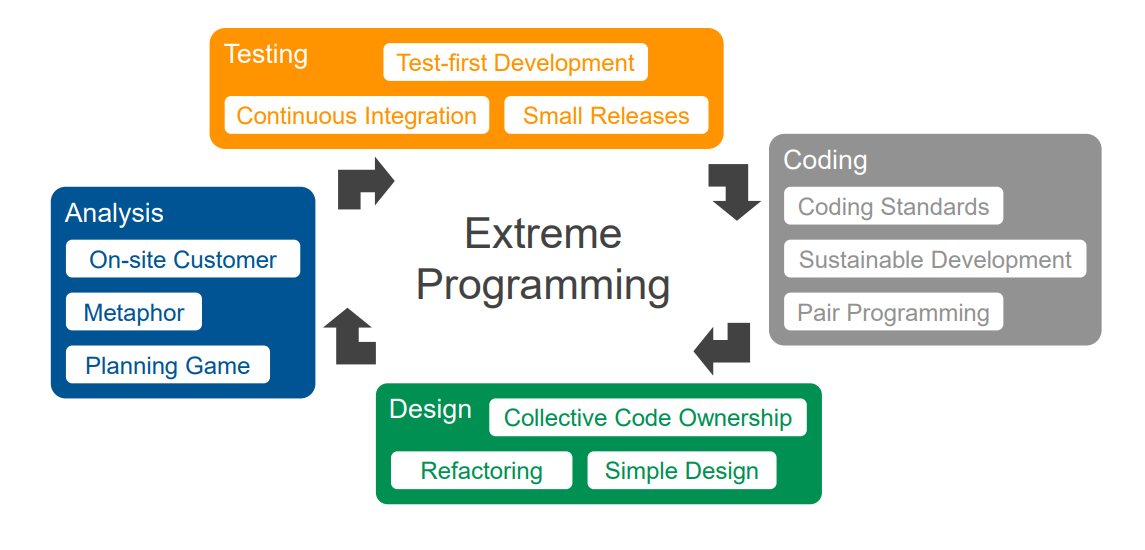
3 Key Practices categories for sowtware dev
Customer Satisfaction
Software Quality
Project Management
Customer Satisfaction 2
(1) On-site Customer (2) Small Releases
Software Quality 5
(3) Metaphor (4) Test-First Programming (5) Simple Design (6) Refactoring (7) Pair Programming
Project Management 5
(8) Planning Game (9) Sustainable Development (10) Collective Code Ownership (11) Continuous Integration (12) Coding Standards
On-site Customer
The project is steered to success by the customer and programmers working in concert
• The customer is part of the development team
Sometimes the customer really is too valuable to be on-site → make meeting, representative, visit them
Small Releases
The outermost XP cycle
Release early and release often, Deliver the most value in the shortest time (early feedback, increasing confidence)
Metaphor
language to talk to the customer non techy → communicate clearly
Test-first Programming
write test, then implement it,
− Programmers write unit tests
− Customer specify acceptance tests
Acceptance tests allow the customer to know when the system works, and tell the programmers what needs to be done
Simple Design - when is code simple enough?
Code is simple enough when it:
− Runs all the tests
− Expresses every idea you need to express
− Contains no duplicate code
− Has the minimum number of classes and methods
design for today, when u need it
Refactoring
keep the code simple at all times.
improving the code’s structure while preserving its function
Pair Programming
Two programmers working together are more effective than two working alone
• Driver
− Typing in the code, thinking about the METHOD
− Is responsible for making sure that the partner can be completely engaged
− Explain and listen to the partner
• Partner
− Helping the driver, thinking about the SYSTEM
− Is responsible for being completely engaged
− Must understand everything that is being done
Planning Game
Customer defines releases, Story estimation, few weeks at a time
Steering (tracking) the iteration
− Need to track stories getting done
− How well the task estimates are holding up
Steering (tracking) the release
− Most critical aspect of XP
− Need to track
• What’s done
• How fast you are going
• How well the system works
Sustainable Development
For the most efficiency you need a rested team
Heavy overtime is bad
Collective Code Ownership
All the programmers own all the code
Any programmer that sees an opportunity to add value to any portion of the code is required to do so at any time
gives expert knowledge about the project
Continuous Integration
The longer we wait between integrations and acceptance tests, the worse things get
Integrate as often as possible
Use of version and configuration management
Coding Standards
Everyone codes to the same standards
• Ideally, you should not be able to tell by looking at it who has written a specific piece of code
XP Practices and Development Lifecycle diagram
Handling Defects - 4 steps
Reporting Problems (Defects reduce the value of the software to the customer),
Scheduling Corrections (schedule them like any other story),
Test and Fix the Problem (start with a test that does not work, then fix it),
Preventing future Defects (Reflect on fixed issues frequently)
Ten-minute Build
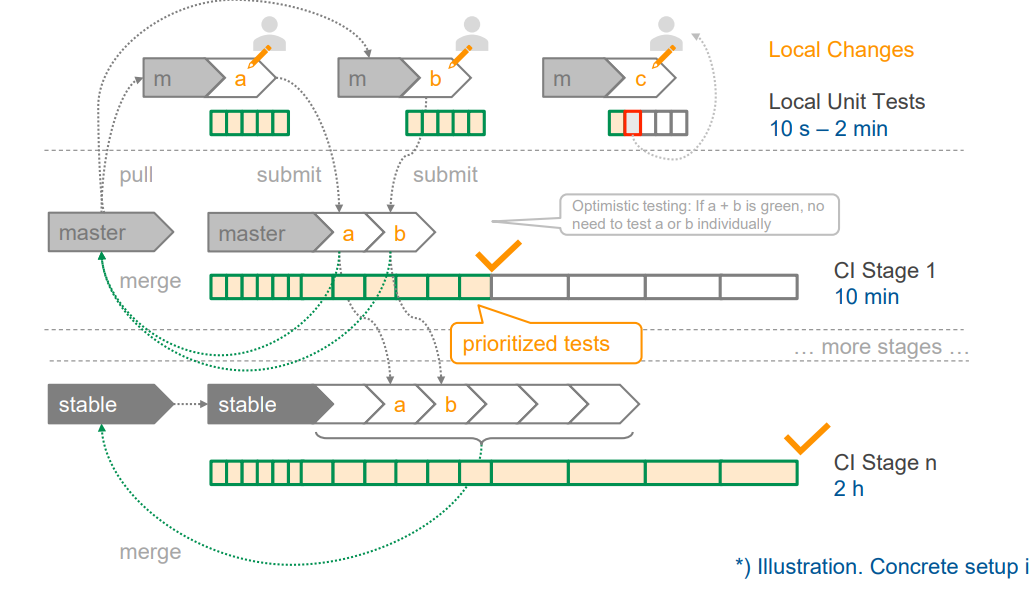
Automatically build the whole system and run all tests in ten minutes
XP also tracks 4 more metrics:
Resources (e.g. Number of developers),
Scope (number of stories over time),
Test Quality (graph showing # tests and # passes),
Time (for each release plan)
3 XP Roles
customer, programmer, manager
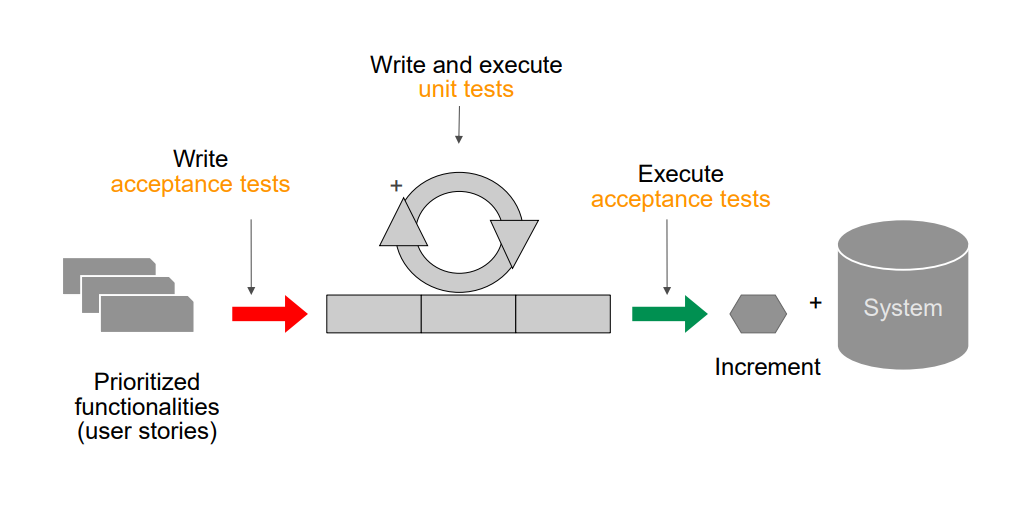
Unit Tests
Help to build the system right − Created by the developer (unit = fine-graines, smallest testable functionality)
Acceptance Tests
Help to build the right system − Created by the customer (ideally) − Test that a user story (coarse-grained) is done
test workflow (unit and acceptance tests)
Integration Tests
Test behavior across multiple “units” in a black-box fashion
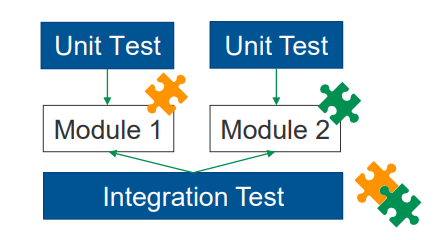
Test levels of granularity
unit → integration → system (biggest)
test classifications
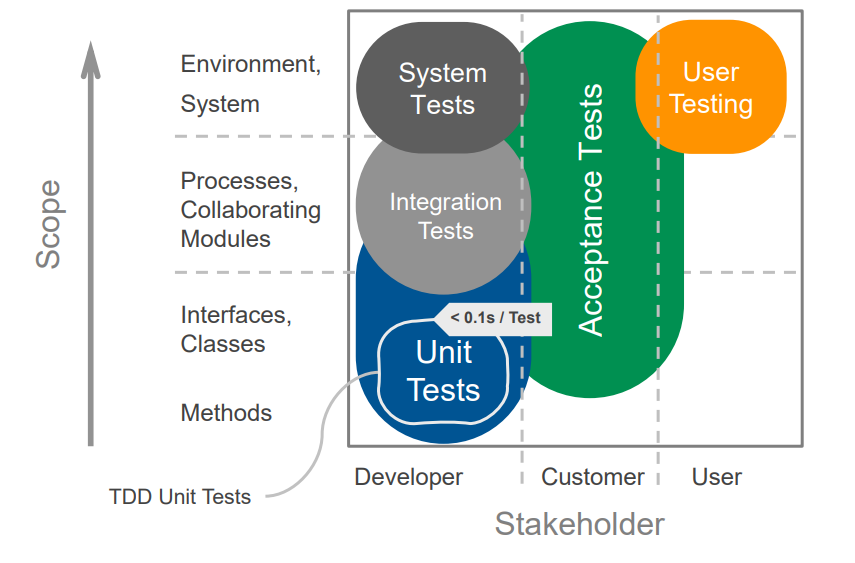
Test-driven Development (TDD)
Goal: Clean code that works.
− Part of Extreme Programming (XP)
two rules:
(1) Write new code only if an automated test has failed
(2) Eliminate duplication
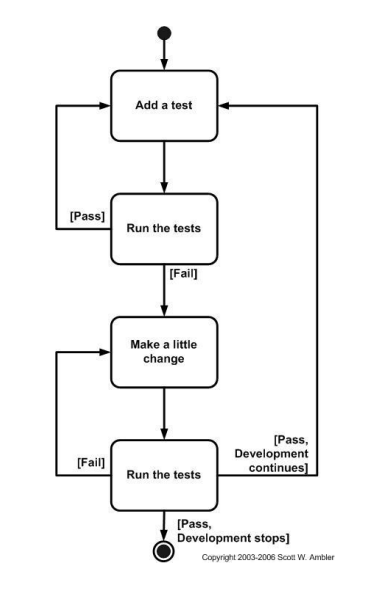
process: write test, Red → Green → Refactor, make green however first, then make clean
one TDD cycle
6 Test-driven Development Patterns
Isolated Test
− How should the running of tests affect one another?
− Not at all!
Test List
− Put tests we want to implement on a list (not code yet)
Test First
− When should you write your tests?
− Before you write the code that is to be tested
Assert First
− When should you write the asserts?
− Try writing them first
Child Test
− gets a test case running that turns out to be too big
Mock Object
− tests an object that relies on an expensive or complicated resource (api, file, large class, etc)
7 Red Bar Patterns
One Step Test
Starter Test
Explanation Test
Learning Test
Regression Test
Break
Do Over
test pattern “fake it“ and “triangulation” example
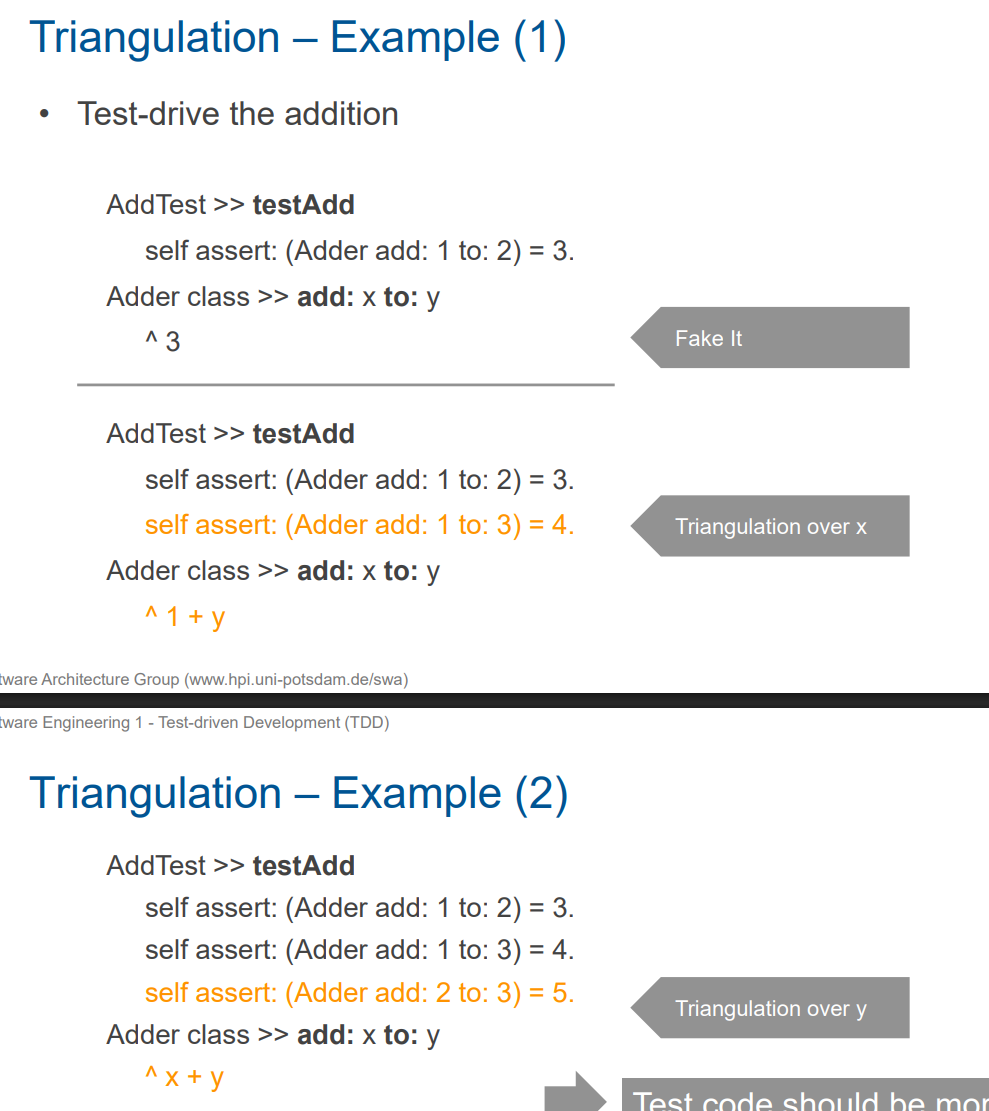
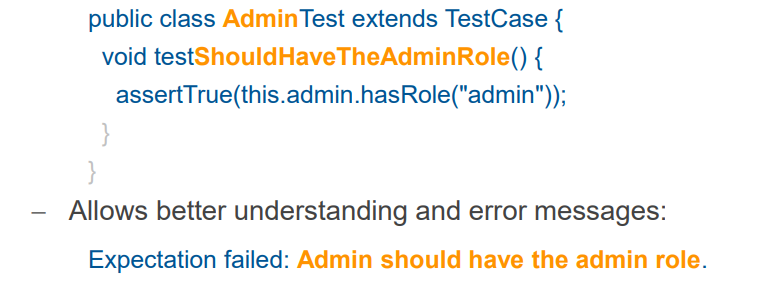
Behavior-driven Development (BDD)
Basic idea: Test read like sentences
− Keeps the test method focused on the behavior
Test Quality - FIRST Principle
− Fast: Enable frequent feedback
− Isolated: Same results when running in any order
− Repeatable: Same results when re-running without change
− Self-validating:
• Clear red/green result (assertion)
• Red tests guide developers to the fault
− Timely:
• Written together with (TDD: before) program logic
• Supported by testable software architecture & patterns
A test is commonly called “flaky” if…
− It starts to fail without a change to the system under test
− Re-running it might cause the failure to disappear
Test Quality measurements
• Coverage
− Percentage of logic executed by tests
• Mutation Testing
− Produce mutants (randomly change a number, operator, ...)
− Run tests for each mutant (expensive!)
− Mutation score = #(failing mutants) / #(total mutants)
Non-functional Requirements that can be tested
Performance
Dependability
Platform Independence
Compliance
Staging
hirarchical leveling of test frequencies
Black- vs. White- vs. Gray box testing
Black-box testing / functionality testing
− Tests derived from specification or requirements
White-box testing / structural testing
− Tests tied to / derived from module implementation
White-box testing / structural testing
middle: − Tests tied to / derived from module implementation
refactoring definition
the process of changing a software system in such a way that it does not alter the external behavior of the code yet improves its internal structure.
Why Should You Refactor? 5 reasons
Make it easier to add new functionality
Improve the design of software
Simplify software to increase understandability
Cope with changes
Clarify to expose bugs
6 strategies for refactoring
Solid test suite
Backtrack if refactoring fails
Maintain backup copies
Use very small steps
Use a refactoring tool
Use Pair Programming
7 Refactoring Categories
1. Composing Methods
2. Moving Features Between Objects
3. Organizing Data
4. Simplifying Conditional Expressions
5. Making Method Calls Simpler
6. Dealing with Generalization
7. Big Refactorings
Composing Methods
• Extract Method
• Inline Method
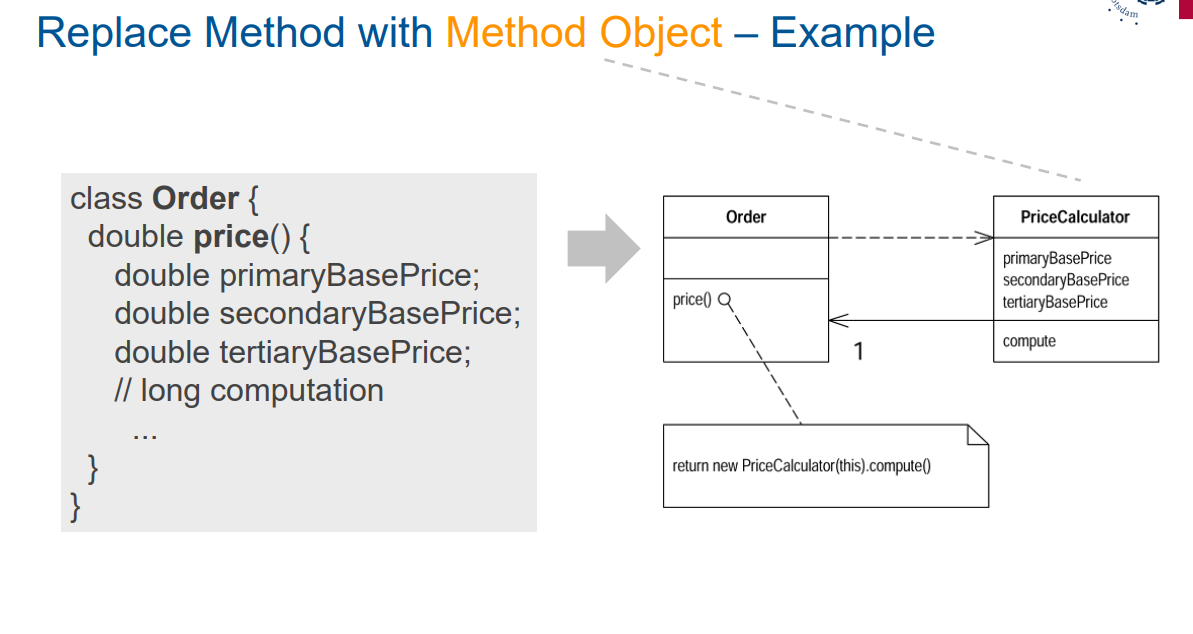
• Replace Method with Method Object (if long method uses local variables in a way you cannot “Extract” it)
• Substitute Algorithm
Moving Features Between Objects
Where to put responsibilities?
Move Method (if method uses more features of another class than the one it is in),
Move Field,
Extract Class (if you have one class doing work that should be done by two)
Organizing Data
− Self Encapsulate Field
—Replace Array with Object
− Replace Magic Number With Symbolic Constants
− Replace Type Code With Class
Simplifying Conditional Expressions
Reason #1 for complex and hard to understand code are conditionals
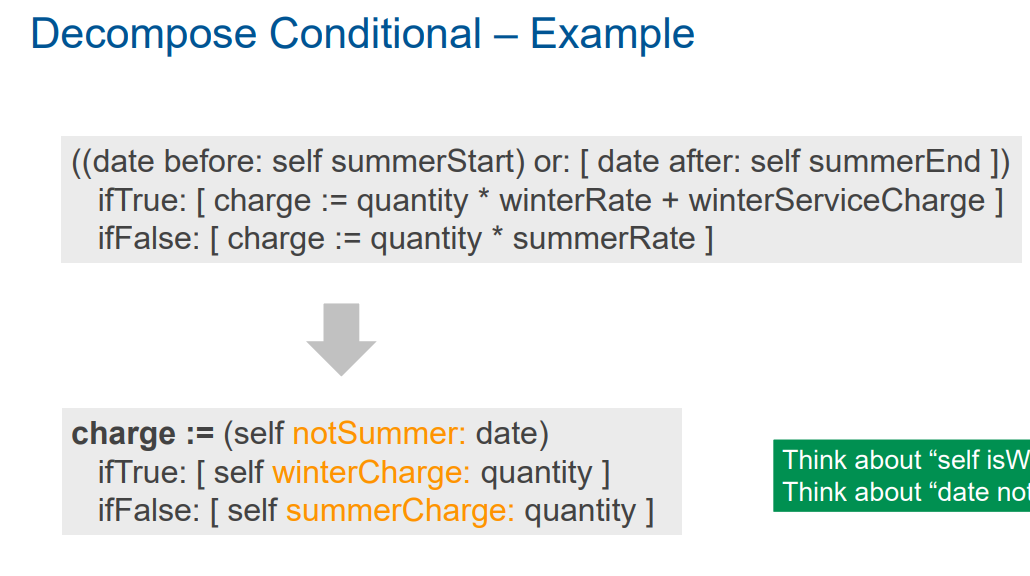
− Decompose Conditional
− Replace Nested Conditional With Guard Clause
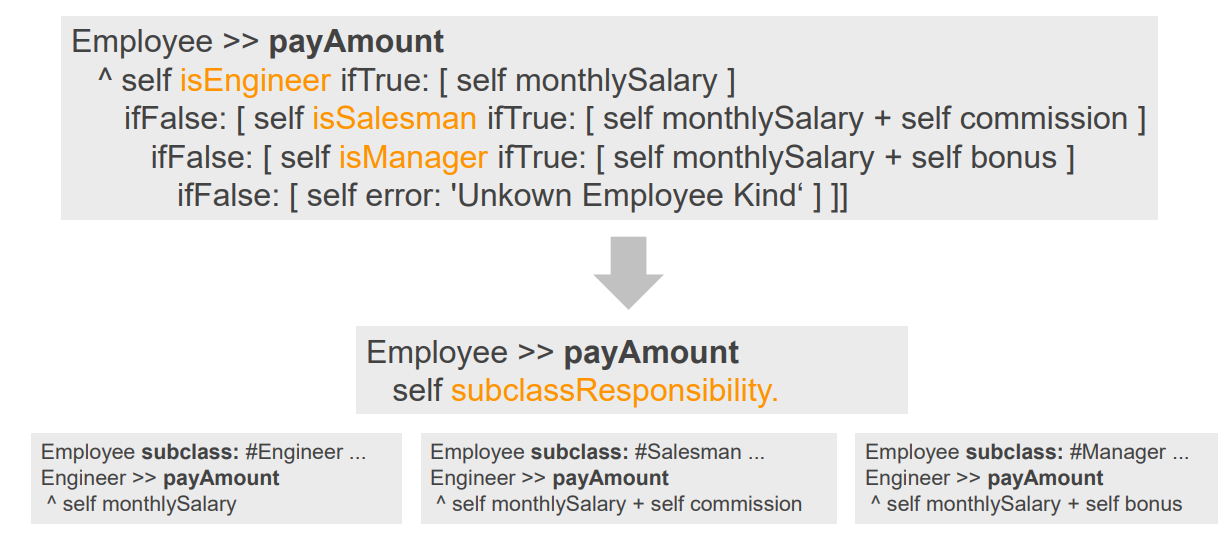
− Replace Conditional With Polymorphism
Replace conditional with polymorphism
Making Method Calls Simpler
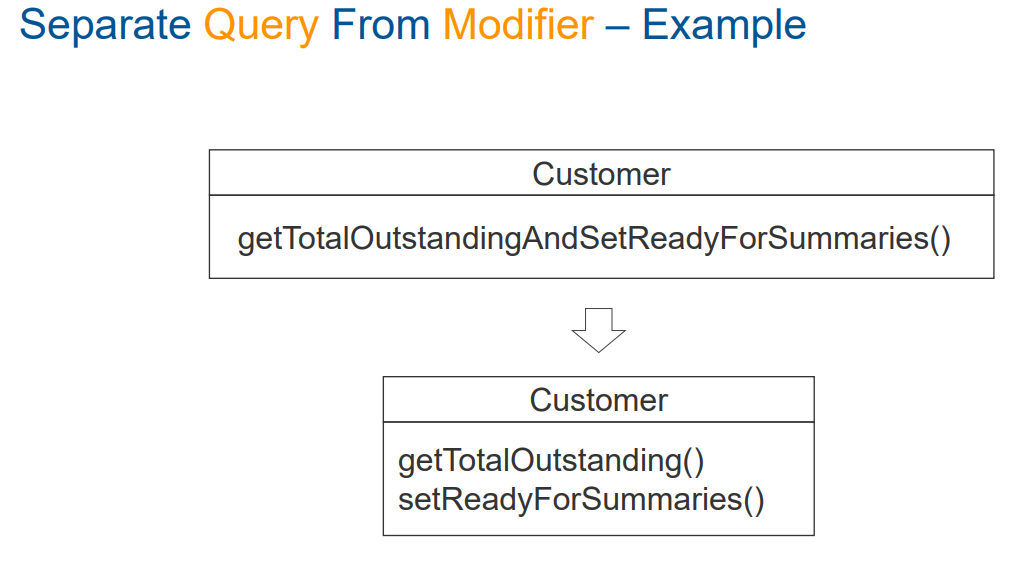
In OOP easy interfaces are a key for understandability and good software; understand what a program is doing
− Rename Method
− Introduce Parameter Object
Dealing with Generalization
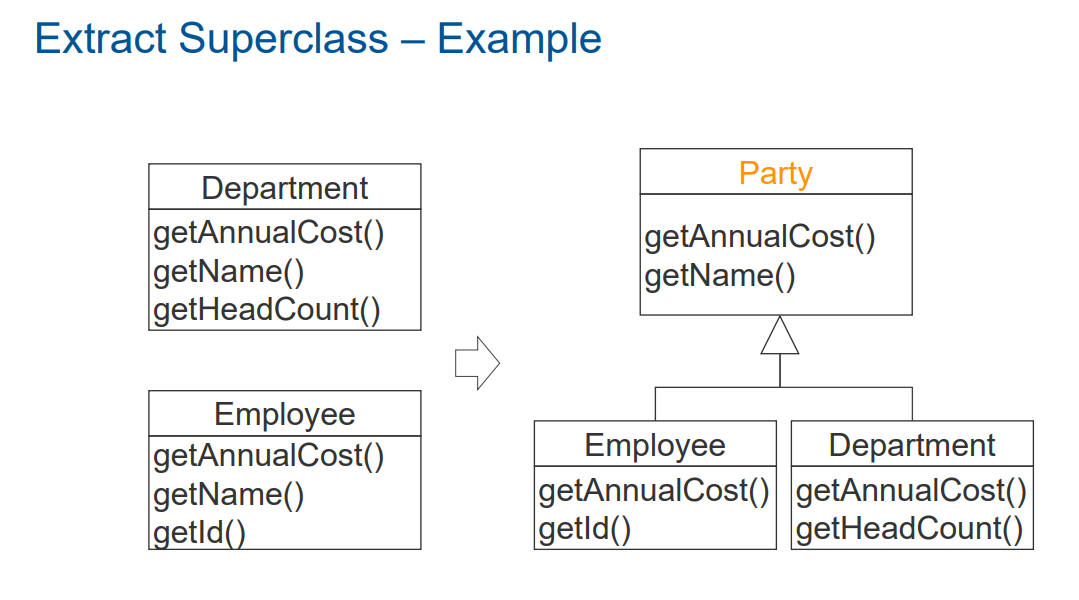
Maintain Responsibilities in hierarchies
− Pull Up/Down Field/Method
Form Template Method
Big Refactorings
Refactoring for some purpose; much larger: days, weeks, months
Convert Procedural Design to Objects