Chapter 13: IT infrastructure and computer networks
 Call Kai
 Learn
Learn Practice Test
 Spaced Repetition
 Match
Match Flashcards
 Knowt Play
1/98

There's no tags or description
Looks like no tags are added yet.
Name | Mastery | Learn | Test | Matching | Spaced | Call with Kai | Chat |
|---|
No analytics yet
Send a link to your students to track their progress
99 Terms
Infrastrucuture
the fundamental physical and organizational structures and facilities needed for the operation of a society or enterprise
IT infrastrucutre
includes the essential components, systems and resources that enable IT services within an organization
Small-scale computing
-Limited hardware resources
-Basic software applications
-Minimal IT infrastructure management
Large-scale computing
-Extensive hardware infrastructure
-Complex network architecture
-Sophisticated software systems
-Robust IT infrastructure management
Types of computers used in large computing
-Supercomputers
-Mainframes
-Server computers
Supercomputers
The largest and fastest computers, capable of storing and processing tremendous volumes of data.
Mainframes
Large, powerful computers used by large organizations for critical applications, bulk data processing, ERP and transaction processing
Server
A powerful computer/software tha provides services, data, opr resources to other computer, called clients over a network
Types of servers
rack server, blade server, and tower server
Rack server
Servers mounting in racks, balancing space and performance
Tower servers
Standalone servers are similar to desktop PCs, but with more powerful components
Blade servers
Compact, modular servers that fit into a chassis, sharing power and cooling
What we need servers for
-Centralized resource management
-Data storage and sharing
-Application hosting
-Security and access control
-Scalability and flexibility
-Reliability and redundancy
-Remote access and management
Client
A device/software that requests and uses services, resources or data provided by a server
What clients are used for
-Requesting services
-Consuming resources
-User interaction
-Network communication
Components of IT infrastructure
-Hardware
-Software
-Facilities
-Networking
-Data centres
Data centres
A location that hosts several servers
Design considerations of data centres
-Power supply
-Cooling system
-Redundancy assurance
Types of network applications
-Communication applications
-File sharing and collaboration platforms
-Web services
-Social networking platforms
-Remote access
-Internet of things
Interconnectivity
Enables seamless communication and data exchange
Interdependence
Components rely on each other for effective function
Monitoring and management
Ensures optimal functionality and security
Types of IT infrastructure
Traditional infrastructure and cloud infrastructure
Traditional IT infrastructure
Infrastructure that uses conventional hardware and software components
Cloud IT infrastructure
Infrstructure that is accessible via the internet with virtualization
Network
A collection of interconnected computers, devices, or systems that share resources and communicate with each other
Network categories
-Personal Area Network (PAN)
-Local Area Network (LAN)
-Metropolitan Area Network (MAN)
-Wide Area Network (WAN)
-Enterprise Private Network (EPN)
PAN (Personal area network)
A network organized around an individual person within a single building
Local Area Network
A network that connects computers and devices withinnn a limited area such as a home, school, or office building
Metropolitan Area Network
A network, often used by businesses to connect branches within a city, that spans a city or a large campus, connecting multiple LANs
Wide Area Network
A network that covers a broad area and represents a largest example of a WAN
Enterprise Private Network
A network built by an enterprise to connect its various sites to share resources and information securely
Network device categories
-Network interface card
-Access network components
-Access point
-Network core components
-Firewall
-Modem
Network Interface Card (NIC)
Provides the physical interface between a computer and a network
Access Network Components
They facilitate connectivity between end devices and the rest of the network. They operate at layer 2 of the OSI model and are responsible for forwarding data frames between devices within the same LAN
Access point
Provides wireless connectivity to devices, allowing them to connect to a wired network via WI-FI.
Network core components
operate at layer 3 and facilitate communication between different networks by forwarding data packets based on network layer addresses
Modem
A communications hardware device that facilitates the transmission of data.
Types of modem
-Dial-up modem
-DSL Modem
-Cable modem
-Fiber optic modem
-Satellite modem
-Cellular modem
WI-Fi router
Sets up and manages a local area network, directing traffic among connected devices and between the LAN and the internet
Wireless antenna
Transmit and receive radio waves
Mesh network
Decentralized topology in which nodes interconnect directly
Network protocols
set of rules that govern how devices format, transmit, and receive data
Routers
Forward data packets between networks based on IP addresses (can combine functions of hubs, switches and modems)
Switches
They connect multiple devices within a LAN, operating at OSI layer 2 and use MAC addresses to forward frames only to their intended destination
Bridge
Operates at OSI layer 2 to connect network segments into a single LAN
Media Access Control (MAC) address
a 48-bit physical identifier assigned to each NIC. The first six digits are the organizationally unique identifier, and the last 6 digits are the device-specific identifier
Network media
The physical/wireless channels that carry data between devices and to the internet
Guided media
Signals travel within solid materials
Unguided media
Signals propagate freely through the air
Guided media types
-Twisted pair cable
-Coaxial cable
-Fibre-optic cable
Attributes of wireless network media
-Signal: radio
-Max distance: 100 ft
-Max bandwidth: 1.3Gbps
-Key issue: Throughput lower in practice
Twisted-pair copper cable attributes
-Signal: Electricity
-Max distance: 330 ft
-Max bandiwth: 1 Gbps
-Key issue: Susceptible to EMi
Fibre-optic cable attributes
-Signal: light
-Max distance: 50 mi
-Max bandiwth: 26 Tbps
-Key issue: High installation cost
Network topology
The arrangement of different elements in a computer network
Types of topologys
-Bus
-Star
-Mesh
-Ring
Bus topology
A single shared cable that requires terminators at both ends to prevent reflections (data transmission errors)
Star topology
Devices connect to a central hub/switch. data passes through the hub before reaching the intended devices
Ring topology
Each device is connected to two other devices, forming a circular network. Data travels in one direction around the ring
Mesh topology
Every device is connected to every other device in the network
Advantages and Disadvantages of Bus Topology
Easy to implement and extend and requires fewer cables but the whole network fails, if the central cable fails and is limited by the cable length and the number of stations
Advantages and Disadvantages of Star Topology
easy to install and manage, and failure of one node does not affect the whole network but the whole network is affected if the central hub fails, and it requires more cable than bus topology
Advantages and Disadvantages of Ring Topology
Data packets travel at high speed, and there are no data collisions, but the whole network can be affected if one device fails, and it's difficult to troubleshoot
Advantages and Disadvantages of Mesh Topology
Highly reliable and redundant and data can be transmitted simultaneously across multiple devices but its expensive and complex to install and requires a lot of cabling
Data transmission steps
1. Preparing the data
2. Breaking the data into packets
3. Addressing the packets
4. Transmitting the packets
4. Receiving the packets
5. Reassembling the data
6. Delivering the data
IP address
A unique identifier assigned to each device connected to a network allows devices to communicate with each other by specifying the source and destination of data packets
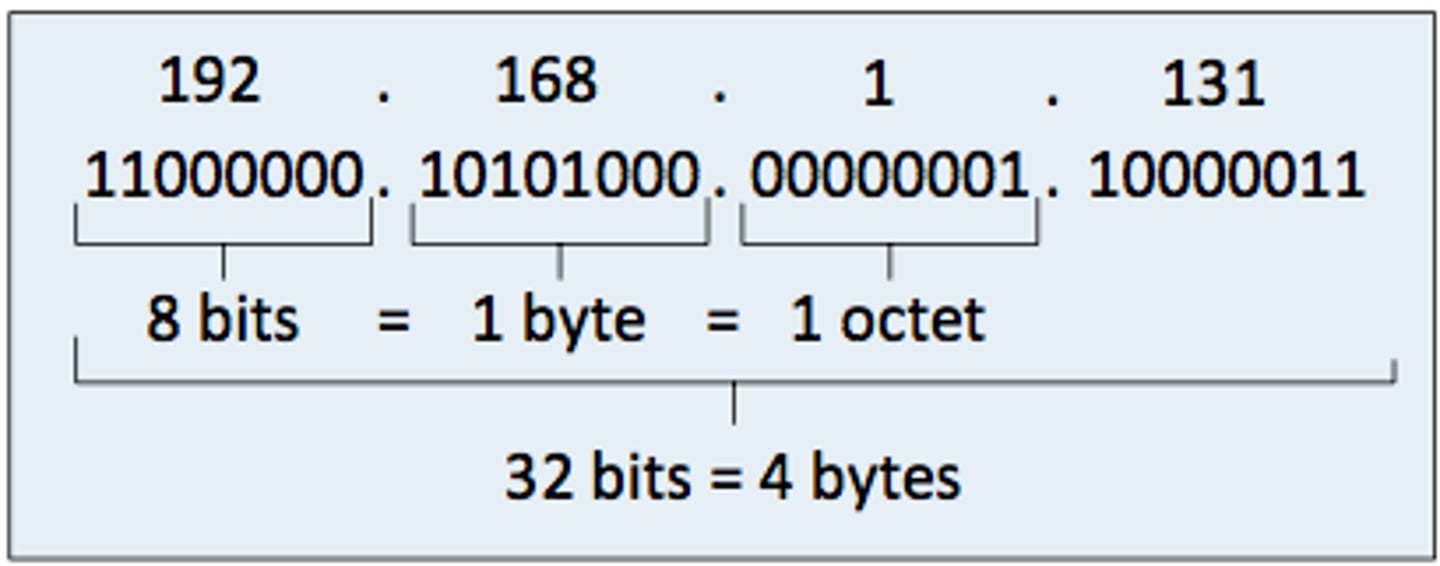
IPv4 address
32-bit number shown in dotted decimal as four octets, with each octet ranging from 0-255
Subnet mask
Masks IP bits to separate the network portion from the host portion
Class A Address
-First bit is set to 0
-First octet ranges from 1-126
-Large networks with up to 16 million hosts
-Default subnet mask: 255.0.0.0
Class B Address
-First two bits are set to 10
-First octet ranges from 128-191
-Medium-sized networks with up to 65,000 hosts
-Default subnet mask: 255.255.0.0
Class C Address
-First three bits to 110
-First octet ranges from 192-223
-Small networks with up to 254 hosts
-Default subnet mask 255.255.255.0
DHCP
Protocol that dynamically assigns IP, subnet mask, gateway, and DNS to hosts.
IPv6
128-bit hex address in eight groups
The internet
A global network of networks that connects billions of devices using protocols
Origins of the Internet
Started in 1969 as ARPNET (Advanced Research Projects Agency Network), then evolved into NSFNET (National Science Foundation Network) in 1987
WWW
A service on the internet that is a collection of websites and web pages
Domain Name System (DNS)
A distributed directory that maps human names to IP addresses
nslookup
Command used to check the IP of a domain name
layers of the TCP/IP protocol
-Application layer
-Transport layer
-Internet layer
-Network interface layer
Application layer
Provides protocols and services directly to end-users, enabling applications to access network services
Hypertext Transfer Protocol (HTTP)
a protocol for computers to request and share the pages that make up the world wide web on the Internet
Transport Layer
Makes sure data gets from one device to another correctly
Key protocols for transport layer
TCP and UDP
TCP
Makes sure every piece of data is delivered in the right order reliably
UDP
Sends data quickly, but doesn't guarantee that it arrives
Internet layer
Figures out the best path for data to travel across multiple networks to reach its final destination
Network interface layer
gets data from one device to another over a specific network
Key protocol for the network interface layer
-MAC address
-Physical layer: sends the actual bits of data
web browser
Software application used ot access and display information on the World Wide Web
Encryption
Process of converting readable plaintext into unintelligible ciphertext so only authorized parties can read it
Uses for cryptography
-Data integrity
-Entity authentication
-Data origin authentication
-Non-repudiation
Cryptosystem (cypher system)
A system that provides both encryption and decryption services
Types of Cryptosystems
-Symmetric key encryption
-asymmetric key encryption
-Hashing
-Classical ciphers
Hashing
converting a string of characters such as letters, numerals or symbols by applying a mathematical formula
Symmetric key encryption
Same key is used to encrypt and decrypt
Asymmetric key encryption
Uses a public key for encryption and a private key for decryption
Types of classical ciphers
-Substitution ciphers: Replacing each plaintext symbol with another symbol
-Transportation ciphers: Rearanging the order of letters
Ceaser cipher
A type of substitution cipher that rotates the alphabet by three letters
Not studied (98)
You haven't studied these terms yet.