Module 2 System Development Life Cycle (SDLC)
 Call Kai
 Learn
Learn Practice Test
 Spaced Repetition
 Match
Match Flashcards
 Knowt Play
1/38

There's no tags or description
Looks like no tags are added yet.
Name | Mastery | Learn | Test | Matching | Spaced | Call with Kai | Chat |
|---|
No analytics yet
Send a link to your students to track their progress
39 Terms
Software Development Life Cycle (SDLC)
A systematic step-by-step process used by software developers to plan, design, develop, test, deploy, and maintain software applications within budget and schedule.
Primary Objectives of SDLC
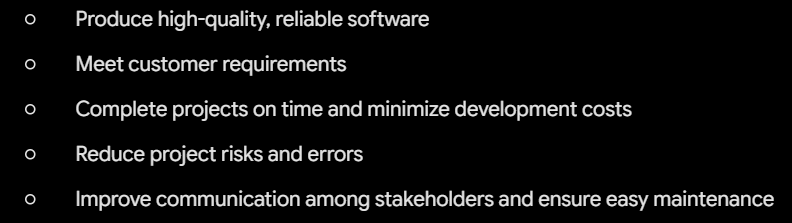
Key Benefits of Using SDLC
Standardizes software development, improves teamwork and productivity, reduces project failure, controls costs, and makes testing more effective.
Phase 1: Planning Phase
The first stage of SDLC where project goals, scope, schedule, cost, feasibility, and stakeholders are identified.
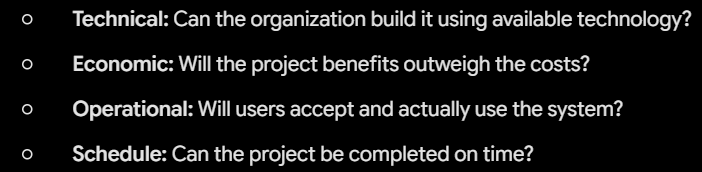
Feasibility Study
An assessment conducted during the Planning Phase to determine whether a project is practical and worth pursuing.
The 4 Types of Feasibility
Phase 2: Requirements Analysis
The phase where developers closely communicate with stakeholders to identify, gather, and document what users need from the software.
Functional Requirements
Specifications describing what the system should do (e.g., Login, Registration, Payment, Search, Report Generation).
Non-Functional Requirements
Specifications describing how the system should perform (e.g., Security, Reliability, Speed, Scalability, Availability).
Phase 3: Design Phase
The phase that converts gathered requirements into a system blueprint (interfaces, databases, system architecture, security).
High-Level Design (HLD) vs. Low-Level Design (LLD)

Phase 4: Development Phase
The phase where developers write actual source code, build databases, develop APIs, and integrate modules.
Phase 5: Testing Phase
The process of verifying that the software works correctly, meets user requirements, and is free of bugs before deployment.
Phase 6: Deployment Phase
The process of releasing the software to users, including installation, server configuration, data migration, and user training.
Phase 7: Maintenance Phase
The ongoing phase to keep software operational, secure, and updated after deployment.
Flowchart
A diagram that illustrates the sequence of steps, activities, decisions, and workflow of a process using standardized symbols and arrows.
UML Diagrams (Unified Modeling Language)
Standardized visual diagrams used to document the structure and behavior of a system (e.g., Use Case, Class, Activity, Sequence, and State Diagrams).
ER Diagrams (Entity-Relationship Diagram)
A diagram that maps out data structures and shows the relationships between entities to help design databases.
Wireframe
A simple, low-detail visual layout of an interface focusing on structure, layout, and functionality without color or styling.
Mockup
A detailed, static visual representation showing the final appearance of an interface, including colors, fonts, images, and branding.
Unit Testing
Testing individual components or units of source code independently.
Integration Testing
Testing the interaction and data flow between integrated modules.
System Testing
Testing the entire, complete software application end-to-end.
Acceptance Testing
Final testing conducted by users/clients to verify business requirements before deployment.
Direct Deployment
The old system is immediately shut down and replaced by the new system.
Parallel Deployment
Both the old system and the new system run side-by-side until the new system is verified.
Pilot Deployment
The new system is released to a small, limited group of users to test in a live environment first.
Phased Deployment
The new system is rolled out gradually in stages or modules.
Corrective Maintenance
Fixing reported bugs, errors, and defects in the software.
Adaptive Maintenance
Modifying the software to adapt to new environments (e.g., new operating systems, hardware, or cloud platforms).
Perfective Maintenance
Enhancing software performance and adding new features requested by users.
Preventive Maintenance
Making proactive modifications to prevent future software failures and reduce risks.
Requirements Gathering Activities
Conducting interviews, observing users, distributing questionnaires, holding workshops, and gathering business requirements.
Development Phase Activities
Writing source code, creating databases, developing APIs, and integrating modules.
Deployment Phase Activities
Installing software, configuring servers, migrating data, training users, and monitoring the live system.
Class Diagram (UML)
A structural UML diagram that visualizes the classes, attributes, methods, and relationships within an object-oriented system.
Sequence Diagram (UML)
A behavioral UML diagram that documents the chronological sequence of interactions and messages passed between objects over time.
Activity Diagram (UML)
A behavioral diagram that illustrates the step-by-step workflow of operational components and decision logic within a system.
State Diagram (UML)
A diagram that shows the different states an object transitions through in response to external events.