CLN 251/252 : Configuring the Epic End User Clinical
 Call Kai
 Learn
Learn Practice Test
 Spaced Repetition
 Match
Match Flashcards
 Knowt Play
1/200

There's no tags or description
Looks like no tags are added yet.
Name | Mastery | Learn | Test | Matching | Spaced | Call with Kai | Chat |
|---|
No analytics yet
Send a link to your students to track their progress
201 Terms
Report
Displays information, shareable, appears in different activities
Print Group
A group of records shared across reports
Profile
Contains details within activities, can control settings
Chart Review Tabs
Tabs for reviewing charts in a profile
Note Speed Buttons
Buttons for quickly adding notes in a profile
SmartText
A feature in a profile for adding pre-defined text
Workflow Engine Rule
A set of conditions that will change a patient workspace based on certain conditions.
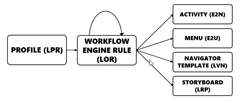
More Menu
A menu in a workflow engine rule
Activity Tabs
Tabs for navigating activities in a workflow engine rule
Navigators
Guide clinicians through a workflow
Sidebar
A side panel in a workflow engine rule
Storyboard
A visual representation of a workflow in a workflow engine rule
Role
Determines layout and behavior, controls various settings
Max Number of Workspaces
The maximum number of workspaces a user can have
Use Last Login Department
Determines the department a user logs into by default
Startup Activities
Activities that are automatically opened when a user logs in
Toolbars and Menus
Customizable toolbars and menus in a role
Timeout Interval and Action
Determines the time period of inactivity before a user is logged out
Security Class
Controls access to different functionalities
Basket of Keys
Types of security, including In Basket, Reporting Workbench, Shared, EpicCare, Inpatient
Point
An individual piece of functionality
Class
A grouping of points
Provider
Provides clinical care, has specific criteria for needing one
Scheduled with Patients
One of the criteria for needing a provider
Clinical Credentials
One of the criteria for needing a provider
Completes Clinical Documentation
One of the criteria for needing a provider
Authorizes Orders
One of the criteria for needing a provider
Referrals
One of the criteria for needing a provider
User
Logs in to the system, determines login details and settings
ID/Password
Credentials used to log in
Default Login Department
The department a user logs into by default
Link to Template
Connects a user to a template with shared settings
Link to Provider
Connects a user to a provider
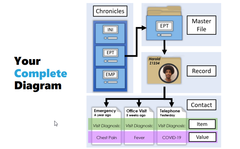
Chronicles
Epic's database management system. Data lives here.
Hyperspace
Epic's front-end user interface.
Text
Back end, text-based interface for administrators. build and use utilities here.
Master File
Stores data about one type of thing. "drawer"
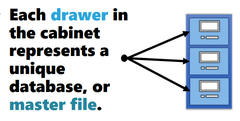
INI
Abbreviated name for a master file

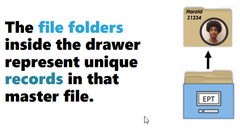
Record
Stores information about one specific entity in a master file. "file folder inside the drawer"
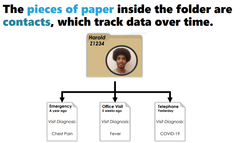
Contact
A date-specific snapshot of data within a record. "piece of paper inside the folder."
What is a Record Viewer?
A tool to view records in Chronicles.
What can you do with a Record Viewer?
Take a read-only look at a record.
What is the purpose of a Record Viewer?
To view records and their data in Chronicles.
How are records and data displayed in a Record Viewer?
Records and data may have different naming and content.
What is a Report (LRP)?
Displays information and is shareable.
What is a Print Group (LPG)?
A group of records shared across reports.
What is a Profile (LPR)?
Contains details within activities and is shareable.
What can be controlled in a Profile (LPR)?
Over 1000 settings, including Chart.
What are the review tabs in a Profile (LPR)?
LQT, Note speed buttons for SmartText (ETX), Reports (LRP), and more!
How many levels can a Profile (LPR) be assigned at?
Six different levels in a hierarchy.
How is a compiled profile created?
System compiles item by item.
What are the components of a Workflow Engine Rule (LOR)?
More Menu, Activity Tabs, Navigators, Sidebar, Storyboard (MANSS).
What are Conditional Statements in a Workflow Engine Rule (LOR)?
Evaluate properties against operators and values.
What happens if a condition in a Workflow Engine Rule (LOR) contains one property, operator, and value?
It is considered a case.
What happens if a Workflow Engine Rule (LOR) has nested conditions?
They are evaluated using AND.
What does the 'Then' directive in a Workflow Engine Rule (LOR) do?
It sets the 'details' or directs to another rule.
What is a Navigator (LVN)?
Guides clinicians through a workflow and is shareable.
What are the different types of LVN records?
Templates, Topics, Sections.
Where is a Navigator (LVN) usually assigned?
In a Workflow Engine Rule (LOR).
What is a Role (E2R)?
Determines layout and behavior and is shareable.
What settings can be determined by a Role (E2R)?
Max number of workspaces, Use last login department, Startup activities (E2N), Toolbars and menus (E2U), Timeout interval and action.
What is a Security Class (ECL)?
Determines access and is shareable.
What are the types of Security in a Security Class (ECL)?
In Basket, Reporting Workbench, Shared, EpicCare, Inpatient.
What is a Provider (SER)?
Provides clinical care and there is one per person/thing.
What are the requirements for needing a Provider (SER)?
Scheduled with patients, Clinical credentials/completes clinical documentation, Authorizes orders, Referrals to/from (SCAR).
What is Chronicles?
Epic's database management system
What is Hyperspace?
Epic's front-end user interface
What is the Classic client?
The original Hyperspace client used for building, configuring records, and using utilities
What is Text?
A text-based interface used by administrators for creating, editing, and analyzing records
What are some applications of Text?
Clinical Administration, Chronicles, Training Tools
What are master files?
Files that store all the data about one type of thing
What is a record?
A specific entity in a master file that stores information and has a unique ID
What is a contact?
A date-specific snapshot of the data within a record
What is an item?
A question prompt on a standardized form
What is the purpose of Built in Text?
To create, edit, and analyze records in Chronicles
What is the purpose of User Template (EMP)?
To contain shared settings for similar users
What is the purpose of department (DEP)?
To link to the template (EMP) and provider (SER), if needed
What is the purpose of Log in?
To determine ID/password and default login
What is the purpose of Classic icon in training?
To launch the original Hyperspace client (Classic client)
What is the purpose of Clinical Administration in Text?
To manage various clinical apps
What is the purpose of Chronicles in Text?
To import, duplicate, hide, search for, or manage records
What is the purpose of Training Tools in Text?
To provide tools for training, such as patient duplication
What is the purpose of a master file?
To store all the data about one type of thing
What is the purpose of a record?
To store information about a specific entity in a master file
What is the purpose of a contact?
To store date-sensitive information about a record
What is a value in Chronicles?
The answer or information specified for an item in a record.
What does the INI field represent in Chronicles?
Master File
What does the left shaded column in the main Record Viewer workspace represent?
Items
What does the right side of the main Record Viewer workspace represent?
Values
What are reports in Epic?
Printed or displayed information that helps users stay informed about a patient.
What are print groups in Epic?
Determines what information displays and how it is formatted in a report. Information is retrieved from chronicles by looking at specific items and their values.
Where do print groups get their information from?
Chronicles by looking at specific items and their values.
What is the purpose of the Report & Print Group Assistant?
To help administrators manage reports by providing record names and IDs.
What information can be seen for each print group in the Report & Print Group Assistant?
Category it belongs to (e.g. Patient List, Chart Review).
What is the Session Information Report?
A troubleshooting tool that displays important information related to a user's current session.
What can be determined by the category a print group belongs to?
Where the print group is used (e.g. Patient List, Chart Review).
What is the print group?
A preview of how the print group appears to end users.
What is the efficient level to start profile build?
The most general level in the hierarchy
What is the Rule of Specificity?
Making general settings in broad levels and overriding in specific levels
What does building by exception allow for?
Efficient build that is easier to maintain over time