System Analysis Midterm 1 (Chapters 1-4)
 Studied by 2 people
 Call Kai
 Learn
Learn Practice Test
 Spaced Repetition
 Match
Match Flashcards
 Knowt Play
1/110

Earn XP
Name | Mastery | Learn | Test | Matching | Spaced |
|---|
No study sessions yet.
111 Terms
Information Technology
combination of hardware and software products and services
used to manage, access, communicate, and share information
Systems Analysis and Design
step-by-step process for developing high-quality information systems
Information system - combines technology, people, and data to perform certain business functions
System Analyst
Investigates, analyzes, designs, develops, installs, evaluates, and maintains a company’s information systems
Manages IT projects, conducts meetings, deliver presentations, and write memos, reports, and documentation
Constantly interacts with users and managers within
and outside the organization
System Analyst Role
Acts a translators to managers and programmers
Best line of defense in an IT disaster
Most valuable skill: ability to listen
Seeks feedback from users to ensure that systems do not go off track
System Analyst Knowledge, Skills, and Education
Technical knowledge
Communication and business skills
Critical thinking skills
Education: college degree in information systems, science, or business
Some IT experience is required
Certification: helps IT professionals learn new skills and gain recognition for efforts
Systems Analyst Career Opportunities
Companies will need systems analysts to apply new information technology
Explosion in e-commerce will fuel IT job growth
Important factors:
Job titles
Company organization
Company size
Salary, location and future growth
Corporate culture
Information Systems
System: a set of related components that produces specific results
Mission-critical systems: vital to a company’s day-to-day operations
Data (component of an information system)
All systems require input data
Data: basic facts that serve as raw material
Information: data transformed into output that is valuable to users
Stored in tables
Hardware (component of an information system)
Physical layer of information system
Moore’s Law: transistors on an integrated circuit chip double about every 24 months
Software (component of an information system)
controls hardware
System software: manages hardware components
Application software:
Support day-to-day business
Horizontal, vertical, and legacy systems
Processes (component of an information system)
Describe tasks and business functions performed to achieve specific results
People (component of an information system)
Stakeholders: individuals interested in an information system (includes the management group, users, IT staff members)
Major Trends That Shape Business Today
Rapidly increasing globalization
Technology integration for seamless information access
Rapid growth of cloud-based computing and services
Internet Model
Internet-based systems
Ecommerce (electronic commerce)
A series of web pages that provides a user interface to enable communication between a database management software and a web-based server
Mobile devices interact with the system using app
B2C (business-to-customer)
In a single convenient session, customers can:
Do research and compare prices and features
Check availability and arrange delivery
Choose payment methods
B2B (business-to-business)
Ecommerce was initially carried out using electronic data interchange (EDI)
Most firms use supply chain management (SCM) software
Helps manage inventory levels, costs, and suppliers
Modeling
Produces a graphical representation of a concept or process
Business profile
Overview of a company’s mission, functions, organization, products, services, customers, suppliers, competitors, constraints, and future direction
Business process
Specific set of transactions, events, and results that can be described and documented
Business process model (BPM)
Graphically display one or more business processes
Business process modeling notation (BPMN)
Includes standard shapes and symbols to represent events
processes, workflows, and more
Enterprise computing
Supports company-wide operations and data management requirements
Enterprise resource planning (ERP) systems provide cost-effective support for users and managers throughout the company
Transaction processing (TP) systems
Processes data generated by day-to-day business operations
Customer order processing, accounts receivable, and warranty claim processing
Business support systems
Provide job-related information support to users at all levels of a company
Especially the decision support capability
Management Information Systems (MIS)
Previously, managers were the primary users
Today, employees at all levels need information to perform their jobs
Radio frequency identification (RFID)
Uses radio waves to track physical objects throughout the
retail process
Knowledge management
Knowledge base: a large database that allows users to find information by entering keywords
Inference rules: identify data patterns and relationships
User productivity systems
Technology that improves productivity
Email, voice mail, video and web conferencing
Groupware: runs on a network to enable data sharing in teams
Digital assistants
Combinations of knowledge management systems and user productivity systems
Enhanced by artificial intelligence and machine learning
Such as Amazon’s Alexa, Apple’s Siri, and Google Assistant
Systems integration
Most large companies require combination of transaction processing, business support, knowledge management, and user productivity features.
Organizational Information Models
To model business functions and organizational levels
A systems analyst must understand the company’s organizational model
To recognize who is responsible for specific
processes and decisions and to be aware of what information is required by whom
Top managers (Organizational Information Model)
Develop long-range strategic plans
Middle managers and knowledge workers (Organizational Information Model)
Middle managers provide direction, resources, and performance feedback to supervisors and team leaders
Knowledge workers provide support for the organization’s basic functions
Supervisors and team leaders (Organizational Information Model)
Oversee operational employees and carry out day-to-day functions
Operational employees (Organizational Information Model)
Rely on TP systems to enter and receive data they need to perform their jobs
Empowered to handle tasks and make decisions that were assigned previously to supervisors
Structured analysis
Uses systems development life cycle (SDLC)
Plan, analyze, design, implement, and support an information system
Object-oriented analysis
Combines data and processes as objects
Agile methods
Build a series of prototypes and constantly adjust them to user requirements (spiral model)
Prototyping
Early working version of an information system
Disadvantage: important decisions might be made before business or IT issues are thoroughly understood
Prototypes based on careful fact-finding and modeling techniques can be extremely valuable
Tools for System Development
Computer-Aided Systems Engineering (CASE) tools
Computer-aided software engineering
Provide an overall framework
Support design methodologies
Generate program code
Application development (IT Department)
Systems are developed by teams consisting of users, managers, and IT staff members
Systems support and security (IT Department)
Provides vital protection and maintenance services
User support (IT Department)
Provides users with technical information, training, and productivity support (known as a help desk)
Database administration (IT Department)
Involves data design, management, security, backup, and access
Network administration (IT Department)
Includes hardware and software maintenance, support, and security
Web support (IT Department)
Specialists design and construct web pages, monitor traffic, and manage hardware and software
Quality assurance (QA) (IT Department)
QA team reviews and tests all applications and systems changes to verify specifications and software quality standards
Strategic Planning
Process of identifying long-term organizational goals, strategies, and resources
Starts with a mission statement that focuses on long-term challenges and goals
Reflects the vision, purpose, and values
Critical success factor: a high-priority objective that must be achieved
SWOT Analysis
Strengths, weaknesses, opportunities, and threats
Commonly used to analyze a company’s technical, human, and financial resources
IT Department Role
Careful project planning
Supports overall business strategy and operational needs
Scope is well-defined and clearly stated
Goals are realistic, and tied to specific statements, assumptions, constraints, factors, and other inputs
Mind maps
Starts with a central concept or idea placed in the middle of the page
Branches extend outward to represent related subtopics or ideas, which can further branch out into more specific details
Balanced scorecards
A performance metric used to monitor and measure an organization’s performance
Help organizations translate their vision and strategy into actionable objectives
Gap analysis
To compare an organization’s current performance with its desired performance
Allowing for the development of strategies to bridge those gaps
Systems Requests
Starting point for most information systems projects
Formal way of asking for IT support
Stronger controls to ensure data is secure and accurate
Reduced cost
More information
Better performance
Improved service
More support for new products and services
Often require new types of levels of IT support
Systems Review Committee
Broader viewpoint enables a committee to establish priorities more effectively
One person’s bias is less likely to affect decisions
Disadvantages
Action on requests must wait until committee meets
Members might favor projects requested by their own departments
Operational Feasibility
Proposed system will be used effectively after it has been developed
Can be affected by organizational culture
Cannot be accurately measured but requires careful study
Questions that can help predict feasibility
Is the project supported by management and users?
Will the new system result in a workforce reduction?
Do legal or ethical issues need to be considered?
Economic feasibility
Projected benefits of a proposed system out-weigh total cost of ownership (TCO)
Determination of TCO requires cost analysis
People, including IT staff and users
Hardware and equipment
Software
Formal and informal training
Licenses and fees
Consulting expenses and facility costs
Estimated cost of not developing or postponing
Technical feasibility
Technical resources required to develop and operate the system
Questions analysts should ask
Does the company have the necessary hardware, software, and network resources?
Does the company have the required technical expertise?
Does the proposed platform have sufficient capacity for future needs?
Will a prototype be required?
Schedule feasibility
Project implemented in an acceptable time frame
Issue: interaction between time and costs
Additional schedule feasibility issues
Can the company or the IT team control the factors that affect schedule feasibility?
Has management established a firm timetable?
What conditions must be satisfied?
Will an accelerated schedule pose any risks?
Will project management techniques be available?
Discretionary projects
Projects where management has a choice in implementing them
Nondiscretionary projects
No choice
Many are predictable
Annual updates to payroll
Tax percentages
Quarterly changes
Step 1 of The Preliminary Investigation
Understand the problem or opportunity
Develop a business profile that describes current business processes and functions
Understand how modifications will affect business operations and other information systems
Identify the departments, users, and business processes involved
Consider using a fishbone diagram
Step 2 of The Preliminary Investigation
Define the project scope and constraints
Define specific boundaries, or extent, of the project
Create a list with must do, should do, could do, and won’t do sections
Avoid project creep
Identify constraints
Step 3 of The Preliminary Investigation
Perform fact-finding
Gather data about project usability, costs, benefits, and
schedulesAnalyze organization charts
Conduct interviews
Review documentation
Observe operations
Conduct a user survey
Analyze the data
Step 4 of The Preliminary Investigation
Analyze project usability, cost, benefit, and schedule data.
What information must be obtained, and how will it be gathered and analyzed?
Who will conduct the interviews? How many people will be interviewed?
Will a survey be conducted? Who will be involved?
How much time will it take to tabulate the results?
How much will it cost to analyze the information and prepare a report with findings and recommendations?
Step 5 of The Preliminary Investigation
Evaluate feasibility to track whether a project is worth the investment.
Operational feasibility
Technical feasibility
Economic feasibility
Schedule feasibility
Project Manager or Project Leader
Serve as the project coordinator
Assume administrative responsibilities
Negotiate with users
Typically perform four main tasks
Project planning
Project scheduling
Project monitoring and controlling
Project reporting
Project Planning
Identifying tasks
The size of the project is important
Amount of work and complexity increases and project scope increases
Capabilities of project team members also affect time requirements
Brooks Law: adding manpower to a late software project only makes it later
Estimating tasks time and cost
Person-days: the amount of work that one person can complete in one day
Project Scheduling
specific timetable
selecting and staffing the project team
assigning specific tasks to team members
arranging for other necessary resources
Graphical Planning Aids: Gantt chart & PERT/CPM chart
Gantt Chart
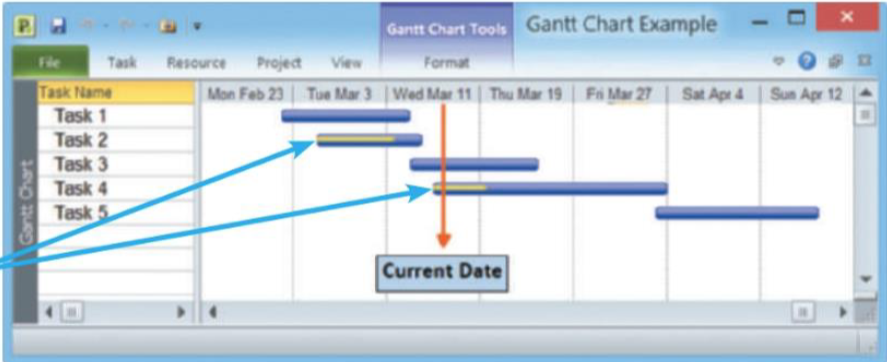
The goal was to show planned and actual progress on a complex project
Offers a rapid overview
A horizontal bar chart that represents a series of tasks
Display time on the horizontal axis
Arrange tasks vertically from top to bottom
The position of a bar shows the planned start and end of a task
The length of a bar indicates its duration
PERT/CPM Chart
Program Evaluation Review Technique (PERT)
By US navy to manage complex projects
Critical Path Method (CPM)
By private industry to manage complex projects
Distinctions between them have disappeared. The technique can be called either PERT, CPM, or PERT/CPM
More helpful than Gantt for scheduling, monitoring, and controlling projects
A bottom-up technique
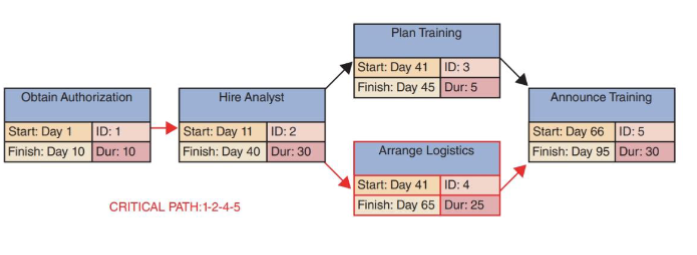
Know the tasks, their duration, and the order in which they must be performed
Calculate the time to complete the project
Identify the specifics tasks that will be critical to the project’s on-time completion
Critical Path
includes all tasks that are vital to the project schedule
If any task along the critical path falls behind schedule, the entire project is delayed.
Slack Time
The amount of time that a task can be late without affecting the completion date of a project
Project Risk Management
The process of identifying, analyzing, anticipating, and monitoring risks to minimize their impact on the project
Every IT project involves risks that systems analysts and project managers must address
Risk Management Plan
A review of a project’s scope, stakeholders, budget, schedule, and any other internal or external factors that might affect the project
Should define
Project roles and responsibilities
Risk management methods and procedures
Categories of risks
Contingency/response plans
Qualitative Risk Analysis
Evaluate each risk by estimating the probability of occurrence and the degree of impact
Can use a formula to weigh risk and impact value
Can display the results in a two-axis grid
Such as a Microsoft Excel XY chart
Help a project manager to focus on the most critical areas
Where both the risk probability and potential impact are high
Quantitative Risk Analysis
To understand the actual impact in terms of dollars, time, project scope, or quality
Can involve a modeling process called what-if analysis
Allow a project manager to vary one or more elements in a model to measure the effect on other elements
Project Status Reports
A project manager must report regularly to his or her immediate supervisor, upper management, and users
Should explain the handling and monitoring of problems
Most managers recognize that problems do occur on most projects
It is better to alert management sooner rather than later
Software Change Control
The process of managing and controlling changes to an information system requirements
After the document has been submitted and accepted
Changes to information system requirements are inevitable
Steps of Software Change Control
Complete a change request form.
Take initial action on the request.
Analyze the impact of the requested change
Determine the final disposition of the requested change.
Joint Application Development (JAD)
A popular fact-finding technique
Bring users into the development process as active participants
User involvement
Users have a vital stake in an information system (Should participate fully)
Successful systems must be user-oriented
JAD team approach involves a task force of
Users, managers and IT professionals
Work together to gather information, discuss business needs, and define the new systems requirements
End Product: a requirement model
Disadvantages & Advantages of JAD
Disadvantages
More expensive and can be cumbersome
If the group is too large relative to the size of the project
Advantages
Allows key users to participate effectively
When properly used can result in
A more accurate statement of system requirements
A better understanding of common goals
A stronger commitment to the success of the new system
Rapid Application Development (RAD)
A team-based technique
Speed up information systems development and produce a functioning information systems
Rely heavily on prototyping and user involvement
Allow user to examine a working mod as early as possible
A complete methodology with a four-phase life cycle that parallels the traditional SDLC phases
End product: A new system
RAD: Requirements planning phase
Combine elements of the systems planning and systems analysis phases of the SDLC
Users, managers, and IT staff members discuss and agree on business needs, project scope, constraints and system requirements
End when the team agrees on key issues and obtains management authorization to continue
RAD: User design phase
Users interact with systems analysts and develop models and prototypes
Typically, use a combination of JAD techniques and CASE tools to translate user needs into working models
A continuous and interactive process allowing users to understand, modify, and eventually approve a working
model of the system that meets their needs
RAD: Construction phase
Focus on program and application development tasks similar to the SDLC
Users continue to participate and still can suggest changes or improvements
RAD: Cutover phase
Like the final tasks in the SDLC implementation phase
Including data conversion, testing, changeover to the new system, and user training
As a result, the new system is built delivered, and
placed in operation much sooner
RAD Objectives
To cut development time and expense
By involving the users in every phase of systems development
In addition to user involvement, a successful RAD team must have IT resources, skills, and management support
Especially useful when a company needs
An information system to support a new business function
To design a system that requires a highly interactive or complex user interface
Disadvantages & Advantages of RAD
Disadvantages
Might allow less time to develop quality, consistency,
and design standardsRAD stresses the mechanics of the system itself and does not emphasize the company’s strategic business
needs
Advantages
Systems can be developed more quickly with
significant cost savings
Agile Methods
Attempt to develop a system incrementally
By building a series of prototypes and constantly adjusting them to user requirement
Developers revise, extend, and merge earlier versions into the final product
A large community of agile-related software and services has evolved
Many agile developers prefer not to use CASE tools at all
Rely on whiteboard displays and arrangements of movable sticky notes
Disadvantages & Advantages of Agile Methods
Disadvantages
Team members need a high level of technical and interpersonal skills
May be subject to significant change in scope
Advantages
Are very flexible and efficient in dealing with change
Frequent deliverables constantly validate the project and reduce risk
Functional decomposition diagrams (FDD)
A top-down representation of a function or process
Also called structured chart
Can show business functions and break them down into lower-level functions and processes
Data flow diagrams (DFD)
To show how system stores, processes, and transforms data
Unified modeling language (UML)
Use object-oriented design concepts to visualize and document software system design
Use case diagram
Represent the interaction between users and the information system
Sequence diagram
Show the timing of interactions between objects as they occur
Can use a sequence diagram to show all possible outcomes or focus on a single scenario
System Requirements
A feature that must be included in an information
system to satisfy business requirements and be acceptable to usersServe as benchmarks to measure the overall
acceptability of the finished systemFall into five general categories
Outputs, inputs, processes, performance, and controls
System Requirement: Outputs
The Web site must report online volume statistics every four hours, and hourly during peak periods
The inventory system must produce a daily report showing the part number, description, quantity on hand, quantity allocated, quantity available, and unit cost of all sorted by part number
System Requirement: Inputs
Manufacturing employees must swipe their ID cards into online data collection terminals that record labor
costs and calculate production efficiencyThe department head must enter overtime hours on a
separate screen
System Requirement: Processes
The student records system must calculate the GPA at
the end of each semesterAs the final step in year-end processing, the payroll
system must update employee salaries, bonuses, and
benefits and produce tax data required by the IRS