ITGC and App Controls
 Call Kai
 Learn
Learn Practice Test
 Spaced Repetition
 Match
Match Flashcards
 Knowt Play
1/79

There's no tags or description
Looks like no tags are added yet.
Name | Mastery | Learn | Test | Matching | Spaced | Call with Kai | Chat |
|---|
No analytics yet
Send a link to your students to track their progress
80 Terms
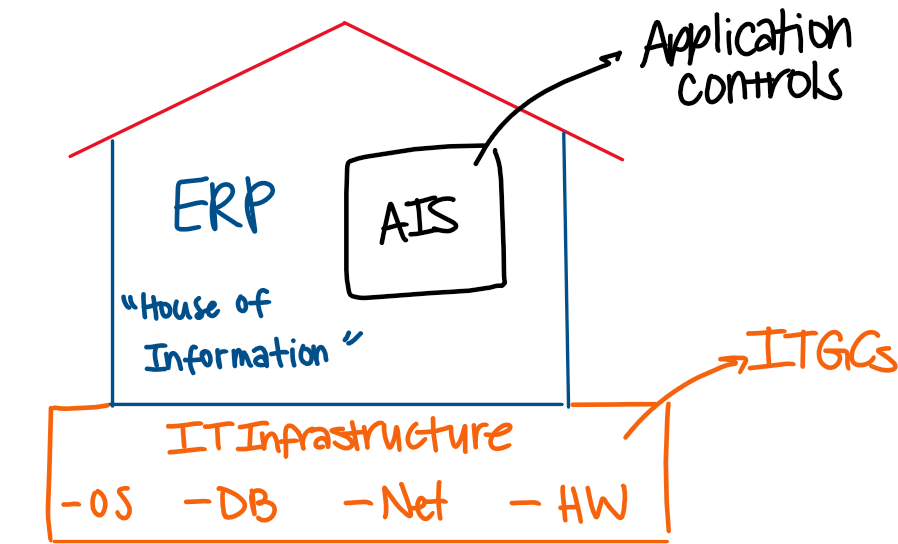
relationship bw AIS, ERP, and IT
house of information
what are the 2 main options for AIS acquisition?
In house development, and purchased systems
advantages of purchased systems
lower cost
quicker to implement
customizable thru modules
reputable, certified vendor
may be only option for small biz
disadvantages of purchased systems
dependent on vendor
not fully customizable
may be inflexible when change is needed
ERP systems
purchased software packages designed to meet all of an organization’s information needs; offer a large number of modules that are integrated into one system
client server model
a user’s computer accesses the ERP system via powerful host comupter (server) that runs ERP app; client sends requests, server responds
server
a special-purpose computer that runs programs that provide services to multiple other companies
IT control types
application controls, and IT general controls
application controls
controls that are part of the AIS that help ensure transactions are recorded appropriately (ex: 3 way match)
ITGCs
controls that are part of the underlying IT infrastructure that help ensure that this infrastructure is dependable (ex: passwords, fire suppression, ticketing systems)
relevance of components
if a component fails, the AIS fails; auditors must consider controls over each component
list of underlying components
operating system (OS), network, database (DB), and physical equipment
operating system
a helper; program that runs and manages other programs; performs three main tasks:
schedules jobs
allocates resources
interfaces w/ peripherals
peripherals
printers, monitors
networks
facilitate the exchange of information bw people and computers; the use of common physical resources (hard drives, printers)
local area network
cover small geographic area
wide area network
cover large geographic area
intranet
private, restricted, closed network for specific groups of people
internet
global, open network interconnecting a bunch of smaller networks; aka a WAN
nodes
computers or peripherals
address
used to direct data to specific computer
bandwidth
rates at which the carrier can transmit data
switch
helps configure the network to preserve BW
router
sends messages along the best path
packets
messages are chopped up into these smaller pieces
database
collection of information that is:
stores electronically
access electronically via ERP or direct query
retrieve data
data is read
update data
data is modified or inserted
database administrator
person repsonsible for managing DB resources:
determine how the DB is organized
set policies
secures the DB
performs maintenance
creates and maintains a data dictionary (nature of data in fields and columns)
logical access
electronic access to the IT environment, including each of its components; aka logging in
logical access risk and controls (overarching)
risk: unauthorized electronic access
controls: ITGCs that restrict access
Why is granting access a problem and what could happen?
current and former employees, hackers might gain unauthorized logical access to change, modify, destroy data, overwhelm resources, or install malicious programs for personal gain, bc they’re disgruntled, or moral/ethical/political stance
LAC - granting access
not the intended users due to insufficient processes or procedures around granting access
controls: background checks, new rights approved by admin in advance
test of LAC - granting access
inquire about the company’s policy
select sample of users and verify:
background check
approval
reasonable access = function
removing LAC - controls
access rights verified periodically by admin
if employee leaves or changes, HR requests access rights be modified/removed
access rights of inactive users are removed
test of LAC - removing access
obtain doc of periodic review of employee access
obtain list of terminated employees and determine whether access was removed on a timely basis
obtain list of users that reflects the dat of their last login
LAC - employee credentials
risk: log-in credentials of legit users are compromised
controls: comp requires employees have strong passwords, strong authentication process, training for phishing and social engineering
test of LAC - employee credentials
inquire about the policy regarding credentials
sample of users and verify passwords are strong and that strong authentication process is being used
inspect stored passwords and verify they are properly encrypted
inspect docs related to any recent education campaigns related to phishing/social engineering
LAC - default passwords
risk: using default PW that come with the purchased ERP system and not changing them
control: change default passwords
test of LAC - default pw
log in to the system w/ a known default pw and determine if access is denied
LAC - firewalls and IPSs
risk: able to access the company’s private intranet and transmit data across it
controls: firewalls and intrusion prevention systems are put in place to restrict access to company intranets
firewalls
systems of software/hardware that prevent unauthorized access to private intranets
looks at packet address and destination address
limited if spoofing address
stop unauthorized access
intrusion prevention systems
systems of software/hardware that prevent unauthorized access to private intranets
look at packet contents, comparing them to a DB of malicious content
limited if DB of malicious content is incomplete
identify unauthorized access
test of LAC - firewalls and IPSs
inquire and observe to determine if firewalls and IPSs have been put into place
have IT specialists help assess the adequacy of these programs
LAC - monitoring sensitive activity
risk: individuals w/ system admin or superuser access to components of the IT environment compromise security settings or take advantage of authority
controls: audit trails turned on and reviewed periodically
audit trails
logs of activity that deter individuals from abusing authority and allow organizations to detect unintended changes to security settings; usually autonomous feature of an OS package
types of audit trails
keystroke monitoring - tracks everything the user does
event monitoring - summarize key events
test of LAC - monitoring sensitive activity
obtain list of user IDs w/ system admin and determine whether level of access is appropriate given function
determine whether admin is logged and the accounts cannot change th elog settings or alter the logs
obtain evidence logs are reviewed by the comp
inspect the logs for unusual activity
LACS - mitigating damage
risk: damage to data or systems will occur following breach
controls: anti-virus software, sensitive data is encrypted
test of LAC - mitigating damage
observe whether latest version of anti-virus software is used
verify data is properly encrypted
physical access
tangible access to the IT environment, including each of its components
physical access risks
explosing from gas mains or nearby chemical facilities
floods
earthquakes
fires
heat from temp control failures
excessive dust or pollen
unauthorized personnel
physical controls - preventatitve
solid material computer center
located in own bldg, raised floor
connected to utilities via underground power lines
temp and humidity control systems (70-75*F, 50% humid)
air filtration systems
fire alarms
appropriate fire suppression system (NO sprinklers)
uninterruptable power supply (generator)
physically locked
auditing preventative controls
inspect architectural plans
observe computer center
obtain fire marshal records of fire dectection and suppression systems
verify systems are fault tolerant w/ backup power sources
observe access process
inspect access logs and security tape footage
physical controls - backup
once a day, create copy of DB
all changes to DB should be logged
at periodic checkpoints, comp should reconcile the log of DB changes against the DB
testing backup controls
verify backup is being performed routinely and frequently (several times a day)
verify the backup copies of the DB are stored off-site (separate from company location or cloud storage w/ vendor)
disaster recovery plan
a formal set of procedures designed to help a company survive in the event of a disaster; restoring mission critical functions
mutual aid pact
2+ orgs agree to help each other with their data processing needs
cold site (empty shell)
the company buys or leases a building that will be used as the new computer center
hot site (recovery operations center)
the comp has access to a fully equipped computer center, but shares w/ others (from a 3rd party vendor)
internally provided backup
the comp has a fully equipped computer center and owns it
paper assessment
employees read the plan and provide feedback
discussion
groups meet to talk thru the plan
simulation
a hypothetical disaster is presented and employees work thru how they would respond
parallel test
the company tries to process data via the backup system, but does not shut down the primary system
cutover test
primary systems are shut off and the comp tries to process data via the backup system
auditing the DRP
verify DRP is adequate for dealing with disasters
inspect comp’s list of mission critical apps for completeness
inquire w/ members of the recovery team to evaluate preparedness
inspect documentation regarding new data processing site (i.e. lease contracts, in contrast w/ hot site)
why do modifications result in risk?
programming errors —> data integrity problems
new programs can disrupt data processing
new programs don’t work well w/ existing programs
developers implement unauthorized changes
bad actors use opportunity for fraud
change management (CM) controls
initiated by users who are responsible for specifying the need met
evaluated and jointly authorized by IT and user supervisors
tested in development environment before they are implemented in the production environment
access to source code and configurations should be restricted
all changes should be logged
key configuration settings are reviewed periodically
testing CM controls
select sample of changes, verify changes were properly initiated, approved, and tested
examine change log for suspicious changes or access by unusual personnel
obtain documentation to see periodic review of configuration settings
app controls: processing
automated version of transaction processing controls that exist in more manual systems (ex: automated credit check control, enforcement of approval rules, 3 way match)
error messages
missing data checks (blanks)
alpha numeric checks (letters in number fields, vice versa)
limit check
validity check (value doesn’t match)
sign check
role
groups users together according to the system resources they need to perform their jobs; more than one individual can be assigned a role and each individual can have multiple roles; roles restrict access to certain modules, transactions, and permissions
best practices for role based access
no unnecessary roles
rules of least access (avoid separation of duties violations)
monitoring
role examples
user
manager
supervisor
read
each department (PO or AP) would have their own
black box approach
auditing around the computer; auditor reperforms what the system is doing w/o bothering to gain understanding of the internal workings of the system; is it behaving in an appropriate way?
white-box approach
auditing through the computer; gain an in-depth understanding of the internal workings of the system, the auditor can test the system more directly w/o reperformance; how does the system work?
configuration test
WB technique; auditor verifies the system setting or underlying program logic are appropriate given the control
out of the box controls - screenshot settings
custom controls - inspect source code
test data method
WB technique; the auditor initiates a transaction, sends it thru, and assesses whether system is behaving as expected
test of one
check valid and invalid transactions
create data and decide on environment (development vs production)
integrated test facility - test using data from live/real data but without interfering with the real data
embedded audit monitor
WB technique; audit software is added to the ERP system that automatically gathers information relevant to controls and automatically flags unusual transactions for further review (not external)