Lesson 1 - Web Programming Introduction to React JS
 Call Kai
 Learn
Learn Practice Test
 Spaced Repetition
 Match
Match Flashcards
1/60

Earn XP
Description and Tags
Lesson 1 - Web Programming Introduction to React JS (Web Programming )
Name | Mastery | Learn | Test | Matching | Spaced | Call with Kai | Chat |
|---|
No analytics yet
Send a link to your students to track their progress
61 Terms
ReactJS
is an open-source JavaScript library used for building fast, interactive, and reusable user interfaces (UI). It was developed by Facebook(now Meta) and released in 2013.
ReactJS
focuses only on the View layer of the application, making it ideal for creating modern Single Page Applications (SPAs).
Companies Using ReactJS
Facebook, Instagram, Netflix, Airbnb, Discord, WhatsApp Web, Dropbox
Installing ReactJS
Before creating a React application, the following software must be installed: • Visual Studio Code
• Node.js (LTS Version)
• npm (comes with Node.js)
• Google Chrome or Microsoft Edge
Node.js
is a JavaScript runtime environment that allows JavaScript to run outside the browser.
node -v
npm -v
to verify the installation of node.js by opening the terminal:
The major features of ReactJS include:
• Component-Based Architecture
• Virtual DOM
• JSX (JavaScript XML)
• One-Way Data Binding
• Declarative UI
• Reusable Components
• High Performance
Feature 1: Component-Based Architecture
A component is an independent, reusable piece of the user interface (UI) that contains its own structure, logic, and behavior.
Instead of creating one large HTML page, React divides the application into small components. For example, a website may consist of separate components such as a Header, Navigation Bar, Sidebar, Content Section, and Footer. Each component can be developed, tested, and maintained independently.
• Promotes code reusability.
• Simplifies debugging and maintenance.
• Makes large applications easier to manage.
• Enables multiple developers to work on different components simultaneously
Feature 1: Component-Based Architecture
Why is it important?
Feature 2: Virtual DOM
is one of React's most important features. It is a lightweight copy of the Real DOM stored in memory.
Whenever data changes, React first updates the Virtual DOM instead of immediately updating the webpage. React then compares the new Virtual DOM with the previous version using a process called Diffing. Finally, React updates only the parts of the Real DOM that have changed.
• Improves application performance.
• Reduces unnecessary browser rendering.
• Makes user interfaces faster and smoother.
• Handles frequent updates efficiently
Feature 2: Virtual DOM
Why is it important?
DOM
Document Object Model
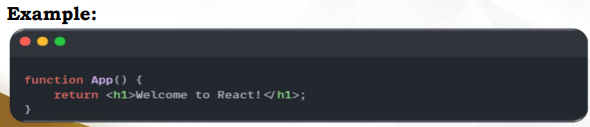
Feature 3: JSX (JavaScript XML)
is a syntax extension that allows developers to write HTML-like code directly inside JavaScript.
Instead of separating HTML and JavaScript into different files, JSX combines them in one place, making the code more readable and easier to understand.
Although JSX looks like HTML, browsers cannot understand it directly. React uses tools such as Babel to convert JSX into regular JavaScript before execution.
• Makes UI code easier to read.
• Reduces repetitive coding.
• Combines HTML and JavaScript in a single file.
• Improves developer productivity.
Feature 3: JSX (JavaScript XML)
Why is it important?
Feature 4: One-Way Data Binding
which means data flows only in one direction—from the parent component to the child component through Props.
Unlike two-way data binding frameworks, child components cannot directly modify the data they receive. This makes the application more predictable and easier to debug.
• Prevents accidental data modification.
• Makes applications easier to maintain.
• Improves debugging.
• Provides better control over data flow.
Feature 4: One-Way Data Binding
Why is it important?
Feature 5: Declarative User Interface
Instead of writing instructions on how to update the webpage step by step, developers simply describe what the interface should look like based on the application's current data.
Whenever the data changes, React automatically updates the user interface.
• Simplifies coding.
• Reduces manual DOM manipulation.
• Makes code cleaner and easier to understand.
• Improves application reliability.
Feature 5: Declarative User Interface
Why is it important?
Feature 6: Reusable Components
React encourages developers to create components that can be reused throughout the application.
Feature 7: High Performance
By combining the Virtual DOM, efficient rendering techniques, and reusable components, React minimizes unnecessary updates and improves the overall responsiveness of web applications.
Advantages and Disadvantages of ReactJS
Like any software technology, ReactJS has its strengths and limitations. Understanding its advantages helps developers identify why it is widely adopted in the industry, while understanding its disadvantages allows them to recognize situations where React may not be the most suitable choice.
Evaluating both the benefits and drawbacks of ReactJS enables developers to make informed decisions when selecting technologies for web application development.
Advantages of ReactJS
• Component Reusability
• High Performance through Virtual DOM
• Easy to Learn
• Strong Community Support
• SEO-Friendly
• Cross-Platform Development
• Rich Ecosystem
Advantage 1: Component Reusability
Once a component has been created, it can be used multiple times throughout the application without rewriting the same code.
Advantage 2: High Performance
React achieves high performance through the use of the Virtual DOM. Instead of updating the entire webpage whenever data changes, React compares the updated Virtual DOM with the previous version and modifies only the affected elements.
Advantage 3: Easy to Learn and Strong Community
React has a relatively gentle learning curve for developers who already understand HTML, CSS, and JavaScript.
In addition, React has one of the largest developer communities in the world. Millions of developers contribute tutorials, libraries, open-source projects, and documentation.
Advantage 4: Rich Ecosystem and Industry Adoption
React is supported by a rich ecosystem of libraries that simplify web development. Developers can integrate tools for routing, state management, animations, charts, and HTTP requests without building everything from scratch.
Disadvantages of ReactJS
• React only handles the User Interface.
• Frequent updates and changing best practices.
• Additional libraries are required.
• JSX may be difficult for beginners.
• Large projects require proper project organization.
Disadvantage 1: React Only Handles the User Interface
React is a JavaScript library, not a complete web development framework. Its primary responsibility is to build the user interface (UI).
Features such as routing, authentication, state management, and backend communication require additional libraries or technologies.
Disadvantage 2: Rapidly Changing Ecosystem
React continuously evolves, introducing new features and best practices. While these improvements enhance development, they also require developers to continuously learn and adapt.
Disadvantage 3: JSX Learning Curve and Project
JSX combines HTML and JavaScript within the same file. Although it improves readability for experienced developers, beginners often find it confusing because HTML-like syntax is mixed with JavaScript code.
As React applications become larger, managing folders, components, state, and dependencies becomes increasingly complex. Proper project organization and coding standards become essential to maintain scalability and readability.
ReactJS Architecture
Where the user interface (UI) is divided into small, reusable, and independent components. Each component is responsible for displaying a specific part of the application's interface and managing its own logic when necessary.
Unlike traditional web development, where an entire webpage is built as one large HTML file, React organizes the application into multiple components that work together to form a complete application.
This architecture makes React applications easier to develop, test, debug, and maintain, especially as the application grows in size and complexity
Overview of ReactJS Architecture

What is ReactJS Architecture?
refers to the overall structure and organization of a React application. It defines how different parts of the application communicate, manage data, and render the user interface.
A React application consists of several key elements:
• Components
• JSX
• Props
• State
• Virtual DOM
• React DOM
Component-Based Architecture
The foundation of ReactJS architecture is the Component-Based Architecture.
A component is a reusable, self-contained block of code that represents a part of the user interface. Each component has its own functionality, logic, and appearance.
Benefits of Component-Based Architecture
• Improves code organization
• Promotes code reusability
• Simplifies maintenance
• Makes debugging easier
React Application Structure
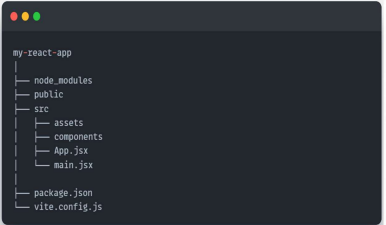
node_modules
Contains installed packages and dependencies.
public
Stores static files such as images, icons, and fonts.
src
Contains the application's source code.
components
Stores reusable React components.
App.jsx
The main application component.
main.jsx
Entry point that renders the application.
How React Components Work?
In this structure:
• App is the root component.
• Header, Sidebar, and Footer are child components.
• The Content component contains several reusable Product Card components.
This hierarchy makes the application modular and easier to manage.
Props (Properties)
Props are used to pass data from a parent component to a child component.
Characteristics
• Read-only
• Passed from parent to child
• Used for communication between components
Props and State in React Architecture
State stores data that can change while the application is running
• User login status
• Shopping cart items
• Counter value
• Form input values
Virtual DOM Architecture
One of React's most important architectural features is the Virtual DOM.
Instead of directly updating the browser's DOM, React first creates a lightweight copy called the Virtual DOM.
When data changes:
• React updates the Virtual DOM.
• React compares the new Virtual DOM with the previous version (Diffing).
•React identifies only the changed elements.
• React updates only those elements in the Real DOM.
This process improves application performance by reducing unnecessary rendering.
Virtual DOM Architecture
Whenever the user interacts with the application, React checks if any data has changed. Instead of refreshing the entire webpage, it updates only the affected components. This makes React applications faster and more responsive.

React Data Flow
React uses One-Way Data Flow, meaning data moves in only one direction—from the parent component to the child component.
This architecture provides better control over application data and makes debugging easier because developers always know where the data originates.

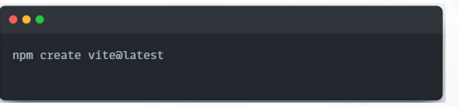
Step 1: Create a React Project
This command tells npm to use Vite to create a new frontend project.
Vite is a modern build tool that helps developers create React applications faster and with less configuration.
Step 2: Enter the Project Name
After running the command, Vite will ask for a project name. Type:
This will create a new folder named my-profile-app
This folder will contain all files and folders needed for the React application.

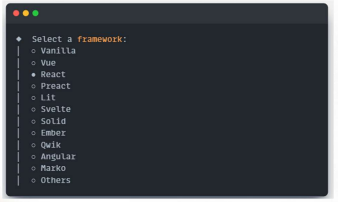
Step 3: Select the Framework
Vite will ask what framework you want to use.
This means the project will be created using the ReactJS library. React will be responsible for creating and rendering the user interface of the application.

Step 4: Select the Variant Vite will ask for a variant.
For beginners, JavaScript is recommended because it is easier to understand before learning TypeScript. After this, Vite will generate the React project files.
For classroom activities and beginner React projects, ESLint is recommended because it is the industry standard and is supported by most tutorials, documentation, and development tools.

Step 5: Go Inside the Project Folder After the project is created, enter the project folder using:
This command changes the current terminal location to the React project folder.
This step is important because the next commands must be executed inside the React project.

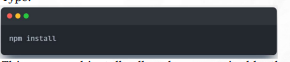
Step 6: Install Dependencies Type:
This command installs all packages required by the React application.
These packages are listed inside the package.json file.
After installation, a folder named node_modules will appear. This folder contains the installed libraries needed to run the project.

Step 7: Run the React Application
This command starts the React development server
After running it, the terminal will show a local address, usually:
Open this address in the browser to view the React application.

Step 8: Understand the Development Server The development server allows the React application to run locally on your computer
The word localhost means the application is running on your own machine, not yet on the internet.
The number 5173 is the default port used by Vite.
While the server is running, any saved change in the code will automatically update the browser.
Step 9: Locate the Important Files In the VS Code Explorer, open the project folder.
Focus on these files:
main.jsx connects React to the webpage.
App.jsx contains the main React component. App.css contains the styling.
package.json contains project scripts and dependencies.


Step 10: Open App.jsx
Delete the default code and replace it with:
Save the file.
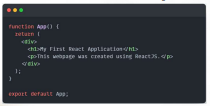
Step 11: Check the Browser Output
After saving App.jsx, go back to the browser. The page should display:
No manual refresh is usually needed because Vite supports automatic updating. This feature helps developers see changes immediately while coding
