OSI Model
 Call Kai
 Learn
Learn Practice Test
 Spaced Repetition
 Match
Match Flashcards
 Knowt Play
1/35

There's no tags or description
Looks like no tags are added yet.
Name | Mastery | Learn | Test | Matching | Spaced | Call with Kai | Chat |
|---|
No analytics yet
Send a link to your students to track their progress
36 Terms
What is a protocol
“In networking, a protocol is a set of rules for formatting and processing data. Network protocols are like a common language for computers. The computers within a network may use vastly different software and hardware; software and hardware; however, the use of protocols enables them to communicate with each other regardless.”
Common Protocols:
HTTP
HTTPS
SMTP
FTP
TCP
UDP

(OSI) Model

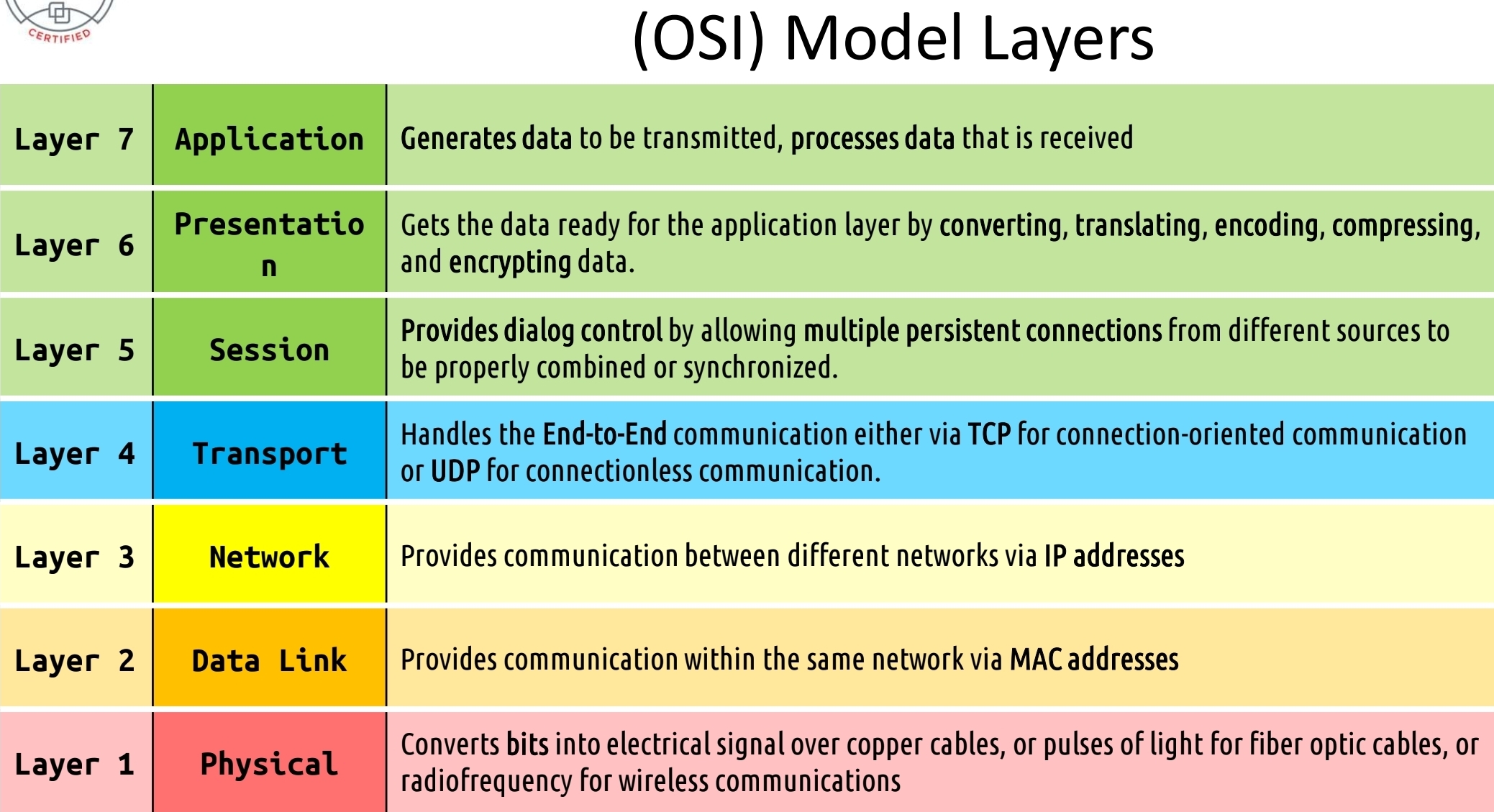
(OSI) Model Layers
Internetworking models are used to organize and describe network functions. Each layer describes a different set of unique functions.
The Open System Interconnection (OSI) Model is made up of seven layers containing various types of hardware and software.
Created to achieve interoperability of diverse vendor devices
Partitions communication systems into abstraction layers
Protocols are the standard terms that computers use to understand each other
Mnemonics
All People Seem To Need Data Processing
Please Do Not Throw Sausage Pizza Away

OSI Model Layers (Example)

(OSI) Model Layers (Example 2)
Encapsulation / De-encapsulation

Layer 7 - Application
This is the entry door to network services at a lower level
Apps uses this layer to get services when they TX or RX data over a network
Applications sit on top of this layer
Responsible for interfacing user applications, network mgmt. services, remote access etc.
The playground of hackers today
Layer 7 - Application pt 2.
Simple Mail Transfer Protocol (SMTP) – 25
Simple Network Management Protocol (SNMP) - 161
Hypertext Transfer Protocol (HTTP) – 80
Line Printer Daemon (LPD)
File Transfer Protocol (FTP) – 21
Telnet – 23
Trivial File Transfer Protocol (TFTP) – 69
Electronic Data Interchange (EDI)
Post Office Protocol version 3 (POP3) – 110
Internet Message Access Protocol (IMAP) –143
Network News Transport Protocol (NNTP)
Secure Remote Procedure Call (S-RPC) RPC - Session
Secure Electronic Transaction (SET)
Layer 6 - Presentation Layer
Concerned about the format
Apps must use a common format
The main services are:
Data Conversion
Character Code Translation
Compression
Encryption & Decryption
Layer 6 - Presentation Layer pt.2
American Standard Code For Information Interchange (ASCII)
Extended Binary-Coded Decimal Interchange Mode (EBCDIC)
Tagged Image file Format (TIFF)
Joint Photographic Experts Group (JPEG)
Motion Picture Experts Group (MPEG)
Musical Instrument Digital Interface (MIDI)
Layer 5 - Session
Provides Logical persistent
connection between peer
hosts
Conversation between
applications exchanging
information
Creates, monitors, tears down
sessions
Full Duplex, Half Duplex,
Simplex
Layer 5 - Session pt 2.
Network File System (NFS)
Structured Query Language (SQL)
NetBIOS
Remote Procedure Call (RPC)
Layer 4 - Transport
One of the busiest layers
Creates an End-to-End transport between peer hosts
UDP and TCP are at this layer
UDP is connectionless, best
effort
TCP is connection oriented &
reliable
TCP uses Flags
Layer 4 - Transport p 2.
Transmission Control Protocol
(TCP)•full-duplex connection-oriented
•User Datagram Protocol (UDP) •simplex connectionless
•Secure Sockets Layer (SSL)
•Transport Layer Security (TLS)
•Sequenced Packet Exchange (SPX)
•TCP and UDP Ports
•Well-Known Ports: Ports 0 - 1023
•Registered Ports: Ports 1024 -
49151
•Dynamic or Private Ports: Ports
49152 – 65535
Layer 3 - Network
Move data between two hosts not physically connected
Use logical addresses (IP)
IP is at this layer
Addressing (uses IP addresses)
IP does not guarantee delivery
It only finds the best delivery
route
Uses routing tables to deliver
the info
Devices: Routers
Layer 3 - Network pt 2.
Internet Protocol (IP)
•connectionless
•Internet Control Message Protocol (ICMP)
•Routing Information Protocol (RIP)
•Open Shortest Path First (OSPF)
•Border Gateway Protocol (BGP)
•Internet Group Management Protocol (IGMP)
•Supports multicasting
•Internetwork Packet Exchange (IPX)
•Internet Protocol Security (IPSec)
•Network Address Translation (NAT)
•Simple Key Management for Internet Protocols (SKIP)
Layer 2 - Data Link Layer
Get packets from the Network Layer
Transmit frames
Detects errors within frames
Converts information into bits
Use MAC/Hardware addresses to communicate
Move data to the next physically connected device
Two Sub Layers
• Logical Link Layer (LLC)
• Media Access Control (MAC)
Devices: Switches and bridges
Media Access Control layer
The Media Access Control (MAC) layer is a sublayer of the OSI model's Data Link Layer that manages protocol access to the physical network medium.
It is responsible for the addressing and channel access control mechanisms that enable several nodes to communicate within a network, typically using MAC addresses.
Logical Link Control layer
The Logical Link Control (LLC) layer is the upper sublayer of the OSI model's Data Link Layer that provides flow control and error control.
Layer 2 - Data Link Layer p.2
Address Resolution Protocol (ARP)
•Resolves IP into MAC
Reverse Address Resolution Protocol
(RARP)
•Resolves MAC into IP addresses
Point-to-Point Protocol (PPP)
Serial Line Internet Protocol (SLIP)
Layer 2 Forwarding (L2F)
Layer 2 Tunneling Protocol (L2TP)
Point to Point Tunneling Protocol (PPTP)
Ethernet (IEEE 802.3) – only remaining
Token Ring (IEEE 802.5)
Fiber Distributed Data Interface (FDDI)
Asynchronous Transfer Mode (ATM)
Copper DDI (CDDI)
Layer 1 - Physical
Receive bits from the Data Link
Layer
Bits converted into electrical
signals
Photons or beam of light if on
Fiber
Physical Topologies
Devices: Cables, Connectors,
wireless access point, hub,
modems etc…
Layer 1 - Physical
EIA/TIA-232 and EIA/TIA-449
• X.21
• (HSSI)
High-Speed Serial Interface • Networking (SONET)
Synchronous Optical
• V.24 and V.35
• Network (ISDN)
Integrated Services Digital • Digital Subscriber Line (DSL)
• 10BASE-T, 10BASE2, 10BASE5,
100BASE-TX, 100BASE-FX,
100BASE-T, 1000BASE-T,
1000BASE-SX