Lesson 6 Advanced Web Programming
 Call Kai
 Learn
Learn Practice Test
 Spaced Repetition
 Match
Match Flashcards
 Knowt Play
1/41

There's no tags or description
Looks like no tags are added yet.
Name | Mastery | Learn | Test | Matching | Spaced | Call with Kai | Chat |
|---|
No analytics yet
Send a link to your students to track their progress
42 Terms
Form
is a user interface that collects information from users.
Common examples
• Login forms
• Registration forms
• Contact forms
• Search forms
• Checkout forms
• Student enrollment forms
• Feedback and survey forms
React Forms
use standard HTML form elements, but their values and behaviors can be managed by React components.
supports both controlled and uncontrolled form elements, but controlled components are commonly taught because React state becomes the primary source of the input value.
Example of React Forms/ React Form Can:
• Store form values in component state.
• Update values when users type.
• Validate user input.
• Display error messages.
• Submit data to an API or server.
• Clear the form after submission.
• Disable buttons while submitting
HTML Forms
Browser manages from data
Page reload after submit
Uses DOM
Less interactive
Validation mostly after submission
React Forms
React manages from data
No page reload
Use State
Highly interactive
Can validate while typing
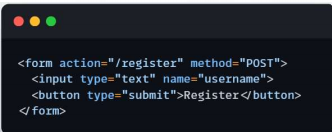
Traditional HTML form
The browser directly submits the data to the server.
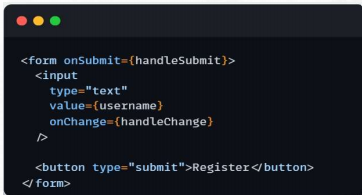
React form
React controls:
• The input value
• Input changes
• Validation
• Submission behavior
• User feedback
Common Form Elements in React
Text Input
Password Input
Email Input
Number Input
Textarea
Select Dropdown
Radio Button
Checkbox
Submit Button
Text Input
allows users to enter a single line of text.

Password Input
hides the characters entered to protect sensitive

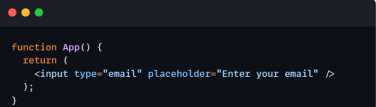
Email Input
is used to collect email addresses and provides basic email format validation.
Number Input
allows users to enter numeric values only.

Textarea
allows users to enter multiple lines of text.

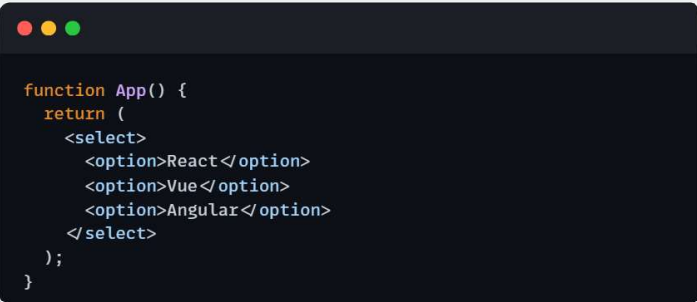
Select Dropdown
lets users choose one option from a list.
Radio Button
allow users to select only one option from a group.

Checkbox
allows users to select one or more options.

Submit Button
sends the form data for processing.
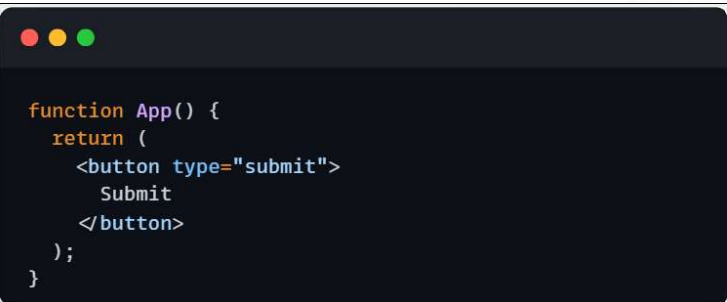
Controlled Components
• Input value comes from State
• State updates every time the user types
React Forms Handling
refers to the way a React application captures, manages, validates, and
submits user input from forms such as login pages, registration forms, search bars, and contact forms.
Why Form Handling is Important
Forms are one of the most common ways users interact with web applications. They allow users to:
• Log in to an account
• Register a new account
• Search for information
• Submit feedback
• Upload files
• Place order
provides a structured way to handle these interactions efficiently.
Types of Form Handling in React
Controlled Components
Uncontrolled Components
Controlled Componnents (most common)
is a form elementwhose value is controlled by React's state.
The input field always reflects the current state, and any changes made by the user update the state.
How Controlled Components work in Form handling in React
• Create a state variable using useState.
• Connect the input's value to the state.
• Update the state whenever the user types
using the onChange event.
Uncontrolled Components
stores form data inside the DOM instead of React state.
React accesses the value only when needed using a ref.
Advantage and Disadvantage of Form Handling in React
Advantages
• Less code
• Slightly better performance for very large forms
Disadvantages
• Harder to validate
• Less React control
• Not commonly used in modern React applications
Form Validation
checks the data entered by the user before the application accepts or submits it. It ensures that the input follows the required rules.
Example of Form Validation
• The name must not be empty.
• The email must have a valid format.
• The password must contain at least eight characters.
• The password and confirmation password must match.
• The age must be within an acceptable range.
React commonly manages form values and validation messages using component state.
Why Form Validation is Important
Form validation helps:
• Prevent incomplete form submissions.
• Reduce incorrect user information.
• Improve data accuracy.
• Provide immediate feedback.
• Improve user experience.
• Reduce unnecessary server requests.
• Protect the application from unexpected input.
Types of Form Validation
Client Side Validation
Server Side Validation
Client Side Validation
Validation happens inside the user's browser before the data is sent to the server.
improves usability, but server-side validation is still required
because browser-side rules can be bypassed.
Example of Client side Validation
• Required fields
• Email format
• Minimum password length
• Matching passwords
Server Side Validation
happens on the server after the form data is submitted.
Example of Server Side Validation
• Checking whether an email already exists
• Checking login credentials
• Validating database records
• Verifying user permissions
HTML Built-in Validation
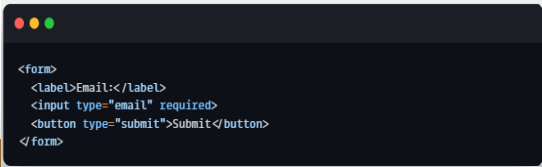
Required
minLength
maxLength
min
max
pattern
type=”email”
Required
prevents the form from being submitted if the field is
empty.

Email Validation
type="email" checks if the input is in a valid email format.
Password Length Validation
The password must be between 8 and 20 characters.

Number Validation
Only numbers between 18 and 60 are accepted.

Pattern Validation
ensures that the user's input follows a specific format by using a pattern (regular expression or regex). If the input does not match the required pattern, the form will not be submitted.

Custom React Form Validation
is the process of creating your own validation rules using JavaScript and
React instead of relying on the browser's built-in validation. It allows developers to check user input based on specific application requirements and display customized error messages before the form is submitted.
Example of custom validation rules
• Name must be at least 3 characters.
• Password must contain an uppercase letter
and a number.
• Password and Confirm Password must match.
• Username must not contain spaces.