3.2 Cables - Video, Storage Cables, Adapters, Converters, & Connectors
 Call Kai
 Learn
Learn Practice Test
 Spaced Repetition
 Match
Match Flashcards
 Knowt Play
1/20

There's no tags or description
Looks like no tags are added yet.
Name | Mastery | Learn | Test | Matching | Spaced | Call with Kai | Chat |
|---|
No analytics yet
Send a link to your students to track their progress
21 Terms
HDMI cable (High-Definition Multimedia Interface)
Digital signal high quality video and audio streaming, most common connector is Type-A HDMI with 19 pins, max 20 m
DisplayPort cable
Digital signals sent in packets carrying video and audio signals, interface may include a locking mechanism. Passive connector compatible with HDMI, VGA, and DVI connectors. Comes in mini and full-size connector
DVI cable (Digital Visual Interface)
Standards for both analog and digital signals for single and dual link video only. Single link video at 3.7 Gb/s (1920 ×1200 at 60 Hz), Dual link video at 7.4 Gb/s (2560 × 1600 at 85 Hz). Three standards, DVI-A, DVI-D, and DVI-I
Describe this connector
DVI-A, Analog signals, backwards compatible with VGA

Describe this connector
DVI-D Single Link, Digital signal
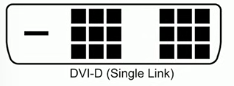
Describe this connector
DVI-D Dual Link, Digital signal
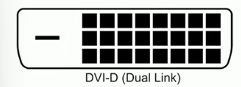
Describe this connector
DVI-I Single Link, Integrated - Digital and analog signal
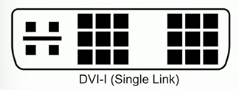
Describe this connector
DVI-I Dual Link, Integrated - Digital and analog signal
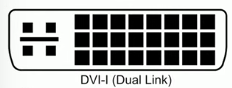
VGA Cable (Video Graphics Array)
Oldest video standard still in use, analog signal video only with DB-15 blue connector and 15 pins, max 5-10 m
WHat does USB-C need to support video?
The port and cable must support DP Alt-Mode (DisplayPort Alternate Mode) or Thunderbolt protocol, indicated by symbol
SATA (Serial Advanced Technology Attachment)
Most common drive interface, data cable has seven pins, power cable has fifteen pins
List SATA revisions
SATA Revision 1.0, 1.5 Gb/s w max 1 m
SATA Revision 2.0, 3 Gb/s w max 1 m
SATA Revision 3.0, 6 Gb/s w max 1 m
SATA Revision 3.2, 16 Gb/S w max 1 m
eSATA (external SATA), Same speed as SATA w max 2 m (external to housing and data only, no power)
What is an adapter for?
A device that converts one type of connection or cable technology to another.
DVI-D to HDMI adapter
HDMI is backward-compatible with DVI-D, no signal conversion and no loss of video quality
DVI-A to VGA adapter
DVI-A analog signal is backwards compatible with VGA, only supports 640×480
DVI-D to VGA adapter
Need converter for digital to analog signal
RJ11 connector (registered jack type 11)
Telecommunication network interface standard for connecting voice and data equipment to a service provider or carrier. Telephone or DSL. 6 position, 2 contanct plug (6P2C, six wire positions in head, but only two conductor pins installed) used with twisted pair cable
RJ45 connector (registered jack type 45)
Modular connector used for e thernet, 8 position, 8 conductor plug used with twisted pair cables
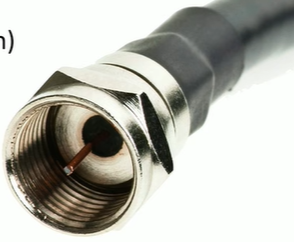
What type of connector is this?
F-type connector used with coaxial cable for cable modem and satellite data connections.
Punchdown block
Wire-to-wire patch panel, no intermediate interface. Wired are punched into the block and connecting block is on top. Very fast and inexpensive
USB-C connector
24 pin double-sided USB connector, used for both host and devices. Used for USB and Thunderbolt protocols