Module 1
 Call Kai
 Learn
Learn Practice Test
 Spaced Repetition
 Match
Match Flashcards
 Knowt Play
1/22

Earn XP
Description and Tags
Name | Mastery | Learn | Test | Matching | Spaced | Call with Kai | Chat |
|---|
No analytics yet
Send a link to your students to track their progress
23 Terms
Windows OS
The "brain" that manages everything you see.
Desktop
Your digital "workspace" or tabletop.

Taskbar
The "utility belt" at the bottom of the screen. Holds most used applications icons.

Start Menu / Windows Button
The "Home" button for finding everything.

Pinning
Like putting a "favorite" sticker on an app so it stays on your Taskbar.
Widgets
Your "glanceable" info board (weather, news).

Minimize (_)
Tucks the window away into the taskbar (it's still "awake").
Maximize/Restore Down
Switches between "full screen" and "windowed" mode.
Close (X)
Ends the program entirely
How do you minimize the active window?
by pressing Windows key + Down Arrow
How do you minimize all open windows and show the desktop?
Pressing Windows key + M
How do you minimize all windows except the active one?
Pressing Windows key + Shift + M
How do you restore minimized windows?
Pressing Windows key + Shift + M
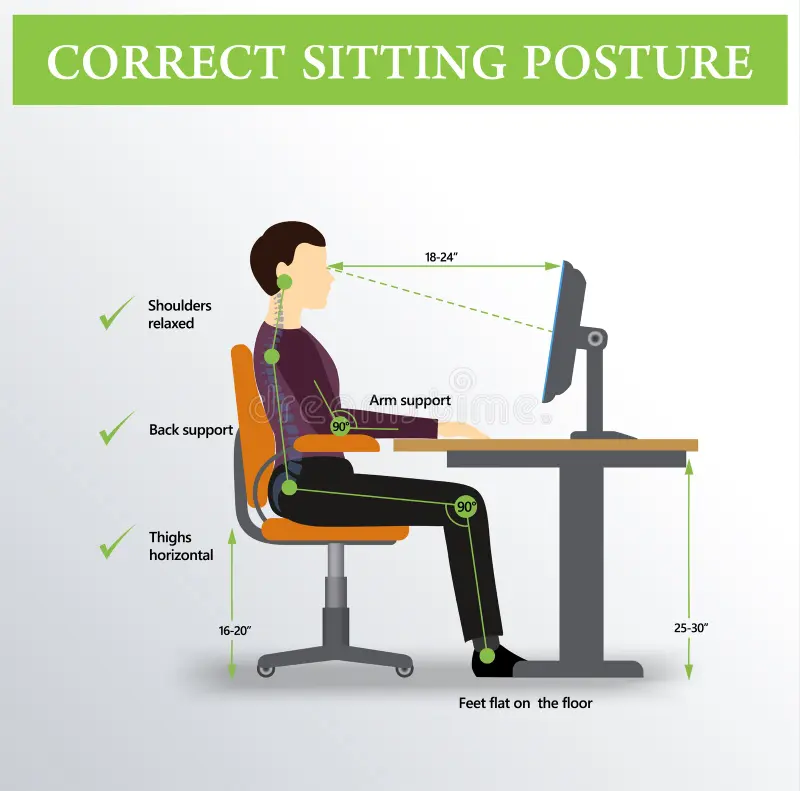
Whist is the proper posture when sitting in front of a computer?
* Sit up straight with your back against the chair.
* Keep your feet flat on the floor
* Position your elbows at a 90-degree angle
* Keep your wrists straight and hovering slightly above the keyboard
What is the proper hand positioning on a keyboard?
* Place your fingers on the home row (ASDF for left hand, JKL; for right hand)
* Curve your fingers slightly and keep them relaxed
* Use your thumbs for the space bar
* Return to the home row position after each keystroke

What is the correct keyboard placement?
* Position your keyboard at elbow height
* Center the keyboard in front of you
* Keep the keyboard flat or slightly tilted away from you

How do you prevent injuries like carpel tunnel syndrome or other repetitive strain injuries when working on a computer?
* Take regular breaks (5 minutes every hour)
* Perform stretching exercises for your hands, wrists, and fingers
* Adjust your workstation to fit your body
* Consider using ergonomic keyboards and wrist rests
Hardware
is anything you can touch
What are examples of hardware?
Monitor, keyboard, mouse, laptop printer, speakers
Software
is the program that tells the computer what to do.
What are examples of software?
Microsoft 365, Google Chrome, Zoom, Canvas, App, Calculator, Spotify
Operating System
Manages everything on the computer. Think of it as the boss
What are examples of Operating System?
Windows 11, MacOS, Chrome OS, Android, IOS, Linux