HCI MODULE 2
 Call Kai
 Learn
Learn Practice Test
 Spaced Repetition
 Match
Match Flashcards
 Knowt Play
1/49

There's no tags or description
Looks like no tags are added yet.
Name | Mastery | Learn | Test | Matching | Spaced | Call with Kai | Chat |
|---|
No analytics yet
Send a link to your students to track their progress
50 Terms
User-Centered Design (UCD)
A design approach that places users at the center of the system development process. Rather than designing systems based on assumptions, designers continuously involve users in planning, designing, testing, and improving the product.
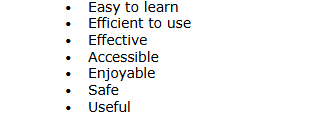
Goal of UCD is to create products that are:
ISO 9241-210
Emphasizes understanding users, involving them throughout design, and refining solutions based on feedback.
Understand the Context of Use
Identify User Requirements
Create Design Solutions
STAGES OF THE USER-CENTERED DESIGN PROCES
Sketches
The simplest and fastest way to visualize an idea
Wireframes
A blueprint for a website or app
Mockups
Shows what the product is expected to look like.
Prototypes
An interactive representation of the product.
Evaluate the Design
Conduct usability testing by observing users while they complete
tasks.
Iteration (in UCD)
The continuous cycle of prototyping, testing, analyzing, and refining (Design → Test → Improve → Test Again) to incrementally improve usability.
Quantitative Research
Data focused on numbers, measurements, and statistics that answers "How many?", "How much?", or "How often?" (e.g., task completion time, ratings).
Qualitative Research
Data focused on descriptions, opinions, experiences, and observations that answers "Why?" or "How?" (e.g., user feedback, feelings, interview quotes).
Structured Interview
An interview method using a fixed set of questions asked in the exact same order to every participant, making answers easy to compare.
Semi-Structured Interview
An interview format using prepared questions while allowing the interviewer flexibility to ask spontaneous follow-up questions.
Contextual Inquiry
A research method combining observation and interviewing by watching users perform tasks in their real-world environment while asking them what they are doing and why.
User Persona
A fictional representation of a target user based on real research data, detailing demographics, goals, needs, pain points, and behaviors (Answers: WHO?).
User Scenario
A short narrative describing how a specific user performs actions in a specific situation to achieve a clear goal (Answers: WHAT SITUATION?).
User Journey
A step-by-step timeline showing what a user does, thinks, and feels from the start of a task until the goal is completed.
Task Analysis
The process of examining how users complete a task by breaking it down into goals, steps, decisions, inputs, outputs, and potential errors.
Functional Requirements
Specifications that describe what the system should do (e.g., log in, calculate grades, search items, send alerts).
Non-Functional Requirements
Specifications that describe how the system should perform (e.g., load speed, security, responsiveness, accessibility, ease of use).
Information Architecture (IA)
The organization, structuring, and labeling of information within a digital product so users can find content easily (Formula: Organize + Label + Navigate).
Breadcrumb Navigation
A secondary navigation trail showing the user's exact hierarchical location within the site or app (e.g., Home → Shoes → Sneakers).
Footer Navigation
Secondary links placed at the bottom of a page to provide access to supporting pages, contact info, and legal policies without cluttering the main menu.
Mental Model
A user's internal belief and expectation of how a system works, formed by their prior real-world and digital experiences.
Affordance
The actual or perceived physical/visual properties of an object that indicate what actions are possible (e.g., a raised shape affords clicking).
Signifier
A visual, textual, or sensory clue that explicitly communicates where and how an interaction should take place (e.g., a label saying "Submit" or a magnifying glass icon).
System Visibility
Keeping the user continuously informed in real-time about what the system is doing and its current status (e.g., progress bars, loading spinners).
Standards
Widely accepted design conventions and patterns (e.g., magnifying glass for search, shopping cart for checkout, X for close) so users don't have to learn from scratch.
Direct Observation
A UX research method where the researcher watches users perform tasks in person.
Indirect Observation
Watching user task performance remotely or asynchronously using video recordings or monitoring software.
Questionnaires (UX Research)
A research instrument using written questions (multiple choice, rating scales, open-ended) to collect data from large audiences at low cost.
Stage 1 of UCD: Understand the Context of Use
Identifying who will use the product, why they will use it, where they will use it, and mapping user environments, tasks, and pain points.
Stage 2 of UCD: Identify User Requirements
Translating research data into clear functional and non-functional requirements aligned with user goals and business objectives.
Stage 3 of UCD: Create Design Solutions
Building information architecture, sketches, wireframes, mockups, and interactive prototypes.
Stage 4 of UCD: Evaluate the Design
Conducting usability testing with real users to measure success rates, errors, completion time, and satisfaction
Stage 5 of UCD: Iterate
The continuous repeating cycle of prototyping, testing, analyzing, and refining until usability goals are achieved.
Global Navigation
Navigation menus and controls that appear consistently across the entire website or app (e.g., Home, Products, About, Contact).
Local Navigation
Navigation options that exist only within a specific sub-section (e.g., inside "Courses" → Math, Science, English).
Tab Navigation
Interface tabs used to switch between closely related views or sections on the same screen (e.g., Overview | Reviews | Specifications).
Hamburger Menu
A three-line menu icon used to collapse and hide navigation links, commonly on mobile devices.
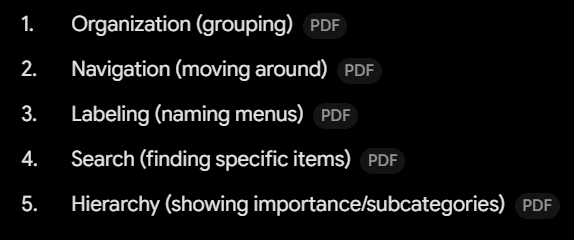
Five Main Parts of Information Architecture
Interaction Design (IxD)
The process of designing how users interact with a digital product to ensure experiences are clear, predictable, and efficient.
Principle: Visibility
Ensuring essential controls, options, and status information are easily seen and located by the user.
Principle: Feedback
The system immediately communicating the outcome or status of a user's action (e.g., success banners, error messages, progress indicators).
Principle: Error Prevention
Designing the interface to stop errors before they happen (e.g., confirmation dialogs before deleting, graying out invalid options).
Principle: Predictability
Ensuring that interacting with an element produces the exact outcome the user expects based on intuition (e.g., clicking a magnifying glass opens search).
Principle: Simplicity
Keeping user flows short, removing unnecessary steps, and minimizing cognitive load during tasks.
Principle: Accessibility
Designing systems so they can be used by as many people as possible, including users with disabilities (e.g., high color contrast, screen reader alt-text).
Principle: Efficiency
Allowing users to complete their tasks quickly and with minimal effort (e.g., search autocomplete, shortcuts).