Tryhackme - Pre Security Flash Cards | Quizlet
 Call Kai
 Learn
Learn Practice Test
 Spaced Repetition
 Match
Match Flashcards
 Knowt Play
1/131

There's no tags or description
Looks like no tags are added yet.
Name | Mastery | Learn | Test | Matching | Spaced | Call with Kai | Chat |
|---|
No analytics yet
Send a link to your students to track their progress
132 Terms
Security Operations Center (SOC)
A team of security professionals with the main responsibility of detecting and responding to network attacks and security events.
Threat Intelligence
The process of investigating and collecting information about emerging threats and threat sources.
is the application of science to investigate crimes and establish facts. With the use and spread of digital systems, such as computers and smartphones, a new branch of forensics was born to investigate related crimes: computer forensics, which later evolved into, digital forensics.
Forensics is the application of science to investigate crimes and establish facts. With the use and spread of digital systems, such as computers and smartphones, a new branch of forensics was born to investigate related crimes: computer forensics, which later evolved into, digital forensics.
Incident Response
The process of responding to a security incident. Organizations often create an incident response plan that outlines the procedures to be used when responding to an incident.
Malware Analysis
Process of inspecting a sample to determine its significant components, capabilities and behavior. Malware developers are very careful in writing malware to be effective, so malware analysis is an intricate process.
Static analysis: Studying the malware sample without executing it. Involves a set of tools to disassemble (reverse engineer) the sample and analyze its attributes and instructions. An analyst can then infer how it may operate under various conditions.
Dynamic analysis: Studying the sample as it executes on a system. Behavior is scrutinized and logged. Conducted in a secure environment.
Vulnerabilities
flaws in programs that can be exploited to either crash the system or take control of it
Threat Actor
An entity, like a cybercriminal group or nation-state, responsible for launching cyberattacks.
DFIR
Digital Forensics and Incident Response
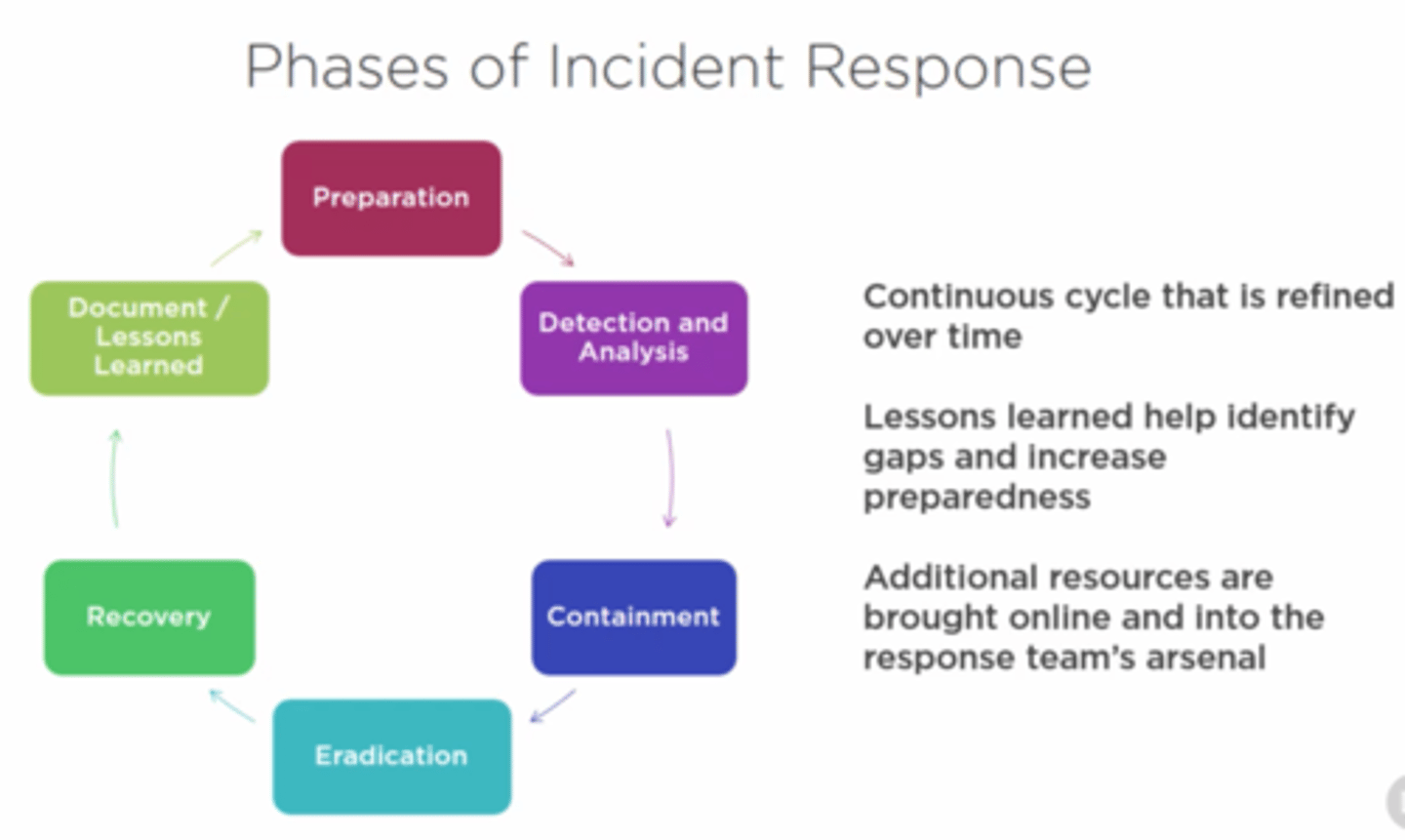
Incident Response Phases
1: Preparation
2: Identification (detection and analysis)
3: Containment, Eradication, and recovery
4: Post-incident analysis (Lessons learned)
Virus
a piece of code (part of a program) that attaches itself to a program. It is designed to spread from one computer to another; moreover, it works by altering, overwriting, and deleting files once it infects a computer. The result ranges from the computer becoming slow to unusable
Trojan Horse
program that shows one desirable function but hides a malicious function underneath. For example, a victim might download a video player from a shady website that gives the attacker complete control over their system.
Ransomware
a malicious program that encrypts the user's files. Encryption makes the files unreadable without knowing the encryption password. The attacker offers the user the encryption password if the user is willing to pay a "ransom."
Security analysts
Responsible for maintaining the security of an organisation's data
Security Engineer
Design, monitor and maintain security controls, networks, and systems to help prevent cyberattacks
Incident Responder
Identifies and mitigates attacks whilst an attackers operations are still unfolding
Penetration Tester
A penetration tester's job role is to test the security of the systems and software within a company - this is achieved through attempts to uncover flaws and vulnerabilities through systemised hacking.
Red Teamer
Plays the role of an adversary, attacking an organisation and providing feedback from an enemies perspective
"Red teamers share similarities to penetration testers, with a more targeted job role. Penetration testers look to uncover many vulnerabilities across systems to keep cyber-defence in good standing, whilst red teamers are enacted to test the company's detection and response capabilities. This job role requires imitating cyber criminals' actions, emulating malicious attacks, retaining access, and avoiding detection. Red team assessments can run for up to a month, typically by a team external to the company. They are often best suited to organisations with mature security programs in place."
WWW
World Wide Web; a system of interlinked hypertext documents contained on the Internet
IP
Internet Protocol
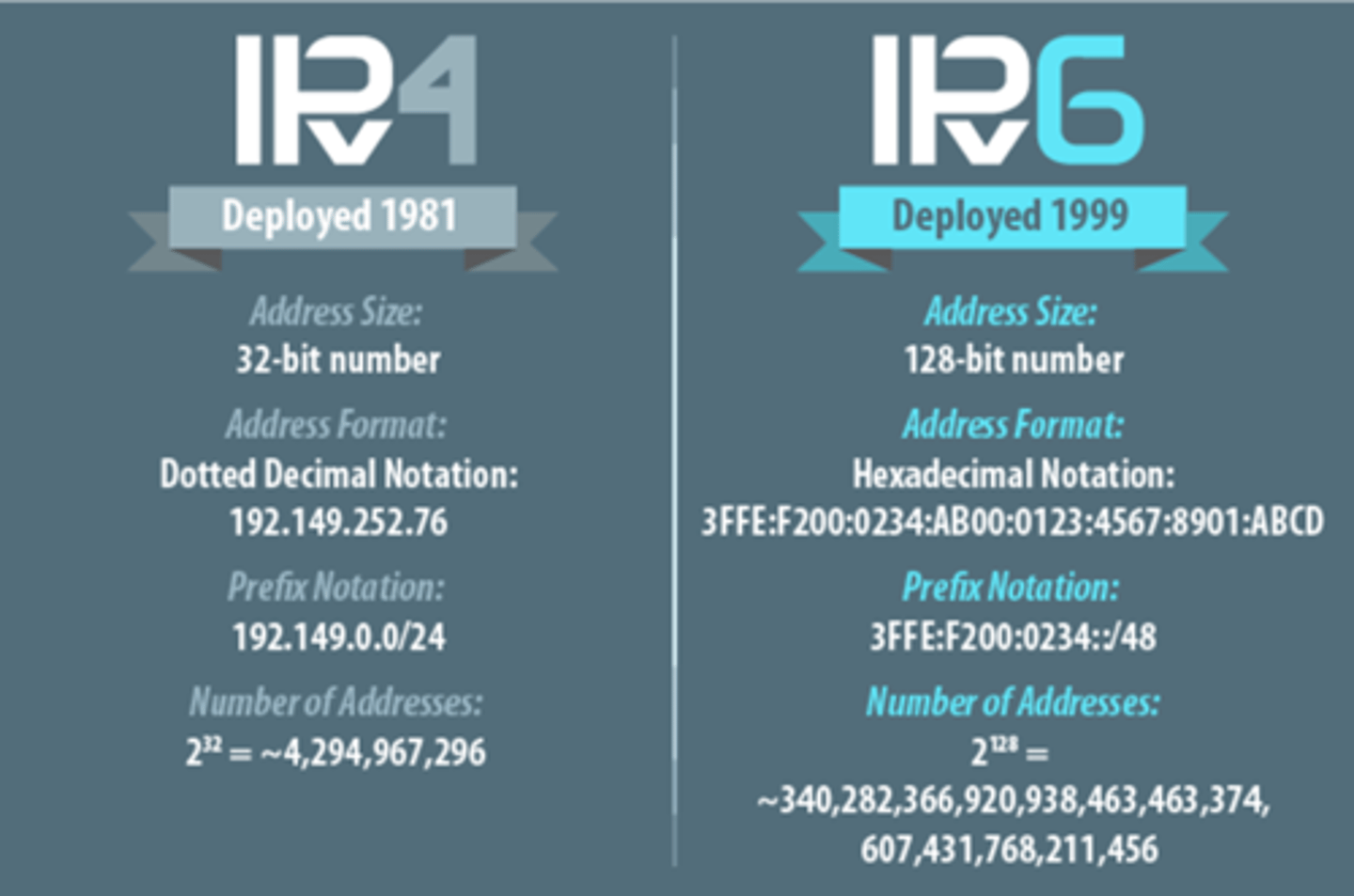
IPv4 vs IPv6
IPv4: 32-bit number: 4 billion addresses; four sets of numbers marked off by periods
IPv6: 128-bit addresses, able to handle up to 1 quadrillion addresses; almost unlimited # of addresses
MAC Addresses
media access control address 12-bit identification number unique for each device. Unique number that identifies a device, manufacturer id and serial number of device, address is allocated by manufacturer
ICMP
Internet Control Message Protocol. Used for diagnostics such as ping. Many DoS attacks use ICMP. It is common to block ICMP at firewalls and routers. If ping fails, but other connectivity to a server succeeds, it indicates that ICMP is blocked.
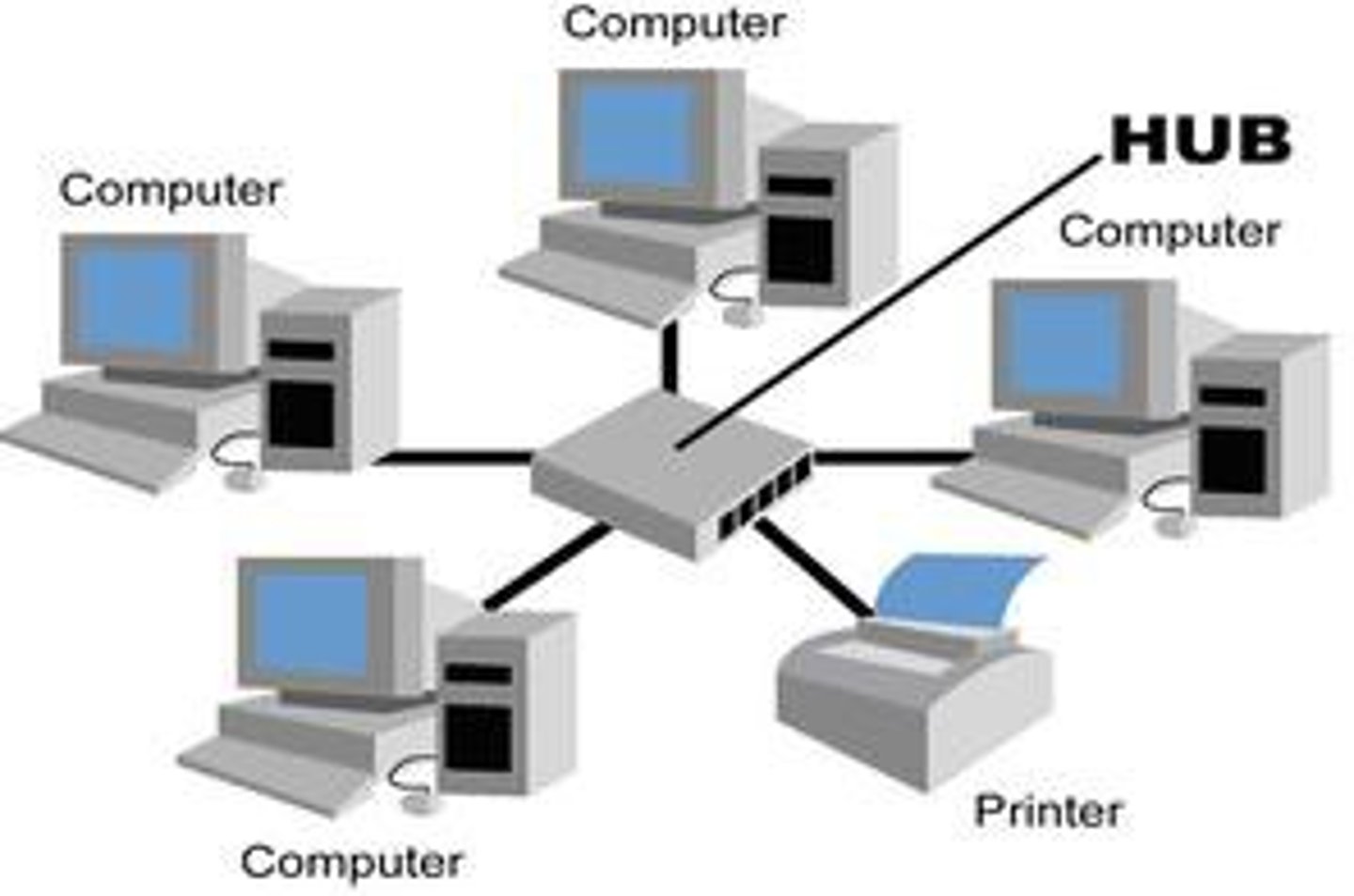
Star Topology
A topology with one central node that has each computer or network device attached to the central node. All data first goes into the central node and then is sent out to its destination. (Think of it like a bicycle wheel with spokes.)
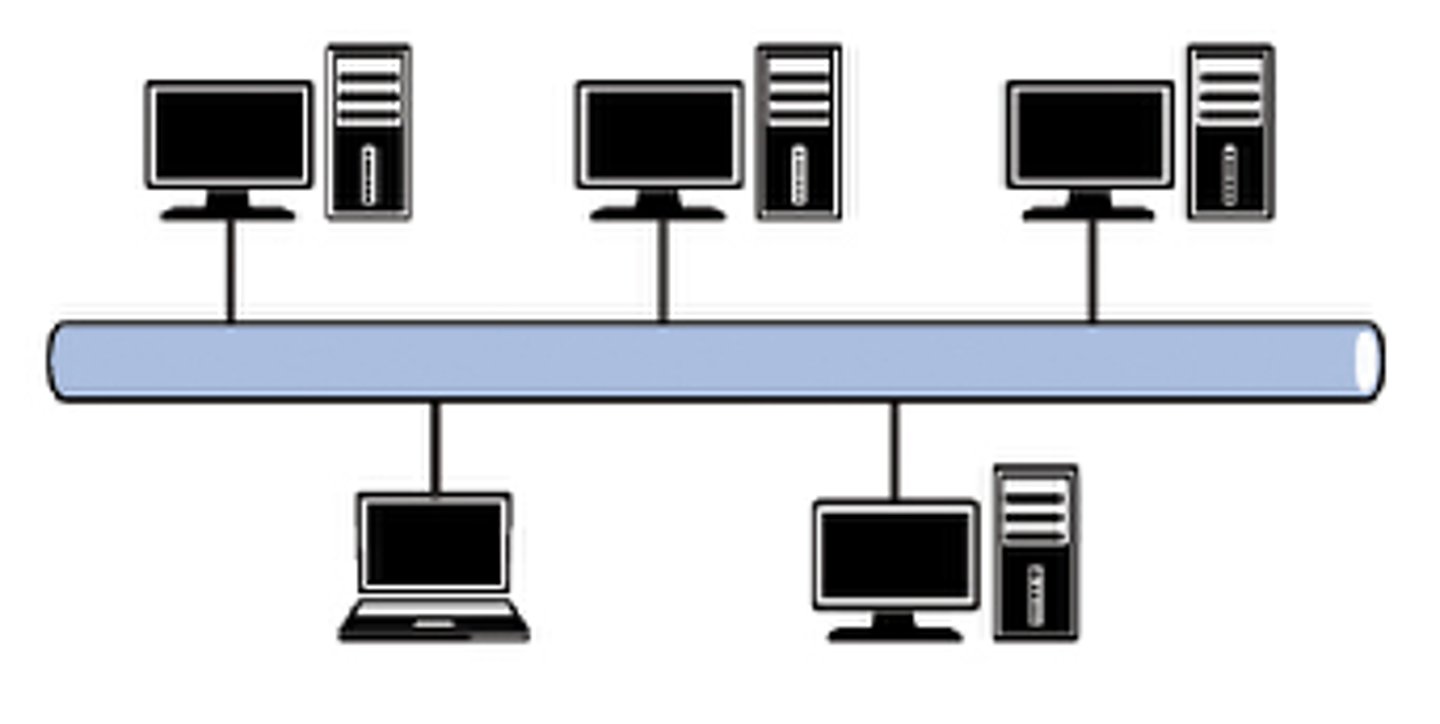
Bus Topology
A network layout in which there is one main trunk, or backbone, that all the various computers and network devices are connected to.
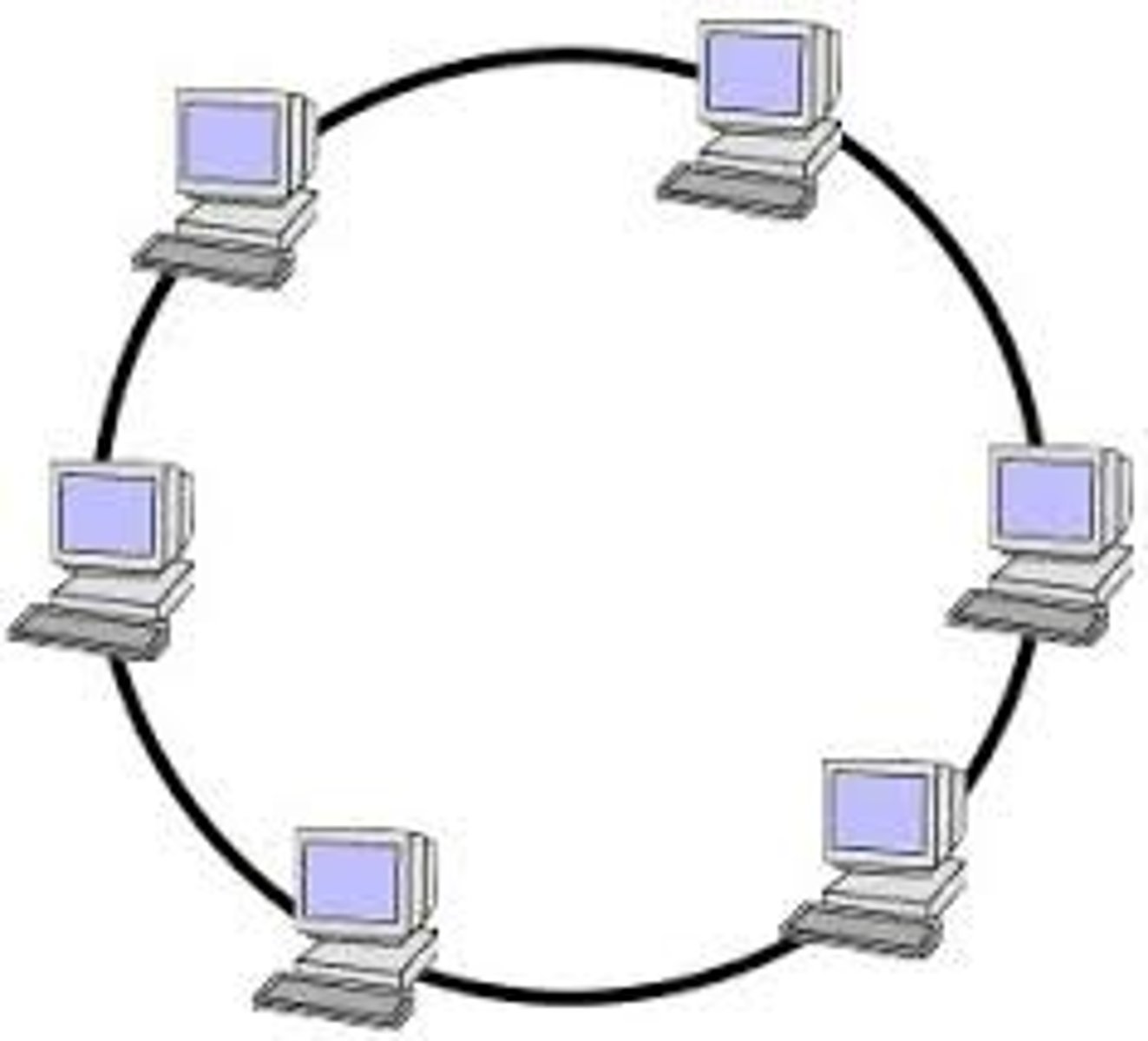
Ring Topology
A LAN configuration in which all nodes are connected in a closed loop
switch
dedicated devices within a network that are designed to aggregate multiple other devices such as computers, printers, or any other networking-capable device using ethernet.
Router
A device that transfers data from one network to another in an intelligent way. connects networks and passes data between them.
Network Address
This address identifies the start of the actual network and is used to identify a network's existence.
Host Address
An IP address here is used to identify a device on the subnet
Default Gateway
The default gateway address is a special address assigned to a device on the network that is capable of sending information to another network
How many bits are in a subnet mask?
32
Subnetting
The process of logically dividing a network
into smaller subnetworks or subnets.
What is the range of a section (octet) of a subnet mask?
255
ARP
Address Resolution Protocol. Resolves IP addresses to MAC addresses. ARP poisoning attacks can redirect traffic through an attacker's system by sending false MAC address updates. VLAN segregation helps prevent the scope of ARP poisoning attacks within a network.
DHCP
Dynamic Host Configuration Protocol. A service used to dynamically assign TCP/IP configuration information to clients. DHCP is often used to assign IP addresses, subnet masks, default gateways, DNS server addresses, and much more.
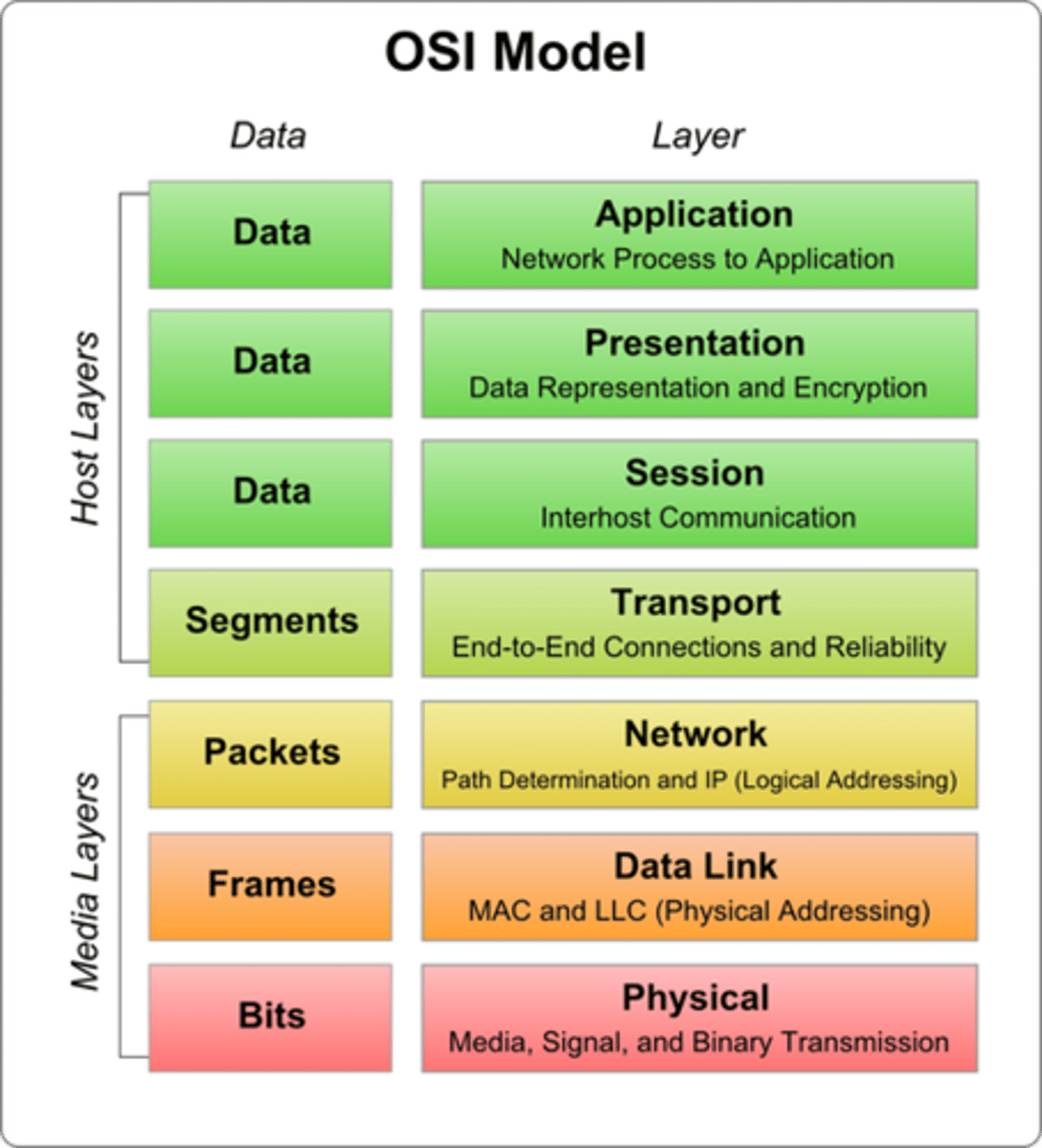
OSI model
Open Systems Interconnection Model:
Application, Presentation, Session, Transport, Network, Data Link, Physical
application layer
The application layer of the OSI model is the layer that you will be most familiar with. This familiarity is because the application layer is the layer in which protocols and rules are in place to determine how the user should interact with data sent or received.
Everyday applications such as email clients, browsers, or file server browsing software such as FileZilla provide a friendly, Graphical User Interface (GUI) for users to interact with data sent or received. Other protocols include DNS (Domain Name System), which is how website addresses are translated into IP addresses.
Presentation Layer
Layer 6 of the OSI model is the layer in which standardisation starts to take place. Because software developers can develop any software such as an email client differently, the data still needs to be handled in the same way — no matter how the software works.
This layer acts as a translator for data to and from the application layer (layer 7). The receiving computer will also understand data sent to a computer in one format destined for in another format. For example, when you send an email, the other user may have another email client to you, but the contents of the email will still need to display the same.
Security features such as data encryption (like HTTPS when visiting a secure site) occur at this layer.
Session layer
The fifth layer in the OSI model. This layer establishes and maintains communication between two nodes on the network. It can be considered the "traffic cop" for network communications.
Transport Layer
The fourth layer of the OSI model. In this layer protocols ensure that data are transferred from point A to point B reliably and without errors. this layer services include flow control, acknowledgment, error correction, segmentation, reassembly, and sequencing.
-TCP
-UDP
TCP
Transmission Control Protocol - provides reliable, ordered, and error-checked delivery of a stream of packets on the internet. TCP is tightly linked with IP and usually seen as TCP/IP in writing.
UDP
User Datagram Protocol. Used instead of TCP when guaranteed delivery of each packet is not necessary. UDP uses a best-effort delivery mechanism.
Network Layer
the third layer in the OSI model. Protocols in this layer translate network addresses into their physical counterparts and decide how to route data from the sender to the receiver.
Data Link Layer
The data link layer focuses on the physical addressing of the transmission. It receives a packet from the network layer (including the IP address for the remote computer) and adds in the physical MAC (Media Access Control) address of the receiving endpoint. Inside every network-enabled computer is a Network Interface Card (NIC) which comes with a unique MAC address to identify it.
MAC addresses are set by the manufacturer and literally burnt into the card; they can't be changed -- although they can be spoofed. When information is sent across a network, it's actually the physical address that is used to identify where exactly to send the information.
Additionally, it's also the job of the data link layer to present the data in a format suitable for transmission.
Physical Layer
the lowest, or first, layer of the OSI model. Protocols in this layer generate and detect signals so as to transmit and receive data over a network medium. These protocols also set the data transmission rate and monitor data error rates, but do not provide error correctionn
GUI
the technical term that is given to the name of the software that users interact with.
Packet
a small chunk of any kind of data: text, numbers, lists, etc
Session
technical term for when a connection is successfully established
OSPF
Open Shortest Path First
RIP
Routing Information Protocol
NIC
Network Interface Card
Time to Live
This field sets an expiry timer for the packet to not clog up your network if it never manages to reach a host or escape!
Checksum
This field provides integrity checking for protocols such as TCP/IP. If any data is changed, this value will be different from what was expected and therefore corrupt.
Source Address
The IP address of the device that the packet is being sent from so that data knows where to return to.
Destination Address
The device's IP address the packet is being sent to so that data knows where to travel next.
frame
a digital data transmission unit in computer networking and telecommunication. In packet switched systems, a frame is a simple container for a single network packet.
Source Port (TCP Header)
This value is the port opened by the sender to send the TCP packet from. This value is chosen randomly (out of the ports from 0-65535 that aren't already in use at the time).
Destination Port(TCP Header)
This value is the port number that an application or service is running on the remote host (the one receiving data); for example, a webserver running on port 80. Unlike the source port, this value is not chosen at random.
Source IP
Contains a 32-bit binary value that represents the source IP address of the packet.
Destination IP
This is the IP address of the device that the packet is destined for.
Sequence Number (TCP Header)
When a connection occurs, the first piece of data transmitted is given a random number. We'll explain this more in-depth further on.
Acknowledgement Number (TCP Header)
After a piece of data has been given a sequence number, the number for the next piece of data will have the sequence number + 1.
Flag
This header determines how the packet should be handled by either device during the handshake process. Specific flags will determine specific behaviours, which is what we'll come on to explain below.
SYN
A SYN message is the initial packet sent by a client during the handshake. This packet is used to initiate a connection and synchronise the two devices together (we'll explain this further later on).
SYN/ACK
This packet is sent by the receiving device (server) to acknowledge the synchronisation attempt from the client.
ACK
The acknowledgement packet can be used by either the client or server to acknowledge that a series of messages/packets have been successfully received.
DATA (TCP HANDSHAKE)
Once a connection has been established, data (such as bytes of a file) is sent via the "DATA" message.
FIN
This packet is used to cleanly (properly) close the connection after it has been complete.
RST
This packet abruptly ends all communication. This is the last resort and indicates there was some problem during the process. For example, if the service or application is not working correctly, or the system has faults such as low resources.
FTP (File Transfer Protocol)
21 - This protocol is used by a file-sharing application built on a client-server model, meaning you can download files from a central location.
Secure Shell (SSH)
22 - This protocol is used to securely login to systems via a text-based interface for management.
HyperText Transfer Protocol (HTTP)
80 - This protocol powers the World Wide Web (WWW)! Your browser uses this to download text, images and videos of web pages.
HyperText Transfer Protocol Secure (HTTPS)
443 - This protocol does the exact same as above; however, securely using encryption.
Server Message Block (SMB)
445 - This protocol is similar to the File Transfer Protocol (FTP); however, as well as files, SMB allows you to share devices like printers.
Remote Desktop Protocol (RDP)
3389 - This protocol is a secure means of logging in to a system using a visual desktop interface (as opposed to the text-based limitations of the SSH protocol).
Port
A virtual point where network connections start and end.
Port Forwarding
Forwards an external network port to an internal IP address and port.
stateful firewall
This type of firewall uses the entire information from a connection; rather than inspecting an individual packet, this firewall determines the behaviour of a device based upon the entire connection.
This firewall type consumes many resources in comparison to stateless firewalls as the decision making is dynamic. For example, a firewall could allow the first parts of a TCP handshake that would later fail.
If a connection from a host is bad, it will block the entire device.
stateless firewall
A firewall capable only of examining packets individually. Stateless firewalls perform more quickly than stateful firewalls, but are not as sophisticated.
VPN (Virtual Private Network)
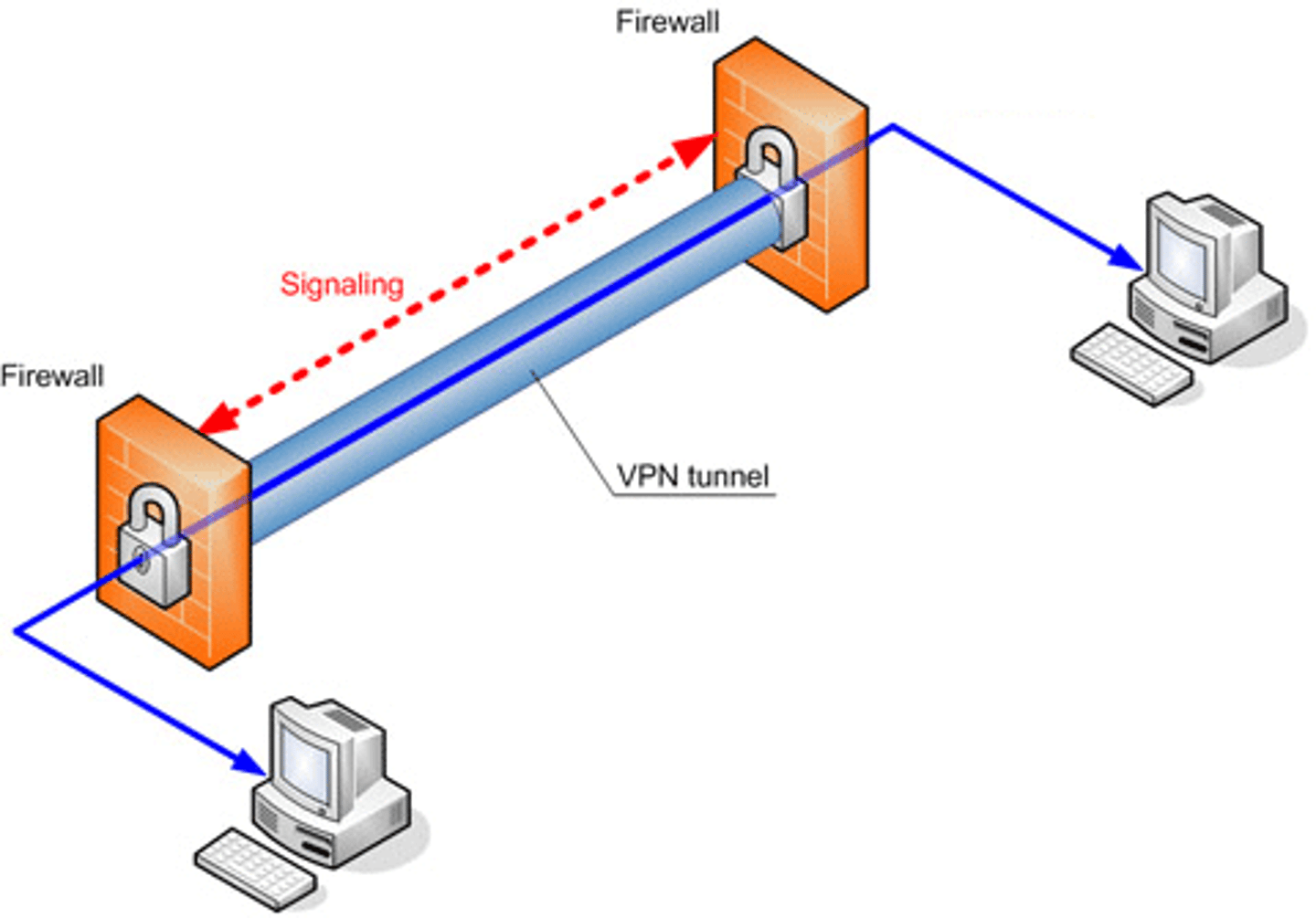
A Virtual Private Network (or VPN for short) is a technology that allows devices on separate networks to communicate securely by creating a dedicated path between each other over the Internet (known as a tunnel). Devices connected within this tunnel form their own private network.
PPP
This technology is used by PPTP (explained below) to allow for authentication and provide encryption of data. VPNs work by using a private key and public certificate (similar to SSH). A private key & certificate must match for you to connect.
This technology is not capable of leaving a network by itself (non-routable).
PPTP
The Point-to-Point Tunneling Protocol (PPTP) is the technology that allows the data from PPP to travel and leave a network.
PPTP is very easy to set up and is supported by most devices. It is, however, weakly encrypted in comparison to alternatives.
IPSec
Internet Protocol Security (IPsec) encrypts data using the existing Internet Protocol (IP) framework.
IPSec is difficult to set up in comparison to alternatives; however, if successful, it boasts strong encryption and is also supported on many devices.
DNS (Domain Name System)
The Internet's system for converting alphabetic names into numeric IP addresses.
TLD (top-level domain)
The highest-level category used to distinguish domain names-for example, .org, .com, and .net. A TLD is also known as the domain suffix.
second-level domain
Unique name within a top-level domain
Yahoo.com, Whitehouse.gov, Unesco.org
Subdomain
A portion of a URL that usually indicates a specific subdivision or server within a large site. for example, in the name admin.tryhackme.com the admin part.
ccTLD
A two-letter country code in a web address.
gTLD
generic Top-Level Domain (.com, .org, .edu, .gov, .net)
A Record (DNS)
These records resolve to IPv4 addresses, for example 104.26.10.229
AAAA Record (DNS)
These records resolve to IPv6 addresses, for example 2606:4700:20::681a:be5
CNAME Record (DNS)
These records resolve to another domain name, for example, TryHackMe's online shop has the subdomain name store.tryhackme.com which returns a CNAME record shops.shopify.com. Another DNS request would then be made to shops.shopify.com to work out the IP addre
MX Record (DNS)
These records resolve to the address of the servers that handle the email for the domain you are querying, for example an MX record response for tryhackme.com would look something like alt1.aspmx.l.google.com. These records also come with a priority flag. This tells the client in which order to try the servers, this is perfect for if the main server goes down and email needs to be sent to a backup server.
TXT Record
free text fields where any text-based data can be stored. It has multiple uses, but some common ones can be to list servers that have the authority to send an email on behalf of the domain (this can help in the battle against spam and spoofed email). They can also be used to verify ownership of the domain name when signing up for third party services.
Authoritative DNS Server
the final holder of the IP of the domain you are looking for
HTTP (Hypertext Transfer Protocol)
It is what's used whenever you view a website, developed by Tim Berners-Lee and his team between 1989-1991. It's the set of rules used for communicating with web servers for the transmitting of webpage data, whether that is HTML, Images, Videos, etc.
HTTPS (Hypertext Transfer Protocol Secure)
An encrypted version of HTTP. It uses port 443.
URL (Uniform Resource Locator)
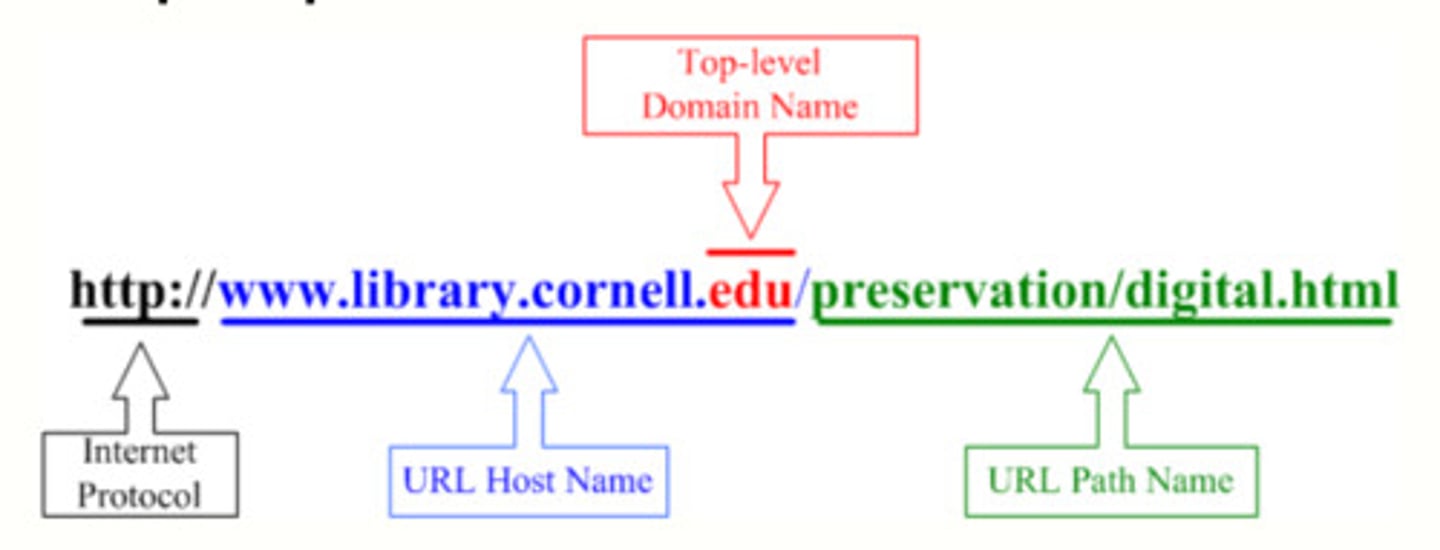
A location or address identifying where documents can be found on the Internet; a Web address
scheme (HTTP)
This instructs on what protocol to use for accessing the resource such as HTTP, HTTPS, FTP (File Transfer Protocol).
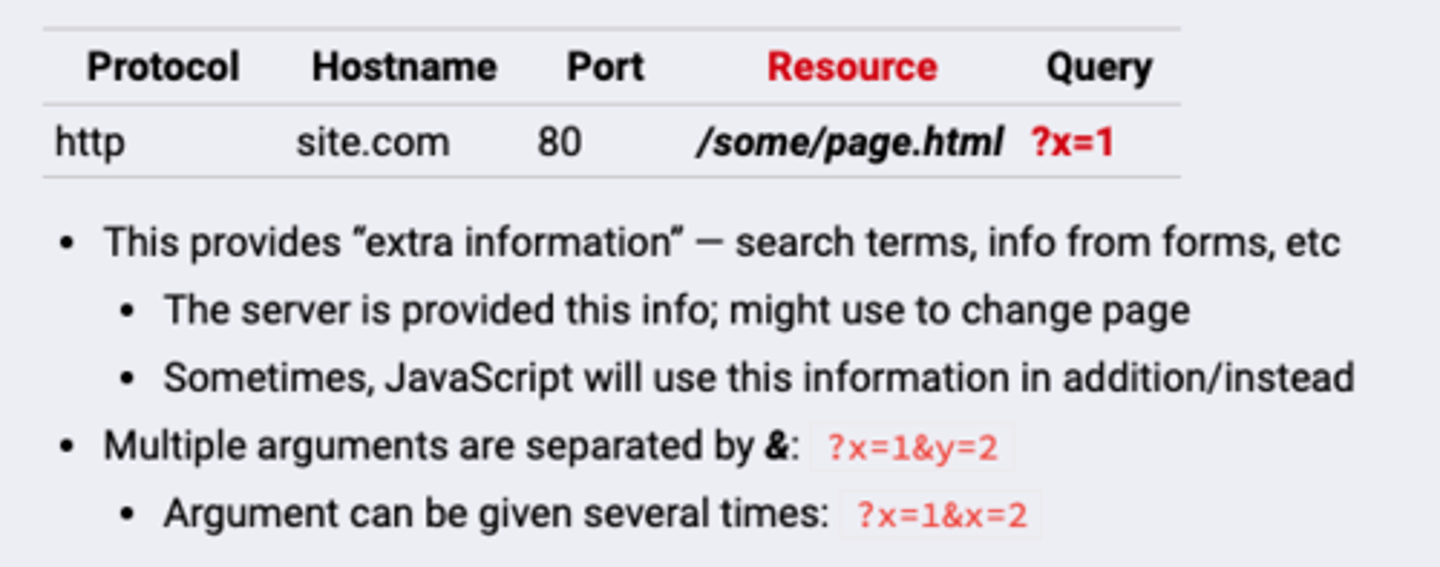
Query String (HTTP)
Part of a URL that contains data including fields added to a base URL by a browser or application.