Chapter 6 - JDK cuncurrency libraries (java.util.package)
 Call Kai
 Learn
Learn Practice Test
 Spaced Repetition
 Match
Match Flashcards
 Knowt Play
1/33

There's no tags or description
Looks like no tags are added yet.
Name | Mastery | Learn | Test | Matching | Spaced | Call with Kai | Chat |
|---|
No analytics yet
Send a link to your students to track their progress
34 Terms
What is an Atomic action?
an atomic action is an operation that happens all at once or not at all. To the rest of the system, it is instantaneous. There is no "in-between" state where another thread can peek in and see the work half-done.
What’s the purpose of an Atomic Action
Without atomicity, concurrent programs suffer from race conditions—where two or more threads manipulate shared data at the same time, and the final outcome depends unpredictably on the exact timing of the threads.
The purpose of making an action atomic is to guarantee data integrity without the massive performance cost of freezing your entire program.
Without atomic actions, if Thread A and Thread B try to increment a counter at the exact same millisecond, they will overlap, overwrite each other's data, and corrupt the final count. An atomic action forces them to take turns implicitly at the CPU hardware level.
What’s the purpose of java.util.concurrent.atomic
Before this package was introduced (in Java 5), if you wanted to make a variable thread-safe, you had to use the synchronized keyword or explicit Lock objects:
Java
// The old, heavy way
public synchronized void increment() {
    this.count++;
}
While synchronized works perfectly, it relies on OS-level locking. When a thread hits a synchronized block that is already in use, that thread is blocked. It gets put to sleep, and the operating system has to context-switch it out of the CPU. This is computationally expensive and slow.
The java.util.concurrent.atomic package was created to provide a faster, lock-free alternative for single variables.
How Atomic classes work?
Instead of locking other threads out, classes like AtomicInteger, AtomicBoolean, and AtomicReference use an ultra-fast CPU hardware instruction called CAS (Compare-And-Swap).
A CAS operation takes three arguments:
The memory location to update.
The expected current value.
The new value you want to set.
The CPU will only update the value if the current value matches your expected value. It does this check-and-update in a single, unbreakable hardware step.
If another thread snuck in and changed the value first, the CAS operation simply fails, returns false, and the atomic variable tries again in a loop (called a spin-lock). Because threads are never put to sleep by the OS, this is incredibly fast.
How to spot an Atomic action?
Look for "Check-Then-Act" Patterns (The Biggest Trap)
An operation is truly atomic if it happens as a single, indivisible unit of work from the perspective of other threads. It either completely happens, or it doesn't happen at all, with no half-baked state visible in between.
Whenever you see an if statement checking a condition, followed by a line of code that changes that same condition, you are looking at individual, non-atomic operations.
Take a look at this snippet from your original code:
Java
if (count.get() != 1_000) {      // Operation 1: Check
    count.getAndAdd(1);          // Operation 2: Act
}
Even though count.get() is thread-safe on its own, and count.getAndAdd(1) is thread-safe on its own, the space between them is not.
Imagine count is currently at 999:
Thread 1 executes the
ifstatement. 999 is not 1,000, so it enters the block.Context Switch: The CPU pauses Thread 1 right before it increments.
Thread 2 executes the
ifstatement.countis still 999! Thread 2 enters the block.Both threads now execute their
getAndAdd(1)operations.countbecomes 1,001. Your limit failed.
Rule of Thumb: If a thread can be paused between the decision and the action, the block is not atomic.
How to spot Read-Modify-Write operations?
Standard Java operations that look like a single step on screen are actually broken down into three distinct CPU instructions under the hood.
Consider standard integer incrementation:
Java
count++; // Looks like 1 operation, but it's actually 3!
Behind the scenes, the CPU does this:
Read: Fetch the current value of
countfrom memory into a local register.Modify: Add 1 to that value inside the register.
Write: Write the new value back to memory.
If Thread A reads the value (say, 5) and gets paused, Thread B can read the same value (5), increment it to 6, and write it back. When Thread A wakes up, it still thinks the value is 5, increments it to 6, and overwrites Thread B's work. One increment is lost.
What is the notion of what a lock is?
The block-structured approach to synchronization is based on a simple notion of what a lock is. This approach has a number of shortcomings, as follows:
Only one type of lock exists.
It applies equally to all synchronized operations on the locked object.
The lock is acquired at the start of the synchronized block or method.
The lock is released at the end of the block or method.
Either the lock is acquired or the thread blocks indefinitely—no other out-comes are possible.
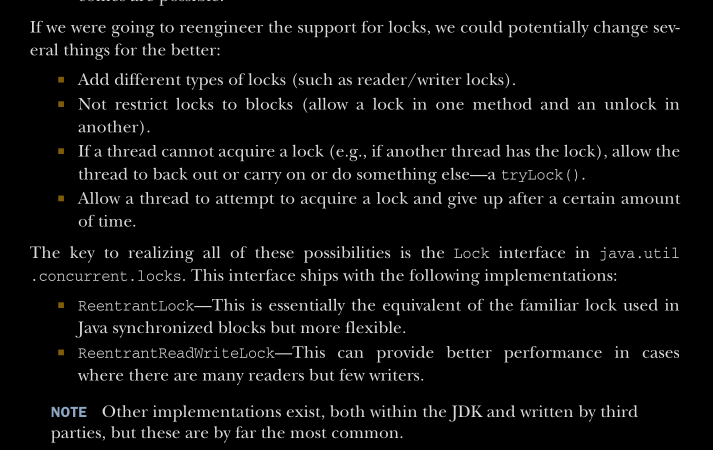
How the lock interface can be used to completely replicate any functionality that is offered by block-structured concurrency?
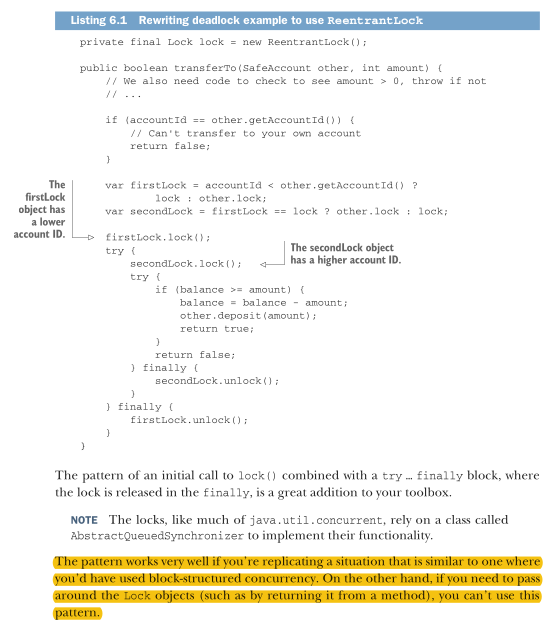
And learning the Lock ordering (img)
listing 6.1 shows the example from chapter 5 for how to avoid deadlock rewritten to use ReentrantLock. We need to add a lock object as a field to the class, because we will no longer be relying on the intrinsic lock on the object. We also need to maintain the principle that locks are always acquired in the same order. In our example the simple protocol we maintain is that the lock on the object with the lowest account ID is acquired first.
What are Condition objects in Atomics package & What do they do?
Another aspect of the API provided by java.util.concurrent are the condition objects.
These objects play the same role in the API as wait() and notify() do in the original intrinsic API but are more flexible. They provide the ability for threads to wait indefinitely for some condition and to be woken up when that condition becomes true.
However, unlike the intrinsic API (where the object monitor has only a single condition for signaling), the Lock interface allows the programmer to create as many condition objects as they like.
This allows a separation of concerns—for example, the lock can have multiple, disjoint groups of methods that can use separate conditions.
A condition object (which implements the interface Condition) is created by calling the newCondition() method on a lock object (one that implements the Lock interface). As well as condition objects, the API provides a number of latches and barriers as concurrency primitives that may be useful in some circumstances.
CountDownLatch
CountDownLatch is a synchronization utility in java.util.concurrent that lets one or more threads wait until a set of operations being performed in other threads completes. It hasn't changed in Java 25 — it's been stable since Java 5.
How it works
You create it with a fixed count:
CountDownLatch latch = new CountDownLatch(3);
That count can never be reset or increased — it only counts down, and once it hits zero, it stays there (it's a one-shot tool, not reusable).
Two core methods matter:
countDown()— decrements the count by one. Called by the threads doing the work.await()— blocks the calling thread until the count reaches zero. Called by the thread(s) waiting for the work to finish. There's alsoawait(timeout, unit)if you don't want to wait forever.
A simple example
import java.util.concurrent.CountDownLatch;
import java.util.concurrent.ExecutorService;
import java.util.concurrent.Executors;

public class Demo {
    public static void main(String[] args) throws InterruptedException {
        int workerCount = 3;
        CountDownLatch latch = new CountDownLatch(workerCount);
        ExecutorService pool = Executors.newFixedThreadPool(workerCount);

        for (int i = 0; i < workerCount; i++) {
            int id = i;
            pool.submit(() -> {
                try {
                    System.out.println("Worker " + id + " doing work...");
                    Thread.sleep(500); // simulate work
                } catch (InterruptedException e) {
                    Thread.currentThread().interrupt();
                } finally {
                    latch.countDown(); // signal completion
                }
            });
        }

        latch.await(); // main thread blocks here until count == 0
        System.out.println("All workers finished. Proceeding.");
        pool.shutdown();
    }
}
The main thread doesn't proceed until all three workers have called countDown().
What it's typically used for
Wait for parallel tasks to finish — the classic case: fan out work to multiple threads, then block until all of them report done, like the example above.
Starting gate / simultaneous kickoff — the reverse pattern: initialize a latch with count 1, have several threads call
await()on it, and have a controller thread callcountDown()once to release them all at the same time (useful for load-testing or benchmarking "start together" scenarios).Waiting for service/resource initialization — e.g., don't let requests start being processed until N background resources have finished loading.
Important limitations
One-shot — once the count hits zero, you can't reuse it. If you need repeated synchronization points, you want
CyclicBarrierinstead.No task ordering guarantees — it just tracks a count, not which thread did what.
If a thread crashes/throws before calling
countDown(), the latch may never reach zero, and any thread inawait()could block forever — that's whycountDown()is almost always in afinallyblock, and why timedawait()is often safer for production code.
![<p>CountDownLatch is a synchronization utility in <code>java.util.concurrent</code> that lets one or more threads wait until a set of operations being performed in other threads completes. It hasn't changed in Java 25 — it's been stable since Java 5.</p><p>How it works</p><p>You create it with a fixed count:</p><pre><code class="language-java">CountDownLatch latch = new CountDownLatch(3);
</code></pre><p>That count can never be reset or increased — it only counts down, and once it hits zero, it stays there (it's a one-shot tool, not reusable).</p><p>Two core methods matter:</p><ul><li><p><code>countDown()</code> — decrements the count by one. Called by the threads doing the work.</p></li><li><p><code>await()</code> — blocks the calling thread until the count reaches zero. Called by the thread(s) waiting for the work to finish. There's also <code>await(timeout, unit)</code> if you don't want to wait forever.</p></li></ul><p>A simple example</p><pre><code class="language-java">import java.util.concurrent.CountDownLatch;
import java.util.concurrent.ExecutorService;
import java.util.concurrent.Executors;
public class Demo {
public static void main(String[] args) throws InterruptedException {
int workerCount = 3;
CountDownLatch latch = new CountDownLatch(workerCount);
ExecutorService pool = Executors.newFixedThreadPool(workerCount);
for (int i = 0; i < workerCount; i++) {
int id = i;
pool.submit(() -> {
try {
System.out.println("Worker " + id + " doing work...");
Thread.sleep(500); // simulate work
} catch (InterruptedException e) {
Thread.currentThread().interrupt();
} finally {
latch.countDown(); // signal completion
}
});
}
latch.await(); // main thread blocks here until count == 0
System.out.println("All workers finished. Proceeding.");
pool.shutdown();
}
}
</code></pre><p>The main thread doesn't proceed until all three workers have called <code>countDown()</code>.</p><p>What it's typically used for</p><ol><li><p><strong>Wait for parallel tasks to finish</strong> — the classic case: fan out work to multiple threads, then block until all of them report done, like the example above.</p></li><li><p><strong>Starting gate / simultaneous kickoff</strong> — the reverse pattern: initialize a latch with count 1, have several threads call <code>await()</code> on it, and have a controller thread call <code>countDown()</code> once to release them all at the same time (useful for load-testing or benchmarking "start together" scenarios).</p></li><li><p><strong>Waiting for service/resource initialization</strong> — e.g., don't let requests start being processed until N background resources have finished loading.</p></li></ol><p>Important limitations</p><ul><li><p><strong>One-shot</strong> — once the count hits zero, you can't reuse it. If you need repeated synchronization points, you want <code>CyclicBarrier</code> instead.</p></li><li><p><strong>No task ordering guarantees</strong> — it just tracks a count, not which thread did what.</p></li><li><p>If a thread crashes/throws before calling <code>countDown()</code>, the latch may never reach zero, and any thread in <code>await()</code> could block forever — that's why <code>countDown()</code> is almost always in a <code>finally</code> block, and why timed <code>await()</code> is often safer for production code.</p></li></ul><p></p>](https://assets.knowt.com/user-attachments/a368714a-16a9-426c-8556-713a4666b0c0.png)
Is the number of counts in the CountDownLatch arbitrary?
Good question — it's not arbitrary at all, but it's also not computed by the JVM or anything automatic. You choose the number, and it must equal the exact number of countDown() calls you expect to happen before the waiting thread(s) should proceed.
What the number represents
The count is however many "events" or "signals" need to occur before await() unblocks. It's up to you to make it match your actual workload. Common patterns:
1. One count per worker thread/task
int workerCount = 3;
CountDownLatch latch = new CountDownLatch(workerCount); // 3, because 3 workers
If you're processing a list of 50 files across 50 tasks, the count is 50. If you spin up a thread pool with 10 tasks, it's 10.
2. One count per distinct step/resource, regardless of thread count
CountDownLatch latch = new CountDownLatch(3); // e.g. DB connected, cache warmed, config loaded
Here it's not about thread count — it's about 3 specific initialization steps completing, maybe even from different parts of the code.
3. Count of exactly 1, for the "starting gate" pattern
CountDownLatch startSignal = new CountDownLatch(1);
Here the number 1 just means "a single go signal" — many threads await() on it, but only one countDown() call releases them all.
The critical constraint
The number must match reality exactly, or you get bugs:
If you set the count too high (e.g.,
new CountDownLatch(5)but only 4 things ever callcountDown()),await()blocks forever — a silent deadlock.If you set it too low (e.g.,
new CountDownLatch(2)but 3 things callcountDown()), the latch reaches zero early and releases waiters before all the work is actually done. ExtracountDown()calls beyond zero are just ignored — no error, no exception, so this can fail silently.
So in practice, the count is almost always derived directly from something concrete in your code: list.size(), a thread pool's task count, or a fixed number of known initialization steps you're writing by hand. It's a number you calculate or know in advance, not one you guess.
CountDownLatch in moden java of VT
Java 25 context
Nothing about CountDownLatch itself changed in Java 25. If you're doing this kind of coordination in modern Java, though, it's worth knowing that virtual threads (finalized in Java 21) make the "spin up thousands of threads and wait on a latch" pattern much cheaper than it used to be with platform threads — and Java 25 also has structured concurrency (finalized as a stable feature in this release via JEP 505) as a higher-level alternative for many "fan out, then join" scenarios, where you don't manage the countdown manually — the API tracks completion of a group of subtasks for you and handles cancellation/error propagation automatically. CountDownLatch is still perfectly valid and often simpler for straightforward wait-for-N-things-to-finish or release-N-threads-at-once cases.
When do you still want CountDownLatch (even with virtual threads)
Case 3: Threads doing the waiting aren't the ones managing the tasks: If your waiting logic is decoupled from your task-submission logic (e.g., a completely separate part of the codebase needs to block until some background initialization finishes, and there's no natural "join point" like a try-with-resources), a latch is still the simplest tool. Virtual threads don't remove the need for that.
Case 4: The "release everyone at once" starting-gate pattern: CountDownLatch(1) used to synchronize many threads to start at the same instant has no equivalent in plain executor APIs — this is a latch-specific use case regardless of thread type.
Case 5: You need partial/rolling progress tracking, not just "all done": If something needs to observe the count dropping (e.g., a progress bar), a latch (or a custom counter) fits naturally; invokeAll/close() only give you an all-or-nothing block. When to reach for structured concurrency instead (Java 25 preferred default)
Case 6: Fan-out/fan-in where you also want cancellation & error propagation
try (var scope = StructuredTaskScope.open()) {
    Subtask<String> t1 = scope.fork(() -> fetchUser());
    Subtask<String> t2 = scope.fork(() -> fetchOrders());
    scope.join(); // waits for both, propagates exceptions, handles cancellation
    ...
}
If one subtask fails, structured concurrency can automatically cancel the others — CountDownLatch and even plain virtual threads give you no such behavior; you'd have to build it manually.
What is concurrentHashMap
The ConcurrentHashMap class provides a concurrent version of the standard HashMap. In general, maps are a very useful (and common) data structure for building concurrent applications. This is due, at least in part, to the shape of the underlying data structure. Let’s take a closer look at the basic HashMap to understand why.
Understanding a simplified HashMap
the classic Java HashMap uses a function (the hash function) to determine which bucket it will store the key-value pair in. This is where the “hash” part of the class’s name comes from.
The key-value pair is actually stored in a linked list (known as the hash chain) that starts from the bucket corresponding to the index obtained by hashing the key.
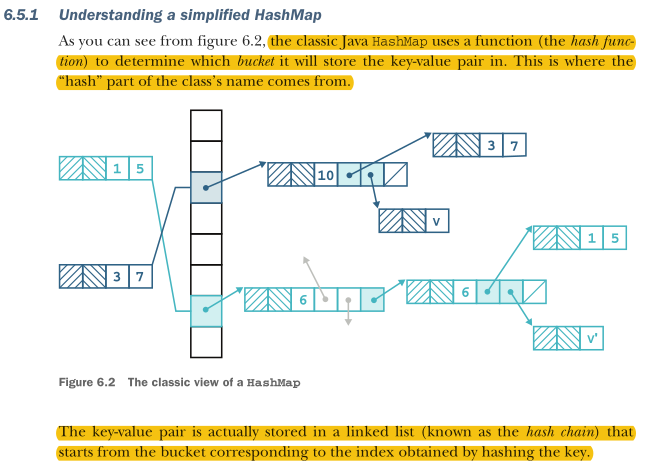
The underlying emchanisms of get() in a HashMap
First, the get() method deals with the irritating null case. Following that, we use the key object’s hash code to construct an index into the array table. An unwritten assumption says that the size of table is a power of two, so the operation of indexFor() is basically a modulo operation, which ensures that the return value is a valid index into table.
Now that we have an index into table, we use it to select the relevant hash chain for our lookup operation. We start at the head and walk down the hash chain. At each step we evaluate whether we’ve found our key object,
What problem does NOT resizing the hash table cause, and what complexity is lost?
As elements grow, more keys collide into the same bucket. Lookup degrades toward O(N) instead of the expected O(1)/O(log N). The key advantage of hashing — fast retrieval — is lost entirely without dynamic resizing.
What are the two serious runtime limitations of Dictionary that make it unfit for production?
1. No table resizing — performance degrades toward O(N) as elements accumulate.
2. No defence against pathological hashCode() implementations — a badly-behaved key collapses all lookups to O(N).
Note: Java's own HashMap has neither of these problems — it auto-resizes on load factor threshold and since Java 8 converts overloaded buckets to red-black trees (O(log N) worst case).
Core problem
Why is the plain Dictionary class not thread-safe? Give a concrete example.
What are the two naive approaches to making Dictionary thread-safe, and what is the verdict on both?
Two threads can interleave operations on the same key and both report success when only one actually took effect. Example: Thread A deletes a key while Thread B updates the value for that same key — depending on execution order, both return success but only one operation actually happened. There is no mutual exclusion protecting the read-modify-write sequence.
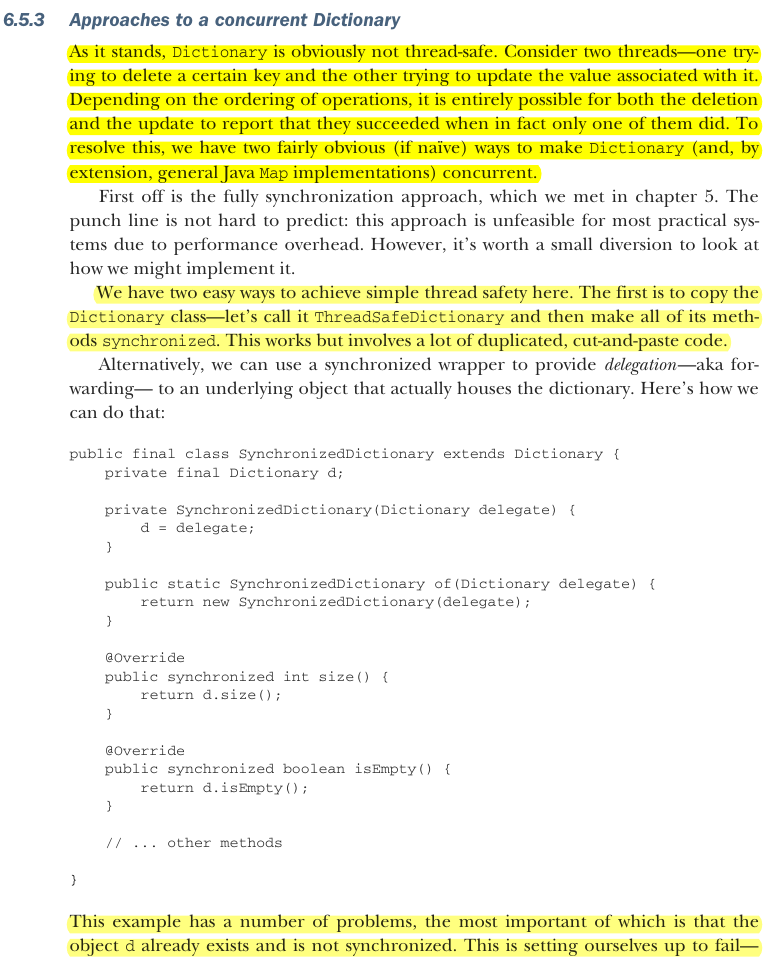
Full synchronization — make every method synchronized, either directly or via a wrapper. 2. Immutability — wrap Dictionary so all mutating methods throw UnsupportedOperationException. Both fail: synchronization has prohibitive performance overhead, and both share the same deeper flaw — the underlying mutable object still exists and can be accessed directly, bypassing any protection.
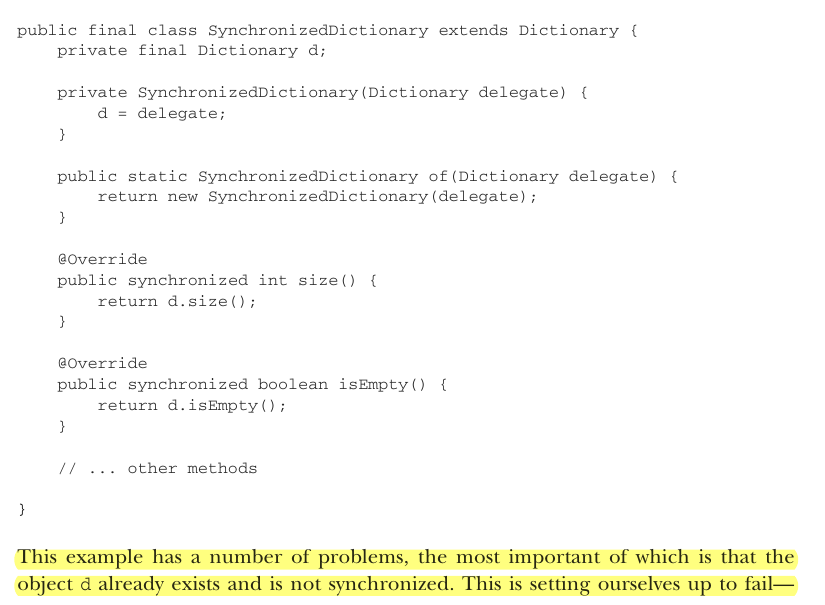
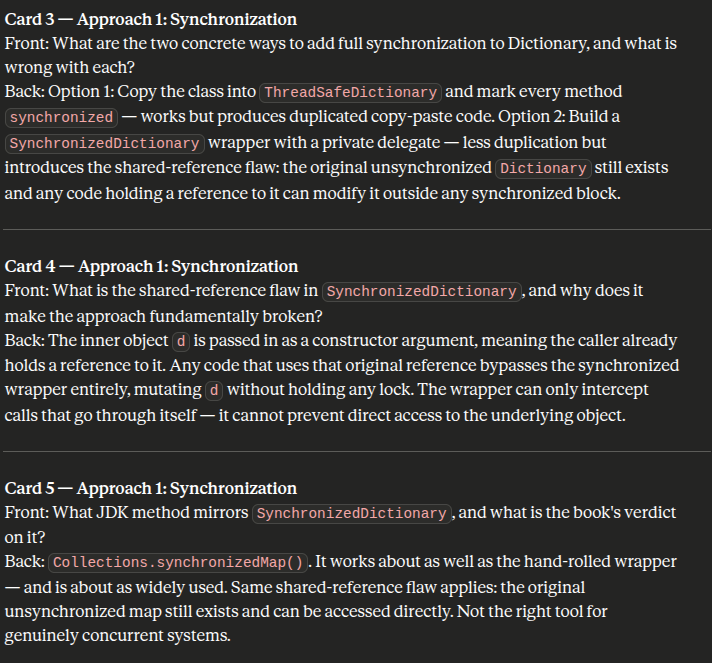
Approach 1: Synchronization
What are the two concrete ways to add full synchronization to Dictionary, and what is wrong with each?
What is the shared-reference flaw in
SynchronizedDictionary, and why does it make the approach fundamentally broken?What JDK method mirrors
SynchronizedDictionary, and what is the book's verdict on it?
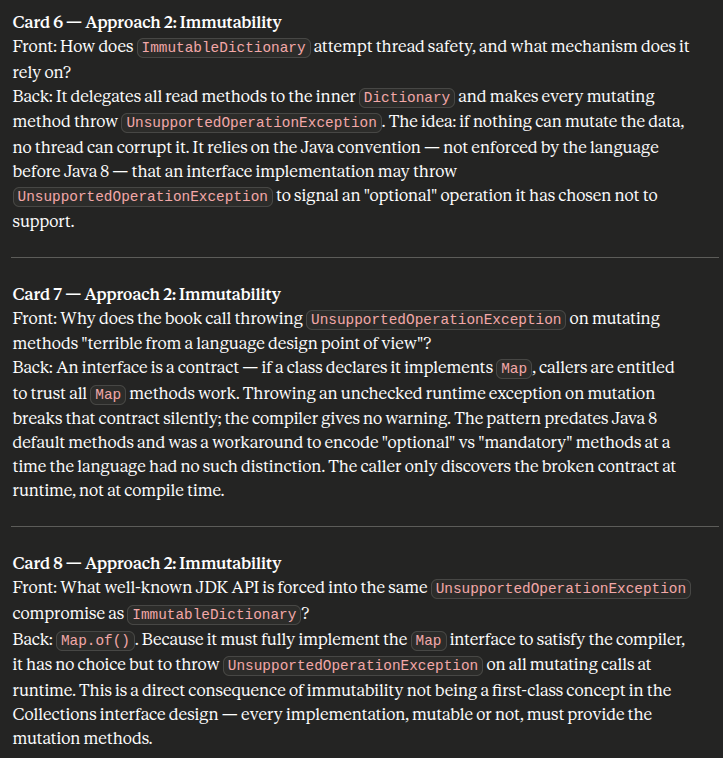
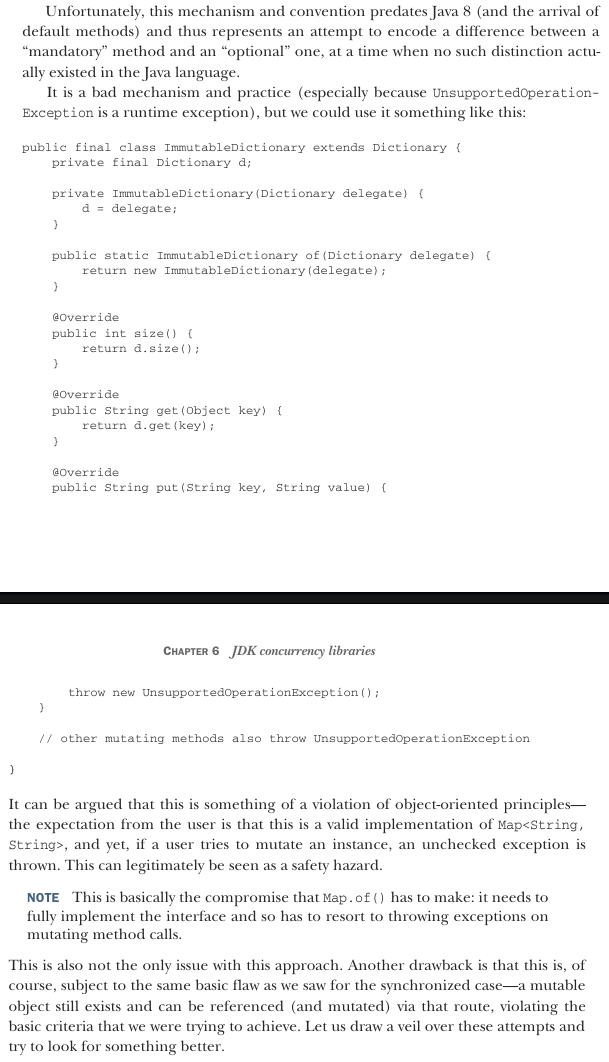
Approach 2: Immutability
How does
ImmutableDictionaryattempt thread safety, and what mechanism does it rely on?Why does the book call throwing
UnsupportedOperationExceptionon mutating methods "terrible from a language design point of view"?What well-known JDK API is forced into the same
UnsupportedOperationExceptioncompromise asImmutableDictionary?
Card 9 — Both approaches & Setup for the solution
What single fundamental flaw do both
SynchronizedDictionaryandImmutableDictionaryshare?What key insight do both failed approaches reveal about what a correct concurrent map actually needs?
Card 9 — Both approaches
Back: In both cases the underlying mutable Dictionary delegate still exists as a separately reachable object. Any caller who holds a reference to that original object can read and mutate it directly, completely bypassing the wrapper. The wrapper cannot seal off the inner object — it can only intercept calls that go through itself. Neither approach actually achieves its stated goal in a real codebase.
Card 10 — Setup for the solution
Back: The wrappers fail because concurrency control is bolted on top of a mutable object they do not own exclusively. A correct solution needs the concurrency control built into the data structure itself from the ground up — not layered on via a wrapper. This is exactly what ConcurrentHashMap provides: fine-grained internal locking per bucket and atomic operations baked into the implementation, with no separately accessible unsynchronized object underneath.
Interfaces can't express "optional" vs "mandatory" methods in Java
Map (and List, Collection, etc.) are defined as single, monolithic interfaces that bundle together both read operations (get, size, containsKey) and mutation operations (put, remove, clear, putAll) into one contract. There's no way in the interface itself to say "these methods are required, but these other ones are optional depending on the implementation."
That means if you want to build an immutable map — one that genuinely cannot be modified after construction — you're still forced to write a class that implements put(), remove(), clear(), and every other mutating method, because the compiler requires every method of the interface to have a method body. There is no Map variant, no sub-interface, no annotation, that lets you say "I only support the read half of this contract."
The "back door" and why it's unsatisfactory (Solutions)
Since Java can't structurally express "this method isn't supported," the workaround the JDK designers landed on decades ago was: implement the method anyway, but make its body just throw UnsupportedOperationException immediately. This technically satisfies the compiler (the interface contract says "you must provide a method with this signature," and throwing an exception counts as "providing" it), but it violates the actual meaning of an interface contract — which is supposed to be a promise that calling any method will do what it says, not potentially blow up at runtime.
Using ConcurrentHashMap - Example of using HashMap with multiple threads
Having shown a simple map implementation and discussed approaches that we could use to make it concurrent, it’s time to meet the ConcurrentHashMap. In some ways, this is the easy part: it is an extremely easy-to-use class and in most cases is a drop-in replacement for HashMap.
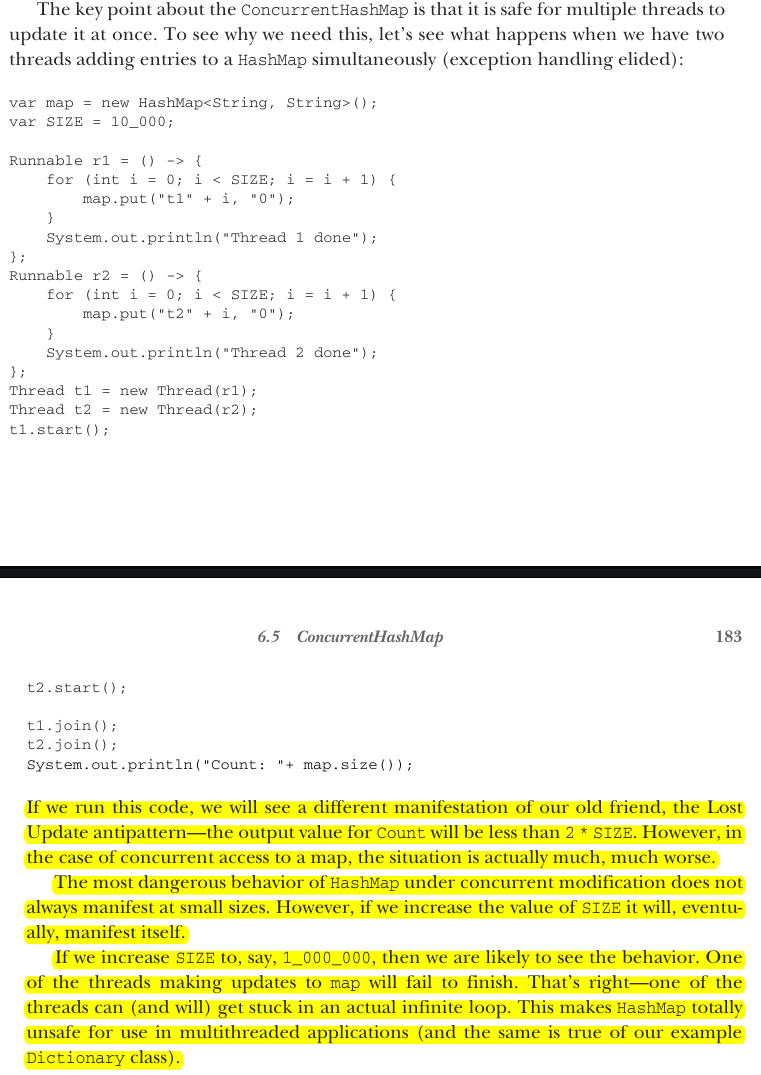
The key point about the ConcurrentHashMap is that it is safe for multiple threads to update it at once. To see why we need this, let’s see what happens when we have two threads adding entries to a HashMap simultaneously (exception handling elided):
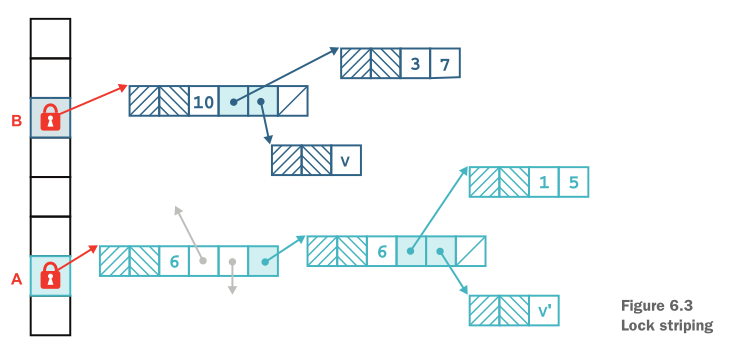
Using ConcurrentHashMap - How does ConcurrentHashMap avoid locking the whole structure when making a change?
Since Java 8, ConcurrentHashMap no longer uses fixed segments. Instead, it stores entries in an array of buckets (bins), just like HashMap internally. For an insert into an empty bucket, it uses a lock-free CAS (compare-and-swap) operation — no lock at all.
Only when there's a collision (the bucket already has a node) does it fall back to a synchronized block on that individual bucket's head node. This means the lock, when needed, is scoped to a single bucket — not a whole segment of buckets as in pre-Java 8 versions.
Reads are essentially always lock-free, using volatile access to guarantee visibility. If two threads need to write to the same bucket, they still exclude each other, but this fine-grained approach gives much better throughput than synchronizing the entire map. As the map grows and the table resizes to more buckets, lock contention naturally decreases further since collisions become less likely.
When to use a ConcurrencutHashMap
Using ConcurrentHashMap can be almost too simple. In many cases, if you have a multithreaded program and need to share data, then just use a Map, and have the implementation be a ConcurrentHashMap. In fact, if there is ever a chance that a Map might need to be modified by more than one thread, then you should always use the concurrent implementation.
It does use considerably more resources than a plain HashMap and will have worse throughput due to the synchronization of some operations. However, those inconveniences are nothing when compared to the possibility of a race condition leading to Lost Update or an infinite loop.
Finally, we should also note that ConcurrentHashMap actually implements the ConcurrentMap interface, which extends Map.
Why don't Map's two concurrency patterns (full sync, immutability) work well for List,
and how does CopyOnWriteArrayList solve the problem differently?
The list's linear structure can't be partitioned like a hash map's buckets — even a linked list sees contention under append-heavy workloads.
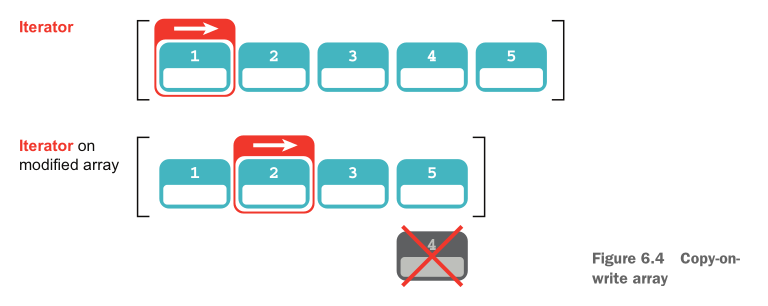
CopyOnWriteArrayList instead uses copy-on-write semantics: every mutating operation creates an entirely new backing array rather than modifying the existing one.
This means iterators are guaranteed never to throw ConcurrentModificationException and never see additions, removals, or changes made after the iterator was created — they read a frozen snapshot.
Caveat: only the list structure is protected; if elements are themselves mutable objects, they can still be mutated directly by another thread.
The cost of using CopyOnWriteArrayList & When to use it
This implementation is usually too expensive for general use but may be a good option when traversal operations vastly outnumber mutations, and when the programmer does not want the headache of synchronization, yet wants to rule out the possibility of threads interfering with each other.
Example of how CopyOnWriteArrayList idea is implemented
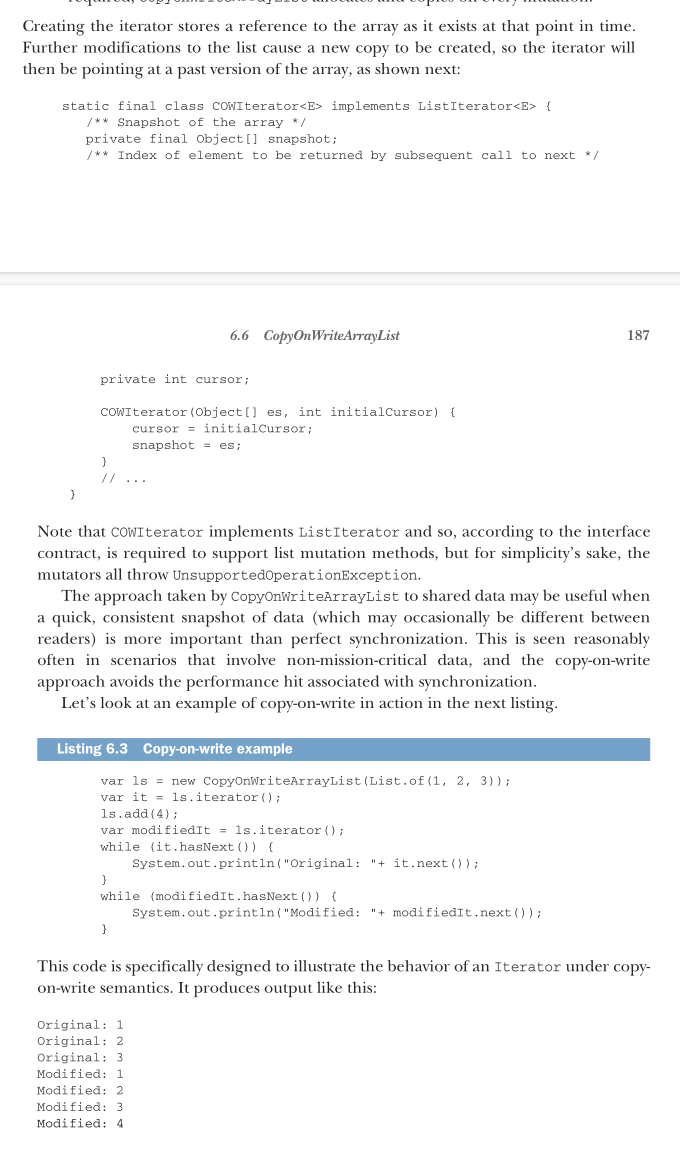
In general, the use of the CopyOnWriteArrayList class does require a bit more thought than using ConcurrentHashMap, which is basically a drop-in concurrent replacement for HashMap because of performance issues—the copy-on-write property means that if the list is altered, the entire array must be copied. If changes to the list are common, compared to read accesses, this approach won’t necessarily yield high performance.
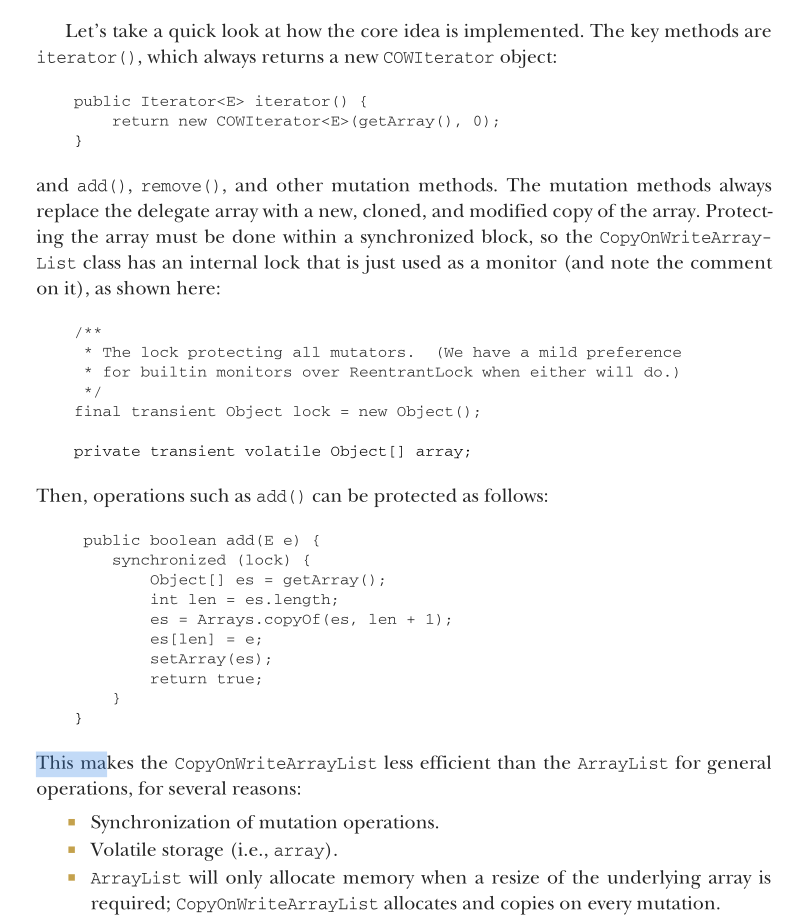
Difference between CopyOnWriteArrayList and synchronizedList()
In general, the CopyOnWriteArrayList makes different trade-offs than synchronizedList(). The latter synchronizes on all operations, so reads from different threads can block each other, which is not true for a COW data structure.
On the other hand, CopyOnWriteArrayList copies the backing array on every mutation, whereas the synchronized version does so only when the backing array is full (the same behavior as ArrayList).
However, as we’ll say repeatedly in chapter 7, reasoning about code from first principles is extremely difficult—the only way to reliably get well-performing code is to test, retest, and measure the results.
What is BlockingQueue
A BlockingQueue is an interface in java.util.concurrent designed specifically for producer-consumer patterns in multithreaded code. It's a queue that automatically handles thread coordination for you — instead of manually writing wait()/notify() logic, the queue itself blocks a thread when it can't proceed.
The core idea
If a consumer thread tries to take an item from an empty queue → it blocks (waits) until another thread puts something in.
If a producer thread tries to put an item into a full, bounded queue → it blocks until a consumer removes something and frees up space.
One very common use case, and the one we’ll focus on, is the use of a queue to transfer work units between threads. This pattern is often ideally suited for the simplest concurrent extension of Queue—the BlockingQueue.
A number of patterns in multithreaded Java programming rely heavily on the thread-safe implementations of Queue, so it’s important that you fully understand it.
What are the two additional special properties of BlockingQueue?
The BlockingQueue is a queue that has the following two additional special
properties:
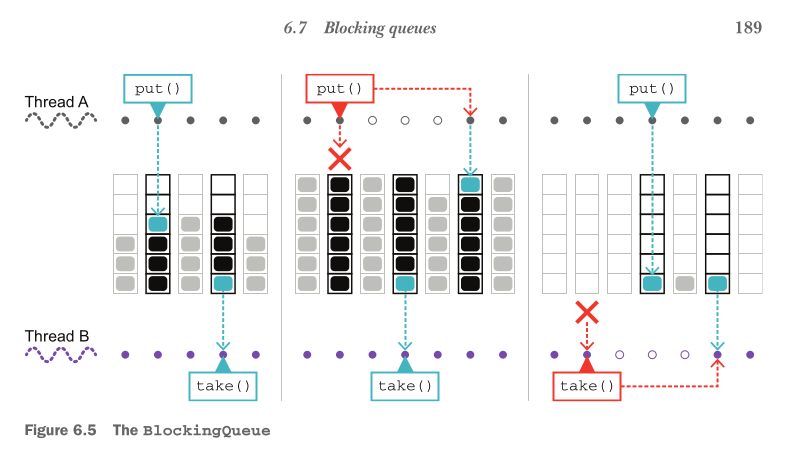
When trying to put() to the queue, it will cause the putting thread to wait for space to become available if the queue is full.
When trying to take() from the queue, it will cause the taking thread to block if the queue is empty.
These two properties are very useful because if one thread (or pool of threads) is out-stripping the ability of the other to keep up, the faster thread is forced to wait, thus regulating the overall system. This is illustrated in figure 6.5.
What are the implementations of the BlockingQueue?
Java ships with two basic implementations of the BlockingQueue interface: the LinkedBlockingQueue and the ArrayBlockingQueue. They offer slightly different properties;
For example, the array implementation is very efficient when an exact bound is known for the size of the queue, whereas the linked implementation may be slightly faster under some circumstances.
BlockingQueue’s implementation of back-preassure
It comes down to implied capacity semantics. LinkedBlockingQueue can be given a size limit, but is usually created without one — defaulting to Integer.MAX_VALUE, which is effectively infinite. A real application would never recover from a backlog of over two billion items, so in practice put() never actually blocks — producer threads can write at an unlimited rate.
ArrayBlockingQueue, by contrast, has a genuinely fixed size (the size of its backing array). If producers outpace consumers, the queue eventually fills up, and further put() calls block — forcing producer threads to slow down to match the rate consumers can keep up with.
Key takeaway: ArrayBlockingQueue provides real backpressure by design; LinkedBlockingQueue only provides backpressure if you explicitly bound it — left unbounded, it offers none.
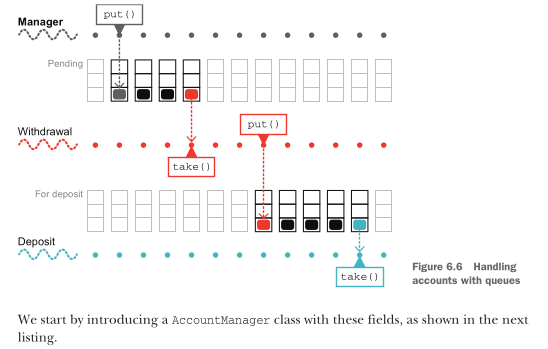
Let’s see the BlockingQueue in action in an example: Altering the account example to use queues and threads. The aim of the example will be to get rid of the need to lock both account objects. The basic architecture of the application is shown in figure 6.6.
Listing 6.4 The AccountManager class
public class AccountManager {
    private ConcurrentHashMap<Integer, Account> accounts =
        new ConcurrentHashMap<>();
    private volatile boolean shutdown = false;
    private BlockingQueue<TransferTask> pending =
        new LinkedBlockingQueue<>();
    private BlockingQueue<TransferTask> forDeposit =
        new LinkedBlockingQueue<>();
    private BlockingQueue<TransferTask> failed =
        new LinkedBlockingQueue<>();
    private Thread withdrawals;
    private Thread deposits;
The blocking queues contain TransferTask objects, which are simple data carriers that denote the transfer to be made, as shown next:
public class TransferTask {
    private final Account sender;
    private final Account receiver;
    private final int amount;

    public TransferTask(Account sender, Account receiver, int amount) {
        this.sender = sender;
        this.receiver = receiver;
        this.amount = amount;
    }

    public Account sender() {
        return sender;
    }

    public int amount() {
        return amount;
    }

    public Account receiver() {
        return receiver;
    }
    // Other methods elided
}
There is no additional semantics for the transfer—the class is just a dumb data carrier type.
NOTE The
TransferTasktype is very simple and, in Java 17, could be written as a record type (which we met in chapter 3).
The AccountManager class provides functionality for accounts to be created and for transfer tasks to be submitted, as illustrated here:
public Account createAccount(int balance) {
    var out = new Account(balance);
    accounts.put(out.getAccountId(), out);
    return out;
}

public void submit(TransferTask transfer) {
    if (shutdown) {
        return false;
    }
    return pending.add(transfer);
}
The real work of the AccountManager is handled by the two threads that manage the transfer tasks between the queues. Let's look at the withdraw operation first:
public void init() {
    Runnable withdraw = () -> {
        boolean interrupted = false;
        while (!interrupted || !pending.isEmpty()) {
            try {
                var task = pending.take();
                var sender = task.sender();
                if (sender.withdraw(task.amount())) {
                    forDeposit.add(task);
                } else {
                    failed.add(task);
                }
            } catch (InterruptedException e) {
                interrupted = true;
            }
        }
        deposits.interrupt();
    };
The deposit operation is defined similarly, and then we initialize the account manager with the tasks:
    Runnable deposit = () -> {
        boolean interrupted = false;
        while (!interrupted || !forDeposit.isEmpty()) {
            try {
                var task = forDeposit.take();
                var receiver = task.receiver();
                receiver.deposit(task.amount());
            } catch (InterruptedException e) {
                interrupted = true;
            }
        }
    };

    init(withdraw, deposit);
}
The package-private overload of the init() method is used to start the background threads. It exists as a separate method to allow for easier testing, as follows:
void init(Runnable withdraw, Runnable deposit) {
    withdrawals = new Thread(withdraw);
    deposits = new Thread(deposit);
    withdrawals.start();
    deposits.start();
}
We need some code to drive this:
var manager = new AccountManager();
manager.init();
var acc1 = manager.createAccount(1000);
var acc2 = manager.createAccount(20_000);
var transfer = new TransferTask(acc1, acc2, 100);
manager.submit(transfer);          // Submits the transfer from acc1 to acc2
Thread.sleep(5000);                // Sleeps to allow time for the transfer to execute
System.out.println(acc1);
System.out.println(acc2);
manager.shutdown();
manager.await();
This produces output like this:
Account{accountId=1, balance=900.0,
lock=java.util.concurrent.locks.ReentrantLock@58372a00[Unlocked]}
Account{accountId=2, balance=20100.0,
lock=java.util.concurrent.locks.ReentrantLock@4dd8dc3[Unlocked]}
However, the code as written does not execute cleanly, despite the calls to shutdown() and await() because of the blocking nature of the calls used. Let's look at figure 6.7 to see why.
![<p><strong>Listing 6.4</strong> <strong>The AccountManager class</strong></p><pre><code class="language-java">public class AccountManager {
private ConcurrentHashMap<Integer, Account> accounts =
new ConcurrentHashMap<>();
private volatile boolean shutdown = false;
private BlockingQueue<TransferTask> pending =
new LinkedBlockingQueue<>();
private BlockingQueue<TransferTask> forDeposit =
new LinkedBlockingQueue<>();
private BlockingQueue<TransferTask> failed =
new LinkedBlockingQueue<>();
private Thread withdrawals;
private Thread deposits;
</code></pre><p>The blocking queues contain <code>TransferTask</code> objects, which are simple data carriers that denote the transfer to be made, as shown next:</p><pre><code class="language-java">public class TransferTask {
private final Account sender;
private final Account receiver;
private final int amount;
public TransferTask(Account sender, Account receiver, int amount) {
this.sender = sender;
this.receiver = receiver;
this.amount = amount;
}
public Account sender() {
return sender;
}
public int amount() {
return amount;
}
public Account receiver() {
return receiver;
}
// Other methods elided
}
</code></pre><p>There is no additional semantics for the transfer—the class is just a dumb data carrier type.</p><figure data-type="blockquoteFigure"><div><blockquote><p><strong>NOTE</strong> The <code>TransferTask</code> type is very simple and, in Java 17, could be written as a record type (which we met in chapter 3).</p></blockquote><figcaption></figcaption></div></figure><p>The <code>AccountManager</code> class provides functionality for accounts to be created and for transfer tasks to be submitted, as illustrated here:</p><pre><code class="language-java">public Account createAccount(int balance) {
var out = new Account(balance);
accounts.put(out.getAccountId(), out);
return out;
}
public void submit(TransferTask transfer) {
if (shutdown) {
return false;
}
return pending.add(transfer);
}
</code></pre><p>The real work of the <code>AccountManager</code> is handled by the two threads that manage the transfer tasks between the queues. Let's look at the withdraw operation first:</p><pre><code class="language-java">public void init() {
Runnable withdraw = () -> {
boolean interrupted = false;
while (!interrupted || !pending.isEmpty()) {
try {
var task = pending.take();
var sender = task.sender();
if (sender.withdraw(task.amount())) {
forDeposit.add(task);
} else {
failed.add(task);
}
} catch (InterruptedException e) {
interrupted = true;
}
}
deposits.interrupt();
};
</code></pre><p>The deposit operation is defined similarly, and then we initialize the account manager with the tasks:</p><pre><code class="language-java"> Runnable deposit = () -> {
boolean interrupted = false;
while (!interrupted || !forDeposit.isEmpty()) {
try {
var task = forDeposit.take();
var receiver = task.receiver();
receiver.deposit(task.amount());
} catch (InterruptedException e) {
interrupted = true;
}
}
};
init(withdraw, deposit);
}
</code></pre><p>The package-private overload of the <code>init()</code> method is used to start the background threads. It exists as a separate method to allow for easier testing, as follows:</p><pre><code class="language-java">void init(Runnable withdraw, Runnable deposit) {
withdrawals = new Thread(withdraw);
deposits = new Thread(deposit);
withdrawals.start();
deposits.start();
}
</code></pre><p>We need some code to drive this:</p><pre><code class="language-java">var manager = new AccountManager();
manager.init();
var acc1 = manager.createAccount(1000);
var acc2 = manager.createAccount(20_000);
var transfer = new TransferTask(acc1, acc2, 100);
manager.submit(transfer); // Submits the transfer from acc1 to acc2
Thread.sleep(5000); // Sleeps to allow time for the transfer to execute
System.out.println(acc1);
System.out.println(acc2);
manager.shutdown();
manager.await();
</code></pre><p>This produces output like this:</p><pre><code>Account{accountId=1, balance=900.0,
lock=java.util.concurrent.locks.ReentrantLock@58372a00[Unlocked]}
Account{accountId=2, balance=20100.0,
lock=java.util.concurrent.locks.ReentrantLock@4dd8dc3[Unlocked]}
</code></pre><p>However, the code as written does not execute cleanly, despite the calls to <code>shutdown()</code> and <code>await()</code> because of the blocking nature of the calls used. Let's look at figure 6.7 to see why.</p>](https://assets.knowt.com/user-attachments/d88ec7c7-4ebb-4457-a0d4-5136e680f661.png)