Unit 2: Introduction to Mobile Apps & Pair Programming
 Call Kai
 Learn
Learn Practice Test
 Spaced Repetition
 Match
Match Flashcards
 Knowt Play
1/216

There's no tags or description
Looks like no tags are added yet.
Name | Mastery | Learn | Test | Matching | Spaced | Call with Kai | Chat |
|---|
No analytics yet
Send a link to your students to track their progress
217 Terms
Our mobile devices and computers are built _____
To interact with us
The mobile apps will also will also communicate with users by _______
Getting input from the users and displaying output
Program
Code statements or a sequence of instructions to be executed by a computer to perform a task. Also called software or an app.
Input
Data sent to a computer for processing by a program
Output
The data sent back from the program to the device
Program + Output
Program output is usually based on a program’s input or prior state (e.g., internal values or variables)
Input and output examples
Can come in many forms, such as Tactile (for example touching a button or the device vibrating) Audible (a sound) Visual (an image) Text
User Interface (UI)
The part of computer application through which a user interacts with a program
User Interface (UI) of an app examples
A button that appears on the screen The color of the app's background screen An audible click that happens when the user taps the button An error message that appears when something goes wrong
Events in CS
An event is any detectable occurrence or change in the state of a system that the code can react to
Event-driven programming
Program statements are executed when triggered rather than through the sequential flow of control. Events are triggered when a key is pressed, a mouse is clicked, a program is started by another application, etc., and they supply input data to a program and trigger different blocks of code in the program that influence its behavior.
Event driven programming examples
When we swipe up or down, it scrolls following wherever we swipe on any media We drag, the maps, for example, moves along with it In social apps, when reacting to a post, when hearting it, it fills in the heart
User event
Actions by the user
Events (trigger) examples (that a code to process and respond)
User Actions/Events: Clicking a button in a graphical user interface (GUI). Typing a key on a keyboard. Moving a mouse pointer over an element on a webpage. Submitting a form on a web page Taps on the screen Shaking the phone Sensor/Hardware Events: A sensor detecting heat or light. A smartwatch detecting an irregular heartbeat. A vehicle's location and speed changing Any device’s location changing Internal clock ticks System/Software Events: A web page finishing its loading process. A system notification indicating it's starting up or shutting down. A warning that disk space is running low. A database record being inserted, updated, or deleted. The phone receives a text message A network status change (e.g., 3G or WiFi becoming unavailable) New process starting Fnishing its download Other Programmatic Events: An object in a game colliding with another object. A message from another program or thread. A new tab being opened in a browser, triggering a notification. A program is started by another application
Event handler
A program, function, or method that executes specific code in response to a particular event
What does an event handler do?
By catching and processing these events, it enable applications to be interactive and dynamic, allowing them to react to external stimuli and user actions.
Most programs and apps these days are ____
Event-driven programming, which means they display the UI and wait for a user event
A program needs to work for ____
A variety of inputs and situations
Integrated development environment (IDE)
Software that provides comprehensive tools for programming such as UI design, code editing, and a way to interpret and run the program. A collection of software tools for designing, developing, debugging, and testing mobile apps.
Components (of an app)
The basic building blocks of applications, serving as entry points for users and the system to interact with the app
Components (of an app) examples
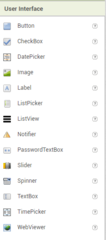
Button Player Label
UI components
Parts of the user interface such as Buttons, Labels, etc
Horizontal arrangement
A component used to display a group of components laid out from left to right, side by side in the UI
MIT App Inventor is an example of
Cloud application An Integrated Development Environment (IDE) A software system for developing mobile apps. A programming language
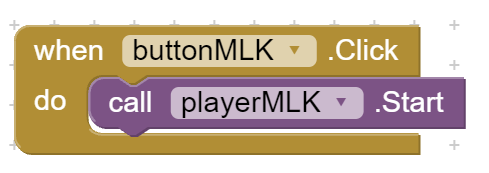
Description of 2.02 I Have a Dream Tutorial Block of code example 1
When buttonMLK is clicked, playerMLK is started (sequence in that the app has to run this one block of code; there is no selection or iteration/repetition
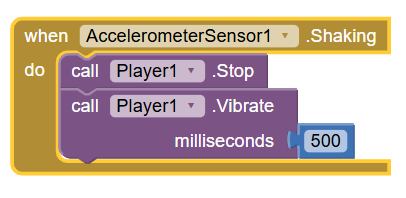
Description of 2.02 I Have a Dream Tutorial Block of code example 2
When AccelerometerSensor1 is shaking, Player1 stops, and at the same time, the Player1 vibrates the device, having the motor pulsate for 500 milliseconds (sequence in that the app has to run this block of code; there is no selection or iteration/repetition
Algorithm
A step-by-step procedure of precise instructions that performs some calculation or computation, for solving a particular problem.
What can’t algorithms do?
It can’t be written to solve every problem
What is the importance of algorithms?
They are at the heart of computer science and are expressed in computer code and interpreted by the computer, are what make our computers such powerful and adaptable machines.
Executing Algorithms
Algorithms expressed in a programming language can be run on a compute
What algorithms must be
Precise Unambiguous (not open to more than one interpretation), so specific Doable (it can't be something that is impossible to do)
Control structure
A block of programming statements that controls the flow or behavior of an algorithm
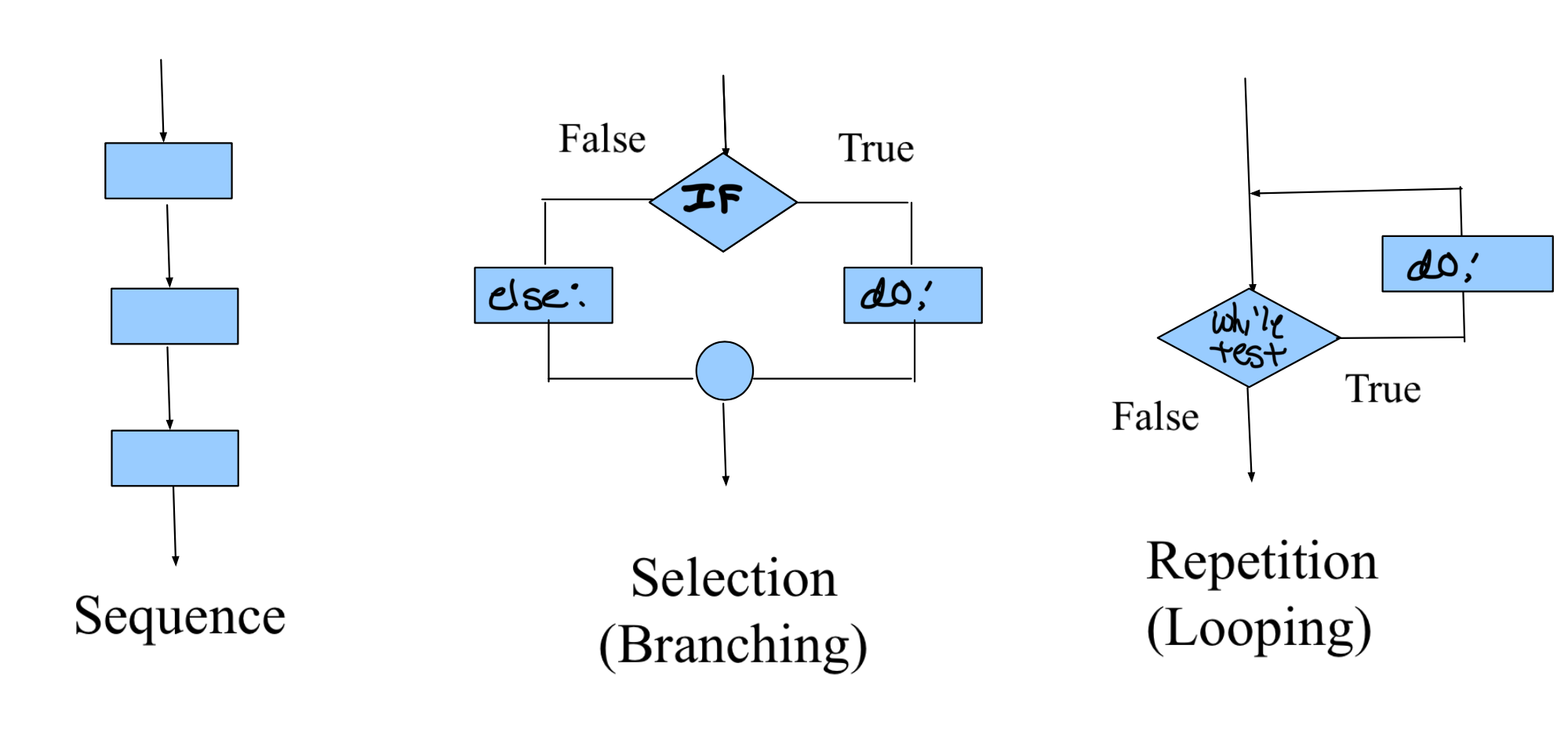
3 basic control structures that’s all algorithms are constructed by
Sequence Selection Iteration/repetition (can be a combination of these)
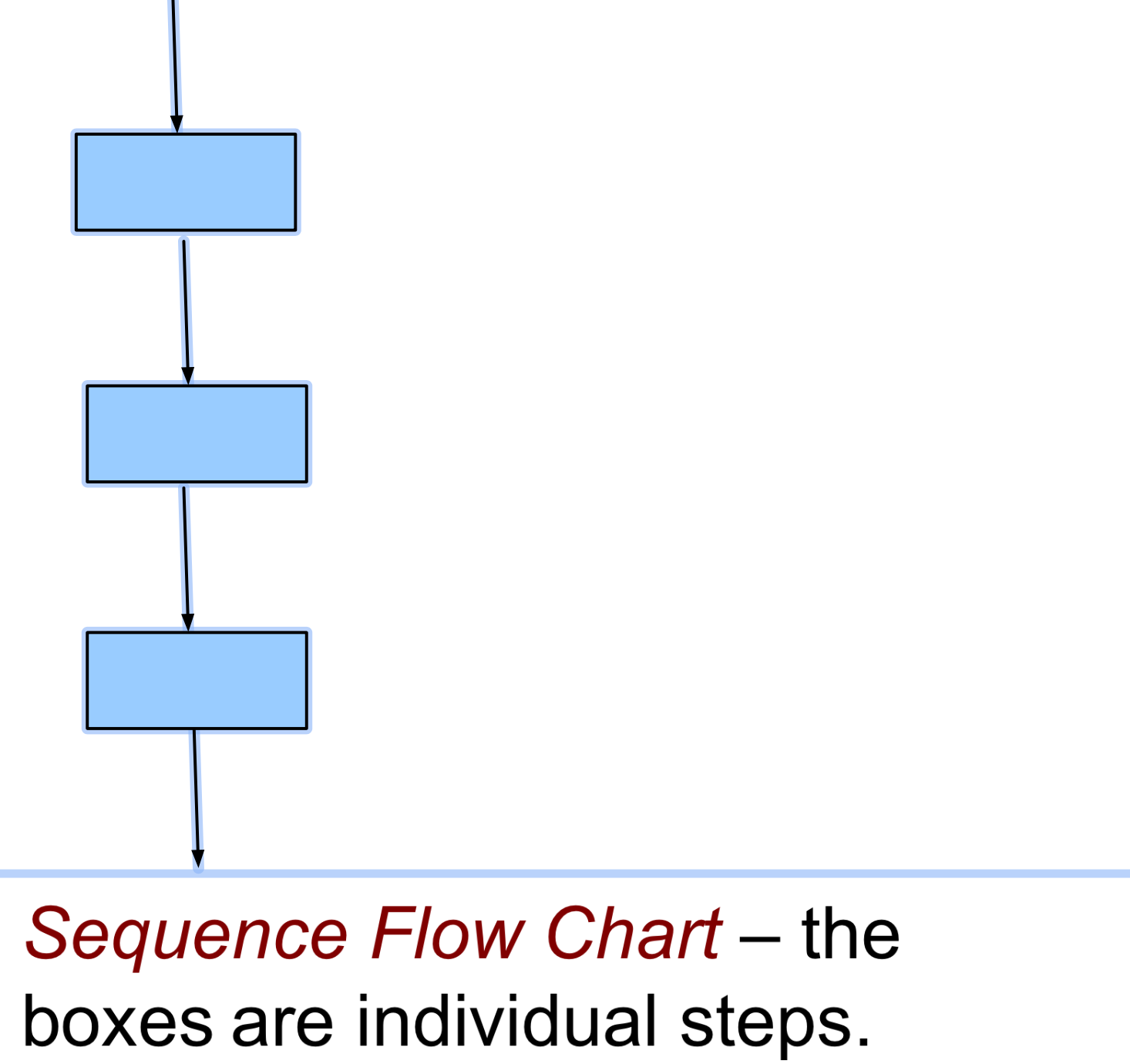
Sequence/sequencing
(the application of) Each step of the algorithm is executed in the order in which they (statements/instructions) are given.
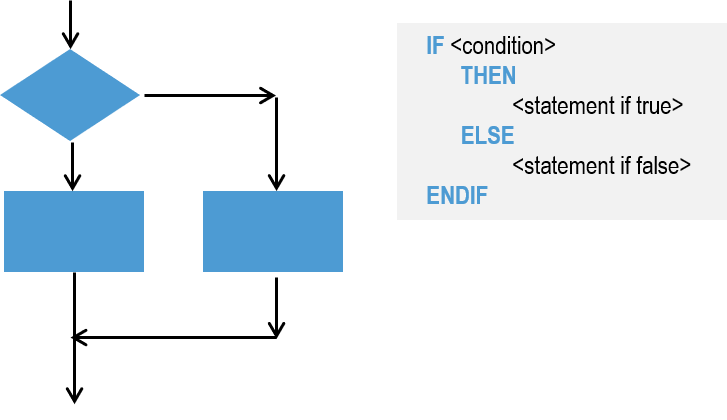
Selection
A conditional instruction that lets the program branch between two or more alternatives. Uses a boolean (true, false) condition to decide which part of the algorithm to use In Selection Flow Chart -- the diamond is the condition the circle is a connector.
Boolean condition
A true/false condition. It is named after George Boole (1815-1864) an English mathematician.
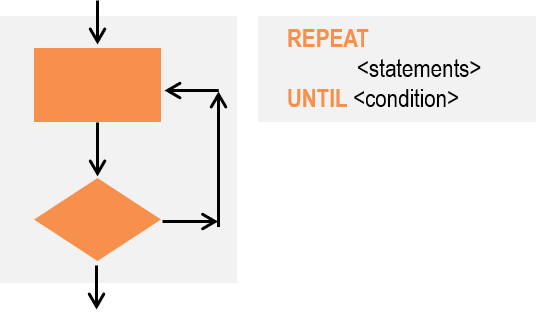
Repetition (also called iteration and looping)
The repeating of a part of the algorithm for a specified number of times or until a condition is met.
Expressing Algorithms
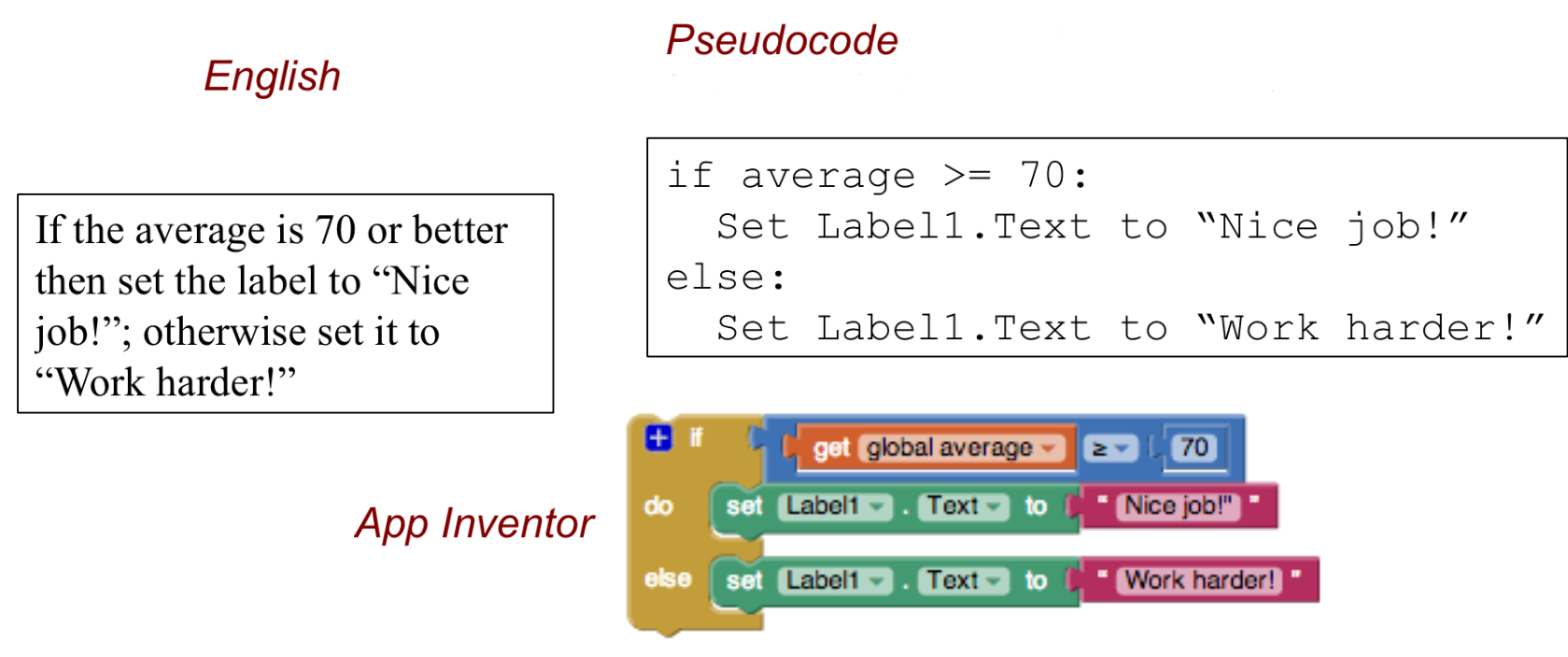
In flowcharts, pseudocode, as blocks (in app inventor), even the natural language: English (not as precise though), and (many) programming languages
Flowchart
A visual (i.e. graphical) notation for expressing algorithms
Examples of programming language
The block maze language, coding blocks (like in app inventor), JavaScript, Python, and more
Pseudocode
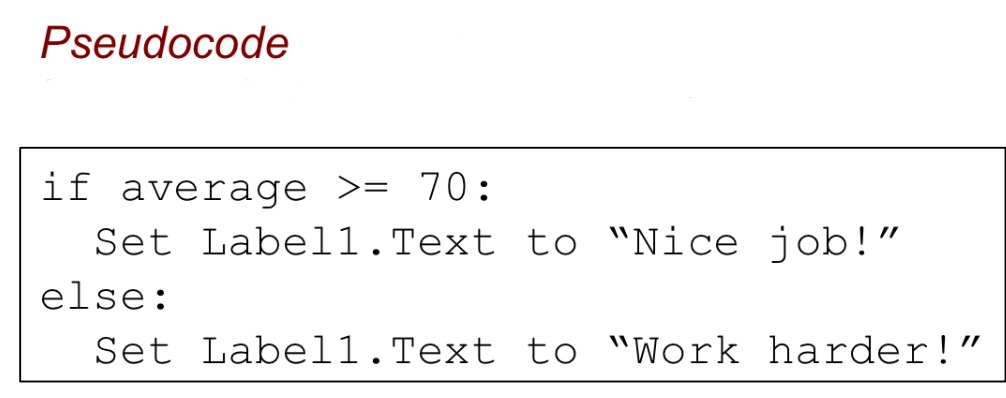
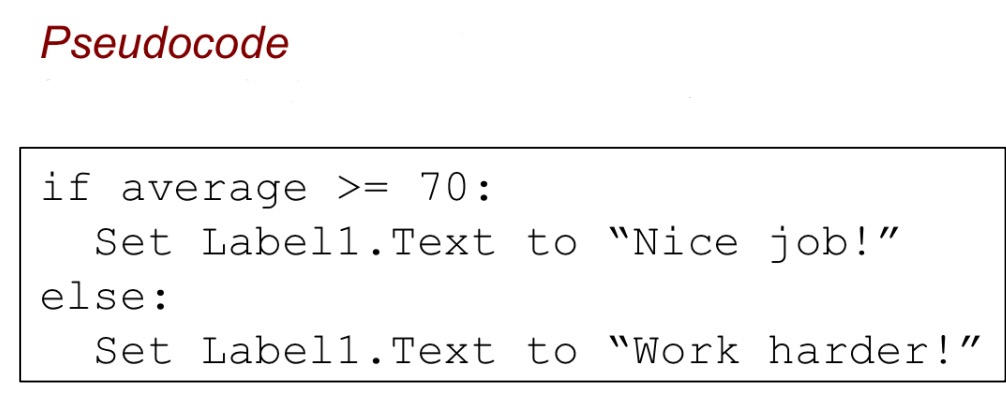
A blend of English and code or programming language, used to write down an algorithm for a program that is easy to read. It is less formal than a programming language or actual computer code, such as Java or Python or MIT App Inventor but more precise than English.
What is pseudocode not?
It is not a programming language (refer to the definition of it).
How can algorithms be created?
From an idea, by combining existing algorithms, or by modifying existing algorithms. Knowledge of existing algorithms can help in constructing new ones.
What are the benefits of using existing algorithms
Using existing correct algorithms as building blocks for constructing another algorithm has benefits such as reducing development time, reducing testing, and simplifying the identification of errors
Algorithms: Solving a Maze
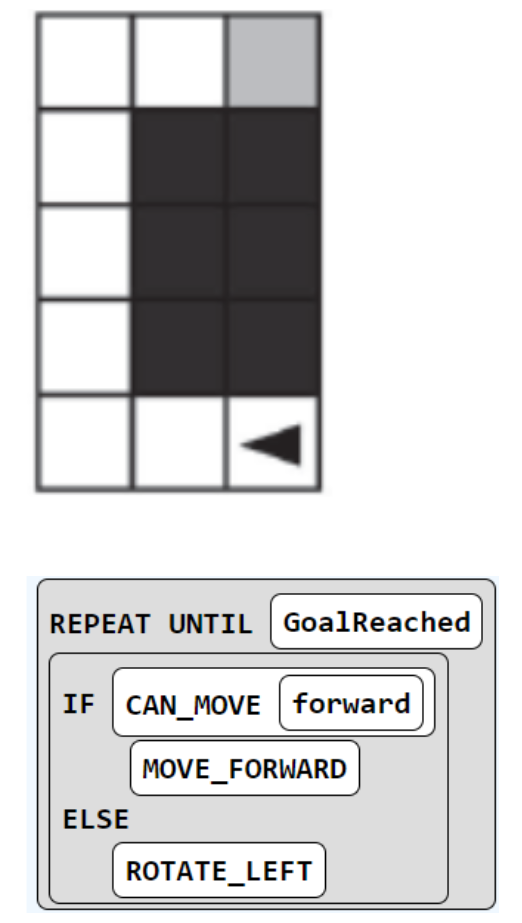
The problems, where you create an algorithm for a robot, which is the triangle to which is the triangle, go through a maze to the finish which is grey square is similar to a type of AP CSP exam question, using the simple sequence commands below: MOVE_FORWARD: The robot moves 1 square forward in the direction it is facing. ROTATE_RIGHT : The robot turns right 90 degrees, staying in the same square. ROTATE_LEFT: The robot turns left 90 degrees, staying in the same square. CAN_MOVE( direction ): This command can be used with 4 possible directions: left, right, forward, and backward. It returns true if there is an open square in the specified direction from the square that the robot is in. To make it even more concise, instead of individual, maybe repeated steps, use “repeat n times” commands or “repeat until goalreached” with if commands
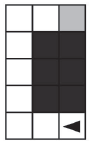
What would the algorithm be to navigate the robot above through its course to reach its goal, the gray square?
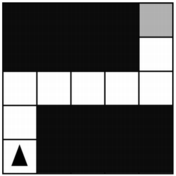
For the robot in the maze above, is CAN_MOVE(forward) true? Is CAN_MOVE(right) true?
CAN_MOVE(fwd) is true for the starting position given above. CAN_MOVE(right) is NOT true…this is because immediately to the right is a black square where the robot cannot move.
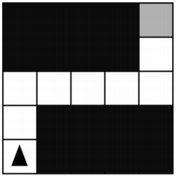
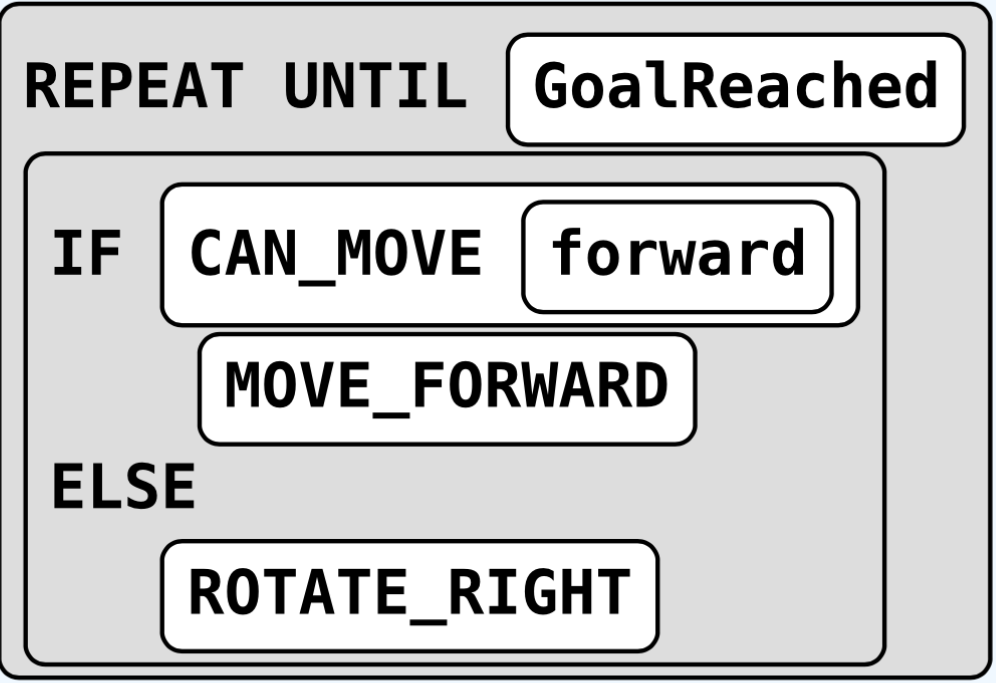
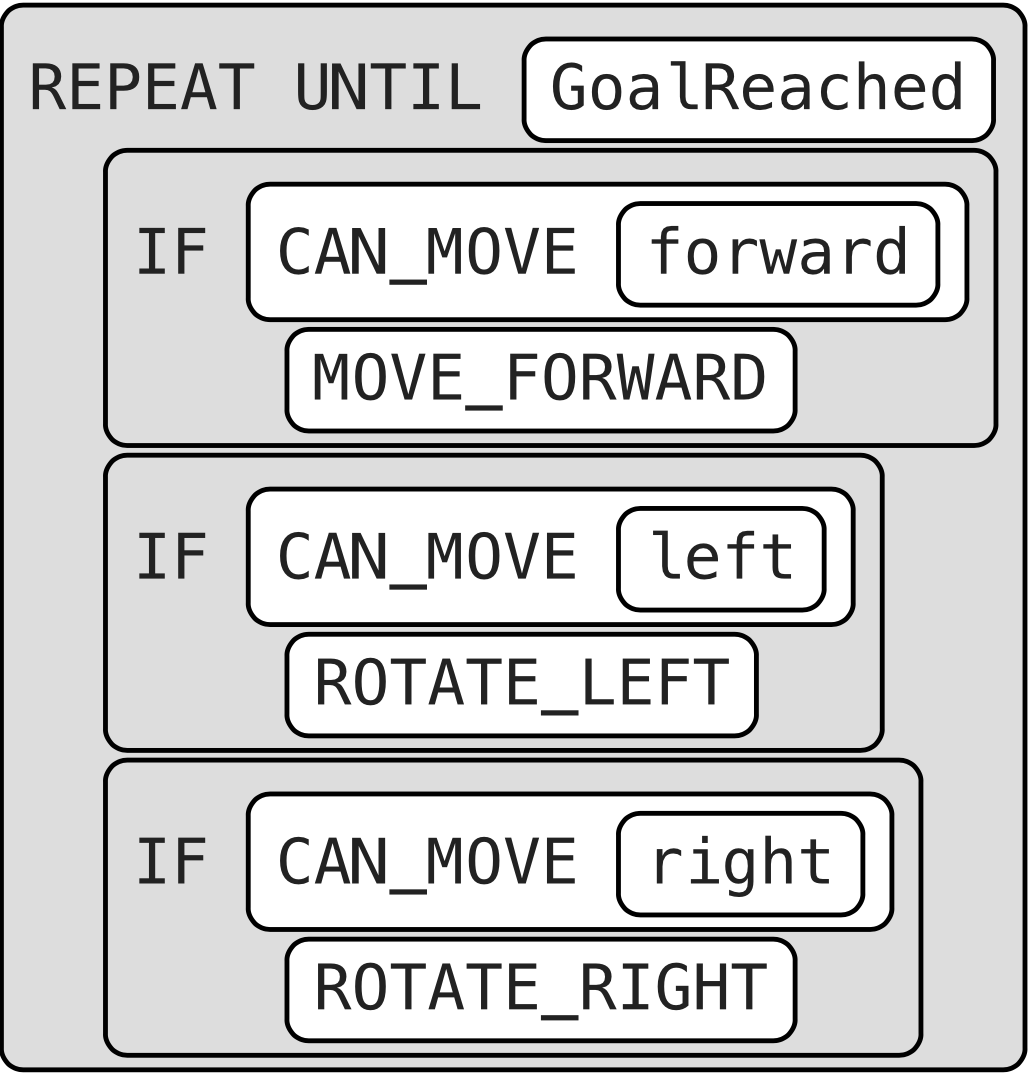
What is a more general algorithm to navigate a maze using IF commands and a REPEAT UNTIL GoalReached command, which tests if the robot has reached the gray square goal?
From bottom left to top left
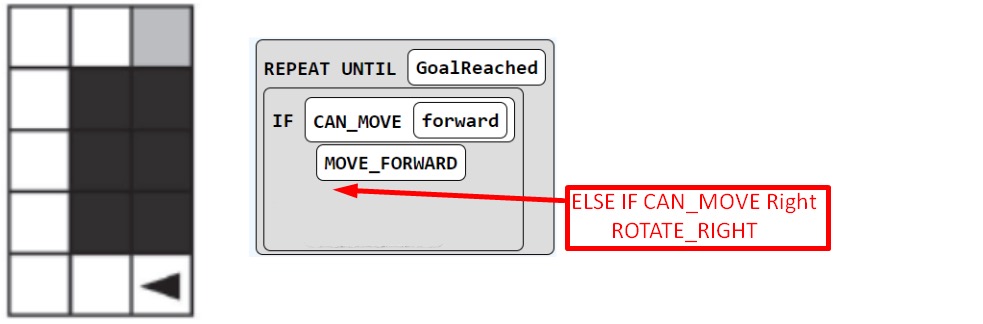
REPEAT UNTIL GOAL REACHED: If (CAN_MOVE(left)): --Rotate Left If(CAN_MOVE(fwd)) --Move Fwd If (CAN_MOVE(right)): --Rotate Right
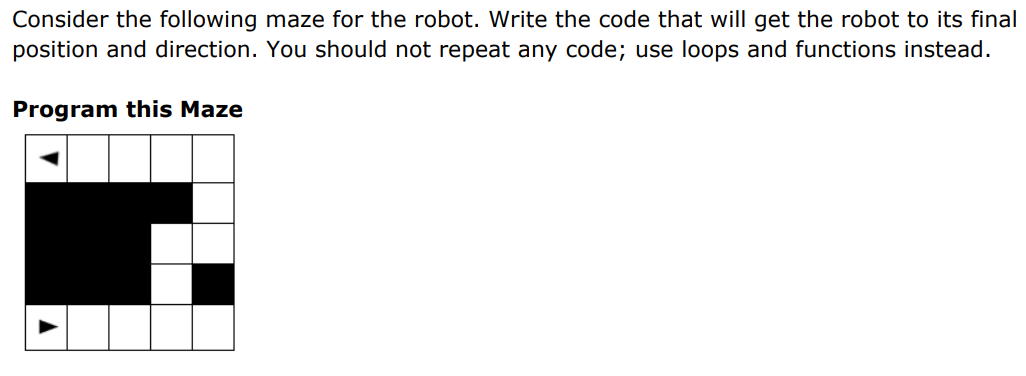
Consider the following maze. How does the code need to be rewritten in order for the robot to reach the gray square?
Computing innovation
It includes a program as it is an integral part of its function and it can be physical, non-physical computing software, or non-physical computing concepts.
Computing innovation examples
Self-driving cars, picture editing software, e-commerce, a mobile app, office software (used to create spreadsheets or word documents)
If-else condition
Selection or conditional algorithm that allows a program to choose between different actions
“if” blocks purpose example
Like used in the “I Have a Dream” app, "if" blocks are used to determine, when the buttons are clicked, whether a speech is already playing.
What does all programming languages have?
They all have something like if blocks, called selection or conditional algorithms, to make decisions based on a condition
What is the result with the expansion of computers and the Internet?
Every day new computing innovations are being developed
What is the purpose of computing innovations?
To solve problems and/or to pursue interests through creative expression
What does the understanding the purpose of a computing innovation do to developers?
Provides developers with an improved ability to develop that computing innovation
What is the difference between function and purpose of a program
Function is what code does when it is run versus the purpose is why the program is being written
Function of a program
The behavior of a program when it is executed
Naming components
It is best to name a component by its function.
Which of the following is the best name for a button whose function is to clear another component?
ClearButton
The purpose of a program
Intending to solve or the creative interest being pursued by a program.
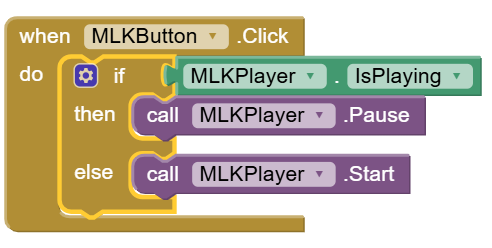
Description of 2.04 I Have a Dream pt. 2 Block of code example 1
When MLKButtion is click, if MLKPlayer is playing, then the MLKPlayer pauses or else (if it isn’t playing) the MLKPlayer starts ( selection and sequence to run the blocks in the order that is given in this event handler) (there is no iteration/repetition )
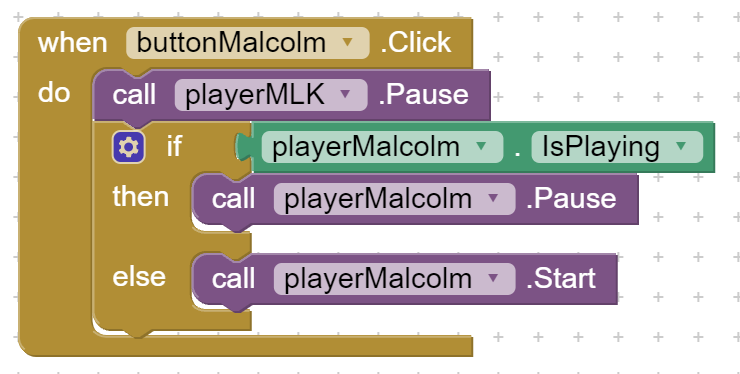
Description of 2.04 I Have a Dream pt. 2 Block of code example 2
When buttonMalcolm is clicked, first playerMLK is always paused ( sequence ), next if playerMalcolm IS PLAYING ( selection ), then the playerMalcolm is paused, else the playerMalcolm is started (there is no iteration/repetition )
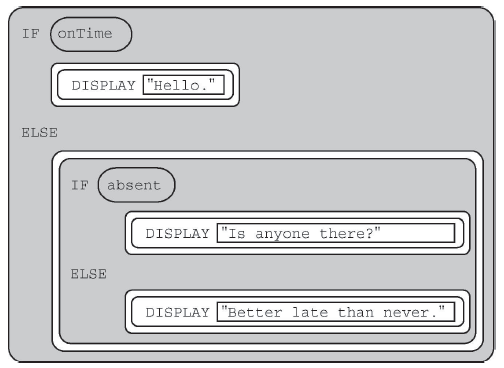
Example of a question about the workings about if/else and/or else if: Consider the code segment below. If the variables onTime and absent both have the value false, what is displayed as a result of running the code segment?
Better late than never
What does the basic hardware and software do together?
They work together to enable our mobile devices to run the amazing apps that we'll be building
Computer
A computing device that is an electronic device for storing and processing data by following instructions given to it in a program. A machine that processes information under the control of a program
A general purpose computer
It is one that can run many different programs or apps
Examples of general purpose computers
Mobile devices like a smartphone and tablets, smart watch, desktop and laptop computers
Special purpose computers
It is one that has a fixed program or one can run only a single set program that can’t be changed
Examples of special purpose computers
A simple (non-programmable) calculator, a digital watch, a microwave oven, a smart thermostat, a car's anti-lock braking system
What does computers understand?
Binary code or machine language
A machine language
A programming language that is directly readable by the computer’s CPU which it carries out are written in the computer's low-level of this programing language — Machine Readable
Bit
The most fundamental (basic) unit of data information and digital communication. The name is a portmanteau (a word blending the sounds and combining the meanings of two others) ans short for binary digit. It can only have one of two values, commonly represented as 0 or 1, akin to an on/off switch or a true/false state
What does Binary code consist of?
Consists of 0s and 1s
Byte
A more complex unit of info, a group of eight bites (or binary digits) next to each other, for computer information and processing, and in data storage capacity.
The purpose of a bite
They are the basic building blocks used to encode and process all digital data, from numbers and text to images and sounds, forming the foundation of all digital systems, and by combining 0s and 1s in various combinations we can represent any and all the data that computers use and process!
Binary sequences
Sequences of 0s and 1s -- are used to represent all computer data
Bite of memory and memory of a character
One byte of memory takes about the same amount of memory as a character, such as the letter 't'
What kinds of computer data does binary sequences represent?
Numbers Letters and text Images Machine language instructions Sounds and video Every kind of data you find on a computer
Question of bits and bytes example: A group of eight bits is called a byte. If you have a text message that is 150 characters long, how many bits of memory does it take up assuming each character in the text message is approximately 1 byte?
1,200 Bits 8 Bits = 1 Byte 1 character = 1 Byte, so there is 150 Bytes ? Bits = 150 Bytes 150 Bytes x 8 Bits
The base of a number system
The number of distinct digits used to represent numbers in that system refers to this
Positional number system
An arrangement where the value of a digit in a number depends on its place (place value), meaning the value of any particular digit in a number depends on its place in the number
What does position number systems have?
It has a base which determines how many digits it has and the place values
An example of positional number systems
Our decimal system, in the decimal number 545, the leftmost '5' represents 500 because it occurs in the hundreds place, but the rightmost '5' represents 5 because it occurs in the ones place
Binary vs. Decimal System
Binary system is similar to the decimal system. Both are positional number systems
Decimal System
Base-10 system. 10 digits, 0 through 9 Place values are powers of 10 1s, 10s, 100s, 1000s, etc. Each place is previous place times 10
Binary (number) system
Base-2 system. 2 digits, 0 through 1 Place values are powers of 2 1s, 2s, 4s, 8s, 16s, etc. (from left to right Each place is previous place times 2
Another example of positional number systems: Binary
101 is 4 + 0 + 1 = 5
Why Do Computers Use Binary?
In an electronic circuit, it’s easy to represent the difference between a switch being “on” or “off” or a voltage being “high” or “low”. It’s hard to represent 10 distinct states: “really high voltage”, “pretty high”, …, “pretty low”, “really low”. Just easier to process and takes up less room. Because the binary system only contains one and zero, other technology other than just computers can utilize this system of counting
What is true that computers or other devices can do of storing bits?
They can store large numbers, even if it can only count up to one, many strings of them with only ones and zeros, but of course it requires more than one of these binary digits or bits
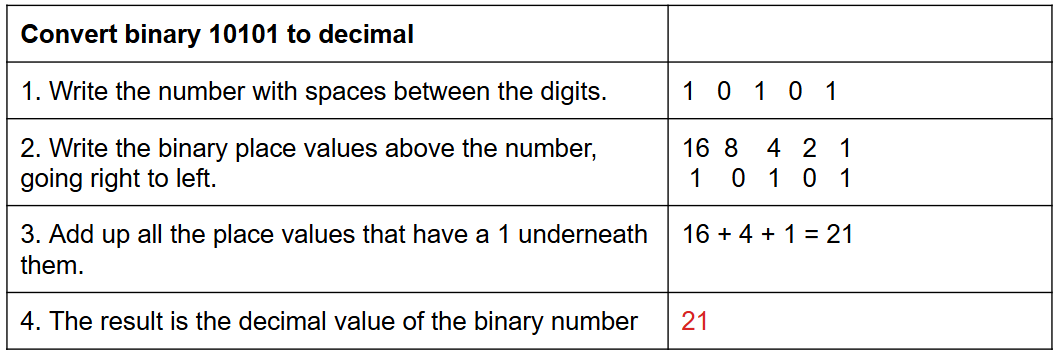
Converting Binary to Decimal
Step 1. Write the binary number with some spaces between its digits Step 2. Write the binary place values above the number, going right to left: 1s, 2s, 4s, 8s, etc. Step 3. Add up the place values that have a 1 beneath them. Step 4. The result, the sum, is the decimal value of the original binary number.
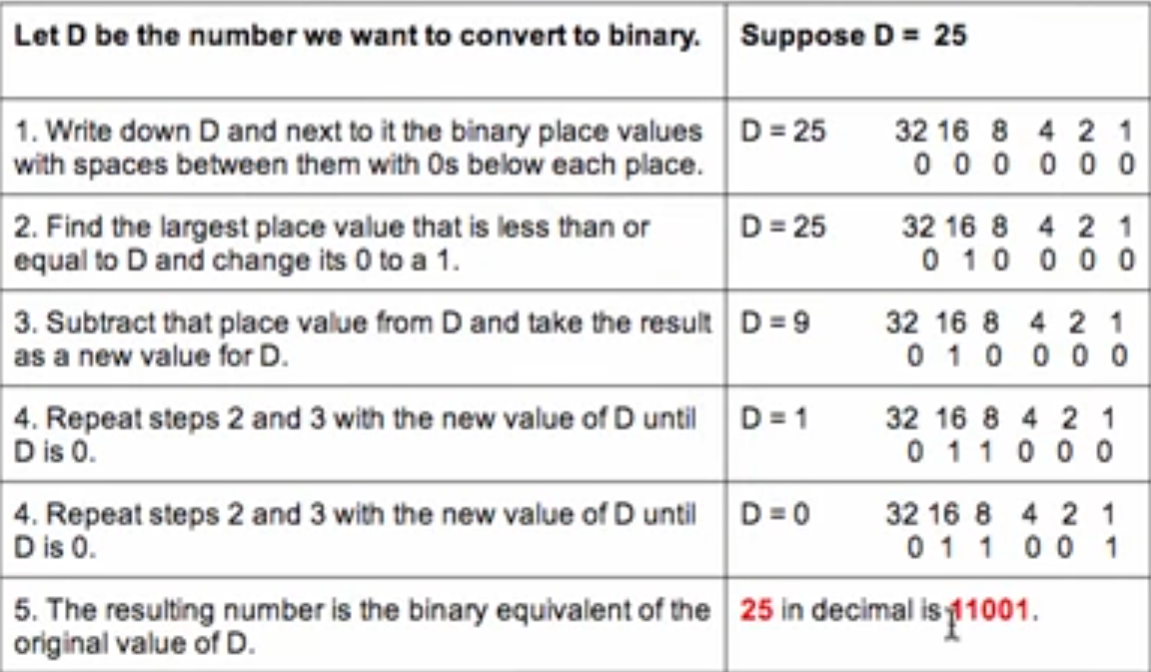
Converting Decimal to Binary
Step 1: Write down the number to convert and the binary place values, 1, 2, 4, 8, 16, and so, however munch needed. And put 0s under each place. Step 2: Find the largest place value that is less than or equal to that number and change its 0 to 1. Step 3: Subtract that place value from that number and take the result as the new value of that number . Step 4: Repeat steps 2 and 3 until that number is 0. Step 5: Now that that number is 0 we stop. The value of 25 in decimal is 11001 (we drop the leading 0s).
What is there to know about the next to the one before
Adding a one to the left just doubles the range of numbers. It is the double of one before
What pattern should you notice with all being ones, a lot of ones in a row?
It will soon turn to zeros but the beginning digit, the left most; the next number results in all of them changing to zero and that next to the zeros, a one (to represent the place value that comes next). This then repeats and continues until all is one again. Ex: 15 (1111 made up of all ones), then the next number is 16 (10000)
What is a quick trick with binary numbers when there is a 1 and the rest to the right of it is 0s?
Know what the next place value to the left, for the total, (of the rest, to the right that is zeros) counted or added up worth of the place values, will be one less than that next value when there is at least two digits, this is especially helpful one there's sets of four digits Ex: 0100 (4, left of the 1 is 3), 1000 (8, left of the 1 is 7), 10000 (16, left of the 1 is 15)
What is a tip for looking at the left most end of binary number?
Binary numbers ending in 1 are odd ending in 0 are even
Ex: 0110 (6) VS. 0101 (5)
What is a trick when it is all 1s binary number?
Binary numbers of all 1’s can be easily calculated; it always adds up to the next base-2 place value minus 1
Ex: 0011 1111 is 63 because if the next 0 were to become a 1, all the other 1’s would be come 0’s and it would be 1 in the 64’s place… 0 everywhere else
What is a trick to use when there is mostly ones in the place values?
One is subtracting the zeros instead of adding all the place values that has ones. Specifically, when converting from binary to decimal, rather than adding a bunch of place values up if there is a 1 in that space, sometimes it’s easier to look to see what the next place value up would be and subtract one or two missing place values (where the zeros are) from there. Ex: 1111 1001 is more easily calculated as 255 - 4 - 2 = 249 as opposed to adding 1 + 8 + 16 + 32 + 64 +128 = 249