SLR06 - software development
 Call Kai
 Learn
Learn Practice Test
 Spaced Repetition
 Match
Match Flashcards
 Knowt Play
1/24

There's no tags or description
Looks like no tags are added yet.
Name | Mastery | Learn | Test | Matching | Spaced | Call with Kai |
|---|
No analytics yet
Send a link to your students to track their progress
25 Terms
Stages of software development lifecycles (6)
Feasibility: Is the problem solvable
Requirements: Working out what solution need to do
Implementation: Code of solution
Testing: Check code works
Deployment: Installing in target environment
Evaluate: Check with user if solution complete
Different software development methodologies
Waterfall lifecycle
Rapid application development (RAD)
Spiral model
Agile methodology
Extreme programming
Waterfall lifecycle
Each phase defined start & end point
One phase after another
Evolution allow move back & forward
Easy management = better for large scale development projects assuming they are well-understood & carry little risk
Waterfall positives (4)
Simplicity = easy to manage
Everyone is clear on their responsibilities at each stage
Clear deliverables
Easy to see if project is running to schedule
Waterfall negatives (4)
Carries a lot of risk
User doesn’t get to see product until project near end
Misunderstanding requirements can lead to errors that are not easy to fix
Requirements must be very well understood so not suitable for complex projects
Rapid application development (RAD)
Produces successive prototypes of software until final version produced & approved
Feasibility —> (Requirements, Design, Testing) —> Deployment —> Maintenance
RAD positives (3)
Requirements don’t need to be entirely clear from start
Focus group involving user used to gather requirements without full formal requirements document upfront
Continuous feedback from client = solution has excellent usability
RAD negatives (2)
Focus on usability rather than how products works - not suited for projects where code efficiency is very important
Regular contact with clients must be maintained at all times Scale poorly for large projects with big team
Spiral model
Risk driven development process
Any project has unique risks associated
4 quadrants:
Determine objectives
Develop & test = concept of requirement
Develop & test = concept of operation
Plan next iteration = concept of operation
Spiral positives (3)
Risk management is at the heart of this model
Excellent for projects that contain high level risk
Suitable for large scale problems and those that involve high degree of risk especially where users doesn’t fully understand their requirements upfront
Spiral negatives (2)
Complex nature of risk analysis = increase cost as it requires specialised skill
If risk analysis done poorly, could impact project
Agile methodology
Refers to group of methodologies
Focus on idea requirements will change during development = producing software in iterative way
Iterations known as sprints - short, time-boxed periods when a team has to compete set amount of work
Each sprint ideally small, no longer than 4 weeks
Emphasis of project is on quality of finished code
Extreme programming
Agile paradigm
Focus is on good quality code
Iterative process
Designed to allow development to respond to changing user requirements
Involves paired programming
Extreme programming core practices
Collective code ownership
continuous integration
Code standards
Refracturing
Paired programming
Agile & extreme programming positives (2)
Emphasises programming, so quality of end code high
Core principles = productive dev team
Agile & extreme programming negatives (3)
Require team of programmers working in close collaboration - unlikely to work well if team widely distributes geographically
client must be able to commit to have full-time representative working with dev team
Some of the processes involved in extreme programming such as programming con be quite costly
Flowcharts
One way or representing sequence of steps of algorithm
Pseudocode
Alternative, text based method of representing sequence of steps in algorithm, allow lay out logic without worrying about syntax
Flow diagram symbols
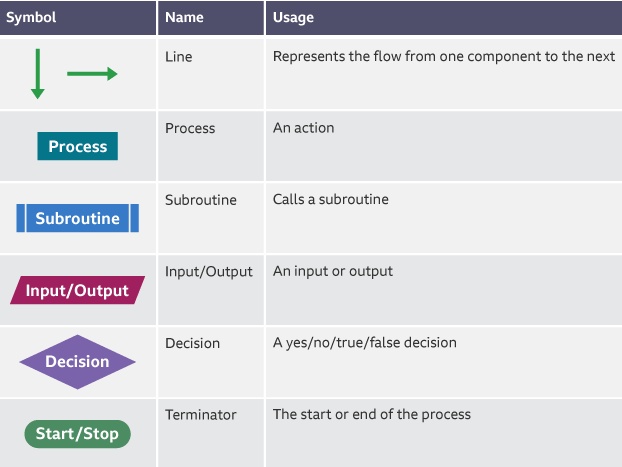
Black-box testing
Checks whether input produces expected output
Code efficiency is not important as long as desired output is returned
White-box testing
Involves testing algorithms in code and making sure all parts of these algorithms function as intended
Focus on identifying and testing all possible paths of execution through program
Alpha testing
Typically occur first & limited to employees and friends
Often early version of software and allows to check for bugs
Beta testing
Usually opened up to wider community through public beta
Almost finished state of software
Testing for load balance & multiple hardware compatibility
Suitable test data
No data - Should always check special case of no data being entered
Erroneous/invalid - Data that should be rejected by program
Normal/valid - Data that should be accepted
Boundary - Data of correct type that is one either edge oof accepted validations limits
Importance of user feedback
Keeps project focused
Makes sure develop actual system needed
Provides opportunities for discussion
Makes user feel part of finished solution

