Module 10: Computer Programming
 Call Kai
 Learn
Learn Practice Test
 Spaced Repetition
 Match
Match Flashcards
 Knowt Play
1/51

There's no tags or description
Looks like no tags are added yet.
Name | Mastery | Learn | Test | Matching | Spaced | Call with Kai | Chat |
|---|
No analytics yet
Send a link to your students to track their progress
52 Terms
computer program (application)
step-by-step instructions that tells the computer what to do.
A program is written by computer programmers using a programming language.
Software engineering
uses mathematical, engineering and management techniques to reduce the cost and complexity of a program while increasing its reliability and modifiability.
Programmers typically specialize in either application programming or systems programming:
Application programmers
Systems programmers
Application programmers
create business and productivity applications, mobile apps, web apps and games.
Systems programmers
develop systems software such as operating systems, device drivers, security modules and communications software.
Two approaches used in program development are
procedural (also called structured) programming
object-oriented programming.
Procedural programming
is used when a program can be created with step-by-step instructions (called an algorithm) that are performed in a sequential manner.
Each programming task is performed using separate chunks of code called procedures or modules.
Object-oriented programming
focuses on the objects that make up the program and how these objects interact with one another.
Each object contains attributes (also called properties) that describe the object and methods that are tasks related to objects.
The fundamental concepts behind object-oriented programming are:
Objects
Attributes
Method
Message
Class
Objects
a person, place, or thing within the program (employee, pizza, GUI button)
Attributes
a characteristic of an object (employee name, pizza diameter, button color)
Method
statements that define an action performed by an object or to an object (hire an employee, sell a pizza, click on a button)
Message
A line of code that "calls" or directs the program to perform a specific method
Class
a group of objects that share common attributes (employees, menu items, GUI controls)
Companies have used object-oriented programming languages for new program development since the mid-1990s.
Popular object-oriented programming languages are Java, Python and C++.
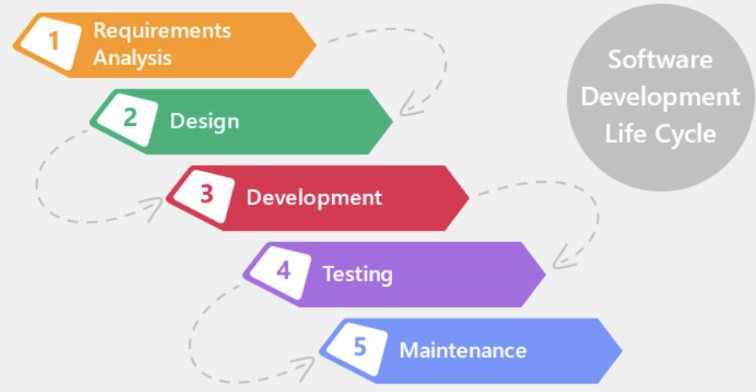
Software development life cycle.
The five-step process that most programmers follow when creating a program development life
The five steps (or phases) are illustrated on the next page.
Phase 1: Requirements Analysis
What does the application need to do?
When does it have to be completed?
What programming language will be used?
How the program will interact with other programs in the organization
What documentation is required (program code, pseudocode, program flowcharts, UML diagrams, class diagrams, test results, user manual)
Phase 2: Design
In the design phase the programmer designs the algorithm that the program will perform, using design tools such as pseudocode, program flowcharts, use case diagrams and class diagrams.
Pseudocode
uses short statements to explain the sequence of steps involved in a program
Program flowcharts
use geometric shapes, lines and arrows to show the sequence of steps in a program
Unified Modeling Language (UML)
used for modeling object-oriented programs
Two UML modeling tools are use case diagrams and class diagrams:
A use-case diagram documents the users of a program and the functions they perform
A class diagram lists the attributes and methods of the objects in a program
Sequence
the programming statements follow one after another in sequential order.
Selection
the programming statements that will be performed next depends upon whether a certain condition is true or false (has a bill been paid? is a library book overdue?)
Repetition (also called loop or iteration)
a block of programming statements repeats until a certain condition is met (calculate invoices until all customer orders have been processed)
Phase 3: Development (Coding)
Program development is when a programmer converts the program design (flowchart, class diagram, etc.) into a functioning program using a programming language.
Every programming language has its own syntax
Every programming language has its own syntax, which is the combination of rules, punctuation, capitalization and keywords that the program must follow.
Variables
one or more characters that represent the value of a data item within a program
(FirstName, PhoneNum, PayRate).
The value of a variable can change throughout a program.
Keywords
words that a programming language has reserved for a specific function.
Keywords cannot be used as variables.
Comments (remarks):
Text information placed within a program to explain the purpose of the programming code immediately following the comment.
Comment lines
begin with special characters (such as forward slashes, apostrophes or asterisks).
are necessary to help programmers understand what the program is doing next.
The type of characters used to indicate a comment
depends upon the programming language being used.
The special character(s)
indicate that the line is a comment line and NOT part of the programming code.
In the development phase programmers decide
what variables and control structures they will use, code the program using the keywords and syntax of the programming language,
type comments within the programming code.
Agile development methodology:
When the requirements of a program are not easily defined and/or
A goal is allowing users to participate in the development process and an agile methodology is used.
focuses on breaking the overall application into smaller, functional pieces of code.
Each piece of code is treated like a separate software project of its own.
Users test each piece of code separately and provide feedback concerning how they want the code modified
The code, test, and feedback process can have multiple iterations (called sprints) until the user is completely satisfied with that piece of code.
Sometimes the small pieces of code are implemented as soon as they are completed--while other pieces of code related to the larger application are still being coded, tested and modified
The programming language that will be used to create a program is determined
in the requirements analysis phase of the SDLC.
However, the development phase is when a programmer begins typing the programming code using an integrated development environment (IDE).
Integrated development environment (IDE).
is a software package that provides tools to type and edit programming statements, automate and simplify parts of the coding process, debug errors and compile and run the program.
Every programming language has its own specific IDE.
Phase 4: Program Testing & Debugging
In this phase programmers “run” the program by sending the program to a language translator.
A language translator
converts a programming language (called source code) into the 0's and 1's of a machine language (called object code).
A computer can only run the object code of a program.
In this phase programmers also fix (debug) programming errors.
There are two main types of language translators:
compilers
interpreters.
compiler
converts the entire application into object code before sending it to the CPU for processing.
Compilers are unique for each programming language.
interpreter
similar to a compiler, except that it translates and executes programming code one line at a time as the program is being run.
There are three types of programming errors:
runtime errors,
syntax errors
logic errors.
Runtime errors are
when a line of code cannot be executed.
For example, attempting to divide by zero, multiply by a variable that is not a number
Syntax errors
occur when the programmer has not followed the rules or grammar of the programming language.
Examples of syntax errors are misspelled words, incorrect punctuation, incorrect capitalization, not defining variables, etc.
Syntax errors prevent the program from finishing, so they must be fixed before the program will produce a result.
Syntax errors are normally detected and identified by the compiler.
Logic errors occur
when the program contains no runtime or syntax errors, but produces incorrect results.
are caused by incorrect programming “logic” such as using a wrong mathematical formula or putting coding statements in the wrong sequence.
Because compilers cannot identify logic errors, they are often much more difficult to find and fix than runtime or syntax errors.
Programmers debug programs in one of three ways:
Compilers identify the statement where runtime and syntax errors have occurred and often even explain the reason for the error
Debugging tools step through a program and monitor the status of variables, input and output.
Debugging tools can be packaged with a programming language or can be obtained as an add-on
Programmers can read through each line of code and proofread for incorrect statements
To verify the program will provide correct results no matter what type of data the user enters:
programmers test a program with both valid and invalid (negative numbers, numbers that exceed the variable maximum value, wrong data types) data.
The program should provide clear error messages when invalid data is entered by the user.
Beta testing
is when a software company provides free review copies of a new program to selected companies.
The companies are asked to use the program and report back to the vendor any programming bugs.
In exchange for their help, the testing companies are either given a free or discounted copy of the final product when it is released to the public.
Once a program has been tested and debugged, the programmer should complete the program documentation and develop user documentation:
Program documentation
User documentation explains how to use the program.
Program documentation
explains how the program is designed (using tools such as flowcharts, pseudocode and class diagrams)
provides comments within the programming statements that explain what the next few lines of code will accomplish.
User documentation explains how to use the program.
These instructions can be accessed by a help button on the program's user interface or are provided in a user manual
Phase 5: Program Maintenance
until the organization decides that it needs a completely new application.
At that point the company uses the SDLC methodology once again to create a new application.
That is why this methodology is called a life cycle.
A program is created, is used for several years, and is eventually replaced by a new program.