Gab Prelims
 Call Kai
 Learn
Learn Practice Test
 Spaced Repetition
 Match
Match Flashcards
 Knowt Play
1/8

There's no tags or description
Looks like no tags are added yet.
Name | Mastery | Learn | Test | Matching | Spaced | Call with Kai | Chat |
|---|
No analytics yet
Send a link to your students to track their progress
9 Terms
Open PowerPoint and select blank layout
Duplicate blank slides until you have 20 slides
select all slides and modify transition speed to 20 seconds
insert and resize images
after saving, check transition speed and ensure all slides has a saved speed of 20 seconds
practice and record narration for Pecha Kucha presentation
Steps in making a Pecha Kucha presentation
Only someone with extensive multimedia software and production knowledge can create a quality multimedia show.
Problems such as file size, data corruptions and overload can occur
It is costly
Not all devices are compatible with multimedia
Time consuming
Disadvantages of Multimedia
Allows user to present ideas in an attractive and interesting way
helps simplify presenting complex ideas
makes information easier to remember
makes teaching easier
helps people learn topics through interaction
helps make movies and games realistic
is useful in presenting large level presentations
advantages of multimedia
Text
Graphics
Audio
Animation
Video
different modalities of multimedia
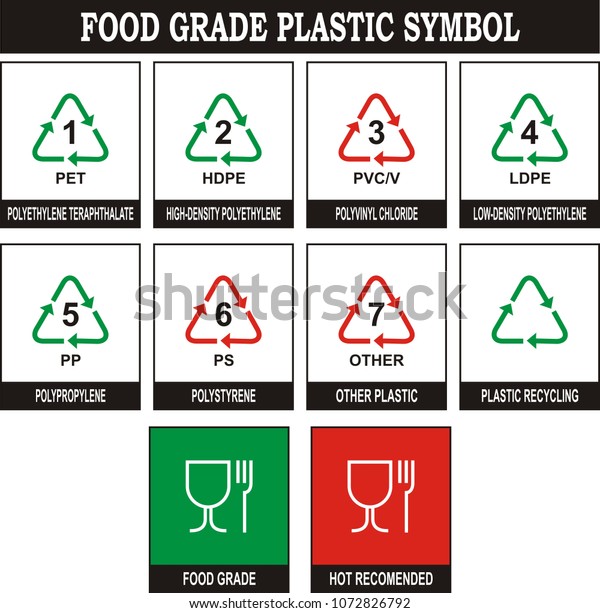
plastic grade symbols
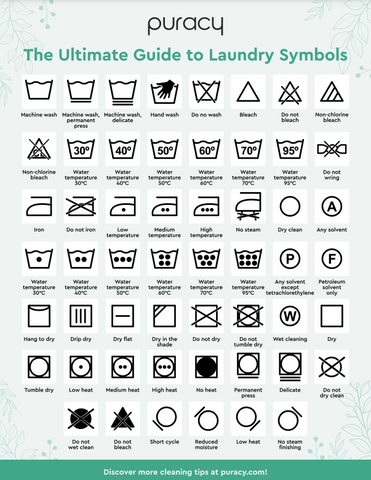
fabric care symbols
Subject
Verb
Noun
words that are horizontal in a sentence diagram
20 slides
20 seconds for slides
exactly 6 minutes and 40 seconds
features of a pecha kucha