it terms theory
 Call Kai
 Learn
Learn Practice Test
 Spaced Repetition
 Match
Match Flashcards
 Knowt Play
1/66

There's no tags or description
Looks like no tags are added yet.
Name | Mastery | Learn | Test | Matching | Spaced | Call with Kai | Chat |
|---|
No analytics yet
Send a link to your students to track their progress
67 Terms
Describe what is meant by accurate information.
Information should be/that is free from errors/mistakes
9626/12/F/M/23
Describe how the use of interviews and questionnaires for collecting data may affect the accuracy of the resulting information.- 6
• People might not answer the questionnaire truthfully (1) • People might answer the interview truthfully (1) • People may be biased (1) • The questions might be badly phrased (1) • Interviews can clarify the answer (1) • Interviews can ask questions based on previous answers (1) • Questionnaires cannot expand on what the question means (1) • Interviews include open ended questions that are hard to quantify (1) • In a multi choice type question there may not be a sufficient number of alternatives//answers restricted to those provided (1) • There is the possibility that the people collecting the data may make errors when collecting it (1)
Define what is meant by online processing - 1
• User is in communication with a central computer (1) • Where a process is carried out on the internet/WWW (1)
. Describe the steps he takes when purchasing goods from the online store - 5
• Go to the website (1) • Log on (by entering username and password) (1) • Choose goods category (1) • Choose/select item (to examine the product) (1) • Add (items) to shopping basket/cart //click on buy button//pick up item (1) • Check good in basket/cart//make changes to goods in basket/cart (1) • Click on/proceed/go to checkout (1) • Confirm billing address (1) • Confirm/enter delivery address (1) • Choose method of delivery (1) • Select/use payment method (1) • Type in credit card/debit card number (1) • Enter card security code/last three digits of CVV/CVC/CSC (1) • Confirm order//click checkout button//click pay (1) (NO further marks to be given after this mark given, unless candidate clearly states that the action happens before this point)
A linker is a type of system software used during the process of translating high level language programs to machine code. Discuss the benefits and drawbacks of using a linker - 6
benefits (max 5)-
programs can be written in modules
- which requires less ram
- so saving cost of memory
Whole program and complier do not need to be in memory at the same time
- which requires less ram
- so saving cost of memory
a number of programmers can be used to write seperate modules
- which saves time compared to just one person writing the entire code
If there is an error in the code only that module needs to be corrected
Drawbacks-
variable names can cause problems
- the same variable may have been given different variable names in different modules
documentation has to be more detailed
- so it takes longer to write
3 Most computer systems have a variety of utility software including anti-virus software. Discuss the benefits and drawbacks of anti-virus software.-6
Benefits (MAX 4) • Protects from computer viruses/malicious code (accept either ‘finds’ or ‘stops new infections’ (1) • Prevents data/files (in files) becoming corrupted/deleted (1) • Can prevent passwords from being changed (1) • Can prevent user’s email account sending out spam (1) • Can prevent computer from crashing (1) • User can select how regularly the anti-virus scan is to take place (1) • User can select which files to scan (1) • Quarantines any infected files (removes BOD) (1) Drawbacks (MAX 4) • Anti-virus software can cost//has to be purchased (any awareness of cost or expense) (1) • Only purchase for one year (1) • Anti-virus needs to be kept up to date …(1) – …because there always new virri to be countered (1) • Anti-virus can only detect a virus if it is listed in the AV database (1) • Anti-virus background scans can slow a computer down//slow down download process (1) • Can give a false sense of security/does not give 100% coverage (1) • Can result in false positives (award as a concept, not necessarily these words) …(1) – …what appears to be suspicious activity turns out to be harmless (1) • Needs expertise to personalise (1) Accept examples such as – “Can take a long time to customise account/settings”. • Takes up space on the hard drive (1) • Can only delete the whole file that is infected (1)
Mark has a small glasshouse. He lives in a warm country where plants can die if they are left without water for too long. The glasshouse has a microprocessor controlled sprinkler system and a moisture sensor in the soil. Complete this flowchart to show the processing required to control the level of moisture in the soil of the glasshouse. You may assume that a pre-set value, dry, has already been input so that the system can test if the amount of moisture in the soil has reached or fallen below a certain level. The user activates the microprocessor system by pressing a switch. (a) Complete the flowchart which inputs the moisture reading in the glasshouse and switches the sprinkler on and off according to this value. It also checks if the sprinkler is already on or off before attempting to switch it on or off. - 6

Draw the symbol used to represent a subroutine in a flowchart -1

State what you would expect to see in the first box of a subroutine.- 1
• The name of the subroutine (1) • Start (1)
Explain why encryption is needed. - 4
(Using data encryption is) a way to keep their data secure//to protect their information from a hacker //to safely exchange data (1) • Information needs to be impossible to understand/unreadable/indecipherable (1) • Information needs to be useless to a 3rd party if intercepted/hacked/they should not have it (1) • Only authorised people/people with the key can understand the information (1) • Encrypted data needs to be decrypted which is hard/impossible (without the key) (1) • To make hacking not worthwhile (1)
Sensors are used to measure physical variables. (a) Describe these sensors and give an appropriate use in a monitoring system for each.- temperature- 2-
• Measures temperature value (1) • Any suitable example of use – Used in weather stations to measure the temperature (1)
Sensors are used to measure physical variables. (a) Describe these sensors and give an appropriate use in a monitoring system for each.- Light - 2-
• Measures/detects light intensity//how much light hitting a surface//level of light (1) • Any suitable example of use – e.g. Used in weather stations to measure the amount of sunshine – Test match cricket to see if its bright enough to play (1)
sensors need to be calibrated before use. Evaluate the different forms of calibration - 6
One point calibration Max 2 • Is the easiest method to carry out (1) • Only one point of data is used (1) • Can only be used when measuring set/constant physical variables… (1) – …therefore has a limited use (1) • Two-point calibration Max 3 • Is more complex than one point calibration (accept less complex answer)… (1) – …because is needed when a range of values is being monitored (1) • Two points of data are used (1) • Needs to be used where a linear relationship between sensor readings and the variable being monitored exists… (1) – …therefore, cannot be used when the relationship is a curve (1) • Multi point calibration Max 3 • Multi-point calibration is the most complex method… (1) – used for non-linear, multipoint relationships (1) • Multiple points of data are used (1) • Multi-point calibration is the most complex method… (1) – …greater knowledge of maths is needed (1)
Phishing is a method used by hackers to obtain banking information from computer users. Explain the process of phishing. - 5
• Uses email to collect/gather/persuade to give personal information/data (award any concept of 3rd party getting access to personal data) (1) • Any statement that email or website look legitimate/real, but is/are in fact fake/from a hacker/criminal (1) • The email usually contains something that demands the target's (immediate) attention (1) • Any suitable example of a message/scenario demanding attention (1) – EITHER • The email may ask customer to reply (1) • Target asked to enter their information (1) – OR • The email includes a website URL/link (inviting the receiver to go to the site) (1) • Clicking on/opening the link takes them to a fake/malicious website (1) • Target asked to enter their information (1)
Describe how people in developing countries can be disadvantaged when trying to use online shopping. - 5
• Some people in developing countries have no actual postal address making the delivery of goods which are purchased online difficult (1) • Many people in developing countries have no access to broadband so speed of purchase is slower (1) • Many people in developing countries have no PCs/laptops/smartphones/tablet computers so need to borrow a PC/go to a library (1) • In developing countries power outages can mean that connection is lost during the process and so have to start again/lose the sale (1) • Many people in developing countries do not have bank accounts and credit cards so have to organise for someone else to buy the product on their behalf (1) • In many developing countries, goods bought using the internet are not covered by consumer-protection laws so people have no protection from unscrupulous sellers (1)
Describe what is meant by the malware terms. (a) worm - 4-
• A (standalone) malicious computer program/code (1) • A program that replicates itself in order to spread to other computers (1) • Does not need to attach itself to an existing program/file (1) • Worms consume bandwidth, slowing down the (traffic in a) network (1) • Worms consume processing power, therefore (e.g.) slowing down computer operation/system//stopping the computer from operating (1) • A worm exploits (security) holes in networks/computers (1) • They replicate themselves occupying (more) space (1) • Can modify/delete files//bring other (malicious) software//install backdoor (1)
Describe what is meant by the malware terms. b) trojan- 4-
• A malicious computer program which is used to hack into a computer (1) • Misleads users of its true intent/disguises itself as authentic software (1) • Enables the person who created it to take control of the computer it has infected (1) • Trojans (generally) do not attempt to infect other files (1) • They do not attempt to self-replicate themselves (1) • Has to be/is activated by (e.g.) the target person (1) ONE mark for any further action a Trojan may perform (1) e.g. • Provide a backdoor onto your computer so a 3rd party can take control • Delete files from the hard disk • Copies data/files • Can corrupt data (damage = TV) • Can be used to download other malware
10 Describe what is meant by the term open source file format. Include in your answer an explanation of why open source file formats are needed.- 5-
Max four from: • A format used for storing data, for anyone to use (1) • An open-source file format can be used by both proprietary and (free and) open-source software (1) • Open source formats are often called free file formats if they are not covered by any copyrights/patents (1) • Anyone may use them at no cost (1) for any desired purpose (1) • Code is open to inspection (1) • Code can be amended without breach of copyright (1) Max three from: • Needed because not everyone can afford proprietary software (1) • Needed so users can work on files in different locations without the need for the same software (1) • Provides a standard file type (1)
9626/12/M/J/23
Give reasons why using an Electoral Register as an indirect data source would not produce the data required by the study. - 5-
It would now be used for a different purpose to that for which it was originally collected (1) Electoral register only shows adults (accept does not show children) (1) Only shows people who are registered to vote (1) The data on the electoral register might be out of date//not have been updated (1) ... … people on the electoral register might no longer live in the area (1) … people new to the area might not be included (1) … new homes may have been built (1) … people may have died (1) Not all people who live at the same address are from the same family (1)
Apart from the Electoral Register, give an example of another indirect data source - 1
Businesses collecting personal information when used by third parties (1) Census (data) (1) A newspaper (1) An encyclopedia (1) Medical records (1) Museum archive (1)
Explain what is meant by symmetric encryption. - 5-
Five from: One mark for a description of encryption (1) Often called secret key encryption (1) Uses a single/the same key (to decrypt/encrypt the data) (1) Any awareness that it is a private key (1) This (private/secret) key must be shared between the sender and the receiver (1) The encryption key is sent to the recipient (1)
Many credit card purchases use online processing, whereas customer bills tend to be produced using batch processing. Describe the differences between online processing and batch processing systems.- 5-
Data is grouped into batches (in batch processing) (1) With online processing, data is processed as quickly as possible (1) With batch processing there is a delay between the collection of data and the actual processing (1) With batch processing, the data is entered and processed altogether in one batch by the computer (1) With online processing the user tends to be in direct communication with a central computer (1) Online systems require more hardware/input devices/workstations than batch processing systems (1) Batch processing uses very little processing time compared to online processing (1) In online processing errors are revealed immediately (1) (whereas) Errors in batch processing errors are revealed much later/only when processing takes place/overnight/when batch process is complete (1) Batch processing can be done when the system is not busy//scheduled to a specific time (1) (whereas) online processing has to be active for the whole day (1) For batch processing, data is only accurate at the time of processing (1) (whereas) online processing, the data is accurate all the time.
Some individuals post personal data on social media or in emails. Discuss why personal data needs to be kept confidential -8-
Eight from: (because) It is sensitive information about yourself (1) an example of personal data that could be given (1) plus how this would be detrimental//how used to (e.g.) gain (your) trust (1) Fraudsters could use the data to: e.g. commit identity theft (1) to (e.g.) buy products (may exemplify) (1) get past bank security (1st) withdraw large sums of money from bank accounts (1) (for this second mark accept any situation where identity could be proven by details shared online – credit card/inheritance etc) By sharing (e.g.) phone number may lead to phishing (1) Burglars could use the data to e.g. target homes of people who announce they are going on away from their home (holiday etc) (1) Employers could e.g. use comments about politics/religion/their current job//embarrassing photos to decide on future job opportunities (accept any example of an area of opinion, but must be at least one stated) (1) Insurers/employers could e.g. make decisions based on evidence of risky/dangerous activities (may exemplify about decisions) (1)
A printer driver is a type of device driver. Explain, using a printer driver as an example, what is meant by a device driver and why it is needed- 5-
Five from: Four max from: A device driver is a piece of (system) software (1) It operates/controls a device attached to the computer (1) Allows communication between printer and computer (1) A device driver tells the operating system/application software how to communicate with a hardware device (1) A printer driver acts as an interface between the operating system/ application software and the printer (1) When a document is to be printed the application tells the printer driver and the printer driver tells the printer (1) The user appears to have control of the device (1) Upon installation it detects and identifies the peripheral device (1) Handles the translation of requests between a device and the computer (1) Defines where outgoing data must be stored before it can be sent (1) Two max from: Without the required (printer) driver the printer fails to work (1) The software used by a computer tends to be created by different companies to those that manufacture printers (1) Computers (may) use software which uses a different type of language/instruction set to the printer (1) The printer driver is needed to convert the language/instruction set so that the software is able to communicate with the hardware (1)
Describe these sensors. For each sensor, explain how it could be used in a control system. Each system must be different. Infrared -2-
Infrared Detects heat (1) Turns infrared electromagnetic waves into an electrical signal (1) e.g. Used in a burglar alarm – accept any reasonable use (1)
Describe these sensors. For each sensor, explain how it could be used in a control system. Each system must be different. Ultrasonic- 2-
Detects sound (1) Turns sound waves into an electrical signal (1) e.g. It is used in automated car parking//reversing system (1) Measure distance (1)
Control technologies are replacing human-controlled car park barriers and timer-controlled traffic lights. Discuss the advantages and disadvantages of the use of control technologies in these scenarios.-8-
Advantages MAX five from Increased employment for technicians needed to maintain the systems//maintenance (1) and programmers to program the systems (1) (May also be used as a disadvantage - Award ONCE only) Data is processed more quickly (1) Reaction times of control technologies is much faster (1) Computer-controlled traffic lights tend to create fewer traffic jams (1) Computer-controlled car park barriers lead to fewer/shorter queues (at car park entrances) (1) Any indication of reduced day to day costs (may be exemplified – e.g. ‘no need to pay anyone to do the job’) (1) System can operate 24 hours a day//the whole/all day//continuously … (1) … without needing to pay overtime (1) The readings/inputs taken by computers are more reliable/accurate than human readings ... (1) ... the number of car park spaces are more accurately calculated (1) Disadvantages MAX five from Has increased unemployment for car park attendants (1) (Converse answer may also be given as an advantage – Award ONCE only) The number of new jobs created tends to be far fewer than the number of old jobs lost (1) (Control systems) can be expensive to install/purchase (1) A computer-controlled system will not be able to function if there is a problem with the computer/power outage ... (1) ... leading to possible chaos at traffic lights/traffic jams (1) ... causing longer queues at car park entrances (1) Computer maintenance costs can be expensive (1) Sensors can deteriorate after a period of time //suffer wear and tear (1) … whereas this would not be a problem with car park attendants (1)
Explain why there can be a digital divide between different socioeconomic groups.-5-
Different socioeconomic levels imply differing levels of (disposable) income (1) Different incomes/socioeconomic groups impact on what people can buy/ access/afford (1) such as ‘things’ … (must be an extension linked to technology) (1) such as acquisition of skills/paying for training (1) This impacts on what people can commit to renting (1) New equipment is costly (1) Old equipment is not as advanced (1) People from lower socioeconomic groups tend to have lower digital skills (1) No/reduced incentive for companies to develop cheaper systems ... (1) ... because the profits would be lower (1) No/reduced incentive to provide infrastructure to poor areas …. (1) … because reduced demand in the area (1)
Peter wants to create a database containing the details of all the books he owns and the shops he bought them from. Mary suggests that he should create a relational database. Peter will need to use normalisation. (a) Describe what is meant by normalisation.- 4-
One mark for identification of any three forms (1) A method of organising data tables (1) Attempts to avoid data loss (1) Attempts to avoid data redundancy//data duplication (1) Attempts to improve/improves data base efficiency (1) Breaks data from non-atomic structure to atomic//description of atomisation (takes an example of non-atomic data and states how it becomes atomic) (1) Breaks data into smaller/other units/tables of data (1) The units/tables are related to each other (may exemplify) (1) Only related data is stored in a table (1) It is an iterative process// It is a multi-step/stage process (1) … (where) each step/stage improves the efficiency of the database (may be given as a standalone mark) (1)
Describe the benefits of creating a relational database rather than a flat file database-6-
Searching a large database is quicker to locate records (1) A relational database does not have duplicated/redundant data (1) Uses reduced storage space (DNA ‘memory’) (1) When data in one field of a table is modified the data in the corresponding field//related field is updated (1) Integrity constraints ensure that table relationships are/remain valid (1) It is easier to maintain security of data (1) Use of related tables reduces need for (as much) data entry (1) Reduced chance of data entry errors (1) Easier for users to produce reports (1)
Gustav has started to write an algorithm using pseudocode. It will input 6 numbers, all less than 1000, and output the smallest value. Complete the algorithm using pseudocode. count 0 smallest 1000 WHILE count < 6 (6)-

9626/12/O/N/22
Here is a set of data. > < = >= <= Explain why this is just a set of data and describe how this particular set of data would become information. - 4
MAX four marks: Max three from: • Information is data which has a context/meaning/has been processed// this data can become information if meaning/context is added (accept any indication that meaning or context is key to data being information) (1) • This data/it has no context/meaning//it doesn’t explain what each symbol means (must clearly refer to the set of data here)//it is raw (1) • Any valid context//The context for this set of data could be that it can be used in search criteria in spreadsheets ... (1) ... the symbols would then be given meaning (1) Max two from: • 1 mark for 2 correct meanings (1) OR • 2 marks for 4 correct meanings (2) > means greater than < means less than = means equal to >= means greater than or equal to <= means less than or equal to
2 Describe what is meant by the term RAS (Reliability, Accessibility and Serviceability) when applied to mainframe computers. -5-
• Describes the robustness/durability of mainframe computers (1) • Reliability is the chance of the system behaving as intended (1) • Accessibility refers to the mainframe being operational at all times//the operating time as a percentage of total time (1) • Serviceability means it can be easily fixed within a short period of time (1) • Mainframes are reliable as the system will use alternative methods to carry out tasks (if there is a failure) (1) • The system's software is reliable as it is extensively tested and updates are made quickly to overcome problems (1) • Mean time between failures (MTBF) is quite long for mainframes (1) • Mainframes give months/years between system downtimes (1) • Even when unavailable (due to failure) a mainframe is unavailable for a very short time (1) • Spare components/CPU are often included in mainframes so that if one component/CPU fails another takes over (1) • The mainframe can determine why a failure occurred (1) • This enables hardware and software components to be replaced without affecting the mainframe’s operations (1) • Can be serviced while the system is still running (1)
3 Phishing, smishing and vishing are methods of fraudulently obtaining personal data. (a) Describe two differences between phishing and vishing. - 4-
• Phishing involves sending an email (to gather personal details) ... (1) ... whereas vishing involves a phone/voice call (to gather personal details) (1) (Candidate MUST have referred to personal data//details being gathered by either method within the body of the answer) • Phishing involves sending a website link/email address, asking the receiver to email back/click on link ... (1) ... whereas vishing involves getting the victim to give out their details verbally / leaves a number on their answerphone / tells them over the phone the bank’s supposed phone number the victim can call to check the call is authentic (1) • With phishing the link takes the victim to a (fake) website ... (1) ... whereas with vishing the phone number causes the victim to be put through to the hacker’s own phone/answerphone (1) • Vishing involves the customer having to respond immediately to the caller ... (1) ... whereas phishing allows the user more time to check whether the email is authentic (1)
Describe how smishing is used to obtain personal data. -3-
• Fraudster sends a (cell phone) text message (or VERY close alternative) to persuade customer to divulge their personal information (accept any reference to personal information/data in the body of the answer) ... (1st) ... includes a link to fraudster’s/fake/replicated website (1) ... Example of message that could be used (must be more than ‘please send information’) (1) ... the target's immediate attention/action is demanded (accept any reference to peril or scaring the target into immediate action) (1) • They include a telephone number in the message that connects to an automated voice response system (1)
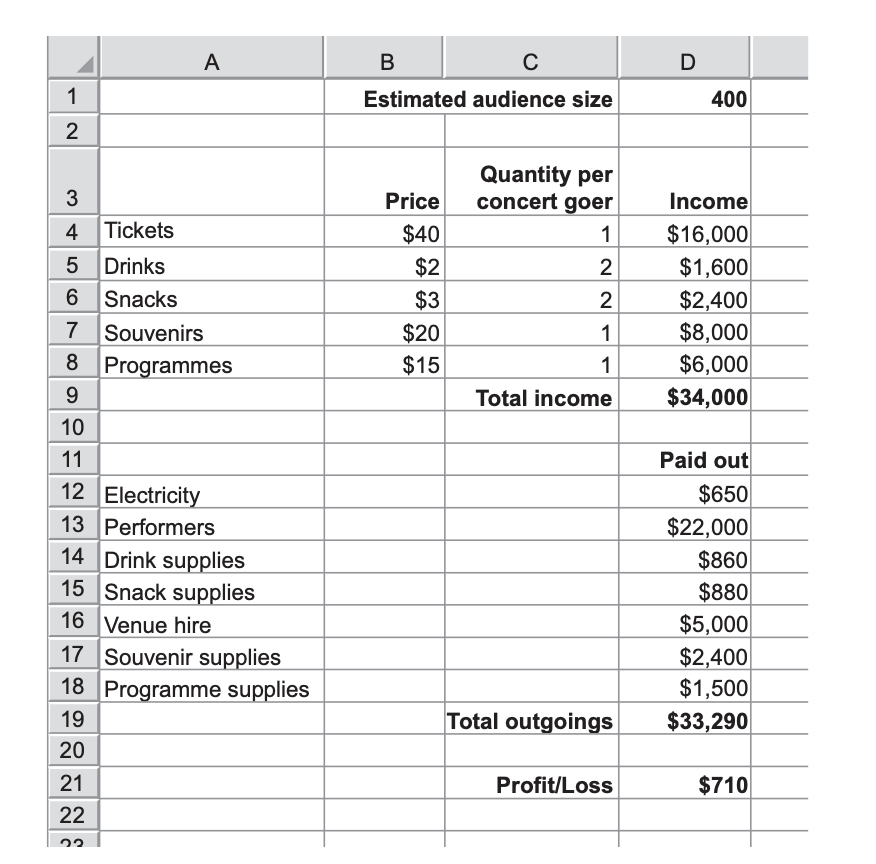
Here is a spreadsheet created by the organisers of a concert. They have assumed that 400 people will attend the concert. They have also assumed that each member of the audience will purchase 2 snacks and 2 drinks during the concert. If these assumptions are correct, their profit will be $710.
A number of factors could affect the amount of profit. • The audience size might be higher than the organisers estimated. • Members of the audience might not buy 2 snacks and 2 drinks. • The cost of souvenir supplies might change. (a) Explain how the organisers could use what-if analysis to see the effects of these three factors on their profit. You should refer to specific cells from the spreadsheet in your answer - 3-
• They could increase/change (the number of customers by increasing/changing) the value in cell D1 ... (1) • They could increase/change (the number of snacks by increasing/changing) the value in cell C6 ... (1) (accept decrease answer) ... • They could increase/change (the number of drinks by increasing) the value in cell C5 ... (1) (accept decrease answer) ... • They could increase/change (the cost of souvenir supplies by increasing) the value in cell D17 ... (1) (accept decrease answer) ... ... The value in D21/profit would change (showing the new profit/loss//profit would change) (1)
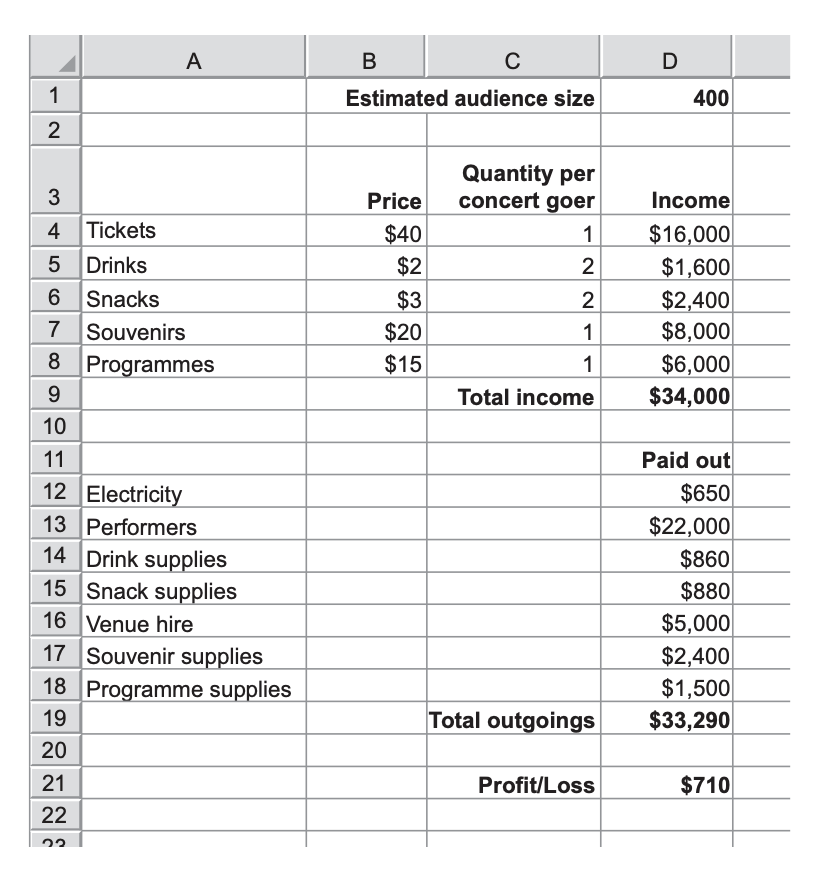
the organisers wish to achieve a larger profit. By explaining what each step requires them to do, describe how the organisers would use goal seek to find the size of the audience needed to make a profit of $5000. You should refer to specific cells from the spreadsheet in your answer. Include in your answer a reason why the result might not be satisfactory.- 4-
Four marks available Max three from: • The organisers would select the cell containing the formula that returns the result they want/D21, and select goal seek (1) They input the value they want the formula to return/5000 (1) They enter the cell reference of the input value that the spreadsheet can change to reach the target/D1 (1) Max one from: • The number could be to several decimal places and needs to be a whole number of concert goers (1) • If other assumptions are incorrect (e.g. the number of snack/drinks bought per concert goer), the number produced by goal seek would be inaccurate (1) • Venue may not be able to hold that many people (not ‘number too large’ on its own) (1)

The owner of a book shop has created a database of her books. She will now test that it works. Some of the records are shown. The data shown contains the maximum and minimum values. There are only two types of book.
(a) Describe, in detail, the three most appropriate validation checks, apart from a check digit, type check or presence check, that could be used to validate the data. For each validation check, your description should include the field it could be used for. Each validation check and each field must be different. -6-
Three matched pairs: • A length check could be performed (on the data) in the ISBN field (1) Each data item must be 13 characters/numbers/digits long (1) • A lookup check can be performed (on the data) in the Book_type field (1) Each data item is compared with the lookup list of P and H to see it exists//The code must be P or H only (1) • A range check could be performed (on the data) in the Copies field (1) Each value must not be less than the minimum/2 and must not be greater than the maximum/5//between 1 and 6 (1)
ll also need to verify the data in her database. Using examples from the three fields you used in part (a), explain why verification is needed in addition to validation. -3-
Three marks available: • Generic statement about why both required (no reference to fields). MUST be more than a statement about what each does. (1) • Verification would identify if P had been typed in the Book_type field for the first record//if it was relevant (accept any letter and book combination from the sample) (1) • A lookup check/validation would accept P or H (1) • Verification would identify if (e.g) 5/wrong number had been entered (into the first record) (1) • A range check/validation would accept 5 (1) • Verification would identify if two digits had been transposed in the ISBN field//the ISBN number was incorrect (1) • Length check/Validation would accept any 13 characters (1)
Explain why supercomputers are used for weather forecasting -4-
A supercomputer is fast/powerful/run at several petaflops enough to carry out the calculations that are required for weather forecasting (1) • A supercomputer can process huge amounts of data// a supercomputer is needed because a huge amount of data is collected (1) • Weather forecasting is based on the use of very complex/scientific computer models (which only supercomputers can handle) (1) • A sophisticated/three-dimensional model of the earth’s atmosphere/ocean/space has to be created (which needs the processing power of a supercomputer) (1) • (A supercomputer is needed) because a large number of calculations have to be carried out//a supercomputer can do a large number of calculations (1) • Needs to do complex/scientific calculations (1) Max two marks for the data that has to be collated: e.g. • records of previous weather conditions (1) • weather measurements from weather stations (candidate may exemplify) (1) • observations from radar/satellites (1) • information from ships /aircraft (1)
Explain how malware can be used to carry out industrial espionage.- 4
• Malware can be downloaded without realising when an employee (e.g.) clicks on adware (1) • Spyware/Trojan is an example of malware that can be used ... (1) ... the data collected is sent back to the hacker (Allow once only) (1) • Malware can gain access to computers/network/database (NOT – the business) to get files/secrets ... (1) ... such as (e.g.) intellectual property/research projects/future business plans (1) ... the data collected is sent back to the hacker (Allow once only) (1) • Malware is used to exploit weaknesses in software to gain access ... (1) ... the data collected is sent back to the hacker (Allow once only) (1) • Types of spyware target specific computers for industrial espionage ... (1) ... to spy on a particular company (1)
A rootkit is a type of malware. Describe the features of a rootkit.-4
Four marks available: • (Allows a hacker to) install a set of tools (in a computer) (1) • Allows (continuous) remote access (to the computer) (1) • It allows the hacker/third party to gain administrator access to a victim’s computer//gain (full) control of a computer (1) • It’s buried deep within the operating system (1) • The user is unaware that their computer has been infected//secretly gains access (1) • Designed to stay hidden/to avoid detection by anti-malware software (1) • The attacker/a third party can access/steal the information/data/files on the computer (1) • It changes any anti-virus software so it thinks the rootkit is not inside the computer (1) • It can remove anti-virus software (1) • It can hide illegal files on a computer (1) • It can be difficult to get rid off (1)
Encryption is often used to protect data. (a) Discuss the need for encryption.-4
When a message/information is intercepted//accessed it is unreadable/ can't be understood ... (1) ... so, therefore, it is useless (1) ... to a hacker (accept alternative examples of 3rd party or just ‘third party’) (1) • It protects customers when they bank/shop online/any other suitable example from any area of use (MUST BE protecting data) ... (1) ... as the data cannot be used for identity theft (1) • Data can only be decrypted by the receiving computer if it has the private/decryption key (1
Discuss the advantages and disadvantages of using symmetric encryption -4 -
Advantages (MAX 3) • It is a faster process//quicker to encrypt compared to asymmetric (1) ... ... as it has less mathematical complexity (1) • It requires less computational power than asymmetric (1) Disadvantages (MAX 3) • Does not have a different key for encryption and decryption//sender and receiver use the same key (1) ... ... therefore only one key needs to be stolen (1) ... making it less secure (1) • The encryption key cannot be generally published (1) • The encryption key must be sent to the receiver of the message (1) • Key could be intercepted/stolen (by a hacker) whilst being sent ... (1) ... who can then decrypt any message encrypted by the sender (accept any reasonable implication) (1)
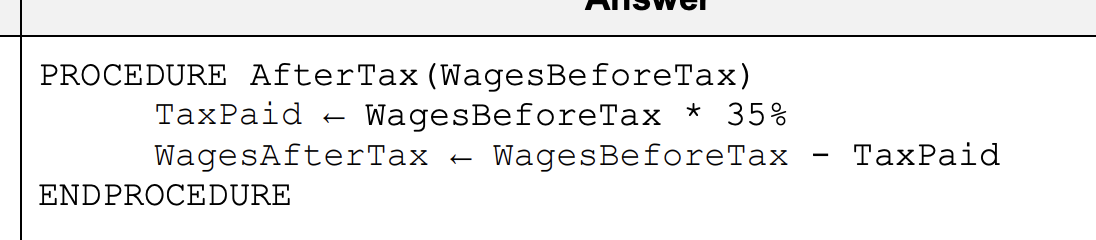
A programmer is writing an algorithm in pseudocode to represent a company’s payroll system. The system calculates a worker’s wages before tax by multiplying the number of hours worked by the rate of pay per hour. A procedure within the main algorithm representing this could be: PROCEDURE BeforeTax(Hours, Rate) WagesBeforeTax Hours * Rate ENDPROCEDURE There are two stages involved in calculating the wages after tax: • the amount of tax paid by the worker is calculated by multiplying the WagesBeforeTax by the rate of tax (35%); • the amount of tax paid is then subtracted from the WagesBeforeTax. (a) Write a procedure for calculating the wages after tax, assuming the value of WagesBeforeTax is passed to it.


Schools often use computerised weather stations to collect data, rather than requiring their students to do it manually. Discuss the advantages and disadvantages of schools using monitoring technologies rather than students taking readings manually.-8
Advantages Max 6 marks e.g • Computers are able to take readings at more frequent intervals ... (1) ... as students take time writing down readings/values (allow once only)(1) • Taking readings manually takes time//time consuming (not slower) ... (1) ... because students have to write down the readings/values (allow once only) (1) • Computers can read several physical variables at the same time ... (1) ... whereas students would only be able to read one at a time (1) • Computers can take continuous readings ... (1) ... whereas students find it difficult to continually take readings/students may need to take breaks (1) • Students wouldn't be able to take readings during school holidays ... (1) ... but computers can take readings every day//computers work 24/7 (1) • (Readings taken by computers) tend to be more accurate ... (1) ... and so are more reliable//students can make mistakes when tired/due to human error (1) • Training is not required ... (1) ... to collect accurate data (1) Disadvantages Max six marks e.g. • Monitoring systems/computers can be expensive to buy ... (1) ... but students do not have to be paid (1) • Monitoring systems/computer maintenance costs are expensive ... (1) ... whereas there is none with students (1) • Sensors can lose accuracy over time ... (1) ... which would lead to inaccurate readings being taken (1) • Sensors may not be calibrated properly ... (1) ... so any measurements will be inaccurate (1)
9626/11/M/J/21
When data is entered into a database, verification is often used. (c) Analyse, including their effectiveness, the different methods of verification that can be used when entering data into a database. -6-
Max four from: Double data entry is where the data is entered twice by the same person… … The computer stores the data on its hard disk/SSD… … the two versions are compared by the computer… … discrepancies are highlighted as the second copy is entered… … the computer generates an error message/alerts the user if the second entry does not match the first Double data entry can be when two people enter the data simultaneously… … the two versions are compared by the computer as they are entered… … discrepancies are highlighted immediately… The keyboard freezes if there is a difference Visual verification is when a person compares the original source document visually… …with the data on screen/database printout If mistakes are spotted, they can be corrected by the person Sometimes the data entered is printed out… …and the printout is compared to the original paper document for differences/mistakes Must have visual and double entry to gain these four marks Max Six from: With double data entry data, the second copy must be entered in exactly the same order as the original data entry otherwise errors will occur With visual check data is only entered once… …so it is normally a quicker process than double data entry… Visual check tends not to identify all errors unlike double data entry which is much more reliable A problem with double entry is that if the same error is made both times… …the computer will not find a difference Visual checking can be unreliable… …as it is difficult to transfer attention between screen and paper
Evaluate, by weighing up the advantages and disadvantages, the use of MICR for inputting text. -8-
Eight from: Advantages MICR characters are readable even if a document is obscured by marks or overprinted MICR systems provide a high level of security… …since MICR documents are difficult to forge The error rate for reading MICR characters is small compared to other character recognition systems Data entry is quicker than typing the details Disadvantages Printing of MICR is demanding, requiring difficult-to-achieve standards… …which causes it to be slower to print MICR readers are expensive to purchase… …whereas manual input of text can be used with a very cheap keyboard MICR readers can only recognise MICR fonts/cannot read text with normal fonts/ink… …which are written in a specific format There are a limited number of characters available for use in documents MICR printers run on cartridges that cost far more than other toner cartridges Because of cost, it is often impractical for small businesses to use MICR
Financial reports can be produced using word processing software or spreadsheet software. Compare and contrast the use of these two pieces of application software for this purpose.-8-
Similarities Both allow users to enter numeric and text data into a report Both perform calculations using formulae and functions Both let users format text with a variety of fonts, styles and symbols Both allow the importing of graphics such as images and charts Both include the ability to save files in a variety of formats for use with other packages Both have spelling and grammar checking and search/replace functions Both have page formatting options, including headers/footers/justification options Differences Spreadsheet software allows users to perform "what if" scenarios/create models Word processing software lets users produce reports which can be mail merged Word processing software only has rudimentary functions to aid calculations Spreadsheet software uses cells, rows and columns to hold data whereas word processing software doesn't restrict where data can be entered Word processing software and spreadsheet software control text alignment and page margins in different ways Word processing software includes a word count feature
Describe how the data from an air pollution monitoring system is collected and prepared, ready for processing by a computer-3-
Sensors are used to feed data back to a computer Naming two sensors/devices used to gather data Analogue data is converted into digital data for the computer to process using an analogue to digital converter The computer stores readings in a table/database/file/spreadsheet
A school has classrooms where students can use computers to access the school network. There are other classrooms where the computers do not have access to the school network. Compare and contrast the use of computers in both types of classroom. -6-
Similarities Both can use all forms of software available within the school Both can produce neater work than if handwritten Both allow for computers to be used to make lessons more interesting/entertaining/varied Both allow computers to be used to help students with special educational needs Both can allow more accurate work to be produced by using spellcheckers Differences Network computers make it easier for students to share work in group projects All network computers can access the internet through the same connection, thereby having access to a greater range of information The school intranet is available to students who can access the network Students could access their work from any network computer… …whereas they would need USBs/portable media on non-networked computers Students using network computers could have too much information available through the internet/intranet and may find it difficult to synthesise Students could print their work from any network computer
The manager of an IT department has been asked to set up a video-conference. At the moment she only has a router, a networked computer and a large screen. Describe how she would set up this video-conference before joining in. -8-
She would agree a date and time with the other participants She would send a reminder shortly before the start to the other participants She would send the other participants means of access to the password/PIN She would send the other participants the link to join the conference For herself, she would purchase a webcam, a microphone and speakers/headphones She would ensure the webcam, microphone, speakers/headphones are switched on, connected and ready She would carry out tests on the webcam/microphone/ speakers/headphones She would adjust her webcam so she can be seen She would open/run the video conferencing software She would log on to the system/Internet She would ensure the video conferencing software/internet connection is running properly/installed She would select/create a room
VALUE(RIGHT(B2,3)). Explain, without using cell references, what this formula does. -3-
It looks at the first Serial number 614481 It takes the three characters from the right-hand side 481 It returns the numerical value of this text… …and displays it in the Price column as $481
SUMIF(A$2:A$17,F3,D$2:D$17). Explain, without using cell references, what this formula does.- 4-
It looks at all the Months in the Month column For the Sales Month Jan It adds up all the corresponding Prices It displays the answer as a Monthly Total as $1964
Evaluate, by weighing up the advantages and disadvantages, the use of the spreadsheet in Fig. 8.1 for financial forecasting.-6-
Advantages What if statements can be asked without rebuilding the spreadsheet… …from scratch each time a test is carried out Calculations can be performed more quickly/more easily/recalculated automatically… … than if done by pen and paper It can provide quick results for predictions of sales that may take years to actually happen Graphs of monthly sales can automatically change… …as new values are added/old values altered This spreadsheet already exists and reduces the need for technical experts The model can have formulae replicated fairly easily… …to show future trends Graphs can be produced automatically/more quickly/no manual method required Disadvantages It does not take into account every possible variable… …when calculating/forecasting sales There is no way of predicting the effect that financial crises will have on real life behaviour Many variables need to be considered and it is easy to omit some… …To improve the spreadsheet, try to account for as many variables as possible Complex sales predictions may need additional expensive software
A company is creating a database to record information about each employee. The IT manager is creating an on-screen data entry form that will be used by the Human Resources department. This is her first design: describe, in detail, appropriate improvements that could be made to the form to make data entry more accurate and easier to complete.-8-
Text boxes or individual character boxes for Name More accessible/readable font Spaces for Name/Address should be longer Separate lines for each part of the address Drop down dates or calendar for Date of birth and Date joined company Radio buttons/drop down list for Gender Navigation buttons: forward/back Help button/information/prompts on how to complete the form Appropriate title at the top of the form Appropriate white space and information filling the page
Explain, using examples, what is meant by the term generic file format-3-
Three from: A generic file format is one which will be recognisable to most software packages If a software package does not recognise a particular file format it will be unable to load it Generic file formats are .txt, .csv, file types (allow any two correct examples) Max one for an expansion e.g. .txt can be loaded by most word processing software .csv can be loaded by most spreadsheet software
Describe, in detail, what is meant by a hierarchical database management system.-4-
Four from: It is organised in the form of a tree-like structure The data is stored as records which are connected to one another through links It uses (several) one-to-many relationships It links several records to one owner/parent record It is not a versatile system It is limited by using only one type of relationship
February/March 2020