Chapter 1: Computer Networks and the Internet
 Call Kai
 Learn
Learn Practice Test
 Spaced Repetition
 Match
Match Flashcards
 Knowt Play
1/50

There's no tags or description
Looks like no tags are added yet.
Name | Mastery | Learn | Test | Matching | Spaced | Call with Kai | Chat |
|---|
No analytics yet
Send a link to your students to track their progress
51 Terms
What are hosts/end systems?
Billions of connected computing devices
Run network apps at the Internet edge
How is data moved across the Internet?
Packet switches: forward packets → routers, switches
Communication links: fiber, copper, radio, satellite
Bandwidth: transmission rate
What makes up a network?
Devices + routers + links
Managed by an organization
Examples: home, mobile, enterprise, datacenter, content-provider networks
Internet = ______ of _______
network of networks
Interconnected ISPs
Home, mobile, enterprise, datacenter, content-provider networks
Internet protocols
Control sending/receiving of messages
Examples: HTTP, TCP, IP, WiFi, 4G, Ethernet
Internet standards
RFC = Request for Comments
IETF = Internet Engineering Task Force
What does the Internet provide as a service?
Infrastructure: supports applications
Web, streaming, email, games, e-commerce, social media, etc.
Programming interface: “hooks” for apps to send/receive data
Service options: different Internet transport services → like a postal service
What do protocols define?
Format of messages
Order messages are sent/received
Actions taken when messages are transmitted/received
What are the 3 main parts of Internet structure?
Network edge: hosts → clients & servers
Servers often in datacenters
Access networks: connect hosts to Internet
Wired / wireless links
Network core: interconnected routers
“Network of networks”
How do end systems connect to the edge router?
Access networks
Residential access networks
Institutional access networks → school, company
Mobile access networks → WiFi, 4G/5G
Key considerations:
Transmission rate: bits/second
Shared vs. dedicated access among users
Your device → access network → edge router → Internet core
How does cable-based Internet access work?
Cable modem → connects home to cable network
Splitter → separates channels/signals
Cable headend → central provider facility
Uses FDM (Frequency Division Multiplexing)
Different channels → different frequency bands
What is HFC?
Hybrid Fiber-Coax: fiber + coaxial cable network
Asymmetric: downstream > upstream
Downstream: 40 Mbps–1.2 Gbps
Upstream: 30–100 Mbps
Fiber/coax connects homes → ISP router
Homes share the access network to the cable headend
How does DSL provide Internet access?
Uses existing telephone line → central office
DSLAM: separates/routes Internet data from voice
Data → Internet
Voice → telephone network
Different frequencies → voice + data simultaneously
Dedicated line (not shared)
Downstream: 24–52+ Mbps
Upstream: 3.5–16 Mbps
What are the two types of wireless access networks?
WLAN (WiFi):
~100 ft range
802.11b/g/n
11, 54, 450 Mbps
Connects end system → access point/router
Wide-area cellular:
10s of km range
Provided by mobile/cellular operators
10s of Mbps
4G, 5G (6G coming)
Both: shared wireless access networks
What are enterprise networks?
Used by companies, universities, etc.
Mix of wired + wireless technologies
Connect switches + routers
Ethernet (wired): 100 Mbps, 1 Gbps, 10 Gbps
WiFi (wireless): 11, 54, 450 Mbps
How does a host send data?
Application message → broken into packets
Each packet = L bits
Transmitted into access network at rate R
R = transmission rate / link capacity / bandwidth
Packet transmission delay: time to transmit packet onto link
Delay = L / R
What are physical links/media?
Bit: propagates between transmitter ↔ receiver
Physical link: medium between transmitter & receiver
Guided media: signal travels through a solid medium
Copper, fiber, coax
Unguided media: signal propagates freely
Radio
Twisted Pair (TP):
2 insulated copper wires
Cat 5: 100 Mbps, 1 Gbps Ethernet
Cat 6: 10 Gbps Ethernet
What are the key features of coaxial and fiber optic cables?
Coaxial cable
2 concentric copper conductors
Bidirectional
Broadband: multiple frequency channels
100s Mbps/channel
Fiber optic cable
Glass fiber → light pulses = bits
10s–100s Gbps
Point-to-point, high-speed transmission
Low error rate
Repeaters spaced far apart
Immune to electromagnetic noise
What are the key features/types of wireless radio links?
Wireless radio
Signal carried in electromagnetic spectrum
No physical wire
Broadcast + half-duplex → sender ↔ receiver, not simultaneous
Example: walkie-talkie
Broadcast = multiple receivers can hear
Half-duplex = communication goes both directions, one at a tim
Propagation affected by:
Reflection, Obstructions, Interference
Types:
Terrestrial microwave: up to 45 Mbps/channel
Wireless LAN / WiFi: up to 100s Mbps
Wide-Area / Cellular (4G): ~10s Mbps
Satellite: up to 45 Mbps/channel
~270 ms end-to-end delay
Geosynchronous vs. low-earth-orbit
What is the network core & how does packet switching work?
Network core: mesh of interconnected routers
Packet switching:
Hosts break messages → packets
Routers forward packets hop-by-hop
Packets travel across links from source → destination
Each packet transmitted at full link capacity
What is store-and-forward packet switching?
Transmission delay: time to push L-bit packet onto link
L/R seconds
Store-and-forward: router must receive entire packet before forwarding to next link
End-to-end delay (2 links):
2L/R (assuming zero propagation delay)
Example: L = 10 Kbits, R = 100 Mbps
L/R = 0.1 ms transmission delay per hop
What happens when packet arrival rate > link transmission rate?
Queueing: packets wait in a buffer to be transmitted
Packet loss: if router’s buffer fills up, arriving packets are dropped/lost
Key idea:
Arrival rate > transmission rate → queue → buffer fills → packet loss
What are the 2 key network-core functions?
Forwarding = local action
Move arriving packet input link → appropriate output link
Uses destination address in packet header
Routing = global action
Determines source → destination paths
Uses routing algorithms
Recall: Forwarding = “where next?” | Routing = “which path?”
What is circuit switching?
End-to-end resources reserved for a call
Dedicated resources: no sharing
→ Guaranteed/circuit-like performance
Each link divided into circuits
Idle circuit = wasted capacity (cannot be shared)
Common in traditional telephone networks
No available circuit → call rejected/blocked
Recall: Circuit switching = reserved path + dedicated resources
How does circuit switching allocate resources?
FDM — Frequency Division Multiplexing
Frequency divided into narrow bands
Each call gets its own frequency band
Transmits at max rate of that band
TDM — Time Division Multiplexing
Time divided into slots
Each call gets periodic time slot(s)
Transmits at max rate of the wider frequency band during its slot(s)
Recall: FDM = divide frequency | TDM = divide time

Why can packet switching support more users than circuit switching?
Given:
Link = 1 Gbps
Each user = 100 Mbps when active
User active 10% of the time
Circuit switching:
1 Gbps ÷ 100 Mbps = 10 users max
Resources reserved even when users are inactive
Packet switching:
Users share link dynamically
35 users can use the network
Probability of >10 users active simultaneously < 0.0004 - P(k) = C(35,k)(0.1)^k(0.9)^(35−k)
Recall: Packet switching → statistical sharing → more users
What are the advantages/disadvantages of packet switching?
Advantages:
Great for bursty data → data sent intermittently
Resource sharing
Simpler → no call setup
Disadvantages:
Congestion possible → packet delay + loss from buffer overflow
Requires protocols for reliable transfer + congestion control
Circuit-like behavior requires bandwidth guarantees (traditionally for audio/video)
Recall: Packet = efficient + flexible, but congestion can occur
How can access ISPs connect to the Internet?
Access ISP → global transit ISP
Customer ISP pays/has an economic agreement with provider ISP
Global transit ISP provides connectivity to the rest of the Internet
What is at the center of the Internet’s “network of networks”?
Small number of highly connected large networks
Tier-1 ISPs:
Large commercial ISPs
National/international coverage
Examples: Level 3, Sprint, AT&T, NTT
Content provider networks:
Private networks connecting data centers → Internet
Often bypass tier-1 & regional ISPs
Examples: Google, Facebook
IXP: Internet Exchange Point → connects networks for exchanging traffic
How do packet loss and delay occur?
Packets queue in router buffers → wait for transmission
Transmission delay: packet is being transmitted
Queueing delay: packet waits in buffer
If arrival rate > output link capacity:
Queue builds up
No free buffer → packet dropped (loss)
Recall: Queue → delay | Full buffer → loss
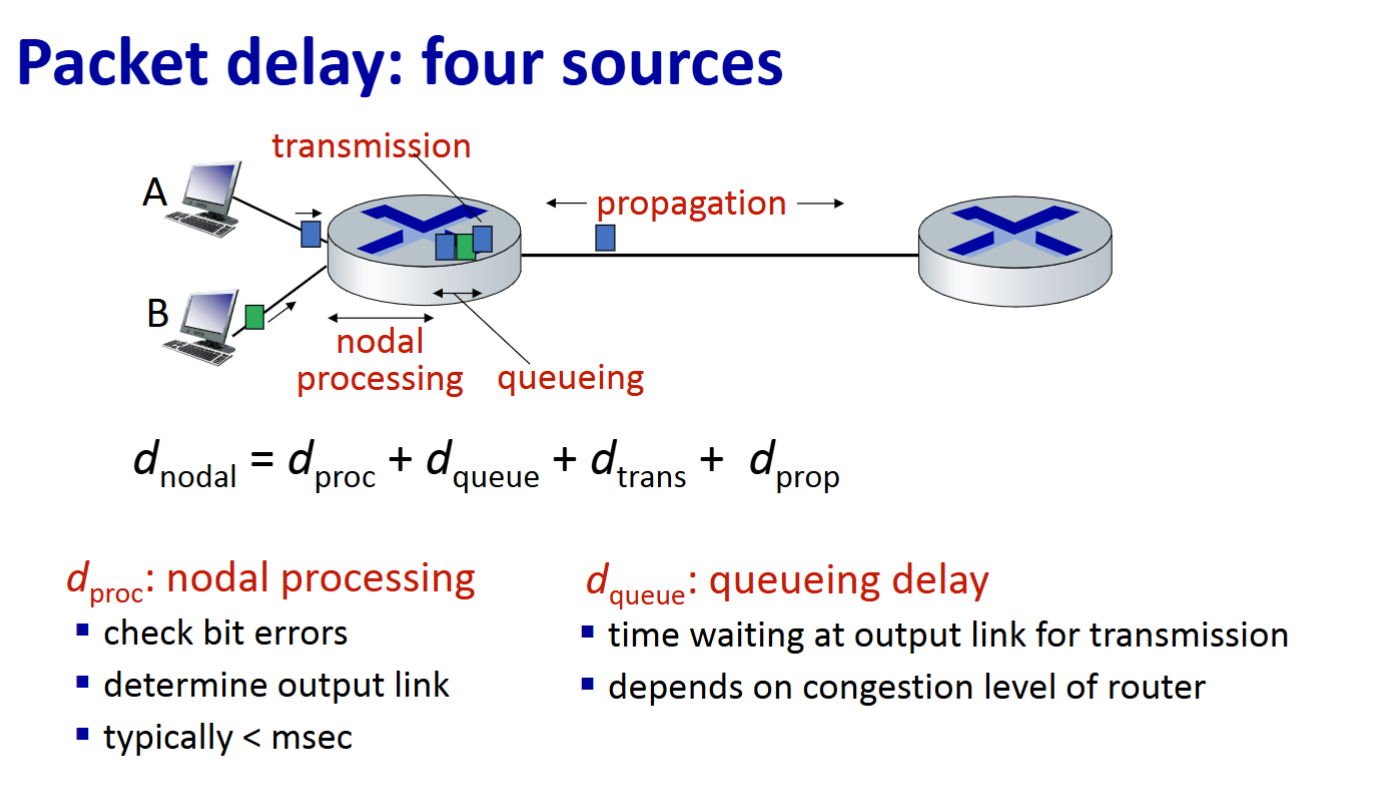
What are the 4 sources of packet delay?
Processing (dproc): check errors + determine output link
Typically < 1 ms
Queueing (dqueue): waiting for transmission
Depends on router congestion
Transmission (dtrans): time to push packet onto link
Propagation (dprop): time for signal to travel across link
Total:
dnodal = dproc + dqueue + dtrans + dprop
What are transmission and propagation delays?
Transmission delay (dtrans): time to push packet onto link
L = packet length (bits)
R = transmission rate (bps)
dtrans = L/R
Propagation delay (dprop): time for signal to travel across link
d = physical link length
s = propagation speed ≈ 2 × 10⁸ m/s
dprop = d/s
Key difference:
Transmission = getting packet onto the link
Propagation = packet traveling across the link
What does the car/toll booth analogy show?
Car = bit
Caravan = packet (10 cars)
Toll booth service = transmission delay
12 sec/car × 10 = 120 sec = 2 min
Driving to next booth = propagation delay
100 km ÷ 100 km/hr = 1 hr
Total time until caravan is lined up at 2nd booth = 62 min
Key idea: Transmission = push onto highway | Propagation = travel across highway
How does La/R affect average queueing delay?
R = link bandwidth (bps)
L = packet length (bits)
a = average packet arrival rate
La/R:
≈ 0 → queueing delay small
→ 1 → queueing delay large
> 1 → arrivals exceed capacity → average delay infinite
Recall: La/R measures how heavily the link is being used.
What does Traceroute measure?
Measures delay from source → each router along path → destination
Sends 3 probe packets to each router
Uses TTL = i to reach router i
Router i sends a reply back
Sender measures round-trip time (RTT) = time between sending probe and receiving reply
Recall: Traceroute = route + delay at each hop
How does packet loss occur?
Router buffer/queue has finite capacity
If a packet arrives when the buffer is full → packet is dropped/lost
Lost packet may be:
Retransmitted by previous node
Retransmitted by source
Not retransmitted
What is throughput?
Throughput: rate at which bits are sent sender → receiver
Instantaneous: rate at a specific point in time
Average: rate over a longer period
Rs: server → link capacity
Rc: receiver-side link capacity
Bottleneck: slower link limits the throughput
Recall: Throughput = bits/time actually delivered
What determines average end-to-end throughput?
Bottleneck link: link with the lowest transmission rate
If Rs < Rc → throughput = Rs
If Rs > Rc → throughput = Rc
Formula:
Throughput = min(Rs, Rc)
Recall: Slowest link = bottleneck = end-to-end throughput
What happens when 10 connections share a bottleneck link?
R: backbone bottleneck capacity
10 connections fairly share R
Each gets R/10
Per-connection throughput:
min(Rc, Rs, R/10)
Bottleneck = smallest capacity
In practice, Rc or Rs is often the bottleneck
What is network security?
Goal: protect networks from attacks
How attackers attack networks
How to defend against attacks
How to design attack-resistant architectures
Internet wasn't originally designed for security
Original vision: mutually trusting users
Security designers are “playing catch-up”
Security considerations exist at all layers
What are the main types/effects of malware?
Virus: self-replicates by receiving + executing an infected object
Example: email attachment
Worm: self-replicates by passively receiving an object that executes itself
Spyware: records keystrokes/websites → uploads information
Botnet: infected hosts controlled together
Used for spam or DDoS attacks
Recall: Virus = execute | Worm = self-execute | Spyware = collect | Botnet = controlled hosts
What is a Denial of Service (DoS) attack?
Goal: make resources unavailable to legitimate users
Overwhelm target with bogus traffic
Steps:
Select target
Compromise hosts → create botnet
Send packets to target from compromised hosts
Recall: Compromise hosts → flood target → deny legitimate access
What is packet sniffing/interception?
Packet sniffing: reading/recording packets as they pass through a network
Possible on broadcast/shared media
Shared Ethernet
Wireless
Promiscuous network interface: captures all passing packets
May capture sensitive data, e.g. passwords
Wireshark: packet-sniffing software
Recall: Shared media + promiscuous interface → packets can be captured
What is IP spoofing?
IP spoofing: sending a packet with a false/faked source IP address
Makes packet appear to come from another device
Recall: IP spoofing = fake source IP
Why are protocol layers/reference models used?
Networks have many complex components:
Hosts, routers, links
Applications, protocols
Hardware + software
Purpose: organize the complexity of networks
Makes it easier to understand, design, and discuss network systems
Layers: each layer implements a service with own internal actions
Recall: Layering = organize network complexity
What are the different benefits of layering?
Structure: identifies components + their relationships
Modularization: easier maintenance + updates
Layer changes: implementation can change without affecting other layers
Example: change in one layer’s procedure → rest of system unaffected
Potential downside: layering can sometimes be harmful/restrictive
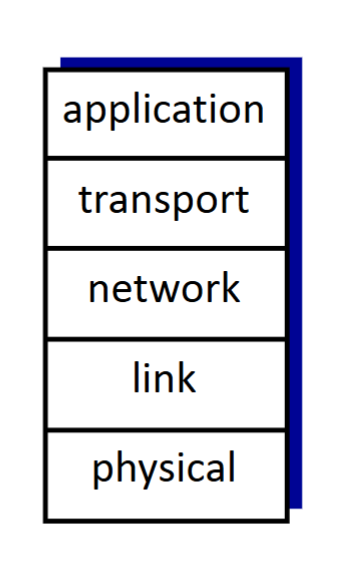
What are the 5 layers of the Internet protocol stack?
Application: network applications → HTTP, SMTP, IMAP
Transport: process-to-process data transfer → TCP, UDP
Network: routes datagrams source → destination → IP, routing protocols
Forwarding + routing
Link: data transfer between neighboring network elements → Ethernet, WiFi, PPP
Physical: transmits bits over the medium
What are the key differences between OSI/ISO and the Internet stack?
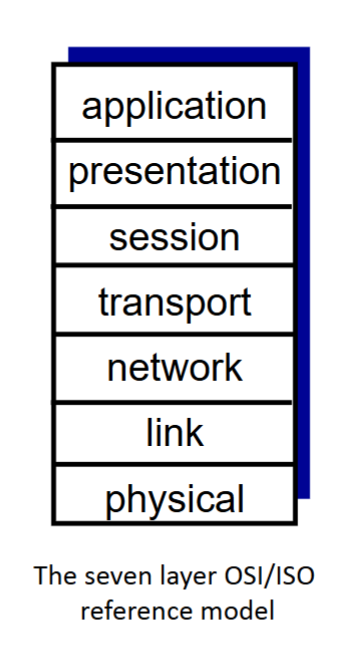
OSI/ISO = 7 layers
Application
Presentation
Session
Transport
Network
Link
Physical
Internet stack does NOT have:
Presentation: data interpretation → encryption, compression, machine-specific conventions
Session: synchronization, checkpointing, recovery
These services, if needed, are handled by the application layer in the Internet stack.
Recall: OSI adds Presentation + Session
How does data move through the protocol stack?
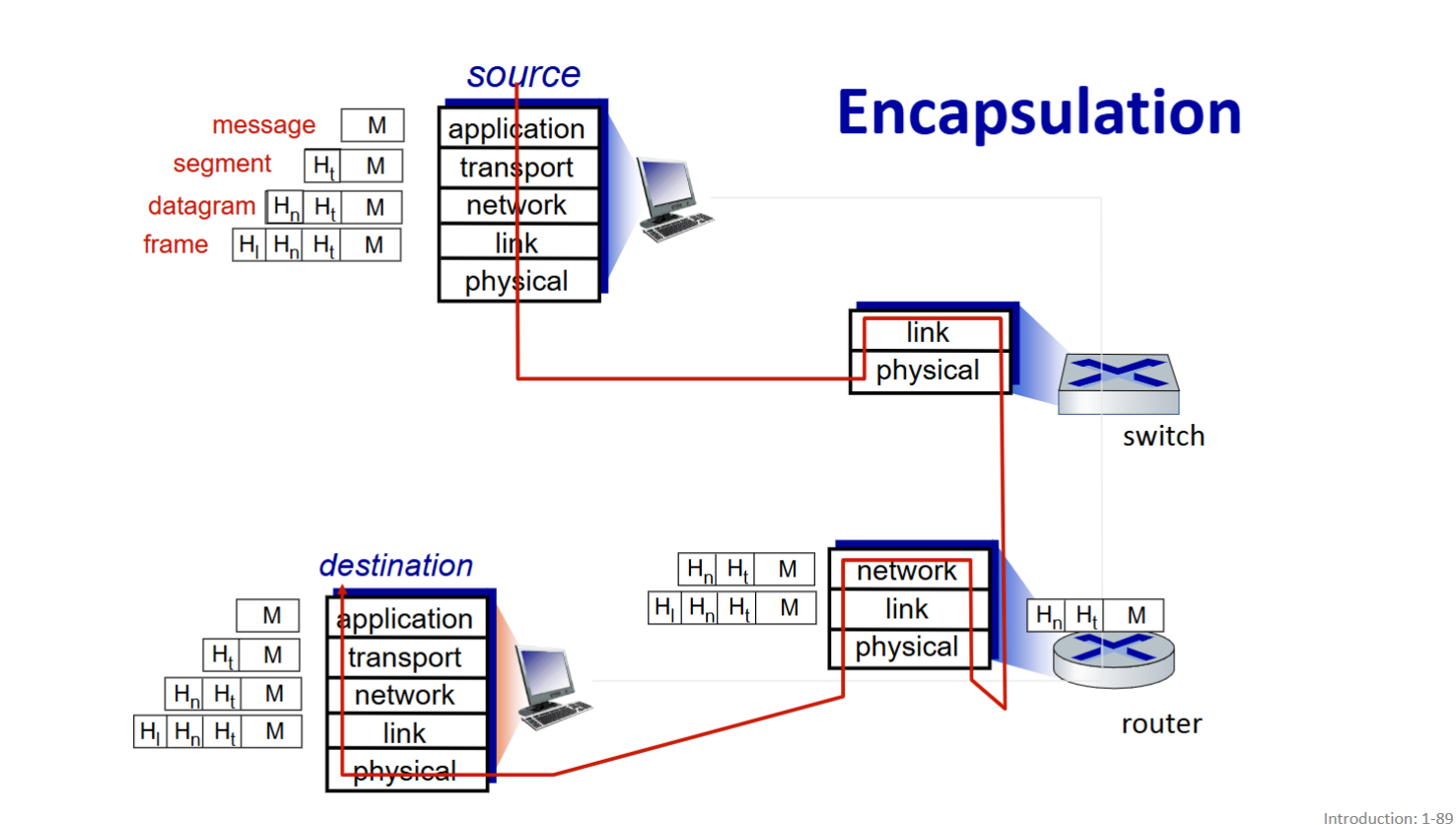
Down = encapsulate/add headers | Up = decapsulate/remove headers
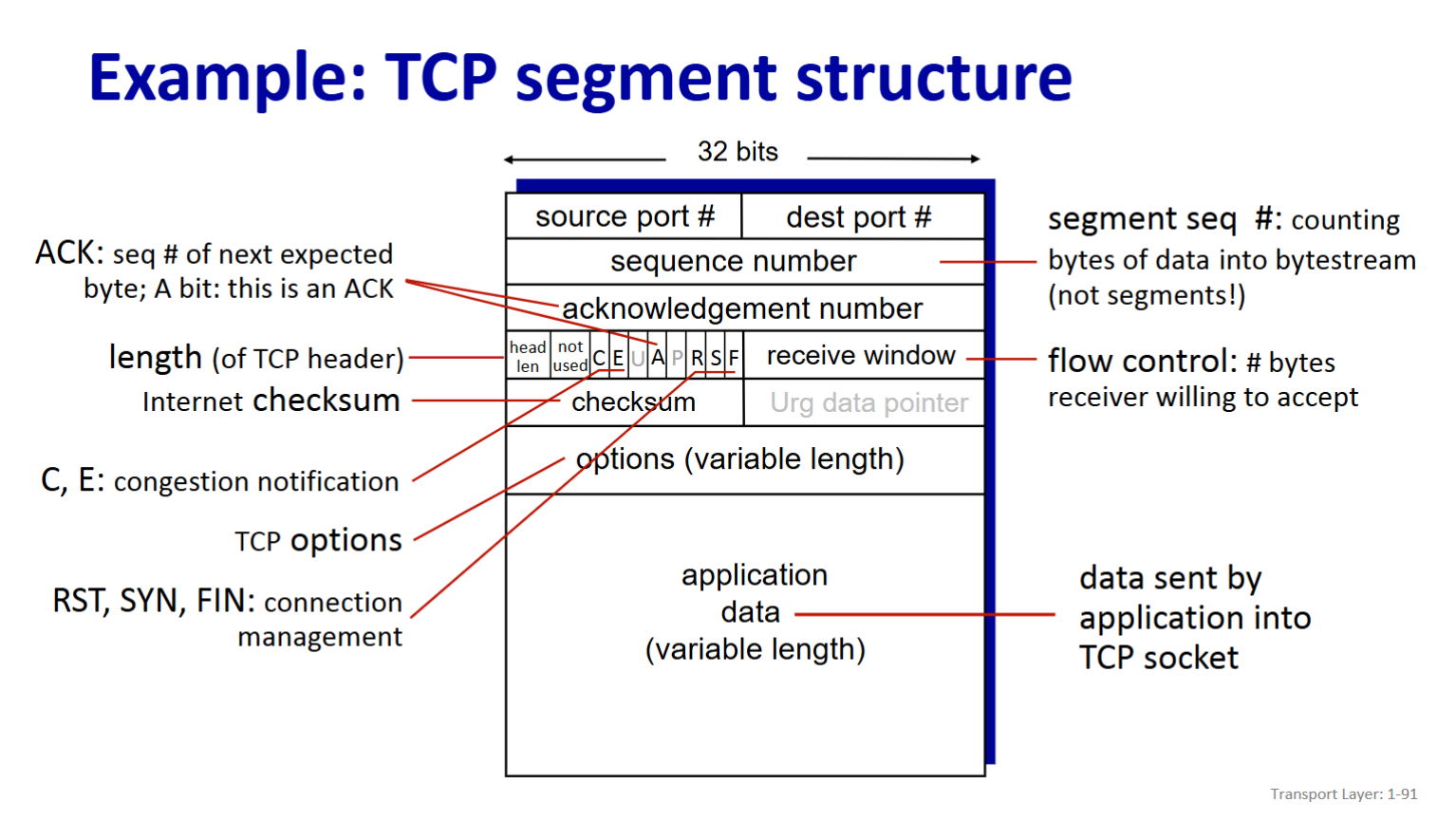
What information is contained in a TCP segment?
Source + destination port # → identify applications
Sequence number → counts bytes in data stream
Acknowledgment number (ACK) → next expected byte
Receive window → bytes receiver is willing to accept (flow control)
Checksum → error detection
Flags: connection/congestion management
SYN, FIN, RST
C, E → congestion notification
Options → additional TCP features
Application data → variable-length payload
Header length → length of TCP header
What are the major milestones in Internet history?
1961–1969: Packet switching → ARPAnet
1961: Kleinrock → packet-switching theory
1967: ARPAnet conceived
1969: first ARPAnet node
1970s: Internetworking
ALOHAnet, Ethernet
1974: Cerf & Kahn → Internet architecture
1979: ARPAnet → 200 nodes
1980s: Core protocols
TCP/IP (1983)
DNS (1983), SMTP (1982), FTP (1985)
TCP congestion control (1988)
~100K hosts
1990s: Web + commercialization
ARPAnet decommissioned
Web, HTML, HTTP
Mosaic → Netscape
Web commercialization
Late 1990s–2000s: Killer apps + security
IM, P2P
Network security becomes major concern
Gbps backbone links
2000s–2017: Modern Internet
~18B devices
Smartphones, broadband, 4G/5G, WiFi
Social networks
Private provider networks
Cloud computing (AWS, Azure)