Module 1.3: Working with the Forms Developer Environment
 Call Kai
 Learn
Learn Practice Test
 Spaced Repetition
 Match
Match Flashcards
 Knowt Play
1/14

Earn XP
Description and Tags
Prelim Topic
Name | Mastery | Learn | Test | Matching | Spaced | Call with Kai | Chat |
|---|
No analytics yet
Send a link to your students to track their progress
15 Terms
Module
Is a major component of your application and is the basis for storage and ownership. It owns the objects that it contains
Form
(Forms Developer Module Types)
As the main component of an application, it presents the objects and data that users can see or interact with. The data items in this are arranged into records
Menu
(Forms Developer Module Types)
Can consist of hierarchy of menus, each with selectable items. Forms builder provides the default menu for every form.
It includes commands for all basic database operations, such as insert, delete, query, and so on. If your application has specific requirements that are not met by the default menu, then you can create a custom menu module. You can use a menu module with multiple forms
PL/SQL Library
(Forms Developer Module Types)
Is a collection of PL/SQL program units whose code can be referenced and called from other modules. PL/SQL library documents can contain program units that can be used by other form and menu modules
Object Library
(Forms Developer Module Types)
Is a collection of form objects that you can use in other modules. You can create it to store, maintain, and distribute standard objects that can be reused across the entire development organization.
Forms Builder
Is a major component of Oracle Forms Developer. You can use it to quickly develop form-based applications for presenting and manipulating data in a variety of ways
You can use it to design and store the definitions of form,
menu, and library documents. While in it, you can invoke the
other component, Forms Compiler.
Object Navigator
Is a hierarchical browsing and editing interface. You can use this to locate and manipulate application objects quickly and easily.
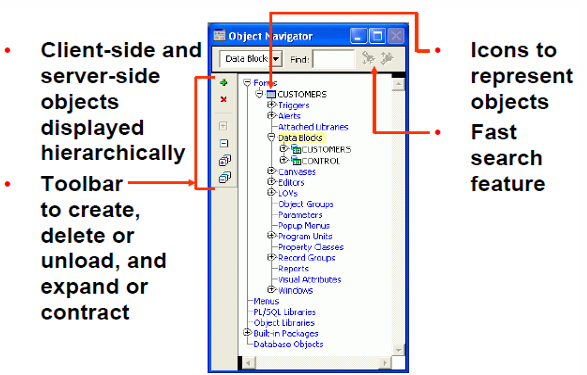
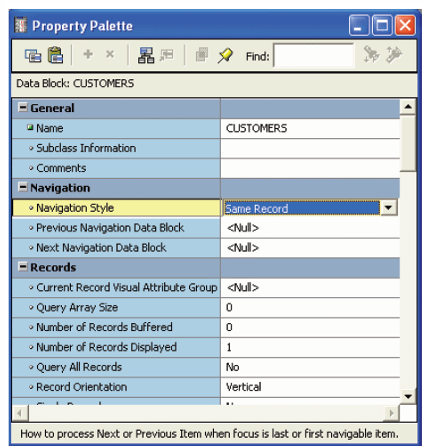
Property Palette
All objects in the module, including the module itself, have properties you can see and modify
Copy and paste properties
Fast search feature
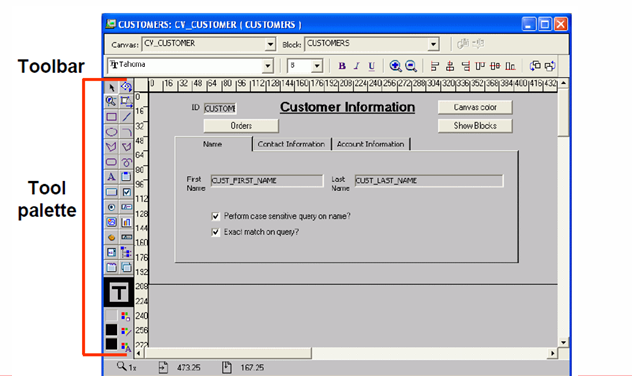
Layout Editor
Is a graphical design facility for creating and arranging interface
items and graphical objects in your application. You can use the Tool palette and
the toolbar available in this to design the style, color, size, and
arrangement of visual objects in the application. The layout can include graphical
objects and images.
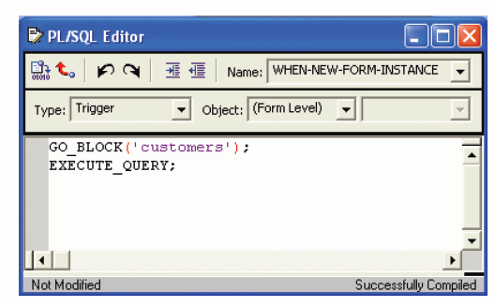
PL/SQL Editor
Enables you to incorporate PL/SQL code objects into your
form. Code objects in Forms Developer include event triggers, subprograms
(functions and procedures), menu item commands, menu startup code, and
packages.
You enter and compile code here.
Items
(Major Object Types in Forms)
These are interface objects that present data values to the user or enable the user to interact with the form, depending upon the item type. There are several types of these.
They are logically grouped into blocks and visibly arranged on canvases
Blocks
(Major Object Types in Forms)
Is the intermediate building unit for forms. Each form consists of one or more blocks.
Is a logical owner of items, and each item in a form belongs to a block. Items in a block are logically related (for example, they may correspond to columns in the same database table or may need to be part of the same navigation cycle).
Canvases
(Major Object Types in Forms)
Is a “surface” where visual objects, such as graphics and
items, are arranged. A form module can have several of these (such as the
pages of a paper form).
It can display items from one or more blocks.
Data Blocks
When you build database applications with Forms Builder, many of the blocks will be this. It is associated with a specific database table (or view), a stored procedure, a FROM clause query, or transactional triggers
Control Blocks
This type of block is not associated with a database, and its items do not relate to
any columns within any database table. Its items are called control items. For
example, you can create many buttons in your module to initiate certain actions,
and you can logically group these buttons in a control block