3.3 RAM Technologies
 Call Kai
 Learn
Learn Practice Test
 Spaced Repetition
 Match
Match Flashcards
 Knowt Play
1/20

There's no tags or description
Looks like no tags are added yet.
Name | Mastery | Learn | Test | Matching | Spaced | Call with Kai | Chat |
|---|
No analytics yet
Send a link to your students to track their progress
21 Terms
Describe use of memory
Data and programs can only be used when moved to RAM, faster memory mean faster computer
What is Form Factor?
The physical size and shape of a hardware component, dictates compatibility with other components, such as the motherboard.
DIMM Form Factor
Dual inline memory module, 64 bit data width with different electrical contact lengths on each side, used in desktop computers
SODIMM Form Factor
Small Outline Dual In-Line Memory Module, about half width of DIMM stick, used in laptops and mobile devices. DDR1 & 2 have 200-pin, DDR3 has 204-pin, DDR4 has 260-pin
DRAM
Dynamic Random Access Memory, Memory on DIMM sticks is composed of DRAM memory chips. Dynamic means it needs constant refreshing or the data in memory disappears. Random access means any storage location on the chip can be accessed instantaneously for data.
SDRAM
Synchronous Dynamic Random Access Memory, SDRAM is synchronous with the common system clock, so can queue up one process while waiting for another. Classic DRAM doesn’t wait for a clock signal.
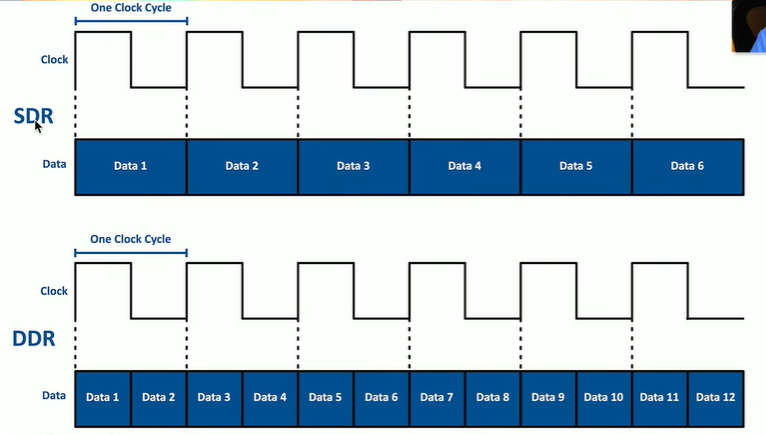
SDR vs DDR (Single vs Double Data Rate)
The rate to transfer memory to the CPU and then back using the clock rate. Single rate transfers one bit of data per clock cycle; double rate transfers two bits of data per cycle, one at both top and bottom.
DDR & DDR2
Legacy technologies no longer used in modern devices, DDR doubled the rate of SDR and DDR2 doubled the data rate of DDR2
DDR3 SDRAM
Twice the data rate of DDR2 with larger memory chip capacities and 30% less power consumption. No backwards compatibility. Comes in 240-pin DIMM and 204-pin SODIMM form factors
DDR4 SDRAM
Faster frequencies than DDR3 and less power consumption, no backwards compatibility. Comes in 288-pin DIMM and 260-pin SODIMM form factors
DDR5 SDRAM
Doubles the speed of DDR4 to 6.4 Gbps, 1.1 V power efficiency, up to 128 GB modules, no backwards compatibility
Why would a RAM stick not fit in the RAM slot?
May be using the wrong DDR type, each generation the key slot is moved to prevent use of the wrong type (not backwards compatible)
Parity memory
For each byte of memory, a parity bit is set that will allow the logic to detect and correct an error in a single bit of each byte. Doesn’t detect every error and can’t correct on the fly.
ECC RAM
Error-Correcting Code RAM, used in memory critical operations such as servers. Logic built in to detect and correct single-bit memory errors using parity bits. Parity is saved as ninth bit after each byte and gets set such that its sum with the positive bits makes an even total. If sum is not even, we know some error has occurred.
Non-ECC RAM
Used in standard consumer computers, has increased speeds over ECC as it does not perform corrections.
CPU to RAM throughtput
Memory bandwidth is the maximum throughput between RAM and CPU, measured in MT/s. Faster speed is better but limited on how fast by physics.
Single-Channel Memory
Single channel memory trasfers data in chunks the same size as the system bus’s bandwidth.
Dual-Channel Memory
The memory controller coordinates two memory buses to work in conjunction with one another as a synchronized set when communicating with the CPU, doubling data transfer size.
Triple-Channel Memory
The memory controller coordinates three memory buses to work in conjunction when communicating with the CPU.
Are two memory modules faster than one?
Two memory modules are faster than one.
Multi-channel memory
Dual-channel, triple-channel, and quad-channel
Memory module slots often colored differently and memory combinations should match