Computer systems
 Call Kai
 Learn
Learn Practice Test
 Spaced Repetition
 Match
Match Flashcards
 Knowt Play
1/21

There's no tags or description
Looks like no tags are added yet.
Name | Mastery | Learn | Test | Matching | Spaced | Call with Kai | Chat |
|---|
No analytics yet
Send a link to your students to track their progress
22 Terms
Logic gates
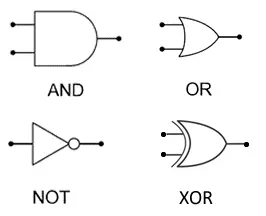
using binary digits, you can make electric circuits to process data - to carry out boolean true false operations the boolean operations are :
NOT : reverses the input
AND: Both inputs need to be 1 for 1 output
OR : two inputs, and either one or both can be on for 1 output
XOR : two inputs, either one can be 1 for 1 output but 0 if both are on (exclusively to one)
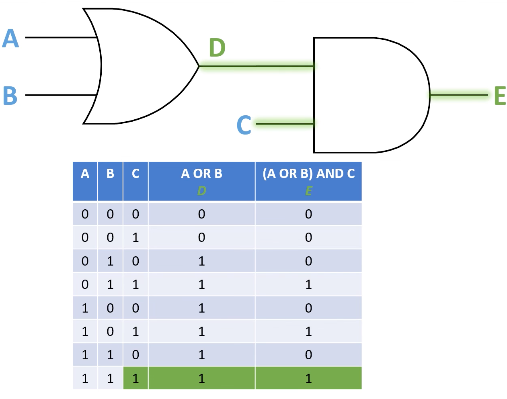
Truth table - how to do + example
all the possible combinations of inputs and output of logic gate systems including which side - list all the possible binary numbers and tackle one logic gate at a time
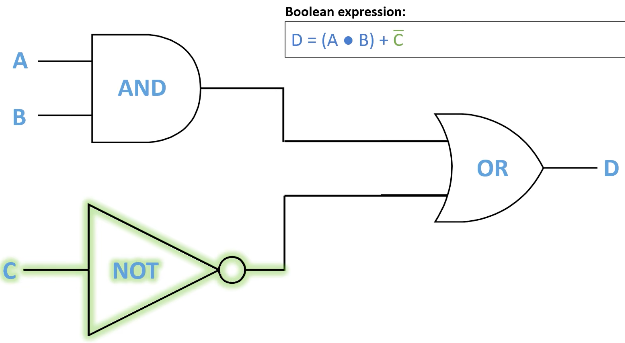
converting logic gates into Bool
And is a ⋅ , or is a + , XOR is a ⨁, and NOT is a line above : Ā
first label the inputs and outputs of the logic gates, and find the master output, then construct the equation to get an output 1 on the master output
e.g. D is 1 when A AND B are 1 and C is not
there can be more than one expression
hardware and software
computer systems comprise of hardware and software :
All physical parts of a computer system and its related devices that can be both internal and external (e.g. mobo ssd cpu)
general term covering all computer programs, categorised into application and system software
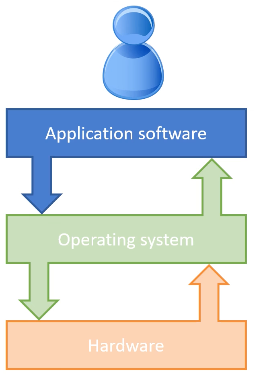
system + application software examples + relationship between AS, OS and hardware
system software has two categories : operating systems (windows linus ios) and utility software (Antivirus, backup, compression, firewall)
application : presentation, word processor, communication, Email, games and photo editing - software that performs end-user tasks
AS communicates w the OS which interacts w the hardware to communicate back to the AS (OS is the middleman)
Operating systems
provides the interface between the user and the hardware
user doesn’t interact w the hardware directly, but application programmes to accomplish specific tasks (commonly w a user interface) and the OS has to act as a platform to run application software (and has its own interface)
commonly the OS has utility programmes that handles the management of processing, memory, storage (files), apps + security
Examples of an operating system interfaces
GUI - windows, icons, menus, pointers - v visual interactive and intuitive - optimised for mouse and touch gesture input
command line interface - text based with more commands, efficient, less resource heavy compared to GUI and useful for script automation
natural language - spoken language - not always reliable the improving constantly
OS importance for multitasking
Running multiple applications at the same time by giving each application a small time-slice of processor time.
This allows more than one program to be held in memory at a time, and data shared between them such as copy and paste.
[{(It also enabled you to listen to music on your PC at the same time as word processing)}]
OS importance of memory management
When programs are loaded, the operating system decides where they are held in memory.
Over time the memory becomes fragmented (in diff locations) as programs are loaded and closed because they use different amounts of memory.
The operating system must keep track of different program fragments.
When the memory is full, the operating system uses virtual memory.
OS importance of device drivers
Translates operating system instructions into commands that the hardware and devices e.g. keyboard mouse printer will understand.
Each peripheral needs a device driver.
Many are already built into the operating system.
OS importance of user management
Providing for different users to log into a computer.
The operating system will retain settings for each user, such as icons, desktop backgrounds etc.
Each user may have difference access rights to files and programs.
A client server network may impose a fixed or roaming profile for a user, and manage login requests to the network
OS importance of file management
Data is stored in files and an extension to the file name tells the operating system which application to load the file into
The operating system may present a logical structure of files into folders, and allow the user to rename, delete, copy and move files.
Utility system software - encryption + HDD SSD defragmentation
designed to keep your computer safe, running efficiently, whilst providing useful tools for management of files and apps
e.g. encryption when transferring or sending files, scrambles into cipher text and can only be decrypted again with a key
HDD defragmentation : reorganises files and puts fragments back together to collect free space and makes file access faster as reduces movement of the read write head
SDDS shouldn’t as they have no moving parts and can decrease their lifespan
Utility system software : data compression
Compression utilities reduce the size of a file so that it takes up less space, and is quicker to download over The Internet.
Compressed files must be extracted before they can be read.
Depending on the algorithm used, data is either lost, reducing the quality of an image or sound e.g. JPEG, or represented in a different way using binary, retaining the original data in a new, compressed format e.g. Zip
Low level languages e.g. assembly languages
Allow programmers to express programs using simple commands that could be easily translated machine code by an assembler→
These were closely mapped to machine architecture and Written for specific processor fam
v efficient and fast (as worked w the memory directly) but requires a great deal of intellectual effort as it is hard to understand and write
often restricted now to develop software for embedded systems and for controlling specific hardware components
Machine code
Binary representation of instructions in a format that the CPU can decode and execute - each cpu or cpu family has its own specific machine code instruction set
Have an operation code instruction and address or data to use
and one instruction from assembly language will be one instruction in machine code
High level programming languages
Source code is written in languages as Python, C++, Java, Visual Basic translated by a compiler or interpreter into machine code.
Makes the writing of computer programs easier by using commands that are like English.
One source code instruction translates to many machine code instructions.
Code will run on different types of processors + programmer has lots of data structures to use.
Code is quicker and easier to understand and write but Less memory efficient
Code can be slower to execute if it is not optimised.
Purpose of translator
all code, whether assembly or source is converted into machine code for exe
for high level source code the two methods of translation are interpreting and compiling
assembly languages are always translated into machine code using an assembler
Compiler
compilers translate their input into machine code directly before being processed by the CPU - the whole program is translated before it is run
this means that there is no need for translation software at run time, and the speed of execution is faster. The code is optimised and the source code cannot be copied
the program will not run with syntax errors ∴ can make it difficult to write code, and code needs to be recompiled when changed, designed for a specific type of processor
Interpreter + limitations
Translates source code from high level languages into machine code ready to be processed by the CPU.
The program is translated line by line as the program is running
Translation software is needed at run-time ∴ speed of exe is slower. Code is not optimised and source code is needed.
interpreter advantages
Easy to write source code because the program will always run, stopping when it finds a syntax error code and does not need to be recompiled when code is changed, and it is easy to try out commands when th program has paused after finding an error.
makes interpreted langs v ez for beginner programmers to learning to code.
Assembler
Translates mnemonics in low level assembly languages into machine code ready to be processed by the CPU and changes labels and variables in Assembly into memory addresses.
no need for translation software at run time, and the speed of exe is very quick, code is optimised and cannot be copied (secret)
hard to write in assembly with limited and hard to understand commands , needs to be reassembled when code is changed, designed for a specific processor